
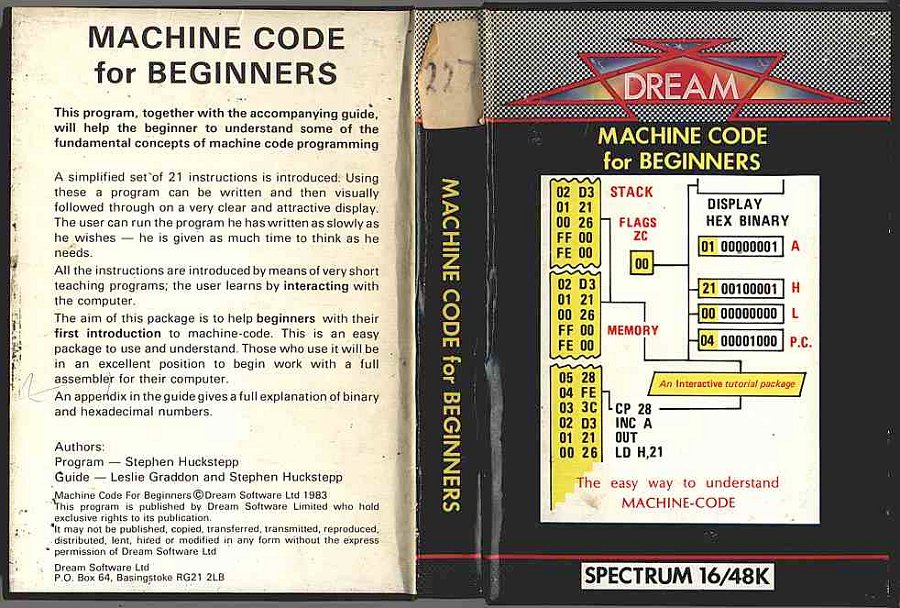
Machine Code for Beginners
Programming: Assembler/Mcode · ZX-Spectrum 16K · 1 players · English
Dream Software Ltd · 1983 · Pound sterling 7.95
Discussion
Nobody has started a thread about this yet.
Play
- MachineCodeForBeginners.tzx.zipTape image English4 KB
Files and rights
No permission is on record either way. Screens and pictures are copied here on a take-down basis: if you hold the rights and want something removed, say so and it goes.
Credits
- Stephen Hucksteppcredited
Sign in to credit somebody, or say what these people did.
Scores
Elsewhere on the web
- WorldOfSpectrum 2 votes8.50
In the magazines 6
Big K #9Dec 1984 · p.69
Fin Fahey
THE EXTENDED SPECTRUM Fin Fahey checks out a smattering of utility programs for Old Rubber Keys. System Software, as we old computer industry hacks call programming tools, is hardly destined to set the world alight. It smacks of hard work and late night sessions over a hot keyboard and seems light years away from the glamour and fun of, say, a new Melbourne House adventure release. But for people interested in stretching their minds, and their machines, some of these trusty workhorses may well turn out to have hearts of gold. But why go beyond the facilities offered by Sinclair BASIC? (One may well ask.) Quite simply, no machine, and particularly no BASIC interpreter, fills all the needs of the budding programmer, and for a lot of requirements like arcade games, just hasn't got the speed. There area fair number of - packages which just add a few useful commands to BASIC extensions r programmer's toolkits, these generally give you the sort of goodies you've always needed to develop your BASIC programs. There's no line Renumber command on the Spectrum, and for this you'll have to buy a toolkit. The same goes for many other 'system' commands. Trace, to give you a continuous listing of program lines being executed, Map, to tell you which variables have been specified, and Block Delete, so you can get rid of more than one line at a time, to name but a few. Super Toolkit, from Nectarine, has all of these plus such things as a Crunch command, to get all those useless spaces and REMs out of your program before running. It clocks up a total of 12 commands, as does Toolkit from IMS Software, which includes an Auto line-numbering routine. Slightly fewer facilities on CP Software's Spectrum Extended BASIC, only 10 commands in this case, and the only one unique to this package is Find, which will look fora specific string text in your program. CP, however also do Supercode, a machine code toolkit, incorporating a hundred off-the-shelf machine code routines. These include an impressive range of scrolling effects, high-resolution diagonal scroll, low-resolution shutter and ripple scrolls and many others. There are four sound effects generators too, but the truly impressive thing is that you can include CP's code in your own BASIC and machine code programs, an amazing bit of altruism. Each routine has full in-program documentation and a demo mode shows you what they can do. It's got to be good value. From off-the-shell machine code to creating your own. If you've decided that BASIC's too slow for your program design, then you'll probably want to write machine code. Some people seem quite happy programming this byte by byte as BASIC POKEs, but for really effective development you'll need an assembler. Assemblers allow you to put Z80 code in assembly language, a much more understandable form, even though it's a lot more obscure looking than BASIC. A good assembler will allow you to specify addresses and constants as meaningful labels which makes the code a lot easier to follow. In such a symbolic assembler, the JP instruction (equivalent of BASIC GOTO) could be rendered JP LOOP instead of giving an actual address, say JP $4000. But before actually using one of these things, you may need to learn what it's all about. To help you, there are a number of tutorial programs, and some of these actually allow you to set up and test code. Sinclair's Beyond BASIC offers a tutorial on the internal structure of the Z80 plus lessons on each assembler instruction. These are illustrated with simple moving graphics. There is an experimenter section where you can watch the effects of your own code on memory and registers. Sadly, this one doesn't cover the entire instruction set. More complete is New Generation's Machine Code Tutor. This comes on two cassettes and covers everything. Once again, you can write your own code and 'run' it on a diagrammatic simulator. Although this is rather harder work than Sinclair's, I think it gives a closer feeling to using an actual assembler. Dream Software also have a simulator. This has much nicer printed documentation than the other two, but unfortunately it describes an imaginary chip which resembles the Z80 in many respects. I think that this may be unnecessarily confusing, but as long as its borne in mind, the transition to the real chip shouldn't be too hard. So now you can get down to some real coding... Sinclair themselves market the Zeus Assembler, which allows full symbolic instructions. Lines of code are entered much as in BASIC, and editing is similar, so this should be an easy one for beginners to move to. Picturesque's Editor/Assembler, on the other hand, has a rather better editor than the Spectrum, but the key response seemed a bit slow to me. This latter program is very tolerant about the format in which you enter code. Very different from these two is Oasis Software's Spectre Macro-assembler, and I certainly wouldn't recommend this one for beginners. It's a very professional product, but using it is more like learning a new computer language than anything else. It doesn't use Z80 instructions directly; they have to be set up as procedure definitions much as in high-level languages like Forth or Pascal. This makes it very powerful, since it's just like building your own interpreter. But, as I say, not for newcomers. An indispensable tool when developing machine code is some sort of Monitor. A Monitor provides easy ways of getting at memory, moving it, changing it, searching it for particular values, that sort of thing. You can also usually get dumps of Z80 register values and step through a machine code program. The Zeus assembler has a reasonable monitor with it, but Sinclair do a more extensive version as a separate product. This also allows you to Disassemble code, which means to translate machine code back to assembly format. Useful for looking at the ROM, but maybe you'd be better off buying one of the 'Spectrum ROM disassembled' type books which also give explanatory notes. Picturesque's Editor/Assembler has no attached monitor and you have to buy theirs separately, although both programs can be loaded at the same time. Agai, there's a disassembler. Assembly language isn't the only way of getting fast code. Scope II, from ISP, is a simple language aimed at producing fast machine-code animation. The makers call it a medium-level language, as it's mid-way between BASIC and assembler. I feel it's rather closer to machine code, but it's certainly a lot easier to use. Once you've written code in SCOPE II, it is boiled down by the program to machine code routines, which can be run without Scope being present, so you develop commercial products, or give copies of your games to your friends without fear of committing piracy. This process of boiling down machine code is known as compilation, and it's possible to do it to BASIC. The only BASIC compiler we had available to look at was Softek's. This is certainly fast. From running a few simple loops, it looks roughly about 150-200 times faster than interpreted BASIC. It does have some serious drawbacks, though. For one, there a quite a few BASIC functions it can't translate, floating-point arithmetic and arrays among them. More seriously, compiled programs will not run without Softek's run-time routines being present. Unfortunately, the company is being quite prickly about this, and are claiming that if you develop your program and compile it with their program. then they've suddenly acquired a share in it, Whatever the legal position, this seems a little dubious to me, and it's certainly a discouragement to using Softek's product for commercial development. The final approach to fast code is to use Forth. This high-level language is closer to machine code than BASIC, and for most purposes runs up to ten times faster. Not spectacular maybe, but it can make a difference. The speed saving is nice, but it's not really the central point about Forth. The language takes a fundamentally different approach to BASIC, and one which provides a much sounder design discipline. It would certainly be easier to write good machine code after a grounding in it. Forth is known as a 'procedure-oriented' language. That means there's no more complaining about there not being a command in BASIC to do something. If it's not there in Forth, then you just write your own command, which is compiled into the language vocabulary. Although you can theoretically do this in BASIC by using subroutines, compiled procedures are much faster and easier to use. Forth is easier to structure too. There are at least four versions of Forth available on the Spectrum. It's hard to decide between them, but Melbourne House's Abersoft Forth is the only one recognised by the independent Forth interest Group. Sinclair also do a Forth which to my relatively untutored mind seemed much the same, both in terms of speed and usability. Both versions have minimal printed documentation, since they rely on the user going out and acquiring a Forth manual. The sad thing about Forth is that. unless you're a fan of the ill-fated Jupiter Ace, you can't market any of your programs since they won't run without someone else's product. While on the subject of languages, Logo has been stirring up interest as a teaching language, particularly for younger children. Unfortunately, the version I looked at, Snail Logo by CP Software, really merited its name. Logo is high-resolution graphics oriented, and the user commands a 'turtle', or in this case a snail, to draw shapes on the screen. The CP interpreter turned out to be written in BASIC, so every command is interpreted twice. Slow? I can't imagine anyone, adult, or child, having the patience to work through the manual, let alone use it. Something of a weirdie, but one I find particularly fascinating, is Micro -Prolog, from Sinclair. Prolog represents yet another direction in new languages, and is particularly suited for Artificial Intelligence and linguistic purposes. Its very odd to use after command oriented type languages like BASIC, or even Forth, because a program in Prolog (it stands for PROgramming in LOGic) is mostly a way of organising data, not of setting up a fl ow of commands. Now I've got the point, I want to know more about this one. Sinclair Micro-Prolog's documentation isn't bad either. Dr Ming back to the problem of generating programs, if you're an adventure game writer, you haven't really got one, The Quill, from Gilsoft, and Dream's Dungeon Builder can both be used to generate adventures of any complexity. We've reviewed them before, and they're both good value. Dungeon Builder has the edge in user-friendliness, and can be used to add graphics to adventures, while Quill has a more mechanistic approach. Both Gilsoft and Dream are perfectly happy for people to market games produced with their packages. Right on! On which cheery note I'll roll the credits and fade to black, but not before noting that this is far from being a complete survey, so if you've discovered an utterly wonderful, or unspeakably awful bit of useful/useless software in this field let us know. BASIC EXTENSIONS: SUPER TOOLKIT from NECTARINE TOOLKIT from IMS Software SPECTRUM EXTENDED BASIC from CP Software Price: £9.95 SUPERCODE from CP Software Price: £9.95 MACHINE CODE TUTORIALS: BEYOND BASIC from Sinclair Price: £9.95 THE COMPLETE MACHINE. CODE TUTOR from New Generation Software Price: £7.95 MACHINE-CODE FOR BEGINNERS from Dream Software Price. £0.00 ASSEMBLERS: ZEUS ASSEMBLER from Sinclair Price: £12.95 EDITOR/ASSEMBLER from Picturesque Price: £8.50 SPECTRE MAC-MON from Oasis Software Price: £14.95 MONITORS: MONITOR/DISASSEMBLER from Sinclair Price: £12.95 SPECTRUM MONITOR from Picturesque Price: £7.50 COMPILER from Softek Price: £9.95 LANGUAGES: SCOPE II from ISP Price: £11.95 FORTH from Sinclair Price: £14.95 ABERSOFT FORTH from Melbourne House Price. £14.95 SNAIL LOGO from CP Software Price: £9.95 MICRO-PROLOG from Sinclair Price: £24.95 ADVENTURE GENERATORS: THE QUILL from Gilsoft Price: £11.95 DUNGEON BUILDER from Dream Software Price: £9.95
Advert3
- Popular Computing Weekly #21May 1984 · p.25
- Popular Computing Weekly #16Apr 1984 · p.23
- Popular Computing Weekly #12Mar 1984 · p.14
Feature1
- Big K #9Dec 1984 · p.69
Review1
- Home Computing Weekly #67Jun 1984 · p.34
Reviews from people here
Sign in to write about this, or make an account. It takes a minute and lets you correct the catalogue too.
No description, tag recorded.
Sign in to correct or add to this.
Hold the rights to this and want it taken down?