
Starter Wordsplits
General: Education · ZX-Spectrum 48K · 1 players · English
Sulis Software Ltd · 1983 · Pound sterling 7.95
Discussion
Nobody has started a thread about this yet.
Play
- StarterWordsplits.z80.zipSnapshot image English6 KB
- StarterWordsplits.tzx.zipTape image English6 KB
Files and rights
No permission is on record either way. Screens and pictures are copied here on a take-down basis: if you hold the rights and want something removed, say so and it goes.
Credits
- R.V. Beaumontcredited
- G.M. Beaumontcredited
Sign in to credit somebody, or say what these people did.
In the magazines 5
Crash #33Oct 1986 · p.49
Rosetta McLeod
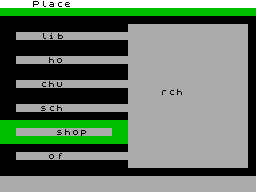
CRASH COURSE By Rosetta McLeod PROGRAMMED BY TEACHERS It is interesting to see that my favourite programs this month were designed, written and produced by practising teachers. Andy Watson in Aberdeen and Bill Elliot in Plymouth, have both become aware that much of the educational software on the market is not really what teachers in schools are looking for, and so have come up with their own products. If you expect these to be amateurish, you'd be wrong - Expose and Nightmare/Potholer are both extremely professional packages which have been thoroughly tested in the classroom. STARTER WORDSPLITS AND JUNIOR WORDSPLITS Producer: Sulis Retail Price: £7.95 each Age Range: Starter Wordsplits 4-8 years; Junior Wordsplits 9-11 years. Both of these programs are aimed at improving word recognition and spelling by matching up two halves of words. In Starter Wordsplits, there are 14 different categories to choose from, such as Sounds, Movement, Animals, Nature and People. Each category has 18 words to be completed more than enough to hold a young child's interest. The word ending appears on the right of the screen, and can be brought in line with its beginning by using keys 7 (up) and 6 (down). To make the two halves join up, the child must press 5. Junior Wordsplits is a more difficult version of the same game, and you can choose to practise beginnings such as for/fore/four and des/dis or endings like - ary/-ery/-ory and -ance/-ence/-ense. Each game begins in black and white, with colour being introduced for each correct answer. With each completion of a section the time taken is given. The programs are easy to operate and useful in their own way, but I would like to have seen a more imaginative use of graphics in Starter Wordsplits to motivate the younger children. COMMENTS Control keys: 7 to move up, 6 to move down. 5 to make the word Keyboard play: good Graphics: very limited Use of colour: builds up from black and white at the start
Splitting words to do with movement in Wordsplits. Cam, our photographer, is no famed for his movement - wonder why he chose this particular screen to snap?
Personal Computer News #52Mar 1984 · p.37
Colin Cohen
PLAY AND LEARN Colin Cohen on educational software for the Dragon, Spectrum, BBC and Commodore 64. NAME: Mr T's Number Games, Mr T's Money Box, Mr T Tells The Time SYSTEM: BBC, Spectrum, Commodore 64 PRICE: £12 each PUBLISHER: Ebury Software, [redacted] OUTLETS: Mail order/Retail NAME: Wordpower, Besieged, Wordsplits SYSTEM: BBC, Spectrum, Dragon, Commodore 64 PRICE: £8.95 to £11 PUBLISHER: John Wiley, [redacted] OUTLETS: Retail In PCN 48 I mentioned there were certain conventions observed by book publishers. One of the most obvious is that in the better class of production the publisher take a certain amount of care to ensure that the pages don't fall out. This is the nearest equivalent that I can think of to a series of programs-that won't load. GOOD HOUSEKEEPING When I received the first series of Good Housekeeping software (it is available for the Spectrum as well as the Beeb) they would not load. Or rather, out of a whole series, only one program would load and the usual operating system fixes had no effect. All the programs had to be returned for replacement. It would seem that all National Magazine's resources have been concentrated on protecting the tapes against copying - indeed you are even warned that attempts of copying may affect the tapes themselves. My major complaint is that some of the programs start in Basic while others are in code. While it is not expected that a child should start the programs on their own it seems quite reasonable that they should be able to use them unsupervised subsequently. This is made difficult because some of them are loaded with CHAIN"" and others with *RUN. There is nothing on the tapes to indicate this and the parents' handbook is printed in a type small enough to make PCN's small ads look large. Apart from this annoying idiosyncracy the programs - have common features. There is Nat Mag's own 'Mr T' who does a neat little dance if you get something right, and turns some fairly odd colours if you have a load error (there was only one on the replacement tapes). All the programs have a common title page and the block numbers count back to zero through the lengthy load. There are also common parent screens. Number Games is a pre-school teaching aid. In the first stage the spots jump off a ladybird and then have to be counted back on again. A nice touch is the way the ladybird is animated and walks off the screen when the child gets it right. A later version requires the child to go count the spots and then tap the appropriate number key as opposed to the earlier version in which the learner counts the spots out loud and taps 'N' once for each spot. Other programs on the tape draw large numbers of the child's choice on the screen and have a splendidly-animated elephant eating a number of buns. The Money Box program seems to be a perfect example of what a micro is not good at. The graphics are simply not up to depicting the different coins on the screen and even the relative sizes are not clear. All its other failings relate to this. Alphabet Games draws groups of letters on the screen. You choose which group, depending on any problems the child may have. I have to say that I preferred the Chalksoft version (PCN 16) and the parent screen that came with the program was not the one described in the documentation. I do, however, feel that one is entitled to expect the BREAK key to be adequately trapped (it is not trapped at all and the program can't even be owed) just as ESC can be used to take one back to some form of menu (it is). After all if one really needs to BREAK or ESCAPE this can always be done by a final option on the menu. Our favourite was Mr T Tells The Time. We especially liked the way in which numbers fell off the dial if you try to put them in the wrong position on a good old-fashioned analogue clock. Unfortunately, the real problem with telling the time is the minutes rather than hours and this is beyond the scope of the program. A good word can be said for one aspect the documentation - all the programs, come with suggestions for further related activities. WILEY/SULIS The second batch of programs comes from academic publishers John Wiley who have a very good reputation in the higher education market and are marketing software produced for them by Sulis of Bath. I admit that my very high expectations were sadly disappointed. Having cut my way through the adhesive tape that implied at least a short, sharp sentence in the Tower if I even thought of copying the programs, I was rewarded by two of the three loading without error, while the third could be loaded with *OPT2,0, though I had to use my back-up recorder for them all. While the lengthy load goes on the screen displays another copyright warning - it's a pity as much effort did not go into on-screen documentation. For instance, ESCAPE is trapped, but while BREAK is not, the program can be OLDed. There are all the usual options of difficulty in Wordpower and several different ways of playing each game. In one way or another you have to match opposites, similies, collectives, adjectives, nouns and synonyms. The graphics are totally without imagination, the sound bored me and all but half of the program consists of DATA statements. It's also irritating to have 'The right answer is...' displayed every time you enter the correct word. Besieged is for the dedicated anagrammer - the best one can say is that the anagrams are often very difficult indeed; I suspect too difficult for most secondary children. Up to ten letters may be shown, but as few as four are sometimes needed. Wordsplits invites the child to match the second half of a word with the first. It is probably the best of the bunch, though like the other two it has boring sound and graphics. None of them do anything that could not be done better by a book of the same price or cheaper. VERDICT All six programs were grossly over-packaged. Of the programs in this review only one of the cassettes could be removed from its box without resorting to a screwdriver each time I wanted to use it. It seems to me that no-one would spend about £10 on a book that taught as little as these programs. In particular, book publishers have long since given up binding books in this price range as expensively as the average program. The inevitable conclusion is that too much of the final price relates to the packaging and not enough to the contents. More effort needed.
Advert3
- ZX Computing #9Oct 1983 · p.33
- Personal Computer News #27Sep 1983 · p.59
- Popular Computing Weekly #36Sep 1983 · p.9
Related
- Tags
- Wordsplits
- Same entry at
- Spectrum ComputingZXInfo
Reviews from people here
Sign in to write about this, or make an account. It takes a minute and lets you correct the catalogue too.
No description recorded.
Sign in to correct or add to this.
Hold the rights to this and want it taken down?