
Flight Simulation
Game: Flight Simulator · ZX-Spectrum 48K · 1 players
Sinclair Research Ltd · 1983 · Pound sterling 7.95
Also known as Simulador de Vuelo (Spanish), Simulador de Vuelo (Spanish)
_Back.jpg)
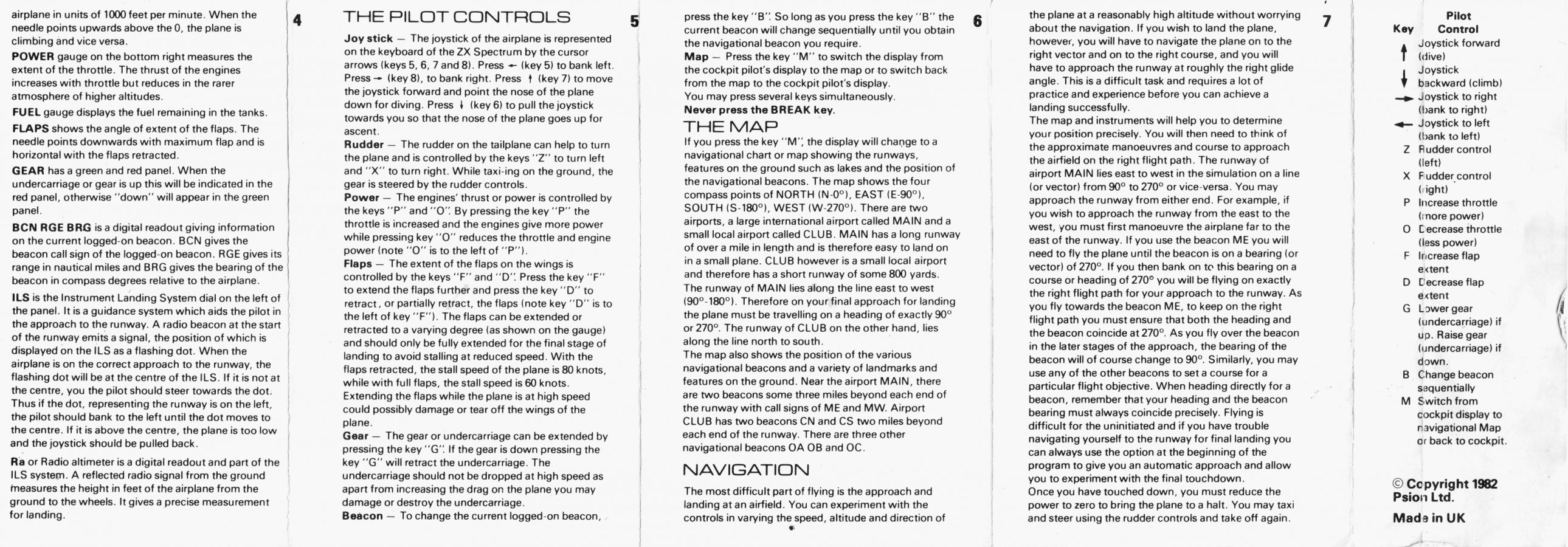
(CzerwenyElectronicaS.A.I.C.)_Back.jpg)
(CzerwenyElectronicaS.A.I.C.)_Front.jpg)
(InvestronicaS.A.).jpg)
.jpg)
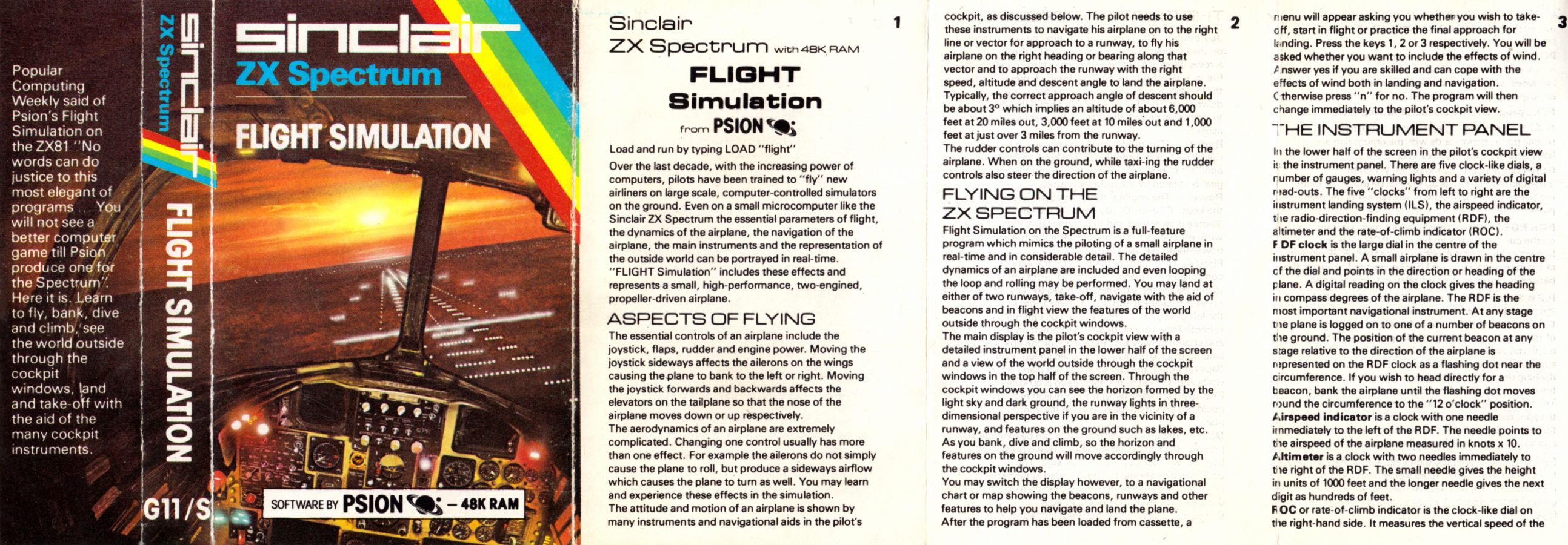
_Media.jpg)
Discussion
Nobody has started a thread about this yet.
Awards
Rank #06 - 1984 Sinclair User Top 50 Spectrum Software Classics
Releases
- 1983Sinclair Research LtdPound sterling 7.95
- 27 Oct 19862.99 Classics
- UnknownCzerweny Electronica S.A.I.C. Sold as Simulador de Vuelo
- 1983Investronica S.A. Sold as Simulador de VueloSpanish peseta 2675.00
- 1983Ventamatic
Play
- flightsimulation.rzxRZX playback file
- FlightSimulationV1.tzx.zipTape image English15 KB
- FlightSimulationV2.tzx.zipTape image English14 KB
- FlightSimulation.tap.zipTape image English22 KB
- FlightSimulation(different).tap.zipTape image English15 KB
- FlightSimulation(2.99Classics).tzx.zipTape image English14 KB
- FlightSimulation(SimuladorDeVuelo)(InvestronicaS.A.).tzx.zipTape image Spanish14 KB
- FlightSimulation(SimuladorDeVuelo)(InvestronicaS.A.).tap.zipTape image Spanish13 KB
Documents
- FlightSimulation.txtInstructions English17 KB
- FlightSimulation_French.zipInstructions French7 KB
- FlightSimulation_German.txtInstructions German14 KB
- FlightSimulation(SimuladorDeVuelo)(InvestronicaS.A.).pdfInstructions Spanish60 KB
- FlightSimulation(SimuladorDeVuelo)(CzerwenyElectronicaS.A.I.C.).pdfScanned instructions Spanish696 KB
Files and rights
Distribution permission is on record, granted to another archive rather than to this one. Screens and pictures are copied here; everything else links to the archive that holds it.
- AllowedSinclair Research Ltd → WorldOfSpectrum
- AllowedVentamatic → WorldOfSpectrum
Credits
- Charles Daviescredited
Sign in to credit somebody, or say what these people did.
Scores
In the magazines
- Sinclair User #111983 · Gilbert Factor6/10
- Sinclair User #221984 · Gilbert Factor6/10
- Your Sinclair #581990 · Overall35%
Elsewhere on the web
- WorldOfSpectrum 25 votes7.87
Awards and competitions
C&VG Spectrum Top Ten 1983
In the magazines 36
Your Sinclair #58Oct 1990 · p.2925%31%0%45%35%35%
The View 25%
Realism 31%
Dakka Factor 0%
Net Weight 45%
Overall 35%
Jonathan Davies 35%
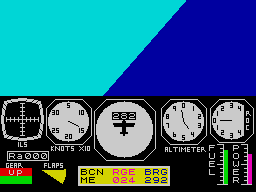
THE COMPLETE YS GUIDE TO FLIGHT SIMS Oh cripes. Whose idea was this? Couldn't we do it on something else? Nah, we promised. How about putting if off for another month? Or we could make JONATHAN DAVIS do it? Heh heh. Right, where's he got to? Ah ha! Neeeeeow! Dakka dakka dakka! Kaboom! "Crikey, Ginger, pull up! Over." "I can't! I think my flaps have gone a bit funny. Over." Neeeow! Boom! "Bail out! Bail out! Over." Dakka dakka dakka. (Ricochet noises.) "Er, okay then. Over and out." Sorry about that, just trying to inject a bit of excitement into this thing because, let's face it, flight sims aren't exactly the most exciting bits of software around. Or are they? No, They're not. But there are loads of them about, and people keep buying them. Why is this? Perhaps we'd better investigate. For thousands of years man has dreamt of flight... (Cut the crap, Ed) Erm, well, perhaps it's because they demand a bit more thought than your average arcade game. Fast reactions are all very well, but what about using your noddle occasionally? Keeping a plane in flight isn't just a matter of wobbling your joystick about a bit, which is the impression that lesser games give. You've got angles of attack to worry about, altitude, navigation, weapons systems, undercarriage... the list is endless. As are the manuals usually. And that's another thing. If you've never played one before you'll need to spend hours wading through one of these breeze-block tomes before you can even get off the ground. Once you've got the thing up in the air though you're well away. With any luck there'll be lots of scenery to look at and plenty of enemy thingies to 'take out'. You might even like to indulge in a bit of aerobatics to pass the time. The one thing you should always keep an eye on though is the ground. Stay away from this at all costs. Unless you're landing, of course, which is another story altogether. SO WHAT'S A FLIGHT SIM THEN, EH? In compiling this guide I was faced with the usual problem - what exactly is a flight simulation? What are the criteria? Where do you draw the line? I decided to seek the advice of one of Europe's leading experts in the field of computer games. "Er, Matt? (Cough.) Matt?' I ventured. "Mmm?" "Would you have said that, say, Fighter Pilot was a flight sim? Huh? Matt?" I enquired cheerily. "Er, probably," he replied. "How about Harrier Attack?" "I expect it is, yes." "Or Night Raider?" "Um, look, I've got to go out. To the, er, shops. I'll see you later. Maybe." Unperturbed. I decided to try Andy, but he didn't appear to hear me. I also tried ringing up a few friends. They all seemed to be out. So it's all down to me then. Well, I reckon that really, in a flight sim, you ought to be in control of a plane of some sort. Ideally you'd get a 3D view out of the cockpit, but I'll be flexible and allow ones where you see the plane on the screen from the back (like ATF) and even ones where you see the view in 2D (from the top or something). Another important guideline is the number of keys. Preferably there should be at least 2,452 of them, each with about three different functions. But, again, I'll allow a generous margin of error and set the bottom line at six. And finally there's the manual. Obviously this should be as large and impenetrable as possible, with lots of incomprehensible acronyms that you have to keep looking up in the glossary at the back. A rough guide to length? Let's say 500-600 pages for a decent one or, if the game comes in an ordinary cassette box, an inlay card that folds out into a thin strip long enough to wrap round Matt's tummy at least two and a half times. So now we know just what makes up a flight sim, let's take a look at a few… RATINGS Once again, the normally-so-versatile YS rating system doesn't really seem too appropriate here (Instant appeal? Addictiveness?). So what we've done is to come up with a revised system, specially tailored to meet the needs of today's flight sim. Let's have a nosey... The View: Can you see anything nice out of the window? Or is it all just green and blue wiggly lines? And does the scenery glide around smoothly or jerk around like an Allegro with a dodgy clutch? Realism: This can often be determined by the number of keys the game uses. So that's just what we've done. Counted 'em. As there are 40 keys on your basic Speccy, and each one can be doubled or even tripled up, the maximum comes out to exactly 100. Handy, eh? Dakka Factor: Is there much to shoot? Or is it all a matter of map-reading, gauge-watching and other such nonsense? And once you've shot whatever it is, does it explode dramatically and plummet to the ground leaving a trail of smoke behind it? Or not? Net Weight: A crucial part of any flight sim is all the junk that comes with it. So, adding together all the disks, maps, manuals, stickers and the box, what do the YS scales make of it? (All weights are, of course, approximate.) (In degrees.) THE CHEAPO SIDE OF THINGS You've got to give them credit - the budget people'll have a crack at anything. And flight sims are no exception. A full-pricey can take anything up to 18 months and a massive team of highly-trained programmers to develop, so what does your average beer-swilling cheapo programmer manage to come up with in the two weeks (evenings only) he's allotted? Let's brace ourselves and take a look. Flight Simulation Psion As we found earlier, this was the first Speccy flight sim ever, and it shows. It comes on a cassette with the game on one side and 'Blank Tape' conveniently written on the other. See which one you prefer. It actually looks quite promising (the inlay card is massive, with loads of miniscule instructions) and, despite the fact that it's largely written in Basic, the game moves along at a fair old rate. The problem is the scenery. All there is to look at on the ground (which is blue) is the runway, Lake Orb (which is round), Lake Tri (which is triangular) and some hills (which you can't see at all, but you'll know if you crash into them). The plane responds to your controls very sluggishly, but luckily you don't have to use them much because a 'flight' generally consists of taking off, pointing the plane towards the other airport, coming back three and a half house later and landing. If you crash there's a lengthy disaster effect and then you're asked if you want another flight. Press N and the program stops. Hmm. A legend in its own time, but a bit crap in this one.
And when was the last time it rained in your flight sim, eh? (Ho ho.)... (Er, it was a joke. No... Oh, go back to sleep.)
EVERY FLIGHT SIM EVER (IN THE WORLD)* *(near enough) Ace - Cascade Ace II - Cascade Ace Of Aces - US Gold Acrojet - US Gold Airliner - Protek ATF - Digital Integration Biggies - Mirrorsoft Chuck Yeager's Advanced Flight Trainer - Electronic Arts Combat Lynx - Durell Dambusters - US Gold Delta Wing - Creative Sparks Deep Strike - Durell F-15 Strike Eagle - MicroProse Flight Path 737 - Anirog Fighter Bomber - Activision Fighter Pilot - Digital Integration Flight Simulation - Psion Flyer Fox - Bug Byte Gee Bee Air Rally - Activision Gunship - MicroProse Nightflight - Hewson Nightflight II - Hewson Night Raider - Gremlin Project Stealth Fighter - MicroProse Red Arrows - Database Software Skyfox - Ariolasoft Space Shuttle - Microdeal Spitfire 40 - Mirrorsoft Strike Attack - Micro Mart Strike Force Harrier - Mirrorsoft Top Gun - Ocean
GAMES THAT AREN'T FLIGHT SIMS, BUT MIGHT JUST WELL HAVE BEEN Caesar The Cat - Mirrorsoft Mr Wong's Loop Laundry - Artic ZX Tool Kit - Star Dreams
GAMES THAT MOST DEFINITELY AREN'T FLIGHT SIMS Beaky And The Egg Snatchers - Fantasy Blue Max - US Gold Harrier Attack - Durell Heathrow Air Traffic Control - Hewson Monty Python's Flying Circus - Virgin Night Gunner - Digital Integration P47 - Firebird Scramble Spirits - Grandslam Spitfire - Encore TLL - Vortex
LOOKING-AT-IT-FROM-BEHIND ONES These ones are really the next step down from the True Flight Sim. They're essentially the same, except that instead of a view out of the cockpit you get a view of the back of your plane. This isn't quite as pointless as it sounds, because usually the plane is small enough so that you can see past it to the 'scenery' beyond. This type of view generally makes it easier to judge landings and to see if you're about to fly into anything, but there is often a corresponding reduction in the number of knobs and dials, and an increase in things to do. Not what we want at all. ATF is the perfect example of this sort of thing. "Chuck Yeager. (Well, he sort of belongs in this box.)"
LOOKING-AT-IT-FROM-JUST-ABOUT-ANYWHERE ONES Now these really are the business. They're like a cross between the True Flight Sim and the Looking-At-It-From-Behind one, with lots more as well. In fact, what you can do is look at your plane from all sorts of different angles, including weird ones like from-the-ground and from-the-front-of-the-plane. To tell the truth, games like this are a bit scarce on the Speccy (they tend to flourish on posh computers like the Atari ST) but there are one or two good ones. Chuck Yeager is a notable example, as is Fighter Bomber.
LOOKING-AT-IT-FROM-THE-SIDE ONES Now we're looking at things like Harrier Attack And they're certainly not flight sims. In fact, they're usually just scrolling shoot-'em-ups with planes instead of spaceships. There's always plenty of stuff to shoot, but technical accuracy is very limited indeed. You never have to worry about setting your flaps at the right angle or the navigational computer to the appropriate beacon, or watching your airspeed in case you stall. Useless. "Harrier Attack - definitely not a flight simulator. (Clear now?)"
LOOKING-AT-IT-FROM-THE-TOP ONES Now we're in dicey territory. We're talking about things like TLL here. Quite frankly, they're not really, are they? Flight sims, I mean. They've rarely got more than four or five keys, placing them firmly on the arcade side of things. So let's pass over them.
SO, YOU WANT TO WRITE A FLIGHT SIM? Er, are you sure? Stick your tongue out. Hmm. Say "Ahh". Crikey. Okay, let's take a look at some essential ingredients... THE SETTING Flight sims are always set in a spooky 'alternative' world where the sky is always blue and the grass is always green (and so is just about everything else for that matter). Other vegetation is pretty sparse, apart from triangles on sticks which look a bit like trees. These are usually about 600 ft high (if your altimeter is anything to go by). The only buildings tend to be in a modernist cereal packet style, with no-one living in them. Mountains are handy for flying into. KNOBS AND DIALS There should be a ridiculous number of these, all of which are unmarked and of no obvious use. If they start reading 'zero', eject. There should also be little red lights which start flashing and making a beeping noise for no apparent reason. They only stop when you press every key on the keyboard very hard, at which point the plane crashes. THE MAP Any relation to a normal map should be avoided. Flight sim maps consist of a large and (usually green-on-yellow, or something else that's probably outlawed by EEC legislation) covered in little splotches. Quite what these are isn't entirely clear. Somewhere in the middle is a flashing square - you. This never seems to move, no matter how long you look. Meanwhile, back in the cockpit, your plane has just been shot down. THE CONTROLS As previously explained, there should be as many as possible, and then lots more on top of that. They should all have obvious purposes (eg P for throttle up, K for map, Symbol Shift, Caps Shift and 3 for left etc). There should also be a disconcerting delay (say, five minutes) between pressing a key and anything happening. The need for constant reference to the manual can easily be incorporated, during which time the plane flies into a tree. SOUND Don't put any in. Apart from the 'crash effect', of course. THE ENEMY Somewhere on the screen there should be a radar with a little flashing dot on it. This is the enemy aircraft. The player will turn to face it, prime the air-to-air missiles and wait for the two aircraft to meet. This, of course, never happens. After a certain length of time the player will get bored, engage the autopilot and nip out to put the kettle on. His plane then gets shot down. LANDING As you'll no doubt be aware, this is impossible. Real F-15s and things land perfectly first time, every time. But not simulated ones. You get them lined up exactly, set the speed rate of descent and everything exactly according to the instructions, flaps and undercarriage down, set it down oh-so-gently and... kaboom. PLAYTESTING Once the game's nearing completion you'll have to thoroughly test it. Sit yourself down in front of it and ask someone to come and check up on you after an hour or so. If you're still awake the game is obviously in need of modification.
THE 'TRUE' FLIGHT SIM The obvious example of one of these is the original Flight Simulation, but that was pretty crap. What we're basically talking about here is the sort where you're placed in the cockpit looking out of the window in the bottom half of the screen (or, worse, on another screen altogether) is the instrument panel, which can generally be ignored, and in the top half is the view. This is generally green on the bottom and blue on the top. If it's the other way round you're probably in trouble. Scattered about will be lots of squiggly lines, and maybe a few dots on the ground to give the impression of 'speed' (ahem). "Night Raider - not of the best but it'll do."
THE A-Z OF FLYING TERMS Ammo: A Latin verb. Being Tail Gunner: Going to the loo. Chocks Away: Someone's pinched your lunch. Dogfight: These are illegal. Eject: If in doubt... Flaps: Do lots of these if the propeller stops going round. Ground: The main hazard faced by most pilots. Heading: See Football Guide, YS Issue 54. Instruments: In-flight entertainment. Joystick: Long thing between your legs with a red bit on the end. Kippers: Probably the nickname of a World War 1 pilot. Landing: The bit at the top of the stairs. Mae West: Something pilots like to keep handy. Normandy: A nice place to go on holiday. Orange: If you paint your 'crate' this colour you'll probably get shot down. Piece Of Cake: Dreadful drama series about planes on telly. Quebec: Keep an eye on the map if you don't want to end up here. Roger: (Er, do S. Ed) Six O'Clock: Tea-time. Take Off: Spoof or parody. Undercarriage: See Joystick. V-Formation: Give one of these to the enemy as you fly by. Wings: Something to do with Paul McCartney. X-Ray: You're meant to say this over the radio quite often. Yellow: See Orange.
THE FIRST FLIGHT SIM EVER Ha. This one's easy. It was Flight Simulation, one of the first games that ever came out on the Speccy. It was also the first game I bought. (Aargh! The secret's out.) It was one of those Psion games which came out on Sinclair's own label, and despite the mind-numbingly tedious piccy on the box (the instrument panel of a plane) it hung around near the top of the charts for years. In actual fact, Flight Simulation is a conversion of a ZX81 game of the same name. Yikes. We'll take a closer look at this one later on.
Sinclair User #32Nov 1984 · p.8
Flight Simulation broke new ground in 1982, as the first 'serious' game for the Spectrum. It has stood the test of time extremely well, and spawned a host of lookalike simulators from other companies. The aircraft is an unspecified light propeller-driven plane, capable of aerobatics but requiring considerable skill to navigate, especially in windy conditions. The large map over which you can fly includes terrain features such as lakes. Although the graphics seem conservative today, the satisfaction of flying a plane, even on a computer, is such that people will return to Flight Simulator again and again. Position 6/50
ZX Computing #15Oct 1984 · p.117
David Wright
Mark Stoneham
Of the many uses the Spectrum can be put to, flight simulators seem to have the most lasting appeal and probably utilise its considerable facilities for memory, colour and graphics more than any other type of commercial software. Two of the best currently available have been produced by two very different software houses: Psion and Digital Integration. The former has many good quality games to its credit whereas the latter has only appeared on the Spectrum scene recently. Seen on the shelf Psion's Flight Simulator has a considerable and unmistakable head start on Integrations Fighter Pilot as its cover design is a much more eye-catching and tempting piece of printing.The next aspect of the products which is always taken into account is the price; in this case they are both a reasonable £7.95 which should not deter the would-be flying ace. Documentation is both thorough and precise for the two packages although Fighter Pilot's is slightly superior in that it contains pilot's notes and technical data as well as the usual instructions. The notes give advice on your approach, flaps and undercarriage and informs you of your take-off and stall speed. The aircraft's performance and specifications are dealt with in the Technical Data. Flight Simulation does not have provision for a joystick although it is possible to use the Kempston device with the aid of a conversion tape. On the other hand. Fighter Pilot can incorporate one of three: Kempston, AGF and Sinclair Interface 2 (as well as the keyboard). Both programs load in just under four minutes and result in a list of options. In Flight Simulation there are three: in-flight final approach and take off. Having made your choice, you are asked whether you require wind effects or not (the novice should decline as it makes the game considerably harder). Fighter Pilot boasts a more extensive menu containing five options: landing practice, flying training, air-to-air combat practice, air-to-air combat and blind landing. As well as this, you have the choice of cross winds and turbulance, your pilot rating and controls. The Fighter Pilot instruments, from left to right, are as follows: radar and compass which includes your compass bearing and distance in relation to either one of eight beacons or an enemy bomber, depending on whether or not you are in combat mode. Next comes a digital speedometer beneath which sits the flap extension indicator. In the middle of the panel is the artificial horizon which shows the roll and pitch angle of your aircraft with respect to the ground. Below this is a linear thrust scale followed by digital altitude and vertical speed indicators. Adjacent to these is the Instrument Landing System (ILS) which doubles as a flight computer. On the far right of your console is the fuel gauge, below which is the undercarriage status indicator (i.e. up or down). Finally comes the ammunition indicator and "kills" so far. The Flight Simulation instrument panel is somewhat similar but consists almost entirely of dials, which can be confusing when the hands rotate more than once. The controls are from left to right: an ILS below which is a radio altimeter which displays your altitude digitally when it is less than 1,000 ft. Beneath this is an undercarriage status indicator adjacent to which is a flaps indicator. Above this is the airspeed indicator which displays your speed in knots. Next comes the RDF clock. This is the principal instrument in your panel and shows your current bearing and your position in relation to your present beacon. Below this there are three digital locks showing your present beacon, your distance from that beacon and its bearing in relation to your aircraft. The altimeter comes next and this is a dial with two hands; the longer giving the height in hundreds of feet and the shorter in thousands. Finally there are the fuel and power indicators. The maps in both programs are very impressive although the Fighter Pilot one is bigger in order to accommodate the much more powerful aircraft. Both maps are wraparound affairs which can be very confusing when crossing from one side to another. The Flight Simulation map covers 12,288 sq. miles and has two runways: club and main. It has seven beacons, one range of hills (1,000 ft high) and three lakes: Orb, Long and Tri. The Fighter Pilot map covers 20,000 sq miles, has two ranges of hills (3,500 & 2,000 ft high), eight beacons and four runways: Delta, Base, Zulu and Tango. Unfortunately, when one displays the map in Flight Simulation, one loses the instrument panel thus making prolonged periods of air borne navigation impossible. There is no sound in Fighter Pilot and hardly any in Flight Simulation (only when you crash) although I am sure most users would rather sacrifice audial effects for the excellent graphics in both programs. The object of Fighter Pilot (that is when air-to-air combat has been selected) is to defend the four airfields from destruction by simultaneous enemy bombers which, although of an inferior performance, are capable of devastating effects on both the airfields and your plane. The only aim we could see in Flight Simulation was to educate the user in the art of flying (which it does admirably). However, we would advise the would-be pilot to consult a flying manual if he is seriously considering flying! Although we have not dealt with Flight Simulation and Fighter Pilot to their full extent we have tried to cover most of the important points. On the whole Fighter gives more satisfaction, even though its landscape graphics are inferior. Its controls seem more responsive and we would like to conclude in saying that although both programs are good, Fighter Pilot is more exciting and thus slightly better than its counter part.
Micro Adventurer #10Aug 1984 · p.12
Kevin Bergin
THE WILD BLUE YONDER Kevin Bergin pilots Spectrum and BBC flight simulators. Picture scene: "I say, Biggles old chap, the weather's triff - how about a spin in the old crate, what?" "Sorry to be a bore, Ginger old worm, but I've got a spot of gippy tummy - must have been last night's bubble-and-squeak, don't you know?" "Bad show, Biggles, old fruit. Tell y'what, I think I might just have a quick shufti round the old cabbage patch for the Hun. Be a good fella and load in the jolly old prog, what?" "Right-ho, Ginger tally ho!" Even with a ZX81 Ginger would have had to decide which flight simulator to use. If you own a Spectrum, BBC or Atari micro, the choice is even wider. This review aims to help you pick the best for your flights of fantasy. The good old lo-res, black and white ZX8l is not a machine that springs readily to mind when talking of flight simulators; but it was for this machine that one of the greatest programs yet written was produced. Psion's Flight Simulation was great in the sense that graphics like this had not been seen on the ZX81 before. It was also fun! But don't think that it was easy brilliant machine-coding ensured that Psion's plane, a twin-engined light aircraft, behaved very like the real thing. The view from the cockpit shows the horizon, and as the plane dives, climbs and banks, so the horizon moves in a very realistic way. The instruments in front of the pilot include dials, digital readouts and bar displays; they show such information as speed, height, and fuel, and an artificial horizon as well as a comprehensive navigation system. Several beacons are dotted around the Psion landscape, and these all help the pilot to pinpoint the runway on which he must finally land. OVERSHOT As the plane nears the landing strip, it appears in view. The ZX's low resolution means that the lines of the runway must take the form of white pixels against the black background - but still, disbelief is suspended, so well-presented is the environment. As the plane approaches the runway, the perspective gradually changes, and the ground really does seem to reach up to meet the descending aircraft. It is even possible to overshoot the runway, and swoop round and round the airport, with the lines of the runway remaining coherent all the time. If the pilot has time, there is a further option ask to see a map (press the M key), and the view from the window is replaced by a plan view of the "play" area. This gives you an idea of where the plane is in relation to the runway. The controls are comprehensive; to make the plane bank, dive and climb, the cursor keys are used, and other keys are pressed to raise and lower the landing gear and flaps, apply and release the brakes, adjust the throttle and rotate amongst the beacons to facilitate taking bearings. There is no rudder control, but all in all, the plane flies quite realistically, although it seems very well balanced - set to level flight, it will happily purr away until the fuel runs out. Precision aerobatics are not really possible, though the controls are very responsive when it comes to necessary manouevres. There is a small question about the flaps put them down above a certain speed, and the plane crashes. This wouldn't happen in real-life, of course; similarly, a stall at a safe height is also fatal for the pilot in Psion's program. The ultimate thrill in this program, though, is the final landing. Flight Simulation became the yardstick by which other ZX81 programs were measured (programs of any kind, that is, 'not only flight programs), and other flight simulators had a very hard job to compete. Hewson released its Pilot not long after Psion's program. Written in Basic, it didn't have the smooth responses typical of the earlier program. Rather than the keyboard being scanned, and the display being updated accordingly every nanosecond, Hewson's program works through the routines (this all takes about two seconds) - pumping away furiously at a control key while waiting for the keyboard to wake merely results in over-correction, and another sickening plunge until the thing can be brought under control. No fine-tuning here! Hewson avoids the problems of coding the horizon by setting the whole simulation at night! Thus the range of hills which is such a hazard is not actually seen just felt as you crash into it. As for flying - once the pilot is accustomed to the annoying slowness of input from the keyboard, then the basics can be accomplished. Banking, climbing and diving are possible, as well as a rudimentary rudder control that adjusts the heading by one degree each time it is pressed. There is no map during the flight this time, but there is a "flight profile" at the end (when you've crashed), which shows all the mistakes you have made. When the Spectrum was released, the colour and enhanced graphics capabilities ensured that, sooner or later, flight simulator programs would start to appear. Sure enough, they did! Psion and Hewson both released new versions of their simulators. For the Spectrum Pilot, Hewson again turned to author M Male, and, again, the program was in Basic. The instrument panel (drawn in white on blue) includes a large circular Air Direction Finder (ADF), which is permanently tuned to a ground beacon, and gives an indication of the plan's position relative to the beacon. Other instruments include a large, square Artificial Horizon, and the instrument Landing System which gives an indication of the plane's attitude when landing, so that the pilot has a continual read out of the plane's position on the approach glide path. Readouts, like Airspeed, Heading, Altitude and so on, are in digital form. Again, an end-of-mission map is available for reference. Then Hewson released Niteflite II, taking the place of Pilot. This made better use of colour, with the instrument panel being drawn in several colours (although the Artificial Horizon suffered a little in its resolution), and a rather more stylish "select option" screen. On-screen information was more comprehensive, with detailed readouts on the cloud-base, wind direction and so on. Also among changes for the better was the provision of brakes, taxiing on the runway, a (signed) assessment card of the pilot's performance, and much better instructions, "talking-through" salient points. The major difference, however, was that input had been dramatically speeded-up, so that keyboard input was almost (not quite) immediate - and provision was made for joysticks. There is still, however, no credible feel of flying; stalling, at any height, is immediately fatal, as is putting down the undercarriage or flaps above a certain speed. Psion's new version of Flight Simulation was the first true simulation for the Spectrum. Only three options are offered the user - Final Approach, Takeoff or in Flight. Again, the aircraft in question is a small, high-performance, twin-engined, propeller-driven airplane, and the view is from the cockpit window. Anyone who had seen the ZX81 version would be immediately at home with the Spectrum version - the horizon is now drawn in higher resolution, as is the comprehensive instrument panel. Again, the feeling of actually flying is intense, and the keyboard is immediately responsive to any keypress. The Map is available here, too, but now it is in much more detail and shows two runways: Club is a small airfield with a rather short landing strip, while Main is an international airport with a much longer runway (much easier to land on). Also on the Map are a couple of lakes, and several beacons. These beacons can be used to attempt navigation to any point on the map. While the Map is on screen, the instrument display disappears, making it necessary to switch continually between the two displays while in flight. THRILLING What makes Psion's program so thrilling is that the lakes and runways are seen in true perspective as the plane approaches them. Unfortunately, while the sky is light blue, the ground is a disappointing uniform dark blue, with the lakes in light blue. Aerobatics can be indulged in - looping the loop is quite possible. Put down the landing-gear while in flight, though, or lower the flaps too far, and the plane suffers damage, maybe even fatal damage, as in so many of these micro-based simulators. Try dive-bombing the lakes or runways, however, and you'll swear that you are in a real plane - fantastic! Fighter Pilot, from Digital Integration (written by D K Marshall), is an unashamed tribute to Psion's Flight Simulation. Here is a Map, showing, in this instance, four runways (BASE, TANGO, DELTA and ZULU), and several beacons which flash as they are selected by the pilot here, too, are mountains which must be avoided. Looking out of the cockpit's window shows light blue sky with, this time, a uniform yellow ground (no lakes, though, in DIland). Your aircraft is an F1 Eagle, the USAF air-superiority fighter, with two turbofan Whitney engines, complete with re-heat. Sounds pokey, and it is! Selecting the Takeoff mode (there are several other Modes, and several levels of difficulty), allows you to use the performance to the full. Unlike the other programs we've seen so far, the brakes, realistically, have to be held on rev up to above the red line, brakes off, and away you go, hurtling down the runway and up into the sky in a near-vertical climb. Within a few seconds, you will be travelling at 600-odd knots (maximum speed is 1,440 knots at 60,000 feet, 800 knots at sea level), and you will already be at a height of 25,000 feet or so. What a contrast to Hewson's 80 knots at a puny 100 feet! Throw the F1 about the sky as much as you like - it's extremely difficult to control until a lot of practice is put in, but I imagine that it is a lot like flying the real thing (a Cessna is the closest I've got!). The instrumentation is the most useful of all the programs so far - the Artificial Horizon looks authentic, with instant feedback, and the Roll and Pitch indicator is very useful in fine-tuning the plane's attitude. Navigation is simplicity itself. Select the Map, on which you will find all the salient features of the landscape along with the four landing strips. While the map is on-screen, the instrument panel remains at the bottom of the display; unlike many other simulations, it's perfectly possible to fly on instruments only, thanks to instant and continual updates. Pressing the N key displays the Next beacon you require - it will start flashing on the map, and its bearing is shown, along with your current heading, on the radar screen on your instrument panel. A flashing cross shows the position of this beacon relative to your current heading steer toward the beacon, until the cross swings directly ahead of the little plane on the radar screen. Above the screen is your new heading, and the distance from the beacon. If you are going to land, the instrument Landing System becomes operative within five miles of the runway, and this allows the pilot to fly down the correct approach path to the runway. Though this may sound easy, it isn't - I have to admit that I still haven't effected a successful landing! This program would be a sensation, and a very accurate simulation, but there is much more - on the opening Option Screen, you will notice two selections that don't appear on others in this review. As the plane you fly is a fighter, all this training would be useless if it couldn't be put to some real use, and this is what you get in the Combat modes. In the Combat Training mode, your task is to find the enemy (looking much like a medium bomber) and destroy him. A cross-hair target and a readout of your remaining ammo help you, and the enemy will not fire back. Once you've had enough practice, it's on to the real thing, and this time the enemy will fire back if he has the opportunity. Things develop into a real dog-fight! Enemy planes are not visible until you are within a one-mile range - they will be at around a 5,000 feet altitude, and you must match height and speed in order to fight effectively. The enemy plans are not just there to be shot at, but also to seek and destroy your runways. As you'll need these to refuel and rearm, it is necessary to protect them at all costs. ACCOMPLISHED All in all, Fighter Pilot is a very accomplished program. A superb fighting machine with very sensitive controls, state-of-the-art navigational aids, and a worthy opponent - what more could the Spectrum owner ask of a Flight Simulator? Before we leave the Spectrum, it is worth mentioning another Hewson program Heathrow. This is another simulation, but this time from the point of view of those on the ground. Air Traffic Control would seem to be an ideal candidate for computer control, and this program gives you some idea of what it must be like to juggle with all those incoming Jumbos and Concordes. As with its Flight Simulator, Nightflite, Hewson has elected to cater for both the 16K and 48K Spectrum from within one program, thus making the thing not quite as complex, maybe, as many people would like. However, with the continually updated radar display, and multiple bar-charts showing aircraft headings, altitudes and so on, there is quite enough to digest for me! The instructions are complex, the display is complex - the whole program is a detailed simulation, including radio failure, emergencies, rogue aircraft and so on, and is recommended for the Spectrum-owner who wants to see what havoc may be caused by his stumbling around in other programs. On now to the Atari. Strangely enough, this machine, in every other sphere of "games" programs so much better than the Spectrum, has been poorly served when it comes to Flight Simulators. One of the first came from APX, the Atari Program Exchange, and is a 747 Simulator. Written in Basic by William J Graham, it is poor when, set against the best for the Spectrum. The only option is Final Approach, although the pilot may select Auto-pilot if so, all that remains for him to do is to decrease the engine revs when prompted, in order to keep the aircraft on the correct glide path. Maneuvering is effected by joystick, and as the landing gear is lowered by pushing the stick to the right while pressing the fire button, this immediately sends your airplane off to the right. As little as 10 degrees off-course means that you have a mid-air collision. The instrument panel consists only of digital readouts (no circular dials here), although the runway is shown in a sort of 3D. The sensation of flying is not particularly strong (and maybe isn't in a real Jumbo), and the program is rather more of an intellectual exercise in number-juggling. Like the vast majority of Atari programs, however, the APX Flight Simulator is, for some reason, extremely addictive, and you will find yourself returning to it again and again, as it seems so simple and yet so infuriatingly difficult to beat. The documentation is extensive, and includes a detailed "talk-down", so that even the first-timer has an even chance. SubLogic's Flight Simulator iI, which has been advertised for some time now as being available, will be the most exciting development in Atari flight simulators. Thousands of people are eagerly awaiting the program, on both sides of the Atlantic, and no-one, as far as I am aware, has seen it at the time of writing (June '84). It has achieved fame on the IBM machine as a yardstick of compatibility, and is justly held in high regard. It includes a World War I Air Ace scenario, with dogfights versus the Red Baron! Instrumentation and facilities are comprehensive, and the flying area includes the whole of the United States, with 80 airfields from Los Angeles to New York, user-defined weather and the time of day all making their impression. It will be expensive, but, also, the only "real" Flight Simulator on the Atari. The BBC machine is not one that is favoured with too many Flight Simulators in fact, I have just two to look at this month. The first is 737 Flight Simulator from Salamander. This comes on a cassette which includes a version for tape loading, together with a version which can be saved to disk. The program is in two parts - the first allows the user to select all the parameters, such as designing an airfield, selecting take-off or starting in mid-flight, choosing between daytime and nighttime flight, and so on. After this initial set-up period, the "business" part of the program is loaded, and the pilot finds himself sitting at the end of a runway, looking over the well-appointed instrument panel (everything you need is here and you'll need it). This assumes that the Take-off option has been selected - and a shock is in store! After take-off, the horizon suddenly disappears the cloud base is at 35 feet! MUCK I personally wouldn't want to fly in muck like that, but Salamander gives you no option, so continue we must - and on the way back, you'll find that the clouds have miraculously rolled back to 400 feet. Having struggled into the (very low) cloud, the pilot will obviously not see very much out of the window (a good wheeze, this, which helps programmers out of a tight spot) - instead, the display is replaced by a radar screen. Suddenly, you are now an Air Traffic Controller. Against a blue background, the track of your aircraft is depicted in red, and, flying on instruments only, you must steer your plane into a landing. For some reason, it seemed a lot easier to land the 737 after selecting the Final Approach option, than it was after a cross-country navigation exercise. But the controls are very responsive, despite the fact that only one key at a time is read. So, you won't be able to lower the undercarriage while throttling back, while lowering the flaps. Each task has to be tackled in turn, and the pilot needs to be an ambidextrous octopus in order to negotiate the 20 or so keys that have to be manipulated. However, there is a very helpful "BEEP" option (which may be turned off) which informs the pilot of acceptance of his executive action. The Beep pales into insignificance, though, beside the whine of the engines, which increase in pitch as the throttle is opened, finally reaching the point when nothing short of a strategically-placed pillow mutes the shriek. Looping-the-loop and other interesting pastimes are not available on Salamander's airliner - but those pilots who like watching the instrument panel should have a good time. Now, let's step back to Aviator, from Acornsoft. Let's be charitable, and say that the early releases from this company were "toes in the water" to feel the temperature - the more recent programs show very much more promise. And this is evident in Aviator. Although the memory constraints of the BBC machine, I imagine, mean that the display consists of white "wire" lines, on a black background, the loss of colour is not noticed after a while. The aircraft you are flying now is a World War II Spitfire Mk3. Of all the planes in this War, the Spitfire is the best known today, and to be in the seat of this one is a real change from the Eagles and Jumbos of the other programs here. An excellent manual, complete with detachable map of the countryside, and another sheet showing the keys to use, prepares the user for the experience to come. When the flight starts, the instruments are slowly drawn - no round instruments here, but octagonal - and the view from the cockpit window of the runway stretching before you. Start up and the very realistic sound of a prop engine is heard. Rev up, ease off the brakes, and away. TORQUE The Beeb Spitfire is the most realistic of all the aircraft we have looked at in this review. Nowhere is this more clearly seen than in the first moments, when you, the pilot, are beginning the take-off. Although the Spitfire suffered from tending to drift to the right (as the torque of the spinning propeller pulled the aircraft's nose from the straight-ahead), the slight left rudder that would be necessary in real life is not needed here. As speed increases, the tail gently lifts off the ground, and the "joystick" has to be slowly eased back in order to keep the propeller from digging a nice little trough along the runway. The Spitfire in flight is very responsive, just as in real life. As with most of the other simulators, it takes a great amount of practice before a smooth flight can be undertaken, and, especially in the first few moments of the flight, it can be all too easy to stall the machine, and spin into the ground (it's not a long job, thank goodness, to start again!). One of the main drawbacks with the Spitfire, and one that caught many trainee pilots unawares, was the narrow track of the landing gear - a slight crosswind, causing the Spitfire to "crab" sideways on landing, would place a great strain on the steering characteristics of the landing gear, and easily cause a ground-loop. I haven't had enough practice, yet, to be able to get close to touching down, but I have a feeling that this detail will not be programmed into Aviator. In most other details, however, the BBC Spitfire behaves pretty much like the original - which was a honey, and one of the best aircraft ever built. The landscape consists of several trapezoid shapes, representing fields, and each of a different shape, thus allowing for some sort of recognition as you pass overhead. It's extremely difficult to tell one shape from another, but it is essential to learn how to do it - there are no beacons or other navigational aids in the Spitfire. You can also fly through the streets of a small town or under a bridge. For these various feats, points are scored - more if you can do them upside down. There is the added fillip in Aviator of combat - but not with Messchersmitt 109s. In a weird bit of lateral thinking, Acornsoft has seen fit to pit the Spitfire against strange alien spaceships shaped like elongated triangles. It seems rather incongruous to have to fight these. However, you can behave realistically turn away after firing, and the shells will continue toward the spot originally aimed at. The combat part of this program, though, is not important (no way could anyone play this game as some sort of antique Space Invaders!), while the flying part is - and Aviator is certainly among the best to be seen so far on a microcomputer. FRINGE It is worth mentioning those "fringe" programs that require a certain amount of flying skills. These include, for the Spectrum, Zzoom and Omega Run (both place the player in the cockpit of a rather mystical aircraft - actually a "skimmer" in the case of Zzoom) and Fort Apocalypse and Chopper Rescue for the Atari and Commodore, which require the player to fly a helicopter remotely. Although these programs are nothing like real simulators, they are worth looking at if you get a thrill from handling fast, maneuverable machinery. The Flight Simulators we have looked at here seem to fall into one of two types. There is the "seat-of-the-pants" type, of which Aviator is a prime example, and the "fly-by-instruments" type, such as the APX Simulator and Jumbo Jet Pilot. Programs in the latter category tend to be intellectual exercises in which many details have to be balanced against each other. The feeling of flying is not particularly great, except for any view that you may have through the "cockpit" window. It is this sort of program that tends to place a heavy emphasis, rather unrealistically, on stress limits, so that lowering the undercarriage, for example, above a certain speed will immediately wreck the plane. The other kind of Simulator lets the pilot pay more attention to the actual flying, and allows aerobatics, and also includes a certain leeway in structural limitations. The Spitfire program for the BBC is an extraordinarily accurate simulation, and, incidentally, addictive. The Fl Eagle program, for the Spectrum, is thrilling the pilot can almost feel the kick in his back as the throttle is pushed into the red, and the plane hurtles, at Mach 2, to 50,000 feet in just a minute or so. Which one you prefer, Biggles, must be your decision.
Sinclair Programs #21Jul 1984 · p.30
June Mortimer
WANTED - RACING DRIVER, PILOT, PRIME MINISTER... Simulation programs are fun and educational . Among a selection of excellent games , many of them best-sellers , we find one leads the field . Spend your time playing Manic Miner or The Hobbit and, although you may gain remarkable proficiency on the Spectrum keyboard, the chances are that you will not feel any better-equipped for any real-life experiences of wandering beneath the streets of Surbiton, or controlling the movements of a recalcitrant dwarf. Spend your time playing simulation games and not only will you enjoy some of the best games on the market but also you will benefit from the educational qualities of simulation games. Whether your dream has always been to bring the government to its knees, form a successful rock band, become a millionaire or simply to get away from the city and take up sport in the countryside, there is a simulation game designed to help you achieve your dream in the comfort of your home. Simulation games put you into the place of another person, a jet pilot for example, provide some background information and instructions, and then allow you to make all the decisions. UNRIVALLED SUCCESS In the field of simulation games nothing has arrived in the Sinclair Programs office to rival The Forest - Phipps Associates, 48K Spectrum . It is a simulation of that sport seemingly least likely ever to be played on a microcomputer, orienteering. Orienteering is essentially a cross-country race across difficult terrain, to which has been added the extra dimension of navigational problems. Contestants are supplied with a map, on which is marked a number of points, each of which must be visited in order. Points are often separated by lakes or dense forest, so the quickest route is not necessarily a straight line but can be found only by a skilled map reader. An added complication is that the map, and the area, do not include roads, footpaths or streams, and so map and compass must be used throughout. Graham Relf, author of The Forest has, amazingly, made it possible to orienteer with a Spectrum and, more incredibly still, has fitted 11,200 sq. km. of map into the program. When the game is loaded, the scene is the start of the course, on the edge of the town and the forest. Objective number one lies around 100 metres to the north-east and is marked by a flag on arrival. The map shows that a direct route would not be too difficult; most of it is downhill and the forest through which a straight path would run is not too dense. It is difficult, however, to run even 100 metres through trees white trying to follow a compass bearing, so the booklet accompanying the program suggests that beginners first aim for the nearby lake and then for the small flag in the middle of the forest. The screen shows the view six metres in front of the player. It may be lake, tall trees, small trees, a town, or a selection of other types of terrain. Ten terrain symbols are shown on the screen at any time. Turning to right and left can be done by means of left and right cursor keys. Turning to face the way you have come is achieved by pressing the downward cursor key, and movement forward by pressing the upward cursor key. Each step you take is roughly one metre long although, as in real life, your steps will vary in length and you will move with much more difficulty uphill through thick trees than when running downhill across grass. A sight set in front of you shows where the ground directly ahead of you would be if the ground were completely level. That gives a clear indication as to whether you are running uphill or downhill. Running on a compass bearing is not possible with a computer. It is possible to estimate on which bearing you should walk, and for how far, but most players will find that a ruler and protractor make life easier. The forest is an extremely good educational aid for anyone wishing to reach or learn map reading, compass hearings, or simply the use of ruler and protractor. The map is very accurate and there is an immense sense of achievement to be gained from finding a flag after navigating through a kilometer of forest. The program also gives a clear idea of how contour lines marked on a map relate to hills and valleys. Experienced players will find that by following the curve of a hill as they run along, they can follow contour lines on the map, which can be very helpful when crossing large areas of forest. BEST-SELLING PROGRAMS Better-known simulation games are the flight simulation programs Flight Simulation - 48K Spectrum and 16K ZX-81, Sinclair Research - and Fighter Pilot - 48K Spectrum, Digital Integration - both best-selling programs. Flight Simulation allows the player to take off, fly and land an aeroplane. The aircraft controls are complex and so the long instructions should be read in full before any attempt at flying is made. Despite that, first flights tend to be unmitigated disasters. Experience quickly makes the controls and instrument panels sufficiently comprehensible to make taking-off and flying possible. The most difficult aspect of Flight Simulation is landing. There are 13 control keys to remember with which the aircraft can be controlled and even experienced simulator pilots tend to find that number is around 12 controls too many when trying to reduce height and speed at the appropriate rate, while keeping on course and keeping the aircraft level. Fighter Pilot gives the player a bigger range of options than Flight Simulation. The player can choose between being a trainee, squadron instructor or ace pilot. Flight, take-off and landing can be practiced with or without the effect of cross-winds and turbulence. As can be deduced from the program title, other options include not more complicated routes or aerial manoeuvres but the opportunity to kill as many other pilots like yourself as you wish. While both Fighter Pilot and Flight Simulation are excellent simulation programs, the wider range of options open to the player in Fighter Pilot provide a more lasting challenge. Chequered Flag - Sinclair Research, 48K Spectrum - is also a well-known example of a simulation game. The screen display is of the driver's view from a racing car. Before the game begins the driver can choose between three cars and a variety of the most famous racing circuits in the world. As in a real car, there are a variety of controls from which to choose, although in a real car drivers are not expected to steer, accelerate, brake and change gear all with their hands. Moving at high speed is hair-raising enough, without the added difficulty of having to search for the brake quickly among a group of very similar Spectrum keys. NOT A NOVEL EXPERIENCE As a simulation the game is not as successful as flight simulation programs, partly because the large number of its imitators make the idea of driving a car on your Spectrum seem stale. Driving a car or being driven in a car is not a novel experience for Spectrum owners and so differences from real life are much more apparent than when trying to fly an aeroplane. 1984 - Incentive Software, 48K Spectrum - gives the player control of the Government of Britain from 1984 onwards. All decisions on Government spending and allocation of resources are made by the player. Radical changes in spending will not be accepted by the computer and budgetary changes which leave certain departments short of money will be queried by the computer before they are accepted. MANAGEMENT GAME 1984 states that it is "a game of Government management" and so computer owners wishing to become involved in other aspects of British political activity, or to overthrow the Government and set up a different political system, will not find it suited to their needs. The cassette insert includes a complex diagram, demonstrating how different sections of the economy are linked and what effects budgetary changes in any area will have. Students of economics or government may find it a helpful game to play, although it is necessarily simplistic in some areas. It is a complex and well-thought-out simulation game. People using it for educational purposes, though, will find that the help of an experienced teacher would be necessary to indicate the problems which necessarily will arise when the player attempts to run the country on a microcomputer. Rather more frivolous is Millionaire - Incentive, 48K Spectrum. The game involves running a software company and the aim is to make a million pounds. It is fast-moving, easily comprehensible but necessarily repetitive with clear graphics on-screen. Decisions must be made as to which kind of software should be written, how much should be produced, how it should be advertised, and how it should be marketed. As profits increase, the size of your house, shown at the beginning of each round, will increase from being a small terrace to a large mansion. Production of cassettes cannot exceed a certain level each month, so once you have made all the correct decisions and are selling out of stock each month there is no chance of becoming an overnight success. Another problem with the game is the irritating over-use of a luck element throughout, so that making the same decisions two games running will produce very different results. Over-use of chance is always a flaw in a simulation game and in Millionaire it gives rise to the suspicion that success would be obtained as quickly by throwing dice to make decisions. BUSKING IN THE SUBWAY Along the same lines as Millionaire is it's Only Rock 'n' Roll - Virgin, 48K Spectrum. The aim is to make it as a rock star, "making it" being defined in this case as earning a million pounds and acquiring three status symbols. From busking in the subway it is possible to rise. to tours of Japan and the U.S., number one hit records and sold-out concerts at Wembley Stadium. All that takes time, however, and Virgin judges rock stars to be over the hill within five years of the start of the game, or fewer if you choose a more difficult level. It is necessary, therefore, tO take a few risks to achieve high popularity levels as quickly as possible. It is disappointing that once you have made it in the set time there is no winning display - you continue the game until you are over the hill and then finish. VERY SIMILAR SIEGES A similar lack of any appropriate ending is apparent in Jerico 2 - Elephant Software, 48K Spectrum. The game can be considered with Fort Apache - Contrast Software, 16K Spectrum - as, except in theme, the two games are remarkably similar in all respects. In both the player leads a siege, in one case on an Apache fort, in the other on the city of Jerico. Battles must be fought, weapons and equipment built and supplies fetched. Not the most accurate of simulations and not the most involving, either. Success can be obtained on Jerico 2 within half an hour, though Fort Apache is slightly more difficult. Despite the similarities of the games, Fort Apache is better than Jerico 2, as it makes full use of the ZX-81 facilities.
Crash #6Jul 1984 · p.84
S. Guillerme
This game must be one of the oldest simulation games designed for the Spectrum. Its title itself gives enough explanation of what it is all about: a flight simulation game. You are the pilot of a 'small two-engined propellor-driven plane', you can take off, land on one of two runways, or just fly about, locating your position on a map and the help of various instruments, all in real time. The simulation in itself is quite detailed. At the beginning of the program you are faced with three options: take-off, start in flight at a random position, and the 'final approach' for landing. Then you will be asked if you want to include the effects of wind. But beginners beware! If you say 'yes' your plane will be far more difficult to handle. Then the simulation itself starts. The main display is the pilot's cockpit view with a detailed instruments panel in the lower half of the screen, and a view of the world outside through the cockpit windows. Through these you can see the 'horizon' formed by the light sky and dark ground. If you are near a runway you will see its lights in 'three dimensional perspective', and also lakes. As you turn, climb, dive, so the horizon and features on the ground will move accordingly through the cockpit windows. Your instruments are rather detailed and technical: speed indicator, altimeter, rate of climb, fuel left, engine throttle, etc... The understanding of those instruments is vital if you do not want to crash immediately. So always keep the instructions near you, they provide everything you need to know about the functioning of the plane. The second screen is a map showing all the lakes, mountains and runways, as well as the beacons used to navigate. Those beacons can be changed, depending on the direction you want to head to. Your plane is also shown on this map, but maybe on too large a scale to be really precise about your position (especially when landing). CRITICISM One thing seems to be lacking in this game: excitement. Apart from flying, you just are not given any tasks to perform, or do not have anything to shoot at. I found that the most interesting part was landing your plane, as this needs a good deal of practice. Otherwise once you have mastered the controls of your plane it is rather dull. The lack of sound gives a sort of eerie feeling to flying, as if you were in a glider rather than a 'two engine propelled plane'. Colours and graphic details do not help either. Apart from lakes and runway lights you do not see anything. I would have liked a bird flapping its way through the screen, or some town with lit skyscraper on the ground. The seven pages of instructions are detailed but actually hard to digest. The instrument Landing System does not seem to work properly (it is better to ignore it altogether) and you sometimes get some oddities when looping the loop. However this is in fact a good simulation game. It takes time to master the keys. Detailed instruments and realistic (I guess), they just should have made it more exciting, less contemplative. Arcade freaks beware!
Approaching the runway - Flight Simulation.
Crash #4May 1984 · p.66
Producer: Psion, 48K £7.95 An early Spectrum program, and always popular, this simulates the effects of flying a single seater light aircraft, including landing and taking off. There are 2 airfields (one very difficult and surrounded by hills), lakes, beacons and a very good map of the whole area. It takes many minutes to fly over the whole map. Instrument flying is essential to success and, as usual, there is a lot of accompanying instruction to digest. The cockpit view is simple but oddly realistic. If you enjoy contemplative games, then this is still one of the best, although watch out for some oddities if you try looping the loop - the program doesn't seem to cope with that!
Crash #2Mar 1984 · p.62
Producer: Psion, 48K £7.95 An early Spectrum program, and always popular, this simulates the effects of flying a single seater light aircraft, including landing and taking off. There are 2 airfields (one very difficult and surrounded by hills), lakes, beacons and a very good map of the whole area. It takes many minutes to fly over the whole map. Instrument flying is essential to success and, as usual, there is a lot of accompanying instruction to digest. The cockpit view is simple but oddly realistic. If you enjoy contemplative games, then this is still one of the best, although watch out for some oddities if you try looping the loop - the program doesn't seem to cope with that!
Sinclair User #22Jan 1984 · p.1106/106/10
Gilbert Factor 6/10
Theodora Wood 6/10
FIRST STEPS TOWARDS PAPERLESS LEARNING Theodora Wood considers the current state and the potential of educational software. Computers have now found their way into approximately one in 10 British households. Half a million Spectrums alone have been sold and presumably at least twice as many adults and children have unwrapped their cartons and plugged-in their hardware. Some will have caught the programming bug, others are small business users, and a large proportion have been shooting-down the alien hordes. Software houses were quick to supply the games market and some have provided educational software but it is only recently that the numbers of educational titles have risen, with the large educational publishing houses realising the potential of the market, complete with glossy packaging and nation-wide distribution. At present Britain lags behind the U.S. market, both in the range and number of educational programs available, and is following roughly the same pattern of development. The biggest number of programs available, for both the Spectrum and ZX-81, are of the rule-drill variety. They operate in the same way as the most traditional methods of teaching, by showing examples of the subject to be taught and then testing, sometimes by games. They can be divided into those for the younger age group - three to nine - and those which are aimed at older children as learning packages. For the younger children the lack of reading skill places a greater emphasis on the use of graphics, animation and sound in the programs used to teach bask skills such as letter recognition, counting, simple mathematics. It is important with programs such as those that there should be a substantial element of interaction with the computer - children love pressing buttons. The testing part of the programs provides for that in most cases and duplicates the worksheets and workbooks used in schools throughout the country in electronic form. First Numbers - Collins Educational, 16K Spectrum, £5.95 - is a series of five programs on one tape illustrating the concept of the electronic workbook. Instead of the examples remaining inert on the page, they bound round the screen in full colour; hopping frogs, seals bouncing balls on their noses, and elephants moving across the screen, rather too slowly, to the tune Nellie the Elephant, all emphasise the numbers one to 10. A program illustrates how to write the numbers by first drawing them on the screen and then flashing arrows following the direction of the pencil, identical to a workbook, except that there the arrows do not flash. In contrast, there is Alphabet - Widget, 48K Spectrum, £5.95 - a program to teach letter recognition which uses no on-screen movement to illustrate its point. Its use of the Spectrum sound capability is lamentable, as the reward for a correct answer is the same for every letter, and can become extremely tedious even for the youngest child. When attempting to teach letter recognition, which is essentially a sound/shape matching activity, it is important that an adult should be present, as without a voice element the objective cannot be realised. For the younger child who has little or no reading ability, better capability of the Spectrum in the area of colour, graphics and sound make it a superior machine to the ZX-81. Moving up the age range, a considerable number of programs operate on the electronic workbook level, from junior up to 0 level and beyond, and they are widely-available either at department stores or by mail order. The ZX-81 appears more regularly in those titles, where more on-screen text can be used and flashing graphics are not so important. That kind of program would be a valuable aid to learning for the motivated child and for examination revision. Rose Cassettes and University Software specialise in that kind of programs. Quiz programs are an extension of the question-and-answer format, such as the ones produced by Psion - 16148K Spectrum, £6.95 - for geography and history. Time Traveller - John Wiley, 48K Spectrum only, £9.95 - extends the scope by using the format of an adventure game, complete with wild animals, soldiers and priests, at the same time testing a child's knowledge of history through having to answer questions on historical fact correctly before passing through the time warps from 2000 BC to the present. This type of quiz would obviously have more attractions than the more straightforward versions, and would be more entertaining for groups. All the programs mentioned so far are an extension of traditional teaching methods and provide a paperless way of learning subjects as diverse as O level French revision and the history of inventions. For the younger age groups they could be a valuable aid to learning basic skills, if used for short periods, and should be compared to other hardware aids such as Speak and Spell, the Talking Computer and little Professor to assess their effectiveness. They also provide an introduction to the use of the computer and its keyboard. In the short term a child's interest would be retained probably by the novelty value of using a computer but that may later prove ephemeral as electronic workbooks become a more familiar feature at home and at school. Older children could use them in conjunction with their studies to clarify and identify areas on which they need to concentrate. Simulation programs present a real departure from the electronic workbook and use the ability of the computer to deal with interactive variables to the full. Simulation programs at their best place a child in a real situation, engaging attention in an imaginative way. Again, the superior Spectrum graphics and colour invalidate the use of the ZX-81 and most titles are available for 48K Spectrum only. Heinemann has produced a package for the eight-to-12 age group, Ballooning, which is accompanied by a glossy booklet explaining ballooning, with its history, development and suggestions for further activities. The balloon moves over a simulated landscape at the top of the screen while a child interacting with information on the dials placed below - altitude, temperature, fuel, rate of climb or fall - controls the upward or downward drift of the craft. The child can stop the action to make a decision more coolly or mark position on a graph relating to altitude and distance, thus simulating a barograph. By practising at the controls of the balloon, a novice balloonist can execute various missions set by the program, some of which are extremely complicated, and in so doing become aware of the interaction between the temperature of the air inside the balloon, its rise and fall and its limitations as a flying machine. The variety of other activities suggested in the accompanying booklet ensures that the program is open-ended and the concepts introduced in the package explored in different ways. Meanwhile, arguments rage as to who has achieved the most number of safe landings. Flight Simulation - 48K Spectrum, Psion, £7.95 - and to a lesser extent Nightflite - 16K Spectrum, Hewson - together with a 16K ZX-81 version, are similar programs suitable for nine-year-olds upwards and continue the theme of flying a machine but with greater difficulty level. Realtime means precisely that and there is no stopping the action to assimilate the information on the dials. Map reading and basic navigational skills are also needed to move the aircraft round the landscape in the case of the 48K version, and the impression of reality is enhanced by being in the cockpit, seeing the landmarks below, and experiencing the tilt of the aeroplane in relation to the horizon, as well as the dizzying effect of rushing towards the ground at an increasingly frightening rate. Simulation programs prove an imaginative vehicle for the introduction of the terminology used and the concepts involved in a particular activity and accomplish it in a different way from the rule and drill programs; instead of learning by example a child learns by the consequences of actions, albeit within the limitations of a simulated micro-world. Learning by direct experience is more valuable than learning by rote and one would expect that more programs of this kind would be available in 1984, to introduce children to a wide variety of concepts and situations. There are also programs for both the Spectrum and ZX-81 which operate in specialist areas not covered by the rule-and-drill format. Programs such as Firework Music and Tuner - 16/48K Spectrum range for 16K ZX-81, Software Cottage, £5 each - introduce children of almost any age to the basics of musical notation, pitch and keyboard use, and are ideal for use where a household has a computer but no musical instruments as, sad to say, only a minority of children retain an interest in playing music beyond a certain age. Bridge Software produces a program, Night Sky - 16K Spectrum, £8.90 - which shows the stars visible at any time of the day or night from the Midlands - 0°, 52°N - on any day of the year. The second program in the pack shows the stars appearing in order of magnitude, with the 20 brightest stars named. Although operating within a specialist field, this type of program is of note as it adds an extra dimension to the star maps in books; moving the time on hour by hour shows the viewer how the stars rise and fall throughout the night and their positions throughout the year. It also gives city dwellers a chance to look at the stars which are rarely seen through the orange glare of street lights and seen even more rarely at 3 o'clock in the morning. The state of the art of educational software for the Spectrum and the ZX-81 introduces children to the keyboard of the computer - just watch a three-year-old press ENTER - and the notion of paperless work while reinforcing the learning processes involved in gaining skills which are basic to any educational curriculum. They can also introduce new concepts in an exciting way through the use of simulation techniques. None of them however, deals with the use of the computer in the programming field. The Microelectronics Education Programme was designed initially for use in schools and contains some programs which teach skills which are the stepping stones to logic and programming techniques, as well as the more usual rule-and-drill programs. At £24.95 per pack of seven to eight programs, it seems rather expensive for home use but its use in schools is a selling point for distributors such as W H Smith. Farmer introduces problem-solving and reasoning to the seven-to-11 group, while Watchperson does a similar task for the eight-to-11 group and includes route planning. Mazes are a graphic way to introduce logical processes and many of them are available in the games section of the software departments of stores. To learn programming as a technique, the most innovative and child- centred way is to use Logo, a high-level language developed at Massachusetts Institute of Technology, under the guidance of Seymour Papert. Instead of using the computer to help a child or young adult to learn certain skills, the user programs the computer to execute commands. Logo enables children from about nine upwards to achieve results which would be much more difficult to achieve using the Basic language common to the Spectrum and ZX-81. By the use of simple commands, a child can instruct a robot/turtle to move round the screen or on the floor, drawing as it proceeds. Imagine telling someone to walk round a square shape; walk 10 steps, then turn right; at that point it would be absolutely essential to know how many degrees to turn through, otherwise the shape would have no chance of being a square. Similarly with Logo and it is in that way that the value of such a program can be seen, as geometric functions are learned not by looking at a text book but by practical use of them in an activity which has been chosen by the child. Logo does much more than introduce children to geometric function, however, because by choosing a problem, like drawing a house, the child has to split the activity into its component parts - roof, windows, chimneys - and find the best way of achieving the desired result. That type of problem-solving can be applied to any number and variety of activities and the adult version is well-known as critical path analysis, involving the exploration of logistics to determine the order in which activities are executed. Logo also introduces children to the basic concepts of programming in a simplified form - to loops, nested loops et at - and for those who have no immediate knowledge of, or affinity with, those concepts, its simplicity is an easy introduction to them. In future years robots and artificial intelligence will enter many areas of life and a knowledge of the logical way in which a programmable machine works will undoubtedly be a skill which many will need to learn. Snail Logo - Spectrum 48K, CP Software, £9.95 - is an example of this type of program which can be used either with the Zeaker turtle on the floor or displays, if desired, a snail moving on the screen. The documentation with the program is excellent, describing the concepts behind it and giving examples of programs to try. They lead the novice from simple routines to more complex ones involving the use of named procedures - subroutines - and variables. Although there are ample facilities to copy the program being worked on, there is no means of saving them, which is very irritating, as obviously children might wish to evolve a program in the space of days or weeks. It would be better also if the snail could be seen on the screen at the same time. No doubt other versions of Logo will be introduced in the coming year. Looking back on the development of educational software at the start of 1984, the main impression is that the field has scarcely been explored. Two obvious areas where development is necessary for the Spectrum and the ZX-81 is a simple word processor allowing children to type-in a piece of writing and then correct it, and the interactive database program similar to that of the Tree of Life which runs on the BBC micro. Potential exists in the simulation/adventure format and the use of Logo to stimulate children into areas of activity which would be impossible without the use of the computer. While rule-and-drill programs can be a pleasant way of learning basic skills and an introduction to the computer and its keyboard, their over-use could have the opposite effect to that desired by deterring children using computers for life. So what developments can we expect in the next few years? Interactive video must surely be an area to be explored. Based on a combination of personal computers and video tapes or disc players, interactive video will expand the use of the computer as an educational tool by introducing real speech into the learning process and enabling children to interact with the pictures. After that, perhaps children will learn to program holograms to dance round the room or a myriad of small independent robots will be whizzing round when fed their programs. Educational software? We have only just begun. Bridge Software, [redacted] CP Software, [redacted]. Rose Software, [redacted]. Software Cottage, [redacted]. University Software, [redacted]. John Wiley & Sons (Sulius Software), [redacted]. Collins, Widget, Heinemann and Psionare widely available at leading department stores.
'While rule-and-drill programs can be a pleasant way of learning basic skills and an introduction to the computer and its keyboard, their over-use could have the opposite effect to that desired.'
Personal Computer News #37Nov 1983 · p.26
John Lettice
REACH FOR THE SKY John (Biggles) Lettice dons flying cap and heads off for the wild blue yonder. Nightflight (£7.95, Dragon) and 737 Flight Simulator (£9.95, BBC B), from Salamander Software, [redacted] Nightflite (£5.95,Spectrum) and Dragonfly (£6.95, Dragon), from Hewson Consultants, [redacted] Flight Simulation (£5.95, Spectrum), from Psion/Sinclair Research, [redacted] If your idea of fun is spending the weekend doing victory rolls over Heathrow's departure lounge, you're surprisingly well catered for nowadays. Most of the popular micros have a flight simulation program or two available for them, and although some of them can be pretty feeble, many are very good indeed. The best flight simulation programs genuinely are simulations. You can operate the various controls of your aircraft and, if the program's good, it will behave in pretty much the same way as a real aeroplane. A good simulation therefore lets you' take off, fly, navigate to the airfield of your choice by sight or radio beacon, and land either visually or on instruments. So producing an accurate simulation is a complex programming job, and some of the more basic simulations, although fairly accurate as far as they go, won't actually produce realistic effects if you do something daft or intricate. Try opening the throttle, pulling the joystick back hard then banking suddenly. Are you losing height rapidly? Is the ground spinning round and round? If the answer is no, you're either flying something very large and sluggish, or you've just done something the program wasn't designed to deal with. Looping the loop is another example - some programs just plain won't do it, and others that will have a bizarre way of doing it. Salamander Software's Nightflight for the Dragon, for example, produced a loop 68 feet in diameter when I tried it... 'You are the pilot of a small, radio-controlled aircraft...' And looping the loop isn't the only way of getting a program's measure. Hewson Consultants' Dragonfly, which comes from the same stable as the relatively honourable Nightflite, loops the loop quite convincingly, although perhaps a little too easily. So I thought I'd try it in a glide. Shut off the power and you see speed decrease. You start to lose height. So try dropping the nose a little to get yourself in a shallow dive. The speed continues to decrease, and you continue to lose height. Matter of fact, speed falls to walking, then to zero, at which point you're told you're not flying a helicopter, and asked if you' want another go. This is all very well, but it might be nicer if the programming allowed the plane to behave like a real one, instead of enhancing the meaning of the phrase 'glides like a brick'. If you fancy something a little hairier, then Psion's Flight Simulation for the Spectrum is the one to fly. This gives you a fairly realistic-looking cockpit display, and also alloWs you to see where you're going. So if you're flying over a lake, you see something that looks a bit like a lake, and so on. The graphics aren't anything like as detailed as the Microsoft flight simulator, which shows you a place I'd swear was Tayport (small town on the south bank of' the Tay estuary), but if you fancy a bit of flying without instruments, it does allow, this. Psion puts you in charge of a high-performance twin-engined aircraft and allows you to fly between two airfields of differing sizes with the aid of a number of radio beacons. Inbetween times, you've got enough technology at your command - just - to really throw the plane about the sky or, alternatively, to make a very large crater on the ground. One of the nice things about the Psion simulator is that it's not easy to control. It's supposed to be a small aircraft, so you'd expect the controls, to be a lot more responsive than on a large airliner. Although taking, off is fairly easy - just a matter of getting the necessary speed up and pulling the stick back - you'll quite probably find it difficult to control at lowish speeds with the nose up (ie, climbing away from the runway). Similarly, it passes the loop-the-loop test with flying colours. Some flight simulators will loop-the-loop if you just pull the stick back hard. You see the sky, roll neatly around you, then find yourself back on the same course as you were before. Psion's effort needs a lot more thought and skill. You need to go into the loop fast enough to retain stability once you bring the nose up, and if you're lucky you'll execute the manoeuvre Successfully and wind up near where you were before. If you've gone into the loop with a little less care you'll find yourself doing pretty much what you'd expect the real thing to do. Too little speed on the initial climb and you'll stall and spin down to earth. If you manage to get to the top of the loop but still don't have the speed, you'll find yourself slipping to one side upside-down. So don't try it too near the ground. With any flight simulator, if you get into trouble and you're not too near the ground, you'll find yourself in a spin. How you get out of this in a good simulator at least depends on the type of aircraft. I found the Psion simulator allowed you to get out if you increased power, then pulled the nose up, but I couldn't, get out this way on Salamander's 737 simulator. PCN's resident veteran of the Molimerx Belfast-to-Gatwick run tells me this is because larger aircraft do not always go into a nose-down spin, but can execute a weird pancaking spin on the level, or even with the nose slightly up. So for larger beasts you pull the nose down, get enough speed to stabilise them, then pull out. Not that you're liable to get into a spin too often with Salamander's 737. The top half-dozen or so lines of the screen are devoted to a series of warning messages. These are innocuous enough when you're flying in a straight line at the right speed, but downright painful if you do anything less than take good care of the passengers out the back. If you do find yourself going too fast, stalling, spinning or running out of fuel, lights start flashing and buzzers start sounding. Behind you, you can imagine, passengers are struggling into lifejackets, penning irate letter about your performance to the chief executive of Microflight Airways, or composing themselves for an unscheduled stopover in perdition. So if you fancy a bit of stunt flying on the 737 - leaving aside from the likelihood that you'll be grounded for life if you ever get back to the ground - you also have the option of going deaf or putting an axe through the Beeb's speaker. I also found I tended to crash whenever I tried to do something really wacky - I'd be grateful if any 737 pilots out there could tell me if one can loop the loop in the things. My major objection to 737 Flight Simulator is that it really is too easy to control in flight. You find yourself sighing for the good old days of goggles, flying helmets and silk scarves getting caught in the propeller, and thinking heretical thoughts on the lines of 'it's just like having a computer flying the thing...' You can punch up your speed, rate of climb and descent, and the 737 will stay at these levels through thick and thin, changing only if something really bad happens. So unless you really get off on flying in straight lines and gentle curves, the most use you'd make of this program would be in practicing take-offs and landings. There are a couple of nice touches, though - you can design your own runways and position radio beacons. You may also find yourself being asked to go into a holding pattern before you land - this can be bad news, as you have only enough fuel for about 25 minutes' flying time. If you crash, taking the option to restart at your previous position puts you back where you were, but with full tanks. Remember to restart the engines, though, or you may find Isaac Newton very much in the driving seat. Of the smaller simulators available, Hewson Consultants produces Nightflite for the 16K Spectrum and Dragonfly for the Dragon 32 (not to be confused with Salamander's Nightflight for the Dragon 32). Nightflite is a nice little program, but the aircraft's tendency to break up if you go too fast leads one to think it owes more to Bleriot than British Airways. I also found I was getting 'collision' explanations when I was trying to climb too steeply, although I'm pretty sure there's nothing else hanging about out there. I found landing considerably trickier than on more complex simulators, perhaps because there seems to be only one configuration of speed and attitude that results in a successful landing. On the more elaborate simulators there will be a range of possible ways of achieving a successful - or semi-successful - touchdown. My patent method for landing the Psion simulator, for example, is to get the thing as low as I can, as slow as I can, approximately over the runway, then cut the power and flop down in a heap. That was a bit rough, wasn't it?', says the Spectrum chattily, but it works. The way things are going, more and more complex simulators are becoming available for at least the more popular micros. The Microsoft Flight Simulator already allows you to get involved in dog-fights, and it's only a matter of time before the others follow suit. What next - a networked re-run of the Battle of Britain? Over to our Micronet correspondent ...
Dragonfly takes off.
Hewson's Nightflite comes in to land.
Salamander's 737 on the runway.
The Psion simulator in flight.
ZX Computing #7Jun 1983 · p.42
Malcolm Jay
What does it cost to fly an aeroplane for pleasure nowadays - at least £20-30 for an hour? Well out of range of my pocket I'm afraid. So all I have are the memories of the many hours I spent cavorting around the sky some years ago. Until, that is, I got the chance to have a go on Psion's Flight Simulation, which I eagerly loaded into my 48K Spectrum. After a brief study of the instructions, I set myself to cavorting around the sky once more. At the start of the program, you are offered the option of take off, in flight or final approach mode, and then, if you require, wind effect. The graphics are superb on this program, especially your view through the cockpit window of the horizon and the landmarks as they appear in range. The instrument panel consists of an instrument landing system, radio altimeter, landing gear indicator, flap angle, air speed, altimeter, rate of descent and climb meter, fuel guage, power setting, and finally, in the centre of the panel, a radio direction finder which is just like the real thing. The keys on the Spectrum controlling the functions are many and various: the '5' key allows you to bank left, '6' to pitch up, '7' to pitch down, '8' to bank right, 'P' to power on, '0' to power off, 'G' to lift and lower the landing gear, 'F' to put the flaps up and 'D' to put the flaps down, 'Z' and 'X' to control the rudders, and finally, the 'M' key is used to provide you with a map of the surrounding landscape, showing the position of beacons, lakes and two runways of different lengths. The flying controls are reasonably sensitive, although I feel that the pitch control could have been more responsive, and the left rudder control on my copy seemed extremely slow. The object of the program is to take off, obtain and hold a reasonable altitude, fly around the countryside or head for the other airstrip and successfully land again; I'm sure I don't need to tell you that landing is the hardest part! When one does successfully land, you are presented with the option of running the sequence again or, with re-fueled tank, taxi for takeoff. This phase of the program I have yet to master - I keep getting the message 'You crashed due to taxiing too fast'. The instructions are supplied with the package are limited to what can be fitted on the fly sheet of the cassette. Although it explains the various function keys, it is not much use to the ab initio pilot so I would suggest that any serious, would-be Spectrum pilot should obtain a book on flying from their local library. So far, I have spent many hours with this program. Priced at £7.95, it is far cheaper than it would cost you to hire an aeroplane, and much safer too!
C&VG (Computer & Video Games) #17Mar 1983 · p.139/109/108/10
Getting Started 9/10
Value 9/10
Playability 8/10
Charles Davies
Many of the features of Psion's Spectrum flight simulation are straight out of the cockpit of a Boeing 747. All information systems are displayed as dials just as in a real plane. These tell you your altitude, rate of climb, speed, wind and weather conditions, and your position. The program gives you two screen presentations. The first of these shows the view from the cockpit with the instruments described above in the lower half of the screen and the view of the horizon in the top. The plane can be made to bank, roll, dive, climb and even loop the loop - though you will have to be a pretty good pilot to make it do this. The second screen presentation shows a map with your plane flashing its rate or progress towards your chosen destination. The airports are represented as flashing beacons with the land and lakes shown. A masterful piece of programming and undoubtedly one of the best flight simulations yet to be produced for a micro. Flight Simulation runs on a Spectrum in 48K and is available from larger branches of W. H. Smith at £7.95.
GAMES GLOSSARY If you can tell a Pacman from a Defender and a Galaxian from a Space Invader you probably know your way around computer games. But if some of the game terms we have used in this supplement, or in the issue itself, are new to you, then this page should supply the answers. In it we take some of the best known types of computer game and describe how they are played and what features these games normally incorporate. So, if we claim that Penetrator is a "Scramble-type game" and that leaves you just as much in the dark about what to expect, then below there is a full description of Scramble to put you in the picture. ASTEROIDS The Asteroids came into the arcades courtesy of Atari. It features a small dart-shaped craft controlled by the player which can rotate left or right and thrust or fire in the direction it is facing. There is one further control, the panic button (hyperspace) which lets you travel to another part of the screen chosen by the computer. The enemy is mainly made up of large asteroids which sweep across the screen in large deadly groups of rock. When blown up these break into smaller fragments worth extra points. There is extra danger supplied by two UFOs. The first larger creature you'll meet fairly early on. It tends to spray shots in all directions and often crashes into an asteroid. The smaller variety is far more deadly in its own shooting and also more difficult to hit. Each cleared screen means you start again with extra asteroids. DEFENDER You can't expect to keep a finger on every control button in Defender or you'd end up in knots. The action, which takes place above an alien landscape, involves some seven control buttons and takes patience to gain proper mastery of your lone craft. That patience can be rewarded though, as Defender is challenging from the word "Go". The Defender craft can go: up, down, thrust forward, reverse direction, fire, smart bomb and hyperspace. Ten humanoids wander on the landscape and these may fall prey to raiding alien creatures known as Landers. Landers pick up the humanoids and take them to the top of the screen. If they succeed in getting there the Landers turn into fearsome mutants hellbent on your destruction. In all there are six alien opponents. On top of Landers and Mutants, these are: Pods are quite harmless but contain the small and persistent Swarmers; Bombers seed space with white bombs and Baiters only appear if you take too long clearing a screen of the rest of the aliens. If all 10 humanoids are captured, the planet explodes and all remaining alien life attacks your craft at once. Defender games usually feature a small radar screen which shows what is going on at all parts of the planet surface. FROGGER Frogger has spawned a whole host of computer games with a similar theme. This game features a frog hero who must jump across a road and make his way across a river torrent to five frog-holes in the bank. The busy road usually features live streams of traffic travelling in both directions at varying speeds, between which the player must hop his frog without wrapping it around any fenders. Once across the road, the river can be crossed by leaping onto floating logs and onto the back of swimming turtles, until our frog can enter a vacant spot in the far bank. Turtles have a habit of diving though so don't let a frog dally too long on one. Being carried off the edge of the screen (by log or turtle) also results in a note in the funeral column of Amphibians' Weekly. When all five frog-holes have been filled, the game becomes more difficult with extra traffic being added to the road, snakes traversing the bank between road and river and alligators appearing instead of logs in the river. A timer running down on each frog also adds to the difficulties. The arcade original also featured a small lady frog who could be "picked up" on the logs and offered a lift home for a bonus. Other bonuses can be scored by entering a frog-hole in which a tasty fly meal has come to rest. DONKEY KONG Donkey Kong is the strange name for a climbing and jumping game which features a starlet-grabbing monster gorilla. Often referred to as Crazy Kong or Crazy Climber in the computer circles, it has only just found its way onto the home screen. The game features a gorilla holding a girl captive at the top of the screen and an intrepid hero (Mario the carpenter), who starts at the bottom of the screen. Between the two is a connecting network of platforms and ladders up which Mario must run to achieve his rescue. Kong hurls barrels down the screen and Mario makes use of his "jump" button to leap over them. He can also grab a hammer and smash the barrels as they approach him. Once at the top of the screen a new complex is built with Mario, again starting from the bottom with a view to rescue. This time the screen features a series of conveyor belts and deadly fires which travel around on the ladders and belts. GALAXIANS The Galaxians were the sons of Space Invaders. Instead of proceeding down the screen at a leisurely pace, they wavered at the top of the screen before swooping down in batches of two or three (or more often on a solo mission) firing bombs. The player has the usual left, right and fire controls on his laser base and must take care not to get trapped in a corner. He scores double points for a galaxian hit in mid-swoop and there are bonus points for taking out the red fleet commanders, who usually descend flanked by their generals, dispersing bombs at such a rate that the first instinct is to flee for cover. That is the essence of Galaxians but with each destroyed platoon, new waves appear at screen top and their attacks become more frequent, more accurate and, all too often, more deadly! PACMAN The ghostly world of Pacman is made up of a dot-filled maze, a hungry dot-eater and four pursuing spectres. Pacman variations can be found under a whole range of titles from Vic-men to Gobbleman, Snapper to Super Glooper and many others. Most dot-eating games are related to it. The main character is the dot-eater, which travels around the maze, eating every dot he touches. His objective is to clear the screen of dots. He is hampered in this by the four chasing ghosts whose touch is lethal. The Pacman's main defence against the ghosts, who usually number four, are energiser dots. These pulse in the four corners of the maze and, upon being eaten, reverse the roles for a short while. This means that Pacman can turn the tables on the ghosts and eat them for bonus points. He is allowed only a few seconds of dominance before the usual hunter and hunted rules come back into operation. It is also usual for fruits to appear on the screen occasionally and these too can be consumed by Pacman for bonus points. When Pacman has cleared the screen, it refills with dots and the game restarts except that this time the ghosts are a little livelier and a new fruit, worth extra points, appears at this level. SCRAMBLE Scramble should have a big one-way sign on its cabinet. The screen rolls from right to left, taking the player's craft along it into ever-increasing danger. Scramble variations often contain the word "Mission" or "Attack" but there are some weird and wonderful titles about. The player controls a craft heading right across the screen over hilly terrain His craft can never turn around and opt out of its mission but he does have some control over his destiny. His controls are up and down, fast and slow and he can both bomb and fire at his enemies. The Scrambler is not usually equipped with enough fuel to complete his task, but it is normal to obtain more fuel by bombing fuel tanks on the ground and so (mysteriously) replenish his own stocks. The enemies come in all shapes and sizes. Most common are missiles which fire up from the ground as your craft passes overhead and alien invader creatures which frequently inhabit caves and fly at the player's craft. The original Scramble game sent the player through a series of different terrains with new challenges in each section. And most computer Scrambles attempt to duplicate this with a number of different stages. Scramble requires a cool head which can find the right control in a crisis, but it makes an ideal computer game as success naturally leads to new and more difficult stages. INVADERS Space Invaders started the whole computer game craze back in 1977 and most gamers know the format backwards. Still, just a brief resume... The invaders come in waves above the ground and move in rows across the screen one step at a time, firing missiles earthwards. When one row of the aliens reach an edge of the screen, the whole platoon jump down a line and return back the way they came. When they achieve their slow progression to the bottom of the screen, the game ends. The player controls a laser base which moves left to right and fires directly up from its position. His aim is to blow up the entire fleet before it reaches the bottom of the screen. Flying saucers move across the top of the screen in both directions and can be hit for a mystery bonus score. In the arcade original, top saucer scores of 300 were achieved by firing 22 shots before shooting at the first saucer, then firing 14 shots in between each subsequent saucer. Some computer versions have copied this technique.
REALISTIC TRAINING Commercial flight simulators are used in the training of airline pilots and are now so good that they provide a genuinely realistic simulation of flying in a jet. These simulators use large computer systems and cost anything from a few million pounds upwards, but a more modest range of flight simulation programs for the home computer are now becoming available in the price range £5 to £50! As with all software, paying a higher price will not necessarily buy you a higher quality program. Here are a few features to look for. The most technically difficult component of a flight simulator is the representation of the outside world. This should include at least the horizon and a representation of a runway - any additional features are a bonus. Landing a plane on a runway is the most exciting part of flight simulators and it is important that this part is done as well as possible. Home computers are not capable of displaying a real instrument panel but it is possible to create an impression of a vast number of gauges and dials which give the feel of a real cockpit. Analog displays like gauges and dials in addition to digital displays are more authentic, interesting and easier to read. Landing a plane safety is one of the most difficult tasks the pilot has to perform and this should be accordingly difficult and instructive in a flight simulation. Charles Davies
Sinclair User #11Feb 1983 · p.316/10
Gilbert Factor 6/10
BETTER PART OF SINCLAIR RANGE The new Flight Simulation program from the Sinclair Research Spectrum software library is one of the better offerings in that range. The program runs on a 48K Spectrum and gives you the opportunity, for a short time at least, to become the pilot of a light aircraft. The program is very interesting and better value than some of the other Sinclair programs. Flight Simulation costs £7.95 and is available from Sinclair Research, [redacted].
C&VG (Computer & Video Games) #16Feb 1983 · p.19
UP, UP AND AWAY WITH SPECTRUM Fly the flag with this latest flight simulation from Psion Software. The game is the most sophisticated flight simulation ever produced for a micro-computer. It represented a marathon programming exercise for the London based firm. It took over eight thousand man hours to complete with up to six programmers working on the project at any given time. Many of the features of this flight program are straight from the cockpit of a Boeing 747. The instrument landing system lines up a flashing dot with a cross which has been centred on the chosen airport. All information systems are displayed as dials just as in a real plane. These tell you your altitude, rate of climb, speed, wind and weather conditions, and your position. The game offers two screen presentations. The first of these shows the view from the cockpit with the instruments described above in the bottom of the screen and the view of the horizon in the top half of the screen. As the plane swoops down you can see land and lakes in the horizon appearing in front of you through the cockpit window. The plane can be made to bank, roll, dive, climb and even loop the loop - though you will have to be a pretty good pilot to make it do this. The second screen presentation shows a map with you plane, flashing its rate of progress. The airports are represented as flashing beacons with the land and lakes shown. Flight Simulation runs on a Sinclair Spectrum in 48K and is available from larger branches of W. H. Smith at £7.95. Also new from Psion this month is a second Horace tape. The original Horace game featured the cute comic character running around a park being pursued by the attendants. They were chasing him because the mischievous little glutton had just gobbled their sandwiches and eaten their prize winning daisies. In this second episode Horace goes ski-ing. You have to get him across a busy road to the hut where he keeps his skis. Hobble back across the road with skis on and Horace can then begin his slide down the snowy slopes. Good luck Horace! Don't fall over! Horace Goes Ski-ing runs on a Sinclair Spectrum in 16 or 48K and is in W. H. Smith stores now, at around £6.
Advert8
- Your Sinclair #11Nov 1986 · p.51
- Crash #34Nov 1986 · p.51
- C&VG (Computer & Video Games) #61Nov 1986 · p.11
- C&VG (Computer & Video Games) #26Dec 1983 · p.172
- Home Computing Weekly #40Dec 1983 · p.10
- Sinclair User #21Dec 1983 · p.174
- Home Computing Weekly #36Nov 1983 · p.9
- Your Computer #9Sep 1983 · p.122
Feature4
- Your Sinclair #58Oct 1990 · p.29
- Micro Adventurer #10Aug 1984 · p.12
- Sinclair Programs #21Jul 1984 · p.30
- Sinclair User #22Jan 1984 · p.60
Letters4
- Popular Computing Weekly #24Jun 1984 · p.7
- Home Computing Weekly #50Feb 1984 · p.24
- Popular Computing Weekly #28Jul 1983 · p.7
- Popular Computing Weekly #22Jun 1983 · p.7
News/Note2
- C&VG (Computer & Video Games) #34Aug 1984 · p.132
- C&VG (Computer & Video Games) #16Feb 1983 · p.19
Information1
- SSD-IISep 1999
Offer1
- Crash #34Nov 1986 · p.61
Tips1
- Popular Computing Weekly #6Feb 1984 · p.7
Review1
- Popular Computing Weekly #9Mar 1983 · p.12
Related
- Compilations
- ZX-Spectrum Vega
- Elsewhere
- Centre for Computing HistoryMobyGamesRZX ArchiveThe TipshopUVLSpectrum Computing RZX - YouTube
- Same entry at
- Spectrum ComputingZXInfo
Reviews from people here
Sign in to write about this, or make an account. It takes a minute and lets you correct the catalogue too.
No language recorded.
Sign in to correct or add to this.
Hold the rights to this and want it taken down?