
Microdrive Doctor
Utility: Media Admin · ZX-Spectrum 48K · 1 players · English
Softschool · 1985 · Pound sterling 6.50 · Pound sterling 8.50 microdrive
Also known as M/drive Doctor (English)
Discussion
Nobody has started a thread about this yet.
Remarks
Version 3.0 also includes 2 other programs in the cartridge: "Sector Editor" and "Shady" (a Shaded Screen-Dump Utility).
Releases
- 1985Softschool Sold as M/drive DoctorPound sterling 6.50 · Pound sterling 8.50 microdrive
- 1986Pipeq Systems
Play
- MicrodriveDoctorV3.0(PipeqSystems).mdr.zipDisk image English7 KB
Documents
- MicrodriveDoctorV3.0.pdfInstructions English1,434 KB
Files and rights
No permission is on record either way. Screens and pictures are copied here on a take-down basis: if you hold the rights and want something removed, say so and it goes.
In the magazines 22
ZX Computing #27Jul 1986 · p.61
Carol Brooksbank
CAROL BROOKSBANK DIAGNOSES AN EXCELLENT UTILITY FOR MICRODRIVE OWNERS Pipeq Systems £7.50 This is a truly splendid utility, and one which every Microdrive user ought to own. Once loaded, it gives fifteen extra BASIC commands which all take the form of a keyword preceded by '*'. If only Microdrive syntax were always that simple! They work on the default drive - drive 1 on loading, but this can be altered by the *POINT command. FORMATTING The *FORMAT command greatly increases cartridge capacity. I formatted two new cartridges using the normal FORMAT, which gave 86K and 87K. *FORMAT S gave 98K and 101K respectively. This feature alone would persuade me to buy this utility, but it is only the first of a number of new facilities which make you think that. If it can be done, Sir Clive should have thought of it in the first place. *CAT, for instance, gives a directory readout which shows tile title, file type, auto start line number if any, the start address and number of bytes in a machine code file, and the cartridge name and space capacity - a great improvement on the normal alphabetical list which tells you nothing about the files. *INVERSE allows you to change any file name at will. *MERGE lets you load auto-start programs without running them, just as you can with taped programs. *NEW works like the normal NEW, except that it preserves these extra commands. *MOVE, if you have two drives, will make a backup of the cartridge in drive 1 onto the one in drive 2, which must either be new or contain unwanted files, because anything already on it will be lost in the process. Although the handbook claims that this option will copy any cartridge, there are some program protection methods which resist it. Superchess 3.5, for instance, shows only one short program in the directory when you CAT the cartridge, though the spare capacity shows that there is another long program present, but invisible in the directory. *MOVE copied the whole tape - the spare capacity figure showed that - but when the program ran, the loading screen appeared, followed by a 'file not found' report. That aside, however, *MOVE lets you back up most cartridges, and is a great boon if you are trying to rescue a damaged one. The remaining extra commands allow you to rescue files from damaged or faulty cartridges, without having to have any detailed knowledge of the makeup of Microdrive channels and sectors. If you have a file which refuses to load, you first use *LLIST, which gives a list of all faulty sectors on the cartridge. *RESTORE, followed by the sector number, will mend a good proportion of them, but even if this fails you can still salvage it. *READ will list the sectors in a file, and *BIN gives a readout of all the sectors on the cartridge showing whether they are used or free. You select an unused one. and copy the faulty sector to it using the *LOAD and *SAVE commands. These actually copy a specified sector into a buffer, and save the contents of the buffer back to the cartridge on the sector of your choice. You can change the data if you wish by POKEing the buffer locations. The checksums are recalculated automatically, so data can be changed freely and the new sector will be properly saved. If your file contains text, *CHR$ displays a sector's contents in character form, so you can simply read it. *ERASE reclaims an unwanted sector, such as the original faulty one from which you copied the data, and you will find that the file will now load, even though the data itself may still be corrupted. EDIT There is a separate Editor program, easier to use than POKEs into the buffer, which allows you to examine and alter, if necessary, a sector's contents. Nine bytes of the sector are shown at a time, with the decimal number stored in each and the character if it is the CODE of a printable character. A cursor line across the screen shows the current byte. Keys 6 and 7 are used to move the cursor back or forward, and keys 5 and 8 to increase or decrease the number stored in the byte. This may seem a bit odd to someone who has only ever lived with a Spectrum+ or 128K model, who might not know that these are the 'arrow' keys on the rubber-keyboard models. Again, the program calculates the checksums when you re-save the sector, so no specialist knowledge is required, unless, of course, you are salvaging machine code files when you would need to understand machine code and the program concerned. The screen output can be sent to the RS232 interface, or to a ZX printer, by diverting stream 2, or a screen dump will give a hard copy of everything except the output of the Editor program. All the commands are very easy to remember and use. After ten minutes with the program I found that I hardly needed the handbook. I shall probably spend the rest of the week *MOVEing my files about so that I can *FORMAT all my old cartridges and save myself a fortune in new ones with all the extra capacity. This program is a must for Microdrive owners, and Pipeq also market a QL version and are currently working on a Wafadrive one. The program is only available by mail order, so you will need their address: Pipeq Systems, [redacted].
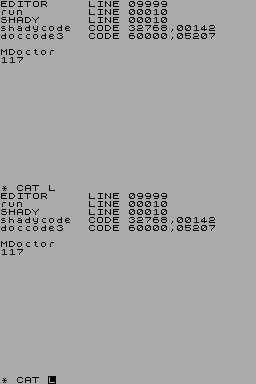
Fig 1. The display produced by the normal microdrive CAT command.
Fig 2. The much more detailed display made available by the new *CAT command.
Crash #25Feb 1986 · p.99
Franco Frey
MICRODRIVE DOCTOR GETS A Phd? Softschool have been adding a little polish to their Microdrive Doctor. The new version includes some new commands and a "much needed sector editor", as the man said. Normally available at £6.50 from LW Tomlin, [redacted], you might like to take advantage of the man's generosity and pay £5.50 instead. Only if you're a CRASH reader, mind!
Advert17
- Sinclair User #55Oct 1986 · p.87
- Popular Computing Weekly #24Jun 1986 · p.36
- Your Sinclair #5May 1986 · p.65
- Popular Computing Weekly #21May 1986 · p.8
- Sinclair User #50May 1986 · p.33
- Popular Computing Weekly #22May 1986 · p.23
- Popular Computing Weekly #20May 1986 · p.23
- Popular Computing Weekly #18May 1986 · p.33
- Your Sinclair #4Apr 1986 · p.87
- Popular Computing Weekly #14Apr 1986 · p.21
- Popular Computing Weekly #16Apr 1986 · p.9
- Your Computer #3Mar 1986 · p.53
- Popular Computing Weekly #12Mar 1986 · p.21
- Popular Computing Weekly #8Feb 1986 · p.31
- Popular Computing Weekly #7Feb 1986 · p.25
- Popular Computing Weekly #6Feb 1986 · p.27
- Popular Computing Weekly #46Nov 1985 · p.37
Review1
- Popular Computing Weekly #12Mar 1986 · p.45
Reviews from people here
Sign in to write about this, or make an account. It takes a minute and lets you correct the catalogue too.
No credit, tag recorded.
Sign in to correct or add to this.
Hold the rights to this and want it taken down?