
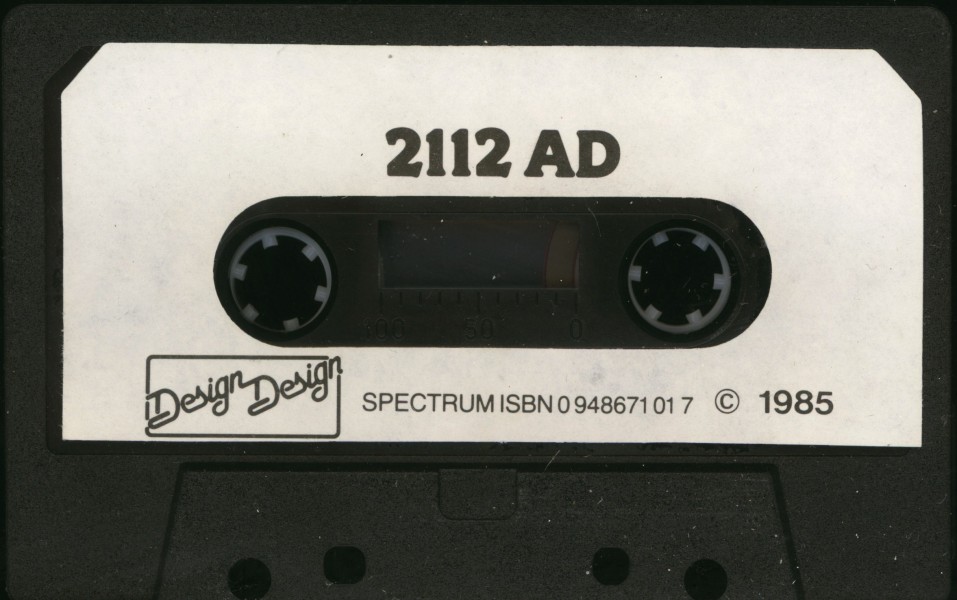
2112 AD
Arcade Game: Adventure · ZX-Spectrum 48K · 1 players · English
Design Design Software · 1985 · Pound sterling 7.95
Discussion
Nobody has started a thread about this yet.
Publication
Zeppelin Games signed an agreement for the publication of three Design Design games in 1989. Although 2112 AD was mentioned on the agreement, there is no direct confirmation if the title finally got published by Zeppelin.
- Control Option
- Interface 2 (right), Kempston Joystick
Releases
- 1985Design Design SoftwarePound sterling 7.95
- UnknownZeppelin Games Ltd
Play
- 2112ad.rzxRZX playback file
- 2112AD.tzx.zipTape image English20 KB
- 2112AD.tap.zipTape image English20 KB
Documents
- 2112AD.txtInstructions English2 KB
- 2112AD(EN).pdfInstructions English115 KB
Other files
- 2112 AD (1985)(Design Design Software).pokPOK pokes file 0 KB
Files and rights
Distribution permission is on record, granted to another archive rather than to this one. Screens and pictures are copied here; everything else links to the archive that holds it.
- AllowedDesign Design Software → WorldOfSpectrum
Credits
- Graham Staffordcredited
- Stuart J. Ruecroftcredited
Sign in to credit somebody, or say what these people did.
Awards
Scores
In the magazines
- Sinclair User #481986 · Overall4/5
- Your Sinclair #31986 · Overall9/10
- Crash #261986 · Overall83%
- Your Sinclair #191987 · 2112 AD7/10
Elsewhere on the web
- WorldOfSpectrum 19 votes7.11
In the magazines 17
C&VG (Computer & Video Games) #54Apr 1986 · p.26C+VG Hit7/106/108/109/10
C&VG (Computer & Video Games)C+VG Hit
Graphics 7/10
Sound 6/10
Value 8/10
Playability 9/10
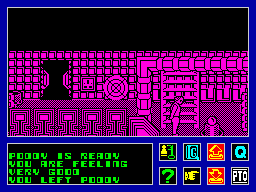
MACHINE: Spectrum SUPPLIER: Design Design PRICE: £7.95 Here at C+VG we have to beg a borrow or steal Design Design games in order to bring you - the people DD expect to go out and buy them - reviews of their products. Why numerous phone calls requesting copies of their games have no effect is anyone's guess... Still we went out and purchased a couple of copies of their new games - to bring you this look at the cult software team's latest cult games. Forbidden Planet is part three of the trilogy which began with Dark Star many moons ago. It features lots of DD's gimmicks like the hidden game - Space Invaders this time, plus the game that started it all, Halls of the Things, free on the back end of the tape. There's Spectacles 2 as well included in this bumper bundle. Forbidden Planet itself is a pretty basic psychedelic shoot 'em up with a nice line in weird vector graphics and off sound effects. The usual completely definable game options - you can change just about everything from the sounds to the difficulty level to the screen display - are available. If you hold down the zero key at the end of the load you'll get a game of Space Invaders. Try holding down the 1, 2, and 3 keys together in the middle of a game, for another free gimmick. The best part of the game are the "lyrics" which appear on the hi-score table. Written by one K. Jordan they would grace any Marillion or Genesis tune - and they are different each time you load up the game. If you liked Dark Star etc - then you'll enjoy Forbidden Planet. But you can always get too much of a good thing. 2122 AD is a completely different proposition. It's a really good 3D arcade adventure set in the year of the title when technology has advanced to a stage where society has become completely computer based. London has become one vast computing complex taking over the job of running the country, providing Government, Law, Food Production and Finance Control. However, due to the activities of some irresponsible hackers messing with the programming, the computer is quickly turning into a Dictator by oppressing the British public and handing all power over to machine servants it has designed itself. Your job is to regain control over the computer by finding all the pieces of a Switching Code and inserting them into the computer in the right places, this will hopefully bring the computer round to a more sensible way of thinking. These Codes are stored in large Rom Cards, numbered 0 to 9, and scattered around the complex. To help, you have a loyal Robo-hound called Poddy, whose numerous uses you will have to work out. He is controlled by a remote control device you carry at all times. The control will also perform other useful functions. The display from the remote control device is shown at the bottom of your screen. The left section is a message window, and the right displays various icons. These are selected by pressing Fire and then placing the cursor over the icon you require and pressing Fire again. All the icons are explained in the Help Menu, which is displayed by selecting the Question Mark icon. Moving around the complex will delete both your food reserves and Poddy's energy. There are things in the computer complex that will be useful and some that will be essential, but you will find that most things mechanical are loyal to the computer and will do their best to stop you. The graphics are all one-colour, prime colour changes from room to room. The sound is pretty basic but animation is good. 2112 AD has real atmosphere and is pretty addictive. The interaction between the main character and Poddy, a K-9 clone, adds an original aspect to the game. It's very playable, too.
Crash #26Mar 1986 · p.4089%85%82%83%81%83%83%
Use of Computer 89%
Graphics 85%
Playability 82%
Getting Started 83%
Addictive Qualities 81%
Value For Money 83%
Overall 83%
Unknown
Unknown
Unknown
Producer: Design Design Retail Price: £7.95 Author: Graham Stafford and Stuart Ruecroft Apart from being a thirteen year old rock album, 2112 AD is the title of Des Des's latest game for the simple reason that it is set in that year. London in the scenario, is not the fair (?) city we all know today but in fact a massive computing complex dedicated to running the entire country. Everybody is free from participating in menial tasks as robots have been designed to do all the dirty work. Everything is ticketyboo until some naughty hackers go and play around with the system. Now the supposedly benevolent computer is turning into a digital dictator, using the robots it designed for peaceful purposes to impose its reign of terror. Your task is to locate all the pieces of a Switching Code and insert them into the computer in the correct places. Ten of these are scattered around the complex. You have an electronic companion called Poddy to help you achieve your quest. The game uses icons for control. These are displayed at the bottom right corner of the screen. There isn't enough room for all of these to be displayed at once so selecting a particular icon changes all those currently shown. To the left of the icon display area is a scrolling message screen used for both game and help messages. Apart from a Help icon which sends information to the message window when selected, icons allow the control of Poddy, the carrying and use of miscellaneous items collected during the game, the ability to check the current status of both man and dog (or modify each within certain limits) and game options such as joystick selection. Double clicking an icon returns you to direct control of your character on the screen. Graphics are somewhat akin to those employed in such games as Tir Na Nog as they use hi-res single colour graphic backgrounds upon which the characters move about. The main difference is that each room is a different screen. The characters may also walk into the foreground so the screen scrolls up and down to a degree. As the characters may also move behind objects on the screen, any that are likely to seriously obscure the view, disappear at opportune moments. Most of the other characters in the game tend to be mechanical in nature. As these are con trolled by the malfunctioning computer, the most harmless looking robots have a habit of hampering you at every opportunity. Items may be placed in their way to stop them or if you have the first aid kit, you can often rectify any minor damage they inflict. For effective control of Poddy, he must remain within the immediate vicinity and this tends to slow you down somewhat until you become accustomed to controlling two characters. Also Poddy must be kept fully powered. There are various power points enabling this but if you neglect him, his usefulness inevitably suffers. Likewise, the main character must be kept fit so it becomes necessary to keep an eye open for food. The game begins in the central location where the Code ROMs have to be placed. To ensure that they are being collected in the right order, when one is found it should be dropped in this room. If it appears in the special cells it is correct. If it falls to the floor, it has been returned too soon. It doesn't take long for things to get complicated. COMMENTS Control keys: selectable layouts Joystick: Kempston, Sinclair, Cursor Keyboard play: very responsive Use of colour: limited on screen but effective on icons Graphics: very good resolution and animation Sound: none Skill levels: 1
Ahh! You've left Poddy behind. 2112AD from Design Design.
With your faithful robo-friend Poddy you stroll through the cityscape in 2112AD, a game from Graham Stafford of Design Design.
Your Sinclair #3Mar 1986 · p.21Your Sinclair Hot Shot9/108/109/108/109/109/10
Your SinclairYour Sinclair Hot Shot
Graphics 9/10
Playability 8/10
Value For Money 9/10
Addictiveness 8/10
Overall 9/10
Gwyn Hughes 9/10
Design Design £7.95 Reviewer: Gwyn Hughes Let me make one think clear - I don't like dogs! And this game features a dog, though it's a robotic one so at least it doesn't foul the footpaths. Poddy is the pooch and in theory he's quite invaluable, carrying things for you, blocking enemy robots - all the things you'd expect of a K9 clone - only I kept finding he was in my way or not waiting with me at a door I wanted to go through. But that said there's a whole heap here that compensates for the robotic Rover's presence, not least being the plot line. This has the London of the future turned into a computing complex, a maze which gives new meaning to the phrase tangle of bureaucracy. However, if you and Poddy can locate the ROM card codes scattered around you can then disable the tyrannical main computer that's busy controlling various robots of its own to stop you. It fancies another 500 year term of office! Probably the neatest feature of the game is its graphics, slightly reminiscent of Marsport though with depth, so that as you move into a screen it scrolls down and partitions disappear to let you see what lies behind them. That could be anything from the invaluable and inevitable keys to the more dubiously useful, though don't neglect anything, just in case. As you wander round the corridors of power you'll come across certain problems that are beyond mere picking up. Now it's all down to icon control. While the options are varied it takes a while to get used to them all and they're not printed in the instructions, just via an on-screen Help. There are also several layers of them which can take some flipping through, though eventually they work okay. All in all a clever arcade maze adventure with some original touches, and that includes Poddy - even though I found him a bitch!
Sinclair User #48Mar 1986 · p.544/54/5
Overall 4/5
Bill Scolding 4/5
Publisher: Design Design Programmers: Graham Stafford and Stuart Ruecroft Price: £7.95 Memory: 48K Joystick: Kempston, Sinclair, cursor The year is 2112ADa nd technology has advanced... Citizens do all their shopping by computer, work at their computer and derive all their entertainment by computer... All menial tasks are now carried out by robots... "The city of London... vast computing complex... running the country... turning into a Dictator... oppressing the British public... power... servants... No prizes for guessing you're reading extracts from yet another piece of cassette inlay hyperbole, in this instance that accompanying Design Design's latest, 2112AD. Sounds more like 1986 to me, but even if it was, it would be just as irrelevant to what you actually have to do, which can be summed up in fewer words: explore the complex, locate the ROM cards, return them to the central room and insert them in the correct order. This, as the inlay puts it rather less hysterically, "will hopefully bring the computer round to a more sensible way of thinking." And the game's not at all bad. It's certainly attractive to look at. Clear, detailed screens depict the various rooms in the computer complex, each room a different colour, full of fancy mechanical thingies, gliding robots and whirring wall discs. You are in control of the wimpish character who attempts to stride purposefully across the rooms. At his heels - or more often than not, somewhere else entirely - is his faithful robo-hound and K9-lookalike, Poddy. A bit like Tintin and Snowy, really. In fact, the game looks like an animated Tintin book, with its sideways-on, crisp 2D graphics. As your hero and his mutt explore the complex, you can turn them towards and away from you, and there is scarcely a jerk as they change direction. Impressive masking ensures that they can disappear behind banks of machinery and partitions to reappear, hopefully, on the other side. Below the large action screen is the scrolling message window and, to the right of that, a very complicated icon display. This is used for picking up, dropping and using objects, checking on the status of man and hound and objects carried by both. There are first aid and food icons, and one for unlocking doors. There are lots of others on further screens, mostly to do with operation of the computer and the joysticks. Virtually no explanation of these is found in the cassette inlay, which concerns itself instead with listing what the game does not feature ("Bloody Mushrooms! Spray Mount..."). It took me over 20 minutes just to get the Kempston working, by which time I was almost ready to stuff 2112AD and its bloddy Poddy. Accessing the icons can be frustrating at times, particularly if you're trying to drop a bomb in the path of some approaching robot, but you'll get the hang of it eventually. You can carry only three items at any one time, but Poddy is capable of transporting many more, so give him the less immediately important ones, such as cans, can opener and light bulb. Give all fuses to him. You can only give or take things from Poddy if he's in your vicinity, so carry the first aid kit yourself, so you can use it if you get separated from him. There is no straightforward way of controlling Poddy, who operates very much like a real dog - ie unpredictable and frequently stupid. If you enter a room with Poddy he will tend to meander off on his own, but if you remain stationary he will eventually return to you. If you want him to return quickly - if, for instance, you're about to leave a room - then place yourself in his direct line of vision and thus manoeuvre him towards the door. Wait until he is at your heels and facing the right direction before leaving a room - he cannot exit a room without you. On the whole, Poddy is not much use other than for carrying objects - though in that alone he is essential. There are, however, a couple of occasions on which he behaves oddly - and it might be worth paying close attention to the directions in which he moves. Poddy needs constant recharging, and periodically you should get him close to a wall socket and employ the Poddy power icon, checking the Poddy status icon afterwards to see if he has been recharged sufficiently. If "Poddy feels okay" then you should let him have another burst or two so that he feels "good". Take care not to overcharge him; if he blows a fuse he will be rendered immobile unless he is carrying spares. Like Poddy, you too will run out of energy, so pick up some cans along the way, find the can opener and enjoy the occasional tasty nibble. Many of the doors are locked, and are opened using different keys. One of the first you'll come across is the Legge key; another is a Chubb, and a third looks like a cashpoint card. Other useful items to look out for are the bombs. These function rather like land mines and can be placed in the direct path of an oncoming robot. You don't have to wait around for the explosion. The light bulb should be kept for illuminating a darkened room, and use the first aid kit when you've been immobilised by a robot. When you find one of the randomly placed ROM cards, take it back to the central room and drop it on the floor. If it appears in one of the cells then it is correct; if not, then you'll have to leave it until you find another. That's about as far as I got, visiting probably only a tiny area of the complex, before Poddy finally ran out of juice, miles from a wall socket. I did discover one idiosyncracy. On leaving one room - yellow - for another, I was transported inexplicably to the central chamber; a useful shortcut, but it's only one-way. It took me a while of back-tracking to locate the hapless Poddy once more. 2112AD is a departure for Design Design, and for me it works a lot better than some of their more recent efforts. There's nothing stunningly original about the pick-up/use/drop object theme, but the graphics take it above many others of the genre. Why 2112AD, rather than 2110AD or any other exciting year sufficiently remote from the present? Well, programmer Graham Stafford got married on the 21st December, last year. It's nice to know programmers are human too. From everyone at Sinclair User, congratulations Graham, and all the best for a long and prosperous future, free of robots... Dictators... oppression... power... servants... etc... etc.
Another room, with a bomb. Poddy, predictably, has disappeared.
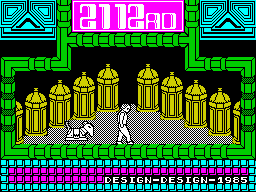
The central chamber. Poddy's the one on the right.
ICON JOYSTICK SELECTION Using the keyboard layout described in the inlay instructions - bottom row for moving left and right, second and third rows for up and down - position the cursor over the '?' icon and press fire on the joystick. You now get a scrolling menu of all icons, from which you should be able to identify the appropriate one for your stick. Also look out for the 'Load Game' icon. Move the cursor to the 'Load Game' icon. Press fire. You'll now get another icon screen, on which is a 'Select Joystick' icon. Press fire. You now have the correct icons for the various joysticks; identify the right one, press fire. You now have joystick control. Position the cursor over the 'Quit' icon and you're ready to move around the screen. Easy, isn't it?
5 Computer Hits carries this game and has 8 references of its own.
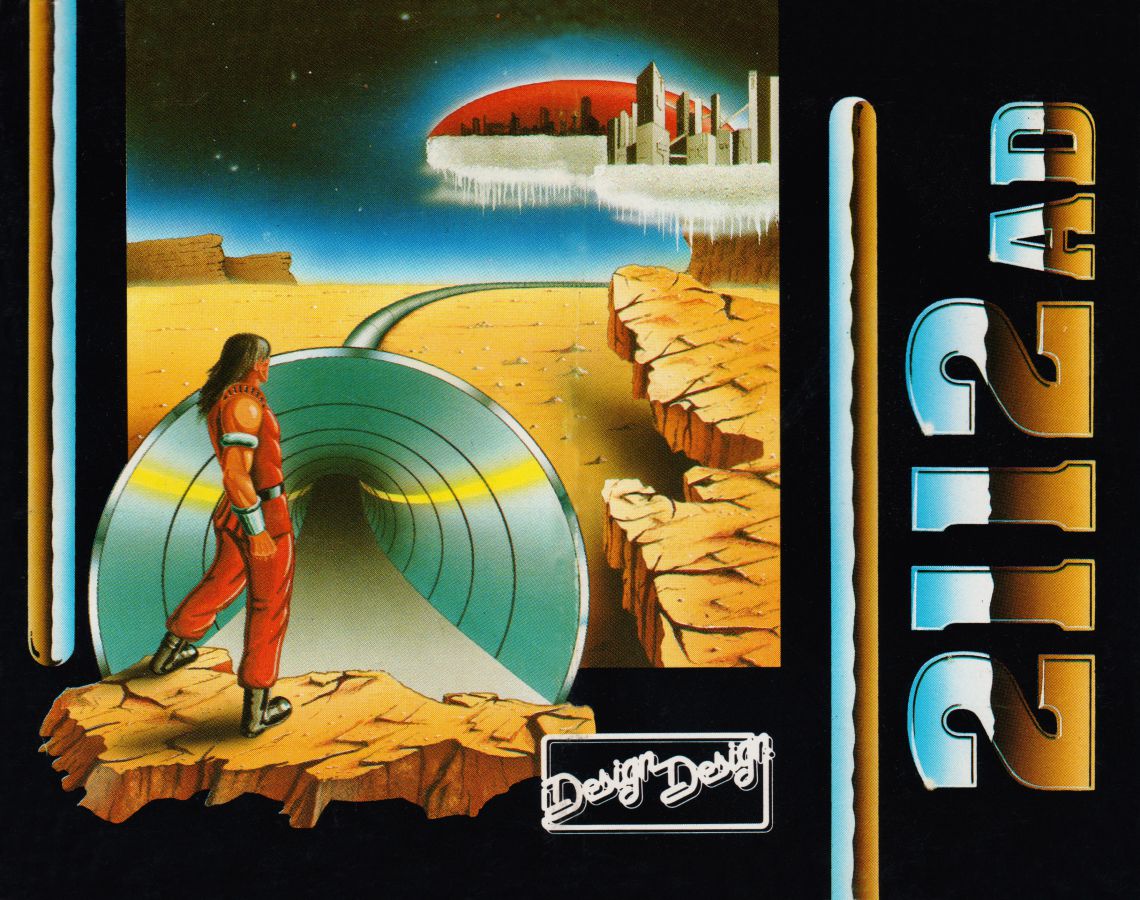
CoverGame2
- Your Sinclair #79Jul 1992 · p.5
- Crash #90Jul 1991 · p.7
Review2
- Your Sinclair #19Jul 1987 · p.60
- MicroHobby #76Apr 1986 · p.12
Information1
- SSD-IISep 1999
News/Note1
- Crash #60Jan 1989 · p.9
CompoResult1
- Your Sinclair #6Jun 1986 · p.80
Tips1
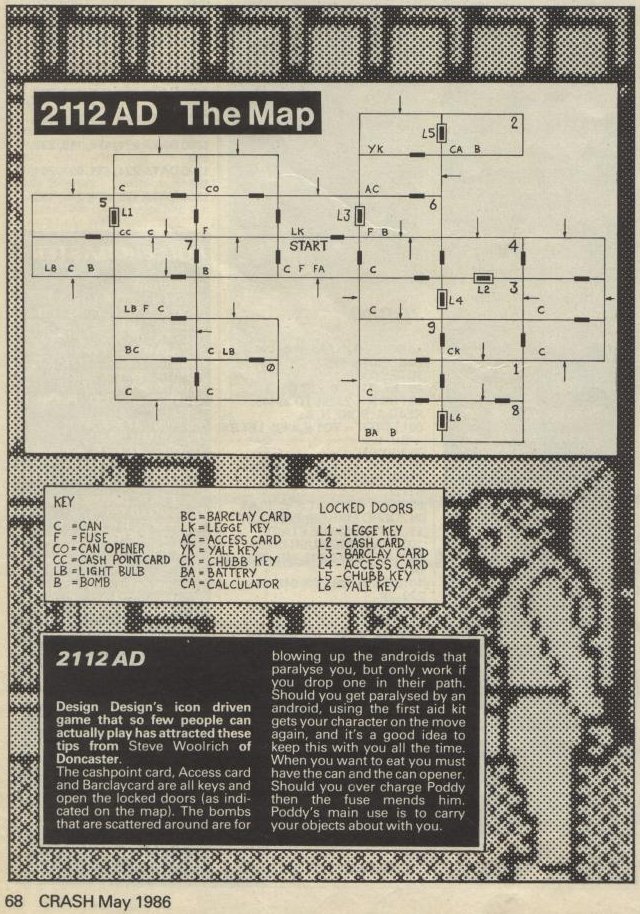
- Crash #28May 1986 · p.68
Map1
- Crash #28May 1986 · p.68
CompoEntry1
- Your Sinclair #3Mar 1986 · p.38
Feature1
- Crash #23Dec 1985 · p.144
Related
- Compilations
- Action Replay, Time and Motion, 5 Computer Hits, Crash issue 90: Presents 26, Your Sinclair issue 79: Magnificent Seven, 2112 AD + Forbidden Planet, Spectrum Load'n'Run v2 issue 06
- Ports
- (Amstrad CPC)
- Elsewhere
- Speccy Screenshot MapsSpeccy Screenshot MapsMobyGamesRZX ArchiveThe TipshopUVLModern ZX-Retro GamingRZX Archive - YouTubeSpectrum Computing RZX - YouTube
- Same entry at
- Spectrum ComputingZXInfo
Reviews from people here
Sign in to write about this, or make an account. It takes a minute and lets you correct the catalogue too.
Everything ZXDB can hold about this is here.
Sign in to correct or add to this.
Hold the rights to this and want it taken down?