
XRI Micon
Utility: Music · ZX-Spectrum 48K · 1 players · English
XRI Systems · 1984
Also known as Ventamatic MIDI Interface (English)
Discussion
Nobody has started a thread about this yet.
Releases
- 1984XRI Systems
- 1984Ventamatic Sold as Ventamatic MIDI Interface
Play
- XRIMicon(VentamaticMIDIInterface)(Ventamatic).tzx.zipTape image English47 KB
Files and rights
Distribution permission is on record, granted to another archive rather than to this one. Screens and pictures are copied here; everything else links to the archive that holds it.
- AllowedVentamatic → WorldOfSpectrum
In the magazines 2
Sinclair User #48Mar 1986 · p.96
John Lambert
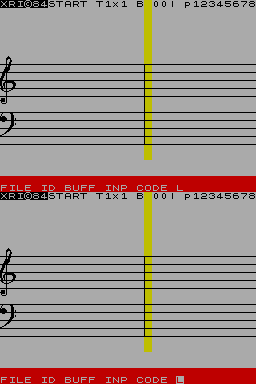
MIDI INTERFACE GOES FOR A SONG Speaking as someone with Van Gogh's ear for music I approached the Micon MIDI interface, from XRI Systems, with some trepidation. I just about know the difference between a crochet and a semi-quaver - one wears funny hats and the other is half a crisp - but now, however, I could give Vangelis a run for his money and still have change for the bus fare. For the uninitiated, MIDI is a standard by which various musical devices, synthesisers, drum machines and computers can be connected so that any device can 'talk' to any other. In this way the Spectrum, with a suitable interface, can control the sounds produced - not only the tone but also the speed and the type of sound. The Micon interface allows all of this over eight tracks. On the top of the interface are five five-pin sockets. MIDI in, two MIDI out, Sync in and Sync out. The last two allow non-MIDI machines - such as the Cheetah SpecDrum - to be used and kept in time with the music. The interface is supplied with two pieces of software, a Step Sequencer and a Real-time Sequencer. The first centres around an on-screen stave. Music is input to this stave by pressing keys on the synth' keyboard which then appears on screen as notes. Various options are then available to edit the music produced. These cover copying bars, altering notes and so on. On playback you can display the music on screen as the notes are played - that slows the whole thing down as the screen cannot be updated fast enough, so there is an option to turn it off. Other options set the tempo, select tracks - any or all can be played at once - transpose the music and set the gates. The outcome of all this, is that it is very easy to compose a piece of music one note at a time until you have your masterpiece. Even I can do it. On the flip side of the tape is the Real-time Sequencer. That is simple and acts as a tape recorder. Up to ten sequences can be stored and played back but to use it properly you have to be able to play properly - which counts me out. A fuller version will be available soon which covers all eight tracks and will have all the bells and whistles. For the more advanced user there are additional tapes which allow you to shape the sound produced and produce a graph on screen of what the sound looks like. These are available for the Casio range. Once you get into this sort of thing you can also get software from third parties. Midisoft produces a tape called RAP for the Micon, and other MIDI interfaces, which lets you set up a rhythm track. That covers 16 separate MIDI channels and is a very professional-looking piece of software. If you are at all serious about your music, or even if you are just an enthusiastic amateur, the MIDI is the way to go. The Micon allows things I didn't think were possible with a Spectrum. XRI Systems, [redacted]. MIDI Interface £109.00 Casio Editor £22.95 DX7 Editor £24.95 Juno 106 Toolkit £19.95 Midisoft,[redacted].
Crash #23Dec 1985 · p.107
Jon Bates
DIGITAL TAPE RECORDING WITH MIDI Jon Bates continues his MIDI musings... This month, in the continuing Saga of MIDI, we take a look at two interface devices which turn the Spectrum into a very powerful music processor. Linked via cables to a MIDI compatible synthesiser, both interfaces offer the user a staggering array of musical possibilities, the results of which can be stunning. Your 'umble reviewer managed to get each of them to turn out not only Axel F, but also a pretty decent version of Elgar's introduction and Allegro for Strings (pretty classy, huh?) Enough bragging, and down to the hard and software. The main difference between the two systems as reviewed here is that the Performer is a real time sequencer and the Micon is a step time sequencer. It must be said, however, that both interfaces have software available and in the pipeline that will extend their possibilities. Electromusic Research [redacted] £120.00 The hardware comprises two small and tough plastic cases connected by a short ribbon cable. One part plugs into the Spectrum's edge connector, while the other has flush-fitted five pin Din sockets to connect it to MIDI instruments. The sockets provide MIDI in, MIDI out (twice) and Clock start/stop, which is used for non MIDI devices such as drum machines or analogue synths that are capable of accepting the old pre-MIDI synchronisation format of 24 clock pulses per second. One nice feature on the unit is the provision of LEDs to indicate whether MIDI data is flowing in or out - handy when you can't work out what's plugged into what and your connecting cables resemble a bowl of spaghetti. An eight track tape recorder is capable of recording eight instruments on separate tracks simultaneously; alternatively, a recording can be built up track by track - known as multi-tracking or overdubbing. What Miditrack Performer does is to simulate an eight track digital recorder for approximately one tenth of the price of the real thing. It will record exactly what you play on your keyboard with every subtle nuance and variation in speed, including pitch bending. As there are eight tracks to record onto, even the most ambitious of us will have plenty of room to develop our talents! On loading, the program presents a screen display that gives the status of the tracks. Recording is simple: move the cursor to the track you want, enter 'R' and answer the simple question to confirm that this is indeed your intention - then play away. When you are happy with your performance you can then record over the top of your first efforts onto a separate track, thus building up the sound. You hear your first track being replayed and can therefore add chords, perhaps, over you original tune. This process can be repeated over and over again - should you look like filling all eight tracks, you have the option of track merging. This combines all previously recorded tracks onto one - leaving lots of space free for more dabbling. There is one serious problem here, though. If you make a mistake, then you have no option but to build that track up all over again, which can be more than a little frustrating. The program allows you to play as many notes as you wish, including chords, on each track - in other words each track can be polyphonic. The only limitation is the number of notes your synth is capable of playing simultaneously. To keep things in some semblance of order, there is a count-in (user definable) and a metronome option that bleeps away at whatever speed (tempo in musical terms) you want. The display also informs you of what bar you are at, and how much memory is left. Even for a beginner, this is pretty simple to follow. I did find the flashing background a trifle annoying, especially as it seemed to go beserk with more complex pieces. The program comes with excellent documentation, which is easy to follow, and two demo tunes one of which shows you how to build up a piece, track by track. For the professional whizkid the program gives you more options on manipulating each track. You can repeat the whole piece (but not sections), define the number of beats per bar, change the pitch of the track, and if you're blessed with more than one MIDI instrument, you can tell each track which synthesiser it's going to play on. (MIDI instruments can receive on sixteen separate channels). However, you can't get the program to change sounds for you. The capacity of the program depends on how much information you give it. If there's lots of touch sensitivity information for it to record from your touch sensitive keyboard, for instance, then memory is used up significantly more rapidly. Given a modest synth or two and an average tune, however, lengths of up to fifteen minutes should be possible. XRI Systems [redacted] £108.00 Another sturdy box to clip on to your Spectrum's edge connector - this time with MIDI in and out sockets, and two separate sockets for Clock in and out. Micon is supplied with copious detailed documentation which I found a bit difficult to follow - although the initial start up procedures of the program are straightforward. However, I understand that XRI are taking their documentation in hand and a rewritten set of instructions in on the stocks. The Micon is aimed at the more serious musicians amongst us. It's an eight track recorder that has a scrolling music stave screen with excellent notation, but each note has to be entered manually by playing it on a synth and defining its length by tapping the space key. Each tap on the space key is called an 'event', and each track is capable of holding 2,950 events. Micon is a step-time sequencer which allows you to enter rests and pauses as well as notes, as well as expression. A note may be specified as abrupt or smooth in execution (staccato or legato) and the velocity and pressure sensing that some synthesisers are capable of can also be defined for each note. Micon's editing features are also very powerful. Any note can be removed and replaced at any time, and at any place in your piece. It is also possible to change the sound of the synth from a command inserted within the music. This is known to musical boffins as a 'patch change' - but all it does is tell the synth to stop playing one sound and look elsewhere in its voice library for another. Any bar can be repeated, and this means that repetitive sequences on just one track can be created with ease. Axel F is a case in point, as the bass line is three sequences set to repeat in a certain order. This takes very little time to set up, and the result is very impressive. Once you have created your recording, you can store it on microdrive - and you can put the program on cartridge too. Most thoughtful of XRI! In short, Micon is an exceptionally powerful composing tool. CONCLUSIONS It's a clear case of 'horses for courses' when comparing these two products. On the one hand is the EMR system, MIDITRACK PERFORMER which is easy to use and relates very nicely to the way a tape recorder works. However, it lacks a bit in the editing features and there's no display of the music you've just played. (If there was, it would probably take up most of the remaining memory and render the whole program pretty useless!) In tests, it did give the Casio CZ1O1 some problems as it kept an reverting to mono mode, but this may have had more to do with the way in which the MIDI code is ordered within the Casio itself than any shortcomings in Performer. XRI's MICON, on the other hand, has complete and full editing facilities but is rather more laborious to use. However, you do get a real-time sequencing program thrown in as well, and i understand that multi-tracking software is also on its way. XRI also offer additional software to store and edit on screen the voices of Yamaha, Roland and Casio synths, while Miditrack Performer only supports Yamaha equipment in this way at present. The two systems were tested using a Yamaha DX7 and DX9, a Korg Poly 800 and the acid test was tried using the most modest of set ups, the excellent Casio CZ1O1. Thanks must go to Musicmakers of Selly Oak, Birmingham for supplying the synths used for this and other MIDI reviews...
Related
- Versions
- Wye Compiler (Authored with), XRI Micon (Included with), Ventamatic MIDI Interface (Included with)
- Same entry at
- Spectrum ComputingZXInfo
Reviews from people here
Sign in to write about this, or make an account. It takes a minute and lets you correct the catalogue too.
No credit, description, tag recorded.
Sign in to correct or add to this.
Hold the rights to this and want it taken down?