
Alphacom 32 Printer
Hardware: Printer
Dean Electronics Ltd · 1983 · Pound sterling 59.95 · Pound sterling 59.95 budget
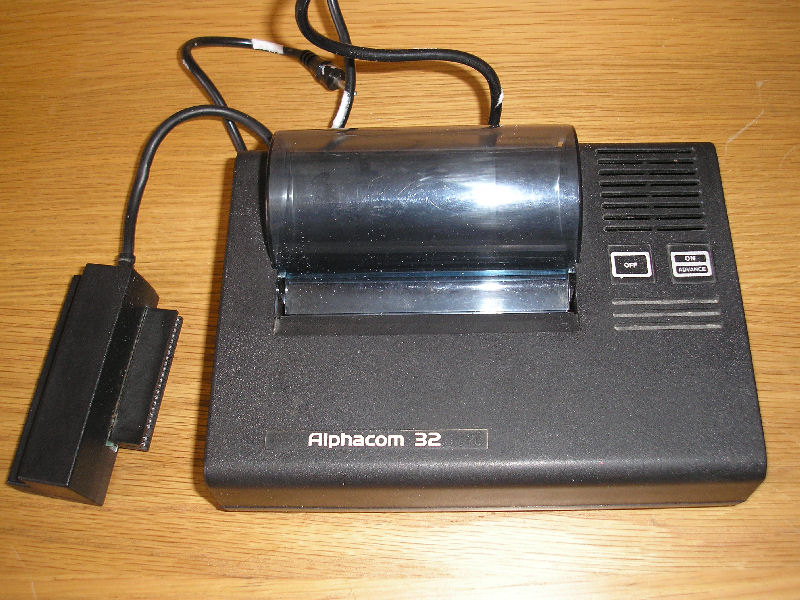
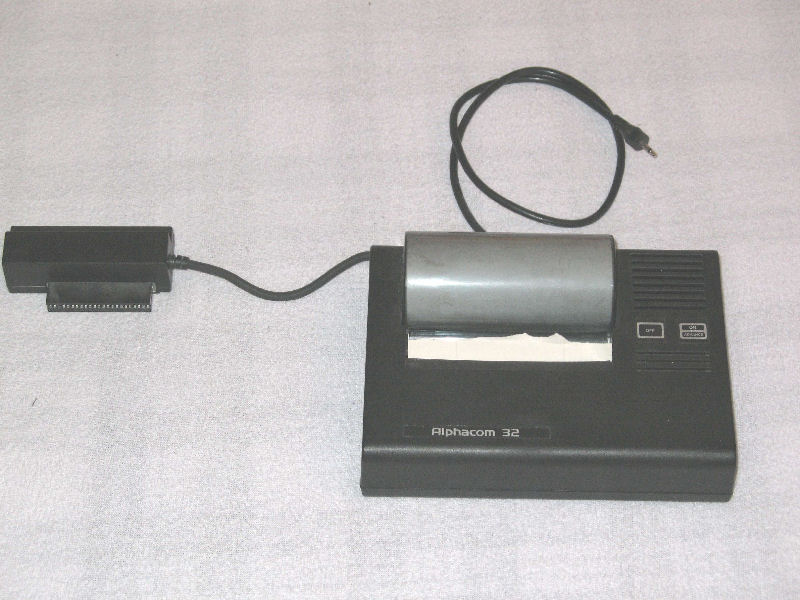
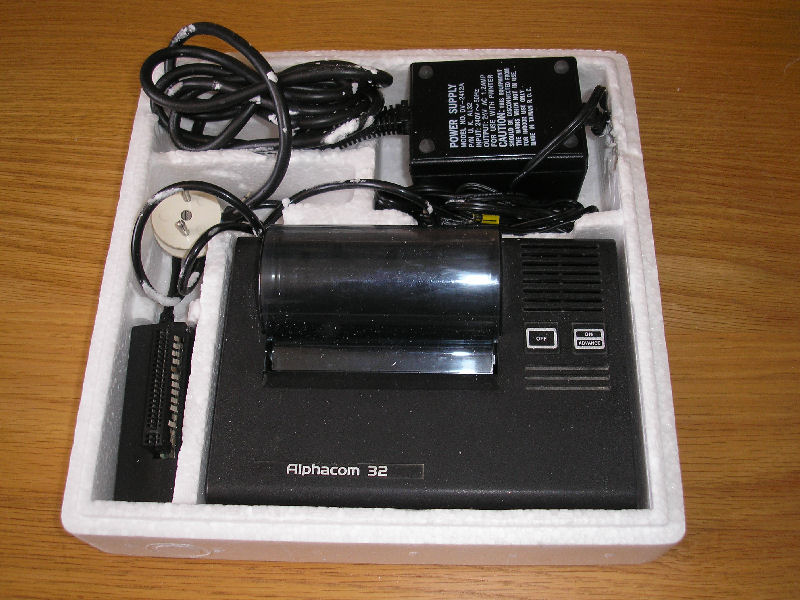
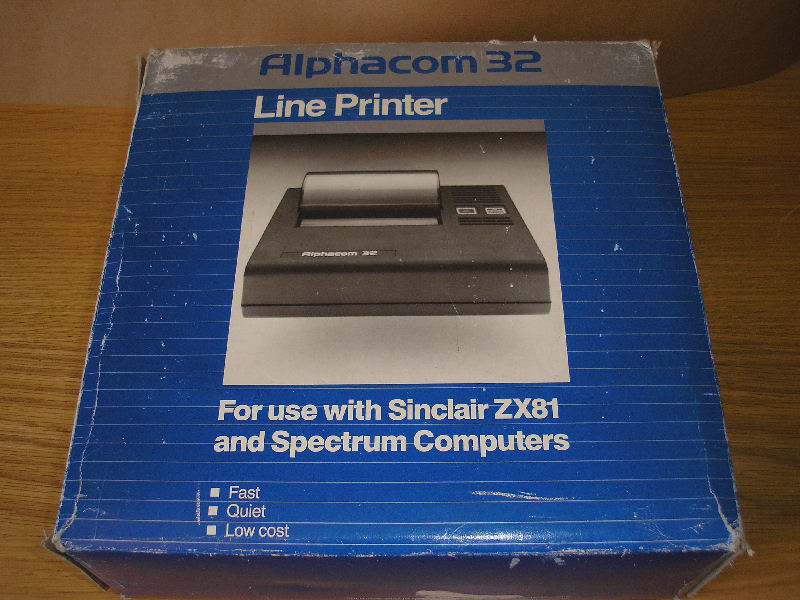
A thermal printer that was the only real rival to the Sinclair ZX Printer. Obeys standard Spectrum commands. 120 lines per min. Includes PSU and interface & through port. Size=7.25" x 3.5" x 3.5".
Discussion
Nobody has started a thread about this yet.
Documents
- Alphacom32Printer_UsersManual.pdfInstructions 104 KB
Files and rights
No permission is on record either way. Screens and pictures are copied here on a take-down basis: if you hold the rights and want something removed, say so and it goes.
In the magazines 57
Your Spectrum #15Jun 1985 · p.42
Peter Green
HOTHEADS If you're not that flush, but you need a printer, stay cool and go thermal. Peter Green comes in from the cold to consider the hottest ones around. The Sinclair ZX Printer was unique - for its size and price, it was quite a remarkable technical achievement. Still, it did leave something to be desired. All those sweaty paw prints, left all over the silver listing paper. And the print quality would strain the definition of the word adequate, as well as your eyes. Program listings on the stuff cause harassed editors to tear their hair out (or at least that's Kevin's excuse!). One solution has been to find a way of linking 'real' printers, like the large dot matrix ones, to your Spectrum. For that you need a commercial interface, or you could have a crack at knocking up one yourself. (Of course, you'll need a copy of YS issue 6 for that. Ed). This works, but your Speccy is now dwarfed by a huge printer - a bit of a shame when Uncle Clive has gone to so much trouble to keep it all small. And it causes even more problems if you've got to squeeze your complete computer setup into the confines of a cramped living room - worst of all it means shelling out between two and three times as much for the printer as you paid for your Speccy. That's good enough reason for me to look seriously at thermal printers. ANYTHING YOU CAN DO... So, what can thermal printers do that dot matrix or daisywheel can't? Well, nothing really - except save you a lot of space and some cash. Most of them are quite tiny, and the good news is that they're all comparable in price to a Spectrum. Thermal printers don't need linked ribbon because they use special paper impregnated with a heat-sensitive ink. The print head is still 'dot-matrix' but the dots are small wires that can be independently heated. The heat makes the ink visible in the correct dot patterns to display characters. Take into account that the saving you'll make on ribbons is offset slightly by the higher cost of the special paper. It's only got to brush its heating elements over the surface, as the print head doesn't have to strike the paper to form an image. Also, thermal printers ought to be much quieter than dot matrix ones to make its mark. Not so though, I'm afraid - to bring the price down the manufacturers often use fairly cheap electric motors to feed the paper and scan the print head, so you get a different sort of noise, but it's not quieter. It's no coincidence that the least noisy of the printers I tested was also the most expensive. If you plump for one of the most basic of the thermal printers, you won't need an interface. They are designed as plugin replacements and work directly from the Spectrum bus. The others have standard RS-232C or Centronics ports, so you need a printer interface as well - take this into account when you're considering your budget. For the extra though, you'll get many of the features of the big machines, including emphasised, condensed and enlarged fonts, variable line spacing, international character sets and bit image graphics. IN THE PICTURE Bit image graphics means you have direct control over the heating elements in the print head. So, you can print any pattern of dots onto the paper. Interfaces such as the ZX Lprint contain the software that uses this facility to perform a screen dump, so duplicating the COPY command. Although you'll have to bone up on the graphics modes before you get to grips with them fully (especially since most Epson-compatibles are Japanese, with manuals written in Janglish!), they do allow you to draw dot graphics of any kind, unrestricted by the Spectrum screen size or resolution. And as they all use roll paper, you could write a program that printed a frieze type of picture. NO LIMIT? Bear in mind if you're considering thermals that, with one exception, none of them can handle A4 width paper, or even cut sheets. Using roll paper means that the top and bottom of your printouts have ragged edges where you've torn them off. Still, that's OK if you only want the printer for listings - or if you're happy sending out letters that look like supermarket checkout receipts. You'll also need another spare mains socket. All but one of these printers require an external power supply, of the small transformer PSU type. Two of them can run off batteries, but they eat them and if you don't use re-chargeables, your running costs will be unbelievable. WHAT PRINTER? Before choosing one of these printers, you'll have to decide exactly what you're going to do with it. If you're looking for a straight replacement for the ZX Printer, then the Floyd 40 is your best bet. Unlike the Alphacom it does a lot of clever tricks besides duplicating a Sinclair printout. However, if you're likely to be writing letters and so forth, you'll need to look up-market a bit. There, the Epson P-40 equals the Brother HR-5 on features, but for the extra fifty quid, the HR-5 lets you use cut A4 sheets and offers the back-up of ink ribbon if you run out of thermal paper. Remember though, that you'll need an extra interface for both of them. ALPHACOM 32 Dean Electronics, [redacted] When it comes down to performance, the Alphacom 32 is simply a souped-up ZX Printer. It will LPRINT, LLIST and COPY in exactly the same 32-column format and nothing else. It won't recognize any of the standard Epson control characters which alter the print width, font style or anything else. And you won't get the graphics commands in any other form than the COPY mode. It even prints a question mark if you send it a line feed code! For my money, this makes it the least useful of the four printers. I tested the blue thermal paper (though you can get black) and found it easier to read than a ZX printout, but the print quality was about the same. The printer also kicked up a bit of a racket - there was a constant grinding of the powerful, geared motor throughout the printing cycle. The machine has a similar footprint to the Spectrum. There's a through connector for other peripherals but the thick connecting cable puts pressure on the power input jack so you can't tell whether it's on or not - it uses non-latching membrane one-off switches and there's no LED indication. The plus is that it's a plug-in-and-go printer, so no software setting-up is required.
HOT STUFF PRINTER: Alphacom 32 PRICE: £54.95 SIZE: 193 x 143 x 48 INTERFACE: ZX-Bus MAX. PAPER WIDTH: 110mm (4.25") MAX. CHARACTERS PER LINE: 32 PRINTING SPEED: 64 CPS GRAPHICS MODE: Spectrum copy command only POWER SUPPLY: Separate OTHER SPECIAL FEATURES: None PRINTER: Floyd 40 PRICE: £69.95 SIZE: 115 x 162 x 54 INTERFACE: ZX-Bus MAX. PAPER WIDTH: 80mm (3 1/8") MAX. CHARACTERS PER LINE: 40 PRINTING SPEED: 33 CPS GRAPHICS MODE: Spectrum copy command only POWER SUPPLY: From Spectrum OTHER SPECIAL FEATURES: Can automatically word-wrap text and indent listings for maximum readability PRINTER: Epson P-40 PRICE: £99.95 SIZE: 216 x 128 x 46 INTERFACE: Centronics or RS232C MAX. PAPER WIDTH: 112mm (4.25") MAX. CHARACTERS PER LINE: 80 PRINTING SPEED: 20-45 CPS GRAPHICS MODE: Block Capitals, Bit image, Graphics, (Requires special software to perform copy) POWER SUPPLY: Internal battery plus AC adaptor OTHER SPECIAL FEATURES: Self-test mode for printhead, variable line spacing, international fonts including Japanese Scandinavian PRINTER: Brother HR-5 PRICE: £149.50 SIZE: 303 x 74 x 65 INTERFACE: Centronics or RS232C MAX. PAPER WIDTH: 216mm (8.5") MAX. CHARACTERS PER LINE: 132 PRINTING SPEED: 30 CPS (A) GRAPHICS MODE: Block graphics, Bit image graphics, (Requires special software to perform copy) POWER SUPPLY: Internal battery or AC adaptor OTHER SPECIAL FEATURES: Accepts A4 cut sheets, self-test mode for printhead, variable line spacing, international fonts including French and German. Can also accept ink ribbons.
Sinclair User1985 · p.22
HARDWARE WORLD With ever-increasing amounts of peripherals available for Sinclair computers, users are finding it more and more difficult to know what to buy. We present a buyer's guide to joysticks, keyboard and printers and review the best of the rest from the 1984 add-on market. The decision to buy a printer to complete your computer system will be one of the most difficult and certainly one of the most expensive which you as a Sinclair user will have to make. The variety of printers available tends to confuse rather than facilitate your choice and many of them are likely to cost more than the rest of your system. Yet if you are intending to use a Sinclair machine for something other than games playing, you will, sooner or later, need to make a permanent copy on paper. With that in mind Sinclair User looks at 11 printers, from the inexpensive to those suitable for small businesses. The first consideration must be the purpose for which you intend to use a printer. All the printers reviewed will produce listings of programs, some faster than others and some more legibly. If you intend to do some word processing the type-style and method of printing is also important. Most of the machines reviewed are dot matrix printers. That means that, just as characters on the screen are composed of a number of dots - pixels - the printer has a number of little pins which are pushed on to the paper, through the ribbon, to form the character. The greater the number of dots the better the definition of the character. Just as user-defined graphics are made by changing the arrangement of the dots, dot matrix printers can easily change the type-style or the character. The printer holds those definitions in ROM and by telling it which set you want to use it can print in different type-styles and use different national characters, in some cases even Japanese. Some of the printers use different methods. The Alphacom 32 and the Brother EP44 are thermal printers. That means they use special, more expensive paper although they are still dot matrix types. The pins become hot and cause the paper to change colour. The Brother can also use plain paper with the addition of a special ribbon. The Dyneer DW16 is a daisywheel printer, using a wheel which has each character, like those on a typewriter, at the end of a spoke. To change type-styles the wheel has to be changed. The Olivetti JP101 has a small cartridge which fires an ink-jet at the paper. As there are few mechanical parts the printer is quieter than most. The Tandy CGP-llS has four ballpoint pens which form characters by moving the pen horizontally and the paper up and down. The speed of a printer normally is measured in characters per second; in theory the higher the number the greater the speed. To test that we used a standard body of text, the first chapter of Genesis, and timed how long it needed to print. The text was prepared using Tasword 2 and printed via a Kempston E Interface, where suitable, a total of 796 words over 77 lines. The results were surprising. The Microline 80, with a quoted speed of 80 cps, took nearly twice as long as the Mannesmann Tally MT80 and three times as long as the Olivetti. The answer would be to take such quoted figures only as a very rough guide. Another thing to consider is how you want to drive the printer. Two of the machines reviewed connect directly to a Sinclair computer, the Alphacom 32 and the Seikosha. While that is undoubtedly the cheapest method, when and if you upgrade your computer you are left with a printer you may not be able to connect to your new machine. There are two standards by which printers normally are driven, Centronics and RS232. Roughly speaking, Centronics interfaces have eight wires so that the bits of each byte travel to the printer at the same time along each wire. Serial interfaces have one wire and the bits travel along it one after the other. Whether you use Centronics or RS232 does not make much difference so long as you do not try to mix them. On many of the printers Centronics is fitted as standard and RS232 is available as an add-on at extra cost. Your future plans must be taken into consideration. Users with a Microdrive can use the RS232 port fitted. If you are thinking of buying a QL it also has an RS232 port fitted as standard. Other add-ons such as modems also tend to use RS232 and so the system has advantages, despite the extra cost. The width of paper the printer can handle may also be a consideration. Normal listings may use only 32 columns but if you like to add REM statements at the side or for word processing, 80 is the minimum. It is often necessary to indicate to the printer what you want it to do, whether changing the type-style or feeding paper through it. There is a standard for it known as ESCape codes, i.e., codes which escape from normal printing to do something different. Those codes were originated by Epson and are now used by most other makes of printer. To help you each printer is now considered, briefly, in turn. The Sinclair printer has not been included as it has been discontinued and will be available only while stocks last. Alphacom 32 is the cheapest on the market at the moment. It has reasonable print quality and is easy to use. It has only a ZX-81 size connector, so Spectrum users must use it as the last add-on. From Dean Electronics or Prism. Seikosha GP50S is an inexpensive plain-paper printer, not particularly fast and rather noisy but easy to use. It has a Spectrum-size edge connector, so ZX81 users will need an extender card not yet available from Seikosha, so try Eprom Services. From DRG or Prism. Tandy CGP-115 is the cheapest colour printer; it is very slow but can do pleasant graphics with the appropriate software. From retail shops. Microline 80 is supplied with roll paper holder as standard. It uses ordinary typewriter ribbons. It has only one type-style. From X-Data. Brother EP44 is a portable typewriter with RS232 connection. It is not really suitable as a computer printer but as a typewriter it is amazing. From local typewriter shops. Olivetti JPIOl is a quiet ink-jet printer; it has slightly blurred print but is reasonably fast. Epson RX80 is the standard by which other printers are measured. It is versatile with clear print and all the facilities you are liable to need. Star Gemini-10X was caught by a recent price reduction for the Epson, which it mirrors. It may be discounted further. From London Computer Centre or Micro Peripherals. Mannesmann Tally MT80 is a good-looking printer, also heavily discounted. Canon PW1080A is very fast and has a good range of facilities, including programmable characters. It is slower in near letter-quality mode. From London Computer Centre or Micro Peripherals. Dyneer DWl6 is a business users' daisywheel printer. The code is compatible with Diablo printers. From X-Data. British Olivetti Ltd, [redacted]. Dean Electronics Ltd, [redacted]. DRG Business Systems Ltd, Peripheral Division, [redacted]. London Computer Centre, [redacted]. Mannesmann Tally Ltd, [redacted]. Micro Peripherals Ltd, [redacted]. Prism Microproducts Ltd, [redacted]. X-Data Ltd, [redacted].
Alphacom 32
Brother EP44
Canon PW1080A
Dyneer DW16
Epson RX80
Mannesmann Tally MT80
Microline M80
Olivetti JP101
Seikosha GP50S
Star Gemini 10X
Tandy CGP-115
Name: Alphacom 32 Rec. Retail Price: £70 Centornics Port: No RS232 Port: No Sinclair Port: Yes Plain/Thermal: T Printing Method: Dot Characters Per Line: 32 Dots Per Character: 8x8 Characters Per Sec.: Time For Test (secs.): 50 Max. Paper Width (inches): 4.25 Line Feed Button: Yes Escape Codes: No Different Type-styles: No Graphics: Yes Name: Seikosha GP50S Rec. Retail Price: £138 Centornics Port: No RS232 Port: No Sinclair Port: Yes Plain/Thermal: P Printing Method: Dot Characters Per Line: 32 Dots Per Character: 7x7 Characters Per Sec.: 40 Time For Test (secs.): 152 Max. Paper Width (inches): 5 Line Feed Button: No Escape Codes: No Different Type-styles: No Graphics: Yes Name: Tandy CGP-115 Rec. Retail Price: £149 Centornics Port: Yes RS232 Port: Yes Sinclair Port: No Plain/Thermal: P Printing Method: Pen Characters Per Line: 40/80 Dots Per Character: N/A Characters Per Sec.: 12 Time For Test (secs.): 483 1440 Max. Paper Width (inches): 4.5 Line Feed Button: Yes Escape Codes: No Different Type-styles: No Graphics: Yes Name: Microline 80 Rec. Retail Price: £229 Centornics Port: Yes RS232 Port: £68 Sinclair Port: No Plain/Thermal: P Printing Method: Dot Characters Per Line: 80 Dots Per Character: 9x7 Characters Per Sec.: 80 Time For Test (secs.): 170 Max. Paper Width (inches):8.5 Line Feed Button: No Escape Codes: No Different Type-styles: No Graphics: No Name: Brother EP44 Rec. Retail Price: £253 Centornics Port: No RS232 Port: Yes Sinclair Port: No Plain/Thermal: T/P Printing Method: Dot Characters Per Line: 80 Dots Per Character: 24x18 Characters Per Sec.: 16 Time For Test (secs.): 383 Max. Paper Width (inches): 8.5 Line Feed Button: Yes Escape Codes: No Different Type-styles: No Graphics: No Name: Olivetti JP101 Rec. Retail Price: £265 Centornics Port: Yes RS232 Port: £40 Sinclair Port: No Plain/Thermal: P Printing Method: Ink jet Characters Per Line: 80 Dots Per Character: 7x7 Characters Per Sec.: 80 Time For Test (secs.): 67 Max. Paper Width (inches): 9 Line Feed Button: Yes Escape Codes: Yes Different Type-styles: No Graphics: Yes Name: Epson RX80 Rec. Retail Price: £286 Centornics Port: No RS232 Port: £69 Sinclair Port: No Plain/Thermal: P Printing Method: Dot Characters Per Line: 80 Dots Per Character: 9x9 Characters Per Sec.: 100 Time For Test (secs.): 80 Max. Paper Width (inches): 8.5 Line Feed Button: Yes Escape Codes: Yes Different Type-styles: Yes Graphics: Yes Name: Star Gemini 10X Rec. Retail Price: £286 Centornics Port: Yes RS232 Port: £80 Sinclair Port: No Plain/Thermal: P Printing Method: Dot Characters Per Line: 80 Dots Per Character: 9x9 Characters Per Sec.: 120 Time For Test (secs.): 69 Max. Paper Width (inches): Line Feed Button: Yes Escape Codes: Yes Different Type-styles: Yes Graphics: Yes Name: Mannesmann Tally MT80 Rec. Retail Price: £299 Centornics Port: Yes RS232 Port: £57 Sinclair Port: No Plain/Thermal: P Printing Method: 80 Characters Per Line: 80 Dots Per Character: 7x8 Characters Per Sec.: 80 Time For Test (secs.): 92 Max. Paper Width (inches): Line Feed Button: Yes Escape Codes: Yes Different Type-styles: No Graphics: Yes Name: Canon PW1080A Rec. Retail Price: £367 Centornics Port: Yes RS232 Port: No Sinclair Port: No Plain/Thermal: P Printing Method: Dot Characters Per Line: 80 Dots Per Character: 11x9 Characters Per Sec.: 160 Time For Test (secs.): 48 Max. Paper Width (inches): 10 Line Feed Button: Yes Escape Codes: Yes Different Type-styles: Yes Graphics: Yes Name: Dyneer DW16 Rec. Retail Price: Centornics Port: £378 RS232 Port: £413 Sinclair Port: No Plain/Thermal: P Printing Method: Daisy Characters Per Line: 101 Dots Per Character: N/A Characters Per Sec.: 14 Time For Test (secs.): 330 Max. Paper Width (inches): 10 Line Feed Button: Yes Escape Codes: Yes Different Type-styles: Yes Graphics: No
Sinclair User #28Jul 1984 · p.30
GETTING INTO PRINT The decision to buy a printer to complete your computer system will be one of the most difficult and certainly one of the most expensive which you as a Sinclair user will have to make. The variety of printers available tends to confuse rather than facilitate your choice and many of them are likely to cost than the rest of your system. Yet if your are intending to use a Sinclair machine for something other than games playing, you will, sooner or later, need to make a permanent copy on paper. With that in mind Sinclair User looks at 11 printers, from the inexpensive to those suitable for small business. The first consideration must be the purpose for which you intend to use a printer. All the printers reviewed will produce listings of programs, some faster than others and some more legibly. If you intend to do some word processing the type-style and method of printing is also important. Most of the machines reviewed are dot matrix printers. That means that, just as characters on the screen are composed of a number of dots - pixels - the printer has a number of little pins which are pushed on to the paper, through the ribbon, to form the character. The greater the number of dots the better the definition of the character. Just as user-defined graphics are made by changing the arrangement of the dots, dot matrix printers can easily change the type-style or the character. The printer holds those definitions in ROM and by telling it which set you want to use it can print in different type-styles and use different national characters, in some cases even Japanese. Some of the printers use different methods. The Alphacom 32 and the Brother EP44 are thermal printers. That means they use special, more expensive paper although they are still dot matrix types. The pins become hot and cause the paper to change colour. The Brother can also use plain paper with the addition of a special ribbon. The Dyneer DW16 is a daisywheel printer, using a wheel which has each character, like those on a typewriter, at the end of a spoke. To change type-styles the wheel has to be changed. The Olivetti JP101 has a small cartridge which fires an ink-jet at the paper. As there are few mechanical parts the printer is quieter than most. The Tandy CGP-115 has four ball-point pens which form characters by moving the pen horizontally and the paper up and down. The speed of a printer normally is measured in characters per second; in theory the higher the number the greater the speed. To test that we used a standard body of text, the first chapter of Genesis, and timed how long it needed to print. The text was prepared using Tasword 2 and printed via a Kempston E interface, where suitable, a total of 796 words over 77 lines. The results were surprising. The Microline 80, with a quoted speed of 80 cps, took nearly twice as long as the Mannesmann Tally MT80 and three times as long as the Olivetti. The answer would be to take such quoted figures only as a very rough guide. Another thing to consider is how you want to drive the printer. Two of the machines reviewed connect directly to a Sinclair computer, the Alphacom 32 and the Seikosha. While that is undoubtedly the cheapest method, when and if you upgrade your computer you are left with a printer you may not be able to connect to your new machine. There are two standards by which printers normally are driven, Centronics and RS232. Roughly speaking, Centronics interfaces have eight wires so that the bits of each byte travel to the printer at the same time along each wire. Serial interfaces have one wire and the bits travel along it one after the other. Whether you use Centronics or RS232 does not make much difference so long as you do not try to mix them. On many of the printers Centronics is fitted as standard and RS232 is available as an add-on at extra cost. Your future plans must be taken into consideration. Users with a Microdrive can use the RS232 port fitted. If you are thinking of buying a QL it also has an RS232 port fitted as standard. Other add-ons such as modems also tend to use RS232 and so the system has advantages, despite the extra cost. The width of paper the printer can handle may also be a consideration. Normal listings may use only 32 columns but if you like to add REM statements at the side or for word processing, 80 is the minimum. It is often necessary to indicate to the printer what you want it to do, whether changing the type-style or feeding paper through it. There is a standard for it known as ESCape codes, i.e., codes which escape from normal printing to do something different. Those codes were originated by Epson and are now used by most other makes of printer. To help you each printer is now considered, briefly, in turn. The Sinclair printer has not been included as it has been discontinued and will be available only while stocks last. Alphacom 32 is the cheapest on the market at the moment. It has reasonable print quality and is easy to use. It has only a ZX-81 size connector, so Spectrum users must use it as the last add-on. From Dean Electronics or Prism. Seikosha GP50S is an inexpensive plain-paper printer, not particularly fast and rather noisy but easy to use. It has a Spectrum-size edge connector, so ZX-81 users will need an extender card not yet available from Seikosha, so try Eprom Services. From Dean Electronics or Prism. Tandy CGP-115 is the cheapest colour printer; it is very slow but can do pleasant graphics with the appropriate software. From retail shops. Microline 80 is supplied with roll paper holder as standard. It uses ordinary typewriter ribbons. It has only one type-style. From X-Data. Brother EP44 is a portable typewriter with RS232 connection. It is not really suitable as a computer printer but as a typewriter it is amazing. From local typewriter shops. Olivetti JP101 is a quiet ink-jet printer; it has slightly blurred print but is reasonably fast. Epson RX80 is the standard by which other printers are measured. It is versatile with clear print and all the facilities you are liable to need. Star Gemini-10X was caught by a recent price reduction for the Epson which it mirrors. It may be discounted further. From London Computer Centre or Micro Peripherals. Mannesmann Tally MT80 is a good looking printer, also heavily discounted. Canon PW1080A is very fast and has a good range of facilities, including programmable characters. It is slower in near letter-quality mode. From London Computer Centre or Micro Peripherals. Dyneer DW16 is a business users' daisywheel printer. The code is compatable with Diablo printers. From X-Data. British Olivetti Ltd, [redacted]. Dean Electronics Ltd, [redacted]. DRG Business Systems Ltd, Peripheral Division. [redacted]. London Computer Centre, [redacted]. Mannesmann Tally Ltd, [redacted]. Micro Peripherals Ltd, [redacted]. Prism Microproducts Ltd, [redacted]. X-Data Ltd, [redacted].
Alphacom 32
Brother EP44
Canon PW1080A
Dyneer DW16
Epson RX80
Mannesmann Tally MT80
Microline M80
Olivetti JP101
Seikosha GP50S
Star Gemini 10X
Tandy CGP-115
Alphacom 32 Rec. retail price: 70 Centronics Port: No RS232 Port: No Sinclair Port: Yes Plain/Thermal: Thermal Printing method: Dot Characters per line: 32 Dots per character: 8x8 Characters per sec.: Not Known Time for test (secs.): 50 Max. paper width (inches): 4.25 Line feed button: Yes Escape codes: No Different type-styles: No Graphics: Yes Seikosha GP50S Rec. retail price: 138 Centronics Port: No RS232 Port: No Sinclair Port: Yes Plain/Thermal: Plain Printing method: Dot Characters per line: 32 Dots per character: 7x7 Characters per sec.: 40 Time for test (secs.): 152 Max. paper width (inches): 5 Line feed button: No Escape codes: No Different type-styles: No Graphics: Yes Tandy CGP-115 Rec. retail price: 149 Centronics Port: Yes RS232 Port: Yes Sinclair Port: No Plain/Thermal: Plain Printing method: Pen Characters per line: 40/80 Dots per character: N/A Characters per sec.: 12 Time for test (secs.): 483 1440 Max. paper width (inches): 4.25 Line feed button: Yes Escape codes: No Different type-styles: No Graphics: Yes Microline 80 Rec. retail price: 229 Centronics Port: Yes RS232 Port: £68 Sinclair Port: No Plain/Thermal: Plain Printing method: Dot Characters per line: 80 Dots per character: 9x7 Characters per sec.: 80 Time for test (secs.): 170 Max. paper width (inches): 8.5 Line feed button: No Escape codes: No Different type-styles: No Graphics: No Brother EP44 Rec. retail price: 253 Centronics Port: No RS232 Port: Yes Sinclair Port: No Plain/Thermal: Thermal/Plain Printing method: Dot Characters per line: 80 Dots per character: 24x18 Characters per sec.: 16 Time for test (secs.): 383 Max. paper width (inches): 8.5 Line feed button: Yes Escape codes: No Different type-styles: No Graphics: No Olivetti JP101 Rec. retail price: 265 Centronics Port: Yes RS232 Port: £40 Sinclair Port: No Plain/Thermal: Plain Printing method: Ink Jet Characters per line: 80 Dots per character: 7x7 Characters per sec.: 80 Time for test (secs.): 67 Max. paper width (inches): 9 Line feed button: Yes Escape codes: Yes Different type-styles: No Graphics: Yes Epson RX80 Rec. retail price: 286 Centronics Port: No RS232 Port: £69 Sinclair Port: No Plain/Thermal: Plain Printing method: Dot Characters per line: 80 Dots per character: 9x9 Characters per sec.: 100 Time for test (secs.): 80 Max. paper width (inches): 8.5 Line feed button: Yes Escape codes: Yes Different type-styles: Yes Graphics: Yes Star Gemini 10X Rec. retail price: 286 Centronics Port: Yes RS232 Port: £80 Sinclair Port: No Plain/Thermal: Plain Printing method: Dot Characters per line: 80 Dots per character: 9x9 Characters per sec.: 120 Time for test (secs.): 69 Max. paper width (inches): Unknown Line feed button: Yes Escape codes: Yes Different type-styles: Yes Graphics: Yes Mannesmann Tally MT80 Rec. retail price: 299 Centronics Port: Yes RS232 Port: £57 Sinclair Port: No Plain/Thermal: Plain Printing method: Dot Characters per line: 80 Dots per character: 7x8 Characters per sec.: 80 Time for test (secs.): 92 Max. paper width (inches): Unknown Line feed button: Yes Escape codes: Yes Different type-styles: No Graphics: Yes Canon PW1080A Rec. retail price: 367 Centronics Port: Yes RS232 Port: Unknown Sinclair Port: No Plain/Thermal: Plain Printing method: Dot Characters per line: 80 Dots per character: 11x9 Characters per sec.: 160 Time for test (secs.): 48 Max. paper width (inches): 10 Line feed button: Yes Escape codes: Yes Different type-styles: Yes Graphics: Yes Dyneer DW16 Rec. retail price: Unknown Centronics Port: £378 RS232 Port: £413 Sinclair Port: No Plain/Thermal: Plain Printing method: Daisy Characters per line: 101 Dots per character: N/A Characters per sec.: 14 Time for test (secs.): 330 Max. paper width (inches): 10 Line feed button: Yes Escape codes: Yes Different type-styles: Yes Graphics: No
Crash #5Jun 1984 · p.116
Franco Frey
PRINT A PRINT If you ever wanted a permanent record of listings or screen printouts, you may have considered a low-cost printer. Up until recently your choice would have been confined to the Sinclair ZX printer. At £39.95 it certainly proves to be the cheapest on the market, but unfortunately it has also received the longest list of not too kindly and often unprintable nicknames from its harassed users. Complaints on paper running askew, feed slippage, lack of print quality due to low-grade silver paper, etc. have not endeared it even to the most ardent Sinclair fans... Rescue has come from DEAN Electronics, who introduced the ALPHACOM 32 printer for the ZX Spectrum (and the ZX81) in this country. This unit has been developed in the States as a sturdier alternative to the original Sinclair printer, which is not being marketed there. Anybody with a dislike to the ZX printers silver paper may be pleased to note that the ALPHACOM 32 uses normal white thermal paper. The result is very readable. The only problem encountered with the print quality is that photocopying is very difficult, as most photocopiers are insensitive to the blue printout. GETTING STARTED The unit comes in a rather large polystyrene box and includes the printer with its edge socket and cable, a hefty power supply, a roll of paper and an instruction sheet. With all power plugs removed, the printer's edge socket is connected to the Spectrum. The edge socket is a 23-way edge connector and will fit the ZX81 and Spectrum edge connection. An extension port is provided at the rear of this socket, which is suitable for the ZX81 add-ons, but not the Spectrum add-ons, since these use the 28-way edge connector. This means that the printer should be connected at the end of the line of add-ons and no problems will be encountered unless one of the add-ons does not have an extension port. The printer receives its power from its own power source, which generates 24V AC. A line jack-plug connection is provided between the two units for powering up the printer. Once connected, pressing the ON/ADVANCE button will start up the printer ready for loading paper or printing. The ON/ADVANCE and OFF switches on the printer do not physically connect or disconnect the printer from the supply line and it is therefore necessary to disconnect the printer from the power supply with the jack-plug connectors for longer shut down periods. LOADING PAPER The printer uses standard thermographic printing paper of 4.25" x 1.9" diameter. The clear acrylic receptacle cover hinges open and the paper roll placed into the paper tray is fed with about six inches protruding from underneath the roll below the rubber platen while pressing the ON/ADVANCE button. The paper should feed automatically. It is best to have a clean-cut leading edge, so that the rubber platen can get a good grip. Pulling the leading edge towards the front, the cover may be closed. If ON/ADVANCE feeds the paper correctly, the printer is ready for action. The printing action may be checked with the in-built self-test mode, which prints a line of eights and a line of ones. SILENT RUNNING The printer operates with very little noise. Printing speed is similar to the ZX printer, possibly a fraction faster and definitely more regular, as the asthmatic ZX printer usually runs out of breath when negotiating long listings. The print quality is better than with the ZX printer. The horizontal dot positioning is far more accurate, as each thermal head only has to scan eight horizontal dots. The ZX printer on the other hand has a set of conductive styli running along the entire width of the paper and their position is monitored by a signal generated from the stylus hitting the leading edge of the paper and from an optical encoder disc, so positioning errors may occur and accumulate over the 256 dot stretch of the print run. The paper feed works well; no paper running askew or slipping to create foreshortened characters. The ON/ADVANCE and OFF facility proves useful with software, which includes unconditional print commands, as the print action can be switched manually on or off without going to the trouble of disconnecting the printer from the Spectrum. APPLICATIONS When buying a printer it is necessary to consider precisely what it is required to do. If you require word processing on the Spectrum, then obviously the ALPHACOM 32 is totally the Spectrum, then obviously the ALPHACOM 32 is totally unsuited for this application. Nothing less than an 80 character width daisy wheel printer and a proper typewriter-style keyboard should be considered and this means running up costs of over five times the value of the ALPHACOM 32. If, on the other hand, you require a machine capable of creating program listings, or making screen copies of title pictures or technical/financial graphs, then the ALPHACOM fits the bill. The listings are very legible and are a godsend for debugging long programs without eye strain. The screen copies are an added bonus, but it is a shame that the paper feed is just that little bit too fast and creates unnecessary white gaps between the screen plot lines and elongates the vertical dimension of the screen picture. Many Spectrums find their way into development or test laboratories as cheap scientific calculators and a hard copy is always required. With very little extra hardware (PIO and A/D extension cards) the Spectrum can operate as an intelligent measuring device or datalogger and can even replace an expensive chart recorder. CONCLUSION The ALPHACOM 32 is an ideal and dependable printer for program listings, screen copies and any other applications not requiring large paper format. For those people who do not want to be bothered with the unorthodox silver paper and the dodgy feed of the ZX printer, it is well worth the extra cost of the ALPHACOM 32.
C&VG (Computer & Video Games) #31May 1984 · p.157
EXTRA BITS Two things which make a micro are hardware and software. Software is the part you can't see - the program, recorded on tape or disk. Hardware is that part that you can see - the computer itself, disk drives, the cassette recorder, a printer. Anything which you plug into your micro to add certain facilities or functions is called a peripheral. In February's C&VG we decided that it was about time we looked at some of the hardware which might interest the games-playing micro-owner. Since then, a lot more add-ons have been released, so we've decided to make Extra Bits a regular feature. You'll find all the latest hardware releases in these pages every three months. Just to prove that we know there's more to the hobby than software. So if there's anything that you think deserves a mention and perhaps a review on these pages, then drop me a line with some details. If you're already in with the communications revolution then you may be a member of Micronet. If so, write to me via Mailbox. My account number is 012 786 556. NOT THE ZX83 A lot has happened for the games player since February. One of the most interesting and closely-watched launches was Sinclair's new micro - the QL. The initials stand for Quantum Leap which sounds like it should mean enormous but, in fact, means quite the reverse. A quantum leap is the smallest possible. Maybe Clive doesn't mean it's a giant leap forward at all. Perhaps he thinks it's only a small step down from, say, an IBM PC which costs many times more. Indeed the free software which comes on microdrive cartridge with the QL will soon be made available to IBM owners, at a cost of around £800. Although Nigel Searle, Sinclair's Managing Director, said at the QL's launch that the machine was aimed at small businesses and not at the games market, many software houses are realising how good a machine the QL will be for writing games on. Its very fast. It has 128K of RAM; enough to store a very large arcade game, and for adventure freaks, the 800k of space available on microdrives could bring some of the traditional adventures out from the massive mainframe computers and onto a home micro for the first time. SPECTRUM INTO QL WILL GO Software house Joe the Lion is currently working on a Spectrum emulator for the QL. This, we're promised, will allow you to load and run Spectrum games on your new QL. The adaptor to handle the cassette input (the QL works only on microdrives) plus the software will cost around £25. MONITOR YOUR SPECTRUM Spectrum owners unhappy with the quality of the display which the machine produces on a normal television can now use a professional monitor, but luxury comes at a price. There are two ways of linking a Spectrum to a monitor. Microvitec, well known maker of display monitors and given much publicity on the BBC's Computer Programme, now has a monitor especially for the Spectrum. And if you think you may ever outgrow your trusty little micro with rubber keyboard, then it'll also fit a QL. It's a standard monitor in a black case to match Sinclair's fairly uninteresting colour scheme. As well as having standard connections for a BBC and QL (which has normal RGB output to drive standard monitors), it is also the first to have the added circuitry inside to accept a connection straight from the Spectrum's edge connector. Although a video signal is available from this connector, it is not in the correct form to be used by a monitor and until now no-one has converted it. The Microvitec product in question is the 1431 and it costs £286, which is around £35 on top of the basic Beeb-only model. This covers the extra chips and things to handle the Spectrum. IT'S A MIRACLE If £35 for a few chips sounds a little expensive to you, then you obviously haven't heard of the Miracle Systems MI3 interface. Its a fairly large black box which you plug into the back of the Spectrum. It then has a socket on the outside to allow a normal RGB monitor to connect to the machine in the same way as the BBC. In effect, this machine has the same circuit as the special Microvitec monitor but fits on the Spectrum directly instead. As an added extra, it also contains a sound amplifier. A volume knob on top is provided to keep the neighbours happy and the box takes all its Power and signals from the edge connector. And so it should - at a cost of just over £70. It's better value to buy the Microvitec monitor and put your ear closer to the machine. Unless of course you already have a monitor. And talking of TVs, the new Sinclair flat screen TV is now available, but still only through mail order. It costs £79 and is a true pocket television. You can run it from a mains adaptor or a special battery. There's no connection for linking it to a computer, although such a facility would be impractical anyway and rather difficult to read. RISING THERMALS Until recently the only printer which would connect straight to a ZX81 or Spectrum without extra hardware was the official Sinclair electrostatic printer. Currently priced at £39, it's still pretty good as value goes. Problem is that it doesn't go very far where print quality is concerned. The paper's also quite expensive and is difficult to write on. Without opting for the expense of a professional dot matrix or daisywheel printer, there is still a happy medium to be found (Russell Grant take note) in thermal printers. These use special paper, but it's treated in a different way. It's a lot thinner, and you can write on it too. Rolls of this thermal paper cost around £l each and, because it's thinner, you get a lot more on a roll. There are two thermal models, distributed by Dean Electronics. Called the Alphacom 42 and 32. they cost £99.95 and £59.95 respectively. The 32 will plug straight into a Spectrum or ZX81 and print the full graphics of the machine. As well as being easier to read than the output from Sinclair's device, it also prints faster. The model 42 comes complete with an interface to link the printer to an Atari, Vic, 64, Dragon or BBC and prints all the graphics. Further interfaces can be plugged in and they cost £25 each. So if you've got a Beeb and a Dragon, you can link them both to the printer for a total of under £125. The Commodore version works with both the Vic and the 64, and even prints cursor control characters properly. A couple more Commodore add-ons have arrived recently. Protek has brought out an interface which will allow you to use any tape recorder with your Vic or 64 - you won't have to fork out for the overpriced Commodore version. This box of tricks cost £9.95, and Protek is based in Edinburgh. TRUE MAGIC Facing imminent launch from Commodore itself is Magic Voice, a speech synthesiser for the 64. It comes as a cartridge but has the expansion slot duplicated on the back, in true Sinclair style, so that you can also plug games in. Some speech systems work on allophone systems. This splits the words up into syllables so that you can produce any word. The Commodore unit only stores whole words, and can hold 235 of them. You can change this list of words if you can digitise your own voice. Commodore will be launching such a system in the summer, called Voicelab, which will let you do just this. No price has been announced for this, but Magic Voice itself costs £49.95. No doubt other software companies will produce games with built -in speech, but Commodore has started the ball rolling with 'Wizard of Wor'. MICRONET HITS 64 Also due out soon for the 64 is a Micronet modem to allow you to link up to the Micronet service. Launch date for the system is mid May, and until then they'll all be hard at work preparing the Commodore 64 database of news, reviews and software. DISK OR MICRODRIVE? Since the launch of the Byte Drive 500 from ITL, you can now buy a true 5.25in floppy disk drive from your local Spectrum dealer. Based around a Shugart drive, the package includes all the necessary interfaces to link to your Spectrum and costs £245. The interface alone, which allows you to use the drive of your choice, costs around £90. However there are a couple of problems with the device. A couple of people have told me that it's rather difficult to use and that the commands are rather complicated - especially in machine code. Slightly more serious is the almost total lack of software released on disk for the Spectrum. This makes the system an ideal buy for a programmer, but not such a bargain for the games player - unless software companies will provide ways of backing up cassette games to disk which is very unlikely in view of recent events. DRIVE WITH CLIVE If exercise is the name of the game, then these two new Spectrum add-ons will interest you. A driving module is now available for the Spectrum, similar in function to the add-on for the ColecoVision. It's a steering wheel contraption which plugs into the Spectrum to add reality to those road race games. The device is produced by Spirit Software which is based in London. I can't tell you anymore about the company as they don't have a phone number at the moment. But if we hear any more news about this product, then you'll be the first to know. Also recently announced is an exercise bike complete with computer interface. The idea seems to be that you use it like a joystick. In your attempts to out-run a Pac-Man, the faster you pedal, the faster you move on screen. Sounds quite clever, really, but rather tiring. After 20 screens of action, your legs'll probably feel a little worse for wear. If you'd like to try your own hand (leg?), then details are from Micro Scope in Maidenhead. HEARING VOICES AGAIN Latest in the line of speech synthesisers to land on my desk is an offering from Cheetah, which comes as a little black box (don't they all) and sits on the user port at the back of a Spectrum. Unlike the Commodore Magic Voice cartridge, this one uses a system of allophones. This means that instead of storing whole words, it stores syllables which you can link together to produce absolutely any word in any language. Although this is harder to program, it is far more versatile and well worth the extra effort. You won't need any software to run the package - it's all on a ROM, so there're no tapes to load. It does come with a cassette demo, though, complete with sample speech in foreign languages, including German and French. And the Scottish one's pretty funny too. Sweet Talker, from Cheetah, costs £29.75. MORE MODEMS Latest news on the modem front is that Minor Miracles has brought out its world standard modem. Although still awaiting approval from British Telecom, the company told me this afternoon that, if the customer wants one, they'll be more than happy to supply it. And at a starting price of around £118, I'm not surprised. But rest assured that the product is well worth the money. It's beautifully made in real plastic, and features all the different baud rate settings. As well as allowing you to link up to Micronet, you can also dial up the various 300 baud bulletin board services which are run in this country. And, if your 'phone bill can stand the pace you can try some of the foreign ones too, The modem will handle all the different rates, leaving you to worry how you're ever going to pay for all those international calls.
ZX Computing #11Feb 1984 · p.68
Ray Elder
Ray Elder takes a look at another way of getting into print at a reasonable price. The first attempt to improve the listings in ZX COMPUTING was an investigation into an alternative printer. The Alphacom 32 is the American version of the Sinclair printer and is marketed in Britain by Dean Electronics. Originally priced at £99.95, it has now been reduced to £59.95 due to an exclusive distribution agreement. In size it is nearly twice as deep and slightly longer than the ZX printer and looks an altogether sturdier machine (actual measurements are 19.4cm x 14.4cm x 7.5cm). The printer comes complete with connector, a roll of paper, instruction book and power supply unit, the PSU being used at the same time as the Sinclair PSU. It also uses all the Sinclair commands; LLIST, LPRINT and COPY. Having unpacked the unit from its attractive box and read the instructions, the next thing to do was connect it to the Spectrum (it is compatible with both ZX81 and Spectrum). The Alphacom connector is larger than the usual connector, having a hump which is flush with the top of the Spectrum when fitted, and a row of spring clips along the underside. These clips do not seem to have any practical use (probably an earthing connection on the American Timex machine) but you have to fit the connector carefully in order not to bend or break them. The connector has a good, tight fit and presented no problems. Next step was to fit the paper to the machine. Thermal paper is used as on the ZX printer, but this is white unlike Sinclair's silver paper, and it produces a blue coloured print. Feeding the paper into the machine only took a few seconds and the roll then sits in a tray. It is not held on spindles like the Sinclair roll and this probably helps to keep the feed straight. Two switches are provided on the printer, an OFF and an ON/ADVANCE switch - pressing both puts the printer into self test mode where it continually prints alternate lines 1s and 8s. OK, so what's it like in operation? The first thing I noticed was how quiet it was. Being used to the ZX's strangulated croak, I was worried that it wasn't working! But, as the print appeared the other immediately impressive feature became obvious - the speed of printing is much faster, two lines a second in fact. For technical buffs I'll give the specifications: Graphics at 80 dpi (256 x n) Vertical line spacing; 6 1pi Horizontal spacing: 10 cpi For non technical buffs, this means that the print is slightly thinner and slightly taller! The print is easy to read with the naked eye, looks very professional and the paper is easy to handle. It does not tend to take a copy of your fingerprints every time you touch it! The paper is also much cheaper than the ZX printer paper, at £1.00 per 25 metre roll. The main disadvantage of this machine is the great number of extra leads involved by using a separate PSU. If your system is permanently set up then they can be tucked away neatly and forgotten, but if you are using a mobile system then they add significantly to the spaghettiness of the situation. Having produced twenty or so printouts on this machine, I sent them to our reproduction department for them to congratulate me on discovering a better listing print. My smug self-satisfaction was quickly destroyed as the print would not copy well enough to use in magazine! The project therefore, is still on. However, if you are looking for a very good alternative to the ZX printer, I can wholeheartedly recommend this machine. At the new reduced price it represents very good value for money. Fig. 1. shows a few lines from this printer as an example of its output. Please remember that the reproduction is not very successful and the quality is actually better than is shown. Finally, Dean Electronics can be contacted at [redacted]. Meanwhile, they have kindly donated an Alphacom 32 as this month's super competition prize.
A sample screen display on the Alphacom 32.
Fig 1.
Sinclair User #23Feb 1984 · p.34
John Lambert
STANDING IN FOR THE SINCLAIR PRINTER Dean Electronics has announced the introduction of a Sinclair-compatible thermal printer, the Alphacom 32. It is manufactured by the American company which produces the Timex-Sinclair 2040 printer - reviewed in the July Sinclair User. The printer is very different from the U.K. Sinclair printer in both external appearance and print quality but is designed to be just as easy to use. It plugs into the rear connector of either a ZX-81 or Spectrum and will accept the standard commands of LPRINT, LLIST and COPY. That means it can be used in exactly the same manner as the Sinclair, without alteration to existing software. Using 110mm. wide white thermal paper, it produces a very readable output at a speed of roughly two lines per second. The printer casing is approximately 195 x 140 x 55mm., black-moulded ABS, with a perspex blister on top which holds the paper. Two thick wires emerge from the back, one about 150mm. long to the edge connector which has a ZX-81-size connector to the computer and a through port for RAM packs and the other to the supplied external power supply by way of a male 3.5mm. jack plug. Inside the printer there is a minimum of electronics, a ROM chip to handle the printer operations, five chips to control the printing mechanism, a handful of discrete components and two PCB-mounted switches to turn the printer on and off and to advance the paper; the use of both switches together performs a self-test function. The bulk of the space is taken up with a very solid-looking, rubber-mounted, printer mechanism. The mechanism contains, to one side, a 1 5V motor which, through a series of nylon gears, turns the rubber platen which feeds the paper through and also moves the printhead. The print head is made of a ceramic material into which are inlaid 20 wires. As they are moved across the paper they burn off the top surface of the paper to leave a black ink impression. Each wire covers two character squares in a zig-zag fashion which shows up the only disadvantage of the printer. When producing a copy this zig-zag is noticeable on any solid blocks of ink. The printer becomes warm in use but that is not a problem as there are adequate ventilation slots on the top and bottom and a large heat-sink inside. One slight problem, however, is that on a Spectrum the edge connector lead fouls the power lead, making insertion difficult. Priced at £59.95, including power supply and one roll of paper, with extra rolls of paper at only £1, the printer must be seen as a viable alternative to the Sinclair printer. The Alphacom 32 is obtainable from Dean Electronics Ltd, [redacted] and branches of W H Smith.
Sinclair User #9Dec 1982 · p.30
Ap Pandaal
GETTING THE BETTER OF THE ZX PRINTER Ap Pandaal sorts his way through the serials and the parallels to get copies. When the Sinclair printer was introduced, it was regarded as a real breakthrough both in design and price. Since then, the price has been increased from £49.95 to £59.95 - perhaps to offset the price reduction of the 16K RAM pack and because the special metallised paper has proved to be expensive to use. Since the printer draws its power from the ZX-81 power supply, that has caused problems due to the heavier current consumption, even though a bigger transformer capable of providing 1-2 amps is provided free by Sinclair with every printer sold; sometimes, a helping hand has to be given to pull through the paper while it is printing. Those shortcomings prompted several independent companies to find other ways of providing hard copy. Before examining them it is worthwhile looking at the problems involved in transferring information or data from the ZX-81 to a printer. The keywords LPRINT, LLIST and COPY are subroutines contained in the ROM, so entering one of those keywords from the keyboard is a jump to the relevant section in the ROM. The LLIST command looks at the section of memory where your Basic program is stored and transfers the contents for forwarding to the printer. That process is very complex, since the program is not stored as simple characters but in a much shorter form using tokens to represent the keywords. Those tokens have to be 'blown up' by the ROM to form a keyword before they can be sent to the printer. Sinclair uses a nonstandard way of representing characters which would not be recognised by a printer other than its own. The industry standard, ASCII, ensures that the alphabet, numbers and other characters are each represented by a fixed number, for instance A to Z have the numbers 65 to 90. There are also standards for connections to printers, two of the popular ones being Centronics parallel and RSZSZC serial. In simple terms, a parallel data transfer means that the eight data bits which comprise a character are transferred all at once, while in serial transfer the bits are sent one after another. Parallel transfer therefore is much faster but fewer wires are required for hooking-up a printer with a serial transfer method. Not surprisingly, Sinclair has its own standard which is largely the result of economies in design. At present there are four companies which have designed interfaces for linking the ZX-81 to a printer: Company: Cobra Interface: RS232C Handshake: Yes Price: £29.95 Company: Data-Assette Interface: RS232 Handshake: No Price: £49.95 Company: Memotech Interface: Centronics Handshake: Yes Price: £39.90 Company: Capital Computers Interface: RS232C/Centronics Handshake: Yes Price: £39.95 The significance of the handshake column is that the speed of data transfer is restricted - up to 300 baud - if handshake is not provided. The Cobra interface is contained in a neat black box which plugs into the back of the ZX-81. There are two jack sockets on the side of the interface, the bigger one being the serial output while the smaller one is for handshaking. The interface contains a 2716 EPROM, located between 2000 hex and 2FFF hex. In the EPROM are the routines which provide program and data listings. A four-page instruction manual is provided by Cobra which describes how to connect it to a printer. The interface does not use the Sinclair keywords LLIST and LPRINT but uses a USR call to its own EPROM. Before a program can be listed, the format of the output has to be set by using a table or the manual. It is possible to list a program, list a string of data and also to type in lower-case by using the inverse characters. Unfortunately, there is no way of obtaining a screen copy. The ZX-99 made by Data-Assette works in a similar way but is not a true RSZBZC, as it is not capable of monitoring the status of the printer, since it has no handshake facilities and can therefore operate only at up to 300 baud on most printers. Although more expensive than the Cobra, it provides extra facilities for tape handling. Capital Computers also markets a combined RS232C and Centronics interface for use with its motherboard system. It has not been possible to test the interface for this survey but it operates on the Sinclair keywords LLIST, LPRINT and COPY. The interface is said to be bi-directional, thus allowing full communication between other intelligent devices. The Memotech interface is neatly-packaged in a black aluminium case which is similar to RAM modules. The version supplied was designed to be used exclusively with a Seikosha GP100A 80-column printer but the later versions have a small hardware modification to allow them to work any Centronics-type printer. As well as providing listings in upper- and lower-case, using inverse characters, the interface also allows double-width printing, which is achieved by sending control characters to the printer. It is also possible to print up to 80 characters on a line by sending-out the relevant control character. A flat 34-way ribbon cable connects the interface to the printer, the two ends plugging-in. It is not possible to print the Sinclair graphics since they are not standard ASCII but the high-resolution module can be used with the interface to print graphs plotted in high resolution. The unit is easy to use, since the standard keywords are used to list, print and copy and that is a great advantage over some of the other interfaces which have to make use of variables for their operation. Other than the Sinclair printer, there are only three known printers which have been designed for use on the ZX-81. Dean Electronics markets the model 81 thermal printer which costs £110.97 including the purpose-built interface, a roll of paper, postage and VAT. The printer uses 4.2in. wide thermal sensitive paper and is capable of printing up to 40 columns. The only controls on the printer are power and paper advance. The interface is contained in a rather over-sized black case. That seems strange, since the interface printed circuit board is populated largely with empty IC sockets, perhaps to allow future use with other computers. Another annoying feature is that the cable from the interface to the printer is so short that it is difficult to plug or unplug the power, cassette and TV leads to the ZX-81, since the computer has to be to the right of the printer, which gets in the way of the leads. That apart, the instructions provided with the printer are clear and easy to follow. It is possible to list, print a string of characters and perform a screen copy, both in normal mode and enhanced mode which means that the characters are printed at twice their height. The printer prints faithfully all the Sinclair character set, including inverse and graphics. That is achieved by using variables in conjunction with USR calls. It is not possible to copy the screen directly from the keyboard, since the display file is cleared. The only way to deal with that problem is to put the USR call in the program in such a position that the screen is filled first. The Amber 2400 is a plain-paper dot matrix printer costing £105.24 including interface cable, paper, postage and VAT. The paper rolls are 2%in. wide, which allows up to 24 characters to be printed in normal mode. The printer can be used in serial or parallel mode with a variety of computers but, sadly, it is extremely difficult to use with a ZX-81. Amber is the first to concede that the interface provided is not the complete package you need for use on ZX-81. The main reason is that the driving software is not provided in an EPROM as it is on the other interfaces mentioned, but has to be loaded separately from a cassette. That software has the task of converting the non-standard internal character codes into ASCII and also checking the status of the printer. It is not possible to obtain listings or a screen copy. There are, however, routines to allow the printer to be used with a Spectrum, which is much easier to interface, since it uses ASCII codes. Amber Controls Ltd, [redacted]. Capital Computers Ltd, [redacted]. Cobra Technology Ltd, [redacted]. Data-Assette, [redacted]. Dean Electronics Ltd, [redacted]. Memotech Ltd, [redacted].
'As the printer draws its power from the ZX-81 power supply that has caused problems due to the heavier consumption.'
Dean Electronics thermal printer.
Memopak interface with Seikosha GP-100A printer
Advert23
- Popular Computing Weekly #35Aug 1986 · p.30
- Popular Computing Weekly #30Jul 1986 · p.12
- Popular Computing Weekly #25Jun 1986 · p.11
- Your Computer #11Nov 1985 · p.30
- Sinclair User #33Dec 1984 · p.86
- Your Computer #11Nov 1984 · p.212
- Sinclair User #28Jul 1984 · p.136
- ZX Computing #13Jun 1984 · p.136
- Sinclair User #26May 1984 · p.128
- Sinclair User #25Apr 1984 · p.136
- Sinclair User #24Mar 1984 · p.42
- Your Computer #3Mar 1984 · p.88
- Sinclair User #23Feb 1984 · p.134
- Personal Computer Games #3Feb 1984 · p.66
- Your Spectrum #1Jan 1984 · p.78
- Sinclair User1984 · p.38
- Popular Computing Weekly #48Dec 1983 · p.52
- Your Computer #11Nov 1983 · p.166
- Personal Computer News #35Nov 1983 · p.40
- Popular Computing Weekly #45Nov 1983 · p.25
- Popular Computing Weekly #46Nov 1983 · p.25
- Sinclair User #19Oct 1983 · p.103
- Sinclair User #18Sep 1983 · p.38
News/Note12
- ZX Computing #26Jun 1986 · p.7
- ZX Computing #24Apr 1986 · p.5
- Your Spectrum #21Dec 1985 · p.13
- Popular Computing Weekly #39Sep 1985 · p.4
- Home Computing Weekly #111May 1985 · p.6
- C&VG (Computer & Video Games) #31May 1984 · p.157
- Sinclair User #23Feb 1984 · p.34
- Personal Computer News #35Nov 1983 · p.3
- Popular Computing Weekly #46Nov 1983 · p.7
- ZX Computing #9Oct 1983 · p.61
- Your Computer #8Aug 1983 · p.45
- Popular Computing Weekly #30Jul 1983 · p.5
Feature6
- Your Computer #6Jun 1986 · p.50
- Your Computer #5May 1986 · p.58
- Your Spectrum #15Jun 1985 · p.42
- Sinclair User1985 · p.22
- ZX Computing #16Dec 1984 · p.88
- Sinclair User #28Jul 1984 · p.30
Full-page ad4
- Your Computer #7Jul 1984 · p.16
- Your Computer #6Jun 1984 · p.192
- Your Computer #4Apr 1984 · p.214
- Your Computer #2Feb 1984 · p.96
Letters1
- ZX Computing #19Jun 1985 · p.6
CompoResult1
- ZX Computing #13Jun 1984 · p.93
Review1
- Sinclair Projects #9Apr 1984 · p.6
CompoEntry1
- ZX Computing #11Feb 1984 · p.80
Related
- Elsewhere
- WorldOfSpectrum
- Same entry at
- Spectrum ComputingZXInfo
Reviews from people here
Sign in to write about this, or make an account. It takes a minute and lets you correct the catalogue too.
Everything ZXDB can hold about this is here.
Sign in to correct or add to this.
Hold the rights to this and want it taken down?