
Comcon Programmable Joystick Interface
Hardware: Joystick
Frel Ltd · 1984 · Pound sterling 17.95
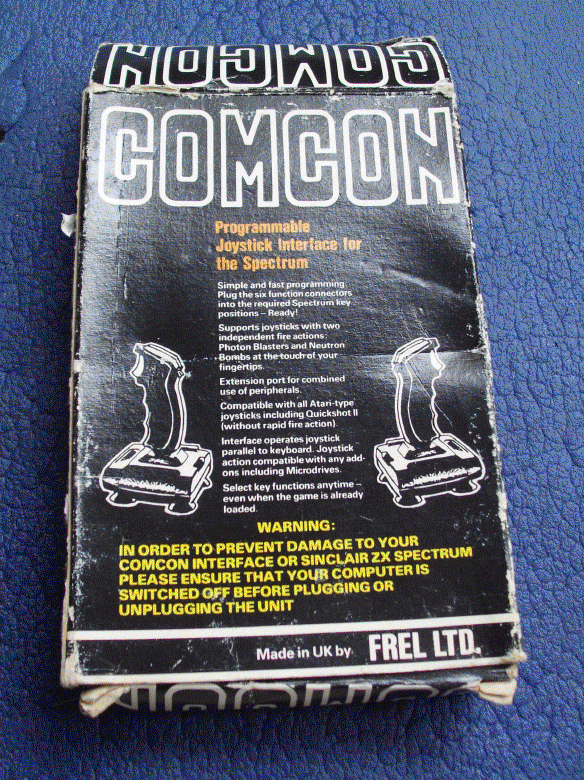
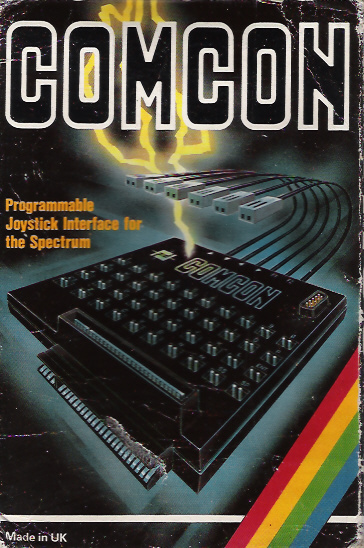
Programmable joystick interface for the Spectrum.
Discussion
Nobody has started a thread about this yet.
Documents
- ComconProgrammableJoystickInterface_Manual.pdfInstructions 101 KB
Files and rights
No permission is on record either way. Screens and pictures are copied here on a take-down basis: if you hold the rights and want something removed, say so and it goes.
Awards and competitions
Crash Readers Awards 1984
- 1Best Hardware Addon
In the magazines 74
Crash #47Dec 1987 · p.114
Ben Stone
Dominic Handy
CHRISTMAS LISTE Ben and Dom, Crash, [redacted]. What's small and black and bursts the seams of a stocking? A Spectrum add-on, of course - there are hundreds of little black boxes for music, printing, screen art and program transfer. Dominic Handy suggests some utilities and hardware for the Christmas list, and Ben Stone brings joysticks to the world - but don't fight over them, or they'll all be broken by little black Boxing Day. JOYSTICKES TERMINATOR Supersoft £19.9 Like most pointless street cred - take Raybans, expensive earplugs on a Radio Shack personal stereo and the Beastie Boys - the Terminator does serve a purpose, but only just. And its wacky design takes a lot of getting used to. Being so tiny the Danish stick has a lot of travel, so it's quite unresponsive. And the fire pin is difficult to use: you have to hold the grenade and fire with the same hand, but you can get it to work fairly quickly it you're prepared to go through hand-ache agony. The Terminator is all but indestructible, made of very thick plastic and durable electrical parts, but for nearly 20 quid I'd expect something a little more efficient than this. OMPETITION PRO 5000 Dynamics £14.95 (£15.95 with transparent case, Competition Pro Extra £16.49 with autofire and go-slow mode) This is THE joystick. The fire action is brilliant and the stick performs like a dream. It looks much the same as the Euromax Professional, but for just a pound more you can get it with high-tech clear casing (as in the picture). It's durable, because the shaft is made of steel and the microswitched mechanism inside is remarkably simple (and pretty much user-serviceable). The fire buttons work with reed switches, sometimes considered unreliable, but I've never had any trouble. Sadly, there's no autofire on either model, though there's a souped-up version on the market (the Competition Pro Extra) with autofire option and a go-slow mode never before seen on any joystick. SPEEDKING Konix £11.99 (£12.99 with autofire) The Speedking was a novelty when it appeared - the first truly hand-held joystick that worked well. It's easy to use, though it has the problem of the Euromax Professional in reverse: the diagonals are a pig to find and use quickly, which makes playing games like fighting sims very difficult. The position of the fire button really makes your hand ache if you're pressing it a lot - shoot-'em-ups turn into a nightmare when you're doing well! - though it would be difficult to have it anywhere else on the compact little body of the Speedking. There is a Speedking with autofire available. Earlier this year Konix claimed one Speedking lasted for 17,604,000 waggles (that's 27 days of nonstop waggling, folks!), but the story is not now believed, Our Waggling Editor writes. PROFESSIONAL Euromax £15.95 (£18.95 with autofire) The Euromax Professional has most of the features now becoming standard in the joystick world: posey design and microswitches, and an autofire option if you want to pay a bit extra. (It's the autofire version in the picture.) At first it's a little difficult to get to grips with, literally, because it's biased slightly to the diagonals. Theoretically this means the joystick's eight directions are equally easy to use, but in practice the stick often slips out of the vertical/horizontal into a diagonal. But the Euromax Professional has a brilliant fire action. And it's a great stick for games where deft, precise movements aren't needed; it feels rather flimsy, but the couple that were in the office had fairly long lives considering the hammering a CRASH joystick gets! 125 SPECIAL Cheetah £12.99 This new joystick, introduced in last issue's PCW Show report, has the usual eight directional controls as well as two independent fire buttons - and a special rotate function which allows the player to twist the joystick for extra-realistic movement. Of course a joystick of such complexity needs more than the usual five pin in/outputs; you'll have to have an extra joystick port, or use both ports on the +2 and +3/. There is an autofire function. IN THE BLEAK MIDWINTER MIDI INTERFACE Cheetah Marketing £49.95 With this interface box and accompanying software you can control any MIDI instrument via the Spectrum. It's superb for people who can write music but can't play - just enter the notes and the computer plays the instrument. Or do it the other way round: you play the music and the computer puts it into musical notation. Including a MIDI lead for connecting the interface to your instrument, the MIDI interface was reviewed in issue 40. MK5II KEYBOARD Cheetah Marketing £199.95 This 61-key fully polyphonic board with foot switch and MIDI output ports comes packed in a rugged steel case. It's an ideal accessory to Cheetah's MIDI interface. MUSIC MACHINE Ram Electronics £49.95 'One of the best all round music add-ons for the Spectrum' - Jon Bates, Issue 34. A sound sampler, sequencer, editor, drum machine and composer all in one little black interface, the popular Music Machine is supported by a wide range of software. Recent additions include Quasar Software's Sample Editor (reviewed last issue) and Tectrics's chord construction kit Compuchord (Issue 45). SPECDRUM Cheetah Marketing £29.95 Now the standard drum add-on for the Spectrum, the SpecDrum comes complete with eight samples of real drum sounds. Extra drum sounds can be loaded in from tape: the Electro Kit and Afro Kit both retail at £4.99 and the older Latin Kit at £3.99, and all come complete with their own editors. The SpecDrum plugs into most hi-fis via a connecting phone lead. Jon Bates enthused over it in Issue 27. MUSIC TYPEWRITER Romantic Robot £7.95 Coming complete with keyboard overlays (48/+), this clever piece of software is a sophisticated tool for music on the Spectrum. Music written on Music Typewriter is displayed onscreen using realistic graphics which can be dumped to most dot-matrix printers, so you can print your own music. And your compositions aren't limited to Music Typewriter - all your tunes can be converted to machine code for use in your own programs. Jon Bates went sharpening and flattening on Music Typewriter in Issue 16. PRINTING MULTIPRINT Romantic Robot £39.95 A printer interface with all the options, the Multiprint can dump any Spectrum screen to an Epson-compatible printer in three different densities - it's handy for listings, too. There's more info in Issue 43. RAM PRINT Ram Electronics £34.95 Not only does this little black box drive your printer using a very easy menu-driven system (all stored on a ROM chip), it's also useful for those apres-Christmas 'thank you' letters because it comes with a built-in word processor, accessible from BASIC at any time and also on ROM. And if you ever get bored of all those line feeds and ESCape codes you can always plug your joystick in the built-in Kempston port and bash away at a game. See the details in issue 35. FOR THE ARTIST THE OCP ART STUDIO THE ADVANCED OCP ART STUDIO Rainbird £14.95, £24.95 'Probably the best art utility on the Spectrum' - Mike Dunn (On The Screen Editor). Need we say more? Several versions of the mouse- and joystick- compatible Art Studio utility are available for different Spectrum setups; The Advanced OCP Art Studio, which really needs an Interface One and microdrive to use its full potential, is much more powerful than the original. It has a Scrapbook library facility so you can combine and paste together pictures. Issues 24 and 40 have reviews of The OCP Art Studio and The Advanced OCP Art Studio respectively. VIDEO DIGITISER Sunset £128.00 Ever wanted to change Prince Charles's ears, or rub out out that blot on Gorbachov's forehead? You can do this and more, provided you've a video recorder, with the Sunset Video Digitiser. This little black box has all the connections for grabbing TV pictures from the video and then using them anywhere you want - even in games. Sadly, there's no printer ribbon that will put them onto T-shirts. Franco Frey got frame-grabbing in issue 31. VIDEOFACE DIGITISER Romantic Robot £69.00 plus £1.00 postage and packing The Videoface Digitiser is amazingly cheap and fast - it's all here. You can grab and scan three pictures a second, and then produce a very realistic animation sequence using up to six screens. At about hall the price of the Sunset Video Digitiser, this represents unbelievable value for money. NOT A CREATURE IS STIRRING, EXCEPT FOR A MOUSE KEMPSTON MOUSE Kempston Data £49.95 There's no WIMPing out with Kempston's version of the yuppie controller, with button eyes and connecting tail. Don't forget to lock up your cheeseboard and keep the cats indoors. Kempston is still bundling Rainbird's OCP Art Studio with this rodent at £69.95. Or those with a Spectrum +3 you can get Kempston's new Desktop utility package for +3 DOS and the mouse for exactly the same price. COMCON Frei £17.95 (single port), £19.95 (twin port) This is guaranteed to work with any product that uses the Spectrum keyboard. By connecting the six plugs to the miniature keyboard add-on you can have eight directions and TWO independent fire buttons (provided you have the correct joystick - also available from Frei). A twin-port version is also available for complex games. Lloyd reviewed the single-port version way back in Issue Eight. AND... MULTIFACE ONE, MULTIFACE 128, MULTIFACE 3 Romantic Robot £39.95, £44.95, £44.95 'One of the most versatile and user-friendly units on the market' - CRASH Issue 29 - Romantic Robot's Multifaces are ideal for the serious gameplayer or utility user with a fast storage device: they can put cassette games on Beta, Opus and Kempston disks. The Multiface 3 (pictured) can transfer cassette programs for the Spectrum and 128 to the - +3's Amstrad disks. It was welcomed in Issue 45 as a good reason to buy the +3, though Sixword's Swift Disc and Rockfort Product's Disciple are also worthwhile disk systems. The Multifaces have other uses: most POKEs can be entered using the ROM-based toolkit. And printer-owners are also catered tor with a COPY command, ideal for dumping your greatest high scores! All these options are available at any time at the press of a little red button. CRASH first saw the Multiface One in Issue 26. PLUS D Miles Gordon Technology £49.95 (£129.95 with 3.5-inch 780K-capacity disk drive) The Plus D is a new disk and printer interface from the designers of Rockfort Product's Disciple. Its Snapshot button will save all 48K and 128K cassette programs to disk, it's claimed, and the interface can make single and double-size screen dumps to a printer. The Plus D is also available in a package with a disk drive. GAMMA-STRIKE Gamesware £24.95 Gamesware's Gamma-Strike target-shooting system is a novel combination of hardware and software - you plug a target into the Spectrum, shoot at it with a model gun and watch the computer monitor your score! It's all done with the latest signal-detection techniques, and Gamesware promises more 'plug-in games' including darts and snooker soon... look out for the CRASH review. Thank you Santa, lots of luv Ben and Dom xxxxx
Sinclair User #46Jan 1986 · p.54
John Lambert
STICKING TO THE BEST Zap in style. John Lambert juggles with joysticks. Joysticks are the most popular add-on for the Sinclair computers, not just for playing games but also for drawing, cursor control in word processing packages and for moving anything around the screen. The keyboard can be used for all of those things but it is so much easier with a joystick. Choosing a joystick from the hundreds available is not an easy decision, but this guide will show you what to look for, and how to connect it to a Spectrum or QL. Joysticks are generally all the same. They may be different shapes and sizes but they all contain a number of simple switches which get turned on or off as the stick is moved. That type of digital joystick was first used on a home computer by Atari and, therefore, is sometimes known as the Atari standard. All Sinclair machines use this type of joystick interface. The switch used can vary a great deal. The cheapest joysticks, such as Quickshot 1, us a bubble which when compressed by the stick makes contact. Those can wear fairly quickly and cannot stand up to heavy use. Next in price and strength are leaf spring switches where the stick causes two pieces of metal to make contact. Finally, the most expensive joysticks use microswitches. Those will last a long time and can easily be replaced should they go wrong. Generally, you should buy the most expensive joystick you can afford as that way it should last a long time. Try to get one with a metal shaft in the handle - plastic ones break - and, if possible, try it out in the shop. The feel of a joystick is very important, some are sloppy and others require a lot of movement before they register. it is within the interface that the complications arise. All interfaces have at least one Atari standard socket where the joystick is plugged in, but those vary in how they tell the computer when the stick has been moved. Which type of interface you buy will depend on what software you want to use with it. The most common method is known as Kempston - named after Kempston Microelectronics who invented it. What that does is to configure the interface as part of the Z80 I/O map so that it can be read - to find what position the joystick is in - using the instruction IN 31. Another method is for the interface to emulate the cursor keys - five to eight plus zero as fire. For obvious reasons that is known as Cursor. The third method is known as Sinclair and emulates the six to nine keys, with zero as fire. That is based on Interface 2 from Sinclair. Why Sinclair wanted to bring out yet another method is anybody's guess! The problem is that until you but the software you have no way of knowing which of those three methods it will use. Many programs give you a choice but unfortunately not all. The way to get round that is to use a programmable interface. Those allow you to let each stick direction and fire represent a key on the keyboard. All games have a keyboard option and you just set the interface to the keys it uses. That also gets round the problem of game that do not use any of the three normal methods - Psion is very bad in that respect. Unfortunately, programmable interfaces tend to be the most expensive, and in some cases can be very difficult to set up. For playing arcade games a Kempston standard interface is the most useful, and the cheapest. Some interfaces combine more than one method in the same box, but the more facilities it has the more expensive it will be. Some joysticks offer extra facilities and you should take care when buying those. Although it is popular to have two fire buttons on a joystick, in many cases they are joined electrically and perform the same function, so it does not matter which one you press. Some joysticks, however, have two, independent, fire buttons and some interfaces can take advantage of this. That type of joystick can also be used with interfaces which normally only expect one fire button, and so are particularly worth considering. Care should be taken, though, as pressing the used button on some interfaces, will cause the computer to crash. Another common extra is auto-fire, giving an auto repeat on the fire button. In order to make their interfaces more attractive some companies add extras which are not related to joysticks. The best known is probably the Nidd Valley Slomo which lets you slow down the computer so that - in theory - the games are easier to play. Two other products, the Opus Discovery 1 disc drive, and the Mikro-Gen Mikro-Plus include Kempston compatible interfaces. As far as the QL is concerned life is much simpler. The two control sockets on the back are already wired to emulate either the cursor keys and space, or the function keys. All you need to plug in a joystick is an adaptor which fits the control socket at one end and a standard joystick at the other. Joysticks are available which plug straight into the QL - ones that have a QL style plug rather than the Atari standard. The problem with those is that when you upgrade to a different computer you will have to buy another joystick, as it is unlikely it will fit the new machine. Buying a joystick and interface can be a harrowing experience. Don't be afraid to try out half a dozen in a shop - and don't buy from a shop which won't let you experiment. Ask your friends and, of course, read the reviews in Sinclair User. PROTOCOL 1 Company: AGF Telephone: [redacted] Price: £9.95 Kempston compatible interface which contains a through port. PROTOCOL 2 Company: AGF Telephone: [redacted] Price: £14.95 Kempston, cursor interface. Contains a through port. PROTOCOL 3 Company: AGF Telephone: [redacted] Price: £19.95 Programmable interface. As Protocol 4 but not Kempston compatible. PROTOCOL 4 Company: AGF Telephone: [redacted] Price: £29.95 Programmable, Kempston compatible interface. Top of the range interface which uses a system of preprogrammed cards. Those clip over a membrane on the interface. Also has a through port, reset switch, and free demo tape. Fiddly to program but one of the few which allows auto-fire. It also allows a second interface to be plugged into the back for a second player. COMCON Company: Frel Telephone: [redacted] Price: £19.95 Programmable interface which, although it may not look too good, is easy to program using leads plugged into a matrix. Can run joysticks with two fire buttons. GAMES ACE Company: Datel Telephone: [redacted] Price: £10.99, £17.99 (with Quickshot II) Kempston compatible interface. Allows the use of auto-fire joysticks and outputs sound through the television. SWITCHABLE JOYSTICK INTERFACE Company: Datel Telephone: [redacted] Price: £12.95, £19.99 (with Quickshot II) Kempston, cursor, Sinclair compatible interface. Switchable interface which covers all the main joystick standards. Can be used with auto-fire joysticks. TURBO ACE Company: Datel Telephone: [redacted] Price: £15.99, £22.99 (with Quickshot II) Kempston, cursor, Sinclair compatible interface. Top of the range model which includes all the features of the Games Ace and the Switchable interface. Well priced for the wide range of facilities. DUAL PORT Company: DK'tronics Telephone: [redacted] Price: £13.00 Kempston and Sinclair compatible interface. Interface includes two sockets, one for Kempston and one for Sinclair. PROGRAMMABLE Company: DK'tronics Telephone: [redacted] Price: £22.95 Programmed by loading software from tape. FORMULA 1 Company: Kempston Telephone: [redacted] Price: £16.95 Large joystick with two - not independent - fire buttons. It uses micro switches and has a metal shaft so it should last a long time. Good value. FORMULA 2 Company: Kempston Telephone: [redacted] Price: £11.95 Three fire buttons and plenty of movement for the careful enthusiast. PROGRAMMABLE Company: Fox Telephone: [redacted] Price: £28.95 Programmable interface holding the details of which keys to use for 16 games in a battery backed RAM. Can also be used as a Psuedo ROM. Good operation and value for money. FLIGHTLINK HOTSHOT Company: Frel Telephone: [redacted] Price: £10.50 Small hand held joystick with a very good precise, action and two independent fire buttons. JOYSTICK INTERFACE Company: Kempston Telephone: [redacted] Price: £9.95 Kempston interface made by the inventors of the standard. KEMPSTON PRO Company: Kempston Telephone: [redacted] Price: £16.95 Kempston, cursor, Sinclair compatible interface with three sockets and a slot for games ROMs. Covers all the main standards including two Sinclair sockets, one to five and six to zero. TRISTATE Company: Kempston Telephone: [redacted] Price: £12.95 Kempston, cursor, Sinclair compatible interface. Two sockets cover all the main standards. MIKRO-PLUS Company: Mikro-Gen Telephone: [redacted] Price: £14.95 Kempston compatible interface. Sold as part of the Shadow of the Unicorn game and has 16K of EPROM onboard which will be used in subsequent MikroGen games. Expensive for just a Kempston compatible interface but good value - if you like the game. PACESETTER Company: Nidd Valley Telephone: [redacted] Price: £14.95 Kempston interface with through port and Slomo. PROGRAMMABLE PACESETTER Company: Nidd Valley Telephone: [redacted] Price: £29.95 Tape programmable with Slomo built in, and the ability to use two independent fire buttons. Good range of features. QUICKSHOT 1 Company: AGF Telephone: [redacted] Price: £7.95 Basic joystick which has been overshadowed by the II. QUICKSHOT II Company: AGF Telephone: [redacted] Price: £9.95 Popular joystick, rather fragile and hence, tends to wear out quickly. RAT Company: Cheetah Telephone: [redacted] Price: £19.95 Infra-red remote control joystick and interface. The recently reduced price is good for a complete system and it is the only remote control joystick for the Spectrum. The joystick is a pressure pad which takes a while to master. If possible try one out before buying. TURBO Company: RAM Telephone: [redacted] Price: £18.50 Kempston, cursor, Sinclair compatible interface. All the main standards including two sockets for Sinclair, one to five and six to zero. Also included are ROM slot, full width through port and a reset button. SCOREBOARD Company: Kempston Telephone: [redacted] Price: £19.95 Joystick housed in an enormous consol which is bigger than the Spectrum. Fine if you want to pretend you are in an arcade but a bit over the top. SPECTRUM INTERFACE Company: RAM Telephone: [redacted] Price: £9.95 Standard Kempston interface without through port. SPECTRUM KC Company: Nidd Valley Telephone: [redacted] Price: £8.95, £9.95 (with through port) Kempston compatible interface. Good price for a Kempston with a through port. SUPREME JOYSTICK Company: Cookridge Computer Supplies Telephone: [redacted] Price: £15.95 SURE SHOT JOYSTICK Company: Cookridge Computer Supplies Telephone: [redacted] Price: £12.95 - QL, £15.95 - Atari ZIPSTICK Company: Cookridge Computer Supplies Telephone: [redacted] Price: £12.95 Joystick which is guaranteed for two years' wear and tear.
Sinclair User1985 · p.14
HARDWARE WORLD With ever-increasing amounts of peripherals available for Sinclair computers, users are finding it more and more difficult to know what to buy. We present a buyer's guide to joysticks, keyboard and printers and review the best of the rest from the 1984 add-on market. Joysticks are a popular addition to the Spectrum and many people find it essential for zapping aliens or flying a simulator. In the last year there have been a number of interfaces and joysticks launched, some with more success than others. Nearly all joysticks have accepted a common standard, that of Atari which was the first company to add joysticks to a computer. The style of the joysticks may vary but the connection to the interface remains the same. To use a joystick some form of interface is needed. One, or more, of three standards are normally used. 'Cursor', sometimes known as 'Protek', simulates the four cursor keys for the directions with 0 as fire, 'Sinclair' allows for up to two joysticks and simulates keys 1 to 5 and 6 to 0 respectively and 'Kempston' which does not simulate any of the keys but uses a port address. The most common of those is the Kempston but it is by no means universal. To overcome that a programmable interface can be used which allows you to use any key for any direction or fire. The method of programming varies, some need a tape to be LOADed, while others require you to press a key and then to move the joystick in the direction which that key will simulate; some have physical connections which must be made to signify the key and others simply use a stored memory of which keys are to be used. GRANT DESIGNS & EEC Two designs combine the interface and joystick in one. The Grant Designs Spectrum Stick and a similar one from EEC clip to the Spectrum keyboard over the cursor keys and use a mechanical system to press the keys. Inside the Spectrum Stick there are two frames which move independently up and down, and left and right; to those are attached ramps which push little feet onto the relevant keys. The EEC joystick is more substantial. The casing is a one-piece moulding which fits snugly onto the Spectrum case. Inside that the stick is securely joined to a shaped plate which presses on one or more levers which in turn depress the key. Both are priced at £9.95 and are far cheaper than anything else on the market. Provided they are used with restraint they are better than nothing. RAM TURBO INTERFACE The RAM Turbo interface from Fleet Electronics is what the Sinclair Interface 2 should have been and was not. As well as having two joystick ports, it has a ROM cartridge slot. Moreover, one of the joystick ports can be used for Kempston compatible games and the other can be used as a Protek compatible port. It is similar in size to the Interface 2 but the rear connector is full Spectrum-size as opposed to the Interface 2 ZX-81 size. The area surrounding the joystick port is large enough to take a standard joystick connector. Users who have either built their own joystick or use the Flight Link joystick will have found problems with Interface 2 as the left-hand, most commonly used, port is too near the raised ROM slot. In order to prevent users fitting the interface with the power on (the surest way to blow up your Spectrum) it incorporates a 'Spectrum Protect Adapter', a loop of plastic which covers the power socket on the Spectrum so that the lead must be removed before fitting. If you are considering the Interface 2 then think again; the RAM Turbo interface is better designed and better value for money, costing £22.95. PROTEK INTERFACE The new switchable interface from Protek can be configured for all three of the standards by using a switch on the back. The interface is dead-ended, so it must be the last add-on fitted. As with the Turbo interface, it is liable to crash if used with a twin fire button joystick. Its main drawback is that in the Protek position the top row of keys is disabled, while in the Sinclair position only the 6,7,8,9 and 0 keys are disabled, which could make some games difficult to play. The switch would have to be moved, the key pressed, and the switch returned to its original position. Despite the above problems, which should not affect most users, the interface is easy to use and covers most games on the market. It is priced at £19.95. ELR INTERFACE The programmable interface from East London Robotics for the Spectrum has the distinction of being the cheapest on the market at only £10.00, if bought together with a Trickstick. The interface, as ELR would be the first to admit, was designed to be 'cheap and cheerful' and it is, even to the extent of being uncased. In order to program it small metal clips are used to connect pins which represent the various rows and columns of the keys on the keyboard. That is fiddly and time consuming if you need to reprogram it, but has the advantage that once programmed it is usable from power up. If the interface is purchased separately its price is £15.00. COMCON INTERFACE Frel Ltd market the ComCon programmable interface. Any key on the keyboard can be programmed and there is provision for two fire buttons. To match the interface Frel also markets two compatible joysticks. The interface is of simple design and to program it you have to plug the relevant lead into the pin you want. That can be done with a program running and the keyboard is not disabled. Any joystick with a standard plug can be used and if that has only one fire button then the F1 lead is used. To allow for other add-ons there is an extender card which rises vertically from the front of the board. The two joysticks which Frel markets are the Flightlink and the Quickshot II which has been adapted to have the independent fire buttons, F1 on the trigger and F2 on top. At £19.95 the interface is one of the least expensive and the ease of programming should ensure steady sales. The two joysticks are £10.50 for the Flightlink and £13.95 for the Quickshot, both less £2.00 if ordered with the interface. CCI INTERFACE The interface from Custom Cable International needs a software tape to program it. It can accept any standard joystick; there is no extender card, so it must be the last add-on plugged in. Programming the interface is straightforward. In all, only 10 keypresses are needed plus two to confirm everything is order. The program is written entirely in BASIC which makes it very easy to customise. This is a good interface and competitively priced at £15.00, but it could have been even better if the instructions had been more detailed. PAGE & RAINBOW The Page and Rainbow interfaces are of the kind where you must push a key, move the joystick, release the joystick again for the four positions plus fire, again for the diagonals, again for the diagonals plus fire and finally the fire button on its own. All of that can be done with the game running as the keyboard can still be used. Some people will find that time consuming and fiddly. The one really useful feature of the Page interface is a rapid fire switch. When that is in the up position it simulates the fire button being held down, very handy for the 'zap everything in sight' type of game. The Rainbow interface includes a beep amplifier. With the Rainbow interface at £24.00 and the Page one at £26.00, they deserve consideration provided you do not mind the time and hassle of programming them. FOX ELECTRONICS The programmable interface from Fox Electronics, on the other hand, is probably the easiest of all to program. You only have to flick a switch once you have told it which keys to use. When the switch is up a menu is displayed on the screen. You have the option of creating a new key set, from any of the forty keys or selecting, with a single keystroke, one of the sixteen sets already created. Pressing the E key exits to Basic to load the game and programs the joystick. If necessary the key sets can be saved on tape. Leaving the switch down enables the Spectrum to ignore interface. Inside the interface is a RAM chip and a small ni-cad battery, and on power down it retains the information in its memory for a minimum of six months. When switched on the interface pages the Spectrum ROM and jumps to the program held in its RAM. The program then transfers itself into the Spectrum RAM, pages the ROM back in and puts the menu on the screen. On pressing the E key the program transfers itself back into its own RAM, sets up the joystick and clears the Spectrum memory. Any new key sets created are therefore saved in the process. All that sounds clever but it also has two beneficial side-effects. When the switch is down, the interface causes a hardware reset; in other words, if you have a game running you can jump out of it without pulling the plug - a saving on plug wear. Secondly, details are available from Fox for a machine code programmer to adapt the interface as a pseudo ROM. Often used routines such as toolkits, printer driver programs or complete character sets could then be loaded at the flick of a switch. At £28.95 the interface is excellent value. TRICKSTICK One of the more unusual joystick devices launched in 1984 was the long awaited Trickstick from East London Robotics. In fact, to describe it as a joystick is misleading. It is a 7in long black cylinder with six touch sensitive pads which simulate the four joystick movements, plus two fire buttons. The Trickstick comes with an interface, up to eight of which can be plugged in at any one time, and has the option to give proportional movement on specially written games. It simulates the Kempston joystick so there are many games available on which it can be used. The touch pads use your body as an aerial to pick up mains hum. That is converted by the electronics to simulate the key press. As some people are better aerials than others the sensitivity of the stick can be altered by a small screw near the top. A minor fault is that the lead from the interface to the stick fouls the power lead. It takes some getting used to unlike a joystick, but once mastered is just as useful. As it has no moving parts it should stand up to wear and tear and it is quicker than most others. It costs £34.50. Nineteen eighty-four has been a quiet year for standard joysticks with only two given much publicity. DELTA 3S The Delta 38 from Voltmace has two independent fire buttons, one of which is doubled up for left or right handed players, and rotary switches are used on it. Those switches give it a light action and it can be comfortably held in the hand. At £10.00 the joystick is good value, its solid construction should ensure long life. SUPER CHAMP The Super Champ, currently marketed by Dean Electronics, is unusual in that the cable is held in the base. For use the cable is pulled out and, when you have finished, rotating the stick winds the cable inside. The stick is very long and thin and has two fire buttons, one on top and one in the trigger position; those both operate the same switch. The base is, as expected, larger than usual and has four rubber suckers underneath. Because the stick rotates there has to be a certain amount of play in the pivot. That makes precise control difficult unless you hold down the centre. Despite that the joystick works tolerably and the convenience of not having the wire lying around almost makes up for it. The Super Champ is priced at £12.95. RAT Finally, if the advertising is to be believed, the age of conventional joysticks is past and the future belongs to the RAT and its offspring. The RAT (Remote Action Transmitter) operates in a similar fashion to TV remote control handsets; you simply wave it in the general direction of the screen and press the touch-sensitive movement and fire buttons. It is sold with a receiving unit that connects to the Spectrum and is compatible with most popular Spectrum software. The RAT is powered by a normal PP3 battery which fits into the underbelly of the handset. The first of its kind, the RAT suffers minor teething problems and can cause excessive handache but, like the Trickstick, you will soon grow fond of it. The price is £29.95 from Cheetah Marketing and high street stores. Grant Designs, Bank House, Reepham, Norwich, Norfolk NR10 4JJ. Tel: (0603) 870852. EEC, [redacted]. RAM Electronics (Fleet) Ltd, [redacted]. Protek, [redacted]. East London Robotics Ltd, [redacted]. Frel Ltd, [redacted]. Custom Cables International Ltd, [redacted]. Page Computing, [redacted]. Rainbow Electronics, [redacted]. Fox Electronics, [redacted]. Voltmace Ltd, [redacted]. Dean Electronics Ltd, [redacted]. Cheetah Marketing Ltd, [redacted].
ComCon.
Custom Cables International.
Delta 3S.
EEC.
East London Robotics.
Fox Electronics.
Page.
Protek.
Quickshot II.
RAM Turbo.
RAT.
Super Champ.
Trickstick.
Interface: Grant Programmables: No Cursor: Yes Sinclair: No Kempston: No x2 Fire: No Price: £9.95 Interface: EEC Programmables: No Cursor: Yes Sinclair: No Kempston: No x2 Fire: No Price: £9.95 Interface: RAM Turbo Programmables: No Cursor: Yes Sinclair: Yes Kempston: Yes x2 Fire: No Price: £22.95 Interface: Protek Programmables: No Cursor: Yes Sinclair: Yes Kempston: Yes x2 Fire: No Price: £19.95 Interface: ELR Programmables: Yes Cursor: No Sinclair: No Kempston: No x2 Fire: Yes Price: £15.00 Interface: ComCon Programmables: Yes Cursor: No Sinclair: No Kempston: No x2 Fire: Yes Price: £19.95 Interface: CCI Programmables: Yes Cursor: No Sinclair: No Kempston: No x2 Fire: No Price: £15.00 Interface: Page Programmables: Yes Cursor: No Sinclair: No Kempston: No x2 Fire: No Price: £26.00 Interface: Rainbow Programmables: Yes Cursor: No Sinclair: No Kempston: No x2 Fire: No Price: £24.00 Interface: Fox Programmables: Yes Cursor: No Sinclair: No Kempston: No x2 Fire: No Price: £28.95
Sinclair User #31Oct 1984 · p.23
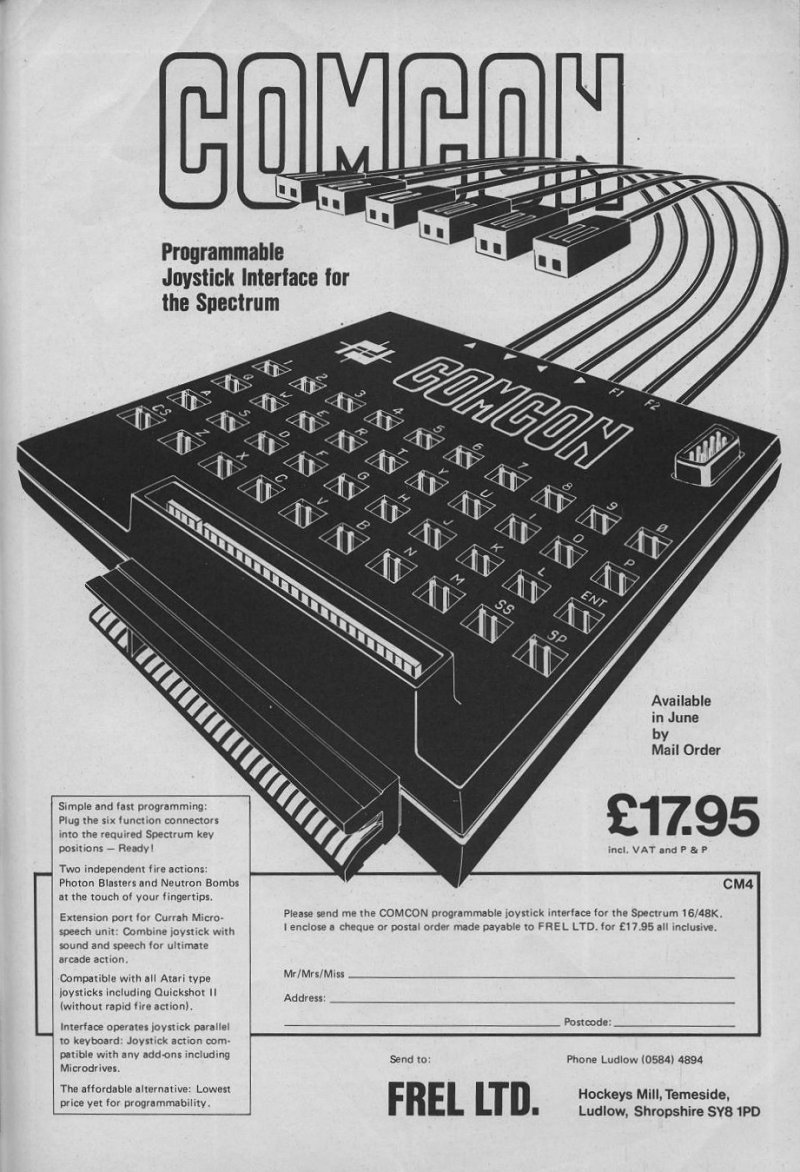
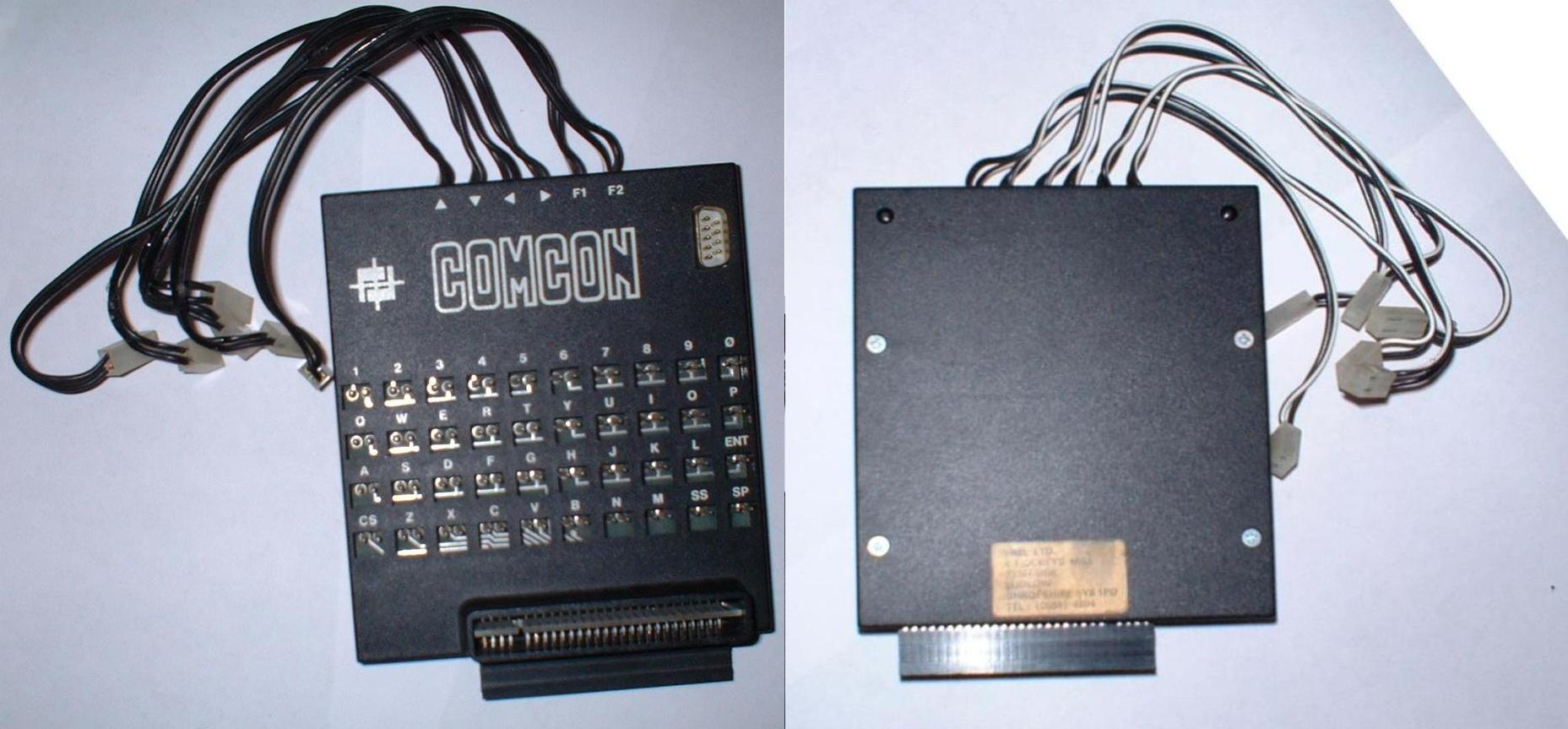
COMCON CONTROL Frel Ltd has announced its new ComCon programmable joystick interface for the Spectrum. Any key on the keyboard can be programmed, including both shift keys, and there is provision for two independent fire buttons. The interface has arrays of pins which correspond to the keyboard and six leads representing the four directions and the two fire buttons. To program it you must plug the relevent lead into the pin you want. That can be done with a program running and the keyboard is not disabled. Any joystick with an Atari-style plug can be used. To allow for other add-ons there is an extender card which rises vertically from the front of the board. The two joysticks that Frel markets are the Flightlink and the Quickshot II which has been adapted to have two independent fire buttons. The joystick usually has an Auto-Fire feature but that has been removed. At £19.95, the interface is one of the cheapest on the market. The Flightlink joystick costs £10.50 and the Quickshot II is £13.95; a £2.00 reduction on either can be obtained if ordered at the same time as the interface. Further details from Frel Ltd, [redacted].
Crash #8Sep 1984 · p.61
Lloyd Mangram
COMCOCTION Lloyd Mangram plugs in programs and plays. The latest spate of joystick interfaces has brought a multitude of different programming concepts on the market ranging from the software selectables to the personalised card systems. As the Sinclair owner is aware, the Spectrum does not provide a dedicated joystick port (rather odd for a games computer), and the add-on market has been quick to provide various solutions to the problem. Before this however, the software houses have had to make do with the keyboard as a playing ground. The multitude of key combinations used for each and every game meant that whoever would bring out a joystick which catered for all these games, would have to provide a system which used the input port address of the keyboard and could link any of the keyboard keys to any of the joystick controls. With five joystick controls and 40 keys this meant an astonishing amount of combinations and it is with no surprise that some manufacturers chose early on to create their own interface standard, leaving it to the software houses to develop compatible software. The earliest and most established is Kempston, using a different input port address to the keyboard (input address 31). Fuller went along similar lines, but selected input port 127. Where Kempston was accepted as the joystick standard, the Fuller system suffered from the lack of support from most software houses (except Imagine). AGF opted for part compatibility by using the keyboard port address and linking the joystick controls to the cursor keys and 0 for fire button. This was met with success too, and the cursor key joysticks (mostly AGF and Protek) developed into a standard. Much of the software catered now for the Kempston and cursor joysticks and the last thing needed was another standard. Promptly Sinclair launched the ZX Interface 2 which was to provide the Spectrum with two joystick ports and a games cartridge interface to complete the arcade image of the computer. You guessed, a new Sinclair standard was created, with the joysticks operating off specific keys, one off the top right half-row, the other off the top left half-row of the keyboard. Although technically a good idea (each joystick requiring only one keyboard address for fast machine code access), it nonetheless created a further confusion on the market and the software houses had to provide a whole plethora of compatabilities. In exasperation, some programmers provided a soft option by including a 'select your own keys' routing within the program. A new interface was needed, which enabled all the games to be played with a joystick and which provided the user with a fast and easy programming system. Frel Limited purport to have found the ideal solution with their COMCON interface... THE HARDWARE The COMCON comes in a brightly coloured package and impresses by its sheer size of 120mm width and 135mm depth with a sleek profile of 19mm excluding the extension port chimney stack. Most of the top stack is taken up by a 4 x 10 matrix of two-pin connectors. This matrix represents the Spectrum keyboard and is annotated accordingly with a white legend. Protruding at the rear are six two-core cables with Molex receptacles which can be plugged into any of the 40 matrix positions. These six cables represent the six joystick controls (4 direction and two fire) and are annotated at the entry point of the cables to the enclosure. To the rear right is a 9-pin D connector plug, which will accept any Atari compatible joystick. A vertical extension port is provided at the front of the unit and is protected by a collar which blends in nicely with the Spectrum's rear enclosure. This extension port provides the possibility of connecting the Currah Speech unit or the Alphacom printer, both do not have extension ports (the Alphacom only provides a ZX81 extension port). Overall the unit looks tidy and professional, the injection moulded enclosure being of good quality and the connectors rugged enough to survive any ill treatment from game addicts. OPERATION COMCON operates parallel to the keyboard using the same input port. Each joystick function is represented by a cable which can be plugged into any key position of the matrix. So if the game requires key Q for up movement, the 'up' function cable is plugged into the position marked Q. Simple! Naturally if the program caters for diagonals, the joystick will automatically provide these as the diagonal movement of the joystick simply is the equivalent of pressing two keys simultaneously on the keyboard. As the interface operates on the same input port as the keyboard, there is no problem of incompatibility as regards to other peripherals. It goes to say that joystick and keyboard can be operated together without any electrical collision and that therefore multi-key games such as Flight Simulation etc can be enjoyed with the joystick and keyboard combined. COMCON also provides two independent fire or special function actions (six cables). Frel Ltd market for this purpose a modified Quickshot 2+2 joystick, which incorporates two independent trigger buttons on the grip (F1 = index finger operated button, F2 = thumb operated button) at the expense of the very little used Rapid Fire option. Also available from Frel is a special Flightlink joystick with two independent fire buttons, which also makes full use of the fire actions on COMCON. The extra fire function proves to be very useful with arcade games (Cavern Fighter or Full Throttle should prove its potential!). Any Atari compatible joystick can be connected to COMCON (Kempston, Quickshot 1, Sumlock etc) although the second fire option will not be available. The review team of CRASH has been operating COMCON for over two months and has had no compatibility problems so far. The major benefit of the unit is its ease of programming, beating any other system for sheer simplicity and speed. The possibility of programming the joystick functions during loading or even in the middle of play is invaluable. In fact most of the times the game is loaded first and the programming is accomplished after reading the operating keys in the screen instructions. COMCONCLUSION COMCON proves to be a perfect solution to the problem of joystick incompatibility with the Spectrum. Any program can be catered for. At £19.95 the unit is very good value for money. The choice is left to the Spectrum owner, whether to go for a two or three standard interface such as the RAM Turbo or Kempston (catering for Sinclair, Kempston and Cursor) with the added bonus of the cartridge port, or to be truly independent from any standard and gain an extra fire function! EPILOG Frel has informed CRASH that the latest Cambridge Computing joysticks have a revised pinout an the D connector affecting the 2nd fire action. Frel provides the service of modifying the COMCON interface to suit the Cambridge joystick 2nd fire function at a charge of £3 all inclusive. At the same time the company offers to upgrade any Quickshot 2 joystick to the Quickshot 2+2 spec with two independent fire actions with the loss of Rapid Fire at a total cost of £4 all inclusive.
Personal Computer News #79Sep 1984 · p.43
David Rosam
JOYSTICK JUNKET Programmable joysticks could be the gameplayer's best friend. David Rosam plugs these three into his Spectrum. Finding a joystick interface that lets you play almost any piece of software on your Spectrum is like finding a needle in a haystack. One solution to the problem, for instance, could be a programmable joystick interface. Three new joysticks try to tackle different approaches to programmable interface design. COMCON INTERFACE PRODUCT: Comcon Programmable Joystick Interface MANUFACTURER: Frel Ltd, [redacted] PRICE: £14.95 OUTLETS: Mail order/retail. Most programmable interfaces work by fooling the computer that it is receiving information from the keyboard. This is done by connecting the joystick into the port dedicated to the keyboard. Comcon is by far the easiest to use of the three interfaces, but its construction is a let-down. The unit is large for a Spectrum add-on, needing a fair amount of space behind the machine to accommodate the unit. On top is a dummy keyboard, consisting of rows of two-pronged connectors. Six wires protrude from the rear, (four for the directions and two fire button options) which you simply push onto the desired keys. The crude plastic plugs give the unit something of an amateur air. The unit is compatible with Microdrives, and takes standard Atari-type joysticks. The manufacturer claims that the duplicate edge connector on the unit is suitable for the Currah Microspeech unit, and there's probably no reason why you can't connect any other add-ons. CAMBRIDGE COMPUTING INTELLIGENT JOYSTICK PRODUCT: Cambridge Computing Programmable Joystick MANUFACTURER: Cambridge Computing, [redacted] PRICE: £29.95 OUTLETS: Mail order/retail. Opening the box reveals three components - the interface itself, a joystick and a cassette tape. The interface and cassette are available without the joystick, if you already have an Atari-type joystick. The interface itself is a small black box, about the size of a non-programmable interface, allowing one joystick to be connected. There's also a duplicate edge connector at the rear of the unit so you can connect other add-ons simultaneously. To use the interface, connect the hardware, and then load the tape. Instructions are given as the program runs, so the whole process is quite simple. The package is the most attractively presented of the three, and it's well made, but it's the most expensive. RAINBOW ELECTRONICS INTERFACE PRODUCT: Rainbow Electronics Programmable Joystick Interface MANUFACTURER: Rainbow Electronics, [redacted] PRICE: £25 (inc P&P) (£27 for through-port model) OUTLETS: Mail order/retail. Another small unit allowing the connection of a joystick with a standard Atari-type plug is the Rainbow Electronics interface. And it offers a small loudspeaker to supplement the small noises struggling from beneath the Spectrum. The Spectrum's edge connector is reproduced on the latest model. No extra software is needed to program the interface. Instead, you must press keys, move the joystick, and operate a small switch on the interface, all at the same time. Sounds complicated? - well it is. If you happen to be an octopus it's no problem - otherwise just borrow an extra pair of hands... The speaker on the unit doesn't have good sound quality, and you'd be better off if you disconnect the 'load' wire, and engage 'record' on your tape recorder's speaker. . That way, you also gain control over the volume. VERDICT If you're in the market for a joystick interface, the programmable types are not quite as attractive as they sound on paper. The biggest drawback with most programmable interfaces is that as soon as you turn off the power, they lose their programming. Therefore, before playing any game, you must plod through all the preliminary palaver. This takes time, and can be quite a frustrating process. Personally, I find having to load up a tape or wrestle with three separate pieces of hardware puts me off playing a game in the first place. The Comcon, with its crude connections will allow you to use the same programming day after day. Also, it is much the quickest to program. Unfortunately, the standard of construction is rather worrying, particularly the way in which the wires connect with the plugs. But it's the cheapest of the three and if you're spoilt for choice it's the one to buy.
Cambridge: best looking, but most expensive.
Comcon Interface: the quickest to program.
Rainbow electronics: no extra software needed.
Advert45
- Crash #39Apr 1987 · p.111
- Crash #35Dec 1986 · p.108
- Sinclair User #51Jun 1986 · p.12
- Sinclair User #49Apr 1986 · p.77
- Sinclair User #48Mar 1986 · p.10
- Sinclair User #47Feb 1986 · p.19
- Crash #24Jan 1986 · p.45
- Crash #23Dec 1985 · p.81
- Sinclair User #43Oct 1985 · p.109
- Crash #21Oct 1985 · p.89
- Sinclair User #42Sep 1985 · p.100
- Crash #20Sep 1985 · p.55
- Crash #19Aug 1985 · p.115
- Sinclair User #41Aug 1985 · p.74
- Sinclair User #40Jul 1985 · p.87
- Crash #18Jul 1985 · p.61
- Sinclair User #39Jun 1985 · p.123
- Your Computer #6Jun 1985 · p.78
- Crash #17Jun 1985 · p.73
- Crash #16May 1985 · p.53
- Sinclair User #38May 1985 · p.118
- Your Computer #5May 1985 · p.34
- Personal Computer News #106Apr 1985 · p.8
- Crash #15Apr 1985 · p.21
- Your Computer #4Apr 1985 · p.38
Full-page ad9
- Crash #22Nov 1985 · p.29
- Crash #12Jan 1985 · p.167
- Your Computer #1Jan 1985 · p.78
- Your Computer #9Sep 1984 · p.126
- Crash #7Aug 1984 · p.59
- Sinclair User #28Jul 1984 · p.44
- Crash #6Jul 1984 · p.24
- Crash #5Jun 1984 · p.59
- Crash #4May 1984 · p.107
News/Note5
- Sinclair User #62May 1987 · p.20
- Your Sinclair #17May 1987 · p.4
- Crash #17Jun 1985 · p.94
- Sinclair User #31Oct 1984 · p.23
- Crash #2Mar 1984 · p.24
Feature5
- Crash #27Apr 1986 · p.108
- Crash #12Jan 1985 · p.105
- Sinclair User1985 · p.14
- Personal Computer News #79Sep 1984 · p.43
- Crash #1Feb 1984 · p.21
Letters1
- Popular Computing Weekly #5Jan 1987 · p.35
Offer1
- Crash #19Aug 1985 · p.108
CompoResult1
- Crash #15Apr 1985 · p.121
CompoEntry1
- Crash #12Jan 1985 · p.110
Reviews from people here
Sign in to write about this, or make an account. It takes a minute and lets you correct the catalogue too.
Everything ZXDB can hold about this is here.
Sign in to correct or add to this.
Hold the rights to this and want it taken down?