
Datapen
Hardware: Graphics
Datapen Microtechnology Ltd · 1985 · Pound sterling 29.00 · Pound sterling 19.95 budget
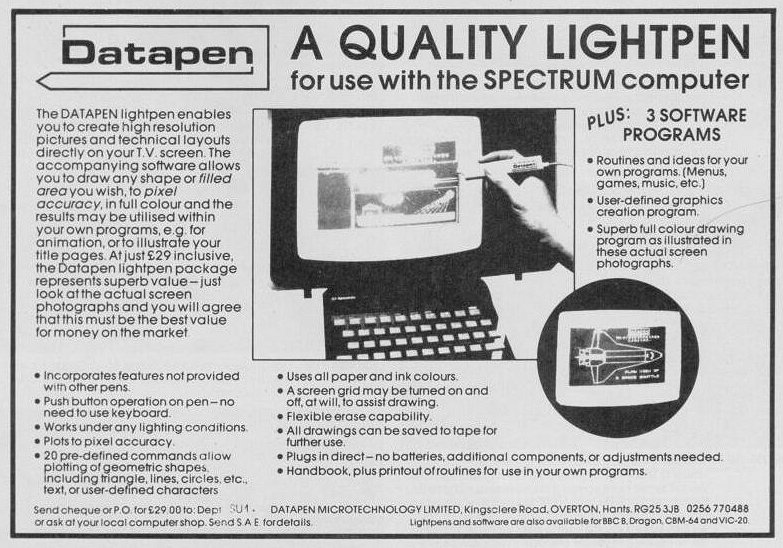
Lightpen system. Draw direct to screen.
Discussion
Nobody has started a thread about this yet.
Files and rights
No permission is on record either way. Screens and pictures are copied here on a take-down basis: if you hold the rights and want something removed, say so and it goes.
In the magazines 44
ZX Computing #16Dec 1984 · p.57
ZX SPECTRUM LIGHTPEN FROM DATAPEN The photograph shows Datapen's lightpen in use with SKETCH, a high resolution colour drawing program. Using this program the lightpen is capable of drawing (and erasing) lines triangles, rectangles, circles, etc., plus user-defined shapes, text characters and block area fills, all to an amazing and repeatable single pixel accuracy. The program is very easy to use as it is controlled by the lightpen placed against keywords on the screen. You don't need a keyboard if you have a lightpen! In another lightpen operated program Datapen provide a user-defined character generator enabling an extremely easy and visual way of designing your own graphic shapes for use in other programs. Both programs, plus an introduction program, are included along with the Spectrum version lightpen for just £29 inclusive. The lightpen plugs into the expansion socket on the Spectrum and is powered by the computer. The Electronics are located inside the pen body itself using electronic watch style micro-miniature circuits. Datapen lightpens, which are also available for other popular micro's, are high performance lightpens with top-of-the-range features, such as a built in switch, LED signal lamp and the ability to work under all lighting conditions. Further details are available from Datapen Microtechnology Limited, [redacted].
Big K #8Nov 1984 · p.93
Richard Burton
Trendiest light has got to be the lightpen. Budding Leonardos of the video age can be spotted instantly. The blank, expressionless stare caused by working within a centimetre of the CRT; the arthritic fingers from manipulating numerous key combinations while drawing. Welcome, then, the Datapen lightpen, as seen on other micros and now appearing on the Spectrum for the first time. It's neat, relatively compact, simply plugs into the Spectrum's expansion slot and is ready to go. No dangling external battery packs or complicated key sequences to memorise. All electronics are packed inside the pen body itself. A useful button on the outside switches in the computer only when you are satisfied the pen is in the correct position on the screen. A red LED on the back of the pen lights to confirm acquisition of valid video data. Software included with the Datapen features an introductory program, a music composer, a user-defined graphics designer and a full hi-res drawing program. This is capable of producing pictures to pixel accuracy and includes pre-defined shapes for circle, rectangle and triangle drawing. Freehand drawing is, surprisingly, not catered for. The makers claim the program contains enough commands to make this "..unnecessary". In use the Datapen is comfortable to hold and very easy to control. Most programs use x, y-axis scanning bars which are fairly fast and don't require the pen to be held in position for long. A friendly bleep tells you all is well when an action is complete. The pen doesn't seem too bothered about exterior lighting conditions. The Datapen lightpen is a worthwhile addition to the Spectrum artist's electronic palette. £29.00 buys you a ticket to creative contentment.
Sinclair User #32Nov 1984 · p.44
STRIKING A LIGHT The Datapen, from Datapen Microtechnology Limited, is completely self-contained, all interface electronics being stored within the main body of the light pen. A light pen is an input device which can be used instead of the keyboard. By using it to point to areas on the screen changes can be made to a display such as option menus. A pen can also be used to draw pictures on the screen and saves time when trying to produce accurate screen diagrams. The manual supplied with the Datapen is technical in some parts but the information provided should allow most people to get to grips with it. It explains that if you want to use the pen in your own programs you will have to know something about machine code. One problem found when fitting the light pen was that the interface is dead ended. That means that you will not be able to add other peripherals onto the back of it. The Datapen is different from other light pens as it incorporates a switch which enables you to use the pen without having to look at the keyboard for guidance. There is also an indicator which when lit tells you that the pen is looking at a light area of the screen and when unlit it is pointing at a dark area. There are several programs supplied with the instrument the first of which gives an introduction to the mechanics of the pen and how to use it. The other programs show how the Datapen is capable of drawing graphic shapes and the type of accuracy that it can achieve when producing diagrams on the screen. The Datapen is one of the best light pens on the market and we suggest you check it out before buying anything else. It is available from Datapen Microtechnology Ltd, [redacted] for £29.00.
Your Spectrum #8Oct 1984 · p.13
LIGHT READING Oh no, not another lightpen I hear you cry! Sorry, but yes. Datapen Microtechnology Limited have launched what they claim is the best lightpen so far for the Spectrum. Why do they make such claims? Well, so far the best accuracy other pens can manage is to one character block. Datapen claim pixel accuracy. The lightpen circuitry itself and the software supplied (there is a drawing program available) is supposed to be a whole lot better than you'll usually find. Well, unless your using a 20" telly, it's difficult to see how pixel accuracy can be achieved considering the size of the tip of the Datapen. Nonetheless it has a nice feel to it and is of a much more professional quality than some other pens. What's the damage? Only £29 including VAT and post and packaging, were from? Datapen at [redacted]; where else!
Advert32
- Sinclair User #57Dec 1986 · p.30
- Sinclair User #56Nov 1986 · p.47
- Popular Computing Weekly #44Oct 1986 · p.36
- Sinclair User1986 · p.21
- Your Spectrum #21Dec 1985 · p.48
- Sinclair User #45Dec 1985 · p.38
- Your Spectrum #20Nov 1985 · p.60
- Sinclair User #44Nov 1985 · p.84
- ZX Computing #21Oct 1985 · p.23
- Sinclair User #43Oct 1985 · p.74
- Your Spectrum #17Aug 1985 · p.38
- Your Spectrum #16Jul 1985 · p.38
- Your Spectrum #15Jun 1985 · p.18
- Your Spectrum #14May 1985 · p.42
- Sinclair User #37Apr 1985 · p.66
- Your Spectrum #13Apr 1985 · p.60
- Your Spectrum #12Mar 1985 · p.65
- Sinclair User #35Feb 1985 · p.120
- Sinclair User #34Jan 1985 · p.175
- Personal Computing Today #6Jan 1985 · p.19
- Personal Computer Games #13Dec 1984 · p.120
- Games ComputingDec 1984 · p.54
- ZX Computing #16Dec 1984 · p.149
- Your Spectrum #10Dec 1984 · p.42
- Your Spectrum #9Nov 1984 · p.84
News/Note5
- ZX Computing #16Dec 1984 · p.57
- Sinclair User #32Nov 1984 · p.44
- Big K #8Nov 1984 · p.93
- Your Spectrum #8Oct 1984 · p.13
- Personal Computer News #67Jun 1984 · p.5
Feature3
- Your Computer #9Sep 1985 · p.46
- ZX Computing #16Dec 1984 · p.83
- Games ComputingDec 1984 · p.42
Reviews from people here
Sign in to write about this, or make an account. It takes a minute and lets you correct the catalogue too.
Everything ZXDB can hold about this is here.
Sign in to correct or add to this.
Hold the rights to this and want it taken down?