
DK'Tronics Keyboard
Hardware: Keyboard
DK'Tronics Ltd · 1983 · Pound sterling 45.00 · Pound sterling 37.50 budget
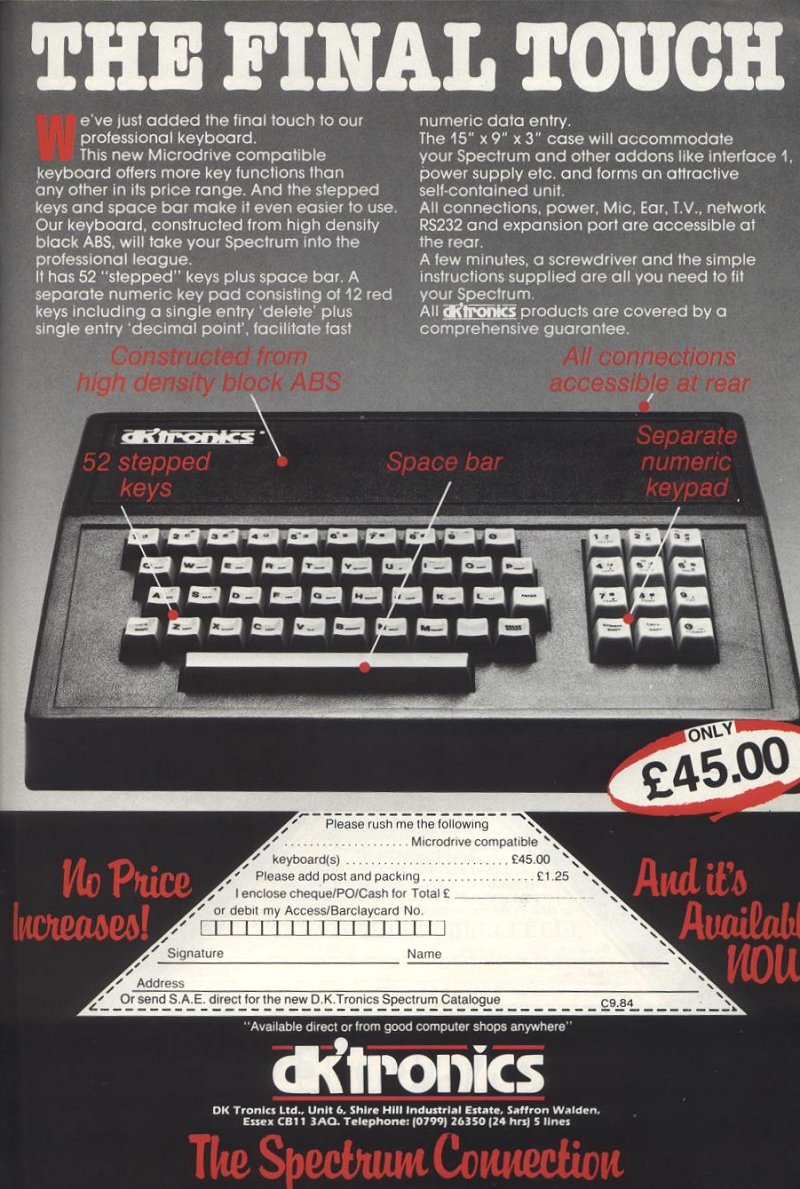
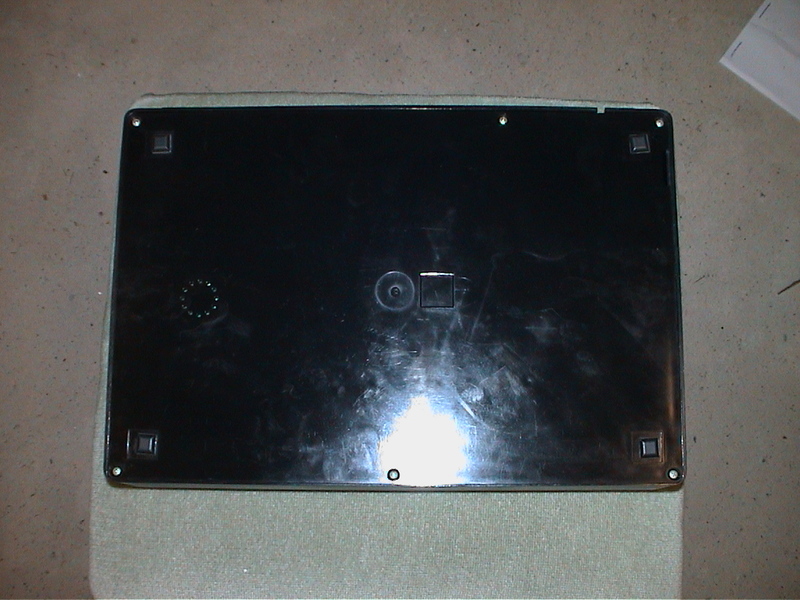
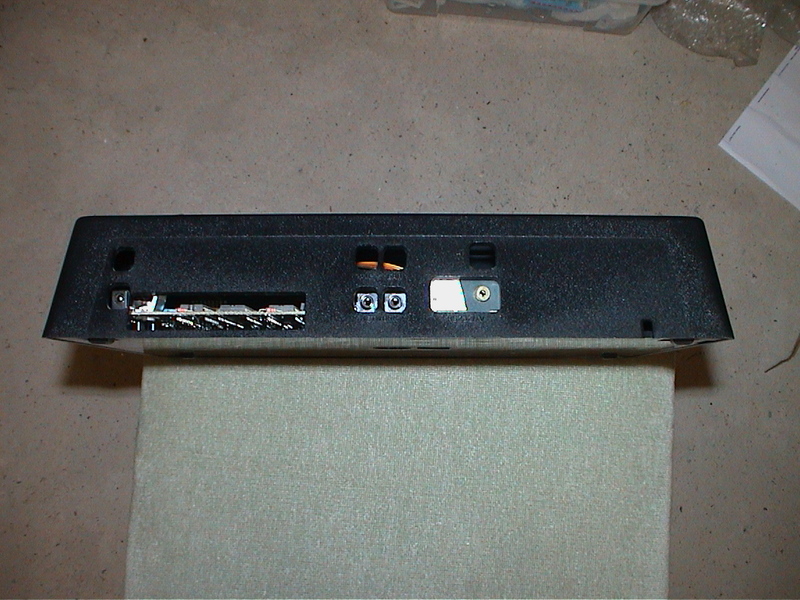
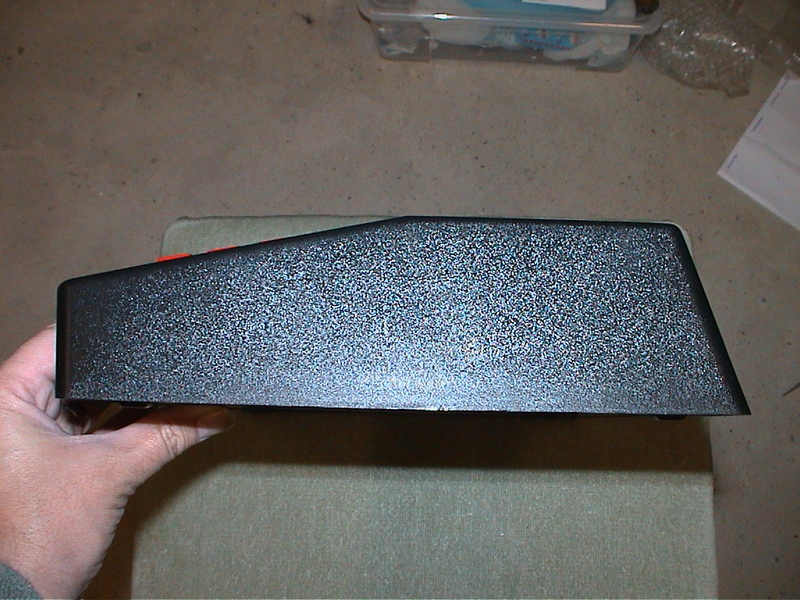
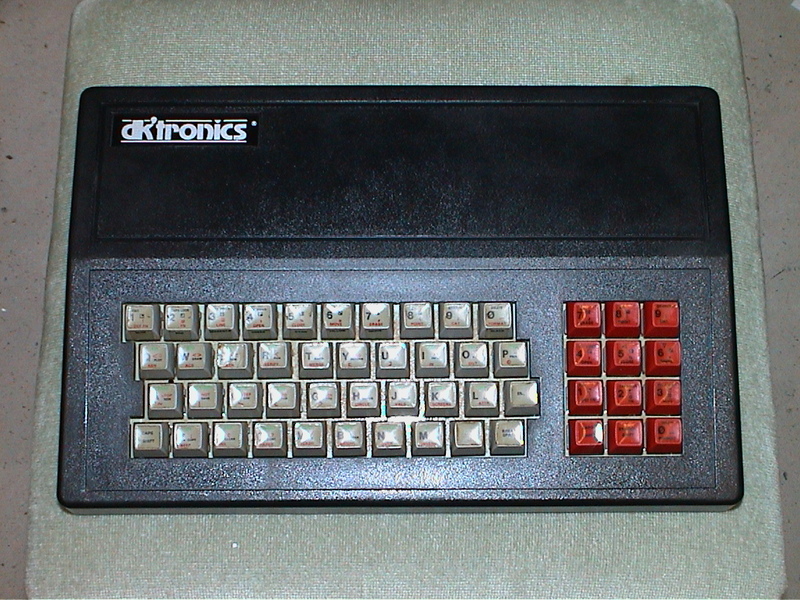
"The DK Microdrive compatible keyboard is the best selling keyboard in the world and is used by 10% of all Spectrum users. It is Microdrive compatible and offers more key functions than any other keyboard in its price range. The stepped keys and space bar make it even easier to use. It is constructed from high density black ABS and has 52 keys and a full width space bar. A separate numeric keypad of 12 red keys, including a single entry 'delete' plus single entry decimal point, facilitate fast data entry."
Discussion
Nobody has started a thread about this yet.
Documents
- DKTronicsKeyboard_Instructions.txtInstructions 4 KB
- DKTronicsKeyboard_Instructions.zipScanned instructions 1,759 KB
Files and rights
No permission is on record either way. Screens and pictures are copied here on a take-down basis: if you hold the rights and want something removed, say so and it goes.
In the magazines 123
ZX Computing #27Jul 1986 · p.32
John Wase
KEYBOARD CAPERS Our all-star reviewing team get to grips with the alternatives to the infamus Spectrum keyboard. DK'TRONICS KEYBOARD DK'Tronics £37.50 The DK'tronics keyboard has had a long history in Sinclair terms. It is sturdy, in a large black plastic case with a sloped back which gets in the way of some peripherals, but is easily hacksawed when the need arises. The box is capacious, and is designed to take the Spectrum printed circuit board; even a buffoon like me can fit it in five minutes. There is also room for Interface 1 (but this can foul the sloping back which has to be pared inside in some versions). The power supply can also be mounted inside, and there is a connector for microdrives. The sloping back prevents many of the standard accessories being fitted direct to the back - you'll need to buy a ribbon connector. Originally introduced for the ZX81 (without space bar) if was fitted right from the start with individual key-switches of the deforming-membrane type. These are by no means the best, but incredibly better than the old rubber buttons, or even the Spectrum+ keyboard. DK'tronics changed keys soon after the space-bar version was introduced; the older switches had a rather better feel. A touch of the do-it-yourself was provided in stick-on labels which wear in use, leaving anonymous keys, now, thanks heavens, superseded by screen-printed keycaps. The number of keys is minimal, and their layout standard only in respect of the letters; there is no single-key comma or full stop, and the shift keys are not arranged so that standard touch-typing is available. On the plus side, there is a numeric pad, ideal for entering lots of data, and a single-key delete. The circuit board design is simple and straight-forward and is very easy to modify. My modified keyboard has been in use for a very considerable time and is used for typing on average several hours a day; it has stood up well to this hammering. If the keyboard feel and layout are sufficient for your purpose, then buy it; it is a robust, honest product which will serve you well. Currently advertised at various prices, you should be able to get it for just over £30 if you shop around, or for £37.50 if you order direct from DK'tronics. And at only £10 more than Sinclair's own upgrade (for the 48K to the Spectrum+) this represents good value.
Sinclair User #41Aug 1985 · p.39
DOFFING CAPS AT KEYBOARD The DK'tronics keyboard has undergone many design changes since it was first introduced for the ZX-81, but it has always retained stuck-on legends. DK'tronics has now relented, and printed keycaps are available as an optional extra for the Spectrum keyboard. The caps are printed in one colour, black, although the caps themselves are grey for the main keyboard, and red for the numeric pad. Fitting the caps is simply a case of pulling the old ones off and pressing the new ones on. Instructions are not included, which would have been useful as you could damage something by being heavy handed. For only £6.00 inclusive the caps are good value if you own a DK'tronics keyboard. If not, they could tip the scales in its favour if you are about to buy. Three-colour printed caps might have been preferable, even at a few pounds more, but it is a step in the right direction. DK'tronics Ltd, [redacted].
Sinclair User1985 · p.18
HARDWARE WORLD With ever-increasing amounts of peripherals available for Sinclair computers, users are finding it more and more difficult to know what to buy. We present a buyer's guide to joysticks, keyboard and printers and review the best of the rest from the 1984 add-on market. A common complaint levelled at the Spectrum is the dead flesh feel of the keyboard. That has encouraged a large number of companies to produce full-sized add-on keyboards for it. We look at seven of the most popular keyboards on the market ranging from a simple replacement board to models of a professional standard. In each case we fitted a Spectrum and Interface One to the keyboard to see how difficult that operation was and also attempted to fit the power supply according to the instructions or inside if there was room. The ease of fitting other add-ons was also considered and a Kempston printer interface was used to test that. Generally, any full-sized keyboard is a vast improvement over the original and of the seven all but the first can be recommended. Two of the keyboards connect to the user port; the other five require you to open the Spectrum to fit them, and that will invalidate your warranty. It is possible that Sinclair will not notice that the case has been tampered with. We have yet to hear of anyone who has been refused a warranty claim. Once the top of the keyboard has been removed the two ribbon cables connecting the old keyboard to the Spectrum are removed from their sockets and those from the new keyboard inserted. It is impossible to damage the Spectrum by fitting those the wrong way round, but care should be taken not to touch the circuit board unnecessarily. As with any piece of electrical equipment the power should not be connected while you are working on it. The feel and size of a keyboard are important - after all, they are the reasons for buying a new one. The sizes are given in the table but the feel is more difficult to measure. The Saga and Lo>>Profile keyboards use keys which press down onto a membrane and have a small plastic dome to provide the spring, all the others use traditional switches. We suggest you try a keyboard before buying to make sure that it feels right for you. K-BOARD The first keyboard we looked at was the K-Board from Kelwood Computer Cases. That fits into the existing Spectrum case in place of the membrane keyboard. Fitting it requires major surgery to the Spectrum. Once the two halves of the Spectrum have been separated the metal cover, which has the E-mode legends on it, has to be removed. The difficulty of that will depend on your Spectrum. After early complaints from Spectrum owners of the glue holding the cover in place melting due to the heat, Sinclair Research used a more powerful glue from issue 3 onwards. Next the old rubber mat and matrix are slipped out and the new PCB containing 40 moving key switches is put in its place. Onto that is placed a plastic housing, and over the top of everything goes the metal cover. For each of the keys you are supplied with a new key cap, and each is hot foil printed in two colours, gold and red. Unfortunately, as the original keys were different in size there is a small gap at the side of all keys and the caps also overhang and shadow the legends on the metal cover. The method of printing the caps does not seem too durable as the legends could be removed by heavy scratching which tends to suggest that they would not wear well. At £28.50 the K-Board is the cheapest replacement keyboard for the Spectrum on the market and as such is worth considering if you can not afford anything else. However, for your money you will get a keyboard that will probably invalidate your warranty as it would be difficult to restore the Spectrum to its original state, and which retains the same, cramped, layout and does not include a full-sized space-bar. Its only advantage is that as it retains the original case there is no problem fitting add-ans. MAPSOFT The Maplin keyboard, marketed under the name Mapsoft, is supplied in either kit form or assembled. It has an extender PCB that fits to the Spectrum and ribbon cable to the keyboard. The Spectrum remains outside the keyboard and so add-ons can be fitted with ease. In all there are 47 keys, the normal 40 plus Delete, Graphs Lock, Shift Lock, Caps Lock, single key E Mode and two space keys. There is also one extra key that you can wire up to your own requirements. Assembling the kit is straightforward provided you are experienced at soldering. None of the chips is socketed and special care has to be taken with them. Once assembled the board is then fitted into the thin plastic moulded case, the top of which is held in place by pieces of Velcro. That top has the colour legends for keys 1 to 7 and 0 printed on it. The legends for the keys are three-colour cards that fit under clear plastic tops. The keyboard offers a number of useful facilities at a reasonable price but it will always look like a DIY kit rather than a professional keyboard. The kit is priced at £44.95 inc. DK'TRONICS One of the best-known names for add-on keyboards is dk'tronics. Although its keyboard design has remained largely unchanged the company has made improvements to it. Those are the inclusion of a full-sized space bar, the addition of single key entry Delete and Full Stop and extra holes in the back of the case to allow the fitting of an Interface One. The company estimates that 10 percent of all Spectrum users own one of its keyboards, a very sizable share of the market and to celebrate that dk'tronics has been offering four software tapes, worth £25.00, free to purchasers, during the last quarter of 1984. The keyboard has the usual forty keys plus a separate numeric pad, which also incorporates the Delete and Full Stop keys. The three-colour legends on the keys have to be stuck on by the user but provided care is taken they will last a long time. To fit the Spectrum into the keyboard it must be taken completely out of its case and screwed to the new base; if you have an Interface One then that is fitted first and the Spectrum PCB is slotted into it and then screwed down. As the PCB is fitted in the back right-hand corner there is an extender PCB for the microdrive lead which connects to Interface One by the solid connector supplied with the microdrive. The lead is taken out of the case through a small slot in the left hand side. An extra long lead can be supplied if required. On the left-hand side are three pillars on which you can mount the power supply. To do that the power supply must be taken out of its case and should therefore only be fitted by people who have some electrical knowledge. There are a number of problems concerning the fitting of the power supply; the Sinclair power supply has gone through a number of design changes, and if it is marked 'Made in Portugal' then it will probably not fit onto the pillars. The design of the pillars is such that they will either need cutting to size and the power supply screwed down using oversized washers or it will have to be wedged in by use of a piece of foam, both methods slightly unsatisfactory. The mains side of the power supply is lead out of the case under, and very close to, the extender PCB. It would have been far simpler to put the Spectrum PCB on the left hand side in the first place and so avoid having leads crossing inside. The Kempston interface will not fit unless you are using Interface One or are prepared to remove the cable's strain relief bar. It is possible to trim the case. Despite those problems the keyboard is very popular. It has a nice feel to it and on the whole can be recommended. It costs £45.00 plus £1.25 p&p. LO>>PROFILE The Lo>>Profile keyboard from Advanced Memory Systems Ltd is one of the newer keyboards on the market and looks very attractive. It is also very large, the largest of the keyboards reviewed, and that could be a problem if you are short of space. As well as the standard Spectrum keys it has a separate numeric keypad, with extra Caps Shift and Full Stop keys, and there is an extra Caps Lock key included with the main keys, but those last two are not single key entry. It has a full-sized space bar. All the keys are sculptured and printed in three colours. The Spectrum PCB has to be removed from its case and there are four bolts sticking up from the base of the keyboard on which it fits. In the review model they did not line up correctly and had to be moved by enlarging the mounting holes slightly. There are plastic washers on those bolts to protect the PCB. While the base seems flimsy, when everything is bolted together it is held securely. Metal inserts in the top where the base is bolted through add to the solidity. When fitting Interface 1 the two long screws are removed and the interface then sits underneath the keyboard. That raises the keyboard to a better working angle. The bolts which secure the Spectrum PCB to the base are also passed through the interface. On the review model the size of the case meant that the normal microdrive lead was not long enough to clear it and so the drive had to be angled out backwards from the case. As with most full-sized keyboards the Kempston interface was a problem to fit due to the increased height of the keyboard at the back. The best remedy for that would be to purchase a flexible connector which fits the user port. Priced at £49.95 plus £2.50 p&p, the keyboards good looks and positive feel will attract many users; its lack of any single key functions may, however, prove a drawback. EMPEROR The Emperor keyboard from Saga Systems is similar to the Lo>>Profile keyboard in that the keys use the same method of operation and it looks very good. What sets it apart is its remarkable 67 separate keys. As well as the usual 40 keys there are 21 of the most commonly used functions on separate keys plus an extra three Symbol Shift and one Caps Shift keys. Those are arranged so that the functions are adjacent to a shift key. In that way just one finger can be used to hit both keys, a system that works remarkably well. Those extra functions are the mathematical - plus, minus, multiply, divide and equals, punctuation - full stop, comma, semi-colon and colon; plus hash and dollar - all operated by a symbol shift. Delete, Edit, Graphics, Caps Lock and the four cursor keys are Operated by a Caps Shift. Two of the Shift keys are together for Extended mode. For good measure there are also two adjacent Enter keys, extra Run, Save and 0 keys and a full size Space Bar with a levelling device. To fit the keyboard you remove the top half of the Spectrum and the bottom half, containing the PCB, is bolted under the base of the keyboard. The board with the actual keys is screwed to that and the top then screws to the base. The whole process only takes about five minutes, as claimed in the advertisements, though you then have to stick the three-colour labels onto the keys which takes considerably longer. Provided care is taken, fitting the labels is not a problem and they stand up well to some heavy use. As the original Spectrum base is now the base of the new keyboard, add-ons such as Interface 1 connect without difficulty but the usual problems with the Kempston interface will be encountered. The price of £54.45, plus £1.15 p&p, is slightly above average but the multitude of keys ensures value for money. STONECHIP The Stonechip Electronics keyboard is one of the few keyboards where the Spectrum does not have to be opened to be fitted. For good measure it also incorporates a beep amplifier, Load/ Save switch and a reset facility. Fitting the keyboard is simple; the top half, which houses the keys and amplifier, is connected by a ribbon cable to a long, thin PCB. That has the aerial, MIC and EAR plugs on one side and sockets on the other. That is plugged into the back of the Spectrum and the keyboard screwed together, with the Spectrum inside. The keyboard has 44 keys printed in three colours, the usual 40 including a full-sized 145mm, space bar plus a single key entry Delete and E mode. In addition there are two Reset keys which when pressed at the same time will reset the computer - particularly useful when with many games the only way to do that is to pull the plug which eventually leads to it becoming loose. You have to be careful as resetting will clear out the memory and as one reset key is placed next to the Caps Shift and the other next to the 0 you must get into the habit of using the Delete key rather than the normal method of using those keys, otherwise you may delete more than you intend. At the top of the keyboard is the Load/Save switch which in its middle position acts as the beep amplifier. There are both tone and volume controls and a good clear sound can be obtained. If you are not using the amplifier then it is best to put the switch to one of the other positions as otherwise it picks up hum from the computer. Also on top there is an LED to show you that the power is on. For some reason best known to Stonechip the company has re-positioned the MIC and power sockets. The MIC socket is 5mm nearer the user port and the power socket placed between the two. That small change means that a number of add-ons will not fit. Interface 1, however, will fit with a slight struggle as will the Kempston interface. Priced at £59.95 the keyboard is one of the more expensive ones available but the ease of fitting and the facilities it offers make it a good buy. TRANSFORM The last of the keyboards reviewed is that from Transform. It is aimed at professional users as it is the only keyboard reviewed with a metal case and also one of the few with three-colour printed key caps. There are 60 keys, including a numeric pad that has an extra Caps Shift and single key entry Full Stop plus a full size space bar. The other extra keys are Symbol Shift, Edit, Delete, E Mode, Colon, Semi Colon, Comma and another Full Stop - all single key entry. Fitting is straightforward; the base of the Spectrum is retained as an insulator and bolted through to the base of the keyboard. If Interface 1 is used the two long mounting screws have to be removed and the bolts then go through it and the Spectrum. There is provision to put the power supply inside the case and special connectors are used to wire an on/off switch and a LED. That is relatively easy and you need not worry about the leads shorting out as everything is well insulated, although Transform do recommend fitting an extra earth wire for safety. The keyboard has a solid feel to it and is certainly the best of the keyboards reviewed. The only problem that may be experienced is that with some issue 3 Spectrums the ULA chip, if not marked with the word Ferranti, is working to the limits of its specification which may make the computer rather temperamental when used with the keyboard. Transform sell a buffer, at £6.95 inc, which cures that problem. The price of £69.95 reflects the sort of use to which this keyboard will be put but it is certainly the best keyboard of the moment. Kelwood Computer Cases, [redacted]. Maplin Electronic Supplies, [redacted]. dk'tronics, [redacted]. Advanced Memory Systems Ltd, [redacted]. Saga Systems Ltd, [redacted]. Stonechip Electronics, [redacted]. Transform, [redacted].
Emperor.
K-Board.
Lo>>Profile.
Mapsoft.
Stonechip.
Transform.
dk'tronics.
The length measured across the Q and P keys is the overall distance and is included to give an idea of the pitch. The original keyboard has been included for reference. Name: Spectrum Length In mm (Q-P): 195 Length In mm (Space): N/A Number of Keys: 40 Size In mm: 230 x 140 x 30 Price: Name: K-Board Length In mm (Q-P): 190 Length In mm (Space): N/A Number of Keys: 40 Size In mm: 230 x 140 x 55 Price: £28.50 Name: Maplin Length In mm (Q-P): 185 Length In mm (Space): 75 Number of Keys: 47 Size In mm: 370 x 165 x 50 Price: £44.95 Name: dk'Tronics Length In mm (Q-P): 200 Length In mm (Space): N/A Number of Keys: 52 Size In mm: 350 x 245 x 70 Price: £45.00 Name: Lo>>Profile Length In mm (Q-P): 190 Length In mm (Space): 155 Number of Keys: 53 Size In mm: 440 x 220 x 50 Price: £49.95 Name: Saga Length In mm (Q-P): 190 Length In mm (Space): 150 Number of Keys: 67 Size In mm: 370 x 180 x 50 Price: £ Name: Stonechip Length In mm (Q-P): 180 Length In mm (Space): 145 Number of Keys: 44 Size In mm: - Price: £59.95 Name: Transform Length In mm (Q-P): 188 Length In mm (Space): 150 Number of Keys: 60 Size In mm: 410 x 220 x 75 Price: £69.96
Your Spectrum #7Sep 1984 · p.28
Henry Budgett
GOING OVER BOARDS Feeling out of touch with your Spectrum? Then join Henry Budgett as he fingers his way through five replacement 'boards - all out to prove that pressing keys doesn't have to be a rubbery experience. Ask a hundred owners of the Spectrum to point out their least favourite aspect of the machine and it's odds on that 99 per cent will plump for the keyboard as the prime culprit - which is hardly surprising, considering it feels not unlike a hunk of dead meat! Added to the peculiarities of its india-rubber action are the allied quirks of a non-standard spacing, a fiendishly complicated system of Shifts and Symbol Shifts to access the various keywords, and punctuation symbols littered everywhere. While Sinclair Research's revolutionary keyword and syntax checking system works well enough for the beginner, it tends to stifle the familiarity that occurs on a more regular kind of computer keyboard. Remember, however much fast typing is simply not possible on a squidgy membrane, still there are several word-processing programs available! Obviously, many of the major objections could be alleviated by the simple bolting-on of a full QWERTY keyboard that uses full-travel keys; this, however, is surely not the ideal answer. Many of the difficulties experienced by users trying to cope with the idiosyncratic shifting system could be solved through the addition of extra keys to handle the more commonly occurring characters - such as the punctuation and mathematical symbols, and the Delete key. While carrying out such reorganisation, an astute designer can also build-in switches to control the power and isolate the EAR lead while recording. And further enhancements could include a case big enough to hold various components of the system... such as the power supply, Microdrive, Interface 1 and other add-ons. All these possible options have been considered while judging the five keyboards under test. So, the question we're going to be asking ourselves is: just how far have the manufacturers gone towards creating the 'ideal' replacement? But there's a sting in the tail. Add a keyboard to your Spectrum and, although you're going to be enhancing its usefulness, you're going to raise its overall price to a level where you're justified in expecting something very special indeed. That's the high level of criteria to which the five units here have been subjected. CONCLUSION Just one of the keyboards on test comes close to meeting the exacting criteria I initially laid down for a replacement unit, and that's the Fuller FDS; even here the finishing touches let it down a bit. From a manufacture point of view, the best made by far was the product from Ricoll; given a set of decently engraved keytops, this would rate very highly as a direct replacement system - and it's also quite attractively priced. Of the rest, the Lo>>Profile had most to offer but lacked the extra function keys of the Fuller model and could also do with more support for its keyboard. The Dk'Tronics unit needs to be supplied with the keys engraved or moulded - stick-on labels that the customer has to apply are not really sufficient. Otherwise it's a substantial add-on. The Transform device seems to be a little over-priced for the facilities it has to offer over its cheaper rivals. Despite that it's recently been rated "top keyboard at the moment" by one of our magazine rivals; maybe you should check it out to see if I've missed an endearing quality or two. On a final note, now that Sinclair Research has perfected the newer type of membrane - as used on the QL - it would be interesting to speculate whether the add-on companies are likely to make the switch too. It could be the key to success! LO>>PROFILE KEYBOARD Price: £49.95 Supplier: Advanced Memory Systems, [redacted] The description 'Big, Black but Slim' might easily be misconstrued by some, but as dedicated readers of a computer magazine I'm sure you'll realise at once that I'm talking about the Lo>>Profile keyboard. Internally, the keyboard can only accept the ZX Spectrum's main PCB - the various connectors hang out the back through slots, allowing you to add whatever's necessary. It comes supplied with a photocopy of an advertisement for the device - presumably to pass on to a friend - and a single sheet of instructions showing you how to fit it all together. Using logic, it's easy enough to assemble but nowhere does it mention that you've got to unplug the old keyboard, or that the Spectrum's PCB must go in the right way round. Once fitted, at first sight it looks really nice, with a decent set of keys all properly laid out and a numeric pad set off to the right. All the legends are printed clearly on the keytops in the same colours as the original; the only one missing is Break - which ought to be on the Space bar, but isn't. The cursor keys are repeated on the numeric keyboard that features its own Caps Shift and V keys as well. The casing is much wider than it needs to be - presumably designed on the premise that bigger looks better - and although the top is made of a substantial plastic, the base isn't and tends to 'give' under pressure. The keyboard surround is also rather flexible; it has provision for 11 mounting plates but only six were fitted. Overall, the unit worked very well, but the initial feeling that it looked smart slowly evaporated once it had sat on the desk for an hour or two. But for those who hold great stead by personal appearances, the Lo>>Profile is definitely a 'looker'. FDS KEYBOARD Price: £49.95 Supplier: Fuller Micro Systems, [redacted]. A sleek, black plastic casing surrounds a contender that's really rather pleasant to look at. But the first obvious problem was a complete lack of any instructions - such is a reviewer's lot. Still, inside the case I found two sets of possible mountings for the Spectrum's PCB - and as only one clears the keyboard, that was easy to solve. Unfortunately, only two of the four posts lined up with corresponding holes on the PCB - which is hardly good news from the mounting point of view. The power lead from the transformer has to go to the keyboard first, and a short lead from here connects to the PCB. There appear to be mountings for the transformer but I suspect these might be best ignored for safety reasons. One of the two ribbon cables was damaged, a wire having broken off at the joint between the cable and the plug; both were rather short, making installation harder than it should have been. The standard set of Spectrum keys have been added-to in an intelligent way, with a cluster of cursor keys, a full-size Space bar and a Shift key on each side of the keyboard. Also included are keys designated Rubout, f1, f2 and Sym - all labelled in bright red; the remainder are grey or black. Once in operation I discovered the extra keys, f1 and f2, select the lower and upper keywords printed on the keytops - a neat idea and one which saves playing octaves across the keys to reach both Shift and Symbol Shift. The legends are screen-printed - which is one better than stickon labels, but so badly done in some cases that it's a toss-up which is the least desirable method. Overall, but for the quality of the finishing touches, I'd have to proclaim the FDS a pretty decent unit. Better keytop printing is a must and the installation of the PCB needs to be made much more secure. And, as usual, I still have serious reservations about installing the power supply unit inside the box. TRANSFORM KEYBOARD Price: £69.95 Supplier: Transform Ltd, [redacted]. This case has obviously been designed to look nice, and it certainly does - for almost £70, you'd have every right to expect something special. Constructed from metal, the unit obviously presented its designers with the problem of isolating the Spectrum's PCB from its new case. Their solution was to request that you leave the bottom half of the computer's casing attached to the PCB - hardly the neatest of ways around the difficulty, but it does solve the problem. The power supply goes in too, and the whole thing (plus case) is stuck down with one of those double-sided pads. Both a power switch and LED are provided but you'll have to be adept with a soldering iron to fit them; the instructions for fitting these extras are not at all clear. Another source of worry is the fact that the case isn't earthed; once again, you've got mains voltages hanging around, just waiting to bite you. While the Ricoll unit is built of solid metal that's formed into a proper box, the Transform keyboard is flimsy by comparison. Littered with sharp-angled corners, it feels as if the slightest pressure could collapse it; with such little support. the board is prone to excessive flexing. There are extra keyboard facilities on-board which include both Delete and Edit keys, as well as a full numeric keypad; once again, however, the Break function isn't labelled - but I'm sure you'll find it. DK'TRONICS CASE KEYBOARD Price: 45 Supplier: Dk'Tronics, [redacted] Definitely one for the DIY fanatic here! A really solid, black plastic case with a real key copy of the Spectrum's existing keyboard on the left and a 12-key numeric/editing keypad on the right. The Spectrum's PCB fixes on to four plastic pillars, and for that you're expected to use the screws that came out of the computer - so don't lose any of them! The power supply will also fit inside the case, although it has to be removed from its casing before you can install it. That means there's a healthy 240 volts floating just an inch or so away from the Spectrum PCB and keyboard. The manual points out that mains can kill - but even if nothing untoward happens, the mains hum will probably affect the picture quality. The DIY element comes in when you find the sheet of self-adhesive stickers, to be used for labelling the blank keytops! The result is cheap, messy and unlikely to last as long as the legends painted on Uncle Sir Clive's original rubber squares. Insufficient support is provided for both the keyboard and keypad (which sag under pressure) but the key actions are quite nice. That apart, if the keyboard came supplied with the keytops engraved or moulded, then I'd have to vote it a very reasonable product. RICOLL ELECTRONICS RIKB1 Price: £37.95 Supplier; Ricoll Electronics, [redacted] If you see sheer weight as a good judge of a product's quality, you're certain to be pleased with this one! Tipping the scales at a good old 1.5kg, this metal-cased keyboard seemed at first to be a solid prospect. The system keyboard support proves better than that offered by many a rival and the main board stays firmly locked on to four metal studs mounted on the base. The 'manual' consists of two photocopied sheets, plus an extra note slipped in; this warns that one of the leads to the keyboard - must be twisted, and that the user should beware of long component leads from the Spectrum's PCB shorting out on the metal base. Shudder! Unfortunately, apart from its full-size Space bar, the device is once again a real key copy of the original. But with no numeric keyboard added the unit is certainly compact and, being built of heavy gauge metal, it's virtually guaranteed to last. The same, however, cannot be said of the keyboard itself - it uses nasty little keytops that feature stick-on legends. Oh well, at least they've been stuck on for you! This could have been a winner, had the quality of the keyboard matched up to that of the casing. As it is it's still a whole lot better than the Spectrum's rubber pads and very reasonable at the price.
Gaps are left at the back of the keyboard unit allowing the user to make use of the expansion sockets at the back of the Spectrum. This feature is similar on all of the units reviewed.
The case is constructed from strong ABS plastic.
The legends for the keytops come as squares of printed sticky-back plastic that have to be stick to the right keys DIY-style.
The main keyboard is an exact copy of the Spectrum original although a numeric keypad is provided on the right - useful for Hex entry.
LO-PROFILE Keyboard Type: Mechanical Action: Excellent Total Keys: 53 Numeric Keypad: Yes Cursor Keypad: Yes Function Keys: No Extra Shift Keys: Yes Full Space Bar: Yes Size (mm): 436 x 218 x 50 Weight (kg): 0.85 Case Material: Plastic Label Method: Screenprint MIC Switch: No Power Unit Inside: No Power Switch: No TRANSFORM Keyboard Type: Mechanical Action: Good Total Keys: 60 Numeric Keypad: Yes Cursor Keypad: Yes Function Keys: Yes Extra Shift Keys: Yes Full Space Bar: Yes Size (mm): 407 x 220 x 75 Weight (kg): 1.3 Case Material: Metal Label Method: Screenprint MIC Switch: No Power Unit Inside: Yes Power Switch: Yes DK'TRONICS Keyboard Type: Mechanical Action: Good Total Keys: 52 Numeric Keypad: Yes Cursor Keypad: Yes Function Keys: No Extra Shift Keys: Yes Full Space Bar: No Size (mm): 350 x 250 x 70 Weight (kg): 1.1 Case Material: Plastic Label Method: Stick-on MIC Switch: No Power Unit Inside: Yes Power Switch: No FULLER FDS Keyboard Type: Mechanical Action: Good Total Keys: 51 Numeric Keypad: No Cursor Keypad: Yes Function Keys: Yes Extra Shift Keys: Yes Full Space Bar: Yes Size (mm): 340 x 225 x 70 Weight (kg): 1.0 Case Material: Plastic Label Method: Screenprint MIC Switch: No Power Unit Inside: Yes Power Switch: No RICOLL Keyboard Type: Mechanical Action: Fair Total Keys: 42 Numeric Keypad: No Cursor Keypad: No Function Keys: No Extra Shift Keys: Yes Full Space Bar: Yes Size (mm): 285 x 205 x 60 Weight (kg): 1.5 Case Material: Metal Label Method: Sticck-on MIC Switch: No Power Unit Inside: No Power Switch: No
Sinclair User #29Aug 1984 · p.31
John Lambert
IMPROVED KEYBOARD dK'Tronics has released yet another version of its popular keyboard for the Spectrum. Readers may remember that when we last reviewed its keyboard we bemoaned the lack of a full-size space bar and that is the main addition to it. The other additions are that on the numeric pad the two shift keys have been replaced by single-key entry Delete and full stop. Note that in its current advertisement it still has the old legends on the keys. A problem we encountered when fitting Interface 1 was that the back of the case bulged slightly and that is still so. While it is possible to trim the case it should not be necessary. One other niggle is that it is usual to have a space bar leveller, a small piece of wire which ensures the space bar remains horizontal when pressed, and that has been omitted. Overall the keyboard is an improvement on the old version and is still one of the better ones available but dK'Tronics has been making keyboards for long enough to ensure that everything will fit properly. Also it has retained the stick-on legends which, while the keyboard was used for both the ZX-81 and Spectrum was understandable, is an unnecessary chore on a dedicated keyboard. The keyboard is still sold at the old price of £45 from dK'Tronics, [redacted] or computer retailers.
Sinclair User #27Jun 1984 · p.45
John Lambert
GIVE YOUR MACHINE THE POSITIVE TOUCH John Lambert flexes his fingers over five professional keyboards for the Spectrum. One of the first add-ons for most Spectrum users is a full-size keyboard. While the original keyboard was a vast improvement on the ZX81, it is still very limiting if you use your Spectrum a great deal. For professional use it is almost a necessity. In the last few months six new keyboards have either been announced or appeared on the market. Of those, we managed to obtain four for review, one was seen in its prototype stage and we are still waiting for the other. In each case we fitted a Spectrum and Interface One to the keyboards to see how difficult it was and also tried to fit a power supply inside, where there was either room or it was suggested in the instructions. We also tried to connect a Kempston printer interface, which is a fairly standard interface and did not fit on some of the older keyboards. Whether or not it fits can therefore be taken as a measure of how other add-ons will fit. The feel and size of a keyboard are important; after all, they are the reasons for buying a new one. The sizes are given in the table but the feel is more difficult to measure, as it will differ from person to person. If possible, visit either a local computer shop or one of the Microfairs and try them yourself; if you cannot do that any of the keyboards should be satisfactory. The Maplin keyboard, marketed under the name Mapsoft, is for the home hobbyist, in that it is supplied in kit form. It is also the only one which connects to the user port of the Spectrum. There is an extender PCB which fits on to the Spectrum and a ribbon cable to the keyboard. It has 47 keys, the normal 40 plus Delete, Graphs lock, Shift lock, Caps Lock, single key E Mode and two space keys. There is also one extra key which you can wire up to your own requirements. Making up the kit is straightforward, provided that you are wed to soldering; if not, it might be an idea to practise first. None of the chips is socketed and special care has to be taken with them. The made-up board is fitted into a thin plastic moulded case, the top of which is held in place by pieces of Velcro and has the colour legends for keys 1 to 7 and 0. The legends on the keys are three colour cards which fit under a clear plastic top. Unfortunately the keyboard was received late for review and we did not have time to test it fully. First impressions, however, were favourable, although the case appears to be fairly flexible. If you prefer making your own keyboard, this is perhaps the best, if not the only one available. The kit costs £44.95 inc. and can be obtained from Maplin Electronic Supplies, [redacted], or from its many shops. The dK'Tronics model for the Spectrum is largely the same as the old, with the same stick-on legends. The case is made of plastic and there are extra holes in the back to allow connection to Interface One when fitted. To fit the Spectrum in the keyboard it must be taken out of its case and screwed to the new base. If you have an Interface One, that is fitted first and the Spectrum PCB is slotted into it and then screwed down. As the PCB is fitted in the back right-hand corner, there is an extender PCB for the Microdrive lead which connects to Interface One by the solid connector supplied with the Microdrive. The lead is taken out of the case through a small slot in the left-hand side. Also on the left-hand side are three pillars on which you can mount the power supply. To do that the power supply must be taken out of its case and should therefore be fitted only by people who have some electrical knowledge. There are a number of problems fitting this power supply - the Sinclair power supply has gone through a number of design changes. If it is marked Made in UK on the base it will probably fit on the pillars. When fitting Interface One it may make the back of the case bulge slightly. It is possible, however, to trim the case but that should not be necessary and is poor design. The Kempston interface will not fit unless you are using Interface One; again, it is possible to trim the case. Despite those difficulties and the lack of a full-size space bar, the keyboard has been very popular in the past. The reviewer has used the old version for the last nine months and it has proved reliable. It is a pity that dK'Tronics did not put a little more thought into the new version, as it could have made a good keyboard even better. Overall, however, it is a good keyboard; it has a pleasant feel to it and can be recommended. It is available, price £45 plus £1.25 p&p, from dK'Tronics, [redacted], or through the Spectrum chain of shops. The keyboard which probably started the sudden interest is the Fuller FDS. It has been a long time arriving and has had more written about it than any other keyboard - not all of it good. As well as the usual 40 keys, it has an extra 11, including a full-size space bar. The extra keys are four direction keys - they are shifted 5, 6, 7 and 8, very useful when editing or using a word processor; two function keys which put the Spectrum into extended mode - f1 gives the red functions and f2 the green; extra Caps Shift and Symbol Shift; and single-key entry for Delete, Comma and Full Stop. All the keys have their legends printed on them, the main functions in white on the top and Extended mode functions on the front in red. Fitting the Spectrum inside proved somewhat difficult, as the screw positions did not line up exactly with those on the Spectrum PCB; with a little effort it can be made to fit if one of the screws is omitted. When trying to fit Interface One more problems arose. In this case the Spectrum is fitted at the front and Interface One at the back, with a flexible connector between them. Fuller does not supply that as standard. As the Spectrum is so far forward the power, cassette and aerial sockets are inaccessable when the keyboard is put back together and would therefore either have to be fitted permanently or additional leads made up and brought out to the back, where holes would have to be drilled in the case to take them. Neither is there a slot for the Microdrive lead and that would have to be cut out if required. The Spectrum power supply is connected directly to the keyboard; a lead which goes to the Spectrum is only just long enough - if you have the Fuller Master Unit you may have to extend it. That also means that if you want to move your Spectrum, you have either to open the case to unplug it or take the power supply with you. It should be possible to fit it inside the case and Fuller has put four pillars in the back right corner for it. Unfortunately they do not line up with any of the holes on the power supply PCB on either version and would need a great deal of ingenuity to fit. In use, the keyboard was reasonably good, the extra keys being a boon when using a word processor, particularly the arrow keys. Unfortunately it was impossible to get shifted Z, X, C and V. That would appear to be a design fault, as we had two keyboards for review and the fault was common to both. Other than that, the keys were a little stiff but that is only to be expected with a new keyboard. All-in-all, the keyboard could have been very good but it has too many little faults and a few major ones. If you can obtain one where the keys work correctly and are prepared to spend a little time customising, it would be worthwhile buying, otherwise do not bother. It is available, mail order only, costing £49.95 plus £2.50 p&p from Fuller Micro System, [redacted]. The emergency enquiry number is [redacted]. The new Saga keyboard, the Emperor, is still in the prototype stage but was expected to be readily available by the latter part of April. We were able to have an exclusive preview of the new model which looks as if it will provide the first real competition to dK'Tronics. There are 67 keys, the normal 40 in white, plus 27 beige function ones, including full-size space bar. They are four shifted arrow keys, 5, 6, 7 and 8; two unshifted ones, 6 and 7, plus 0, to be used in games; two extra Caps Shift and Symbol Shift; and single-key entry for Edit, Delete, Caps Lock and Graphics. In addition a number of keys which normally need symbol shift are now single-key entry; for mathematicians, plus, minus, divide, times and equals; for word processors, comma, full stop, colon, semi-colon and quote; and for programmers, greater than, less than, string and hash. Fitting is very straightforward. Only the top of the Spectrum case is removed and the base, containing the PCB, is bolted to the bottom of the keyboard. In that way Interface One will not have to be taken out of its case and will fit directly to a Spectrum base. The Kempston interface will also fit if the strain relief bar is removed. On the top of the keyboard is a groove to hold pens. Saga could well have a winner if the production modeL is anywhere near as good as the prototype. It will cost £54.45 plus £1.15 p&p and is obtainable, by mail order, from Saga Systems Ltd, [redacted] or in person at The Woking Computer Centre, [redacted]. The Transform keyboard is aimed squarely at professional users. It is the only keyboard reviewed which had a metal case and also the only one with three-colour printed key caps. There are 60 keys, including a numeric pad which has an extra Caps Shift and full stop, plus a full-size space bar. The other extra keys are Symbol Shift, Edit, Delete, E Mode, Colon, Semi Colon, Comma and another Full Stop. Fitting is very straightforward. The base of the Spectrum is retained as an insulator and bolted through to the base of the keyboard. If Interface One is being used, the two long mounting screws have to be removed and the bolts then go through it and the Spectrum. There is provision to put the power supply inside the case and special connectors are used to wire up an on/off switch and a LED. That is also relatively easy. You need not worry about the leads shorting out as everything is well insulated; in any event the switch is on the 9V side and could not cause damage. The keyboard has a solid feel to it and it certainly the best-looking of the keyboards reviewed. The only problem which may be experienced is that some Issue 3 Spectrums are temperamental when used with it. Its price of £69.95 reflects the kind of use to which it will be put but it is certainly the top keyboard at the moment. Transform is at [redacted].
'Saga could have a winner with the new Emperor keyboard.'
'The Fuller FDS probably started the sudden interest.'
Make: Sinclair Length Q-P: 195 Space: N/A No. of keys: 40 Price: Free Size in mm: 230 x 140 x 30 Make: Maplin Length Q-P: 185 Space: 75 No. of keys: 47 Price: £44.95 Size in mm: 370 x 165 x 50 Make: dK'Tronics Length Q-P: 200 Space: N/A No. of keys: 52 Price: £45.00 Size in mm: Make: Fuller Length Q-P: 185 Space: 150 No. of keys: 51 Price: £49.95 Size in mm: 355 x 255 x 65 Make: Saga Length Q-P: 190 Space: 150 No. of keys: 67 Price: £54.45 Size in mm: 370 x 180 x 50 Make: Transform Length Q-P: 188 Space: 150 No. of keys: 60 Price: £69.95 Size in mm: 410 x 220 x 75 The length measured across the Q and P keys is the overall distance and is included to give an idea of the pitch.
Personal Computer News #54Mar 1984 · p.34
John Lettice
ALL KEYED UP Spectrum keyboards feel the light brush of John Lettice's fingertips. PRODUCT: Fuller FDS Keyboard PRICE: £49.95 inc VAT, add £2 p&p MANUFACTURER: Fuller, [redacted] PRODUCT: Transform Keyboard PRICE: £69.95 inc VAT MANUFACTURER: Transform, [redacted] PRODUCT: DK Tronics Keyboard PRICE: £45 inc VAT, add £1.25 p&p MANUFACTURER: DK Tronics, [redacted] In the beginning was the word, and the word was that there was a professional keyboard for the Sinclair Spectrum just around the corner. But the tale grew in the telling, as did the waiting lists. At the end of last summer there were, apparently, plenty of keyboards on the market. We asked for samples from a half-dozen companies in order to compare them. They almost all said they'd send one within ten days, and, with the honourable exception of DK Tronics, they all failed to come up with the goods. Five months on, Fuller has finally launched the FDS and Transform, a newcomer, has started supplying a classy-looking keyboard. And we've still got the one from DK Tronics, so here goes. FULLER FDS Considering the gestation period, the Fuller FDS should be first rate - it certainly looks good. The keyboard layout is essentially the same as on the Spectrum, with a number of additions. You get a full-size space bar, a delete key on the left of the top row, an extra four cursor keys and two function keys which split the role of the symbol shift. The symbol shift is also duplicated on the left of the keyboard, and there's an extra shift on the right. Most important is a comma key plus a full stop key on the right hand side of the bottom row. They look isolated sitting alone on their two keys, but they're crucial if you want to use the Spectrum for word processing. The keys themselves have a smooth feel to them, and click when you hit them. They come with the relevant characters ready printed on the top and the front. The colours aren't the same as on the original Spectrum case, and the colour codes 1-7 are missing. So it could be a bit confusing. I'm not suggesting the FDS is an unmitigated success - we haven't looked inside yet. When you open the case for the first time you don't realise the full horror of the situation. Six small screw holes allow the printed circuit board to be secured either at the front or the back of the case. Just consider the interfacing implications of having the board at the front. Four pillars at the rear right house the power supply. The latter could be terminal for the unwary. When we asked Fuller about the power supply, the company was categorical that an amateur should not take the Sinclair power supply unit out of its case and fit it into the FDS case. The company will fit its own power supply, which looks safe and sturdy. But since there's no official warning in the documentation, someone is likely to try to fit it the Sinclair power unit, even though we warn against it. I risked life and limb and gave it a try. One Fuller advert says: 'The Microdrive is easily adapted to go inside along with the power supply. Fixing is simplicity itself, no soldering or technical knowledge is required.' I'd say this is fairly misleading, but read on, unless you're of a nervous disposition and/or work for Sinclair Research. My first problem was the fact that the power unit I had was secured by three screws, and the FDS had four pillars to screw it to. So I backed off the four pillars, and did a measuring job with a view to super-gluing the power unit base into the FDS. No dice. Even hacking off the various projecting bits of plastic on the unit case still left me about 5mm short when I tried to close the FDS. I finally got together a strictly temporary arrangement consisting of Araldite adhesive and rubber sheeting for insulation, the latter because the ventilation grille at the back of the FDS is so large you could easily poke something in by mistake. So even it you were mad enough to try this you'd come to the same conclusion I did and buy a Fuller power unit. The recommended method for installing Interface 1 is to remove it from its original case, connect it to the back of the Spectrum board with a ribbon connector, then attach it to the back of the keyboard base. Investigations at the ZX Microfair revealed that Fuller itself uses double-sided transparent adhesive tape. I reverted to Araldite adhesive and rubber sheet, filing off the various screw sockets on the keyboard base so I could get it lying flat, then weighting it with tins of corned beef while the glue dried. You've probably worked out disadvantages in this method, not least being the problems getting Interface 1 repaired. Two last details. You need a hacksaw to enlarge the hole at the back of the case so you can use the RS232, and you must cut a slot at the side to run the ribbon cable for the Microdrives out of the machine. Then plug in the tape cables. TV cable and Microdrive cable and close the case. Cost will have dictated short cuts, but it would be nice to have screw holes in the, right place to fit Interface 1, and proper tape control and TV sockets on the back rather than inside. DK TRONICS The DK Tronics keyboard suffers from the same problems inside, this time compounded by the four pillars for the power unit having no screw holes, and the fact that the board sits at the back, leaving no room for Interface 1. The only way to fit the latter would be to do a hacksaw job on the base of the keyboard. The instructions point out mains voltage can kill, but suggest that. Ifyou know what you're doing, you can bolt the power unit to the base of the case. I won't try this until I find a non-conductive bolt. The keys themselves are stiff to use, and there's no space bar. There is a numeric keypad, but you have to stick your own legends on the keys. The main advantage of this one is that it's cheap and available. TRANSFORM Transform's keyboard is a weightier metal-cased beast. An on-off switch sits on the right hand side, there's a numeric keypad and an LED shows you when it's on. At the moment the keys are clear plastic with the legend on the underside, but later models should have standard printed plastic keys. Assembling it isn't as tricky as the FDS. You keep the circuit board in the base of the Spectrum case and bolt it onto the base of the Transform. You attach Interface 1, to the Spectrum's original base and bolt it all inside. The provisions made for the power unit are equally logical. All you have to do is place the whole thing inside the Transform case. If you're using the switch and LED you have to wire them up, but that's the only hassle. I was rather disturbed by the prospect of the switch - it's supposed to go in the cable from the mains, and although it seemed relatively safe, it's not something I'd like to do with a metal-cased keyboard. The keys themselves are of a higher quality construction than the Fuller keys, but there's little qualitative difference in the feel. The numeric keypad is a boon for programmers, but the qwerty section of the keyboard falls down in that the keys, apart from Enter and the space bar, are the same size. There's also only one caps shift, unless you count the extra one on the numeric keypad. However, it does have full stop and comma keys, and the review model had a rubout although it had no legend on it. One other blank key is intended to be a semi-colon, just as soon as it's wired in. The final test for a professional keyboard for the Spectrum is to see how it works with Tasword 2. Because of the springy keys the DK Tronics keyboards couldn't keep up with my typing speed, nor could the Fuller and Transform. This would suggest that the keyboards and Spectrum can't keep up with each other, so there might be a case for a buffer to store the extra characters.
Inside, the power pack stays wrapped up in its araldite and rubber sheeting, and sellotape keeps stray wires at bay. All cables have to be plugged in inside the keyboard, before you replace the cover.
Real keys for your Spectrum, and a colourful peel-off transfer conceals the hard work it took to get the Fuller set up.
The Transform has the advantage of having room to fit the power supply inside without de-casing it. The ribbon cables provided are considerably more sturdy than their Sinclair counterparts.
The Transform is a metal cased keyboard, with plastic topped keys which allow you to interchange the inscriptions. The Transform also boats a separate numeric keypad, for those with an interest in accounting.
A FULLER STORY Despite Fuller's promises that customers' complaints regarding the delivery of Fuller products would be attended to (Issue 48) PCN still receives regular Fuller queries. Fuller's complaints number (051 709 9280) seems to be badly overloaded, and one spot check with an auto-dialling machine took five hours to get through. There also seem to be problems with some FDS units. On some keyboards, hit both function keys at the same time while running machine code, and the Spectrum crashes. There have also been cases of keyboards which did not allow accessing of some keywords. These problems are apparently related to the keyboard scanning, possibly made worse by the way the power to the Spectrum PCB runs through the Fuller circuit board first.
Sinclair User #22Jan 1984 · p.33
USEFUL KEYBOARD SPOILED BY POOR DESIGN d'Ktronics new keyboard for the Spectrum provides an ABS plastic case which contains the computer as well as providing a 40-key keyboard and a numeric pad. The keyboard keys are a dull grey with clear plastic, stick-on transfers. The numeric keypad is numbered from 9 down to 0, at the bottom, in a 3 by 4 high matrix, the other two keys being CAPS SHIFT and SYMBOL SHIFT. Those being next to each other means that a single finger can be used to get into "E" mode. The tops are dished and have a solid feel to them, even if they are noisy to use. The plastic transfers, however, tend to wear out after long use. The shift keys are usually the first to suffer. Also red symbols on grey keys do not show very clearly, as Sinclair soon discovered. The computer is easy enough to fit inside the case; you unscrew the case and remove the printed circuit board, re-screwing it on some pillars inside the case using the same screws. The keyboard connectors are two plugs which go into the keyboard sockets very easily. An area with posts is set aside for the power-pack board, which also must be removed from its case. The instructions then say a bolt or two must be used to hold it in place. No bolts or holes in the case are provided and no safe position on the printed circuit board exists for bolts, Either the company should drop that as a facility or provide some better method of securing the power supply before someone does some damage. There is a simple solution. Four upright projections are moulded into the case which go through holes in the printed circuit board. If several turns of insulating tape are wound over those poles - the number of turns can be found by experiment - when the power supply is pushed down over the poles the insulating tape compresses into tight washers above and below the board, holding it into position. All the wiring should be kept neat and away from the computer board, though the +9 volt plug will have to be taken outside the case to plug into the socket on the computer. Holes are provided in the back for the TV socket, tape sockets, power socket and expansion connector. One problem with the last item is that some add-ons will not fit, due to the slope on the back of the keyboard case. That means that some items which plugged into the edge connector have their cases stopped about 4in. away from where they should be, by the edge of the case. That means that the edge connector does not connect with the device. It should be corrected immediately. It can be solved by cutting away the protection under the expansion port for at least the whole length of the edge connector. Microdrives and Interface One cannot be connected to a Spectrum in this type of case without a massive cutting-out of the back of the case. It is a pity that the keyboard and case is spoiled by moderate design. A little more thought about adding things to the Spectrum would have made a much better product. D'KTronics is at [redacted]. The cost of the keyboard is £46.25.
Advert54
- Sinclair User #64Jul 1987 · p.98
- Sinclair User #63Jun 1987 · p.114
- Sinclair User #62May 1987 · p.114
- Sinclair User #37Apr 1985 · p.38
- Crash #15Apr 1985 · p.22
- Sinclair User #36Mar 1985 · p.112
- Your Computer #3Mar 1985 · p.88
- Your Spectrum #12Mar 1985 · p.54
- Crash #14Mar 1985 · p.38
- Sinclair User #33Dec 1984 · p.75
- Your Computer #12Dec 1984 · p.125
- ZX Computing #16Dec 1984 · p.69
- Sinclair User #32Nov 1984 · p.47
- Your Computer #11Nov 1984 · p.221
- Crash #10Nov 1984 · p.153
- Crash #9Oct 1984 · p.57
- ZX Computing #13Jun 1984 · p.89
- Your Computer #5May 1984 · p.131
- Crash #4May 1984 · p.113
- Your Computer #4Apr 1984 · p.158
- ZX Computing #12Apr 1984 · p.30
- Big K #1Apr 1984 · p.87
- Personal Computer Games #5Apr 1984 · p.154
- Sinclair Projects #9Apr 1984 · p.50
- Your Computer #3Mar 1984 · p.26
Full-page ad41
- Sinclair Programs #35Sep 1985 · p.2
- Sinclair Programs #34Aug 1985 · p.60
- Sinclair Programs #33Jul 1985 · p.59
- Sinclair Programs #32Jun 1985 · p.59
- Sinclair Programs #31May 1985 · p.59
- Sinclair Programs #30Apr 1985 · p.2
- Sinclair Programs #29Mar 1985 · p.2
- Sinclair Programs #28Feb 1985 · p.67
- Sinclair Programs #27Jan 1985 · p.67
- Your Computer #11Nov 1984 · p.151
- Sinclair User #31Oct 1984 · p.27
- Your Computer #10Oct 1984 · p.11
- Sinclair Programs #24Oct 1984 · p.18
- Sinclair User #30Sep 1984 · p.34
- Crash #8Sep 1984 · p.105
- Computer ChoiceSep 1984 · p.15
- Sinclair User #29Aug 1984 · p.89
- ZX Computing #14Aug 1984 · p.140
- Sinclair Programs #22Aug 1984 · p.67
- Crash #7Aug 1984 · p.110
- Sinclair User #28Jul 1984 · p.27
- Your Computer #7Jul 1984 · p.131
- Sinclair User #27Jun 1984 · p.28
- Your Computer #6Jun 1984 · p.23
- Sinclair User #18Sep 1983 · p.98
News/Note10
- Sinclair User #41Aug 1985 · p.39
- ZX Computing #15Oct 1984 · p.18
- Sinclair User #29Aug 1984 · p.31
- ZX Computing #14Aug 1984 · p.39
- Personal Computer News #63Jun 1984 · p.4
- Popular Computing Weekly #22May 1984 · p.5
- Sinclair User #22Jan 1984 · p.33
- ZX Computing #8Aug 1983 · p.67
- Home Computing Weekly #14Jun 1983 · p.5
- Personal Computer News #10May 1983 · p.4
Feature6
- ZX Computing #27Jul 1986 · p.30
- Sinclair Answers #2Jan 1985 · p.4
- ZX Computing #16Dec 1984 · p.90
- Sinclair User #27Jun 1984 · p.45
- ZX Computing #12Apr 1984 · p.53
- ZX Computing #10Dec 1983 · p.105
Two-page ad3
- Sinclair User1983 · p.50
- Sinclair User #9Dec 1982 · p.22
- Your Computer #12Dec 1982 · p.66
Review1
- Games ComputingNov 1984 · p.75
Related
- Elsewhere
- WorldOfSpectrum
- Same entry at
- Spectrum ComputingZXInfo
Reviews from people here
Sign in to write about this, or make an account. It takes a minute and lets you correct the catalogue too.
Everything ZXDB can hold about this is here.
Sign in to correct or add to this.
Hold the rights to this and want it taken down?