
ZX Interface 1
Hardware: Network
Sinclair Research Ltd · 1983 · Pound sterling 49.95
Also known as ZX Interface I (English)

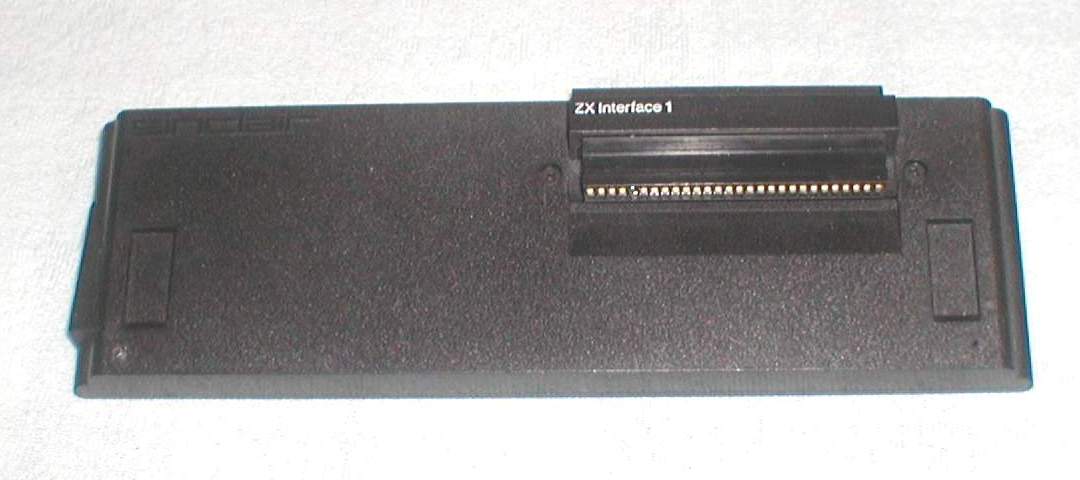
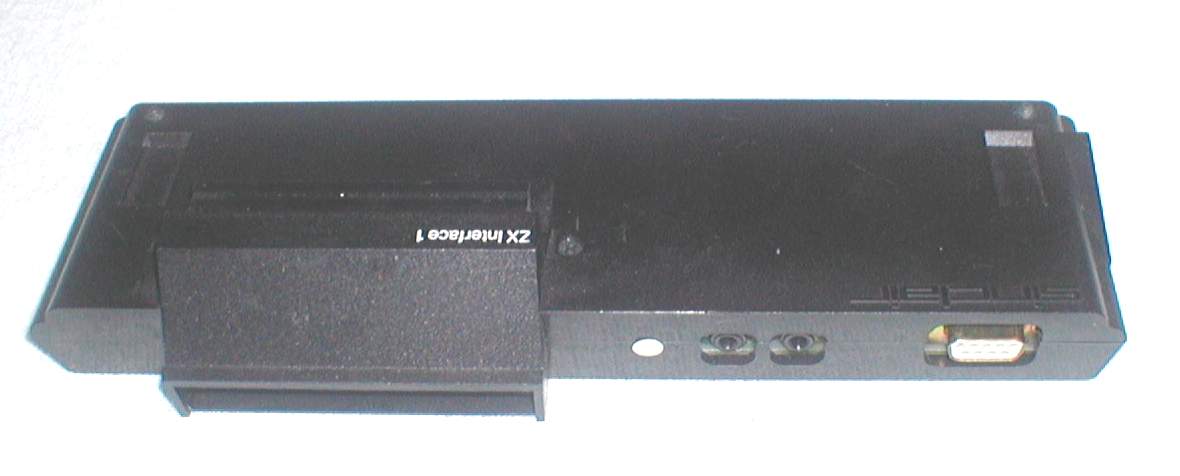
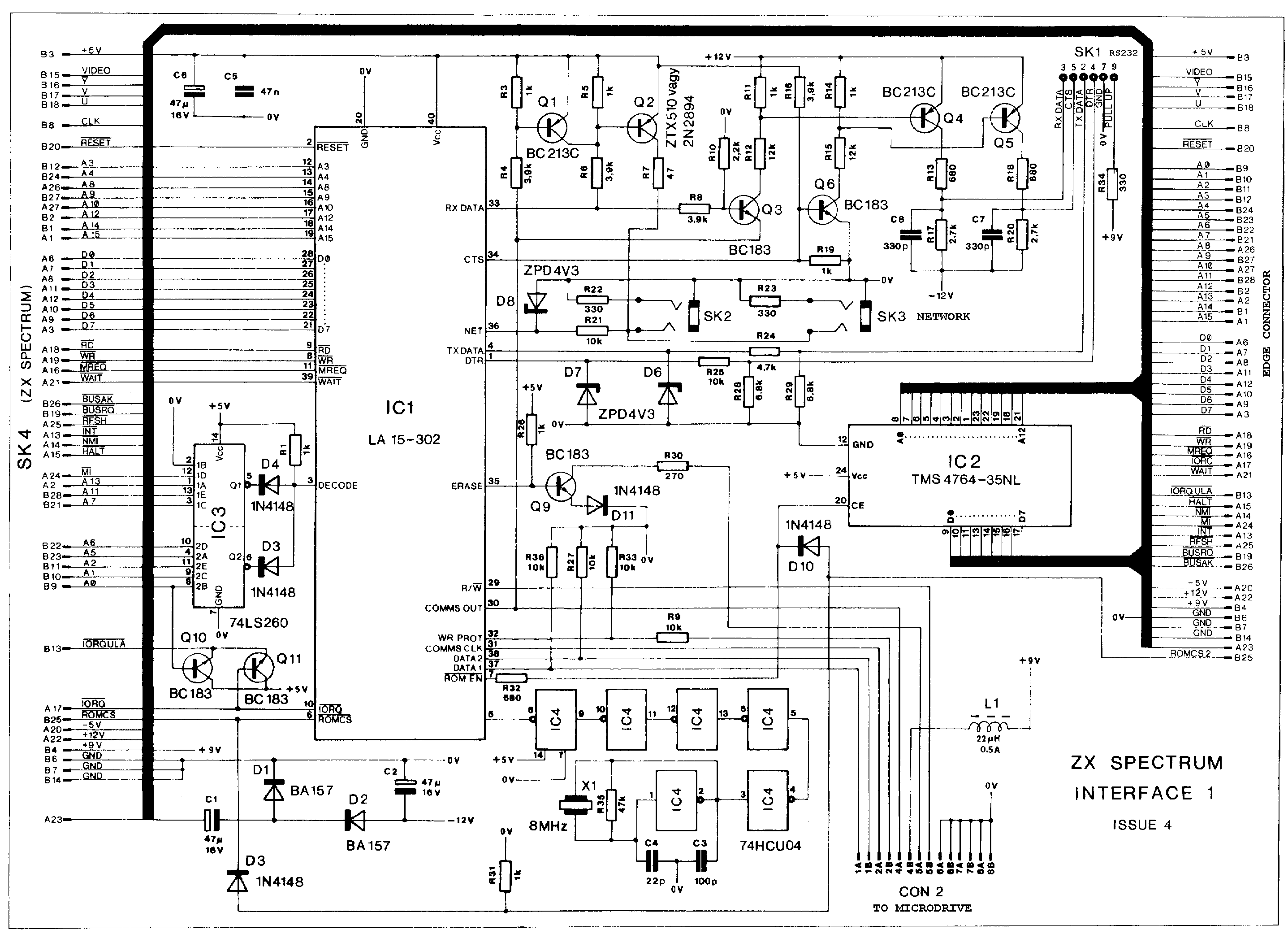
Controls up to 8 Microdrives. Built-in RS232 interface. Network up to 64 Spectrums. This, along with the Microdrive, revolutionised the way that the Spectrum worked. For the first time, Spectrum owners could experience fast access times and super-fast loading.
Discussion
Nobody has started a thread about this yet.
Remarks
Allows connecting the {ZX Microdrive|Sinclair Research Ltd|1000252}. An {RS232 Lead|Sinclair Research Ltd|1000494} was available separately. A complete disassembly of this ROM was published in the book {Spectrum Shadow ROM Disassembly|Melbourne House|2000371} (Melbourne House).
Release price: £49.95 (or £29.95 when purchased with one or more ZX Microdrives)
Other files
- roms.htmlRemote link English
Files and rights
Distribution permission is on record, granted to another archive rather than to this one. Screens and pictures are copied here; everything else links to the archive that holds it.
- AllowedSinclair Research Ltd → WorldOfSpectrum
Scores
Elsewhere on the web
- WorldOfSpectrum 3 votes9.67
In the magazines 42
Sinclair User #53Aug 1986 · p.28
PRINTING ON A BUDGET For most of us all we require from a printer is that it will cope with our listings and do a reasonably legible job of printing out wordprocessed documents. Curiously enough speed is rarely nominated as a highly significant factor. In this survey we have deliberately limited ourselves in two ways. First, none of the printers here costs more than £175. Second, all of them are fairly widely available either through high street chain stores or the larger specialist shops. The idea is to give a simple guide to relatively straightforward printers for those with a limited budget. All the printers here will do the job, but any considerations that may be a particular plus or minus are highlighted. CHOOSING A PRINTER - VITAL QUESTIONS Ask yourself the following questions: Q: Will I be using it for formal letters? A: You probably need a printer with a near letter-quality (NLQ) mode or equivalent Q: Will I be using it with a program or programs where a high degree of Epson compatibility could be important or particularly useful? A: Epson compatibility can be significant because some programs have special features that will only work using Epson character code conventions eg screen dumps Q: Does speed matter? A: it probably won't unless you intend using it quite intensively for business Q: Serial or parallel? A: Seemingly obvious but many people don't realise that if you already have an Interface One you already have a serial interface suitable for connection to some of the printers here. You may not want to buy a new one. Most commercial Spectrum interfaces however, are Centronics ie parallel as are the majority (marginally) of printers Q: Normal paper? A: Thermal printers are often cheap and quite effective but they require special paper which, aside from having to be bought specially, may not be suitable for letters Q:Special ribbon? A: Some printers use unconventional kinds of print ribbon that you may find difficult to replace except from the original manufacturers. This may be very inconvenient Q: Dot-matrix versus daisywheel - does it matter? A: A simple generalisation: even a simple daisywheel will almost certainly have a better text print quality than most dot matrix (even those with NLQ). But a daisywheel will probably be slower and it definitely won't be able to cope with any sort of graphic dumps. If you want graphics you must choose dot-matrix. SHOP AROUND There are good bargains to be found if you know where to look and don't mind having a model that has been superceded (which usually only means slightly improved and put in a different box). The following printers are available at various prices. We indicate a target price found in a weary trek up the Tottenham Court Road. You may be able to do better by keeping your eyes open. Brother HR-5 - an early printer from Brother with standard dot-matrix features. Good enough for most purposes. Target price: £69.99 Citizen 1200 - good all-round dot-matrix from a company fairly new to the market. Tractor Feed as standard. Target price: £169 Seikosha GP500A - bulky but effective dot-matrix. Target price: £115.95 Centronics GLP printer - recently superceded, neat little dot-matrix. Target price: £125 Quendata Daisywheel - unusual in that it's a daisywheel. Slow (18cps) but neat print. Target price: £135 Sinwa CPA-80 - 80-column dot-matrix with NLQ. Target price: £145 Juki 6000 - another daisywheel. Slow (10cps) but sturdy and reliable. Target price: £170 Star Gemini 10X - dot-matrix with impressive spec (120cps). Includes tractor feed and is Epson compatible. Target price: £150 Mannesann Tally MP80 + - good general purpose dot-matrix. Target price: £175 Epson P40 - small thermal, small-width printer. OK for listings. Target price £45. Make/Model: Star STX-80 Typical Price: £79 Print speed (char/sec): 60 Print quality: Average dot-matrix Interface: Centronics Printing style: Thermal Founts: Standard ASCII/International/Block graphics Other Features: Programmable line spacing, excellent manual Verdict: A very high quality thermal printer, which is to say that it has lots of special features but it still isn't suitable for any but the most informal letters. It uses a continuous roll of special thermal paper. Imagine a Rolls Royce version of the ZX Printer and you'll have a pretty good idea of what to expect. If you can accept using special paper then the STX-80 is really very good value for money. It can do most of the clever things Epsons can, including print at different heights and widths. It also has various special character sets accessed through dip switches which give, amongst other things, special graphic shapes and the possibility of customising your own fount designs. Make/Model: Saga LTR-1 Typical Price: £139.95 Print speed (char/sec): 12 Print quality: Letter quality Interface: Centronics Printing style: Daisywheel Founts: Elite only Other Features: Simple RS232 interface included Verdict: A very cheap printer with quite a few unusual features. It uses a special form of daisywheel printing in which an embossed roller is linked via an ink roller. The end result is as good as most daisy-wheel printers. It has no special features like international character sets or tractor feed but can nevertheless be recommended where print quality has a fairly high priority but other factors, like speed, are unimportant. Make/Model: Star Delta 10 Typical Price: £161.50 (available at this price from Flightpath, 43 Hithermoor, Staines, Middx TW19 6AH) Print speed (char/sec): 160 (10 & 12 chars/inch), 137 (17 chars/inch) Print quality: Good dot-matrix Interface: Centronics & serial RS232 Printing style: Dot-matrix 9x9 pin Founts: Various Other Features:Wealth of other options and facilities accessible via control codes. Verdict: An impressive dot-matrix machine - it's an absolute bargain if you can get hold of it. It is a full featured dot-matrix with external controls for Line-feed, Form-feed, On/Off line etc. A large number of alternative character sets include block shapes and international letters, customised character set facilities which can be downloaded into special printer Ram, variable line settings and so on. There are three density (characters per inch) settings. Print quality is certainly good enough for almost all purposes although there is not an NLQ setting as such. The printer has both RS232 serial and parallel Centronics interface ports and easily accessible dip switches. The manual is excellent. Make/Model: Epson P-80 Typical Price: £ Print speed (char/sec): Print quality: Interface: Printing style: Founts: Other Features: Verdict: An unusual printer. Thermal, but it prints on a special kind of paper that looks to all appearances like conventional A4. If you don't mind being locked into buying the special paper this could be a good option. It is very neatly designed. The biggest advantage is that, being an Epson, it has certain control code conventions that should make it easy to use with most commercial software. A serial interface version is also available and the printer can also be powered by batteries. Make/Model: Brother M1009 Typical Price: £ Print speed (char/sec): Print quality: Interface: Printing style: Founts: Other Features: Verdict: Extremely popular low-cost dot-matrix printer, quite well supported by commercial software. Although it doesn't specifically have an NLQ mode it is certainly capable of a print quality more than adequate for most purposes. A large number of special features include various print densities, tab settings, emphasised print, double-width and many other print options. Recommended but at the top of our price range. INTERFACES There are two kinds of interface which will enable you to connect your spectrum or QL to a printer. Make sure you choose the right sort for your printer. For practical purposes there is no special advantage between serial or parallel (RS232 or Centronics) interfaces. An RS232 interface may be more useful for other things - like modems - but Centronics is the rather more common standard. SPECTRUM SERIAL (RS232) Interface One - Sinclair's own. Networking and Microdrive interfacing as well. The most common RS232 used in commercial programs. PARALLEL (CENTRONICS) Kempston - a sophisticated Centronics interface which has the advantage of having all the customising/driving software on Rom ie, there is nothing to load in. Supported by almost all commercial software using printers Tasman - A neat interface with driving software on tape. Well supported. The standard interface for Tasword wordprocessor and associated packages Euroelectronics ZXLPrint III - well supported and also provides an RS232 port. No additional software is needed and on quite a wide range of printers standard LPrlnt List and Copy commands will work S-Print intended specifically for the Kempston Centronics Spectrum 128 QL Comes with RS232 as standard PARALLEL (CENTRONICS) Miracle Centronics interface - one of the first and so quite well supported. No additional software needed Q-Print - similar to the above. Does not require driving software
Kempston Centronics
ZXL Print III
Sinclair User1984 · p.39
Stephen Adams
THE INGENUITY OF THE PERIPHERALS MANUFACTURERS HAS CONTINUED AND SINCLAIR RESEARCH FINALLY LAUNCHED THE MICRODRIVE. STEPHEN ADAMS REVIEWS ANOTHER INTERESTING YEAR FOR SINCLAIR USERS. INGENUITY BEATS SPECTRUM LIMITS Stephen Adams summarises the add-ons. The biggest blow to users of non-Sinclair-produced equipment was the announcement of the Spectrum. It knocked most memory-mapped add-ons on the head, as no provision for those devices had been made. That was because, unlike the ZX-81, there was no way of turning-off the internal RAM from the expansion port. The only thing left was for producers to put things in the input/output map or to supply RAM packs or RAM upgrade kits. The I/O map was already full of Sinclair devices, allowing the use of only eight separate devices, if they wanted them to be compatible with the Microdrive. Nevertheless, ingenuity brought forward a large number of new devices after the initial shock had worn off. RAM kits for upgrading the 16K Spectrum to 32K are now readily available for about £21. Fox Electronics, for example, supplies a kit for £20.99 and it has instructions on how to improve your TV display. They are easy to fit and now have simple instructions on what to do, if you can overcome the fear of opening the case. The kits are usually identical to the proposed Sinclair upgrade but will fit only on model 2-type Spectrums. East London Robotics can also supply an extra 64K kit which is paged. For those with a model 1 Spectrum, identified easily by the grey keys, there is the choice of an add-on board made by Downsway Electronics or the Spectrum 32K RAM pack by Cheetah Marketing. The Spectrum RAM pack will also fit on to any other Spectrum, as it plugs into the expansion port. Another memory-mapped device available this year was in a surprising place, inside the Spectrum 16K ROM space. It was the Orme Electronics ROM containing RENUMBER, block delete of Basic lines and many other usefiil routines in a 2K ROM. That can be very useful, as it is immediately available on power-up. Sinclair has also provided new devices in the ROM space, which should please hardware and software users. One is the Microdrive Interface One which not only contains the controlling ULA and hardware to run the RS232/network/highspeed cassette Microdrive but an extra ROM which can be used to write your own Basic commands. The other is the ROM cartridge system available with Interface Two. The RS232 can handle a printer easily with its limited handshaking ability but Still is limited for input from an RS232 device, as all that is under software control and not a hardware chip. The network is a very simple arrangement which allows you to talk between 64 Spectrums but I have no doubt that someone will write similar software to use it with the ZX-81 through the cassette sockets. Two books which should help in this respect are those by Andrew Pennel and Dr Ian Logan. The Pennel one also contains an ON ERROR GOTO machine code routine which should trap 90 percent of Basic errors and send them to a program line to deal with them. Sinclair has also launched the Interface Two, containing two joystick sockets which will operate the first or last set of five number keys. That will mean that software will have to be re-written to use Sinclair joysticks, as the accepted standard at the moment is the one set earlier in the year by the Kempston joystick interface which operates as an I/O device, depending for its decoding on A6 only being low. Much software has already been converted to use it and I cannot see software writers wanting to do it all again. Programmable joysticks are just starting to reach the market, which will eliminate the need to rewrite the software. For the Spectrum and soon the ZX-81, the Stonechip one seems to be best. For ZX-81 and Spectrum users, a cheaper hardware-based version, the Pickard controller, can be used as it fits both computers by plugging into the keyboard sockets. The AGF version uses crocodile clips to set up the five keys to be used; it is a little unstable but it plugs into the edge connector and does not require entering the machine. The Interface Two also has a single ROM socket which allows you to use Sinclair-designed cartridges. It is not known whether software suppliers will want to try to fit normal ROMs to a port like this. That, and the fact that recording Microdrive cartridges is a slow process, will limit the amount of software available from software manufacturers on Sinclair devices. EPROM software for ZX-81s is available from Eprom Services and Audio Computers. Both, however, concentrate on the machine code user and not the games player. The fall in price of the ZX-81 and the amount of hardware available for it has started to attract the business user as a control processor for a robot or controlling some industrial process. That is because it contains all the requirements of the development system on one board - Z-80-A, one of the most popular processors, working at 3.25MHz, TV interface, cassette interface for program storage, alphanumeric keyboard, Basic as well as machine code monitor for designing programs, and an expandable memory map and I/O map. There is also a wide range of machine code assemblers, disassemblers, EPROM cards and blowers, RAM, battery-backed memory already available, costing just a few pounds. That to the industrial process manufacturer is peanuts, as a development kit from a chip manufacturer would cost more than £200 with far fewer facilities. The ZX-81 costs only £45 with a massive 16K memory included. Plain-paper printer interfaces for the Spectrum abound and Tasword, the word processing program, can work with most of them. Hilderbay and Kempston provide software-driven Centronics versions, while Morex provides both RS232 and Centronics outputs. Deans also introduced its version of the Timex printer, which uses a much better paper than the Sinclair, gives a clearer print in both black and blue ink, and will use Sinclair commands to control it, so there is no need for extra software. Printers and other hardware devices make the software "come alive" and that combination makes the Spectrum a very powerful business computer. That is the most important event of the year, as the more software which is written to use the large amount of hardware, the more that hardware will be used. Voice output units, modems - to talk to other users or databases over the telephone - RS232 interfaces and light pens all rely on good software to make use of them. The Cheetah Marketing Sweet Talker, for instance, works better because it is accompanied by an instruction tape which not only demonstrates how to use the unit but also shows the user how to structure programs to make it easier to use in their programs. Modems from Maplin, Ambit and Micronet - for Prestel - will allow users of the Spectrum and, in the first two cases, the ZX-81, to talk to many other computers. Some of them will be other types of computers, like the BBC and the Commodore 64. The others will be maintained by public and private companies which maintain large amounts of information and programs on their computers. Micronet 800 is a database maintained on Prestel computers as a 24-hour-a-day, seven-day-a-week computer club. It has hints and tips on Spectrums - ZX-81s at the moment cannot use the system - as well as news, free programs and a mail box facility. Keyboards and consoles also have been making their presence felt as ZX-81 and Spectrum users want to upgrade their machines. Plastic cases from W H Smith are about the cheapest containers at £3.99 and will take a ZX-81 or Spectrum, as well as a few add-ons. The d'Ktronics keyboard and case or that from Fullers appear to be the most popular but neither will allow the use of the Microdrive interface without taking it out of its case. The Filesixty button set is a cheap alternative for ZX-81 users which gives the advantage of spring-loaded keyboard the same size as that of Sinclair, but without costing more than £10. Colour for the ZX~81 is now available in a simple form for all PAL television users - that is, most of Europe. The black box requires only two wires to insert between the modulator and the breaking of tracks and can be re-connected if required. The rest of the box plugs into the back of the ZX-81 to give black characters on a choice of 16 coloured backgrounds or coloured characters on a black background from DDC. It is also more stable than the Spectrum and requires no extra memory to use it. It will work even on a 1K machine. One device which requires extra memory is the excellent High-res screen - 192 by 256 pixels - and user-definable graphics package made by Nottingdale Technology Centre. It uses the ZX-81 internal 1K RAM for its system variables and 6K of memory for the storage of the screen in the program. No internal wiring is required, as the unit plugs directly on to the back of the ZX-81. For the Spectrum, a unit has appeared which will be of great delight to children and disabled users. It is the Currah microSpeech unit which plugs into the back of the Spectrum and, on command, will speak the key pressed. That happens during program input as well as INPUT and INKEY$. It requires no programming of the speech by the user. Speech output can also be programmed by using S$ to contain the allophones - sounds which make up words - which are then spoken immediately. Thus input and output can be spoken rather than read. Tapes have been causing problems ever since the ZX computers came into existence; the Spectrum is better than the ZX-81 but still can be improved with some extra hardware. Tape filters and switch-controlled SAVE and LOAD devices are available from several firms, like Abacus and Elinca. There have now been three Spectrums produced by Sinclair. The model is, which can be identified by the grey keys or by looking through the expansion interface and seeing an IC socket on the left-hand side; the model 25 have the large, black, ROM chip there. Those Spectrums need their extra 32K of RAM mounted on a printed circuit board before they can be put into the computer. There are no Sinclair RAM boards available for the machine. The model 25 were re-designed completely by a computer and the ULA was changed to get rid of an extra 1C which had to be inserted in the model is, due to a design error. The extra 32K of RAM which can be added to 16K machine now requires only chips to be plugged into sockets on the board. Model 1s and model 2s have had to have an extra transistor fitted to prevent a clash between the keyboard and the ULA TV interface. The latest model 3s have also had their internal circuitry re-arranged and the ULA updated to give a wider tuning range on TV sets. It has also caused some software problems, as the keyboard inputs are no longer held to binary l - + 5 volts - when not in use. That was done to reduce the power 1 requirements of the ULA.
AGF programmable joystick.
Cheetah Sweet Talker.
Microdrive with Interface 1.
Microdrive.
Orme Electronics EPROM read card.
'Printers and other hardware devices make the software come alive.'
Personal Computer News #32Oct 1983 · p.41
Ian Scales
TELESOFT OPTIONS Catch your breath while Ian Scales analyses the state of the art of data transfer on micros. The past few months have witnessed the triumphant arrival of a variety of separate communications devices for low-cost microcomputers. Now seems to be a good time to take an overview of what's actually going on and which, if any, technology is worthy of your considerable investment. Among those devices to consider are the recently released BBC telesoftware service and Acorn's teletext adaptor for the BBC micro. At the moment the term 'communications' covers three broad concepts. First there is simple computer-to-computer communication, sometimes called networking. The notable recent release in this field is the Interface 1 for the Sinclair Spectrum. The Interface 1 also features a standard RS232 serial interface, which brings us to the next level of communication, the use of the telephone system. Once you have a serial interface (one that sends the data out one bit at a time) it's a short step to configure a modem to convert these digital signals into analogue pulses and send them down the telephone system to another modem which converts them back to computer-speak again. This technology is the basis of Micronet. Britain's public access database and information service. The arrival of Micronet has spurred activity in the modem market. It is now possible to buy a complete RS232 and directly connected modem for the Spectrum for £100 (PCN Peripherals issue 30). Here enters the first complication. Spectrum owners now have two routes. You can buy the Interface 1 and configure your own modem or you can get the all-in-one package from Prism. Prism also sells an RS232-driven, directly coupled modem for £90, so if your computer has an RS232 interface and you have some communications software you're in business. The advantage of the telephone-based approach includes having a virtually unlimited amount of information theoretically accessible. Using a modem on the telephone system allows you to interact with the computer dispensing the information on the other end of the line. In other words you have access to as much information as the computer can hold and you can tell it what to send you. The same cannot be said for the third way of sending electronic information. This involves broadcasting days over the air. This is the way Ceefax and Oracle work. Until recently the hardware needed to access these systems was a special teletext adaptor which you hooked up to your TV set. In this guise the systems were essentially non-enthusiast consumer or business items of only passing interest to the micro hobbyist. But the BBC and Acorn (PCN Monitor, issues 29 and 30) have teamed up to enhance the BBC Computer Literacy Project by introducing a telesoftware service on Ceefax. With the purchase of Acorn's long-awaited teletext adaptor for the BBC Micro the user has free access to any software beamed over the airwaves by the BBC and access to all the Ceefax information - the usual news, weather, travel services and so on. The Teletext adaptor, when it eventually arrives in volume, will cost £225 (inc VAT). The essential difference is that this system is non-interactive. The computer that dishes the stuff out is receiving no indications from your computer as to what you want. Because it's possible to safely send data on a spare TV channel much faster than over a telephone line, there is a way of coping with this non-interactive problem. You send the entire database over the airwaves in a sort of loop. After about 30 seconds the whole lot has been broadcast and you're back at the beginning again. The computer simply selects the data required by the user as it comes flooding into the system, and displays it on the screen. Obviously there is a limit to the amount of data that can be sent out without long waiting periods at the keyboard. Under the Ceefax system you have the ability to chain the pages together. The system saves a consecutive series of pages so you can read them at your leisure. This facility is also vital for downloading medium to long programs. At the moment BBC owners are faced with two competing technologies and it probably won't be long before other micro owners are being lured in similar directions. The BBC owner can select Ceefax, where there is a much more limited quantity of information - though, the BBC claims, there will' be a concerted effort on quality. The Ceefax route also has the advantage of being a free service, though the initial outlay of £225 for the adaptor is pretty steep. On the other hand there is the modem investment to take advantage of the telephone-based information services and databases. Here you get a lower entry cost, but ongoing charges for the service.
Advert29
- Popular Computing Weekly #48Dec 1988 · p.50
- Popular Computing Weekly #34Sep 1988 · p.44
- Popular Computing Weekly #38Sep 1988 · p.49
- Popular Computing Weekly #30Aug 1988 · p.42
- Sinclair User #64Jul 1987 · p.73
- Your Sinclair #19Jul 1987 · p.33
- Sinclair User #63Jun 1987 · p.26
- Your Sinclair #18Jun 1987 · p.66
- Sinclair User #62May 1987 · p.98
- Your Sinclair #16Apr 1987 · p.78
- Your Sinclair #15Mar 1987 · p.65
- Your Sinclair #14Feb 1987 · p.46
- Sinclair User #56Nov 1986 · p.109
- C&VG (Computer & Video Games) #27Jan 1984 · p.128
- Computer ChoiceJan 1984 · p.50
- Your Computer #1Jan 1984 · p.32
- Personal Computer News #40Dec 1983 · p.70
- Personal Computing Today #4Nov 1983 · p.70
- Your Computer #11Nov 1983 · p.158
- Personal Computer News #32Oct 1983 · p.62
- C&VG (Computer & Video Games) #24Oct 1983 · p.60
- ZX Computing #9Oct 1983 · p.68
- Sinclair User #19Oct 1983 · p.116
- Personal Computer News #26Sep 1983 · p.60
- C&VG (Computer & Video Games) #23Sep 1983 · p.88
Classified5
- Your Sinclair #21Sep 1987 · p.95
- Your Sinclair #20Aug 1987 · p.92
- Your Sinclair #19Jul 1987 · p.95
- Your Sinclair #18Jun 1987 · p.99
- Your Sinclair #17May 1987 · p.92
Full-page ad5
- Your Computer #7Jul 1984 · p.25
- Your Spectrum #5Jul 1984 · p.51
- Sinclair User #27Jun 1984 · p.85
- Your Computer #6Jun 1984 · p.119
- Popular Computing Weekly #20May 1984 · p.2
Related
- Elsewhere
- WorldOfSpectrum
- Same entry at
- Spectrum ComputingZXInfo
Reviews from people here
Sign in to write about this, or make an account. It takes a minute and lets you correct the catalogue too.
Everything ZXDB can hold about this is here.
Sign in to correct or add to this.
Hold the rights to this and want it taken down?