
Kempston Centronics Interface E
Hardware: Printer
Kempston Micro Electronics Ltd · 1983 · Pound sterling 55.00 · Pound sterling 35.00 budget
Also known as Kempston Interface E (English)
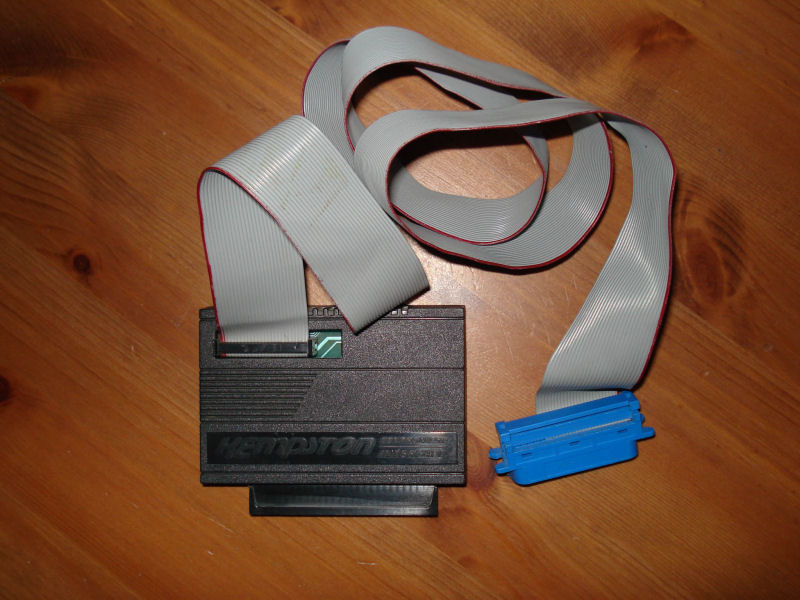
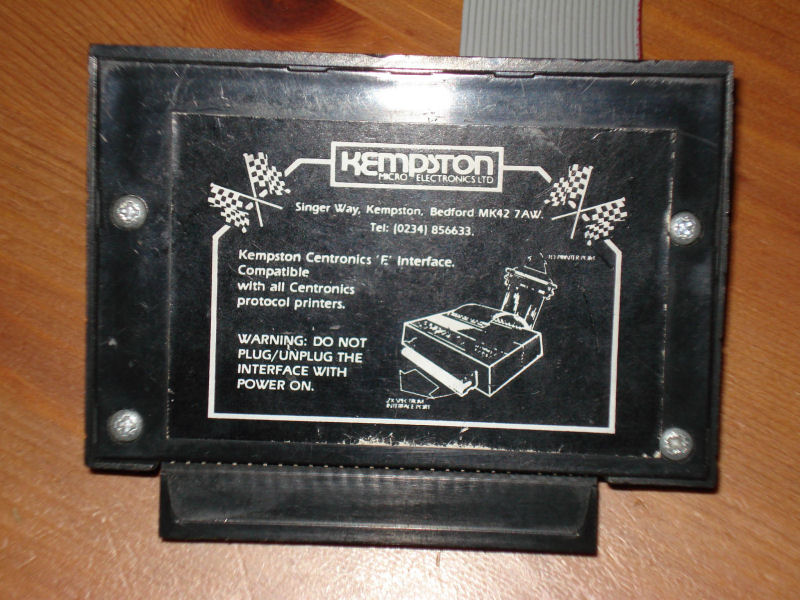
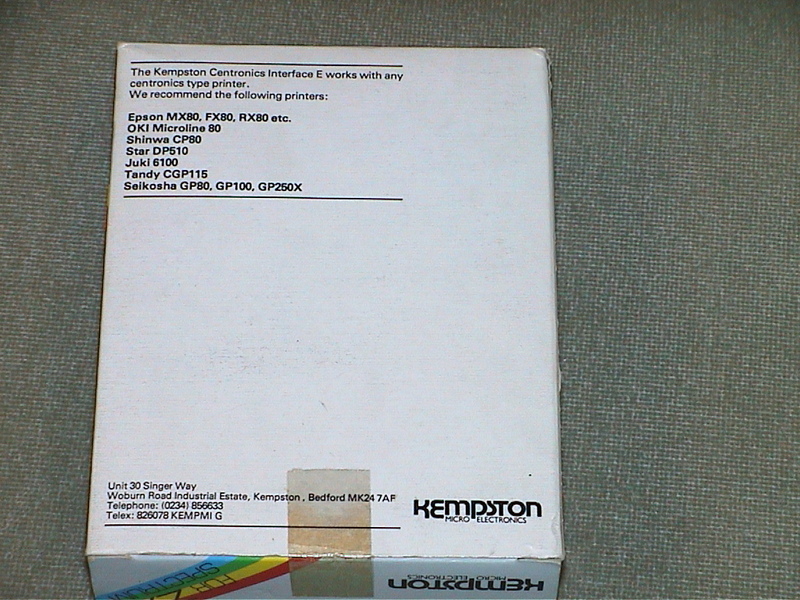
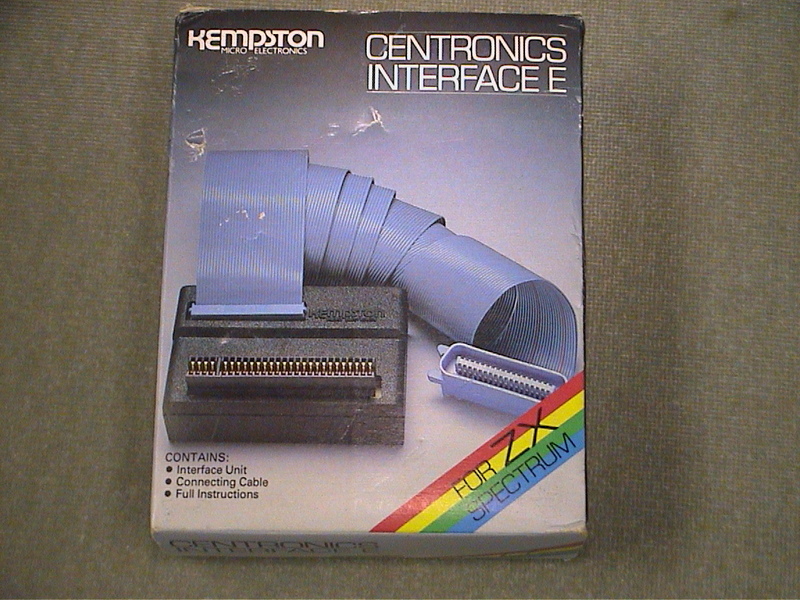
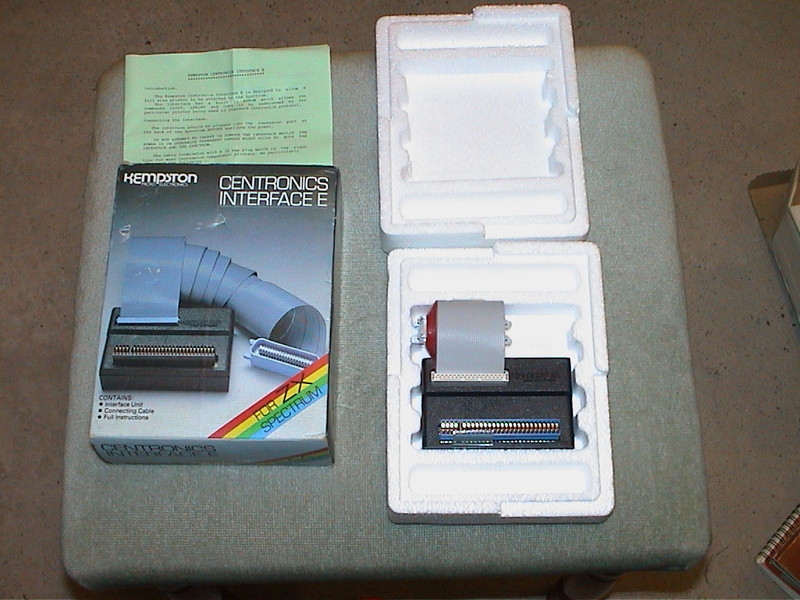
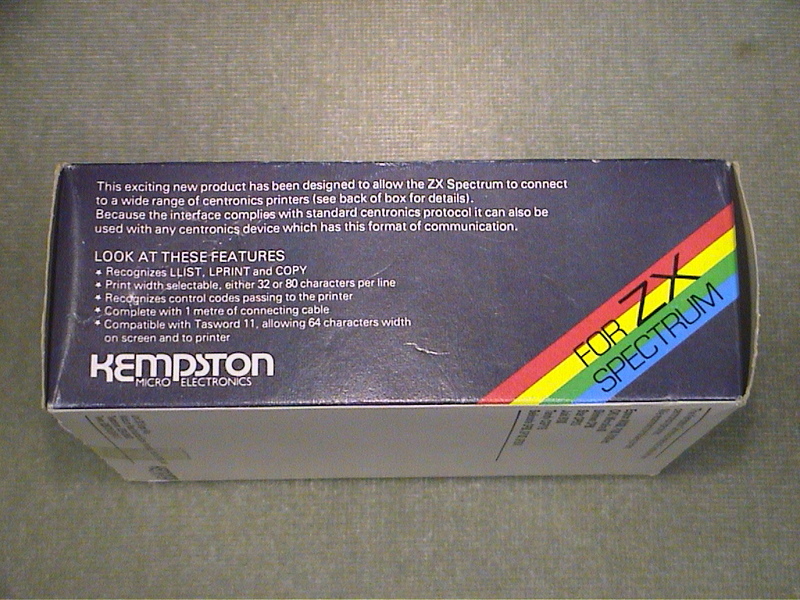
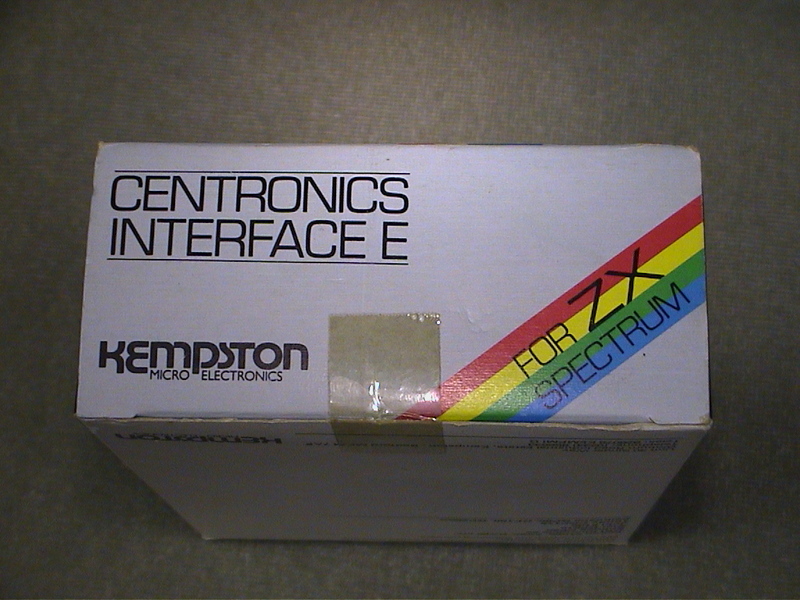
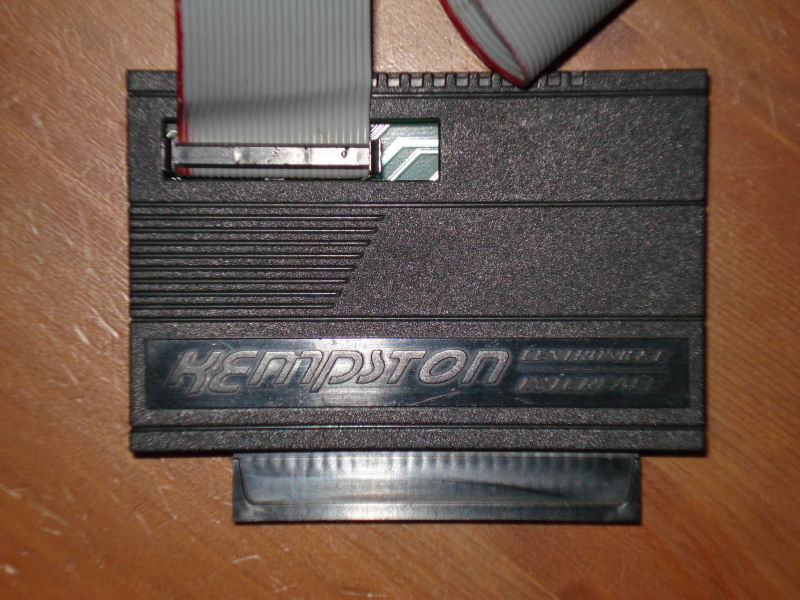
Centronics printer interface for your Spectrum. Fully supports all standard print commands. Onboard EPROM holds all operating code.
Discussion
Nobody has started a thread about this yet.
Remarks
Model E: driver in EPROM; Model S: driver in software
Documents
- KempstonCentronicsInterfaceE_Manual.pdfInstructions 985 KB
Files and rights
No permission is on record either way. Screens and pictures are copied here on a take-down basis: if you hold the rights and want something removed, say so and it goes.
In the magazines 74
Sinclair User #53Aug 1986 · p.28
PRINTING ON A BUDGET For most of us all we require from a printer is that it will cope with our listings and do a reasonably legible job of printing out wordprocessed documents. Curiously enough speed is rarely nominated as a highly significant factor. In this survey we have deliberately limited ourselves in two ways. First, none of the printers here costs more than £175. Second, all of them are fairly widely available either through high street chain stores or the larger specialist shops. The idea is to give a simple guide to relatively straightforward printers for those with a limited budget. All the printers here will do the job, but any considerations that may be a particular plus or minus are highlighted. CHOOSING A PRINTER - VITAL QUESTIONS Ask yourself the following questions: Q: Will I be using it for formal letters? A: You probably need a printer with a near letter-quality (NLQ) mode or equivalent Q: Will I be using it with a program or programs where a high degree of Epson compatibility could be important or particularly useful? A: Epson compatibility can be significant because some programs have special features that will only work using Epson character code conventions eg screen dumps Q: Does speed matter? A: it probably won't unless you intend using it quite intensively for business Q: Serial or parallel? A: Seemingly obvious but many people don't realise that if you already have an Interface One you already have a serial interface suitable for connection to some of the printers here. You may not want to buy a new one. Most commercial Spectrum interfaces however, are Centronics ie parallel as are the majority (marginally) of printers Q: Normal paper? A: Thermal printers are often cheap and quite effective but they require special paper which, aside from having to be bought specially, may not be suitable for letters Q:Special ribbon? A: Some printers use unconventional kinds of print ribbon that you may find difficult to replace except from the original manufacturers. This may be very inconvenient Q: Dot-matrix versus daisywheel - does it matter? A: A simple generalisation: even a simple daisywheel will almost certainly have a better text print quality than most dot matrix (even those with NLQ). But a daisywheel will probably be slower and it definitely won't be able to cope with any sort of graphic dumps. If you want graphics you must choose dot-matrix. SHOP AROUND There are good bargains to be found if you know where to look and don't mind having a model that has been superceded (which usually only means slightly improved and put in a different box). The following printers are available at various prices. We indicate a target price found in a weary trek up the Tottenham Court Road. You may be able to do better by keeping your eyes open. Brother HR-5 - an early printer from Brother with standard dot-matrix features. Good enough for most purposes. Target price: £69.99 Citizen 1200 - good all-round dot-matrix from a company fairly new to the market. Tractor Feed as standard. Target price: £169 Seikosha GP500A - bulky but effective dot-matrix. Target price: £115.95 Centronics GLP printer - recently superceded, neat little dot-matrix. Target price: £125 Quendata Daisywheel - unusual in that it's a daisywheel. Slow (18cps) but neat print. Target price: £135 Sinwa CPA-80 - 80-column dot-matrix with NLQ. Target price: £145 Juki 6000 - another daisywheel. Slow (10cps) but sturdy and reliable. Target price: £170 Star Gemini 10X - dot-matrix with impressive spec (120cps). Includes tractor feed and is Epson compatible. Target price: £150 Mannesann Tally MP80 + - good general purpose dot-matrix. Target price: £175 Epson P40 - small thermal, small-width printer. OK for listings. Target price £45. Make/Model: Star STX-80 Typical Price: £79 Print speed (char/sec): 60 Print quality: Average dot-matrix Interface: Centronics Printing style: Thermal Founts: Standard ASCII/International/Block graphics Other Features: Programmable line spacing, excellent manual Verdict: A very high quality thermal printer, which is to say that it has lots of special features but it still isn't suitable for any but the most informal letters. It uses a continuous roll of special thermal paper. Imagine a Rolls Royce version of the ZX Printer and you'll have a pretty good idea of what to expect. If you can accept using special paper then the STX-80 is really very good value for money. It can do most of the clever things Epsons can, including print at different heights and widths. It also has various special character sets accessed through dip switches which give, amongst other things, special graphic shapes and the possibility of customising your own fount designs. Make/Model: Saga LTR-1 Typical Price: £139.95 Print speed (char/sec): 12 Print quality: Letter quality Interface: Centronics Printing style: Daisywheel Founts: Elite only Other Features: Simple RS232 interface included Verdict: A very cheap printer with quite a few unusual features. It uses a special form of daisywheel printing in which an embossed roller is linked via an ink roller. The end result is as good as most daisy-wheel printers. It has no special features like international character sets or tractor feed but can nevertheless be recommended where print quality has a fairly high priority but other factors, like speed, are unimportant. Make/Model: Star Delta 10 Typical Price: £161.50 (available at this price from Flightpath, 43 Hithermoor, Staines, Middx TW19 6AH) Print speed (char/sec): 160 (10 & 12 chars/inch), 137 (17 chars/inch) Print quality: Good dot-matrix Interface: Centronics & serial RS232 Printing style: Dot-matrix 9x9 pin Founts: Various Other Features:Wealth of other options and facilities accessible via control codes. Verdict: An impressive dot-matrix machine - it's an absolute bargain if you can get hold of it. It is a full featured dot-matrix with external controls for Line-feed, Form-feed, On/Off line etc. A large number of alternative character sets include block shapes and international letters, customised character set facilities which can be downloaded into special printer Ram, variable line settings and so on. There are three density (characters per inch) settings. Print quality is certainly good enough for almost all purposes although there is not an NLQ setting as such. The printer has both RS232 serial and parallel Centronics interface ports and easily accessible dip switches. The manual is excellent. Make/Model: Epson P-80 Typical Price: £ Print speed (char/sec): Print quality: Interface: Printing style: Founts: Other Features: Verdict: An unusual printer. Thermal, but it prints on a special kind of paper that looks to all appearances like conventional A4. If you don't mind being locked into buying the special paper this could be a good option. It is very neatly designed. The biggest advantage is that, being an Epson, it has certain control code conventions that should make it easy to use with most commercial software. A serial interface version is also available and the printer can also be powered by batteries. Make/Model: Brother M1009 Typical Price: £ Print speed (char/sec): Print quality: Interface: Printing style: Founts: Other Features: Verdict: Extremely popular low-cost dot-matrix printer, quite well supported by commercial software. Although it doesn't specifically have an NLQ mode it is certainly capable of a print quality more than adequate for most purposes. A large number of special features include various print densities, tab settings, emphasised print, double-width and many other print options. Recommended but at the top of our price range. INTERFACES There are two kinds of interface which will enable you to connect your spectrum or QL to a printer. Make sure you choose the right sort for your printer. For practical purposes there is no special advantage between serial or parallel (RS232 or Centronics) interfaces. An RS232 interface may be more useful for other things - like modems - but Centronics is the rather more common standard. SPECTRUM SERIAL (RS232) Interface One - Sinclair's own. Networking and Microdrive interfacing as well. The most common RS232 used in commercial programs. PARALLEL (CENTRONICS) Kempston - a sophisticated Centronics interface which has the advantage of having all the customising/driving software on Rom ie, there is nothing to load in. Supported by almost all commercial software using printers Tasman - A neat interface with driving software on tape. Well supported. The standard interface for Tasword wordprocessor and associated packages Euroelectronics ZXLPrint III - well supported and also provides an RS232 port. No additional software is needed and on quite a wide range of printers standard LPrlnt List and Copy commands will work S-Print intended specifically for the Kempston Centronics Spectrum 128 QL Comes with RS232 as standard PARALLEL (CENTRONICS) Miracle Centronics interface - one of the first and so quite well supported. No additional software needed Q-Print - similar to the above. Does not require driving software
Kempston Centronics
ZXL Print III
Your Computer #4Apr 1985 · p.43
Spectrum £39.95 Centronics Interface Compatible with just about anything you can stick on a Spectrum, this new interface from Kempston comes with a metre of ribbon cable and is styled like the new Speccy +. The software in Eprom supports LPrint, LList and Copy commands.
Sinclair User1985 · p.26
HARDWARE WORLD With ever-increasing amounts of peripherals available for Sinclair computers, users are finding it more and more difficult to know what to buy. We present a buyer's guide to joysticks, keyboard and printers and review the best of the rest from the 1984 add-on market. The last year has brought about a vast change in the sort of add-ons available for the Sinclair machines. Many are technically brilliant while some would have made Heath Robinson blush. There are few add-ons still being produced for the ZX81, with even fewer new ones, but there has been an avalanche of Spectrum designs, and the start of what promises to be an interesting range for the QL. The most popular areas of interest - printers, joysticks and keyboards - are dealt with in separate sections but there have been some very innovative designs produced in other areas. KEMPSTON INTERFACE Now that the Sinclair ZX printer has been discontinued, interfaces for full-size printers are becoming sought-after. One of the best of these for the Spectrum is the Kempston Electronics model E. The interface contains an EPROM that enables it, on power up, to direct the commands LPRINT and LLIST direct to the printer without the need for additional software. Also built into the EPROM are routines that allow the use of COPY for the Epsom and Seikosha range of printers. It is housed in the standard Kempston case, plugs into the user port of the Spectrum, and is supplied complete with a cable to connect to the printer. The interface is dead-ended - that is it does not have a through port for other add-ons - and that may be a problem if you want to use it at the same time as the Kempston joystick interface or any other dead-ended device. Using the interface is very simple. If text only is to be printed then no setting up is needed, apart from POKEing an address with the number of columns required if that is other than the default setting of 80. That address is one of the unused ones in the system variables area. To use the COPY command the interface must be set up for your type of printer. If you enter the direct command COPY:REM? the interface displays a menu page which shows its current status. You can then set it up for the Epsom range, Seikosha 100/250 printers or add your own routines. Once you have set it up in this way any user-defined characters or graphic characters that appear in a listing will be printed as shown on the screen. For computer artists there is an enlarged setting which produces a double size COPY. Other settings are available to control the tokens, escape characters, and automatic linefeeds. The interface is by no means cheap but does contain many useful features. Kempston Printer Interface Model E, £55.00 inc. from Kempston Micro Electronics Ltd, [redacted].
Your Spectrum #3May 1984 · p.9
Peter Shaw
E-TYPE INTERFACE Kempston Micro Electronics, probably best known for its joystick interface, has now improved its popular Centronics Interface. Called the 'Model E'. It contains an EPROM which has all the necessary software to drive Centronics printers. This is a great advantage when you consider that most other printer interfaces require software to be loaded from tape. In fact, with the exception of the Fuller Printerface, this is the only Centronics interface to contain its software on EPROM. Included in the software is a copy routine for dot-matrix printers. This works using the actual COPY command rather than a RANDOMISE USR, a great advantage when you forget where the COPY " routine is stored. The software on Eprom has been very well put together from the user's point of view. Most notably, let's look at the COPY handling routine. If you enter COPY: REM ?, the software puts a status table on the screen, displaying the current state of the interface. You can then change it to suit your particular printer. Although at £55 it's a little more expensive than most, the unique features would seem to cover the extra cost. More details from Kempston Micro Electronics, [redacted]. Or phone [redacted].
Big K #1Apr 1984 · p.19
WONDERFUL WIDGETS Some call them Peripherals (though not with their mouths full). Necessary bits - or just so much junk? Big K takes a wander down Bolt-On Boulevard and gives a few new products the once-over... COMMUNICATION BOOST One of the remaining beefs with the Sinclair Spectrum is the electrostatic ZX printer, the only model of printer which will talk to Spectra. Now all that has changed, thanks to those pioneering types at Kempston (home of the Spectrum Joystick). Their special Printer Interface (illustrated, left) allows you to hook up your Spec to most printers that will accept serial input - this includes Epsons. Plug in the gubbins, tap in a piece of supplied software (two lines of machine code). load or write your prog and hey presto it doesn't work. Well, ours didn't, and we've heard some similar tales from other sources. "Must be the code not getting into the buffer", said an Old Kempstonian when taxed with this one. Must be. The replacement software sent with commendable promptness also failed to activate the gizmo but to be strictly fair we're beginning to hear about ones that work as advertised. No doubt it'll all come right before long. At more than fifty quid it should, shouldn't it? And the benefits (banish that shiny-paper look) are incalculable.
Sinclair User #24Mar 1984 · p.36
INTERFACE HAS USEFUL FEATURES New from Kempston Electronics is the Model E Centronics interface for the Spectrum. It contains an EPROM which enables it, on power-up, to direct the commands LPRINT and LLIST direct to the printer without the need for additional software. Also built into the EPROM are routines which allow the use of COPY for the Epson and Seikosha ranges of printers. Housed in the standard Kempston case, the interface plugs into the user port of the Spectrum and is complete with a cable to connect to the printer. The interface is dead-ended in that it does not have a through port for other add-ons; that may be a problem if you want to use it at the same time as the Kempston joystick interface or any other dead-ended device. A problem which may arise with full-size keyboards is that the case is shaped with a lip to fit on top of the standard Spectrum. The lip may prevent the case fitting snugly. Inside the case is a 2K EPROM which houses the printer software and a handful of chips which detect when the Spectrum is using the LPRINT, LIIST and COPY commands. It does that with the COPY command by monitoring an address and when the Spectrum uses it to do a COPY the interface takes over and directs output to the printer. Using the interface is very simple. If only text is to be printed, no setting-up is needed, apart from POKEing an address with the number of columns required if that is other than the default setting of 80. That address is one of the unused ones in the system variables area. To use the COPY command the interface must be set up for your type of printer. By entering as a direct command COPY:REM? the interface displays a menu page which shows its current status. You can then set it up for the Epson range, Seikosha 100 or 250 printers, or add your own routines. Once you have set it up in that way any user-defined characters or graphics characters which appear in a listing will be printed as shown on the screen. An annoying feature is that those characters are wider than normal characters and make the listing appear untidy. For computer artists there is an enlarged setting. When that is turned on COPY will produce a double-sized copy, about 180mm. x 145mm. on an Epson, suitable for hanging on the wall. Other settings are available to control the tokens, escape characters and automatic line feeds. At £55 inc. the interface is by no means inexpensive - but it contains many useful features. Details from Kempston Micro Electronics Lid, [redacted].
Your Spectrum #2Mar 1984 · p.63
Henry Budgett
GETTING INTO PRINT Good as it is for the price, many users are bound to be disappointed with the output from Sinclair Research's own printing device. For those toying with the idea of upgrading their Spectrum system with a professional printer, Henry Budgett takes an in-depth look at the technology involved and the plethora of interface devices now available. Regardless of what one actually thinks about Sinclair Research's ZX Printer, it's impossible to ignore the fact that it really does work. For the price and performance that it offers there's no equal anywhere. But despite that, there are users who need something a little more professional. Software houses developing programs, small businesses using the ZX Spectrum or just a serious user who demands something better than a sheet of aluminised paper that is, at best, just legible after a few days' handling. We're fortunate in having a number of commercially available interface units that allow the ZX Spectrum to be connected to the growing range of low-cost printers. In the main, these units convert the signals provided on the expansion connector into those which conform to the industry standard Centronics interface. There are two stages to this conversion: that of altering the electrical characteristics of the output from the ZX Spectrum and that of converting the character codes from Sinclair Research's own internal format to true ASCII. The alterations to the electrical signals are handled in a variety of ways by the interfaces reviewed here; some use very sophisticated chips to handle the work, others tackle the task by using more of the simple ICs. Only one of the interfaces in this review offered the possibility of connecting to a serial printer but, in theory at least, the problems involved are tackled in much the same way. All the interfaces were supplied with software drivers of one sort or another (see the individual panels for further details) and in general, these all work by intercepting the ZX Spectrum's printer routine vector. This is the location in memory that stores the address of the routine which controls data being sent to the printer by LLIST and LPRINT. By changing this address to that of the new driver all the data is re-routed through one of the OUT ports to the interface. On their way, each of the characters passes through a 'code converting' routine held somewhere in memory. While the normal alphanumeric codes closely follow the standard ASCII set, all the control codes, predefined graphics and Basic tokens must be intercepted. In the case of the tokens, these are converted back into strings of ASCII letters before being listed. Because many of the currently available printers use sequences of control codes to change character fonts or to select graphics, provision must also be made to allow these codes to be sent without being trapped. The test equipment to which the various interfaces were connected comprised a Tandy CGP-115 four-pen plotter printer and an Epson FX-80 dot matrix printer. Unfortunately, the Epson turned out to be 'Dead on Arrival' and the author's Apple Dot Matrix Printer was substituted. As this printer is based on a TEC chassis, it proved impossible to check the graphics dump facilities on all but one of the interfaces. However, there is no evidence to suggest that the software provided wouldn't operate correctly with the appropriate hardware and indeed, the Kempston interface unit has been seen elsewhere to function perfectly with both the RX-80 and FX-80 printers. KEMPSTON CENTRONICS INTERFACE Hardware: A very neat and specially designed casing houses the single printed circuit board. Featuring just two ICs (an 8255 and 4071) the unit is constructed from high quality components and mounts vertically behind the ZX Spectrum, contact being made through a gold-plated edge connector. No provision has been made for other units to cascade from the rear of the interface. The interface cable is detachable but not keyed at the interface end; it might therefore be possible to connect it upside down. Manual: The accompanying documentation consists of just four pages, A5 sized. All the necessary information to attach and operate the unit is given although the quality of the photocopy is poor in places. Software: Four programs are provided on cassette to support the interface and all reside in the printer buffer when loaded. The main program is a simple text-only driver which supports LLIST, LPRINT, PRINT AT, TAB AND ','. All the standard ASCII characters are coped with and all keywords are de-tokenised; control codes can be sent by LPRINTing the appropriate CHR$(x). In addition to these standard features the software supports a TEXT COPY, called by RANDOMIZE USR 23370, and allows the number of characters per line to be set. Also included, and very useful too, is the facility to enable or disable the Line Feed character after each Carriage Return. Kempston also provides, on the same tape, three high resolution copy programs. These effectively replace the text driver's TEXT COPY with a screen graphics copy, all other facilities remaining the same. The first program is for all the standard Epson printers, but programs for the Seikosha GP80/GP100 and the Seikosha GP250X are also provided. Price: £45.00 all inclusive. Summary: An excellent product and one which, in a commercial software environment, has proved to be totally reliable. The instructions are short and sweet, no problems would be encountered by even the newest of newcomers. EUROELECTRONICS ZX LPRINT MKII Hardware: This unit was the only horizontally fitted interface of the range under review. A single PCB is sandwiched inside a small, standard 'plotting' box; the result is not particularly attractive. A detachable ribbon cable just over one metre in length, plugs on to the rear of the unit and although no key is provided at the unit end, it would be difficult to plug it in the wrong way around. On the review sample, the plastic frame of the PCB- mounted header had been cracked but no problems resulted. Interestingly, this interface does the COPY processing internally - a ROM contains suitable software for the printer chosen. Of the six remaining ICs, two had had their idents removed and as they all appear to be common devices, the reason may be that they are rejects - which could bode ill for long-term reliability. Manual: it seems almost churlish to call a single side of A5 paper a manual! However, further information is provided 'on-screen' once the software is loaded. Interestingly, there is no mention of LLIST anywhere, yet it works! Software: The driver consists of a short (109 byte) routine that forces itself to the top of memory and then resets RAMTOP. All the rest of the processing is carried out by the ROM in the interface. To prove that it really works, the tape includes a demo picture to dump - one of those highly magnified views of a pimple! The COPY program supplied with the review sample was suitable for driving the Epson range as well as the Star DP510 and 515 printers and the Shinwa CP80. Alternative software is available for the Seikosha GP100 and GP250X printers, the Microline series and the latest offering is for the Tandy CGP- 115 and MCP40 printer plotters which can provide (very slowly) copies in four colours. A new version of the interface is due out shortly with a range of software built in as standard. Price: £34.50 plus £10.45 for the cable. Summary: Despite its rather shabby looks, the LPRINT worked well and the provision of software in ROM makes for faster operation. When your author passed comment on its appearance to a friend he replied that he expected interfaces to look like that! The price of the cable is very high and it might be worth making your own. But apart from that it offers good value for money. MOREX PERIPHERALS CENTRONICS/RS232 INTERFACE Hardware: The vertically mounted box is functional rather than attractive, and the cut-out appears at first sight to have been made by a hungry rabbit! Even more important than mere aesthetic quality is the fact that the casing partially covers the power socket on the ZX Spectrum; also, the plug has to be forced in and is very prone to dropping out again. As far as design goes, this doesn't. However, the unit was also the only one in the survey to allow other units to be attached in cascade - although the way in which the edge connector is soldered leaves a little to be desired. Inside, however, the circuitry consists of just four ICs, which is a very compact design considering the inclusion of the serial interface. Both parallel and serial cables are detachable; the parallel cable is keyed but because it's BBC Micro compatible it appears to go in the wrong way. The serial interface socket, a conventional DIN type, is not very firmly anchored to the PCB and heavy use could fracture tracks. The serial interface is not a full RS232 implementation, although 'handshaking' is provided. While it will suffice to handle printers or display terminals, it's possible that problems may occur with more sophisticated equipment such as modems. The interface performed perfectly with the CGP-115 in serial mode. Manual: No less than 15 A5 pages accompany this interface. Just about everything is provided: pin-outs of all the connectors, routine addresses within software and hints on getting problematical equipment moving. Also supplied are a couple of example screen prints and a copy of Tasword, probably the most popular ZX Spectrum word-processing package. Software: As provided, the driving software is configured to produce screen copies on the NEC range of printers; however, a simple POKE will set it up for the Epsons. The LLIST and LPRINT commands work with any of the common devices. Morex also provides the information on enabling or disabling token printing and automatic Line Feeds. The serial interface can be configured in much the same way with a wide range of baud rates being catered for. Once the software has been adapted the altered program can be SAVEd as a permanent copy. The screen copy software allows both 'single-size' and 'double-size' copies of the screen to be made; the latter are really very impressive. Price: £48.60 including one cable. £13.40 for second cable. £4.80 for alternative software. Summary: Despite its ragged appearance, the Morex unit offers the user both serial and parallel interfaces at a very attractive price. It's also the only unit to offer a really thorough manual and, given that you need both types of connection, this interface rates very highly indeed. ADS CENTRONICS INTERFACE Hardware: A slim, vertical mounting unit housed in a custom-made casing. Even neater to look at than the Kempston, the interface is excellently constructed internally. The attention to detail is very high; the power supply to each of the seven ICs is filtered by its own capacitor, but on the sample submitted some of the soldering left a little to be desired. The interface lead is some 1.5 metres long and not detachable from the interface. Also, no provision has been made for other interfaces to cascade from the rear of the unit. Manual: Four A4 pages of matrix quality printout provide a substantial amount of detail, although some of it needs reading two or three times. It gives a full explanation of where the software is located and hints are provided on how to alter the COPY routine to suit printers other than Seikoshas. Software: Two routines are provided on tape: one to do simple text listings and the other to give high resolution screen dumps on to a Seikosha GP250X printer. The text printing routine allows the token expansion to be suppressed in order to send control codes. As the software is fully relocatable, it's possible to fit it anywhere, though normally it loads into memory and then relocates to the top before setting RAMTOP to protect itself. ADS is currently working on an upgraded version of the high resolution dump software to give full colour screen images through the Seikosha GP700A printer. Price: £34.50, all inclusive. Summary: A superb unit, equal in many ways to the Kempston, but slightly let down by the provision of supporting high resolution dump software for only one range of printers. HILDERBAY PROFESSIONAL PRINTER INTERFACE Hardware: Housed in the same kind of box as the Morex interface, this vertically mounted unit also suffers from the aesthetic point of view. However, it more than makes up for that by the features it includes. Equipped with two Centronics leads, one short and the other a generous 1.5 metres, it also acts as a printer spooler. The internal design is messy and the attention to detail during construction looks poor; at least two of the internal straps were in danger of shorting out to IC legs. The chip count is small: an 8255, a 4071 and an unidentified device are all that reside on the PCB. A 3.5mm socket is also provided on the unit; this intercepts the EAR lead to the ZX Spectrum and does away with the hassle of having to remember to unplug it each time you do a SAVE. Manual: Seven A4 pages cover everything about the interface, including the various graphics dump routines (although quite who would have the patience to wait while a Juki daisywheel printer does a screen dump is beyond me!). Software: The review sample came with a full driver which resides in normal memory and a smaller mini-driver which lives in the printer buffer. The penalty paid for using the smaller version is that all the control codes are trapped, so specific POKEs must be issued to get the printer to operate in other fonts or modes. A second tape, together with two sheets of documentation, covered the use of the interface as a spooler. Here the ZX Spectrum is used as a printer buffer for a larger computer. When conventional microcomputers are dumping text files on to a printer, the machine cannot do anything else; in fact, while this review is being printed out by my Apple IIe, there really is time to make a cup of coffee. What's needed is a large memory store into which the entire contents of the text file can be loaded. Control of the computer is then restored to the user while the text is being fed to the printer from this buffer. The ZX Spectrum offers a fairly low cost alternative, by using it in conjunction with the Hilderbay interface. The printer spooler idea can be taken even further by allowing the ZX Spectrum to perform some post processing on the text that it's storing. One such program is being developed to allow true justification with proportionally spaced text. Developed for Diablo-type daisywheel printers, it unfortunately doesn't allow buffering at the same time... still, you can't have everything. Price: £99.00 all inclusive. Summary: For reasons known entirely to itself, the Hilderbay unit declined to operate as a spooler with an Apple DMP, although its performance as a standard interface was flawless. As the great strength of the professional unit is that it can operate as a spooler, this was a little disappointing. While the interface as it stands is as good as any of the others, it's the possibility of using it as a buffer that makes it stand out from the crowd. If you already own a bigger computer and just use the ZX spectrum for games or for children to learn on, then this interface offers both real printing on the ZX Spectrum and time saving for your bigger machine. OVERALL SUMMARY Of the three standard units - Kempston, ADS and LPRINT Mk II - the latter inherently has the advantage of on-board software, giving it greater speed and more flexibility. Between the other two the ADS is slightly the neater but the Kempston is supplied with a better range of driver software and virtually every- thing works with it directly. The two 'up-market' units both have advantages in their own ways. For serial printers there is no option but to choose the Morex unit. It offers parallel as well and comes complete with an excellent manual; if pushed, it probably represents the 'Best Buy'. It's a shame about the packaging - fit a nice box around it and you'd have a real winner. The Hilderbay unit stands or falls on its usage. If there is a need in your life for a printer buffer - and you already have a ZX Spectrum - then this interface will satisfy both requirements. It's also rather cheaper than having to fork out £230 for a 64K printer buffer! As a standard interface it offers nothing special, apart from direct compatibility with all of Hilderbay's software. There are other printer interfaces around - for instance, Softest offer one especially for the Tandy CGP-115. However, as it's a serial-only interface and all the others seem to drive the device quite well, I'm not sure about its value. Unfortunately, the promised review unit failed to appear by the deadline for this survey so no further comment is possible. The interface you choose should really reflect the uses to which it is going to be put. If all you want is a simple-to-use means of getting a proper printout then the ADS, LPRINT Mk II and Kempston units offer just what you are looking for, provided that the driving software is available. More sophisticated users will find the Morex unit well worth a look and those with other computers to support will find the Hilderbay device attractive from the printer spooler viewpoint.
Y.S. Hardware Review Printer Interface Summary KEMPSTON Facilities: Parallel (Centronics): Yes Serial (RS232): No Extender: No Vertical Mount: Yes Horizontal Mount: No Detachable Lead: Yes LLIST: Yes LPRINT: Yes Programmable CR/LF: Yes Spoole Facility: No Microdrive Compatible: Yes Graphics Dump Software: Epson RX/FX Series: Yes Star DP 510/515: Yes Shinwa: Yes Seikosha GP80/GP100: Yes Seikosha GP250X: Yes Seikosha GP700A: No NEC: No Tandy CGP115/MCP40: No Juki Daisywheel: No Microline 80: No ADS Facilities: Parallel (Centronics): Yes Serial (RS232): No Extender: No Vertical Mount: Yes Horizontal Mount: No Detachable Lead: No LLIST: Yes LPRINT: Yes Programmable CR/LF: No Spoole Facility: No Microdrive Compatible: Yes Graphics Dump Software: Epson RX/FX Series: No Star DP 510/515: No Shinwa: No Seikosha GP80/GP100: No Seikosha GP250X: Yes Seikosha GP700A: Available Soon NEC: No Tandy CGP115/MCP40: No Juki Daisywheel: No Microline 80: No LPRINT Facilities: Parallel (Centronics): Yes Serial (RS232): No Extender: No Vertical Mount: No Horizontal Mount: Yes Detachable Lead: Yes LLIST: Yes LPRINT: Yes Programmable CR/LF: No Spoole Facility: No Microdrive Compatible: Yes Graphics Dump Software: Epson RX/FX Series: Yes Star DP 510/515: Yes Shinwa: Yes Seikosha GP80/GP100: Availalble Seikosha GP250X: Availalble Seikosha GP700A: No NEC: No Tandy CGP115/MCP40: Availalble Juki Daisywheel: No Microline 80: Availalble MOREX Facilities: Parallel (Centronics): Yes Serial (RS232): Yes Extender: Yes Vertical Mount: Yes Horizontal Mount: No Detachable Lead: Yes LLIST: Yes LPRINT: Yes Programmable CR/LF: Yes Spoole Facility: No Microdrive Compatible: Yes Graphics Dump Software: Epson RX/FX Series: Yes Star DP 510/515: Yes Shinwa: Yes Seikosha GP80/GP100: No Seikosha GP250X: No Seikosha GP700A: No NEC: Yes Tandy CGP115/MCP40: No Juki Daisywheel: No Microline 80: No HILDERBAY Facilities: Parallel (Centronics): Yes Serial (RS232): No Extender: No Vertical Mount: Yes Horizontal Mount: No Detachable Lead: No LLIST: Yes LPRINT: Yes Programmable CR/LF: Yes Spoole Facility: Yes Microdrive Compatible: Yes Graphics Dump Software: Epson RX/FX Series: Listing Star DP 510/515: No Shinwa: No Seikosha GP80/GP100: Listing Seikosha GP250X: No Seikosha GP700A: No NEC: No Tandy CGP115/MCP40: Listing Juki Daisywheel: Listing Microline 80: No
Personal Computer News #14Jun 1983 · p.32
NAME: Kempston Centronics Interface SYSTEM: Sinclair ZX Spectrum PRICE: £45 inc VAT and P&P MANUFACTURER: Kempston Microelectronics, [redacted] SPECTRUM: FIT TO PRINT AT LAST All that stands between the Spectrum and good-quality printing is the absence of an industry-standard interface. One of the reasons the Spectrum is such an economic buy is that a lot of the 'extras' have been left out. But the sheer volume of Spectrum sales has generated a big market for these extra bits and pieces. The interface problem has been overcome by a company called Kempston Microelectronics, which produces a Centronics parallel interface. The interface looks rather like a RAM-pack and fits onto the edge connector at the back of the computer. The male edge connector is continued at the back of the interface cabinet so that further add-ons can be configured. A ribbon cable runs from the interface to a standard Centronics printer plug. The software to drive the interface is LOADed from cassette. Once it's LOADed (this takes about 30 seconds) the user can set up the printing parameters - the format he wants the printer to print in. This is done through a menu - a series of questions answered via the keyboard. The modified program can then be SAVEd onto another tape. This copy can then he LOADed straight in, and the printing done without any further ado. Changes in format after this operation are still possible. It is also possible to add extra control codes to generate special characters from the printer, although this depends very much on the printer you are using. PCN has used the interface frequently for work in the magazine - printing out Spectrum game listings for instance. So far, it has been reliable, and has added to the versatility of the machine.
Reliable cassette-driven Centronics interface.
ZX Computing #7Jun 1983 · p.59
GETTING INTO PRINT If you've felt the frustrations of utilising the ZX Printer or would like to orient the Spectrum more towards the business side, you may like to know of the Kempston Centronics interface which can be used to link your computer up to Centronics type printers. A major feature of this package is its recognition of LLIST and LPRINT, which means that you can list directly from the Spectrum and also get printout direct from listings (BASIC only) without the need for special user calls. It is also possible to send out control codes to the printer giving the facility of different characters, for example, condensed, expanded, etc. The interface is supplied cased and ready to use by simply plugging it into any Centronics type printer, such as the Seikosha 100 A, the Oki Microline 80, and all Epsons including the MX-80 F/T111, etc. Complete with connecting lead, the Centronics interface is priced at £45.00 plus £1.00 postage and packing, which includes a 12 month guarantee. For further information get in touch with Kempston (Micro) Electronics, [redacted].
Sinclair User #14May 1983 · p.24
EASY-TO-USE PRINTER LINK Kempston Micro-Electronics has produced a Centronics printer interface which plugs on the back of the Spectrum. There is nothing spectacular in the box as it is an 8255 chip used as a port to access the printer cable. The printer cable is a full 35-way type and is about one metre long. The plug at the end which fits on the printer seemed a little too thick to put the securing clips around but it was a tight fit in the socket. All the hard work is done in 650 bytes of machine code stored above RAMTOP; a different program is provided for each computer. That may seem a great deal but the accompanying Basic program allows you to specify a number of options on the printer. Once those options are set, the program will save the machine code only to allow you to use all the rest of the RAM yourself. Line length, changing the character codes for individual characters, special features such as the line feed and carriage return, can be set in software. All those commands affect only LPRINT and LLIST as COPY is ignored. Any of the options can be ignored by pressing ENTER in response to the question. In that way a printing routine can be personalised and if, say, the line length is limited to 32, LLIST would produce a duplicate of that listed on the screen. Hilderbay, the company which produced the software, must be congratulated on providing a fine, easy-to-use piece of software. The only way to COPY a screen suggested in the instructions is to use the Basic Point command in a loop to assemble the required graphic bytes to put out to the printer. That is useful but slow and the routine applies only to Epson printers. Looking through the printer manual is the only answer if you do not have one of those. A machine code program for at least two of the popular printers to simulate, if not use the COPY command, would have been useful. That seems preferable to the LPRINT, is it allows you control of the printer with as much ease as possible. The printer interface costs £45 and is available from Kempston Microelectronics, 1[redacted].
Advert33
- Sinclair User #48Mar 1986 · p.38
- Sinclair User #39Jun 1985 · p.2
- Sinclair User #38May 1985 · p.2
- Sinclair User #37Apr 1985 · p.2
- Sinclair User #36Mar 1985 · p.21
- Sinclair User #35Feb 1985 · p.49
- Sinclair User #34Jan 1985 · p.43
- Sinclair User #33Dec 1984 · p.2
- Crash #11Dec 1984 · p.17
- Your Spectrum #10Dec 1984 · p.38
- Your Computer #12Dec 1984 · p.6
- Your Spectrum #9Nov 1984 · p.30
- Crash #10Nov 1984 · p.15
- Your Computer #11Nov 1984 · p.6
- Sinclair User #32Nov 1984 · p.2
- Crash #9Oct 1984 · p.7
- Your Spectrum #8Oct 1984 · p.10
- Sinclair User #31Oct 1984 · p.2
- Your Computer #10Oct 1984 · p.6
- Your Computer #9Sep 1984 · p.6
- C&VG (Computer & Video Games) #24Oct 1983 · p.98
- Personal Computer News #30Oct 1983 · p.18
- Popular Computing Weekly #33Aug 1983 · p.42
- Sinclair User #17Aug 1983 · p.35
- Sinclair User #16Jul 1983 · p.94
Feature11
- ZX Computing #35Mar 1987 · p.26
- Sinclair User #53Aug 1986 · p.28
- Your Computer #5May 1986 · p.58
- Sinclair User1985 · p.26
- ZX Computing #16Dec 1984 · p.88
- ZX Computing #13Jun 1984 · p.90
- ZX Computing #12Apr 1984 · p.53
- Computing TodayMar 1984 · p.59
- Your Spectrum #2Mar 1984 · p.63
- ZX Computing #10Dec 1983 · p.104
- Popular Computing Weekly #31Aug 1983 · p.14
News/Note11
- ZX Computing #19Jun 1985 · p.12
- Sinclair Programs #31May 1985 · p.10
- Your Computer #4Apr 1985 · p.43
- Your Spectrum #3May 1984 · p.9
- Big K #1Apr 1984 · p.19
- Sinclair User #24Mar 1984 · p.36
- Sinclair Projects #4Jun 1983 · p.8
- ZX Computing #7Jun 1983 · p.59
- Sinclair User #14May 1983 · p.24
- Home Computing Weekly #8Apr 1983 · p.7
- Home Computing Weekly #1Mar 1983 · p.8
Full-page ad6
- Sinclair User #28Jul 1984 · p.2
- Your Spectrum #5Jul 1984 · p.16
- Sinclair User #26May 1984 · p.2
- Your Spectrum #3May 1984 · p.54
- Your Computer #11Nov 1983 · p.272
- Sinclair User #20Nov 1983 · p.2
Letters1
- Sinclair User #29Aug 1984 · p.21
Offer1
- Sinclair Projects #10Jun 1984 · p.36
Review1
- Sinclair Projects #9Apr 1984 · p.8
Reviews from people here
Sign in to write about this, or make an account. It takes a minute and lets you correct the catalogue too.
Everything ZXDB can hold about this is here.
Sign in to correct or add to this.
Hold the rights to this and want it taken down?