
Kempston Mouse
Hardware: Mouse
Kempston Micro Electronics Ltd · 1986 · Pound sterling 69.95
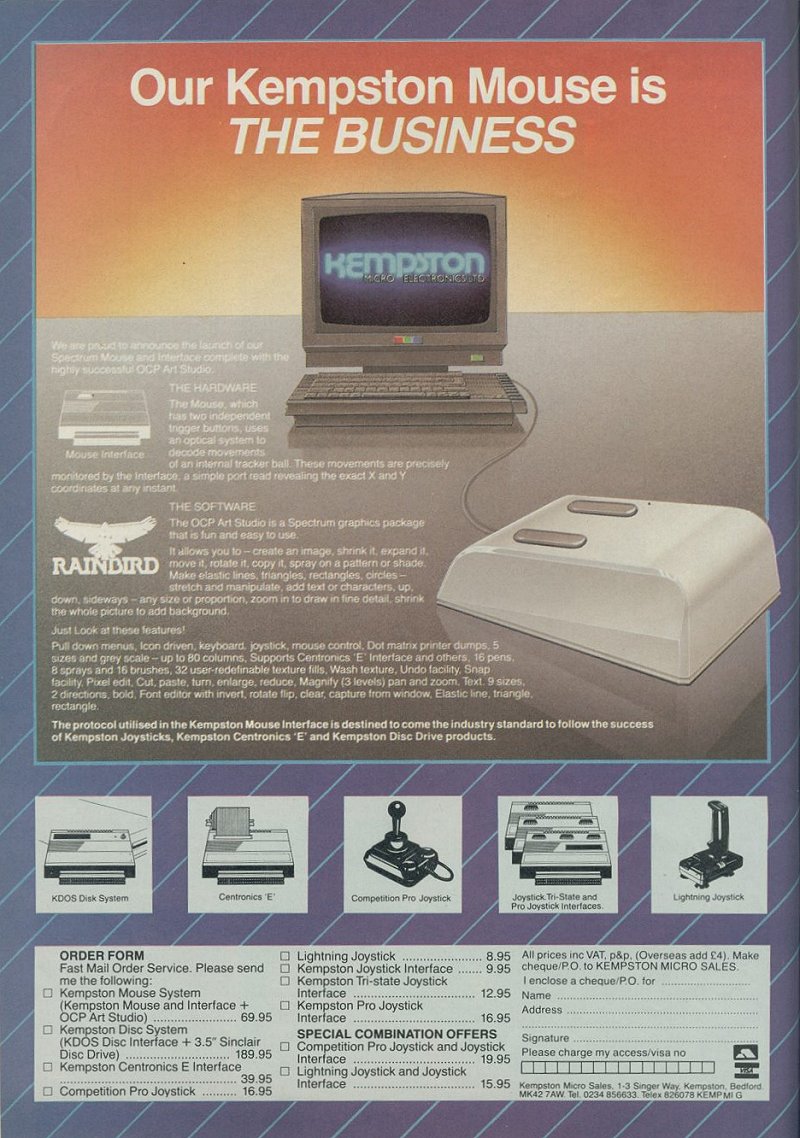
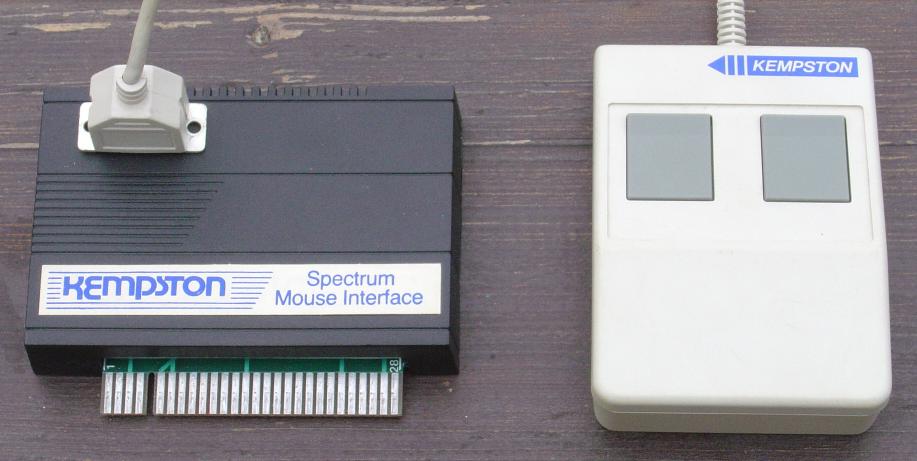
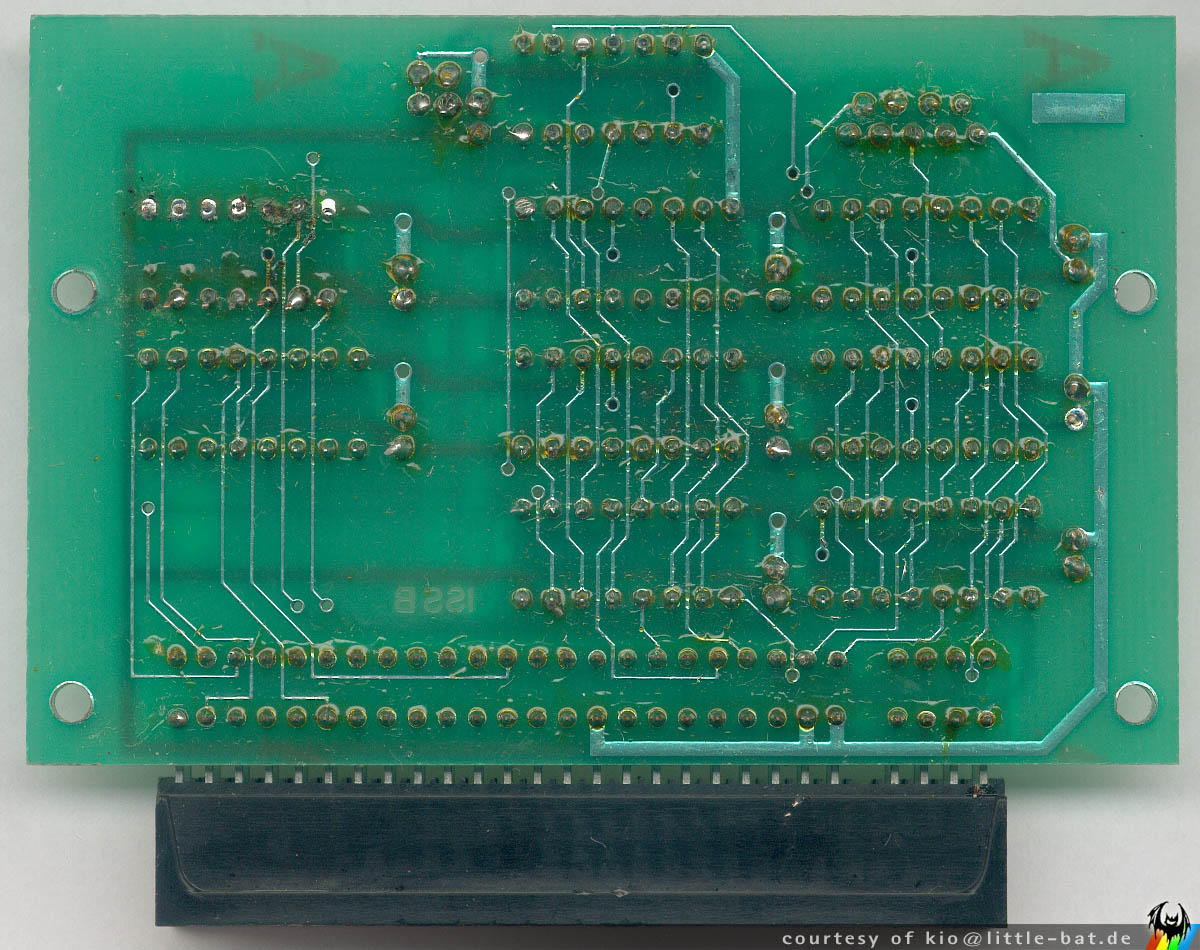
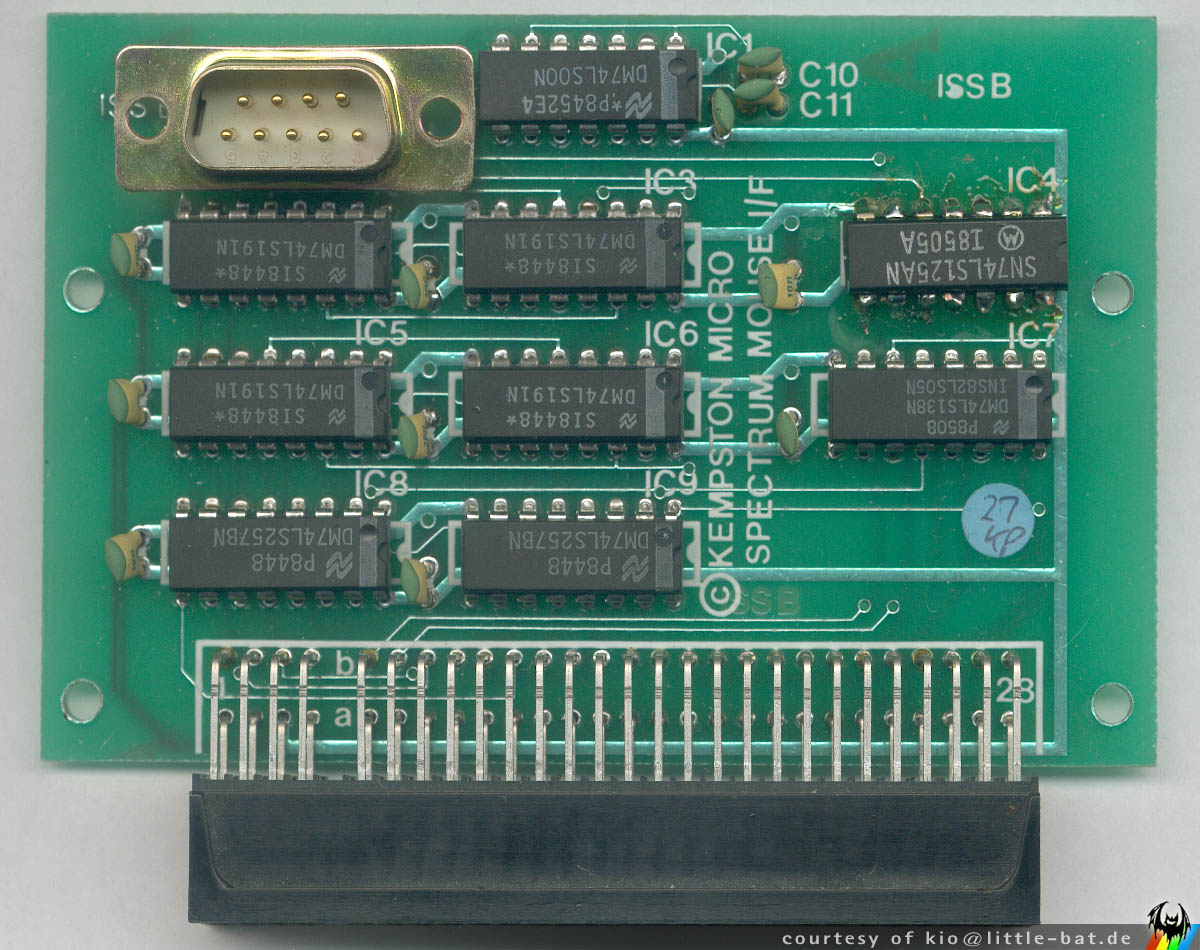
Two button mouse and interface.
Discussion
Nobody has started a thread about this yet.
Remarks
Introductory offer of the Kempston Mouse + (a special version of) {The Art Studio|Rainbird Software Ltd|0007915} software package for £69.95. Later versions of the package include {Kempston Toolkit|Kempston Micro Electronics Ltd|0012456} and {Spectrum Graphics Kit|Kempston Micro Electronics Ltd|0012475} instead of Art Studio, for £49.95.
- Native Programming Language
- Sinclair BASIC
Other files
- kmsoft.htmRemote link English
Files and rights
No permission is on record either way. Screens and pictures are copied here on a take-down basis: if you hold the rights and want something removed, say so and it goes.
Scores
In the magazines
- Sinclair User #561986 · Overall3/5
In the magazines 35
Your Sinclair #30Jun 1988 · p.96
Phil South
RAGE HARD! More twiddling with the Magic Screwdirver with Phil Snout, as he reviews two squeaky new mice for the Speccy. Mice have become more and more widespread in computing. You might say they're breeding like rodents, but jokes of that magnitude are a bit hard to take, so let's not. Instead let's quickly turn our attention to two new mice for the Spectrum, namely the British built Digimouse from Capri Marketing, and the new Kempston job, made in Switzerland. Why should you want to use a mouse? Of course, if Sir Clive had wanted us to use mice, we would have been born with one attached to our user port. Well, yes, the Spectrum wasn't designed to use mice, but then again, when the Spectrum was originally designed, mice didn't exist on any computer. And neither did 128K memories or 3" disk drives. I rest my case. But the reason you would want to use a mouse is simple. It makes life easier. Especially if you are interested in graphics, and one thing the Speccy is really good at, is fast colour graphics. So why not unleash your creative bent (fnar), with a mouse. All the top graphics packages support one mouse and sometimes more. So what's stopping you? You don't know which one to buy? Oh dear. KEMPSTON MOUSE A funny old firm, Kempston. In spite of being quite a small firm, and not producing vast quantities of joysticks, it's managed over the years, to become something of an industry standard. What with joysticks, mice and interfaces and now the Kempston Mouse II, where will it all end? This latest package includes everything you need to get mousing: a mouse, an interface and a piece of software called Toolkit. The new mouse is a precision designed piece of kit from the land of skiing holidays and funny shaped sausages. (No, not Scotland, silly, Switzerland.) The name on the bottom of the mouse is Logimouse(TM) and design is credited to Antoine Cahen and Partners. So a designer mouse, eh? The mouse sits on your desktop on four waxy plastic pads, two tiny round ones at the front and two fat rectangular ones at the back. The ball inside the mouse is easily removed for cleaning by twisting a small round plate in the base, and the plate and the ball just fall into your hand. The ball itself is of silicone rubber, with I suspect, a tiny metal core inside it to give it weight. The two buttons on the top and front of the mouse (the end that the lead comes out of), are flat and square, and not only lend a modern look to the mouse, but are precise and fall conveniently under your fingers as they rest on the top of the unit. Whipping the unit open with my magic screwdriver revealed the guts of the mouse. On the circuit board, two sealed microswitches and two optical potentiometers do all the work, while a single chip does all the thinking. (Interesting to note that there is another switch in between the two used, indicating that the board was originally designed for three buttons!) All in all, the construction has a feel of solid reliability, and stands alongside the mice supplied with more expensive computers, even making some, notably the Atari ST's one, look pretty flimsy. The program which comes with the package is nifty too, because it allows you to construct your own Windows and Icons from Basic, and access the mouse interface. But the test program included with the package I examined, told me that when I pressed the left mouse button. I was in fact pressing the right button, so I figured anything else it told me was of dubious merit. Okay, so how does it feel in use? Pretty good. The switches are smooth, and the ball rolls sweetly across even the roughest desk. The mouse performed effortlessly with my preferred graphics programs, The Artist and Advanced Art Studio, and even did a super little job in Basic. One highly recommended aspect of the Demo program is the calculator, a full screen piccy of a scientific style calculator, where you click the buttons on screen. The Kempston Mouse is a well made and useful piece of equipment, and worth looking at if you're into graphics on the Speccy. DIGIMOUSE The Digimouse is made in England by Nidd Valley and distributed by Capri Marketing. Nice to see a British production in this line, although it has to be said that AMX was there first. Nidd Valley is very strong in the BBC micro field, and its mouse for that machine has been a best seller. So let's have a look. The main worry here was the size of the thing, a big chunky box with three buttons on the front (this time the other end from the flex), and a slide switch on the side. Under the mouse there is a vaguely keyhole shaped hatch, which gives you access to the mouseball... after you've undone the crosspoint screw holding it in place, that is. There are four felt pads on each corner of the base, affording smooth movement on most surfaces, except slightly rough ones like untreated wood, where it catches a bit. The slide switch is on the left hand side of the unit and has two positions. This is the speed control, altering the speed of response for the pointer on your screen,for graphics or menu selection. The mode of operation is supposed to be with your hand on top of the mouse, with your first three fingers on the buttons, and your thumb on the slide switch. I found this a bit unnatural at first, a bit like holding a Konix joystick, where you can only hold it one way and you wish you could change hands. Still, like most things, you get used to it after a white, although it's never very relaxed. Once more into the casing, dear friends, and my magic screwdriver reveals the very different internal construction. One main L-shaped circuit board, containing one central chip and the three button switches, plus the slider on the side. The architecture of the machine isn't as tidy as the Swiss mouse, with multi-coloured wires all over the shop, and a floating circuit board, which is secured inside the lid of the device with a piece of double sided padded sticky tape. This isn't as duff as it sounds, as all but the most expensive hi-fis are actually made like that as well, so the NV mouse isn't alone in that little design feature! The x and y potentiometers are mechanical, so far as I could tell, and firmly sealed too, to prevent any grit mucking up their little graphite plates, I'll be bound. The ball housing is massive, and after unscrewing the plate in the bottom, I discovered why. The ball, which I first thought was plastic, due to the seam on it, was in fact a big polyurethane affair, and not as slick and non-grip as it appeared. Running the thing around my desk, it actually did a fair job of wheeling the pots round, so no complaints about the mechanism. Basically it does the job, even if the design is a little 'kludgey'. In spite of all my initial misgivings about this mouse, as compared to the admittedly better designed and more expensive Kempston, I actually liked it quite a lot. The package that came with it was nicely done, and a sizeable part of the booklet described the various functions of the program. One thing which the book didn't tell you much about, was the program's use of memory (which the Kempston one did, actually), and how to use the mouse with your own programs, or indeed anybody else's. (No IN=61, or POKE howsyafather). It does say that you select 'joystick' on any program you might want to use, but it doesn't actually say which type. But having said all this, the Digimouse is an economically sound and solidly built device, with a great future ahead of it. Good work, NV. OKAY, CLOSE 'EM UP, NURSE Yes indeed, ladies and gentlemen, so there you have it. Now if you don't know everything about these two mice, you must have been asleep for the last page. The verdict? My personal taste is for the Kempston, but that's 'cos I'm a posey git with more money than sense. If you've got slightly less money, then by all means go for the Digimouse, 'cos you wont get better for the money.
CONTACT BOX Kempston Mouse Kempston Data Limited [redacted] Digimouse Capri Marketing Ltd [redacted]
FEATURES KEMPSTON Buttons: Two Potentiometers: Optical Ball: Silicone Rubber No. of Chips: One No. of PCBs: One Feet: Waxy Plastic Interface Type: Flat Dimensions: 9.5 x 6.8 x 2.7 Price: £49.95 DIGIMOUSE Buttons: Three Potentiometers: Mechanical Ball: Polyurethane No. of Chips: Five No. of PCBs: Two Feet: Felt Interface Type: Upright Dimensions: 11 x 6.5 x 4.7 Price: £45.00
Sinclair User #74May 1988 · p.69
EEEEK! IT'S A MOUSE Not so long ago, if you were caught talking about mice with toolkits you were marked as a mental incompetent, fit only for the Presidency of the United States or the editorship of a Commodore magazine. But in this business, the ravings of deranged minds have a habit of turning into hardware. Nobody's suggesting that anyone at Kempston is anything other than completely sane, but they have produced a mouse. With, ahem, a toolkit. The mouse in question is, of course, a pointing device. A small plastic wedge with a large ball, two buttons and a long bit of wire; if you plug it into your Spectrum (using the equipment provided) and push it about on a flat surface then the pointer follows its every move on the screen. Inside the mouse are a couple of wheels (that'll surprise the vet), one of these wheels generates pulses when the mouse moves up and down, the other senses sideways sliding. The interface counts the pulses, the Spectrum reads the count and follows the mouse. Make a good lager slogan, that... But what about the toolkit? When the Spectrum ROM was written in 1982, The Human League were in fashion (ask your father) and mice were small and furry with a cheese fixation. So to interface the hardware to BASIC and to start to use the thing, some extra software is needed. This is where the toolkit comes in. It comes on tape and loads in the usual way. Plus 3 owners will be beside themselves to realise that the toolkit transfers to disk without even a sniff problem. Plug in the interface, plug in the mouse, switch on the Speccy and load the software. Now what? Well, the toolkit adds some useful extra commands to BASIC to control windows, icons and the mouse itself. Since the software works with every Spectrum, it doesn't try to be too clever and all the extra functions are accessed by the old LET X = USR routine. A little crude these days, but it works perfectly well. Routines included are SETUP (to put a window or icon on screen), MOVE (move the pointer on screen). REMOVE (window cleaning) and HIGH (highlight some text). All good stuff; a little basic, but enough to produce quite a reasonable program that shows off just what the beastie can do. There are also a couple of additional programs included on the tape, a demo routine (very pretty) and an icon definer that lets you build up your own pictures. The manual explains things clearly. There really isn't a lot to say about a mouse, especially one as well-designed as the Kempston rodent, so the manual's twenty pages are more than adequate; there is sufficient information to allow rabid machine coders to use the mouse as well, either from the toolkit or in the raw. And of course any Kempston mouse-compatible drawing program will work. The hardware is impeccable - it's a pleasure to play with a mouse like this. Built by a Swiss concern called Logitech (regarded by many as the finest mousers in the business) it is one of the best seen in captivity. There are worse mice included in £10,000 computer design systems. Mice is mice is mice, but building nice mice needs mouse nous. Kempston have it, and it shows. Another recommendation, people.
Crash #47Dec 1987 · p.114
Ben Stone
Dominic Handy
CHRISTMAS LISTE Ben and Dom, Crash, [redacted]. What's small and black and bursts the seams of a stocking? A Spectrum add-on, of course - there are hundreds of little black boxes for music, printing, screen art and program transfer. Dominic Handy suggests some utilities and hardware for the Christmas list, and Ben Stone brings joysticks to the world - but don't fight over them, or they'll all be broken by little black Boxing Day. JOYSTICKES TERMINATOR Supersoft £19.9 Like most pointless street cred - take Raybans, expensive earplugs on a Radio Shack personal stereo and the Beastie Boys - the Terminator does serve a purpose, but only just. And its wacky design takes a lot of getting used to. Being so tiny the Danish stick has a lot of travel, so it's quite unresponsive. And the fire pin is difficult to use: you have to hold the grenade and fire with the same hand, but you can get it to work fairly quickly it you're prepared to go through hand-ache agony. The Terminator is all but indestructible, made of very thick plastic and durable electrical parts, but for nearly 20 quid I'd expect something a little more efficient than this. OMPETITION PRO 5000 Dynamics £14.95 (£15.95 with transparent case, Competition Pro Extra £16.49 with autofire and go-slow mode) This is THE joystick. The fire action is brilliant and the stick performs like a dream. It looks much the same as the Euromax Professional, but for just a pound more you can get it with high-tech clear casing (as in the picture). It's durable, because the shaft is made of steel and the microswitched mechanism inside is remarkably simple (and pretty much user-serviceable). The fire buttons work with reed switches, sometimes considered unreliable, but I've never had any trouble. Sadly, there's no autofire on either model, though there's a souped-up version on the market (the Competition Pro Extra) with autofire option and a go-slow mode never before seen on any joystick. SPEEDKING Konix £11.99 (£12.99 with autofire) The Speedking was a novelty when it appeared - the first truly hand-held joystick that worked well. It's easy to use, though it has the problem of the Euromax Professional in reverse: the diagonals are a pig to find and use quickly, which makes playing games like fighting sims very difficult. The position of the fire button really makes your hand ache if you're pressing it a lot - shoot-'em-ups turn into a nightmare when you're doing well! - though it would be difficult to have it anywhere else on the compact little body of the Speedking. There is a Speedking with autofire available. Earlier this year Konix claimed one Speedking lasted for 17,604,000 waggles (that's 27 days of nonstop waggling, folks!), but the story is not now believed, Our Waggling Editor writes. PROFESSIONAL Euromax £15.95 (£18.95 with autofire) The Euromax Professional has most of the features now becoming standard in the joystick world: posey design and microswitches, and an autofire option if you want to pay a bit extra. (It's the autofire version in the picture.) At first it's a little difficult to get to grips with, literally, because it's biased slightly to the diagonals. Theoretically this means the joystick's eight directions are equally easy to use, but in practice the stick often slips out of the vertical/horizontal into a diagonal. But the Euromax Professional has a brilliant fire action. And it's a great stick for games where deft, precise movements aren't needed; it feels rather flimsy, but the couple that were in the office had fairly long lives considering the hammering a CRASH joystick gets! 125 SPECIAL Cheetah £12.99 This new joystick, introduced in last issue's PCW Show report, has the usual eight directional controls as well as two independent fire buttons - and a special rotate function which allows the player to twist the joystick for extra-realistic movement. Of course a joystick of such complexity needs more than the usual five pin in/outputs; you'll have to have an extra joystick port, or use both ports on the +2 and +3/. There is an autofire function. IN THE BLEAK MIDWINTER MIDI INTERFACE Cheetah Marketing £49.95 With this interface box and accompanying software you can control any MIDI instrument via the Spectrum. It's superb for people who can write music but can't play - just enter the notes and the computer plays the instrument. Or do it the other way round: you play the music and the computer puts it into musical notation. Including a MIDI lead for connecting the interface to your instrument, the MIDI interface was reviewed in issue 40. MK5II KEYBOARD Cheetah Marketing £199.95 This 61-key fully polyphonic board with foot switch and MIDI output ports comes packed in a rugged steel case. It's an ideal accessory to Cheetah's MIDI interface. MUSIC MACHINE Ram Electronics £49.95 'One of the best all round music add-ons for the Spectrum' - Jon Bates, Issue 34. A sound sampler, sequencer, editor, drum machine and composer all in one little black interface, the popular Music Machine is supported by a wide range of software. Recent additions include Quasar Software's Sample Editor (reviewed last issue) and Tectrics's chord construction kit Compuchord (Issue 45). SPECDRUM Cheetah Marketing £29.95 Now the standard drum add-on for the Spectrum, the SpecDrum comes complete with eight samples of real drum sounds. Extra drum sounds can be loaded in from tape: the Electro Kit and Afro Kit both retail at £4.99 and the older Latin Kit at £3.99, and all come complete with their own editors. The SpecDrum plugs into most hi-fis via a connecting phone lead. Jon Bates enthused over it in Issue 27. MUSIC TYPEWRITER Romantic Robot £7.95 Coming complete with keyboard overlays (48/+), this clever piece of software is a sophisticated tool for music on the Spectrum. Music written on Music Typewriter is displayed onscreen using realistic graphics which can be dumped to most dot-matrix printers, so you can print your own music. And your compositions aren't limited to Music Typewriter - all your tunes can be converted to machine code for use in your own programs. Jon Bates went sharpening and flattening on Music Typewriter in Issue 16. PRINTING MULTIPRINT Romantic Robot £39.95 A printer interface with all the options, the Multiprint can dump any Spectrum screen to an Epson-compatible printer in three different densities - it's handy for listings, too. There's more info in Issue 43. RAM PRINT Ram Electronics £34.95 Not only does this little black box drive your printer using a very easy menu-driven system (all stored on a ROM chip), it's also useful for those apres-Christmas 'thank you' letters because it comes with a built-in word processor, accessible from BASIC at any time and also on ROM. And if you ever get bored of all those line feeds and ESCape codes you can always plug your joystick in the built-in Kempston port and bash away at a game. See the details in issue 35. FOR THE ARTIST THE OCP ART STUDIO THE ADVANCED OCP ART STUDIO Rainbird £14.95, £24.95 'Probably the best art utility on the Spectrum' - Mike Dunn (On The Screen Editor). Need we say more? Several versions of the mouse- and joystick- compatible Art Studio utility are available for different Spectrum setups; The Advanced OCP Art Studio, which really needs an Interface One and microdrive to use its full potential, is much more powerful than the original. It has a Scrapbook library facility so you can combine and paste together pictures. Issues 24 and 40 have reviews of The OCP Art Studio and The Advanced OCP Art Studio respectively. VIDEO DIGITISER Sunset £128.00 Ever wanted to change Prince Charles's ears, or rub out out that blot on Gorbachov's forehead? You can do this and more, provided you've a video recorder, with the Sunset Video Digitiser. This little black box has all the connections for grabbing TV pictures from the video and then using them anywhere you want - even in games. Sadly, there's no printer ribbon that will put them onto T-shirts. Franco Frey got frame-grabbing in issue 31. VIDEOFACE DIGITISER Romantic Robot £69.00 plus £1.00 postage and packing The Videoface Digitiser is amazingly cheap and fast - it's all here. You can grab and scan three pictures a second, and then produce a very realistic animation sequence using up to six screens. At about hall the price of the Sunset Video Digitiser, this represents unbelievable value for money. NOT A CREATURE IS STIRRING, EXCEPT FOR A MOUSE KEMPSTON MOUSE Kempston Data £49.95 There's no WIMPing out with Kempston's version of the yuppie controller, with button eyes and connecting tail. Don't forget to lock up your cheeseboard and keep the cats indoors. Kempston is still bundling Rainbird's OCP Art Studio with this rodent at £69.95. Or those with a Spectrum +3 you can get Kempston's new Desktop utility package for +3 DOS and the mouse for exactly the same price. COMCON Frei £17.95 (single port), £19.95 (twin port) This is guaranteed to work with any product that uses the Spectrum keyboard. By connecting the six plugs to the miniature keyboard add-on you can have eight directions and TWO independent fire buttons (provided you have the correct joystick - also available from Frei). A twin-port version is also available for complex games. Lloyd reviewed the single-port version way back in Issue Eight. AND... MULTIFACE ONE, MULTIFACE 128, MULTIFACE 3 Romantic Robot £39.95, £44.95, £44.95 'One of the most versatile and user-friendly units on the market' - CRASH Issue 29 - Romantic Robot's Multifaces are ideal for the serious gameplayer or utility user with a fast storage device: they can put cassette games on Beta, Opus and Kempston disks. The Multiface 3 (pictured) can transfer cassette programs for the Spectrum and 128 to the - +3's Amstrad disks. It was welcomed in Issue 45 as a good reason to buy the +3, though Sixword's Swift Disc and Rockfort Product's Disciple are also worthwhile disk systems. The Multifaces have other uses: most POKEs can be entered using the ROM-based toolkit. And printer-owners are also catered tor with a COPY command, ideal for dumping your greatest high scores! All these options are available at any time at the press of a little red button. CRASH first saw the Multiface One in Issue 26. PLUS D Miles Gordon Technology £49.95 (£129.95 with 3.5-inch 780K-capacity disk drive) The Plus D is a new disk and printer interface from the designers of Rockfort Product's Disciple. Its Snapshot button will save all 48K and 128K cassette programs to disk, it's claimed, and the interface can make single and double-size screen dumps to a printer. The Plus D is also available in a package with a disk drive. GAMMA-STRIKE Gamesware £24.95 Gamesware's Gamma-Strike target-shooting system is a novel combination of hardware and software - you plug a target into the Spectrum, shoot at it with a model gun and watch the computer monitor your score! It's all done with the latest signal-detection techniques, and Gamesware promises more 'plug-in games' including darts and snooker soon... look out for the CRASH review. Thank you Santa, lots of luv Ben and Dom xxxxx
Your Sinclair #14Feb 1987 · p.40
Steve Adams
HARD FACTS SPECIAL Are you having a hard time choosing the right hardware? Hard but Steve Adams has the lowdown on the latest hardware. And it's all under £100. KEMPSTON MOUSE Kempston Micro £69.95 Reviewer: Steve Adams This one's for the WIMPs - Windows Icons Mouse and Pointers that is! The Kempston mouse is just the job if you're using one of the new graphics packages. It even comes complete with Rainbird's Art Studio and the Kempston interface. It'll make the toughest of graphic tasks a mere scrape of the mouse on the tabletop with the aid of a little ball in its base. And it's even got ears - well, two little buttons on the top that'll switch it an and off.
Sinclair User #56Nov 1986 · p.293/53/5
Overall 3/5
John Gilbert 3/5
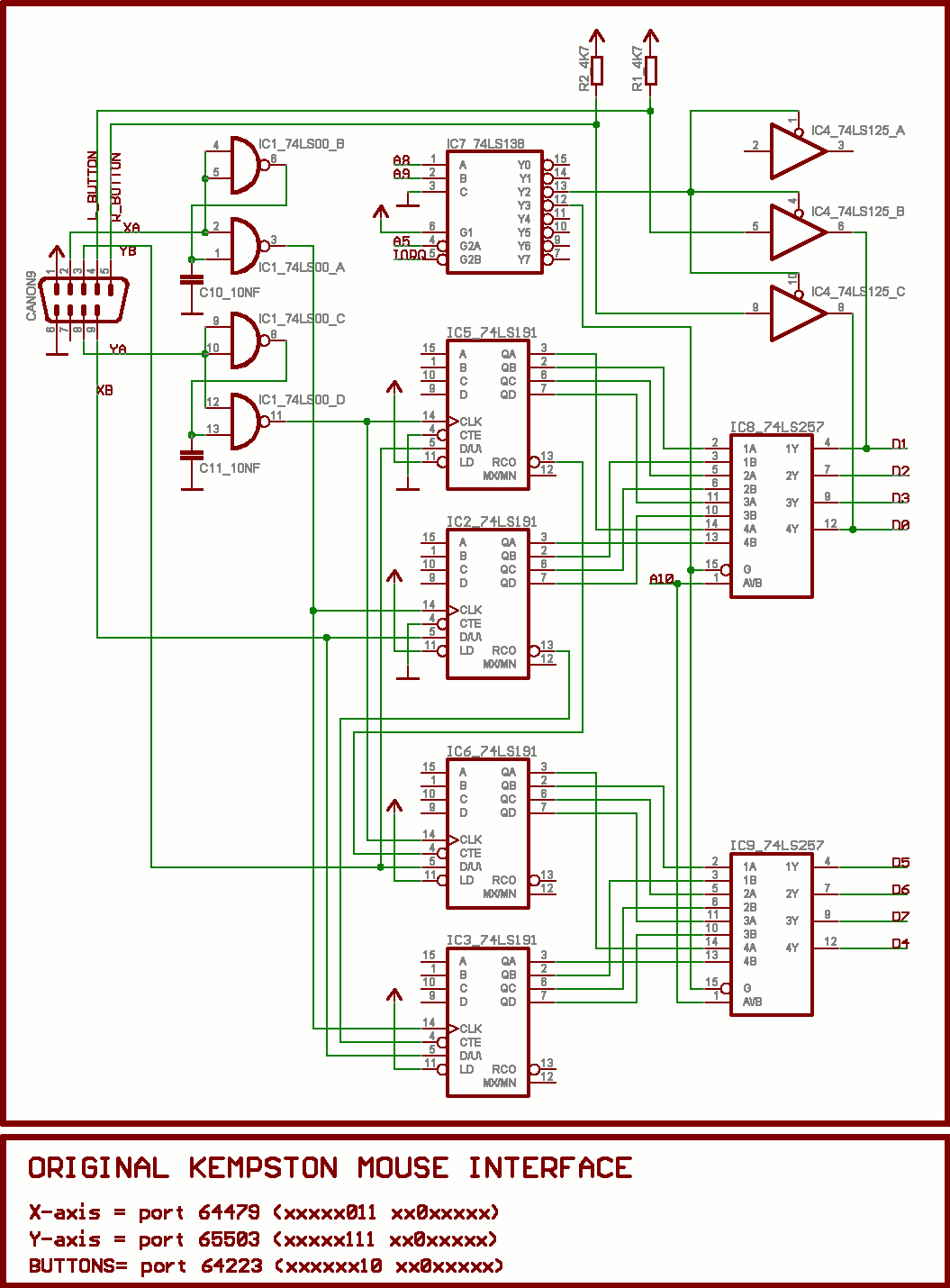
MANIC MEECE Joysticks are just fine but mice are nicer. True or false? Trendy they may be but the simple move-and-select options of mice make them ideal for icon-driven environments. Their freedom of movement also makes ideal for the hand-sketching facilities of computer-aided design packages such as Rainbird's Art Studio. Unlike the inflexible joystick a mouse placed on a board or desk top can be used like a paint brush. A screen cursor is controlled by a revolving track ball under the body of the mouse while options or actions are carried out by the one to three clicker keys on its head. A good mouse should be palmable and lightweight. The ball should be mad of a rough textured material and the click switches should be within easy grasp. Few mice are available for the Spectrum and QL but those that are vary greatly in hardware quality and software support... John Gilbert checks them out and give his strictly no-mousing verdict. KEMPSTON MOUSE Spectrum Price: £69.95 Click Keys: 2 Sensitivity: software controlled Software Bundled - Art Studio Compatible - The Writer (Microdrive version only). Artist II Kempston's mouse package is compatible with all Spectrums and includes the mouse itself, an interface, and a specially converted copy of Rainbird's Art Stndio designer program. The interface uses an Atari-type joystick plug and slots straight into the expansion port at the back of the machine. It's dead-ended but monitor and disc drive drive interfaces will happily share the expansion slot with it. The mouse is supplied in three parts: palm-sized body, rubberised track ball, and a plate which holds the ball in the body. This handy arrangement means that you can take all the moving parts out of the mouse body to clean it. The rubber textured ball will grip even the smoothest of surfaces without slipping. There is no movement sensitivity control on the mouse but Kempston has built in a software-controlled movement scale of one to five. Setting 5 forces the mouse to travel far and wide to achieve just a little cursor movement while Setting 1 the cursor across the screen with a short flick of the mouse. The mouse itself seemed well constructed and instructions supplied with the mouse operating software give pokes to allow the device to be used with a variety of different joystick-controlled software packages. The Kempston version of Art Studio is the only piece of applications software supplied with the mouse package. It's a menu-driven computer-aided design system which produces a wide range of Paint and Draw effects. Included also is a library of pre-defined shapes such as lines, triangles and circles which are created by click- selecting (using the mouse) a point of origin and definition points for circumference boundaries and points of triangles and squares. The speed at which the mouse performs these operations depends upon your agility as an operator but, even if you're a neophyte, the mouse is considerably more flexible than either keyboard or joystick. Art Studio defaults to keyboard input unless you select mouse during the printer/peripheral installation routine which you run through every time you load the program. Your choice should be a careful one as the AMX mouse option uses a different control standard to that of Kempston and, You can't change the input device once you've got into the package. By adjusting the mouse's sensitivity to movement, you can make the mouse suitable for either bold or intricate artwork. Kempston-compatible Art Studio is unfortunately currently only available with the bundled mouse package. Rainbird, however, is working on a Kempston version which will be available shortly. The Kempston mouse is a fabulous drawing tool and a natural companion to Art Studio, but it can be used just for the mundane task of menu control. The Writer, Softechnics word-pro pack, is widely proclaimed for its Kempston mouse compatibility - with one proviso: you must have a microdrive and Interface One. Side 2 of The Writer cassette contains a Microdrive version of the word processor, together with its installation program. Installation on to cartridge is automatic after you've chosen to use keyboard or mouse and a version created for mouse will work with the keyboard but not vice versa. The mouse has no effect until you enter the editor/menu modes by pressing the right-hand click button. You then use the left-hand key to select menus and the options within them. Again, the mouse saves time as you don't have to fiddle around on the keyboard or find specific control keys. Unfortunately, Softechnics doesn't plan to make the standard versions of The Writer or The Artist - it's CAD package - mouse compatible. Artist II will, however, be out soon and it will be compatible with Kempston and AMX mice. A sparse instruction leaflet with the Kempston mouse provides a minimum of information for getting it to work in Basic or machine-code programs. The mouse uses the in instruction to read its position in relation to the cursor on the screen. The X co-ordinate is read by in 64479;Y by in 65503. and the status of both click buttons is relayed. The co-ordinates are returned as eight-bit values corresponding to the relative movement of the mouse while the button is pressed. A small Basic demo program is included in the notes but the process can also be applied in machine code.
Kempston Mouse and Rainbird's customised Art Studio. A dynamic duo.
Your Computer #8Aug 1986 · p.56
Mary Sargent
A TALE OF MICE, JOYSTICKS AND THINGS Mary Sargent gets to grips with joysticks, trackerballs and mice. Books could be written about joysticks - and have been - but finally it is a matter of personal preference. If you play many games on your computer you must buy a stick which feels correct for you. You may sit well back from the TV screen so you need to consider the length of lead you have with the joystick. It may vary from 3ft. to 8ft. depending on the model. The second consideration is if it will tolerate heavy treatment. Internally, switched joysticks have either pressure pads, leaf springs or micro-switches. Those with micro-switches are likely to last longest. Names and models to conjure with are Wico, which also makes joysticks for much-hammered arcade machines; Flight Electronics, which also makes joysticks for industrial use; and Spectravideo, whose Quickshot range is much-favoured, especially by manufacturers offering interface-with-joystick packages - for the Spectrum, of course. At least one company traces its fortunes directly from the lack of a Spectrum joystick port. JOYSTICK PORT Newcomers to the scene are the mercury-switched The Stick, the hand-shaped Konix Speedking, and the Cheetah cordless R.A.T. Not all makes and models will be available for all models of computer. There are pitfalls such as the auto-fire facility, designed to make shooting aliens easy but which can cause the fire button to stop working on some micros. If you want a joystick, the advice is to try it in a shop or buy one on the recommendation of a friend and be prepared to spend between £10 and £20. Two trackerball contenders are the analogue ball from Wigmore House, an import from the East selling for around £22, and the optical/digital Marconi RB2 ball at £59. From there the peripherals begin to become selective about the micro into which they are plugged. The analogue ball will run on the BBC and the Commodore 64. Do not expect any software with it, though it should run on any analogue joystick software without too much difficulty. The Marconi ball, available for the BBC, has its own software on cassette. There are utilities, so that the ball can be used not only from Basic but can also take over the use of cursor keys in word processor programs such as Wordwise and View, and a stand-alone drawing package, Paintball. For Master 128 owners, a supplied ROM ensures that the trackerball works automatically with the View family software. The advantage of trackerball over joystick is a matter of the degree of control. It is a precision-made item, a fact reflected in the prices, and the Marconi version compares well to certain of the rodents available. It is a realistic alternative to the more fashionable mice, if only because its size ensures a finer manipulation of the cursor. It is not dramatically cheaper, however, and the final choice, yet again, is a matter of user preference. There is something infinitely user-friendly about the name of the mouse which, after all, is just a glorified piece of plastic designed to take you from one part of the screen to the other in the shortest time. There is a definite art to calculating the distance your mouse travels vis a vis the results on-screen, and some users never manage to appreciate the discrepancy between hand movements and computer reaction. Nevertheless, mice are breeding and now Wigmore House is marketing a furry one, there could well be a population explosion which will render joysticks and trackerballs as obsolete as the Oric. It was AMS, of course, which pioneered the home-micro rodent by developing a mouse system for the 32K user-RAM/single-disc BBC. That resulted in the affordable Mousepaint and WIMP utility software packages which had hitherto been seen only on the Apple computers, Macintosh and Lisa. Software has always been an integral part of the appeal of a mouse and AMS has produced a great deal of it since the AMX Mouse nibbled its way into the BBC micro in January, 1985 with a sideways-ROM and paint-package at the then outstanding price of £90. Other manufacturers of mice have taken appropriate steps to follow the AMS lead and have, in some cases, made their mice AMX software-compatible. That may well prove advantageous for the user as there is every chance that a common standard for mouse hardware will be adopted based on the AMS three-button design. Atari, with its 520ST series computers, has anticipated the fact that one day all micros will be mouse-driven and has included a neat and well-made mouse, with WIMP software, in the price of its machines, leaving the older generation of micros - BBC, Commodore 64, Spectrum and Amstrad CPCs - to be served by peripheral manufacturers, whose wares are shown, as usual, in the buyers' guide table. Depending on which micro you own you may have little or no choice about which mouse/software package you can select. The Amstrad has only the AMS package, which was unfortunately not available for review at the time of writing, while the Spectrum fares a little better with the AMS package and a Kempston mouse. The Commodore has three mice and so has the BBC. Points to look for when mouse-buying are the physical construction of the unit and the availability of compatible software, The Kempston mouse for the Spectrum is typical of the breed, being a two-button rubber-coated ball device. As with most mice, the ball can be removed easily from its cavity, which is essential since all mice tend to collect fluff, biscuit crumbs and other foreign bodies; if they cannot be shaken-out, the operation of the mouse becomes erratic. BALL SLIDES The inner works reveal that no short cuts have been taken in its design. There are brass spindles, ball-race bearings and a sprung idler wheel. Two PCBs hold the opto-electronics, a few other small components and the two click-switches. A black box interface is needed on the Spectrum, since that micro lacks any ports of which a mouse could make use, but even with the extra hardware the mouse costs a reasonable £69.99, which includes the highly-successful OCP Art Studio software. The efficiency of the AMX mouse is hampered by its uncoated metal ball which tends to slide on many surfaces and that has attracted much criticism from the opposition. On the proper surface - a rubber-compound sheet is ideal - it is reliable. The AMX Mouse/SuperArt package costs around £75. SuperArt is one of a number of offerings from a company which constantly updates and improves its software. It is excellent if you buy after the packages have been field-tested but not so good if you have one of the early versions. AMS is helpful about upgrades and advice but detailed review is difficult, since an assessment of one version of a software offering may not be relevant to later issues. I consider PageMaker to be its best product, since you can use it for straightforward artwork as well as for its more widely-promoted magazine-making role. ANAMOUSE Nidd Valley entered the mouse stakes with devices for the BBC A, B and Master series computers. Anamouse is promoted as being "not just another mouse" but a "new concept in positive mouse control," which does not affect the results so far as the user is concerned to any noticeable degree. What is interesting about it, though, is that it plugs into the analogue port on the BBC, thus making it possible to have something else plugged into the user port. Digimouse, the second of its offerings, is an optical device which is in direct competition with the AMX and the Wigmore Megamouse. As such, it is highly competitive on price and will run AMS software. A large diameter rubber ball is set in its socket with no play whatsoever. That makes for a very stable mouse arrow on the screen but the hand pressure needed to move it is more than is needed for other mice. Digimouse has simple interface software on cassette and can run the large software offerings associated with AMS and Wig- more House. Versions of both Anamouse and Digimouse for the Spectrum 128, the Commodore micros and Amstrads are promised. Each mouse, which is extremely well-made, sells for £34.95. Then there is Megamouse for BBC and Commodore 64, the one and only furry rodent of this selection. It has a large felt pad on its underside on to which a square of Velcro can be fitted. PROTECTION That protects the rubber-coated ball when the mouse is not in use and is genuinely useful. The cost is around £63 but for that price you have a truly ergo-dynamically-designed peripheral which is a joy to use. The technically-minded may note that it has a heavy rubber-coated ball and a low centre of gravity. Software offerings accompanying the mouse are all opfional. Cadmouse is a drawing package with a slight slant to technical drawing - dimensions and centre line can be placed on engineering drawings and there is provision for 45-degree hatching - but the handbook is brief and at £29.90 it has not a great deal to commend it. Alternatively, the Mega-mouse/PearTree Artist package may be purchased for £99 excluding VAT. The Peartree Artist is a 16K ROM for the BBC and is an excellent colour-drawing package with animation facilities. For the serious user, it would undoubtedly be money well spent.
JOYSTICK There are two basic types of joystick, the switched (digital) variety and the analogue variety. The analogue type has two potentiometers inside it which convert the movements of the stick to a screen location. The switch type is much more akin to an aeroplane joystick - it gives directional information, rather than an absolute position. Push a digital joystick up and your space defender travels up-screen forever until you next move the joystick. Digital joysticks are inexpensive to manufacture and are ideal for computer games. PADDLES Really an analogue joystick in disguise. The name derives from the original TV-Tennis games. There, you will recall, the position of the player's bat was directly proportional to the twist given to the paddle. Why the paddle is called a paddle and not a racquet or bat is one of the best-kept secrets of the micro revolution. TRACKERBALL Effectively a low-geared joystick. It does not look anything like a joystick, of course; the user uses a finger or two to move the surface of a plastic ball, not a stick. The movement of the ball is geared down so that it needs a relatively large movement of the finger to move a small way on the screen. You lose speed of movement but gain accuracy. Trackerballs may be digital or analogue but in either case the output gives positional rather than directional information. Trackerballs need to be fairly substantial so that they stay still while you move the ball. MOUSE Take a trackerball, make it small because the intention is to move it, turn it over so it has something on which to move (the ball). and you have a mouse. That is the Darwinian theory of mouse evolution. Mice are usually digital devices. They have speed and accuracy. BITSTICK A precision analogue joystick which looks like a trackerball. Used for high-resolution drawing. It is available for the Apple and for second-processor BBC users. It is expensive. FOOTPRINT A measure of how much space the devices need to work successfully. Some joysticks are held in the hand and never touch the table. Their footprint is zero. The footprint of other devices is equal to their maximum width and depth and for the average joystick that is about 10 sq. in. The exceptions are the mice. Generally they run all over the table-top but how far they wander depends on their internal gearing. It is not uncommon to have to move a mouse some 24 inches to obtain a 4in. line on the screen.
Kempston £69.95 Kempston Micro Electronics, [redacted] AMX Mouse £46 Advanced Memory Systems Ltd, [redacted] Anamouse and Digimouse £34.95 Nidd Valley Micro Products, [redacted] Megamouse £69 [redacted] Dates Mouse - EEC £76 (Commodore 64 only). Magic Mouse - SMC £60 (Commodore 64 only). Bitstick 2 - Robocom £795 Robocom, [redacted] Trackerball - Marconi £69 Central Trade Exchange
Your Sinclair #6Jun 1986 · p.41
Max Phillips
HARDWARE BONANZA Yeeeehaah! Max Phillips rounds up all the latest Speccy add-ons and pens them up... Kempston Mouse Kempston £69.95 With Art Studio Reviewer: Max Phillips This is the Yorkie bar of mice; solid, chunky and very, very smooth. It's a two-button genus rather than the three displayed by AMX's alternative - not that it matters as current programs treat all mice as if they had one button. You should also be warned that the interface has no through-port for other add-ons (neither has the AMX but it does have its own printer port). You can also get down to producing masterpieces straight away because the Kempston comes with the cassette version of Rainbird's much loved Art Studio. On the other paw, the better documented AMX mouse comes with its own reasonable Art program for £79.95.
Sinclair User #49Apr 1986 · p.96
John Lambert
THE ARTIST'S MICE Kempston has finally released its mouse for the Spectrum - and it was well worth waiting for. As a bonus it runs on the new Spectrum 128, so it looks as though it will be around for quite a while yet. The most obvious attraction is that it is bundled with the excellent Art Studio - a Sinclair User Classic - and it makes the program even better than it was before. With the standard Art Studio you have to patch the program to use the mouse, while the extended version is supplied ready patched. Mice are great for moving a pointer round the screen or selecting items from a menu, hence the current expression WIMPS - Windows, icons, Mice, Pointers. As Art Studio utilises all those functions it is much easier to use. The Kempston mouse has two buttons, which although normally independent, appear to have the same function within the program. It has a soft rubber ball, which is less likely to slip, and optical decoders. You cannot avoid comparisons with the AMX mouse. While the Kempston mouse is physically superior and the interface simple and straightforward to use, the main problem is software. Kempston has always been very good at hardware, but not so good at software. The AMX interface has both a mouse port and a printer port, while the Kempston runs only the mouse. For software writers the Kempston interface is potentially easier to use, but that should make no difference to competent writers. The software supplied with the AMX mouse consists of a drawing program - not up to the standard of Art Studio - plus an extended Basic so that you can use the mouse, pull down menus etc, in your own programs. Kempston gives you Art Studio only, plus instructions on how to read the mouse port. On balance I prefer the Kempston mouse, if only because it is better made. It will be up to the commercial software writers to make their choice. If you write your own Basic programs go for the AMX, if you write in Z80 stick with Kempston. After all, the Kempston joystick interface has become a standard. Both mouse packages cost £69.95. Kempston MicroElectronics Ltd, [redacted].
ZX Computing #24Apr 1986 · p.59
Kempston Micro Electronics £69.95 Kempston step into the ring with the reputation of being one of the most well established and successful producers of peripherals for the Spectrum. They can rightly claim to have produced the closest to a universal joystick standard that exists for that machine and so they're in a good position to repeat that success with their mouse system. Simply handling the Kempston Mouse shows it to be even more soundly constructed than the AMX version. It's smaller but slightly heavier and the tracking ball on the underside is made of rubber, factors which may well give the mouse a firmer grip on your work surface. At the same time, the tracking ball is surrounded by four steel ball-bearings that help to make it move smoothly. Just two buttons are mounted on the mouse's 'head' almost flush with the surface and this, along with the smaller size and white finish, gives it a more stream lined, hi-tech look. The interface looks exactly like a standard Kempston joystick interface, with a D socket into which the mouse is plugged. At the moment, the mouse comes bundled with a copy of The Art Studio which, as all good computer magazines will tell you, is the best thing since sliced bread. Its ability to cut and paste areas of the screen is virtually unmatched, except by the harder to use Artist from Softek. It is also very versatile in its shape handling commands, and the fill routine is probably the fastest around. Art Studio is already compatible with the AMX Mouse, but if requires a few POKES to make it Kempston compatible (although the microdrive version, Extended Art Studio is already compatible with both). Adding these POKES took a minute or two, but only needs to be done once since Art Studio allows you to make backup copies of itself with these POKES included. At the moment the documentation for this mouse isn't completed, though the Art Studio obviously carries its own manual and since there are no other bundled programs to compare with the AMX Control and Icon Designer programs, there's unlikely to be any need for a large manual. However, Kempston do intend to produce their own graphics utility which, when finished, will replace Art Studio in the package, and the duplicated sheets that came with our review model had brief notes about the ports used by the mouse and the relevant memory locations as well as a short test program and it would be useful to see these expanded on. THE WINNER... Well, there isn't one really; this is one of the few occasions when I can't honestly recommend one product over another, £69.96 is quite a lot of money, but I have no doubts about recommending them both as being well worth the price. Both packages are good value since they bring to the Spectrum facilities normally associated with much more expensive machines. And in both cases along with the ease of use that a mouse brings there is also an element of sheer fun. A mouse gives you much finer control over picture designing than any of the lightpens, graphics tablets or other graphics aids that I've used, and once doodling on screen becomes as easy as doodling on paper it also becomes an enormously enjoyable pass time. In terms of the actual mice themselves, Kempston have a very slight edge. Though I would never call the AMX Mouse poorly constructed the Kempston seems a little sturdier, and because of the rubber tracking ball it seems to have a better grip on the work surface. On the other hand, the AMX mouse does include that Centronics port which is both useful and excellent value. And, at the risk of hedging my bets, I can't really criticise the construction of the AMX Mouse: they're both very good, it's just that the Kempston is a little better. It's also hard to balance the merits of the bundled software. The Art Studio which (at the moment) comes with the Kempston Mouse is without doubt better than any other Spectrum graphics program, including AMX Art. However, the AMX software also includes the AMX Control and Icon Designer programs which open up all sorts of possibilities, and there is also the likelihood of future software support from AMS themselves. I'm pleased to say that whichever product you decide to buy, this is one of those rare occasions when you're unlikely to regret your choice. Monster hits all 'round.
News/Note7
- Your Sinclair #27Mar 1988 · p.6
- Popular Computing Weekly #3Jan 1988 · p.5
- Crash #46Nov 1987 · p.99
- Popular Computing Weekly #39Oct 1987 · p.4
- Sinclair User #49Apr 1986 · p.96
- Your Sinclair #4Apr 1986 · p.10
- Popular Computing Weekly #6Feb 1986 · p.5
Advert6
- Sinclair User #75Jun 1988 · p.99
- Your Sinclair #30Jun 1988 · p.92
- Sinclair User #74May 1988 · p.45
- Sinclair User #73Apr 1988 · p.45
- Your Sinclair #28Apr 1988 · p.58
- Sinclair User #48Mar 1986 · p.38
Feature6
- ZX Computing #35Mar 1987 · p.26
- Popular Computing Weekly #46Nov 1986 · p.34
- Your Computer #8Aug 1986 · p.56
- Your Computer #6Jun 1986 · p.50
- Your Sinclair #6Jun 1986 · p.40
- Your Computer #5May 1986 · p.58
Full-page ad3
- Sinclair User #50May 1986 · p.99
- ZX Computing #24Apr 1986 · p.2
- Sinclair User #49Apr 1986 · p.54
Review1
- Popular Computing Weekly #16Apr 1988 · p.27
BASIC1
- Crash #48Jan 1988 · p.145
Letters1
- Popular Computing Weekly #39Oct 1987 · p.21
Offer1
- ZX Computing #25May 1986 · p.63
Reviews from people here
Sign in to write about this, or make an account. It takes a minute and lets you correct the catalogue too.
Everything ZXDB can hold about this is here.
Sign in to correct or add to this.
Hold the rights to this and want it taken down?