
Plus D
Hardware: Disk
Miles Gordon Technology · 1988 · Pound sterling 52.13 · Pound sterling 49.95 budget
Also known as MGT Plus D (English)
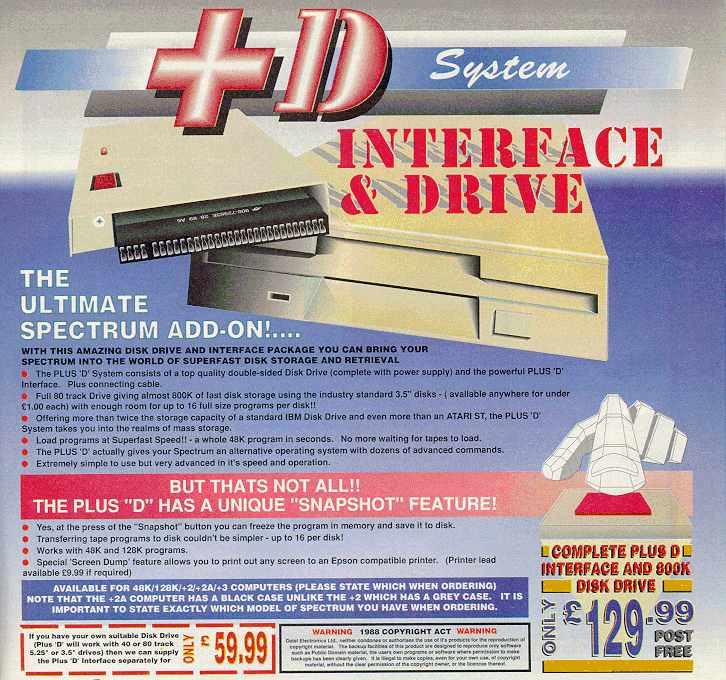
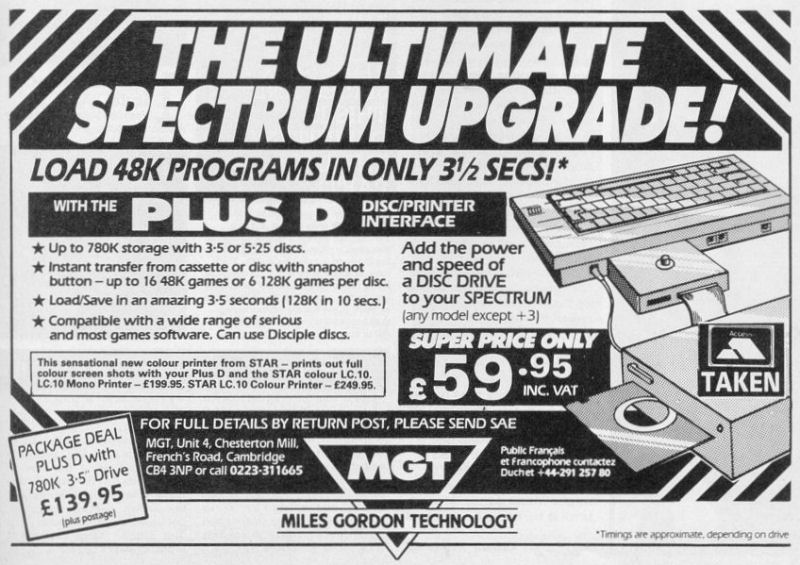
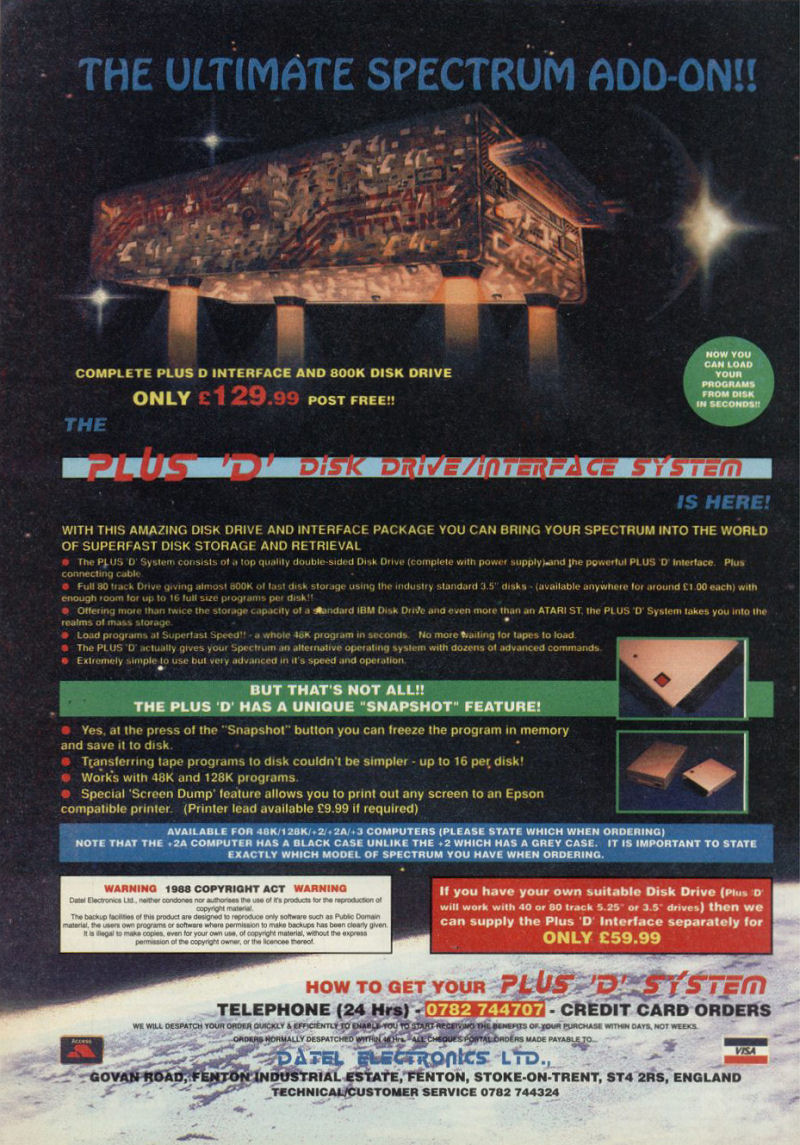
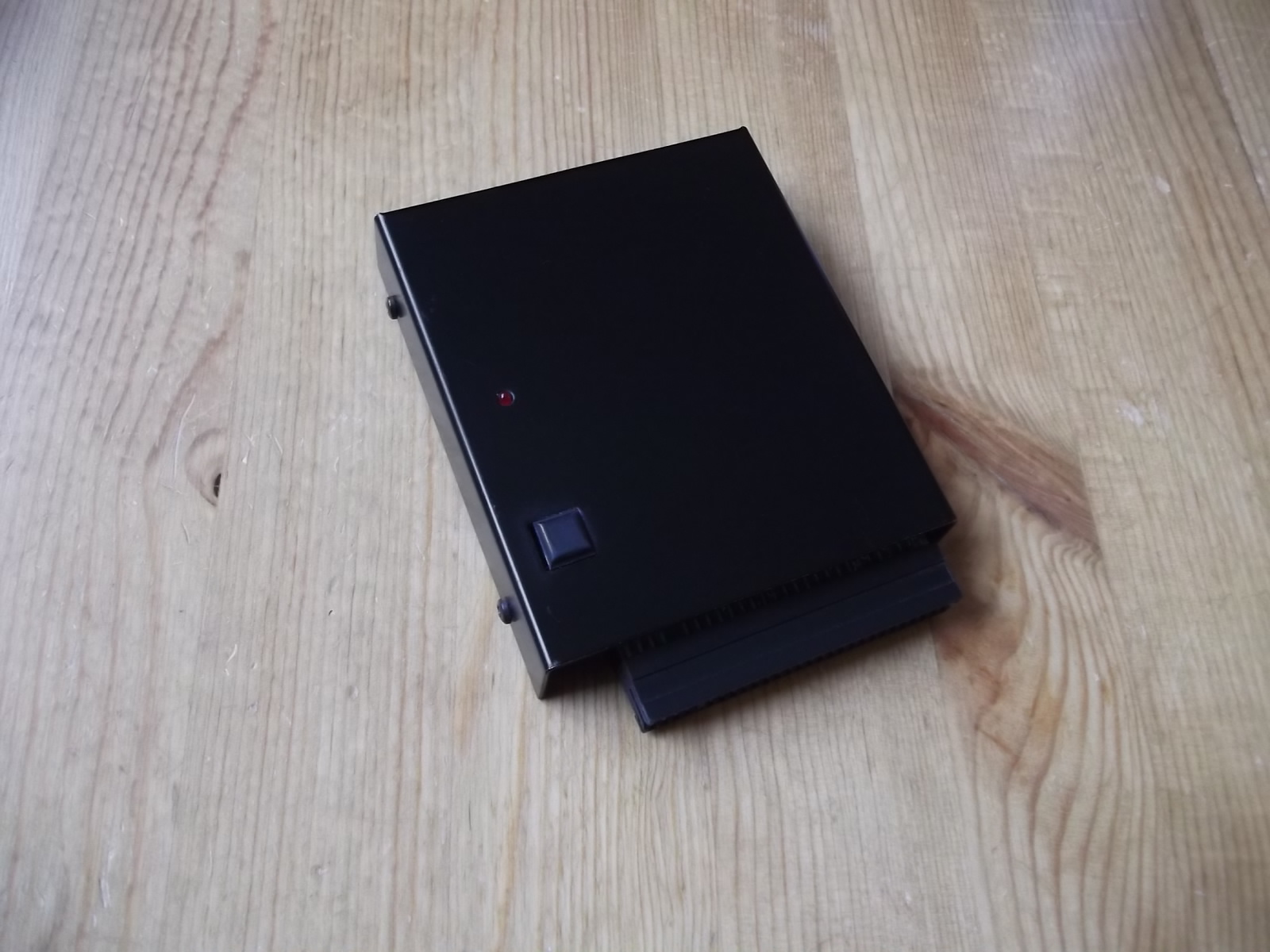
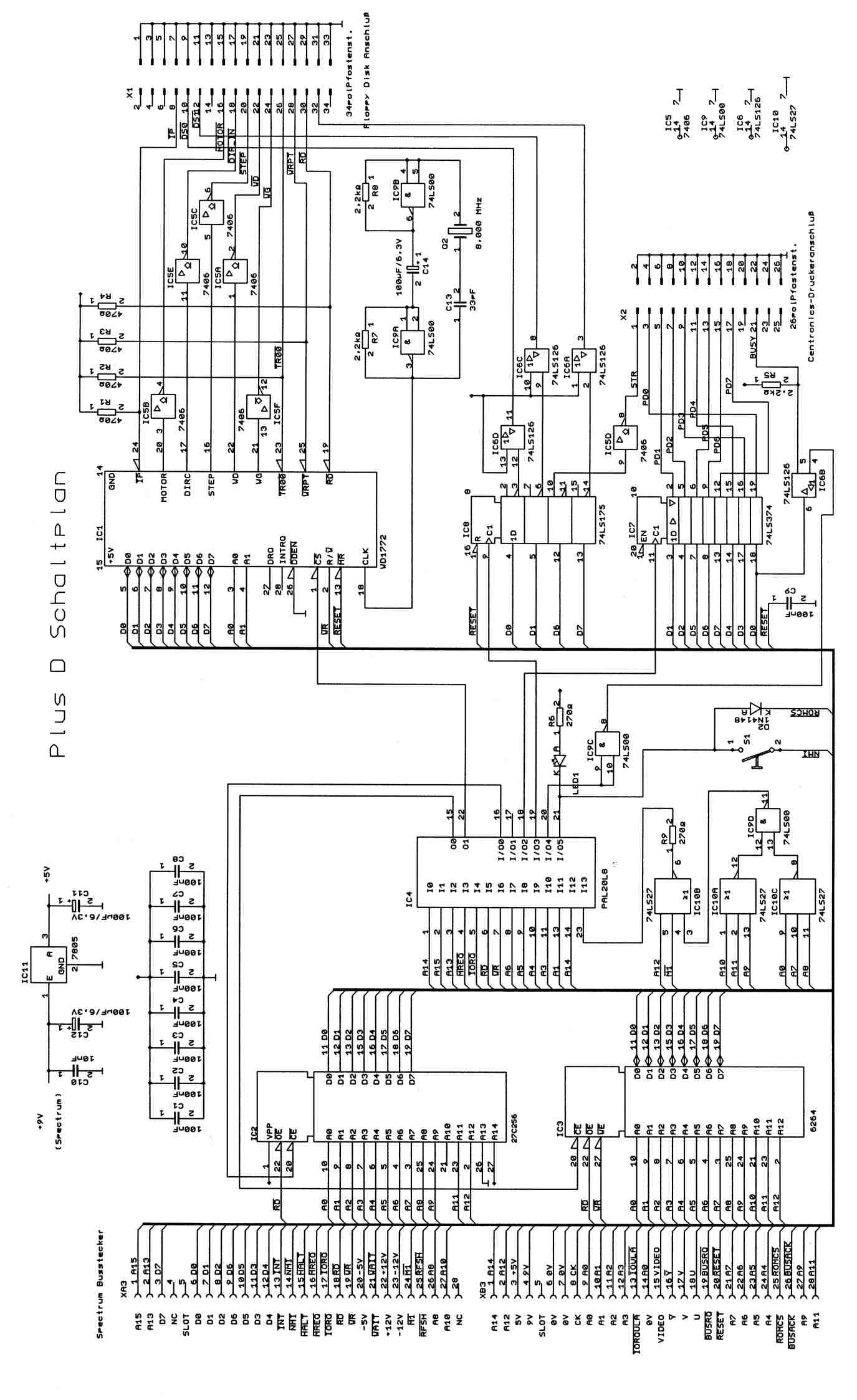
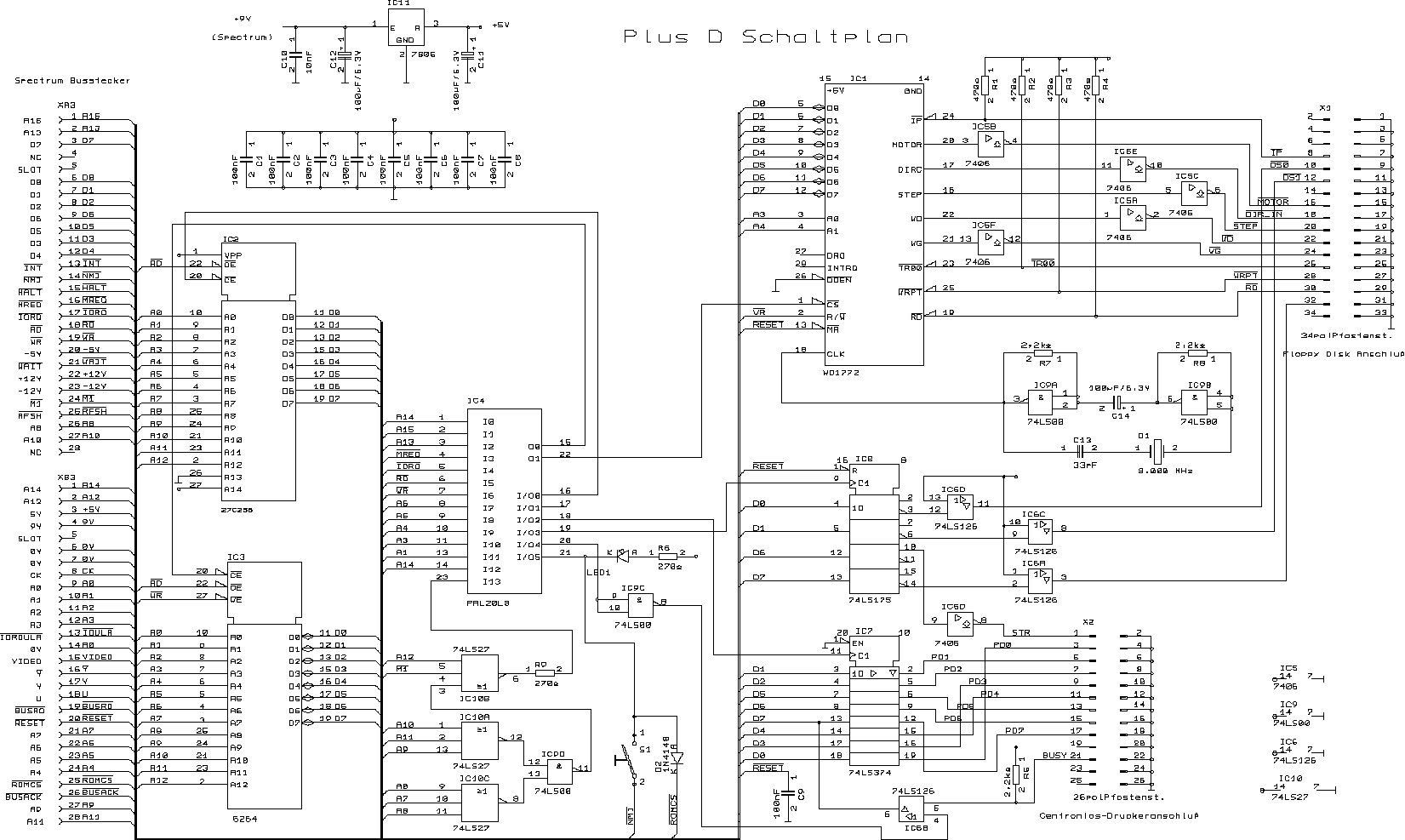
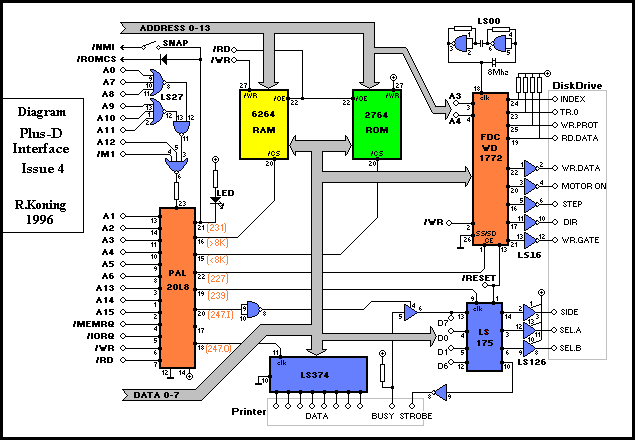
Disk interface with snapshot button. Interface 1 compliant. Up to 780K storage. Loads 48K in 3.5 secs.
Discussion
Nobody has started a thread about this yet.
Remarks
Runs the GDOS operating system. Comes with a {Plus D System Tape|Miles Gordon Technology|0011111}. The ROM image(s) is/are available at Phil Kendall's <A HREF="http://www.shadowmagic.org.uk/spectrum/roms.html">The Spectrum ROMs Collection</A>. An alternative operating system was developed as well: {Uni-Dos|S.D. Software|0014032}, which came as a replacement ROM chip and a floppy disk. The later Datel Electronics version came with {MGT The Fixer|Miles Gordon Technology|1000787} supplied.
SPOT: £129.95 with 780k 3.5" drive; 3.5" disk drive + interface
Releases
- 1988Miles Gordon Technology Sold as MGT Plus DPound sterling 52.13 · Pound sterling 49.95 budget
- UnknownDatel Electronics Ltd
Documents
- PlusD(EN)_TechDoc.pdfHardware technical documentation English277 KB
- MGTPlusD_Information.pdfInstructions 157 KB
- MGTPlusD_Information.txtInstructions 9 KB
- MGTPlusD_ThePlusDOnThe+2aAnd+3.pdfInstructions 635 KB
- MGTPlusD_UsersManualIssue1.zipInstructions 75 KB
- MGTPlusD_UsersManualIssue2.zipInstructions 82 KB
Other files
- PlusD_SourceCode.zipSource code 3 KB
Files and rights
No permission is on record either way. Screens and pictures are copied here on a take-down basis: if you hold the rights and want something removed, say so and it goes.
Awards
In the magazines 83
Your Sinclair #79Jul 1992 · p.42
Jon Pillar
WIRED YS presents a handy-dandy guide to having fun with your peripherals. And who better to lead us down the hardware path than JON PILLAR? Quite a lot of people to be honest, but they were all at lunch. There's more to life than playing Speccy games. Using Speccy hardware is also to be recommended. Over the years a huge number of little black boxes have appeared for plugging into the back of everyone's favourite, um, little black box. Sadly, a lot of these have now gone forever. The Specdrum, the Slomo, the Music Machine... where are they now? Actually, they're still around, you just have to look rather hard for 'em. For those of you who can't be bothered looking rather hard, there are still plenty of goodies to be collected. +D DISK DIRVE AND INTERFACE Datel/£129.99 Lovely, lovely kit. Basically, if you're fed up with lumbago-inducingly long tape loading times (and who isn't?), you should invest in this disk system. With a DOS so clever that user groups have sprung up to worship it, the +D is the Speccy peripheral that should have come with the machine. The £130 version comes complete with a 3.5" disk drive, but if you have a suitable device lying around the house, you can buy the interface system alone for £60. For those of you still hoarding stone age equipment, the interface will work quite splendidly with 5.25" drives. The +D itself is a cunning item. The real fun of it lies with the programming side of things. Even if you're not inclined to go wibbly at the knees at the mere mention of the words "hook codes," a superfast disk drive makes dunking your way through your latest listing a heck of a lot easier. There's an old computery proverb that runs, "After you've used a disk drive, you'll wonder how you ever got along without one." N'er a truer word spoken, Specchums. Those old computer users, eh? What a bunch of brainies. (Mind you, the proverb continues, "And be sure to turn three times widdershins beneath a full moon to banish those embarrassing sector errors," so sometimes we wonder.) The best bit is, if you don't fancy delving inside the new operating system and doing things to programs that only Billiard Lamps with his impressively bizarre imagination could dream of, you can just use the +D's snapshot button to blow your favourite games onto disk. Mercenary in under twelve seconds! Eee, luxury. IT'S ALL GOING HORRIBLY WRONG DEPARTMENT Speccies are like mushrooms. If you keep them warm and nurtured, they flourish. But if you trample them into the ground or allow your dog to eat them while walking in the woods, they tend to fall over. Furthermore, I wouldn't recommend that you put them in a pan and cook them with a nice free-range egg in an attempt to make a mushroom omelette, because it won't work. Um, actually, Speccies aren't like mushrooms at all. Forget I said that bit. Anyway. The point I'm failing quite spectacularly to make is that Speccies are temperamental beasties. Inevitably, they'll break down. And while the most sensible course of action is to take your ill machine along to an authorised repair centre, you can fix some things in the comfort of your own home. But be sure to have a responsible adult on hand. They will then say, "I told you that you should have gone to an authorised repair centre," in a patronising tone of voice when you bodge the job and wreck your Spec. If you feel up to the task though, quite a few companies offer Speccy spares - everything from new ROM chips to new +3 disk drives. WAVE are particularly well-endowed with small bits of Speccies. Their catalogue has just about everything you need to build your own machine! Buy the spares direct, put them aside for that fateful day, and it'll be cheaper to repair your Speccy yourself. Or else get your local soldering iron whizz to do it for you. Just don't say we didn't warn you if things go even more horribly wrong. Well, that's it. Hopefully this little trip through hardware land has been useful and informative. If not, why should I care? I'm off to digitise the climax of The Terminator and save it out to disk as an animated sequence. Just don't tell anyone, or they'll all be at it…
Handel, our lovely model, hails from Grimsby. His hobbies includes eating crisps. He's demonstrating the +2 ROM. (Clap clap clap).
Here's some hardware. Basically.
Um, that's a phone. The interesting bit is behind it. Just over there. That's the VTX5000 modem. It's rather fine. Thank you.
Without this little black box, YS would never reach the shops! Yes, our Multiface helps load the delivery vans. Or something.
Crash #62Mar 1989 · p.55
Ian Cull
+3 KILLER Switch to the Plus D and save £105? After last months unveiling of Miles Gordon Technology's alternative Spectrum SAM - IAN CULL now reviews MGT's alternative to the +3, the Plus D disk drive add-on. Deepening Amstrad's woes further Ian also disparages the +2A, while updating his DICE review and looking over yet more techie mags. Due to Amstrad's predictable refusal to offer hardware for Spectrum owners wishing to upgrade to +3 standards, the only option might seem buying a completely new computer. In fact, this is far from the case thanks to Miles Gordon Technology. Their solution to the problem is the Plus D interface and 780K 3.5 inch disk drive for £139,95 in kit form, (available from MGT, [redacted]). Comparing a 48K or 128K Spectrum with Plus D fitted, to the official disk machine, the +3, is an interesting exercise. The Plus D is a flat, but long, interface, that when fitted to a Spectrum sticks out enough to almost double its length. A cable connects it to the metal-cased disk drive, which has a separate power supply (another cable). There is a built-in parallel printer interface, but no serial ports. This obviously means a lot more desk space is taken up. Another slight problem is that your Spectrum isn't designed to access the disk drive. When powered up the Plus D interface has only minimal internal software - enough to 'boot' a disk, which loads in the full program. However, a configuration program, supplied on tape, allows the specifics of your particular disk drive set-up to be programmed into a system file, which is then stored on disk for future booting - the tape will probably never be needed again. Booting takes only about 2.5 seconds. While the +3 obviously does not need this, the MGT drive offers much more storage space, 780K in all, or four times as much as can be held on a +3 disk without manually flipping it over. The drive is also very fast, the SAVE of 16K took 4.6 seconds, the LOAD just 2.2 seconds. Formatting, however, takes a very slow 110 seconds (18 for the +3, but you need to do it four times to get the same amount of disk storage space). The Plus D can also emulate the Microdrive syntax, making it reasonably compatible with Spectrum business software (the +3 emulates tape loading/saving, but little else), but also has a simpler syntax (still not as easy to type as the +3 though). Another +D advantage is a builtin 'magic button' (saving the cost of a Multiface 3) which allows screen dumps, and 48K or 128K snapshots for copies of programs) to be taken. Also on the plus side is that true disk data files can be created - it is thus possible to open streams to files, and PRINT to, or INPUT from, the file via the stream .It would be possible to write programs handling 390K or more of data in this way! Snapshots cannot be loaded until the disk has been booted, so loading a 48K snapshot (Advanced Pinball Simulator) takes about seven seconds, and five key presses (using the LOAD p5 shortcut). The +3, using Multiface 3, takes 19 seconds (and ten key presses) to load the same game - however, there is a little extra 128K-specific code to be loaded. The one bonus is that Multiface packs the games on disk, allowing more to be fitted on the disk (e.g. 60K for a 128K game on the +3, as against 128K on the Plus D). But then, the Plus D has more space available on the disk. You should also remember that the +3 is quite incompatible with older Spectrums (except the +2A), and much hardware and some software will not run on it. Fitting a Plus D to your old Spectrum will save you £105 (+3 and Multiface 3 = £245), and run everything you already own (NB: the Plus D is NOT compatible with my Alphacom printer or Multiface 1, though).
'It would be possible to write 390K programs'
'Loading a 48K snapshot takes about 7 seconds'
'The +3 is quite incompatible with other Spectrums'
Your Computer #4Apr 1988 · p.49
Chris Hankins
Product: Plus D disc/printer interface. Price: £49.95 Supplier: Miles Gordon Technology MGT Address: [redacted] DRIVE FOR PERFECTION The Plus D Disc/Printer Interface costs only £50. Should Spectrum owners deny the Disciple. Chris Hankins Decides The Plus D by Miles Gordon Technology sells for slightly less than £50. It contains what I would say are the more vital features of the Disciple. Plus D has a disc interface which can handle 3.5in., 3in. or 5.25in. drives which can be singleor double-sided and Plus D allows one or two drives to be used. The system is set up from a cassette-based program which is not so strange as it sounds, because it allows more flexibility in choosing disc drives. Once you have answered the simple question asked by the system file program it will create a system disc for you. The system can then control your disc drive and your printer. To run the disc operating system you must enter run either in 128 or 48 mode. This boots the system which is stored in the Plus D, so it is not affected or lost if you reset the Spectrum via its switch. The disc interface is compatible with Interface 1 and can handle all Microdrive syntax commands. You can load a file by entering LOAD *"m';1;"filename". It also has its own commands which are much simpler to use, LOAD D1 "filename". Files can be Saved, Loaded, Renamed. Catalogued and Erased - wild cards are allowed but not when choosing a filename. FILES Files can be copied but not Snapshot files. This is a built-in safeguard against pirating. The Snapshot function is simple to use; it will transfer virtually any piece of software to disc. You can take snapshot saves at any point in a game, which is very useful for adventure players. There are three types of Snapshot file. After pressing the Snapshot file option, if you press key 3 a Screen save is made, saving only the current screen. It is just like taking a photograph for posterity, perhaps of your all-time high score. Pressing key 4 will initiate a 48K memory save, saving a 48K program, and pressing key 5 will do the same for a 128 program. One thing I found annoying was that you are not given the opportunity to name your Snapshot file. The system does this for you, calling the file Snap A, Snap B and so on, and when you can have up to 16 Snapshot games on one disc it can be confusing. The Plus D system, however, allows renaming of your files at a later stage, so you will not be completely lost. A 48K program will load in about three seconds and when you have been used to waiting up to 10 minutes for a program to load this seems like instant loading. The Plus D printer interface is a standard Centronics/parallel type. You will need a BBC-type 26-way ribbon connector cable. The Plus D has default settings for Epson-compatible printers, enabling it to work automatically with those printers. The system program used when you make a system disc also asks simple questions about your printer. If you choose to answer the questions the printer wilt be ready for use every time you boot-up the system. It is possible to configure the printer interface to a non-Epson-compatible printer. You will need to answer the questions asked by the system program by using information from the printer manual but, if this defeats you, you can get help from INGUG, the independent users' group. Printing can be from standard basic syntax or from programs such as Tasword 2, making serious word processing possible. You can also produce screen dumps of normal size or double size. This is done via the SAVE SCREEN$ command - SAVE SCREEN$ 1 for normal size and SAVE SCREEN$ 2 for a much larger format. SERIOUS WORK Programs for serious work which are known to be compatible with Plus D include Tasword 2, Omnicalc 2, Power Print II, Disc Manager, The Last Word, Word Manager, Small Business Account, Pascal, Devpac and many more. The quality of the steel-cased interface with its power/indicator light and positive feel Snapshot button is excellent and the 3.5in. Mitsubishi drive supplied as a special limited offer of £129.95 for the pair performed well and gave no disc errors. The system is a reliable alternative to tapes and a definite alternative for any Spectrum owner thinking of upgrading to a Plus 3.
The interface of the Plus D can handle 3in, 3.5in or 5.25in drives.
Sinclair User #72Mar 1988 · p.69
Roy Stead
AS GOOD AS A +3? Roy Stead investigates Miles Gordon's +d - the new disc drive interface threatening to superceed the +3. Product: Plus D disc/printer interface Supplier: Miles Gordon Technology, [redacted] Price: £49.95, or £129.95 with 3.3" disc drive. 5.25" drives also available. Got a Spectrum which isn't a Plus 3? Join the majority. So what are you going to do about getting your tape software onto ultra-post disc? When Baron Alan Sugar d'Amstrad launched the Plus 3, everyone became aware of the advantages of disc. It's faster than tape; it's more reliable than tape; and with a disc you can do clever things like loading a specified program from any position on the disc, or searching for programs and data files using "pattern matching" sorting techniques. For games players, the main advantage is that you can sort your huge piles of cassettes into a few fast-loading discs. The Plus D is an interface which connects any Spectrum except the Plus 3 to a 3.5 inch or 5.25 inch disc drive. Bear in mind that these aren't the same as the 3 inch drive built into the Plus 3, so it won't allow you to use any software released for the Plus 3. Like the various microdrive interfaces on the market, the Plus D allows you to take "snapshots" of the Spectrum's 48K or 128K memory, or just the screen, and save it to disc. On a double-sided disc you have 780K of storage space, so you could get two 128K snapshots, eleven 48K snapshots and the odd screen file onto one disc. Handy, yes? When you first plug in the Plus D, you need to let it know what type of disc drive or printer you are using. This is done by loading up a system program and answering a handful of questions on its set-up menu. From then on, all you have to do is load your favourite program from tape, press the reset button to zap it onto disc, then reload any 48K program in about three seconds! Since you can transfer the program at any point, this allows you to save games at high levels if you don't want to go trudging through the early stages every time you play. You can also dump graphic screens directly to the printer, or save them to disc for printouts later. The manual is written in plain English, and the syntax used to control the disc drive is very much like that of the Microdrive. The Plus D is compatible with the Disciple, an earlier product which also features joystick ports and various other widgets, and both can be used with a number of "werious" packages such as Tasword 2, Devpac Assembler, The Last Word, Masterfile and many more. Kempston is currently working on an Amiga-like window/icon/mouse desktop system using the Plus D. The command syntax is dead simple. There are two ways to load a program from disc; either use Load d1 "Program Name", or use Cat 1 to produce a list of all the programs on the disc together with a file number, and use Load p(number). It's also easy to use the Plus D as a printer interface; the Poke@ command is used to set line length, spacing, margins and so on, and Llist, Lprint and Save Screens are used to produce normal or large-size screen dumps. But it's as a disc-drive interface that the Plus D really shines; it's ideal for beginners or advanced users (as you can examine discs sector by sector if you wish), and there's an excellent support service from the independent Disciple and Plus D Users' Group (INDUG). At £49.95 for the interface, or £129.95 for the interface and a double-sided double-density 80-track disc drive, it won't cost you much more to invest in a Plus D and drive than it would to sell your old Spectrum and invest in a Plus 3. The Plus D is an excellent system, and unless someone brings out a product which allows you to transfer tape software onto Plus 3 three-inch discs, it's the perfect choice for anyone who is fed up with waiting five minues for their games to load.
Your Sinclair #27Mar 1988 · p.62Your Sinclair Best Buy
Your SinclairYour Sinclair Best Buy
Phil South
RAGE HARD! You wanna know what's hardest in hardware? Once again YS whips out the magic screwdriver in our first hardware round up of '88. It's been ages since we did a really ripping hardware spread, so we thought it was about time. After a bit of barking at Phil Snout to get his screwdriver out and look at these beasts, we've pulled together a positive cornucopia of hoopy hardware and super software, to turn even the most soft-boiled trainspotter into a hard-boiled egghead. The star of our show is Miles Gordon Technology's Plus D disk interface, the only real alternative for tape users to upgrade to a +3, from the designers of the Disciple. Check out the review further on. Other contenders for the hardware crown are the Multiface family from Romantic Robot, the plastic pal who's fun to be with; a couple of wacky Multiplugs for those of you who work all your household appliances from one socket; an aerial switch so you can plug all your computers, game consoles and videos into your telly at the same time; and Computer Cupboard's nifty little Trojan Light Pen for you to scribble on your screen. Worra lorra lorra stuff. As well as all this hardware, we've got a brain-boggling selection of the most fascinating hardware-based software. So, let's cut the babbling and launch into the reviews. MGT PLUS D FAX BOX Product: Plus D disk interface Price: (Plus D only) £49.95, (with drive) £129.95 Supplier: Miles Gordon Technology, [redacted] A year ago Rockfort Products was marketing a sort of Interface 1 shaped disk interface called the Disciple. It was a very fancy bit of kit, as it goes, with a couple of joystick plugholes, a snapshot button for saving off screens or games, and a parallel printer port. This wangy little peripheral was actually the brainchild of Cambridge based Miles Gordon Technology. So when MGT decided to upgrade the Disciple and market it themselves, they looked very carefully at the mail they got about the Disciple and what people said about it. The result of their research is the new slimline, MGT Plus D. The joystick ports are gone, and the device no longer looks like an Interface 1. Actually it now looks uncannily like one of those flat joystick interfaces, with a button and power light on the top, and two flat IEEE type ports on the back for the disk and printer plugs. If you buy the unit as a package deal you also get a three and a quarter inch disk drive which is very slick and efficient. The Plus D is, to adopt the most massive critical cliche, a joy to use. It's fast, efficient and wholly reliable, and although it's rumoured that there are certain games it won't 'backup', so far we haven't found one. (Incidentally, info about what the machine can't do will no doubt be featured in the independant Disciple User Group Magazine, FORMAT, in the coming months.) The Plus D handles microdrive syntax (even the hook codes), so it can be used with a program which reads and writes to microdrives, without having to rewrite it. Using the button on the top you can print out a screen to your printer, save it to tape, or save the whole program in 48K or 128K modes. Some of the nicer features of the gadget are the ability to rename files, and boot a file in one of three ways; the usual microdrive way with all those asterisks and semicolons; using a LOAD D1 'FILENAME' format, the D1 bit meaning Drive 1; or by typing LOAD Pn, where n is a number. This is a special function of the Plus D, where each file has a number on the directory, and LOAD P1 loads the file numbered 1, LOAD P2 the one numbered 2. As well as this the computer can suss whether the file is a SCREEN$ or CODE or a Basic program from the entry in the directory. Neat, eh? Another item which should have been a feature of microdrive syntax in the first place (ahem!) is the wildcard. Basically, the Plus D can be as easy or as complicated as you want, and should fit into anybody's current setup, making it faster, more powerful and most importantly, a lot more fun. This really is, price-wise and facility-wise, one of the best alternatives to a +3 system yet devised. In summing up, it's nice to see so many good British products in this hardware lineup. There's not many computers you could say that of, and fewer that could match the quality and design of the peripherals represented here. HARD NEWS It's funny, but there's two distinct categories of equipment that we get sent for review. There are the things we review which stay around for a long time after because we like to use them in real life. And then there's the other stuff which we like a lot when it first comes in, but when all's said and done has no real application apart from novelty value. First category things are used until they disintegrate, but second category things tend to just sit around collecting thick layers of dust. And why are we telling you all this? Because all the things on these pages are first category things, items of equipment that are so useful we have to buy new ones when they break down. 1. Multiface +3 Romantic Robot £39.95 Probably top of this list of things YS couldn't do without is the Multiface family of gadgets from Romantic Robot. The most recent of these of course is the Multiface +3. Without this box there would be no screenshots in YS, or if there were, they would be fuzzy photos rather than the technically perfect inkjet dumps we use today. How is this done? Well, having fastened a Multiface to your computer you simply blip the red button on the top of the machine, and follow the menus to save the screen, which is then done automatically. There's a toolkit feature built into the unit, not unlike the previous Multifaces for 48 and 128K, which enables you to POKE numbers into addresses in hex or ASCII formats. The unit can also send shaded print dumps out through the printer port on the back of the +3. So if you've got a printer connected, the picture on screen comes out on the page. If you haven't, the bits just spill out over your desk (that's a joke, by the way!). 2. Multiprint Romantic Robot £34.95 This printing out of screens on proper printers is a trick favoured by the Multiprint interface, a dedicated printer box for all Spectrums to Epson compatible printers. As well as supporting all the usual Speccy syntax of LPRINT, LLIST, COPY etc, it also does a nifty line in various sized dumps, straight to printer. But more importantly, it is the only interface that allows you to reconfigure it while the computer is still running. That's to say you can print out a listing at one measure which turns out to be too wide, press the red button, change the width, line feeds, margins etc and return to print it out properly without having to reset the computer. 3. Smoothflow Multiplug Cambrian Distributors £23.99 Speaking of resetting the computer, has a spike in your mains supply ever found you just topping the highest known score on Outrun and looking like you're going to finish, when suddenly...PHUT! The lights in your room flicker for a moment and your Speccy resets? Could you do without this? Of course you could, which is why you need a snappy new Smoothflow Multiplug. This gizmo, made in the UK by Conblock, screws to your skirting board and accepts four wacky little micro-sized versions of the conventional 3 pin plug. So four into one will go! Now, not only will you be safe from surges and spikes (fnar fnar), but you can also plug your TV, tape machine, Speccy and modem, or indeed any four machines, into just one socket! Incidentally, if spikes don't really bother you, you can just take advantage of the mini plugs by getting a regular Multiplug. 4. Multiplug (Cambrian Distributors) £10.99 Yes, for just over a tenner you can get a four-way Multiplug like this one, which, like it's big brother, uses those dinky little plugs, but also is manufactured to British Standard 5733, so it won't go phut in your face. The same spec as the Smoothflow, but with no buffering for spike protection, so don't blame us if your computer crashes when the mad scientist next door plugs in his generator. 5. 3-2-1 Aerial Plug (Cambrian Distributors) £4.99 Doesn't it give you a pain in the neck switching around the aerial plug on the back of your telly with the RF lead on your Speccy. It does? And what about when you plug in your Nintendo to play Super Mario Bros? Well, it really started getting to us, so we got ourselves a 3-2-1 Aerial Switch to solve the problem. This little box is a three-into-one coaxial switch, which means it can either drive three switchable receivers from one aerial plug (a coaxial plug!) or can send three switchable RF signals to one telly. This means that using this box you can not only have your Speccy, game console and video going into the same telly and push the switch for which one you want, but also (if you had enough aerial cable) have a telly in three rooms and switch the aerial signal to each one depending on where you are! Not a bad little gadget, really, with low interchannel interference. 6. Trojan Light Pen Computer Cupboard £19.95 And finally, if you want to do professional Computer Aided Design on your Speccy, why not buy a Trojan Light Pen? When you buy the Cadmaster graphics system, you get this pen shaped device, which allows you to draw straight onto the screen. This can be very handy if you are quite good at drawing with a pen, but not so hot with a mouse or joystick. With this package you can do freehand drawing, boxes, circles, lines, triangles and rays. You can choose line thicknesses, quills, brushes and text styles, copy, paste, fill with patterns, wash, colour and dump to printers to your heart's content. The program is now compatible with all flavours of Spectrum, from Issue One wubber keyboards, to the new +3 (for £23.95), and is also compatible with microdrives and other media that use that format. It's remarkably accurate, and doesn't suffer from the wristache and slap/rattle sound effects you usually get from using Spectrum mice. The biggest recommendation of the product is that it's British and so all technical backup is available from a telephone number printed on the pen itself. In summing up, it's nice to see so many good British products in this hardware lineup. There's not many computers you could say that of, and fewer that could match the quality and design of the peripherals represented here. SOFT OPTIONS Music Machine Sound Sample Editor Quasar Software £9.99 cassette Although this isn't a legitimate Ram Electronics product, it does work marvellously well with the samples from this excellent sound sampling sequencer. Using key letters (the same as the Music Machine's little menus) to activate various buttons on the screen, you can change the pitch of a sample, alter the volume and actually edit individual points in the waveform. You can also equalise the sound, shifting certain harmonics to make the sound easier on the ear. Brill for the closet Jean-Michel Jarre. The Last Word Computer Cupboard £14.95 cassette Word processing isn't an application you immediately think of in connection with Spectrum computers. But with the advent of The Last Word, all that changed. A sophisticated full featured word processor which, due to the +2 and +3's new keyboard, makes any kind of writing a piece of cake. There's an 80 column screen, up to 148 characters line length, mail merge for those important mailshots. a calculator for you to do Apple Macintosh impressions on, and over 60 commands for you to input and edit the text to your taste. The code for loading and saving is even user alterable allowing you to customise it to your own system. Also available on +3 disk (£19.95). Tasword Plus Three Tasman Software £19.95 disk There can't be a Spectrum user who hasn't heard of Tasword. It has been the standard text editor on the Speccy for more years than this magazine can recall. And now, keeping up with the times as ever, Tasman has produced an extended +3 disk version of the popular word engine. The thing which makes Tasword such a belt to use it it's little on-line help pages, which means you can call them up while editing a document, just by pressing a couple of keys. Like The Last Word it's user alterable to your taste, and like it says in the blurb "now you can write a manual without having to read one." Who wrote that? Qualitas Plus Seven Stars £10.95 The worst thing about writing on a Speccy has always been the quality of print you get from a normal Epson type printer. Either you use the quick draft mode (Ooooo) or you have to settle for one typestyle in the NLQ mode. But now all that has changed. You can beef up your printer's output with Qualitas. Originally planned as an NLQ printout program for Tasword files, Qualitas has now had a Plus added, not to mention compatibility with Tasword Two, Three, The Writer and The Last Word. Now you can print out in the five fonts supplied with the basic Qualitas Plus pack, or you can lay out another £5.95 with the add-on Display Pack and have another 10 decorative fonts to play with. Y'see? Quality doesn't have to be expensive.
Crash #49Feb 1988 · p.64
Simon N Goodwin
(Simon N Goodwin owns the copyright to this review. Please visit http://simon.mooli.org.uk to find original articles and updates, much new material and his contact details.) ANOTHER AMSTRAD CRUSHER Simon N Goodwin finds another fine disk interface in MGT's Plus D and gets rhythm with the SpecDrum System Two. If you're planning to upgrade your Spectrum, the new Plus D interface from Miles Gordon Technology - MGT - is definitely worth a look. It's well-designed and amazing value for money. For £50 you get a disk interface, parallel printer port, sophisticated software to control both these, and a simple snapshot device that lets you print screens or save programs of any size to disk. A 780K 3.5-inch disk drive costs an extra £80 if you buy it at the same time as the interface. You can use any standard 40-track or 80-track drive, but you'd have to be very well-connected to beat the price of the MGT drive. The Plus D was designed by Bruce Gordon, who invented the popular Disciple interface two years ago. That was a competitor for the grandfather of all Spectrum interfaces, Sinclair's aptly-named Interface One. The £90 Disciple is still available from Rockfort Products. The Plus D might be viewed as a cut-down version of the Disciple, but that would be unjust. The Plus D is a complete, coherent product. It lacks the Disciple's through-port, joystick and network connections, but still works with the many programs that have been converted to use the Disciple's disk and printer interfaces. FITS ANY SPECTRUM £49.95 buys you a plain black metal box, not much bigger than a single cassette case. An edge connector protrudes from one end of the box, and plugs into the back of your computer. Two ITC (bed-of-nails) sockets are flush with the other end of the box: one connects to the printer, the other to one or two disk drives. A red light and a small reassuringly rubbery button garnish the top of the box. That's it. The Plus D fits any type of Spectrum, as it pokes out from the back of the computer rather than vertically upwards. You need about 12cm of clearance at the back of the computer; it's best not to use the legs at the back of a Spectrum + or 128K, as they would leave the Plus D hanging precariously by its connections. The metal box isn't just there to make the unit feel chunky - it also acts as a heat sank, keeping the Plus D cool and shielding it from radiated interference. Inside, there's a neat double-sided circuit board holding a custom PAL chip, a standard 1772 disk controller, 8K of ROM and 8K of RAM. a latch for data being sent to the printer, and eight 'glue' chips to tie the rest together. Two of these chips have been soldered piggy-back style on top of other components - this looks ugly but shouldn't cause any problems. The RAM holds part of the disk-control and printer-control code, and is loaded from disk or cassette when you turn on the system and type RUN. This arrangement makes the Plus D flexible, though arguably it's unnecessary. You don't need to reload after a reset, unless the system has crashed or been turned off since the last load. Clever hackers can even run short routines in the Plus D's internal memory without disturbing the main programs. MANUAL AND MAGAZINE The Plus D comes with two A5 leaflets - a user's manual and a 'free introductory issue' of FORMAT, the magazine of the Disciple and Plus D users' group. The main manual is 24 pages of daisywheel type, stuffed with useful information, readable but very dense. There's no index. This manual is filled with useful practical tips that stem from experience, but it does not document the Plus D completely - some of the error messages are not listed, and several technical features are only mentioned in passing. It's a good manual, but would nevertheless benefit from a rewrite. The magazine FORMAT is a gas, with a great mixture of technical articles, advice and gossip. Subscriptions cost £10 a year, and if I were buying a Plus D as a present I'd be sure to include a subscription. User groups like this one make the purchase of add-ons fun, rather than a risk. GETTING STARTED WITH CLIFF RICHARD When you first get your Plus D you must load a cassette to tell the interface about your set-up. The program loads after about three minutes, displays a neat animated screen and BEEPs out Cliff Richard's sixties Eurovision hit Congratulations! Three tidy screens of text follow, and you're then asked to specify the details of your disk drive and printer, in a non-threatening question-and-answer sequence. There are some memorable printer options, like a facility to print Spectrum user-defined and block graphics. There's a fast screen COPY option, and a slower shaded printout. The program initially assumes you've got an Epson printer; it's easy to customise the control codes sent, as long as you've got something similar and can find your way around its manual. When all the questions have been answered you are invited to put a blank disk in the drive so that the machine can format it and stash away the system details. After making extremely sure you've put the right disk in, the little light on top of the Plus D goes out, to show that the disk is busy. It takes about a minute and 40 seconds to initialise a 780K disk. THE MAGIC BUTTON The easiest way to use the Plus D is via the magic button on the top. You can load games or other programs as normal, and then press the button at the point at which you want to SAVE them. The button freezes the program temporarily and fills the border with a pattern, while the system waits for you to press a key. The digits 1 and 2 print the screen out, in either format. Key 3 saves the screen as a disk file, 4 saves an entire 48K program, including the screen, 5 saves 128K, and X restarts the program. This snapshot mode is relatively simple. You cant choose file names, enter POKEs or check if a disk is full. Beware, even if you think there's enough free storage to hold a program - the Plus D can fit no more than 80 files on a disk, and it this limit is exceeded attempts to save will fail and give no message. When saving a 128K program, you must tell the interface which of the two possible screen displays the program was using, so the right one is picked when the snapshot reloads. If the picture changes part way through the SAVE, you must enter Y to tell the Plus D to choose the other screen; otherwise, type N. The manual says that a 48K program saves in 'just over three seconds' -in fact I measured the time, including a period of directory-searching that precedes most file actions, at about eight seconds, or 16 for a 128K file. Loading takes about half this time. Speeds vary a bit depending upon your drive and what's already on the disk, but Plus D Snapshots should be fast enough for almost anyone! Snapshot files are not compressed as they would be by the Multiface, but you can still fit 16 48K snapshots, or six 128K ones, on a single disk. I couldn't find any programs that could not be saved at the press of the button, but programmers and hardware-designers compete constantly in this area, so there are probably one or two resistant games around. The Plus D is fairly compatible with programs designed to work with microdrives. It recognises the same BASIC commands as Sinclair's Interface 1 and also handles the hook codes that machine-code programmers are supposed to use. Sadly Sinclair made rather a mess of these codes, so many existing programs jump straight into the microdrive code. This works OK with Interface 1 or with a Swift Disc as long as you've got their Emulator loaded so the disk code mimics the microdrive very accurately. Unfortunately such jumps usually crash the Plus D. Beta BASIC and all the HiSoft compilers are among the programs which work without problems. I found that Laser Genius and Cheetah's Sound Sampler were painlessly converted to run from disk by their microdrive loaders, but the Sound Sampler couldn't LOAD or SAVE to disk. Laser Genius would SAVE and LOAD files, but the CAT command crashed the system, as did references to microdrive 2. If you want to use software designed to work from microdrive with a Plus D you ought to ask MGT or the user group about it first. DISK BASIC The Plus D recognises Interface 1 commands, and many useful variations of its own. It allows microdrive syntax, to suit existing microdrives and the Plus D at the same time. Alternatively, you can use MGT's own simplified syntax. LOAD and SAVE work with all the usual file types, and SAVE D1 "namel" TO D1 "name2" lets you copy files around a disk, or from one drive to another. Unfortunately this won't copy snapshots or files created with the OPEN command. Copying is quite fast, even with a single drive, but it overwrites the program in memory, so you should SAVE that first. There are two types of CATalogue: one lists disk filenames in three columns, while the other gives full details of each file including its number size and location, line by line. If you're after a quick getaway you can load any snapshot by just typing LOAD, followed by P, followed by the catalogue number of the file. This trick doesn't work for ERASE, the command to delete a file, because that would make it too easy to delete a file by accident. You don't have to supply full filenames, even so. Most commands work with wild-card symbols - for instance, a question mark stands for any letter, and an asterisk stands for any sequence of character, so ERASE D2 "Snap*" erases all the files with names starting 'Snap' on drive 2. This will include all the snapshot files, which are given arbitrary names when the system creates them. Later you should rename them with a command like ERASE D1 "SnapC1A" TO "TechTips" OPEN and CLOSE set up files, accessed with PRINT and INPUT or INKEY$. The normal microdrive syntax is extended so you can explicitly say whether you want to read or write a file, but you can't use random access to skip around a file at will unless you're also using the latest version of Beta BASIC - a fine add-on for serious BASIC programmers, but £16 extra. As compensation, everyone gets direct access to the disk surface, in 510-byte lumps, via the hacking commands LOAD@ and SAVE@. POKE@ commands let you change the system configuration as a BASIC program runs. LLIST and LPRINT send programs and data to the printer port of your choice, and SAVE SCREEN$ copies the display to the printer. MOVE transfers data from one stream to another. 128 BASIC crashes if you try to MOVE a file to the screen, but 48K BASIC lets you MOVE data to any device. STRONGLY RECOMMENDED At its £129.95 total price (including the 780K-capacity 3.5-inch disk drive), the Plus D system is strongly recommended to anyone frustrated by cassette loading. It's even worth considering just as a printer interface, if there's a possibility you'll want disks in future. Sixword's £150 Swift Disc system (reviewed in CRASH issue 44) is still competitive, particularly if you're interested in upgrading from a microdrive system. Both the Swift and the Plus D have unique features, and they're much closer in price than any competitors. Amstrad's Spectrum + 3 has serious compatibility problems and needs a £45 Multiface 3 before it can even approximate to the performance of an older Spectrum with a third-party disk. Post-Christmas trade rumour has it that the +2 sold quite well but the +3 bombed, in the absence of much software on the slow and pricy three-inch disk format. It won't be surprising if there's a further big cut in the price of the +3 soon, following the £50 cut to £199 in September. Even so, I don't think it will tempt many people who already own Spectrums - in particular 128Ks - away from the Plus D or Swift systems, which are superior upgrades.
Crash #47Dec 1987 · p.114
Ben Stone
Dominic Handy
CHRISTMAS LISTE Ben and Dom, Crash, [redacted]. What's small and black and bursts the seams of a stocking? A Spectrum add-on, of course - there are hundreds of little black boxes for music, printing, screen art and program transfer. Dominic Handy suggests some utilities and hardware for the Christmas list, and Ben Stone brings joysticks to the world - but don't fight over them, or they'll all be broken by little black Boxing Day. JOYSTICKES TERMINATOR Supersoft £19.9 Like most pointless street cred - take Raybans, expensive earplugs on a Radio Shack personal stereo and the Beastie Boys - the Terminator does serve a purpose, but only just. And its wacky design takes a lot of getting used to. Being so tiny the Danish stick has a lot of travel, so it's quite unresponsive. And the fire pin is difficult to use: you have to hold the grenade and fire with the same hand, but you can get it to work fairly quickly it you're prepared to go through hand-ache agony. The Terminator is all but indestructible, made of very thick plastic and durable electrical parts, but for nearly 20 quid I'd expect something a little more efficient than this. OMPETITION PRO 5000 Dynamics £14.95 (£15.95 with transparent case, Competition Pro Extra £16.49 with autofire and go-slow mode) This is THE joystick. The fire action is brilliant and the stick performs like a dream. It looks much the same as the Euromax Professional, but for just a pound more you can get it with high-tech clear casing (as in the picture). It's durable, because the shaft is made of steel and the microswitched mechanism inside is remarkably simple (and pretty much user-serviceable). The fire buttons work with reed switches, sometimes considered unreliable, but I've never had any trouble. Sadly, there's no autofire on either model, though there's a souped-up version on the market (the Competition Pro Extra) with autofire option and a go-slow mode never before seen on any joystick. SPEEDKING Konix £11.99 (£12.99 with autofire) The Speedking was a novelty when it appeared - the first truly hand-held joystick that worked well. It's easy to use, though it has the problem of the Euromax Professional in reverse: the diagonals are a pig to find and use quickly, which makes playing games like fighting sims very difficult. The position of the fire button really makes your hand ache if you're pressing it a lot - shoot-'em-ups turn into a nightmare when you're doing well! - though it would be difficult to have it anywhere else on the compact little body of the Speedking. There is a Speedking with autofire available. Earlier this year Konix claimed one Speedking lasted for 17,604,000 waggles (that's 27 days of nonstop waggling, folks!), but the story is not now believed, Our Waggling Editor writes. PROFESSIONAL Euromax £15.95 (£18.95 with autofire) The Euromax Professional has most of the features now becoming standard in the joystick world: posey design and microswitches, and an autofire option if you want to pay a bit extra. (It's the autofire version in the picture.) At first it's a little difficult to get to grips with, literally, because it's biased slightly to the diagonals. Theoretically this means the joystick's eight directions are equally easy to use, but in practice the stick often slips out of the vertical/horizontal into a diagonal. But the Euromax Professional has a brilliant fire action. And it's a great stick for games where deft, precise movements aren't needed; it feels rather flimsy, but the couple that were in the office had fairly long lives considering the hammering a CRASH joystick gets! 125 SPECIAL Cheetah £12.99 This new joystick, introduced in last issue's PCW Show report, has the usual eight directional controls as well as two independent fire buttons - and a special rotate function which allows the player to twist the joystick for extra-realistic movement. Of course a joystick of such complexity needs more than the usual five pin in/outputs; you'll have to have an extra joystick port, or use both ports on the +2 and +3/. There is an autofire function. IN THE BLEAK MIDWINTER MIDI INTERFACE Cheetah Marketing £49.95 With this interface box and accompanying software you can control any MIDI instrument via the Spectrum. It's superb for people who can write music but can't play - just enter the notes and the computer plays the instrument. Or do it the other way round: you play the music and the computer puts it into musical notation. Including a MIDI lead for connecting the interface to your instrument, the MIDI interface was reviewed in issue 40. MK5II KEYBOARD Cheetah Marketing £199.95 This 61-key fully polyphonic board with foot switch and MIDI output ports comes packed in a rugged steel case. It's an ideal accessory to Cheetah's MIDI interface. MUSIC MACHINE Ram Electronics £49.95 'One of the best all round music add-ons for the Spectrum' - Jon Bates, Issue 34. A sound sampler, sequencer, editor, drum machine and composer all in one little black interface, the popular Music Machine is supported by a wide range of software. Recent additions include Quasar Software's Sample Editor (reviewed last issue) and Tectrics's chord construction kit Compuchord (Issue 45). SPECDRUM Cheetah Marketing £29.95 Now the standard drum add-on for the Spectrum, the SpecDrum comes complete with eight samples of real drum sounds. Extra drum sounds can be loaded in from tape: the Electro Kit and Afro Kit both retail at £4.99 and the older Latin Kit at £3.99, and all come complete with their own editors. The SpecDrum plugs into most hi-fis via a connecting phone lead. Jon Bates enthused over it in Issue 27. MUSIC TYPEWRITER Romantic Robot £7.95 Coming complete with keyboard overlays (48/+), this clever piece of software is a sophisticated tool for music on the Spectrum. Music written on Music Typewriter is displayed onscreen using realistic graphics which can be dumped to most dot-matrix printers, so you can print your own music. And your compositions aren't limited to Music Typewriter - all your tunes can be converted to machine code for use in your own programs. Jon Bates went sharpening and flattening on Music Typewriter in Issue 16. PRINTING MULTIPRINT Romantic Robot £39.95 A printer interface with all the options, the Multiprint can dump any Spectrum screen to an Epson-compatible printer in three different densities - it's handy for listings, too. There's more info in Issue 43. RAM PRINT Ram Electronics £34.95 Not only does this little black box drive your printer using a very easy menu-driven system (all stored on a ROM chip), it's also useful for those apres-Christmas 'thank you' letters because it comes with a built-in word processor, accessible from BASIC at any time and also on ROM. And if you ever get bored of all those line feeds and ESCape codes you can always plug your joystick in the built-in Kempston port and bash away at a game. See the details in issue 35. FOR THE ARTIST THE OCP ART STUDIO THE ADVANCED OCP ART STUDIO Rainbird £14.95, £24.95 'Probably the best art utility on the Spectrum' - Mike Dunn (On The Screen Editor). Need we say more? Several versions of the mouse- and joystick- compatible Art Studio utility are available for different Spectrum setups; The Advanced OCP Art Studio, which really needs an Interface One and microdrive to use its full potential, is much more powerful than the original. It has a Scrapbook library facility so you can combine and paste together pictures. Issues 24 and 40 have reviews of The OCP Art Studio and The Advanced OCP Art Studio respectively. VIDEO DIGITISER Sunset £128.00 Ever wanted to change Prince Charles's ears, or rub out out that blot on Gorbachov's forehead? You can do this and more, provided you've a video recorder, with the Sunset Video Digitiser. This little black box has all the connections for grabbing TV pictures from the video and then using them anywhere you want - even in games. Sadly, there's no printer ribbon that will put them onto T-shirts. Franco Frey got frame-grabbing in issue 31. VIDEOFACE DIGITISER Romantic Robot £69.00 plus £1.00 postage and packing The Videoface Digitiser is amazingly cheap and fast - it's all here. You can grab and scan three pictures a second, and then produce a very realistic animation sequence using up to six screens. At about hall the price of the Sunset Video Digitiser, this represents unbelievable value for money. NOT A CREATURE IS STIRRING, EXCEPT FOR A MOUSE KEMPSTON MOUSE Kempston Data £49.95 There's no WIMPing out with Kempston's version of the yuppie controller, with button eyes and connecting tail. Don't forget to lock up your cheeseboard and keep the cats indoors. Kempston is still bundling Rainbird's OCP Art Studio with this rodent at £69.95. Or those with a Spectrum +3 you can get Kempston's new Desktop utility package for +3 DOS and the mouse for exactly the same price. COMCON Frei £17.95 (single port), £19.95 (twin port) This is guaranteed to work with any product that uses the Spectrum keyboard. By connecting the six plugs to the miniature keyboard add-on you can have eight directions and TWO independent fire buttons (provided you have the correct joystick - also available from Frei). A twin-port version is also available for complex games. Lloyd reviewed the single-port version way back in Issue Eight. AND... MULTIFACE ONE, MULTIFACE 128, MULTIFACE 3 Romantic Robot £39.95, £44.95, £44.95 'One of the most versatile and user-friendly units on the market' - CRASH Issue 29 - Romantic Robot's Multifaces are ideal for the serious gameplayer or utility user with a fast storage device: they can put cassette games on Beta, Opus and Kempston disks. The Multiface 3 (pictured) can transfer cassette programs for the Spectrum and 128 to the - +3's Amstrad disks. It was welcomed in Issue 45 as a good reason to buy the +3, though Sixword's Swift Disc and Rockfort Product's Disciple are also worthwhile disk systems. The Multifaces have other uses: most POKEs can be entered using the ROM-based toolkit. And printer-owners are also catered tor with a COPY command, ideal for dumping your greatest high scores! All these options are available at any time at the press of a little red button. CRASH first saw the Multiface One in Issue 26. PLUS D Miles Gordon Technology £49.95 (£129.95 with 3.5-inch 780K-capacity disk drive) The Plus D is a new disk and printer interface from the designers of Rockfort Product's Disciple. Its Snapshot button will save all 48K and 128K cassette programs to disk, it's claimed, and the interface can make single and double-size screen dumps to a printer. The Plus D is also available in a package with a disk drive. GAMMA-STRIKE Gamesware £24.95 Gamesware's Gamma-Strike target-shooting system is a novel combination of hardware and software - you plug a target into the Spectrum, shoot at it with a model gun and watch the computer monitor your score! It's all done with the latest signal-detection techniques, and Gamesware promises more 'plug-in games' including darts and snooker soon... look out for the CRASH review. Thank you Santa, lots of luv Ben and Dom xxxxx
Full-page ad49
- Your Sinclair #93Sep 1993 · p.6
- Your Sinclair #92Aug 1993 · p.29
- Your Sinclair #91Jul 1993 · p.29
- Your Sinclair #90Jun 1993 · p.29
- Your Sinclair #89May 1993 · p.37
- Your Sinclair #86Feb 1993 · p.49
- Your Sinclair #85Jan 1993 · p.49
- Your Sinclair #84Dec 1992 · p.49
- Your Sinclair #83Nov 1992 · p.39
- Your Sinclair #82Oct 1992 · p.39
- Your Sinclair #81Sep 1992 · p.51
- Your Sinclair #80Aug 1992 · p.63
- Your Sinclair #78Jun 1992 · p.73
- Your Sinclair #77May 1992 · p.57
- Your Sinclair #76Apr 1992 · p.57
- Your Sinclair #75Mar 1992 · p.54
- Your Sinclair #74Feb 1992 · p.54
- Your Sinclair #73Jan 1992 · p.78
- Your Sinclair #72Dec 1991 · p.62
- Your Sinclair #71Nov 1991 · p.60
- Your Sinclair #70Oct 1991 · p.42
- Your Sinclair #69Sep 1991 · p.50
- Crash #91Aug 1991 · p.16
- Your Sinclair #68Aug 1991 · p.52
- Crash #90Jul 1991 · p.30
Advert15
- Your Sinclair #31Jul 1988 · p.97
- Your Sinclair #30Jun 1988 · p.97
- Sinclair User #75Jun 1988 · p.73
- Sinclair User #74May 1988 · p.56
- Your Computer #4Apr 1988 · p.48
- Sinclair User #73Apr 1988 · p.98
- Crash #51Apr 1988 · p.107
- Your Sinclair #27Mar 1988 · p.64
- Crash #49Feb 1988 · p.53
- Sinclair User #71Feb 1988 · p.6
- Popular Computing Weekly #7Feb 1988 · p.33
- Sinclair User #70Jan 1988 · p.49
- Crash #48Jan 1988 · p.146
- Your Sinclair #25Jan 1988 · p.53
- Sinclair User #69Dec 1987 · p.134
News/Note6
- New Computer Express #133May 1991 · p.27
- New Computer Express #131May 1991 · p.26
- Crash #63Apr 1989 · p.61
- Crash #63Apr 1989 · p.62
- Your Sinclair #32Aug 1988 · p.7
- Sinclair User #69Dec 1987 · p.21
CoverGame2
- Your Sinclair #89May 1993 · p.6
- Your Sinclair #87Mar 1993 · p.7
Letters1
- Sinclair User #127Sep 1992 · p.24
CompoEntry1
- Your Sinclair #60Dec 1990 · p.33
Tips1
- Crash #54Jul 1988 · p.42
Review1
- Popular Computing Weekly #51Dec 1987 · p.28
Related
- Elsewhere
- Wikipedia
- Same entry at
- Spectrum ComputingZXInfo
Reviews from people here
Sign in to write about this, or make an account. It takes a minute and lets you correct the catalogue too.
Everything ZXDB can hold about this is here.
Sign in to correct or add to this.
Hold the rights to this and want it taken down?