
Mirage Microdriver
Hardware: Add-on
Mirage Microcomputers Ltd · 1985 · Pound sterling 39.95
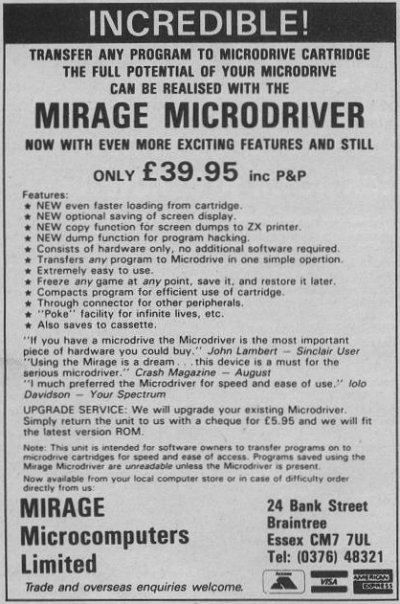
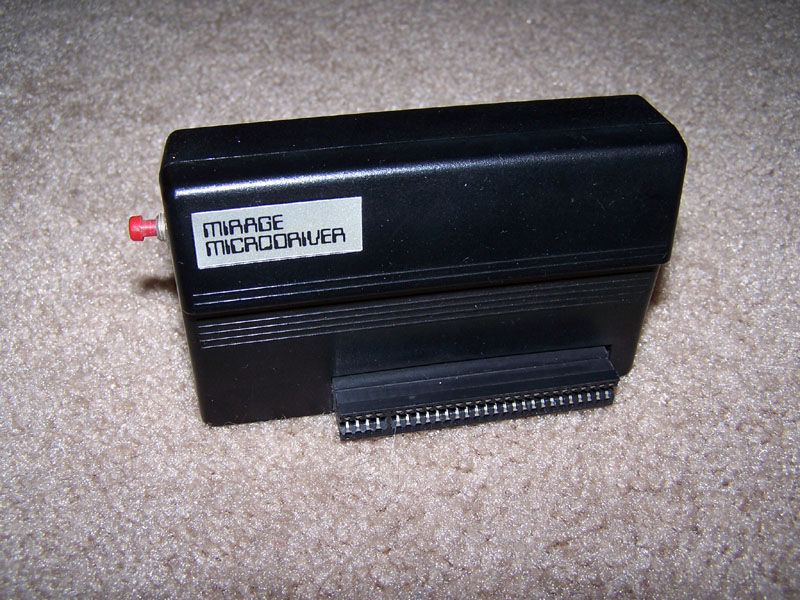
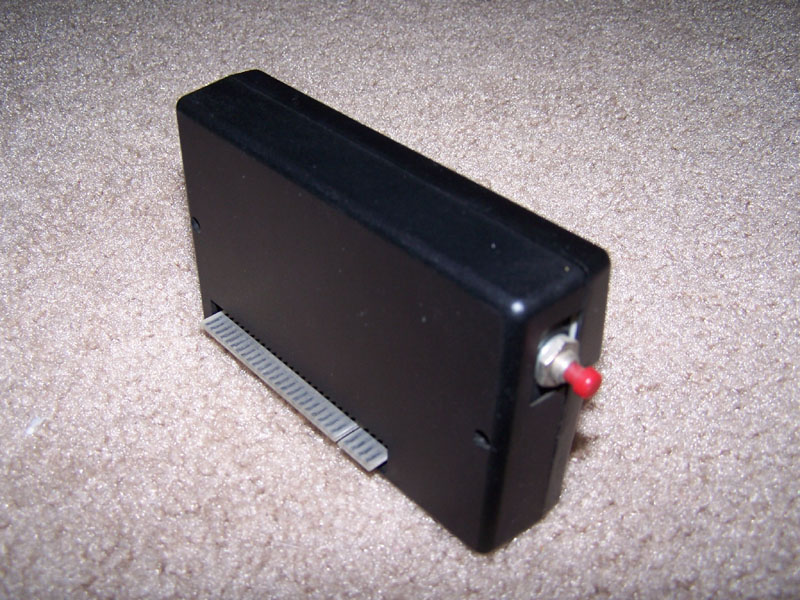
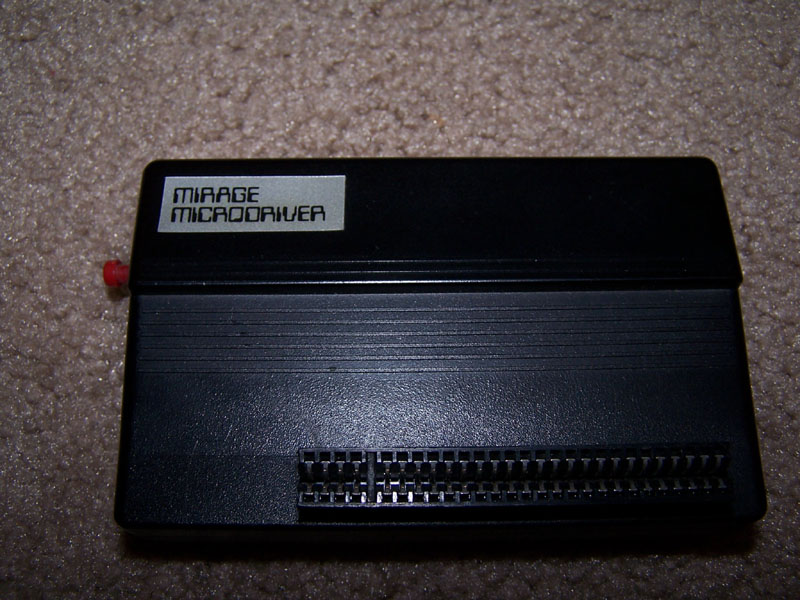
Tranfers all your programs to Microdrive at the touch of a button. Freezes any software. Poke facility.
Discussion
Nobody has started a thread about this yet.
Remarks
There were (at least) two versions of the interface, at least according to the mention in the February 1986 issue of Crash.
SPOT: Microdrive backup accessory
Files and rights
No permission is on record either way. Screens and pictures are copied here on a take-down basis: if you hold the rights and want something removed, say so and it goes.
In the magazines 43
ZX Computing #23Feb 1986 · p.67
SON OF MICRODRIVER STRIKES BACK! The Mirage Microdriver got some excellent reviews when it was first launched just a few months ago, and now Mirage have produced a Version 2.0 Microdriver that is faster and also offers some new facilities. In case you missed the reviews of the original version I'll just do a quick recap. The purpose of the Microdriver is to perform tape to microdrive, or even tape to tape transfers of all Spectrum software, so that you can now use your microdrive for LOADing commercial software without needing to spend hours of hacking to get past piracy protection systems. However, the Microdriver does not encourage piracy, since any back-up copies of software will only run if the Microdriver is still connected to the Spectrum. This doesn't make piracy impossible, but since the Microdriver costs almost £40 it does make it financially impractical, so that should keep the industry happy. The Microdriver looks just like a joystick interface, except for a small red button on one side, and an expansion port in the back. It plugs into the rear port on the Interface 1, and once the microdrive is set up with a cartridge in it, you can load whatever software you choose from tape. Once the software is loaded you then press the button on the side of the Microdriver, follow the prompts, and let the thing do all the work for you. The whole process is very easy to follow as the Microdriver doesn't require you to do much more than choose the option you want (SAVE/LOAD etc) and give the program a name. With its Version 2.0 ROM, the new Microdriver is even faster than before, and when I made a backup copy of a game that took five minutes to load from cassette, the microdrive version loaded in only eight seconds (thirty seven and a half times faster than tape)! The new facilities available with Version 2.0 are; an improved POKE facility that allows you to enter pokes for infinite lives and so on; an option that allows you to choose whether or not you want to save the current screen display - this can save about 7K of space on the cartridge and further reduces loading times; COPY - this allows you to print a complete screen dump to the ZX Printer (and, as far as I can tell, to other dedicated printers such as the Alphacom 32 and Seikosha GP50S). There is also a DUMP facility, that allows you to store screen dumps or sections of memory onto microdrive. If you've got a microdrive and want to use it to speed up loading of software then the Microdriver is an excellent device. It's reliable and very simple to use, and though, at £39.95 it isn't cheap, if you use a lot of cassette based software then its convenience value should justify the expense. For owners of the existing Version 1.0 Microdriver, Mirage are quite laudably offering an upgrade service at a cost of £5.95 when the original Microdriver is returned. Enquiries, upgrade order etc. to; Mirage Microcomputers Ltd, [redacted].
Crash #25Feb 1986 · p.98
Franco Frey
MORE MICRODRIVIN' The boffins at Mirage, flushed with the success of their Microdriver have decided to launch a New improved version. New features include an improved loading algorithm, which means that programs saved to drive can be loaded back into the Spectrum up to five seconds faster; a copy function that can be used to output a full 24 line screen to a ZX printer or Alphacom 32; optional display saving which reduces the file size on microdrive by 7K, meaning you can squeeze more onto a given cartridge; an enhanced POKE entry facility and a brand new DUMP function which gives access to the program in memory. The new version of Microdriver doesn't come with a new price - it's still £39.95 including VAT, and if you have a version 1.0 Microdriver and would like an upgrade, send your unit to Mirage at [redacted] with £5.95 and they'll send you a version 2.0 model by return. Nice, Eh?
Sinclair User #46Jan 1986 · p.48
PERFECT COPY AT A STROKE Mirage has just released version two of the Microdriver and it is now even better. For the uninitiated, all you do is load a program in the normal way - turbo load, colour coded cards, lenslok et at - and then at any time just push the button on the Microdriver. A menu appears and from that you can load or save the contents of memory. The enhancements in version two are that loading and saving have been speeded up, and you now have an option of not saving the screen. Although I still consider the price of the Microdriver to be a little high at £39.95, there is nothing else currently available that does the job as well. Mirage Microcomputers Ltd, [redacted].
ZX Computing #21Oct 1985 · p.44
MIRAGE MICRODRIVER The bane of any games player is the time taken waiting for your favourite game to load. The Sinclair Microdrive was eagerly accepted as a solution to this problem, but no software houses produced games using microdrives (mainly due to the cost of the cartridges). Even those who attempted to convert games from tape onto microdrive found that the time and knowledge required to get round modern anti-piracy methods was too much trouble to bother with. Now, I am completely opposed to the theft of software, but the majority of us simply want to use our microdrives as a fast means of getting programs up and running. Until recently, microdrives have been a bit of a white elephant from this point of view. The MIRAGE MICRODRIVER, however, is the answer to the gamesman's prayers. About the size of a large joystick interface, it fits onto the port at the rear of the Interface 1, and is compatible with Interface 2 and all the other well known joystick interfaces. In fact, it proved compatible with every peripheral I tried, including printer and Beta disc drive interface! The unit is supplied with a typed five page 'manual', which explains in simple detail how to operate it. Even if these instructions had not been included, there would have been no problems, since, once you press the button on the side of the unit, there are prompts at every stage of the process. The unit takes over when this button is pressed, and saves the program by making a complete dump of the RAM. Games can be saved at any point during play, and will continue from that point upon subsequent reloading (great for those long and complex arcade adventures). Of course, there has to be one disadvantage, though I consider it to be only a minor one, and this is that any program which contains a built in SAVE or LOAD routine for data still has to perform that function using a tape recorder. However, as most games keep their data in memory, all that is often needed is a simple reSAVE of the whole program, wiping out the old one if it is no longer required. The chance of misusing the unit for piracy purposes is cut down by the fact that programs copied will only reload if the Microdriver is still present (an excellent idea). The Microdriver is incredibly simple to operate, was 100% effective on all the programs we tried it with, and is an essential device for all microdrive owners. It ought to have been built into Interface 1 in the first place. They should have called it the Miracle Microdriver! The Mirage Microdriver costs £44.95, from Mirage Microcomputers Ltd, [redacted].
Your Spectrum #17Aug 1985 · p.28
Iolo Davidson
BLACK MAGIC BOXES If you're rarin' to go microdrivin' but you're havin' trouble convertin' your tapes, here are two black boxes that'll help you change your gear, Iolo Davidson takes a look at these drivin' movers. The Mirage Microdriver and the Interface III from Evesham Micro Centre are hardware solutions to the problem of converting tape software to LOAD from microdrive. This is a development we've long been waiting for, and just like the number eleven bus, two have come along at once. Either model will enable you to convert your games tapes to fast loading microdrive versions, regardless of the tape protection method designed to prevent it - even fast loading systems. These machines do work as advertised and their arrival will not be appreciated by the software publishers. So, how do they do it? Well, both machines are small black boxes, about the size of a joystick interface, with a little red button that's pressed at any point during the running of a program to save the whole of the memory, plus the Z80 machine registers. What you get is a 'snapshot' of the whole computer at the microsecond that you pressed the button. When you load this instant frozen program later, it takes up exactly at the point it was stopped. You're advised to wait for a static frame like a score table to do the SAVE , so that the copied program doesn't subsequently LOAD straight into the action, but this is just for convenience. You can save it at any point you like, and even use the machine as an extended 'pause' feature, saving a half finished game overnight. INTERFACE III Evesham Micro Centre £39.95 Opening, the case of this one reveals rows of 74 series TTL logic chips, one of which must be a small ROM. The box is plugged into the expansion connector on the Interface 1 or directly into the back of the Spectrum, which means that if you don't have microdrives, you can still use it, but only for tape copies, obviously. There is no through connector for attaching other add-ons, but that's not a problem as the unit need only be inserted during copying and not afterwards. Operation is much the same as with the Microdriver at first. You load the tape which you wish to convert to microdrive, wait for a break in the program, like a 'press any key to start' frame, and press the red button instead. However, you don't get menu driven convenience with this one. First it saves a 'conversion' file to tape, and then you LOAD the supplied conversion software from tape. Now you get a menu, and you reload the conversion file from the tape and SAVE a stand-alone version of the game to tape or microdrive. Stand alone means you can LOAD and RUN the copied game without having to have the Interface III hardware connected. That last feature makes this unit very attractive to the pirates. The worrying thing is that they can make a tape copy to be used by people who don't have an Interface III themselves, or even a microdrive. But I can't stress too much that it's illegal to make copies unless it's for your own private use. The error trapping is definitely not up to much. Trying to SAVE a name twice to the same micro-cartridge dumps you out of the program with an invisible Sinclair error message, the ink and Paper have been POKEd to be the same colour over the whole screen. If this is for protection then it's not only useless, but rather inappropriate in a product of this sort. Those of you with disks may be able to use Interface III to SAVE a tape copy that can be re-saved to these other media, provided you have a tape header reader to find out the code addresses and lengths. I doubt it'll work on Wafadrives though, as the Wafadrive system software requires more RAM work space than microdrives. It's possible to BREAK into the conversion software (do BORDER 1 and INK 7 so you can see. but you won't be able to see yourself do it). That'll give your some idea of what goes on, but the SAVEs are done by code routines, so it's not just a case of a simple rewrite. I found this device much less easy to use than the Microdriver, and all that tape saving and loading takes a lot of time. A particularly dumb feature is the fact that the system goes into a lock-up when it's finished making the first 'conversion file' and then again after saving the final copy. That means you have to pull the plug, and if you do that without first yanking out the microdrive cartridge then you'll corrupt it. MICRODRIVER Mirage Microcomputers Ltd £39.95 This unit contains just two large chips, one of them a ROM holding the controlling software, the other a semi-custom IC with all the active logic. This is more convenient than the Interface III (which has to LOAD its software), and the scale of chip integration is somewhat higher tech, for you hardware addicts. The Microdriver software is menu driven, very easy to use and well error trapped. If you try to SAVE with the same name twice on a micro-cartridge, for instance, it stops and asks you whether you want the first file erased, a smart touch that. The Microdriver plugs into the expansion connector at the back of your Interface 1, and it has a through connector for attaching other hardware, like a joystick. This is important, as you must have the Microdriver fitted when running your microdrive copy. In fact, you won't be able to LOAD it if the box is not in place. One press on the little red button brings up the menu and a choice of LOAD, SAVE, POKE, RUN,, or NEW . A program previously saved must be loaded from this menu. Most of the commands have a sub-menu for entering file names and the like. You are able to SAVE to tape as well as microdrive, but the Microdriver will not work plugged directly into a bare Spectrum - you must have the Sinclair Interface 1 fitted, and you need the Microdrive to LOAD or RUN the tape copy. This means that a tape backup is just that, a safety net, and not a pirated copy that could be sold or even used without the hardware. This is an obvious move by the manufacturer to avoid problems with those software houses that are still anti any form of back-up copying. This means the machine is not much use for hacking, as it doesn't allow you to BREAK the program, but you can use the POKE function on the menu to enter the infinite lives POKEs from Hacking Away. A TRUE CONVERT Both units do the job, but I much preferred the Microdriver for speed and ease of use. However, hackers and disk users will find the copies produced by the Interface III easier to mess around with. There are bound to be wails of anguish and all sorts of threats from software publishers over these two devices, but it's about time that long-suffering microdrive owners were allowed to make use of the things! Games programmers would be well advised to take Sir Clive's advice and put SAVE-to-Microdrive options into all their products. That would instantly remove the market for clever protection busting hardware before the stuff gets widespread. After all, most of us just want to be able to load programs faster, using the manufacturer's own upgrade, the microdrive, and we really oughtn't to be prevented from doing so. Until microdrive transfer is incorporated into all software, the makers of these two machines can claim a legitimate purpose for them.
Crash #19Aug 1985 · p.84
Franco Frey
You may recall that only last month we reviewed a product called Interface III, a machine that would stop and transfer any game onto microdrive. We said then that we expected there to be others, but not so soon. Essentially the Mirage and Interface III perform the same trickery but the Mirage does seem to be better thought out. In appearance it's another famous Spectrum black box with a little red button on the side. After opening the box we spent some time doing a chip count, there are three, all black and well legged. All in all there isn't much inside, nothing even remotely resembling a hoover, as we had expected. Using the Mirage is a dream. Interface III required the user to make two copies of a game in order to a final copy, only one of those copies could be made onto microdrive. The Mirage is fitted to the Spectrum and stays there while the user loads the game. After the game has loaded simply press the little blip on the side and the game will freeze while at the top of the screen a two line deep blue box appears which sternly offers a copyright warning for itself(!) and then invites you to press any key. Now you are presented with five options; Load, Save, Poke, Run and New. To save the game you have loaded press S and Mirage asks you for a filename. After that simply enter the microdrive number and next a touching message appears... 'Please wait...' After a long drawn out 30 seconds the microdrive burst/grinds into life. As long as you remembered to format the cartridge and the microdrive behaving, you are asked if you want to verify the saved game, if you don't trust your drive you ation completed, you can now pocket the saved version of your game. The whole operation is completed in the time it takes to load a game plus a little over a minute. The Mirage unit can copy a game to tape. Instead of the microdrive number you enter T. Tape copy facilities are generally frowned upon and Mirage clearly hope to win friends by designing the system so that games copied with the unit can only be run again if it is still connected to the Spectrum. One very good reason for keeping the unit attached at all times is that all the loading functions are handled by the software within the Mirage. To load a game press the red button and obtain the main menu, press L for load, enter the file name and then the drive number and that's it, much easier than using the normal microdrive commands. When a game has loaded from drive, the menu will appear again, to start the game enter R for run and off you go. The Poke option allows you to enter, say, an infinite lives poke without having to break into the game. You are prompted for the address and then the data. The poke option makes the creation of cheat games a doddle. Because the Mirage must be connected at all times, any other equipment has to plug into its through bus, that's simple enough until the little boxes start to argue. More often than not such rare problems can be prevented by changing the order of the devices hung on the Spectrum. On occasions when using the box we noticed the Mirage system 'invades' the current game with its menu but pressing R returned everything to normal. The Mirage definitely outstrips the Interface III in terms of ease of use, flexibility and speed. However Interface III does allow the user to decide whether to save the opening screen or not. By not saving that screen two games can be fitted onto one cartridge whereas Mirage only allows one game per cartridge. The system would have been even better if a format routine could have been built into the list of Mirage options. This device is a must for the serious microdriver. Price: £39.95 available via Mail order Mirage Microcomputers Ltd [redacted]
Sinclair User #40Jul 1985 · p.40
MICRODRIVE MASTER Making microdrive copies of your own programs for your own use is not illegal as far as I know, but can be extremely difficult. If you bought a microdrive to speed the loading of your favourite games - the main reason for most people buying them - then it is doubly difficult due to the memory space taken up by the microdrive. Help, however, is at hand. The Microdriver, from Mirage Microcomputers, is a piece of hardware for the Spectrum which allows you to make a backup copy of any program to microdrive at the push of a button. As the Microdriver has to be connected to the computer to re-load any programs saved using it, it will be of little use to commercial pirates but it is a boon to the home user. Using the Microdriver is simple. A program is loaded in the normal way, with the Microdriver attached, and at any time - even in mid zap - you can push the button on it and the computer is stopped. A menu appears with a number of options and, once you have made your choice, the program can be started at the same point at which it was stopped. The menu options are Load and Save; Poke, which allows you to enter those infinitive lives; Run, to restart a program; or New, which clears the computer. All options are error-trapped. If you are saving to microdrive and the program exists, you are given the option of overwriting it. In this way, in an adventure program you can save your current position without having to start at the beginning every time. As the Microdriver is hardware-based it is almost impossible to protect a program from it. If you have a microdrive the Microdriver is the most important piece of hardware you could buy. The price, £39.95, is a little high, considering the dearth of components inside, but its features still make it good value. For more information contact Mirage Microcomputers Ltd, [redacted].
Advert30
- Sinclair User #57Dec 1986 · p.101
- Crash #33Oct 1986 · p.129
- Sinclair User #55Oct 1986 · p.68
- Sinclair User #54Sep 1986 · p.87
- Crash #31Aug 1986 · p.37
- Sinclair User #52Jul 1986 · p.14
- Crash #29Jun 1986 · p.43
- Your Sinclair #6Jun 1986 · p.23
- Your Sinclair #5May 1986 · p.70
- Sinclair User #50May 1986 · p.27
- Your Sinclair #4Apr 1986 · p.66
- Sinclair User #49Apr 1986 · p.91
- Your Sinclair #3Mar 1986 · p.78
- Sinclair User #48Mar 1986 · p.92
- Sinclair User #47Feb 1986 · p.40
- Your Sinclair #2Feb 1986 · p.12
- Your Sinclair #1Jan 1986 · p.76
- Sinclair User #46Jan 1986 · p.128
- Sinclair User #45Dec 1985 · p.120
- Your Spectrum #21Dec 1985 · p.46
- Your Spectrum #20Nov 1985 · p.27
- Your Spectrum #19Oct 1985 · p.54
- Sinclair User #43Oct 1985 · p.12
- Your Spectrum #18Sep 1985 · p.42
- Sinclair User #42Sep 1985 · p.88
News/Note4
- ZX Computing #28Aug 1986 · p.6
- Crash #25Feb 1986 · p.98
- Sinclair User #46Jan 1986 · p.48
- Sinclair User #40Jul 1985 · p.40
Letters1
- Your Spectrum #19Oct 1985 · p.20
Feature1
- Your Spectrum #17Aug 1985 · p.28
Reviews from people here
Sign in to write about this, or make an account. It takes a minute and lets you correct the catalogue too.
Everything ZXDB can hold about this is here.
Sign in to correct or add to this.
Hold the rights to this and want it taken down?