
Multiface 1
Hardware: Add-on
Romantic Robot UK Ltd · 1986 · Pound sterling 39.95
Also known as Multiface One (English)
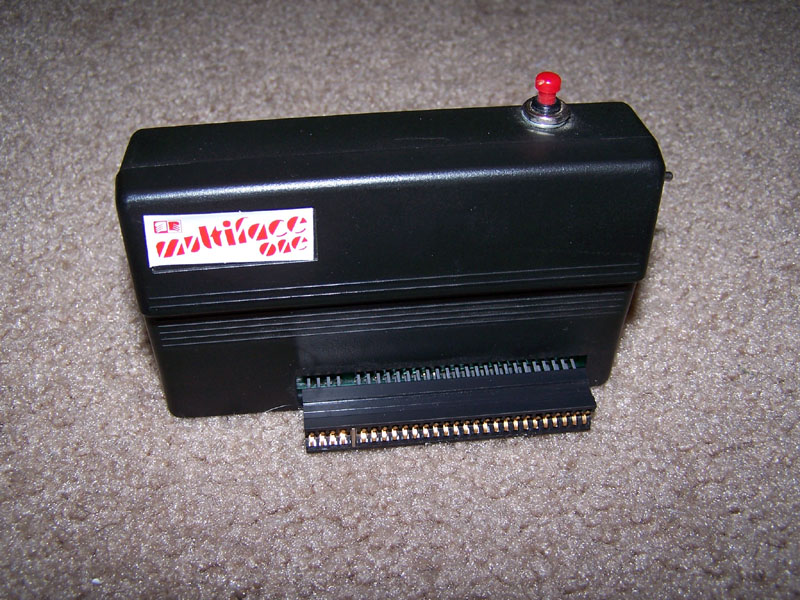
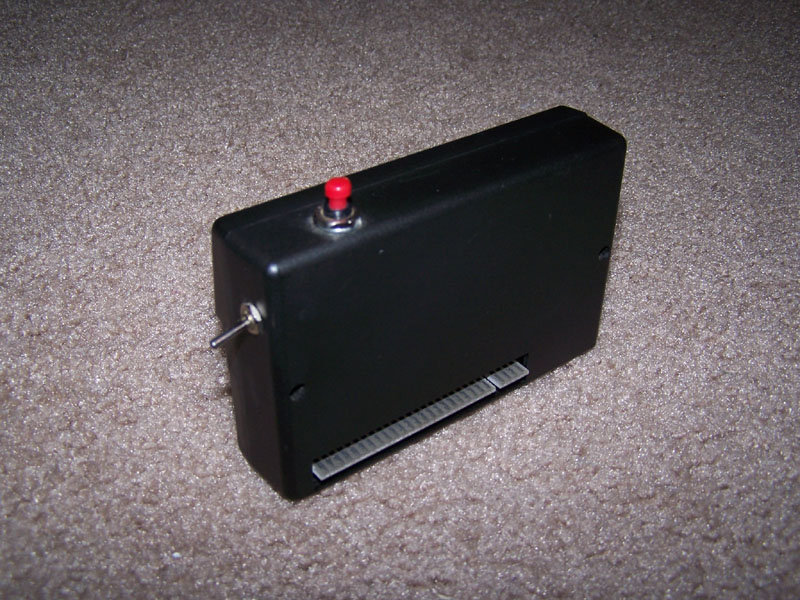
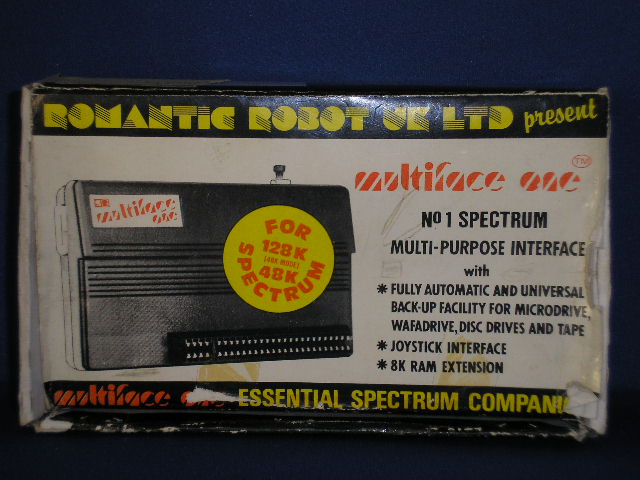
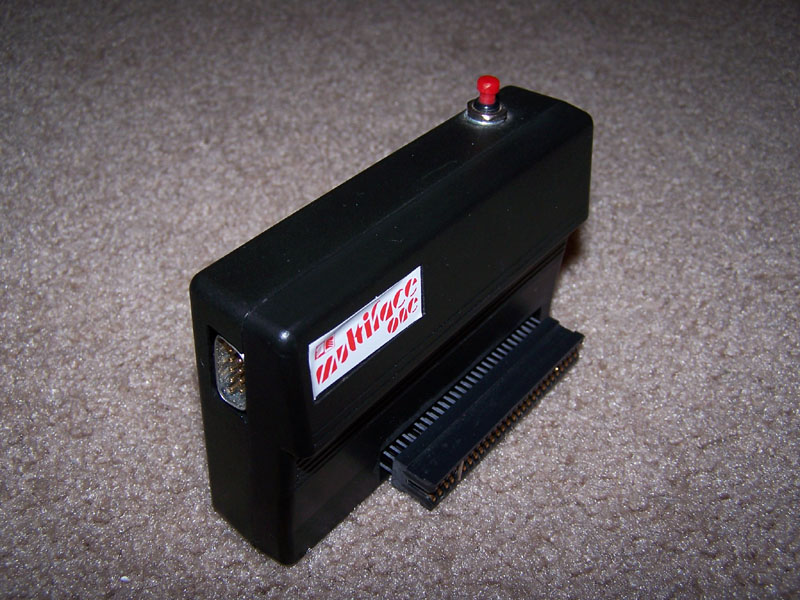
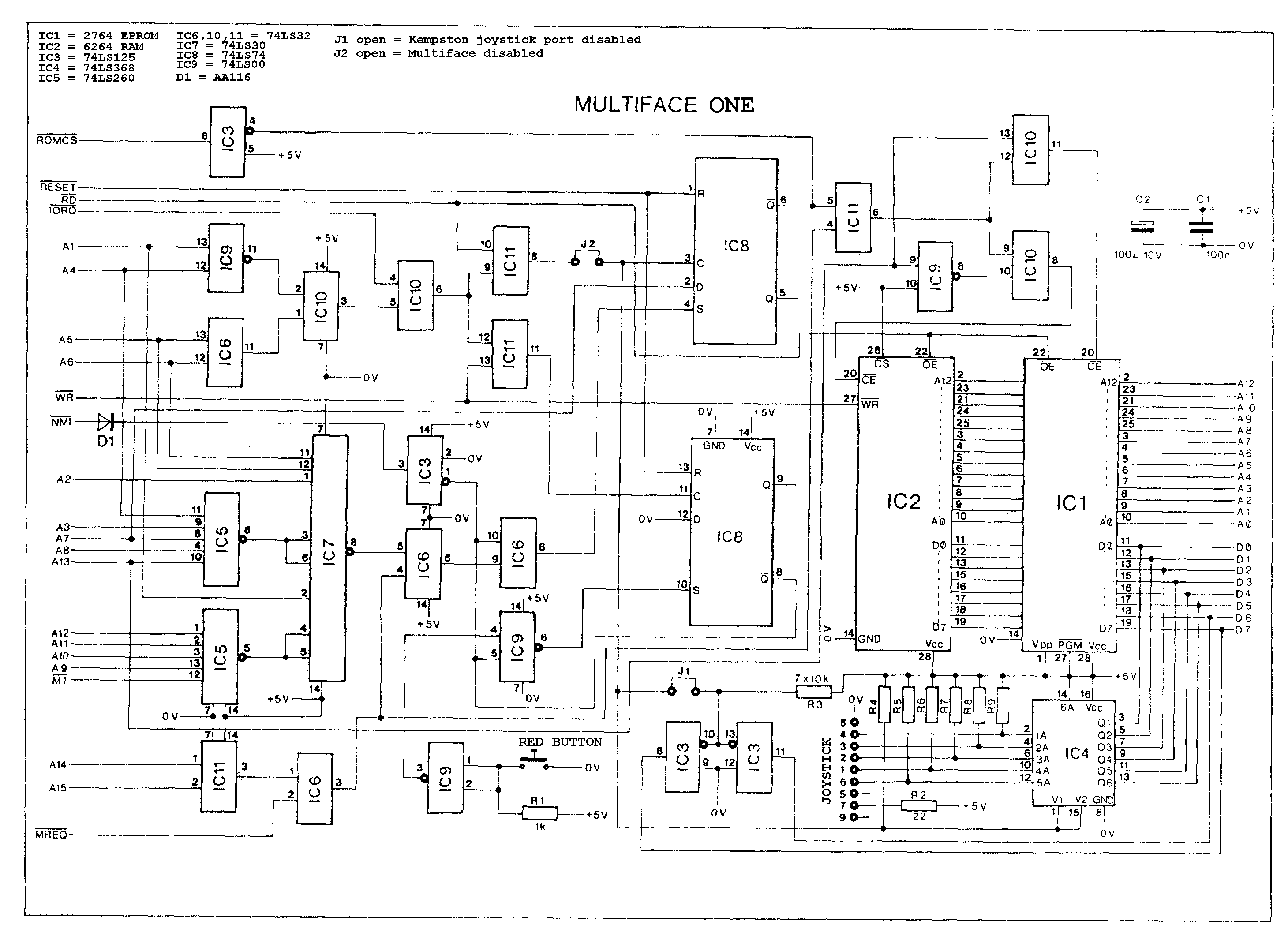
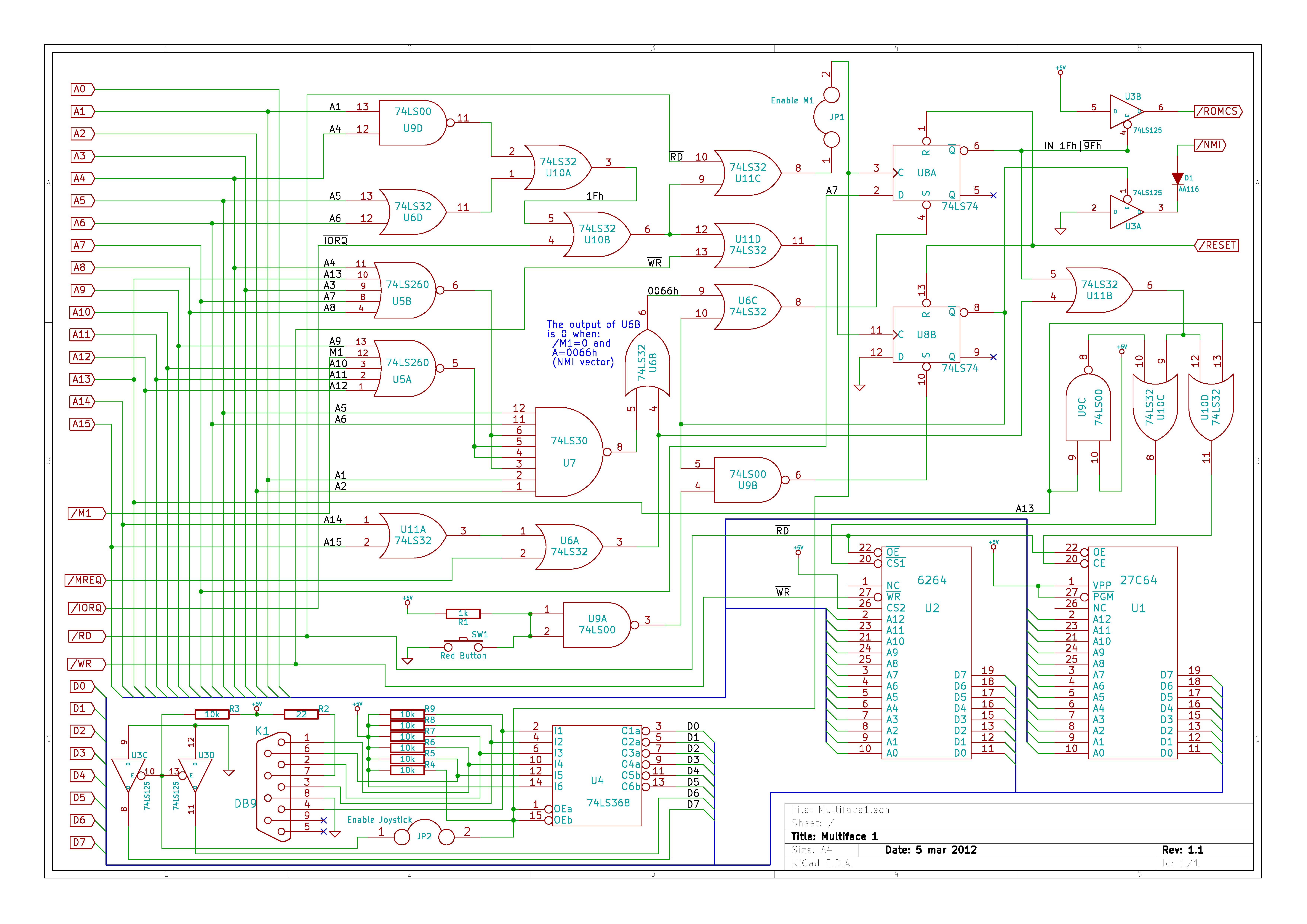
No 1 multipurpose interface for the Spectrum. Internal 8K ROM and RAM. Fully automatic saving to Microdrive, Wafadrive, Beta, Opus, etc. Joystick interface. Toolkit with Peek/Poke functions.
Discussion
Nobody has started a thread about this yet.
Remarks
program copier
Documents
- Multiface1_Manual.pdfInstructions 85 KB
Other files
- roms.htmlRemote link English
- Multiface1_SourceCode.zipSource code 82 KB
Files and rights
No permission is on record either way. Screens and pictures are copied here on a take-down basis: if you hold the rights and want something removed, say so and it goes.
Scores
Elsewhere on the web
- WorldOfSpectrum 5 votes10.00
Awards and competitions
Crash Readers Awards 1987
- 1Best Peripheral
In the magazines 162
Your Sinclair #79Jul 1992 · p.42
Jon Pillar
WIRED YS presents a handy-dandy guide to having fun with your peripherals. And who better to lead us down the hardware path than JON PILLAR? Quite a lot of people to be honest, but they were all at lunch. There's more to life than playing Speccy games. Using Speccy hardware is also to be recommended. Over the years a huge number of little black boxes have appeared for plugging into the back of everyone's favourite, um, little black box. Sadly, a lot of these have now gone forever. The Specdrum, the Slomo, the Music Machine... where are they now? Actually, they're still around, you just have to look rather hard for 'em. For those of you who can't be bothered looking rather hard, there are still plenty of goodies to be collected. MULTIFACE +3 Romantic Robot/£29.95 MULTIFACE 1 Romantic Robot/£29.95 MULTIFACE 128 Romantic Robot/£29.95 We here at YS swear by the Multiface. Yes, many a time you'll find us standing next to the little black box, hitting it and swearing. It's an indispensable programming aid, stopping any Speccy program in its tracks and allowing you to recover from total system crashes with just the press of a button. And then the press of a few more buttons. And then a few more. As well as saving the ears of nearby grandmothers should the worst happen, the Multiface enables you to save out screens or programs to about every storage device imaginable. (How else do you think we get those lovely Speccy screenshots in the mag?) Not only that, but by loading up the Genie disassembler, you can trip merrily through any game you darn well like, ripping off, er, picking up on the techniques of the professionals. A fabulous bit o' kit, and now that Romantic Robot are selling 'em off cheap, a fabulous bargain as well. IT'S ALL GOING HORRIBLY WRONG DEPARTMENT Speccies are like mushrooms. If you keep them warm and nurtured, they flourish. But if you trample them into the ground or allow your dog to eat them while walking in the woods, they tend to fall over. Furthermore, I wouldn't recommend that you put them in a pan and cook them with a nice free-range egg in an attempt to make a mushroom omelette, because it won't work. Um, actually, Speccies aren't like mushrooms at all. Forget I said that bit. Anyway. The point I'm failing quite spectacularly to make is that Speccies are temperamental beasties. Inevitably, they'll break down. And while the most sensible course of action is to take your ill machine along to an authorised repair centre, you can fix some things in the comfort of your own home. But be sure to have a responsible adult on hand. They will then say, "I told you that you should have gone to an authorised repair centre," in a patronising tone of voice when you bodge the job and wreck your Spec. If you feel up to the task though, quite a few companies offer Speccy spares - everything from new ROM chips to new +3 disk drives. WAVE are particularly well-endowed with small bits of Speccies. Their catalogue has just about everything you need to build your own machine! Buy the spares direct, put them aside for that fateful day, and it'll be cheaper to repair your Speccy yourself. Or else get your local soldering iron whizz to do it for you. Just don't say we didn't warn you if things go even more horribly wrong. Well, that's it. Hopefully this little trip through hardware land has been useful and informative. If not, why should I care? I'm off to digitise the climax of The Terminator and save it out to disk as an animated sequence. Just don't tell anyone, or they'll all be at it…
Handel, our lovely model, hails from Grimsby. His hobbies includes eating crisps. He's demonstrating the +2 ROM. (Clap clap clap).
Here's some hardware. Basically.
Um, that's a phone. The interesting bit is behind it. Just over there. That's the VTX5000 modem. It's rather fine. Thank you.
Without this little black box, YS would never reach the shops! Yes, our Multiface helps load the delivery vans. Or something.
Crash #47Dec 1987 · p.114
Ben Stone
Dominic Handy
CHRISTMAS LISTE Ben and Dom, Crash, [redacted]. What's small and black and bursts the seams of a stocking? A Spectrum add-on, of course - there are hundreds of little black boxes for music, printing, screen art and program transfer. Dominic Handy suggests some utilities and hardware for the Christmas list, and Ben Stone brings joysticks to the world - but don't fight over them, or they'll all be broken by little black Boxing Day. JOYSTICKES TERMINATOR Supersoft £19.9 Like most pointless street cred - take Raybans, expensive earplugs on a Radio Shack personal stereo and the Beastie Boys - the Terminator does serve a purpose, but only just. And its wacky design takes a lot of getting used to. Being so tiny the Danish stick has a lot of travel, so it's quite unresponsive. And the fire pin is difficult to use: you have to hold the grenade and fire with the same hand, but you can get it to work fairly quickly it you're prepared to go through hand-ache agony. The Terminator is all but indestructible, made of very thick plastic and durable electrical parts, but for nearly 20 quid I'd expect something a little more efficient than this. OMPETITION PRO 5000 Dynamics £14.95 (£15.95 with transparent case, Competition Pro Extra £16.49 with autofire and go-slow mode) This is THE joystick. The fire action is brilliant and the stick performs like a dream. It looks much the same as the Euromax Professional, but for just a pound more you can get it with high-tech clear casing (as in the picture). It's durable, because the shaft is made of steel and the microswitched mechanism inside is remarkably simple (and pretty much user-serviceable). The fire buttons work with reed switches, sometimes considered unreliable, but I've never had any trouble. Sadly, there's no autofire on either model, though there's a souped-up version on the market (the Competition Pro Extra) with autofire option and a go-slow mode never before seen on any joystick. SPEEDKING Konix £11.99 (£12.99 with autofire) The Speedking was a novelty when it appeared - the first truly hand-held joystick that worked well. It's easy to use, though it has the problem of the Euromax Professional in reverse: the diagonals are a pig to find and use quickly, which makes playing games like fighting sims very difficult. The position of the fire button really makes your hand ache if you're pressing it a lot - shoot-'em-ups turn into a nightmare when you're doing well! - though it would be difficult to have it anywhere else on the compact little body of the Speedking. There is a Speedking with autofire available. Earlier this year Konix claimed one Speedking lasted for 17,604,000 waggles (that's 27 days of nonstop waggling, folks!), but the story is not now believed, Our Waggling Editor writes. PROFESSIONAL Euromax £15.95 (£18.95 with autofire) The Euromax Professional has most of the features now becoming standard in the joystick world: posey design and microswitches, and an autofire option if you want to pay a bit extra. (It's the autofire version in the picture.) At first it's a little difficult to get to grips with, literally, because it's biased slightly to the diagonals. Theoretically this means the joystick's eight directions are equally easy to use, but in practice the stick often slips out of the vertical/horizontal into a diagonal. But the Euromax Professional has a brilliant fire action. And it's a great stick for games where deft, precise movements aren't needed; it feels rather flimsy, but the couple that were in the office had fairly long lives considering the hammering a CRASH joystick gets! 125 SPECIAL Cheetah £12.99 This new joystick, introduced in last issue's PCW Show report, has the usual eight directional controls as well as two independent fire buttons - and a special rotate function which allows the player to twist the joystick for extra-realistic movement. Of course a joystick of such complexity needs more than the usual five pin in/outputs; you'll have to have an extra joystick port, or use both ports on the +2 and +3/. There is an autofire function. IN THE BLEAK MIDWINTER MIDI INTERFACE Cheetah Marketing £49.95 With this interface box and accompanying software you can control any MIDI instrument via the Spectrum. It's superb for people who can write music but can't play - just enter the notes and the computer plays the instrument. Or do it the other way round: you play the music and the computer puts it into musical notation. Including a MIDI lead for connecting the interface to your instrument, the MIDI interface was reviewed in issue 40. MK5II KEYBOARD Cheetah Marketing £199.95 This 61-key fully polyphonic board with foot switch and MIDI output ports comes packed in a rugged steel case. It's an ideal accessory to Cheetah's MIDI interface. MUSIC MACHINE Ram Electronics £49.95 'One of the best all round music add-ons for the Spectrum' - Jon Bates, Issue 34. A sound sampler, sequencer, editor, drum machine and composer all in one little black interface, the popular Music Machine is supported by a wide range of software. Recent additions include Quasar Software's Sample Editor (reviewed last issue) and Tectrics's chord construction kit Compuchord (Issue 45). SPECDRUM Cheetah Marketing £29.95 Now the standard drum add-on for the Spectrum, the SpecDrum comes complete with eight samples of real drum sounds. Extra drum sounds can be loaded in from tape: the Electro Kit and Afro Kit both retail at £4.99 and the older Latin Kit at £3.99, and all come complete with their own editors. The SpecDrum plugs into most hi-fis via a connecting phone lead. Jon Bates enthused over it in Issue 27. MUSIC TYPEWRITER Romantic Robot £7.95 Coming complete with keyboard overlays (48/+), this clever piece of software is a sophisticated tool for music on the Spectrum. Music written on Music Typewriter is displayed onscreen using realistic graphics which can be dumped to most dot-matrix printers, so you can print your own music. And your compositions aren't limited to Music Typewriter - all your tunes can be converted to machine code for use in your own programs. Jon Bates went sharpening and flattening on Music Typewriter in Issue 16. PRINTING MULTIPRINT Romantic Robot £39.95 A printer interface with all the options, the Multiprint can dump any Spectrum screen to an Epson-compatible printer in three different densities - it's handy for listings, too. There's more info in Issue 43. RAM PRINT Ram Electronics £34.95 Not only does this little black box drive your printer using a very easy menu-driven system (all stored on a ROM chip), it's also useful for those apres-Christmas 'thank you' letters because it comes with a built-in word processor, accessible from BASIC at any time and also on ROM. And if you ever get bored of all those line feeds and ESCape codes you can always plug your joystick in the built-in Kempston port and bash away at a game. See the details in issue 35. FOR THE ARTIST THE OCP ART STUDIO THE ADVANCED OCP ART STUDIO Rainbird £14.95, £24.95 'Probably the best art utility on the Spectrum' - Mike Dunn (On The Screen Editor). Need we say more? Several versions of the mouse- and joystick- compatible Art Studio utility are available for different Spectrum setups; The Advanced OCP Art Studio, which really needs an Interface One and microdrive to use its full potential, is much more powerful than the original. It has a Scrapbook library facility so you can combine and paste together pictures. Issues 24 and 40 have reviews of The OCP Art Studio and The Advanced OCP Art Studio respectively. VIDEO DIGITISER Sunset £128.00 Ever wanted to change Prince Charles's ears, or rub out out that blot on Gorbachov's forehead? You can do this and more, provided you've a video recorder, with the Sunset Video Digitiser. This little black box has all the connections for grabbing TV pictures from the video and then using them anywhere you want - even in games. Sadly, there's no printer ribbon that will put them onto T-shirts. Franco Frey got frame-grabbing in issue 31. VIDEOFACE DIGITISER Romantic Robot £69.00 plus £1.00 postage and packing The Videoface Digitiser is amazingly cheap and fast - it's all here. You can grab and scan three pictures a second, and then produce a very realistic animation sequence using up to six screens. At about hall the price of the Sunset Video Digitiser, this represents unbelievable value for money. NOT A CREATURE IS STIRRING, EXCEPT FOR A MOUSE KEMPSTON MOUSE Kempston Data £49.95 There's no WIMPing out with Kempston's version of the yuppie controller, with button eyes and connecting tail. Don't forget to lock up your cheeseboard and keep the cats indoors. Kempston is still bundling Rainbird's OCP Art Studio with this rodent at £69.95. Or those with a Spectrum +3 you can get Kempston's new Desktop utility package for +3 DOS and the mouse for exactly the same price. COMCON Frei £17.95 (single port), £19.95 (twin port) This is guaranteed to work with any product that uses the Spectrum keyboard. By connecting the six plugs to the miniature keyboard add-on you can have eight directions and TWO independent fire buttons (provided you have the correct joystick - also available from Frei). A twin-port version is also available for complex games. Lloyd reviewed the single-port version way back in Issue Eight. AND... MULTIFACE ONE, MULTIFACE 128, MULTIFACE 3 Romantic Robot £39.95, £44.95, £44.95 'One of the most versatile and user-friendly units on the market' - CRASH Issue 29 - Romantic Robot's Multifaces are ideal for the serious gameplayer or utility user with a fast storage device: they can put cassette games on Beta, Opus and Kempston disks. The Multiface 3 (pictured) can transfer cassette programs for the Spectrum and 128 to the - +3's Amstrad disks. It was welcomed in Issue 45 as a good reason to buy the +3, though Sixword's Swift Disc and Rockfort Product's Disciple are also worthwhile disk systems. The Multifaces have other uses: most POKEs can be entered using the ROM-based toolkit. And printer-owners are also catered tor with a COPY command, ideal for dumping your greatest high scores! All these options are available at any time at the press of a little red button. CRASH first saw the Multiface One in Issue 26. PLUS D Miles Gordon Technology £49.95 (£129.95 with 3.5-inch 780K-capacity disk drive) The Plus D is a new disk and printer interface from the designers of Rockfort Product's Disciple. Its Snapshot button will save all 48K and 128K cassette programs to disk, it's claimed, and the interface can make single and double-size screen dumps to a printer. The Plus D is also available in a package with a disk drive. GAMMA-STRIKE Gamesware £24.95 Gamesware's Gamma-Strike target-shooting system is a novel combination of hardware and software - you plug a target into the Spectrum, shoot at it with a model gun and watch the computer monitor your score! It's all done with the latest signal-detection techniques, and Gamesware promises more 'plug-in games' including darts and snooker soon... look out for the CRASH review. Thank you Santa, lots of luv Ben and Dom xxxxx
Your Computer #6Jun 1986 · p.41
THREE-IN-ONE PACKAGE The design of the Spectrum computer shows its age in more ways than one. In particular when compared to more recent machines, the Spectrum is, shall we say, rather short on interfaces. There are many products on the market which compensate for the lack of I/O capability and the Romantic Robot Multiface One is one such unit. It is unusual, though, in that it provides the user with three distinct interfaces in one neatly-designed package. The three interfaces comprise a Kempston-compatible joystick interface, about which there is little more to say; a universal, automatic program save facility; and an 8K RAM extension. The latter facilities require a little more in the way of explanation. The interface is connected to the Spectrum expansion port, making sure that the switch on the left-hand side of the unit is in the on - down - position. With that switch in the off position, the interface is transparent, meaning that there will be no danger of any program failing to load because it detects the presence of the add-on unit. SIX ACTIONS Powering-up the computer will then display the familiar Sinclair copyright notice which will be replaced by the Multiface menu when the red button on the top surface of the interface case is pressed. That menu allows the user to select one of six actions. The first of those options is to exit to Basic, either quitting any existing program or returning with the option of studying/ altering any resident program. In that case the interface will make every effort to preserve the program in an intact form, the interface saving the program as a compressed RAM image in four parts. A successful exit from a program gives the user full access to a program which may be restarted providing that the start address is known. TOOL OPTION Programs in memory may be saved to a variety of media, including Microdrive, Wafadrive, Beta, Discovery indirectly, via tape, to other disc systems. The tool option from the main menu allows areas of memory to be examined and, if required, altered by way of a Poke command. VALUABLE RANGE Other options include a Copy screen command, assuming that the printer interface in use supports a screen dump utility and a jump command which allows the program to jump to a specified address within memory. At £39.95, Multiface One is not the least expensive of Spectrum interfaces but it builds in a valuable range of facilities. Both as a serious aid to developing programming skills and. on a lighter level, as an aid to playing some games, the interface represents good value.
ZX Computing #26Jun 1986 · p.22
John Wase
GETTING YOUR BACK UP Romantic Robot £39.95 A number of backup interfaces work on the principle of saving a "snapshot" of RAM when you press the button. Romantic Robot's Multiface One, one of the newest, is simple to use, for the software is on EPROM (no wearisome cassette-loading). It will save directly to microdrive, to newer versions of Betadisc (with an easy, documented hardware modification), to Opus Discovery, to tape, to Wafadrive or to Kempston disc, although in this case the software is optional instead of that for Betadisc. Saved programs run in the absence of the interface. Apart from the red button, the interface consists of the usual upright black box (neat, strong) has a on-off switch to avoid through port, an interference with peripherals and a Kempston joystick port. The EPROM contains several useful toolkit commands, a COPY command (but only for a limited range of interfaces) and the facility to page in the additional RAM for a variety of purposes. All are well-documented, with examples where necessary. I converted "The Flying Formula" to my Discovery. Multiface must fit between Spectrum and Discovery; users with Spectrum and Discovery firmly connected will have to take them apart (messy). My battered DK'Tronics keyboard needed a ribbon cable to join it to Discovery; just as well, as Multiface One would not fit it. Next to the Discovery, it fouled the disc slot of drive 2 almost completely, and drive 1 is accessed only with difficulty. I have an early disc drive and I see why the Multiface instructions recommend the later (taller) unit. However, this was the only real problem I had. I took only five minutes to convert from tape to disc (including loading time); the instructions (printed on thin shiny card) were easy to follow, and the on-screen prompts made it a doddle. All I had to do was load the game, then when the title screen changed to the joystick menu I pressed the red button and followed the prompts. I have a 5.25" unit as drive 2 which I keep games on. Converting the basic loader took a long time as this is just one huge and most peculiar statement; they must have got it in by devious means! When you try and EDIT, you end up with two cursors. Cursor movement is snail-like and accompanied by the interesting buzz mentioned in chapter 24 of the old manual; you have to delete the first line or so before you can EDIT the hidden lines, and then re-insert the important bits afterwards. In contrast, the code on disc 1, saved in three sections, transferred easily with the MOVE command. Whilst Multiface One will work with the 128K Spectrum, it will do so only in 48K mode. Nevertheless, it has several advantages over comparable interfaces. It is compatible with a large number of devices to which it will load immediately, instead of having to load to tape and then fiddle with a header-reader before saving to disc. It is quick (other devices can take an hour or more). And, best of all, even I found it simple to use. With the additional features (port, switch, toolkit and accessible RAM) it cannot but represent good value at £39.95 and I therefore recommend it.
Sinclair User #51Jun 1986 · p.76
John Lambert
JUMP INTO THE CODE Since I last looked at the Multiface One from Romantic Robot they have up-rated it - at no extra cost - and it is now probably the best back-up device around. The reason is that now it can do far more than just back-up programs, something it is remarkably good at anyway. Externally it looks much like the old Multiface - with a Kempston compatible joystick interface on the left-hand side, a button on the top which when pressed backs up the entire contents of memory to a variety of storage medium, and a through port for other add-ons. The video socket has been replaced by a switch which can be used to make the Multiface transparent to programs. Pressing the button brings up a menu at the bottom of the screen with five main options. Return takes you back to the program as though nothing had happened - an exit option tries to put you back in Basic if possible. Save does the obvious and saves the memory to microdrive, waferdrive, or either Beta or Kempston disc system - state which when ordering. Optionally you can just save the screen. Copy copies the screen to a ZX Printer, or a full size one if you have a Kempston 'E' or Lprint III attached, and Tool enters the tool-kit part of the program. This allows you to alter any part of the Spectrum's memory, either an address at a time, via a window which displays 128 bytes or access the Z80's registers - all with the display in hex or decimal. The last option, Jump, is potentially the most useful. The Multiface contains 8K of Ram which normally is used to hold various bits of the backed-up program. You can put your own program in this Ram and then use this option to jump into it. It might be a dissassembler, Basic tool-kit or whatever you want. Multiface is a bargain at £39.95. Romantic Robot, [redacted].
Crash #29Jun 1986 · p.74
Franco Frey
PHASE 2 OF FACE 1 Franco Frey takes a close look at the New, improved MULTIFACE 1 from Romantic Robot. It has everything you could need, except possibly for Biological Action! Romantic Robot are now making an improved version of their MULTIFACE ONE - which we reviewed in the March issue of CRASH in its original form. Most of the promised additions have been implemented and the interface must now be one of the most versatile and user-friendly units on the market. MULTIFACE ONE features an incredibly versatile SAVE facility for tape, Microdrive, Wafadrive and disk drive. It copes directly with the BETA and OPUS DISCOVERY drives and now also handles the KEMPSTON disk interface. Transfers to other disk systems can be effected via tape. A Kempston compatible joystick interface still appears on the upgraded unit, as well as an 8K RAM extension that can be used as buffer area or as a RAM disk or for machine code routines. The unsatisfactory video output, which was linked to the noisy video signal at the edge connector, has been abandoned. In its place has come a toggle switch to make the MULTIFACE ONE invisible. This means that MULTIFACE ONE need not be physically removed should it clash with another peripheral connected to the system. There are also major changes in the software area. Pressing the all important button reveals six options. EXIT returns you to BASIC with the condition that the standard system variables are still intact, RETURN continues the interrupted program, SAVE initiates the SAVE routine, TOOL accesses the new MULTI TOOLKIT routines, COPY copies the screen to any printer or printer interface which can interpret the COPY command, and JUMP provides direct access to any utilities within the Spectrum ROM/RAM. The JUMP address is located at 8192 and 8193. At address 8194 is a flag determining whether the ROM (0) or the MULTIFACE RAM (1) is paged, (active). For direct access without going through the MULTIFACE menu, the identification code for RUN (Decimal 82,85,78) can be POKEd into 8195-8197, after which pressing the button BREAKS the program and a direct jump is made to the required start address. The JUMP command is useful for jumping directly into a resident disassembler, assembler or monitor. One advantage of storing routines within the MULTIFACE RAM is that they remain unaffected by the NEW command. On the other hand, to save the contents, the whole RAM or part of it must be copied to the Spectrum RAM and saved from there. A BASIC program is provided in the manual for block moves into and out of the MULTIFACE RAM. The TOOL selection presents a new list of options. HEX toggles the display of the current byte between hex and decimal. To view a different memory area, the new address is typed and entered. SPACE clears the address. REG displays the Z80 registers which are held at 16358-16383. WINDOW opens a window in the middle of the screen to show 128 bytes pointed to by a flashing cursor. The address may be changed by using the cursor keys. TEXT translates and displays the bytes within the window into ASCII characters. QUIT gets you back to the opening screen menu. With all these options TOOL provides adequate means to new any system memory either byte by byte or in scrollable blocks of 128 bytes. The facility to scrutinise the 80 registers in the state they were during the BREAK is very handy indeed. This makes MULTIFACE ONE the perfect tool for investigating commercial programs by interrupting them manually at any given time either just to display the memory contents or to pass control automatically over to a disassembler. The SAVE option makes the MULTIFACE ONE indispensable for transferring commercial programs onto the user's own fast storage system, be it Microdrive, Wafadrive or any of the available Spectrum disk drive systems. Programs are saved with or without screen and require little space due to a compression routine. Only the relevant memory areas are transferred and so several programs can be saved on one disk. MULTIFACE ONE need not be present when loading the saved programs. The only disadvantage is the corruption of the top screen area, Which gets restored as soon as the program is left to run. At £39.95 plus £1.00 post and packing, this interface is a must for any budding programmer or for any serious games player with a fast storage device.
Your Sinclair #6Jun 1986 · p.41
Max Phillips
HARDWARE BONANZA Yeeeehaah! Max Phillips rounds up all the latest Speccy add-ons and pens them up... Multiface 1 Romantic Robot £39.95 Reviewer: Max Phillips Romantic Robot's Multiface One is ideal if you've not got round to collecting hardware bobs for your machine. In one £39.95 stroke, you get a Kempston joystick interface, a composite monitor interface, another 8K RAM and the ability to save virtually anything to tape, microdrive, Beta or Opus disk drive! The monitor interface is for either colour or monochrome composite video monitors; not as good as RGB but a real boon for serious work. The 'one-touch save' seemed to work well - it saves either the screen or the whole 48K memory, compressing as it goes. Mind you, Beta users do have to disconnect the joystick port to be compatible. You can also freeze games, put POKEs in and so on. The 8K RAM built into the unit can be used in your own programs to give you a 56K Spectrum - the extra space is ideal for hackers and machine coders but it's not easy to get at from Basic. All-in-all this is a pretty good One-Touch Save box. If you need more add-ons, it's even got a through-connector ready for you. Some of the older rivals may already be wriggling in their boots…
Crash #26Mar 1986 · p.86
Franco Frey
Multiface One Producer: Romantic Robot Retail Price: £39.95 MULTIFACETTED DEVICE Romantic Robot's MULTIFACE ONE follows in the footsteps of earlier FAST-SAVE interfaces such as INTERFACE III and MIRAGE, but incorporates extra facilities. It provides an automatic SAVE facility for cassette, Microdrive, Wafadrive and various disk drive based Spectrum systems, features a Kempston type joystick interface and has a composite video output connection. These three ingredients improve the performance of the Spectrum by providing a more versatile storage interface, a port for the obligatory joystick and a crisper screen picture. MULTIFACE ONE supports the OPUS DISCOVERY and BETA disk interfaces directly and other drives can be accommodated by saving programs to tape in a manageable format. These can then be loaded without MULTIFACE ONE into the computer and copied to disk. The unit plugs in as usual onto the edge connector; the joystick is connected to the 9 way joystick plug on the lefthand side and the video cable to the phono plug on the righthand side of the interface. With a Microdrive system the MULTIFACE ONE should be plugged in at the back of the INTERFACE 1 unit, but all other storage devices, WAFADRIVE, OPUS and BETA, must be connected to the extension port of MULTIFACE ONE. All software functions are initialised by pressing the ubiquitous red pushbutton. The joystick interface is Kempston compatible, which means it is port mapped to address 31. The joystick function can be checked by pressing the red button and then SYMBOL SHIFT and A which should cause the data values to appear at the bottom right of the screen when the joystick is waggled. For the BETA disk interface the Kempston joystick interface must be disabled as it interferes with the disk drive operation. This is done by opening the rear cover and cutting a wire link close to the joystick connector. The video output is not generated by MULTIFACE ONE, but is taken directly from the Spectrum's edge connector. This means some Spectrum owners may not find any signal on the output of their unit as it seems some machines do not have the video signal available at the edge connector. Some Spectrum owners may find the signal very weak and noisy and see no improvement in picture quality. The familiar dot crawl will persist, as the video signal is generated from intermodulation of the colour carrier frequencies required for the standard PAL video signal. The quality of even a perfect PAL composite signal will never match that obtained with the separate RGB signals, but composite video provides an improvement in picture sharpness at least. The save facility is obtained by pressing the red button. This can be done at any time, regardless of the program running. MULTIFACE ONE freezes the current program and displays a list of options on the bottom two lines of the screen. EXIT provides an exit from MULTIFACE ONE and the program. This allows you to study, alter or customise the program but only on the condition that the computer doesn't crash on exit, which depends on the existence of standard system variables. RETURN gives the control back to the current program. SAVE initiates the save routine for screens or programs. POKE provides a facility to POKE and PEEK any part of the Spectrum's memory. Selecting SAVE generates a prompt for the file name, which can be 9 characters long. If only ENTER is pressed the program automatically enters RUN. With the BETA drive the name is 7 characters long and ENTER on its own will provide the name BOOT. Once the filename has been selected a menu appears: SCREEN saves a screen on its own; PROGRAM saves both screen and program and is the default setting. Then you need to specify the device you want to save to which can be TAPE, CARTRIDGE, WAFER or DISC. MULTIFACE ONE automatically detects if OPUS DISCOVERY or BETA is connected and follows the correct procedure. The program or screen is then saved to the selected storage device. Programs are always saved in four parts: a BASIC loader, the main code, the screen and the operating code. MULTIFACE saves the contents of the computer (the RAM IMAGE) in a compressed form. There is an abort facility at every stage of the process - BREAK brings you back to the current menu. In most cases MULTIFACE ONE need not be present to reload the programs it has been used to save. The only disadvantage is the distortion of the top third of the screen, which usually gets updated by the program anyway. Typically, a 16K program occupies 53 sectors (about 13K) and loads within 10 seconds on a BETA drive. This compares favourably with the MAGIC BUTTON facility of the BETA itself, which saves the whole 48K, without compression, onto 192 sectors. If you want to save space you have to name the file and copy it to another disk so that several programs can be stacked. MAGIC BUTTON only operates with empty single sided formatted disks. MULTIFACE ONE can store up to 2416K programs onto a doublesided 40 track disk without renaming and recopying files. MULTIFACE ONE has 8K ROM for its own software and 8K RAM as buffer area. The RAM can be used to store data and machine code routines, utilities, tools and so on, if required. The RAM sits below the screen area and must be paged for access. This can only be done in machine code. MULTIFACE ONE performs well with all the storage devices listed. The compression technique assures economic saving and fast loading of any program. The system is well protected against erroneous usage with different error reports for the different systems. An extra facility, JUMP, should be implemented quite soon and will allow users to JUMP to a specific location in memory and execute code beginning at that address. Useful if you have a Disassembler lurking in memory, perhaps... Extensions to the PEEK and POKE functions are also planned - at present the facility only works in decimal notation, but the upgraded unit will offer a Hex display option and be capable of revealing the contents of the Z80 registers. Direct compatibility with the Kempston KDOS system is also planned for the future. In all, a worthwhile buy, especially for owners of fast storage devices.
MULTIFACE ONE from Romantic Robot. The magic red button helps you save your cassette programs onto fast storage media and there are a few other goodies included in the package...
Sinclair User #47Feb 1986 · p.105
John Lambert
BACKUP YOUR TROUBLES Backup devices are at the best of times controversial and the new Multiface One from Romantic Robot is set to be the most controversial of all. At the push of a button it allows you to backup your programs to disc (Discovery One or Beta), microdrive, or Wafadrive, with other disc systems to follow. It also provides facilities to POKE areas of memory for high score POKEs or to see what is there. Multiface is so called because it can do more than just backup programs. It has a built-in Kempston compatible joystick port and a composite video monitor socket. Inside there is 8K of RAM which is available as, for example, a RAM disc or somewhere to keep a monitor or short machine code routines. Its main use, however, will be as a backup device and as such it is very successful. It cannot backup programs to hardware where the program specifically looks for that hardware and does not run properly if it is connected - such as Elite and the Beta Plus - but it can, for example, backup the same program to microdrive. To be able to get more programs onto one microdrive cartridge the Multiface uses some impressive compression techniques. Compression rates of over 50 per cent are possible with some programs. Given the wide range of hardware which the Multiface can work with, and the extra facilities it provides, the price of £39.95 is reasonable.
Advert134
- Your Sinclair #91Jul 1993 · p.15
- Your Sinclair #90Jun 1993 · p.15
- Your Sinclair #89May 1993 · p.17
- Your Sinclair #88Apr 1993 · p.8
- Your Sinclair #87Mar 1993 · p.49
- Your Sinclair #86Feb 1993 · p.39
- Your Sinclair #85Jan 1993 · p.39
- Your Sinclair #84Dec 1992 · p.39
- Sinclair User #87Jun 1989 · p.81
- Your Sinclair #42Jun 1989 · p.66
- Crash #65Jun 1989 · p.28
- Sinclair User #86May 1989 · p.29
- Your Sinclair #41May 1989 · p.38
- Crash #64May 1989 · p.64
- Sinclair User #85Apr 1989 · p.32
- Your Sinclair #40Apr 1989 · p.60
- Crash #63Apr 1989 · p.38
- Sinclair User #84Mar 1989 · p.42
- Your Sinclair #39Mar 1989 · p.62
- Crash #62Mar 1989 · p.76
- Sinclair User #83Feb 1989 · p.52
- Your Sinclair #38Feb 1989 · p.77
- Crash #61Feb 1989 · p.24
- The Games Machine #15Feb 1989 · p.117
- Sinclair User #82Jan 1989 · p.37
Full-page ad6
- Sinclair User #71Feb 1988 · p.32
- Your Sinclair #26Feb 1988 · p.5
- Crash #49Feb 1988 · p.48
- Sinclair User #70Jan 1988 · p.50
- Your Sinclair #25Jan 1988 · p.8
- Crash #48Jan 1988 · p.192
Feature5
- The Spectrum Show #1Apr 2014 · p.27
- Crash #98Apr 1992 · p.66
- Crash #50Mar 1988 · p.54
- Your Sinclair #6Jun 1986 · p.40
- Crash #29Jun 1986 · p.74
News/Note5
- The Games Machine #25Dec 1989 · p.36
- New Computer Express #16Feb 1989 · p.47
- Sinclair User #51Jun 1986 · p.76
- Your Sinclair #6Jun 1986 · p.13
- Crash #25Feb 1986 · p.99
Offer2
- Sinclair User #129Nov 1992 · p.18
- Sinclair User #128Oct 1992 · p.17
Tips1
- Crash #47Dec 1987 · p.107
Related
- Elsewhere
- WorldOfSpectrum
- Same entry at
- Spectrum ComputingZXInfo
Reviews from people here
Sign in to write about this, or make an account. It takes a minute and lets you correct the catalogue too.
Everything ZXDB can hold about this is here.
Sign in to correct or add to this.
Hold the rights to this and want it taken down?