
Opus Discovery
Hardware: Disk
Opus Supplies Ltd · 1985 · Pound sterling 199.95 · Pound sterling 99.95 budget
Also known as Opus Discovery 1 (English)
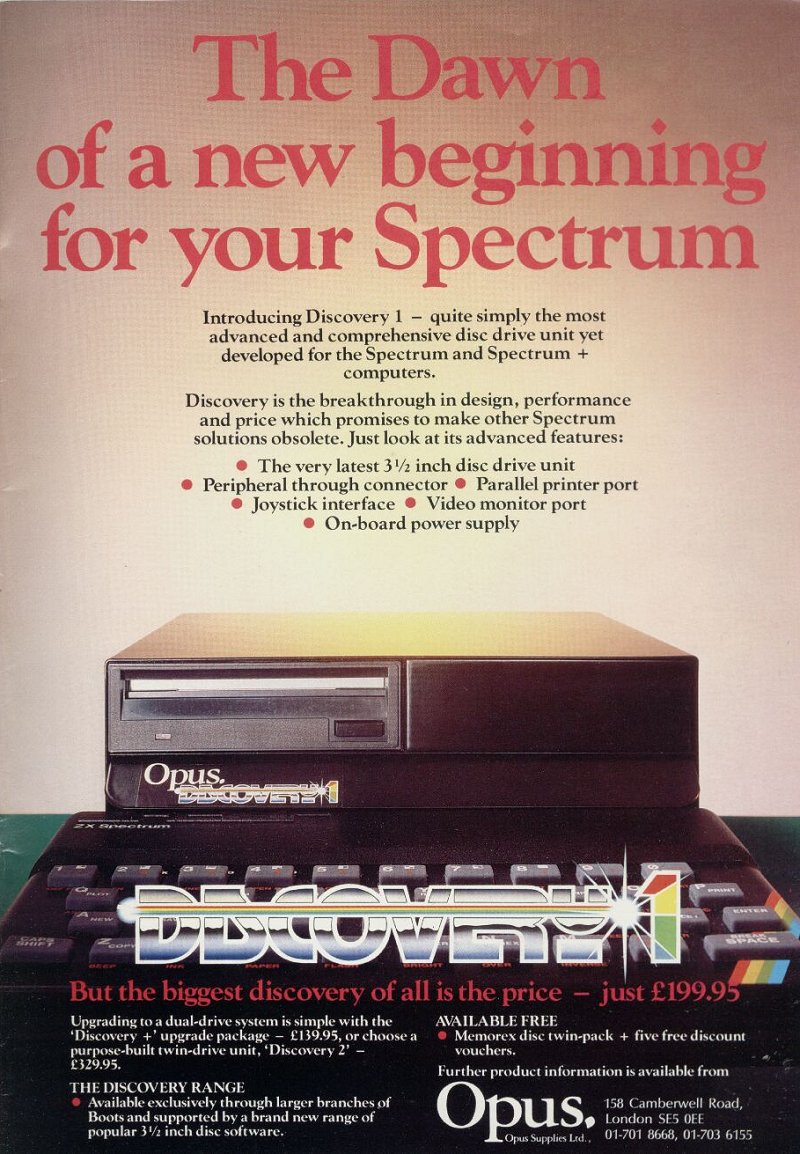
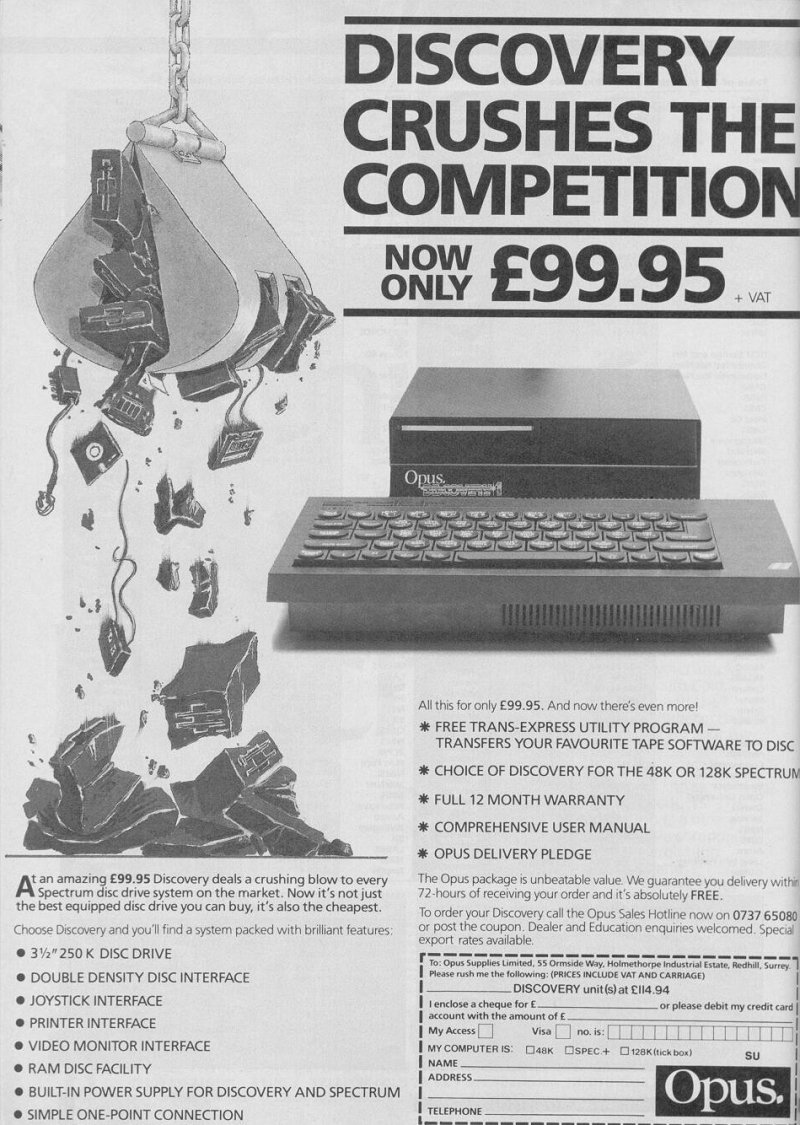
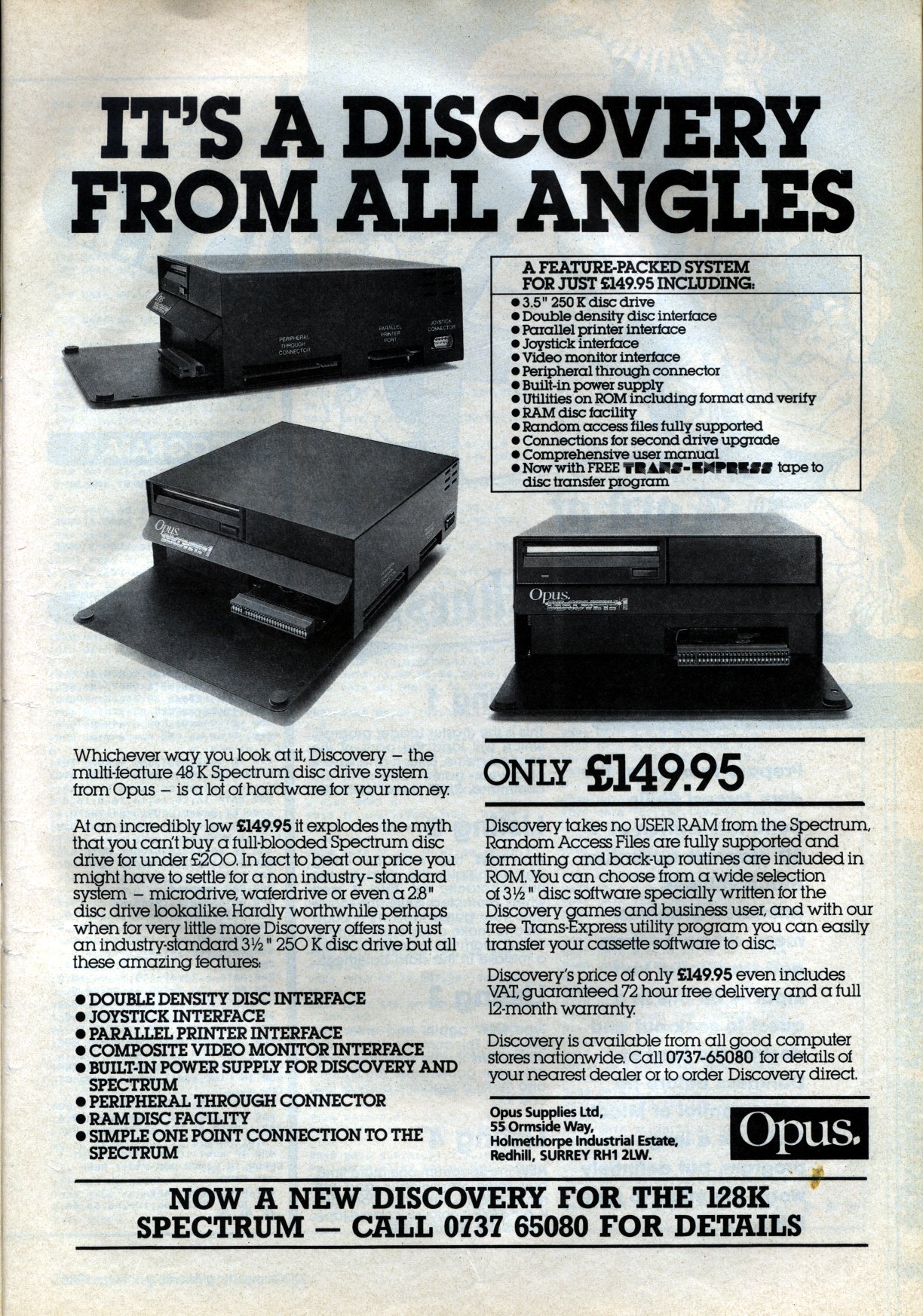
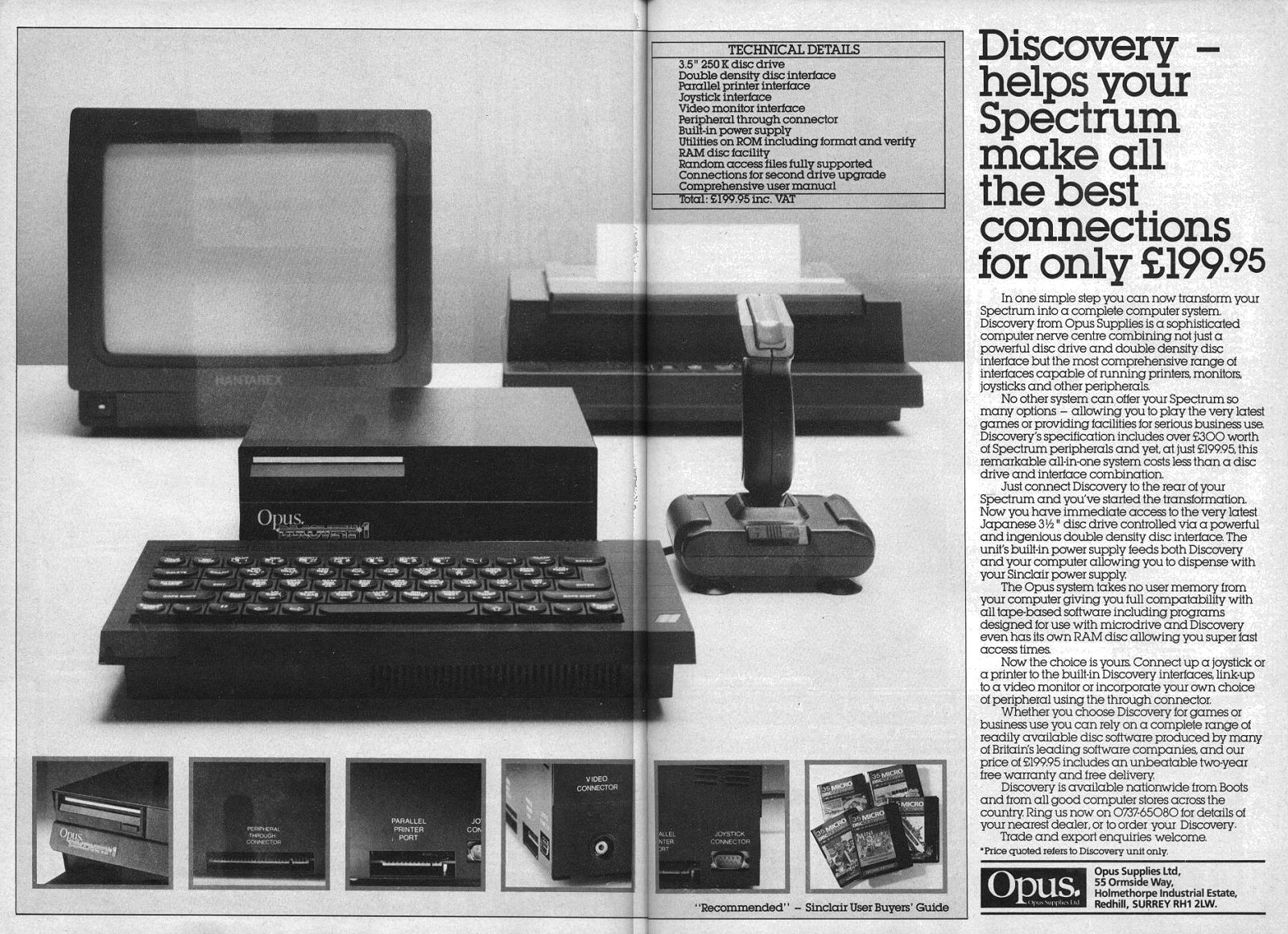
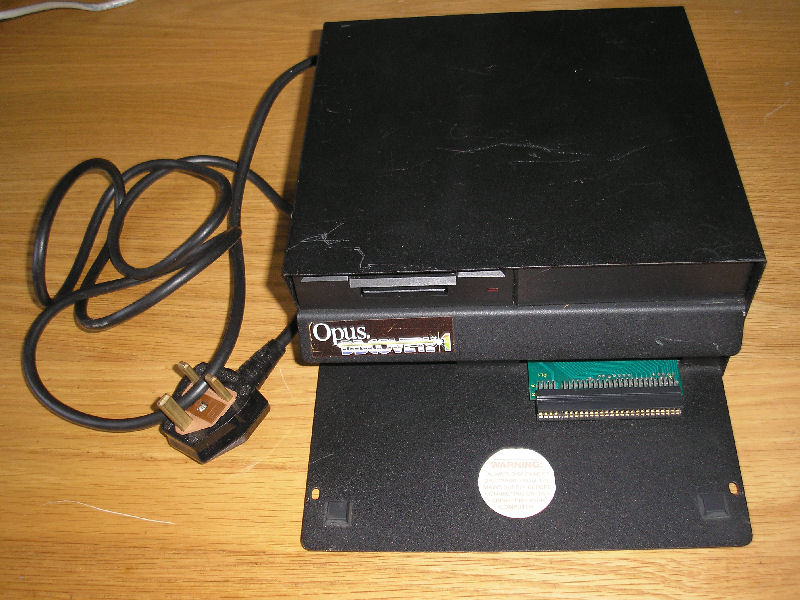
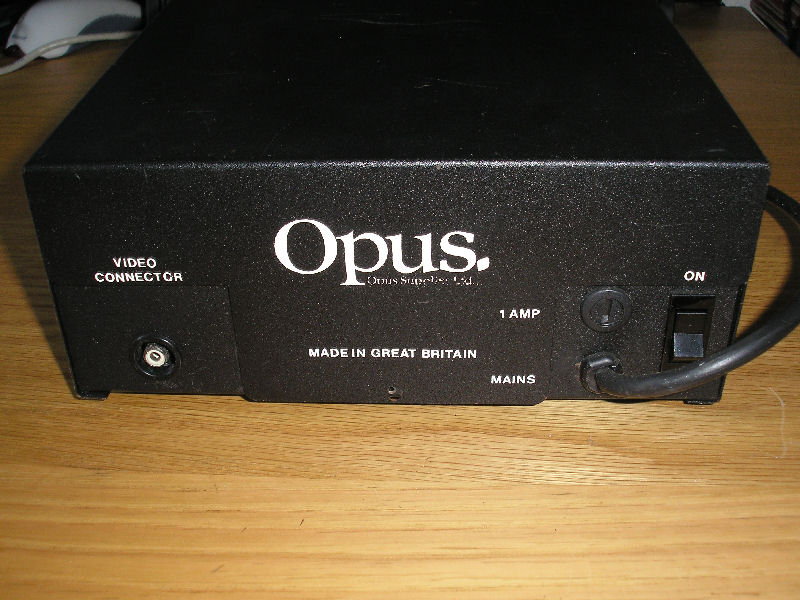
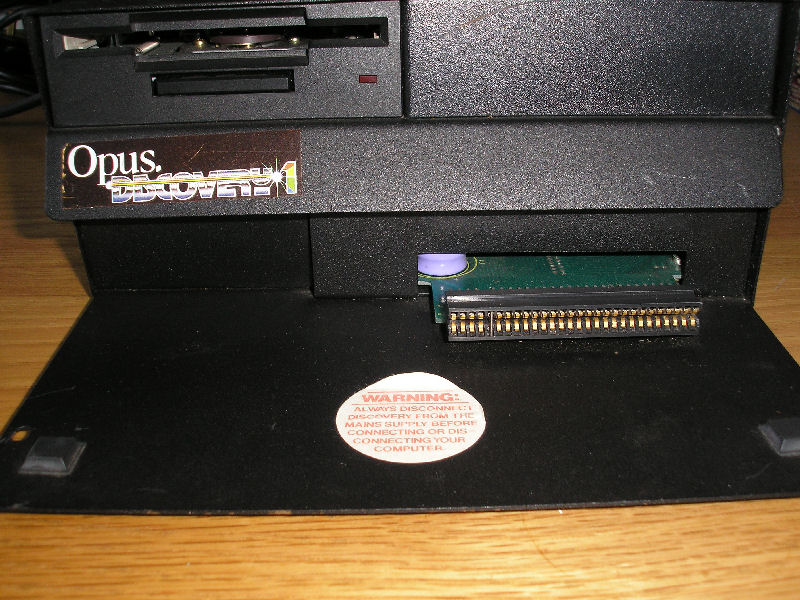
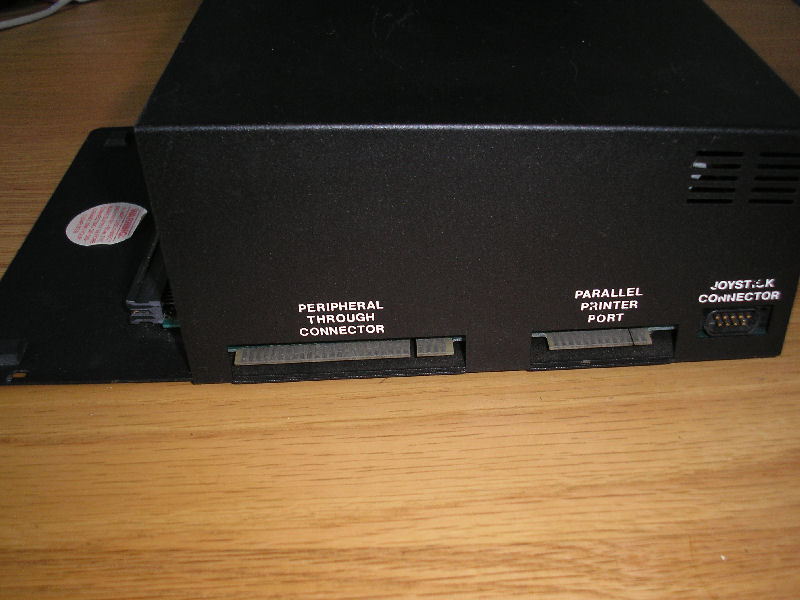
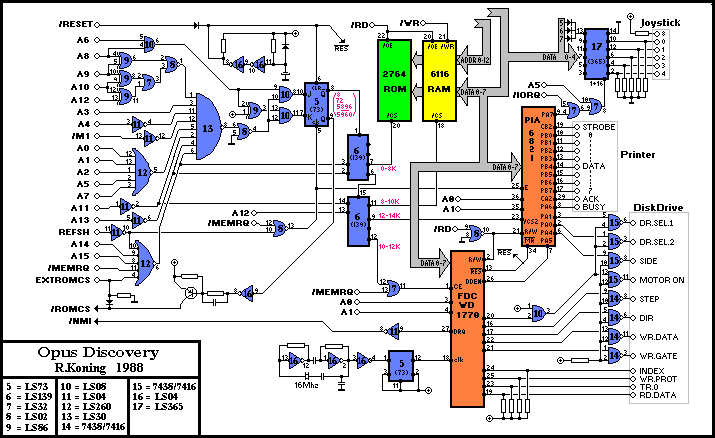
A true disk drive system for your Spectrum. 250K floppy drive and interface. Video output port. Joystick port. Through port. Parallel printer port.
Discussion
Nobody has started a thread about this yet.
Remarks
single/dual drive prices £199.95/£329.95
SPOT: 3.5" disc drive; single & dual drive versions available
Documents
- OpusDiscovery_QuickDosDisassembly.rtfHardware technical documentation 98 KB
- OpusDiscovery_ShadowROMv2.2Disassembly_Addendum.rtfHardware technical documentation 3 KB
- OpusDiscovery_ShadowROMv2.2Disassembly.WP6.zipHardware technical documentation 63 KB
- OpusDiscovery_ShadowROMv2.2Disassembly.htmlHardware technical documentation 252 KB
- OpusDiscovery_Manual-Italian.pdfInstructions 131 KB
- OpusDiscovery_Manual.pdfInstructions 235 KB
- OpusDiscovery_Manual.zipScanned instructions 16,060 KB
Other files
- roms.htmlRemote link English
Files and rights
No permission is on record either way. Screens and pictures are copied here on a take-down basis: if you hold the rights and want something removed, say so and it goes.
Scores
In the magazines
- Personal Computer News #1041985 · Overall Value4/5
Elsewhere on the web
- WorldOfSpectrum 4 votes10.00
In the magazines 105
ZX Computing #28Aug 1986 · p.23
128: THE FIRST DISK DRIVE Opus £99.95 Loading up the memory of a Spectrum 128 from cassette is rather like filling a swimming pool with a one gallon bucket, you get there eventually but it's a long haul. The Opus Discovery 1 disk drive has come to the aid of Spectrum owners in the past and the new 128 compatible version has now made its timely appearance. Using the word 'new' is a little misleading because the only difference is the ROM controlling the machine. The Version 2.2 chip makes no radical changes to the operation of the drive and the manual which came with it is the original 48K machine's document with a sheet of A4 paper outlining the few small changes to the system. The unit is more than just a disk drive because it replaces the strung out power supply, provides a Kempston compatible joystick connector, a parallel printer interface and a through connector for peripherals. There is also room for expanding the system into a twin disk drive utilising 3.5 inch disks which are fast becoming the industry norm. In operation the computer sees the drive as a standard microdrive. The commands follow closely those long-winded phrases required for microdrive operation but this is a syntax imposed by the mother computer, particularly when it is in 48K mode. GOOD CONNECTIONS Setting up the drive requires more care than skill. The standard disk is supplied with the new ROM in a plastic casing. After following the simple instruction sheet on dismantling your new drives outer shell, it's simply a case of removing the old chip from its socket and slotting in the new one. When the casing is reassembled the 128 can be slotted onto the connector and the drives base plate screwed to the bottom of the computer to make a good solid connection. This is where I encountered my first problem. I use an RGB monitor connected to the DIN socket on the back of the 128. If is impossible to fit the drive with the plug in position unless you strip off the plastic cover and remove the metal shield on the plug. Surely it would not be too difficult for Opus to fit a special connector through to the back of the disk drive to overcome this problem. Apart from this the drive was very easily assembled and tidied up the messy collection of wires and interfaces which abound with my microdrive connection. The other pleasing feature for me is the inclusion of an on/off switch. It's just a small improvement but somehow makes the system feel more professional. To be honest, though I marvelled at the technology involved in the development of the microdrive system, it's never really appealed to me. I find the cartridges to small and fiddly. In contrast the rigid cased floppy disk has plenty of room for labels cataloging the contents of the disk, access to information is much more direct and places less strain on the recording medium. From my own tests, a typical loading time is 25 seconds for loading a multi-section program which takes almost 5 minutes from cassette. In a year this will probably mean that the modest cost of £100 will be recouped by the reduction in my weekly consumption of coffee (what else can you do while a program loads from tape!). OVERALL The main advantage of disk over tape is random access of files. This is like the difference between cassette and disc use in the audio world. A piece of music is easily played on an LP record by moving the stylus directly onto the chosen track. A cassette relies on fast winding to the selected area and then hunting up and down for the beginning. With a computer disk the recording head is like the stylus. In a database record disk the individual entries can be loaded, modified or stored in a way which is inconceivable with a tape based system. The Discovery 1 turns the 128 into a plausible small business machine rather than a games computer.
Sinclair User #49Apr 1986 · p.97
John Lambert
OPUS CONVERTS ITS DISC DRIVE FOR THE SPECTRUM 128 With all the excitement over the 128 and what it can do, what it can't do tends to be overlooked. One of the drawbacks is that it can't run many of the better hardware add-ons. While adapting Discovery 1 to run on the 128, Opus has managed to enhance the performance of the machine. You can now go from 128 mode to 48 mode and back again, open files to the RAM disc and access the same RAM disc in 48 mode. In the standard Discovery 1 you can use the top 32K of a standard Spectrum as a RAM disc - drive five. With the 128 you can use the extra memory as a Discovery RAM disc - drive six. The advantage of this over the Sinclair RAM disc is that you can now use all the microdrive type commands with it, plus the added Discovery features. When using the Sinclair RAM disc you can only Load and Save, with Discovery attached you can do that and set up a proper filing system with random access files. It should also be faster than the Sinclair version. In the 48 mode the Sinclair RAM disc is inaccessible; with Discovery that memory can be accessed so you can save a program, go to 48 mode, and then load it back. More importantly you can do the same from 48 mode to 128 mode. Unlike the Spanish 128, the program in memory in the English version is retained when going from 128 to 48. Unfortunately, if you want to use the Discovery facility of returning to 128 mode the program in memory gets deleted in the process. Hence the need to be able to access the RAM disc in both modes. The new, enhanced Discovery 1 still works on the Spectrum Plus and rubber Spectrum. The only difference in the new version is the Discovery ROM which can be updated for a moderate sum. The Discovery still has a 3.5in drive, parallel printer port, joystick port, monitor port, through connector and built-in power supply which also powers the computer. Opus has gone a long way to correcting some of the more glaring omissions in the 128. It is, as far as I know, the only disc drive manufacturer to have successfully converted its product to run on the 128, and so for that reason alone should do well. Opus Supplies Ltd, [redacted].
Crash #23Dec 1985 · p.108
Franco Frey
THE EXPRESS GANG PART 3 Following the excellent Rotronics Wafadrive, and the Beta Plus (TR-DOS V4) interface of last issue, here's a look at two further units, the Kempston Disc Interface and the Opus Discovery 1. The Kempston belongs to the Shugart compatible interfaces and can run with any Shugart standard 3", 3.5" or 5.25" disk drive which incorporate a power supply unit. The drives must however, be capable of double density recording. The K-DOS operating system displays itself as an extended BASIC, where commands have to be called up via a PRINT #4 command. This proves to be laborious and a lot more effort is required when comparing with the simple Beta operating commands or even the Rotronics and Microdrive extended commands. A nice feature for BASIC programmers is the BASIC OVERLAY facility using the excellent MERGE with autorun, and the line definable CLEAR functions. The Kempston unit must be the smallest disk interface for the Spectrum, but this isn't necessarily a plus, as there is no extension port for other peripherals. The Opus Discovery 1 is probably the most comprehensive add-on for the Spectrum next to the Timex drive. It incorporates a 3.5" disk drive, a parallel printer interface, a Kempston compatible joystick interface and a monitor output port and provides an expansion port for any further peripherals. The Opus Discovery 1 comes as a fully integrated unit, into which the Spectrum 48K or Spectrum Plus plugs. Provision is made to incorporate a second drive, but for this the unit has to be returned to the factory. The operating system is similar to the microdrive extended BASIC and the various ports for printer and joystick are accessed via separate streams. The Opus Discovery 1 is the ideal unit for users who abhor a multitude of separate enclosures and cables littering their precious desk space. The next issue will feature the Timex disk drive and a complete comparison table featuring all the fast storage devices looked at in this series will summarise the various findings. KEMPSTON DISC INTERFACE HARDWARE: The Kempston disc interface must be the smallest unit of the series, measuring only 100 x 67mm. It has no expansion port and must therefore be connected as last in the chain of addons. Up to four disc drives (40 or 80 track, single or double sided) may be connected via a Shugart compatible 34-way IDC cable. To save space or cost the 34-way plug is not polarised, which means a trial and error connection. No harm can be done, as the Shugart pin layout only uses one side of the connector. A power indicator and a reset button are incorporated in the unit. SYSTEM DESCRIPTION: On powering up the system, the Spectrum will display the copyright message to indicate the presence of the Kempston DOS. This K-DOS can be included on the same line as BASIC statements, but care should be taken with standard PRINT statements, as these must be separated by use of a double colon to distinguish them from the parameter passing PRINT statements. SYSTEM DESCRIPTION: On powering up the system, the Spectrum will display the copyright message to indicate the presence of the Kempston DOS. This K-DOS is an extension of the Sinclair BASIC and is implemented via a software switch triggered by a PRINT 4 command. Parameters are passed on via a further PRINT statement. K-DOS can be included on the same line as BASIC statements, but care should be taken with standard PRINT statements, as these must be separated by use of a double colon to distinguish them from the parameter passing PRINT statements. OPERATING SYSTEM: Kempston DOS Version 2.0 SYSTEM COMMANDS: All commands with the exception of INPUT#, PRINT# and INKEY$# are preceded by PRINT # 4: CAT: PRINT d gives a catalogue of all files of drive d (1-4). CAT:PRINT d, "string" gives a catalogue of all files on drive d, whose name contains "string". CLEAR:PRINT m1, m2 deletes a block of BASIC lines starting at m1 and ending with m2. COPY:PRINT d is a tape to disc transfer utility which allows the transfer of post unprotected cassette programs to disc. The command batch processes the tape files until a BREAK is detected. The tape must be stopped on a command prompt to allow block storage to disc. On saving, the command displays the filename, the start address and the length of file in decimal notation. Headerless blocks are saved using a "default n" filename. A break into the BASIC loader allows the modification of LOAD, SAVE and MERGE to K-DOS syntax. The transfer of tape programs obviously requires some knowledge of BASIC and possibly machine code. ERASE "filename" erases "filename" from the directory of the current drive. The UP ARROW acts as a WILD CARD character. ERASE "filename":PRINT d erases "filename" from the directory on drive d FORMAT "diskname":PRINT i,j,k,l formats a disc on drive i (1-4) with j tracks (35, 40 or 80), k sides (1 or 2) and stepping rate (6, 12, 20 or 30ms delay). GOTO m forces a BASIC program to jump to line m on any error (Error trapping). INKEY$ # n reads the next character of a sequential file opened to stream n (n can be 0 to 15 with the exclusion of 4) INPUT #n; var1; var2; reads the next record of a sequential file opened to stream n. LOAD "filename" file type: PRINT d loads a program from the specified drive. The drive specifier is optional. The filetype may be CODE, SCREEN$, DATA a(), DATA a$() etc. Programs will AUTO-BOOT after a reset or power on if they are saved as file "AUTO" with a line number. MERGE "filename":PRINT d loads a BASIC file from the specified drive and merges it with the program currently in memory. This function provides the use of BASIC overlays to reduce the memory requirement of large BASIC programs by autorunning from the line number specified in the SAVE function after having been merged in the main program residing in RAM. K-DOS's CLEAR acts as a block delete to prevent the execution of lines from the previous program. MOVE "filel","fi1e2":PRINT d1,d2 copies files from a specified drive to another specified drive. It can also rename files or discs on the specified drive (Back-up on same disc). For single drive users d1 equals d2 and prompts for disc change are displayed automatically. If filename2 is a nullstring, then a copy with the same name as the source file (filename1) is created. Block copy is performed if filename1 is the nullstring. This option allows the back-up of a complete disc to be made. With filename1 a nullstring and a specified filename2 any files on the specified drive with the substring filename2 will be copied to the specified drive. This is useful for file extension systems (MOVE"", "/BAS";PRINT d1,d2 copies all files on drivel with the extension /BAS to drive 2). NEW is similar to BASIC NEW with the exception that K-DOS remains enabled (K-DOS variables are not cleared). OPEN#n,"filename":PRINT d opens a stream n to a sequential file "filename" of the specified drive d and assigns a buffer to it. If the file already exists, it is opened for reading, otherwise for writing. PRINT# n; var1' var2' writes records var1, var2 etc. into buffer n for transfer to a sequential file. SAVE "filename" LINE m :PRINT d saves the BASIC program "filename" onto the specified drive d. The drive specification can be omitted if it is the current drive. The optional line number will provide autorun from the specified line. If the filename is "AUTO" the program will autoboot when loaded. SAVE "filename" file type: PRINT d saves CODE, SCREEN$, DATA a(), DATA a$() etc. ERROR REPORTS: 27 error reports EXTRA FACILITIES: None MANUAL: 24 page manual with introduction, installation, explanation of disc interface commands, error messages and K-DOS summary. APPLICATION PROGRAMS: None CRITICISM: Slow access times. Complicated command structure with PRINT#4 calls. Complicated handling of variables with the use of PRINT statements. No machine code access to the DOS commands due to lack of information. COMMENTS: Average disc interface with good CLEAR and MERGE commands enabling simple BASIC OVERLAY system configuration. MEDIA: Depends on drives connected. TECHNICAL SPECIFICATIONS: Number of drives supported per system: 4 Storage capacity depending on drives connected. PRICE: £85 including VAT OPUS DISCOVERY 1 HARDWARE: The disk drive is integrated in a large metal housing painted in black and incorporates the 3.5" disk drive and the large interface card with a parallel printer interface, a software switchable Kempston protocol joystick interface and a monochrome composite video output. The unit also features an extension port for further peripherals, but the NMI line on A14 is not brought out, which means further ROM based peripherals cannot be connected. Provision is made for a second disc drive which may be fitted into the unit by purchasing the Discovery Plus package. This, however, must be installed by the Opus factory. Discovery 1 accommodates both the Spectrum and the Spectrum Plus, and both computers may be screwed permanently to the unit. SYSTEM DESCRIPTION: Except for minor differences, the Discovery 1 system is completely software compatible at command level with the microdrive system and includes some extra extensions to various commands. Streams and channels are used for the access to the individual input and output devices. The main channels are: K for input from keyboard and output to the lower part of the screen; S output to the upper part of the screen; P for output to the ZX printer; M for input and output to a disk file; B for binary input or output to the parallel port; T for ASCII input or output to the parallel port; CAT for access to the disk catalogue file; CODE for writing or reading directly to memory; D for disk access used in conjunction with a MOVE command; J for switching the joystick port on and off and # to open one stream to another. An excellent feature provided by Discovery 1 is the possibility of creating a RAM disk within the Spectrum RAM area for fast file handling. To this purpose the RAM area needs to be formatted similar to a normal disk and files created o r transferred to the RAM disk area for processing. When the processing is completed, the files may be moved back onto disk for permanent storage. Data storage can be performed via serial or random access files. An existing datafile may be extended with the use of the EXP command extension, random access requires the setting up of fixed record lengths when opening a new random access file. The Discovery 1 is a 2 drive system using only one drive. By using drive 1 and drive 3 the operating system remembers which disk is currently in the drive and asks for a change of disks whenever it needs to write or read from the other disk. The Discovery 1 has a socket for a 2K RAM chip and this may optionally be fitted. All the operating system tables get copied into it and this means the whole drive system may be configured. New commands and channels may be added and error messages changed. All the floppy disk parameters are stored in the RAM chip and this means that Discovery can be used with any sized disk. The sector size may be changed to 1024 bytes for very fast operation or to 128 bytes for memory saving applications. The RAM disk may also be reconfigured to reside anywhere in memory, be of any length and even have a variable block size. Programming expertise is a requirement for this kind of configuring, but Opus will provide technical information for machine code programming. SYSTEM COMMANDS1: CAT(drive) displays the catalogue of the disk in the specified drive. CAT#(stream); (drive) sends the catalogue of the disk in the specified drive to the given stream. CLEAR# clears out all open streams and makes them available for further use. CLEAR# (stream) clears out the specified stream. CLOSE# (stream) closes the specified stream. CLS# clears the screen and sets the display attributes to their defaults CODE(start address), (no. of bytes) is an extension to the LOAD*, VERIFY* and SAVE* commands which allows a block of memory to be saved, loaded or verified. DATA(array name) () is an extension to the LOAD*, VERIFY* and SAVE* commands which can be used to save and load numeric or string arrays. ERASE(file spec.) erases the specified file. FORMAT is used to set up channels "j", " m" and "d". FORMAT "j"; (status) is used to turn the joystick on or off. FORMAT"m"; (drive); "(drive title)" is used to format a disk. "m" may be omitted since it is the default channel. To set up a RAM disk a RAM area has to be cleared and drive number 5 used: CLEAR 32767 ENTER followed by FORMAT 5; "ramd" after which the disk system will recognize RAM disk as disk number 5. INKEY$# (stream) reads one character from the specified stream. If the stream is associated with an "m" channel the command will only return a null string when EOF has been reached. Other slow channels ("K", "t" and "b") will return a null string when a character is not available. INPUT#(stream); var1; var2;... inputs values from the specified stream. If used when inputting from a file, the variable list must be separated by semicolons and not commas to make sure there is no output to the stream. In the file the values to be read must be separated by the ENTER character. LOAD*(channel spec.) loads a programme and variables from the channel specified. LPRINT#(stream); var1, var2, prints the values of variables in the variable list to the specified stream. LPRINT sends the variables to the stream 3 (the ZX printer). LLIST lists the programme to stream 3 (the ZX printer). To list programmes using the parallel port stream 3 must be opened to the "t" channel. MERGE*(channel spec.) merges a programme and variables with the programme and variables already in the memory. MOVE A TO B transfers information from an input channel or stream A to an output channel or stream B. The process is terminated with an End Of File. For input from a slow channel, an End of File must be generated by pressing SHIFT and ENTER simultaneously. OPEN#(stream); (channel spec.) (access) associates the specified stream with the channel given. Possible types of access are IN or OUT. For the "m" channel the following options are available: EXP expands a serial file for output only and AND allows input and output for random access files OPEN#4; "m"; 1 ; "sample" RND 15,10 creates a random access file "sample" with a record length of 15 bytes and with room for 10 records. For the "t" channel a printer width can be specified: OPEN#4; "t"; 0 RND 80. POINT#(stream); (record number) sets the file pointer to the start of the given record in random access files. PRINT# (stream); var1 ; var2;... prints the values in the variable list to the specified strea. SAVE*(channel spec.) saves the current programme and variables to the specified channel. If a BASIC programme is saved with the filename "RUN" followed by the LINE extension, the programme will automatically run after being loaded. USR 0 resets the Spectrum, but not the disk system. USR 14070 resets the Spectrum and the disk system. USR 8 returns the version number of the disk software. USR 432 returns the number of bytes remaining in the current stream. ERROR REPORTS: 13 error reports. EXTRA FACILITIES: Centronics parallel printer port, software switchable Kempston type joystick port and monochrome composite video output. MANUAL: Comprehensive 34 page manual with extensive introduction to the disk system, detailed description of the operating procedures, command reference guide, error reports description and connector details. APPLICATION PROGRAMS: None included. Selection of disk software available from Boots. CRITICISM: None COMMENTS: Comprehensive disk system with good extended BASIC commands, excellent file-handling facilities including random access file management, time saving RAM DISK feature and host of extras such as the parallel printer port, joystick interface and monochrome video output. MEDIA: 3,5" hard cased disks as used with Amstrad and Tatung computers. Price of media: Single sided from £2.40 to £4.10 excl. VAT, double sided from £3.60 to £4.75. TECHNICAL SPECIFICATION: Number of drives per system: 2 Storage capacity: 180 Kbytes per side Number of tracks: 40 Number of sectors per track: 18 Sector size: 256 bytes TIMING: Formatting: approx. 17.5 sec Cataloguing: approx. 4sec Loading a screen: approx. 4sec PRICE: £99.95 including VAT
Your Computer #9Sep 1985 · p.37
Disc System Spectrum £199.95 Granted the Spectrum owner's reluctance to buy a peripheral that costs more than the original system, does the Discovery add up? For your money you get a disc drive, a printer port, a joystick port, a built-in power supply and a monitor output. The disc system is excellent. The single-sided drive gives you 80K formatted capacity. It is compatible with all Micodrive commands, but also has a full complement of "proper" disc commands. These include random access files as wall as a Ram disc system where an area of memory is set aside and acts like a fast disc. Blank 3 1/2 in. discs are widely available, and are rugged and reliable. A fast disc drive with a powerful operating system. But will it tempt the budget minded Spectrum owners? Available from Boots.
Your Spectrum #16Jul 1985 · p.24
Iolo Davidson
DISKO TECH Get the low-down on hi-tech. YS disk jockey, Iolo Davidson takes two new disk drives out for a spin. Prepare for a close encounter of the 3" kind! Mention disk drives and most people's minds immediately turn to thoughts of speed, but that's only one of the advantages. In fact, some disk drives won't even give you much in the way of speed. Some would say the major advantage of disk over tape, and especially over stringy-floppy tape cartridges (and they're pretty fast anyway), is the greater reliability and security of data storage. This is at least as important as fast access if you're using the disk for business - a loading error could mean financial disaster. The third advantage of disks is the filing system used by disk operating systems. It's true that stringy tapes, like the Microdrive, have a similar kind of thing, so this isn't exclusively an advantage of disk, but you certainly don't get it on cassette! The disk operating system, or DOS (you realise, of course, that some software houses, like Digital Research and Microsoft, are also DOS houses!), keeps a DIRectory or CATalogue of the programs or data files on each disk. You can use the DIR or CAT (Speccy uses CAT), command to see what's on a disk, and the other DOS commands allow you to SAVE, LOAD or ERASE files, without having to manually operate rewind, play and record controls. It's this that makes the real difference - it's quick and easy for your programs to use the disk to store and retrieve data - and not just the sheer speed of disk loading. The Spectrum disk drives we're looking at here share all the above advantages, though to varying degrees. The only real drawback is the price. It's not too much to pay for what you get, but it's still a lot of cash to splash out on what's supposed to be a peripheral. You probably ought to think twice about stumping up the readies if you're really only interested in nothing more than world record non-stop JSW marathons. YOU SPIN ME ROUND... Both these drives use the new smaller size disks, rather than the industry standard 5.25" workhorse. But it's not so long ago that the standard size was eight inches, and 5.25s were reckoned to be toys, so pay no attention to any dinosaur who pooh-poohs diddy disks. The new sizes, in the region of three inches, are every bit as good as 'real' disks, except for the amount of storage available per disk. Problem is, these three inchers cost at least twice as much as Microdrive cartridges or 5.25 inch disks, and sometimes a fair bit more. Perfection is unobtainable anywhere in the known universe (When did you last visit Castle Rathbone? Ed.), but I've seen nearer misses than these two. Certainly, both drives are more reliable than the Microdrive, but neither DOS offers much improvement on the arduous Microdrive syntax. If you already have one of Sinclair's little brown stringy spoolers (and assuming that it works for you), then suffer on - there's no point forking out again for something slightly better. Also, you can't connect disks and Microdrives at the same time, because the shadow ROMs clash. But, and it's a big but, if you're still using cassette and need more speed, or if your Microdrives treat you like they treat me, then either of these machines will give you fast storage and more reliability than Microdrives at only double the price. Transferring your own programs to disk is a doddle, but the commercial software that's designed to be copied to Microdrive or Wafadrive, is still going to give problems. Now, there are plusses and minuses on both drives. Of the two, I'd put my money on the Opus as it has more storage on line at one time and the extra interfaces. The Triton would fit different keyboards more easily, it didn't hum or overheat, and it was faster, despite a rather dodgy DOS. But, despite all my griping, these are both good products, not just the toy for the boy whose Dad has everything! OPUS DISCOVERY 1 If you're thinking seriously about a disk drive, it's quite likely that you'll already have invested in a proper keyboard - and no, I don't mean a Plus. Well, that's where you're going to hit the first snag with the Opus Discovery - it's constructed in such a way that the use of these add-on keyboards is extremely tricky. The computer sits half on a shelf, and you're supplied with a pair of stick-on feet to support the rest of the machine. Without the feet, you're magically transported back to the ZX81 days of Rampack wobble and white-out. There's a single fixing screw sited to suit both the Spectrum Plus and the original Speccy, but most add-on keyboards won't have a convenient hole in the right place. Some keyboard upgrades mount the computers circuit board too high from the keyboard's base, so that there's not enough room between the connector and the shelf on the Opus to fit the computer. The practical solution to the problem is to buy an extension ribbon cable to connect the two units - but that costs money, (unless you pinch the one from your VTX 5000 modem!). Some kind of flexible connection should've been a part of the original design, as it is for the Triton QD. This would've also made it much easier to get at the tape and TV sockets, which are otherwise jammed tight against the Discovery's case under the shelf. While I'm whining, suppose I'd better mention the Opus's power supply. The one on our review machine sure makes a bit of a hum. The drive itself is quieter than the Triton's, but the transformer providing the power is on all the time. Overheating's also a slight problem. It doesn't get dangerously hot, but with the case removed, I still found the transformer too hot to touch. I have a hunch that it was chosen for its ability to fit in the box rather than its output current rating. It's a very tight fit, jammed as it is between the bottom of the case and the actual drive. The problem is that fitting a more capable unit would've probably meant going over to a circular design. It's possible to fit a second drive into the Discovery 1 (or rather, have Opus fit it) whereupon it becomes a Discovery 2.1 do hope that they uprate the transformer at the same time. The Discovery uses the Sony-designed 3.5" disks - just feed them into the slot as if you were posting a letter. To get them out again, you press the eject button. This is a slick system and great improvement on large disk drives that require the manual opening and shutting of a 'door'. To use both sides of this kind of disk, the drive must have two heads, as you can't flip the disk over to get to the other side. The Discovery has only the one head, so the capacity of each disk is about 178K - half of what it could have been if both sides were used - but that's still more per disk than the Triton. You also get a good selection of expansion options with the Discovery. There's a joystick port, parallel printer output, composite video socket and a through connection for hooking your other peripherals to the Speccy edge connector. Unfortunately, the video output is in black and white only, and the printer port has an edge connector instead of a proper Centronics socket. The printer connection works in input as well as output, so you can use it to hook two Spectrums together - provided they both have Discovery 1 attached, of course. The DOS commands are mostly identical to those of the Microdrive. The bad news is that the Microdrive has a tortuous command syntax. But the good news is that this awkward syntax means Microdrive software works on the disks without alteration, provided it uses Basic for saving and loading. Machine code tricks using hook codes won't work, as the Discovery shadow ROM is different from the Microdrive's. Programs that have the facility to transfer to Microdrive 'should transfer to disk in exactly the same way' (it says here). The only program I own with that facility is Superchess 3.5 and it doesn't transfer, probably because it tries to do it in machine code. HiSoft's Devpac can save assembly language programs created with Devpac to Microdrive, and this also didn't work. The CAT command gives you a Microdrive-like catalogue, with just the names and amount of storage left on the disk. Not a patch on the Triton's comprehensive directory. The command syntax differs from Microdrive in one rather neat way, as it defaults to the "m" channel. This means that you can save four keyboards by omitting the "m"; (including the quotes and the semi-colon) in the LOAD *"m"; 1;"name" command. This is also the case with SAVE *, ERASE and so on. The Opus manual's a neat little production and shows that the Discovery hasn't been rushed into the market. Trouble is it just doesn't contain all the info required. It's good on the command structure you'll need to use the machine from Basic (in fact, better than the Microdrive manual at explaining some things), but it doesn't tell you about the amount and location of RAM used for disk and other channels and streams. This seems to be similar to the Microdrive system, with the DOS in shadow ROM and chunks of memory being inserted between the systems variables and the Basic program for print channels and so on. It seems though, that merely loading a file doesn't move the start of Basic like it does with Microdrives, but you're not told. You're also given all sorts of info and sample listings for using the joystick in your own programs. But the one item of info that you're actually going to need is that you should select the Kempston option from a game's joystick menu. Again, they haven't divulged this. Finally, one last added attraction. The Discovery can set aside the top half of the Spectrum memory as a RAM disk. This allows disk commands to be used on DATA files at memory access speeds without waiting for disk reads, once the files have been downloaded to the RAM disk. This is a pretty powerful technique when used on big 'PC' type micros with huge memories and although the Spectrum doesn't have a lot of room for the program when you have the RAM disk active, it's still good to have. TRITON QD QD stands for quick disk, a name given to the top-loading 3" version of the minidisk drive. This isn't the same as the Hitachi designed 3" disk used on the Amstrad, which is front loading and has a protective shutter. The top-loader is less widely used than the Sony or Hitachi type, so you may have trouble tracking down the disk - a point to bear in mind. There's nothing intrinsically wrong with the smaller disk, but there are differences. One is that the drive has a flip-up door that you slide the disk into and then shut, just like on a standard cassette tape machine. You turn the disk over to see the other side, again like a cassette. There's no sliding shutter to protect the magnetic surface. More importantly, the 3" quick disk is generally capable of less storage than the 3.5" though this does depend partly on the drive mechanisms. The Triton's 50K per side for 100K per disk is typical, and compares with Opus's 178K per disk. This limits the amount of storage that you can have active at any one time to, say, one large arcade game. The Triton file directory is more informative than that of the Opus, with info on file type (Basic, Code or Data), start address and size. Pretty essential stuff, this. After that advance on the Discovery, the QD starts slipping back. There are no interfaces for printers or joysticks, only a through connection for the Spectrum edge connection, which you're told to use only for the ZX Printer or another Triton QD. Mind you, I did manage to connect a Kempston interface - it doesn't fit properly physically, but it's all right electrically. The command syntax is neither usefully identical to the Microdrive syntax, nor a simplification. It's different enough to be incompatible with programs using Microdrive commands, but just as much of a chore to type. Some disk commands cannot be used within a program, and other must have a line to themselves. There's a default to the disk (there are no Microdrive type channels anyway) which disposes of the "m", but you must add a type specifier for Basic, Code and Data when saving. Plus, there's lots of opportunities for operator error built-in. You must not power-up the Spectrum before the disk drive, you must nor touch the (hair-trigger) eject button during a disk access, you must not access the disk continuously more than three times without a few seconds rest. In an ideal world, these mistakes would be made impossible by the hardware or operating system - not left as pitfalls for the user to avoid. If you've got the gelt, you can buy another QD and chain the edge connectors to run two disks at once. This'll probably be more expensive than adding a second disk to the Discovery, and it'll certainly take up a lot more disk space, as you can't stack a top-loading unit. The QD has its DOS in ROM and uses the printer buffer as workspace when loading and saving, so very little memory is used by the disk system. Most software shouldn't have any trouble with space, unless it has some of its own code in the printer buffer, like some tape copiers do.
DISKOGRAPHY Drive: Opus Discovery 1 Storage Per Side: 178K Storage Per Side: 178K Auto-Verify On Save: No No. File Per Side: No limit Simplest Case Syntax: LOAD *1; "name" Price: £199.95 Disk Type: 3.5" Sony Through Connector: Yes Other Interfaces: Printer and joystick Drive: Triton QD Storage Per Side: 100K Storage Per Side: 50K Auto-Verify On Save: Yes No. File Per Side: 20 Simplest Case Syntax: LOAD *1; "name" Price: £119.95 Disk Type: 3" Top-loading Through Connector: Yes Other Interfaces: None
Drive: Opus Discovery 1 Format Time: 20 sec CAT Time: 2 sec SAVE 35K Time: 20 sec LOAD 35K Time: 20 sec Erase 35K Time: 3 sec Drive: Triton QD Format Time: 9 sec CAT Time: 3 sec SAVE 35K Time: 15 sec LOAD 35K Time: 7 sec Erase 35K Time: 10 sec
ZX Computing #19Jun 1985 · p.18
DISCOVERY DISC DRIVE SYSTEM With a flourish and fanfare Opus Supplies Ltd. announced the launch of the "most advanced and comprehensive" disc drive system for the Spectrum yet. FIRST IMPRESSIONS This is a completely self contained unit consisting of 3-5" disc drive, interface, power supply unit which provides power for the Spectrum as well as through port, Centronics printer port, joystick port and B/W video port. An impressive set of extras indeed! I unpacked it and was pleased to find the manual/booklet very simply written. To use the unit with virtually any Spectrum, Spectrum+ , or other keyboard, all you do is plug it into the user port at the back and, in the case of the Sinclair keyboards, screw it into place with a single screw. My first problem came in working out how to position the TV aerial lead as the case was so close and wide it covered this and all the other Spectrum sockets. The phono plug fitted to my Spectrum's lead was too bulky and I had to find a spare, but then I realized that a slight gap in the case which coincided with the cable's position was to be used and, with a bit of twisting and bending, the Spectrum and drive were connected. Power on, an on/off switch at the back of the case was another useful extra, and all seemed to function perfectly. The system uses all the Microdrive syntax plus some abbreviations and operates in a similar fashion. This means that the use of sequential files, not feasible with some other drive systems, is possible, and another advantage is that many programs may be compatible. The disadvantage is that Interface I and the Microdrives are incompatible. The manual explains its operation and gives some examples, I found it easy to understand and the examples were good. The joystick port is Kempston compatible and this makes it usable with a great many games. The system is available in two formats, a single drive unit for £199.95 and a dual drive unit for £329.95. There is an upgrade drive available to convert a single drive to double drive at £139.95. One of the problems that has held up the development of disc drive systems for the Spectrum is the marketing of such units. Opus have made an impressive start in this area by selling exclusively through the Boots chain of stores. Another limitation is the software available in this format and again Opus have had the forethought to arrange with some S/W houses to supply their programs on disc. At the time of writing there are six packs available each at £14.95 and they are: Technician Ted/International ATC from Hewson Mugsy/Sports Hero from Melbourne House Codename Mat/Kentilla/Jasper from Micromega (an excellent set!) Designers Pencil from Activision Trans Express from Romantic Robot (a good tape to disc utility) Mini Office from Database Publications (a good general business pack, see our full review in this issue.) IN USE Earlier on I said that the unit may be compatible with Microdrive S/W, unfortunately nothing I had that worked with them would operate on this system. My copy of the original Trans Express on tape for tape to m/drive transfer would not even load successfully, however their specially written disc version will no doubt work as impressively as did their original, and the various programs which included options for making microdrive backup copies also failed to work. Oh well back to hand conversions, no immediate apparent advantage to the use of microdrive syntax. Doing it this way varies between easy and impossible and my yardstick is how long it takes to convert Tasword II. This conversion was completed in fifteen minutes with a further half hour to add luxuries like a CAT and ERASE option to the menu. Easy! There was one other problem, the manual had not instructed me to connect the Mic/Ear leads so I had to unscrew the assembly and plug them in, these were now so tight against the drive case that they kept twisting the unit out of place. I tightened the screw to hold it but a nagging worry that the thing might move and cause the port connector tracks to short out remains with me now. I consider this to be a major design fault and I got round it by adding a ribbon extender cable and not having the units connected by the screw. It is possible to obtain such a ribbon from Opus themselves, but as an optional extra, not included with the drive itself. In operation the drives were about as fast as the other systems I'd used, about twenty seconds to load a program which normally took close to five minutes, but they operated almost silently, a great change from the strangled gurgle I'm used to. The 3.5" discs are double density 40 track and two are supplied free by Memorex who are to make and sell them. Finally we would just like to add that any questions or problems we had with the unit were very promptly dealt with by the people at Opus, and if their sales support is as efficient as that then it is to be recommended. All in all, the unit seems to represent very good value for money, and with the distribution and software backup that they have arranged this is likely to represent a serious challenge to the other disc drives on the market. Opus can be contacted at: [redacted].
Sinclair User #38May 1985 · p.37
John Lambert
A VOYAGE OF DISCOVERY John Lambert looks at a disc system which could become a standard. Opus Supplies has just released its Discovery disc system and it has the distinction of being the first to be supported by major software houses, endorsed by a disc manufacturer, and sold through a high street chain. It could, consequently, become the standard system. The level of support is due to four factors. The Discovery, at is lowest level, is completely compatible in Basic with the microdrive, and many existing programs will run on it without modification. It is supplied with a drive, so software houses can sell discs and know they will fit. The unit has both a printer port - Centronics - and a joystick port - Kempston - negating the need for at least some interfaces. Lastly, it uses very little of the Spectrum memory, making program conversion easier. Moreover, the Discovery has improved on the Interface One microdrive set up, by including random access files and the option to set aside pan of the Spectrum memory as a RAM disc, which works like an ordinary disc drive but is much faster. All the Basic errors in Interface One have been corrected and the syntax can be simplified. The Discovery range comprises three units: Discovery One, which has a single sided, 40 track, 3.5 in drive (178K formatted); Discovery Two, which has two drives - the maximum possible; and Discovery Plus which is the upgrade from One to Two. Users with full-sized keyboards need not worry as the drives are high enough to clear the keyboard and those with a base similar to the Specrum - Saga, Lo Profile and so on - fit easily. The unit has a built-in power supply which is used to power the drives and the Spectrum, through the edge connector. That means the on/off switch can be used to reset the computer. It also has the obligatory through port and, for the serious user, a monitor socket. That is taken from the edge connector and so will work only on issue three Spectrums onwards. All internal hardware is memory mapped within the lower 16K and so should not clash with other add-ons which tend to be I/O mapped. It is compatible with the VTX5000 modem, something about which Interface One was temperamental. Naturally, it is not compatible with Interface One. One feature not detailed in the otherwise comprehensive manual is that, with the upgrade, a RAM chip which fits in the interface is supplied. Once fitted that allows you to alter the disc settings of the number of tracks, sectors, and sides, the interleave, skew, and even the density. By playing with those I managed to get a system which gave 196K formatted and was 25 percent faster but which used 1K sectors. The RAM disc, which normally occupies the upper 32K, can also be moved around. For dedicated hackers that will provide hours of amusement; software houses need not worry as there are protection systems built in which, even with that information, are secure. As with Interface One, Discovery works by using a system of channels and streams. A channel sends and receives information and a stream is the path along which it passes. For instance, the 'p' channel is the printer which usually has stream three assigned to it. With Discovery fitted a number of channels are created - 'm' for microdrive (in this case disc drive) and 't' and 'b' for the parallel port. The 't' channel is for text with options for printer width, ZX printer emulation, control of carriage returns and line feeds; 'b' is the binary channel and will accept information without modification. The 'j' channel is for the joystick, which can be turned on and off; the 'd' channel is the drive and is used for commands which relate to the whole disc, such as backup and compact; the 'CAT' channel is the disc directory and can be treated as a file; the 'CODE' channel allows you to send information to, or from, memory. Discovery normally uses 256 byte blocks - the RAM disc uses 32 bytes - and so when loading and saving it takes about 300 bytes. Once the disc has finished, however, that memory is reclaimed and the system takes up no memory. Interface One takes 600 bytes and does not give them back. To be compatible with the microdrive the system will accept all its commands, using the same finger - knotting syntax; however, unless specified otherwise, the 'm' channel is assumed and can be omitted. The few differences have been added to make the system more versatile. SAVE will automatically overwrite an existing file of the same name; the long version of MERGE - including the 'm' - will not auto-run but the short version, if not the end of a line, will; and INKEY$# returns a null string at the end of a file (the microdrive stops with an error message). Files can be specified as read or write files by adding the keywords IN and OUT. The extra random access commands, which can be applied to any file, make ingenious use of existing Spectrum keywords. A random access file is opened using RND, the position is set with POINT and a file can be expanded using EXP. Provision has been made for End of File detection with a simple USR call. The Discovery One costs £199.95. Compared to an Interface One and microdrive that might seem expensive, but taking into account the printer joystick and monitor ports, which would cost you around £50.00, it is a far better deal. Discovery Two is priced at £329.95, Discovery Plus at £139.95 and a printer lead at £9.95. The Discovery range will be available from larger branches of Boots. Further details from Opus Supplies Ltd, [redacted].
Available Software Mugsy/Sports Hero - Melbourne House Designers Pencil - Activision International ATC/Technician Ted - Hewson Codename Mat/Jasper/Kentilla - Micromega Mini Office - Database Publications. All £14.95 a disc. To follow: Trans Express - Romantic Robot. Transform will be releasing versions of all its programs on disc plus a specially enhanced Sales Ledger/Invoicing.
Benchmarks - all times in seconds M/Drive Capacity: 95K FORMAT: 25 SAVE: 231 LOAD in order: 15 LOAD out order: 212 ERASE in order: 238 ERASE out order: 238 Disc Capacity: 178K FORMAT: 18 SAVE: 37 LOAD in order: 23 LOAD out order: 23 ERASE in order: 35 ERASE out order: 23 RAM Disc Capacity: 31K FORMAT: 0 SAVE: 9.5 LOAD in order: 5 LOAD out order: 5 ERASE in order: 12 ERASE out order: 4.5 Program used: 10 FOR n = 1 TO 30 20 SAVE *"m";1;"test"+STR$nCODE 30000,200 30 NEXT n Filing: M/Drive PRINT: 200 INPUT in order: 68 INPUT out order: 199 Disc PRINT: 59 INPUT in order: 83 INPUT out order: 83 RAM Disc PRINT: 29 INPUT in order: 64 INPUT out order: 64 Line 20 was changed as required and line 10 to 30 TO 1 STEP-1 for the reverse order. The filing program opened a file, printed 1000 10-character strings and closed the file 15 times. A compatable Basic program with no disc access took 23 seconds. As microdrives do not handle random access the reverse input gives a comparable timing. The cartridge/disc was reformatted before each test to optimise performance; in normal usage a microdive cartridge uses odd blocks which effectively doubles the time taken per operation.
Sinclair Programs #31May 1985 · p.10
DISC-OVERY Opus Supplies launched a new range of disc drives in March which are compatible with both Spectrum and Spectrum Plus. They regard their new system as the first to seriously threaten the cassette loading systems. The Discovery 11, which has duel drive capabilities can be bought for £329.95, or you can start off with the Discover 1 which, at £199.95, has a single disc drive and then upgrade it to a dual drive with the Discovery plus, which costs £139.95. The Discovery systems will only be available through Boots. Boots have commissioned six top software houses to produce the first programs for the Discovery range. These will be on three and a half inch discs, costing £14.95 each. The programs and companies involved are: Activision, Designer Pencil, Micromega with three games on one disc, Jasper, Code Name Mat and Kentilla, Melbourne House with two games, Sports Hero and Mugsy, Hewson Consultants with two, Heathrow Air Traffic Control and Technician Ted, Data Base Publications, Mini Office, a program with word processing graphics and a database; and Romantic Robot, Advanced utility and file handling. They are all now available, and more programs are promised.
Personal Computer News #104Mar 1985 · p.285/53/54/54/54/5
Features 5/5
Documentation 3/5
Performance 4/5
Overall Value 4/5
Stuart N Cooke 4/5
WELCOME DISCOVERY More facilities is the attraction of this device - the catch is that it costs more too. But it's worth paying extra, says Stuart Cooke. NAME: Discovery 1 PRICE: £199.95 STORAGE: 180K formatted MANUFACTURER: Opus Supplies OUTLETS: Boots The Sinclair Spectrum has never suffered from shortage of add-ons - in fact, if anything it suffers from a surplus of peripherals. One of the latest fads in add-ons for the machine is fast/mass storage devices, ranging from Microdrives to the more expensive floppy disks. One of the latest disk systems is the Discovery 1 from Opus. The Discovery is supplied as either a single or dual 3.5in system in a smart looking metal case. The Spectrum sits on a metal base and plugs into the edge connector on the unit, with only a single screw to hold it. The unit features a joystick port, parallel printer connector and video socket, as well as the usual through connector for other add-ans. IN USE Setting up couldn't be simpler - just screw it onto the main unit. The Spectrum power supply is no longer needed, as the Discovery powers the micro. Its supply is built into the drive and has a moulded plug on the end for connecting it into the mains. To get a picture from your Spectrum, you may want to plug it into a television. Unfortunately the back of the disk drive obstructs the TV socket on the computer, making it a tight squeeze. The same applies to the cassette leads, as their sockets are also obscured. To be fair, the leads do fit but a lot of strain is put on the connectors. At the rear of the machine is a video socket, which allows you to plug your Spectrum into a composite video monitor. The right-hand side of the disk drive holds all the interfaces. The plug for the joystick is the standard 9-pin Atari style, which means that almost every commercial joystick can be used. Before you load up a program however, you must remember to turn it on - rather annoying when you've just spent five minutes loading a program only to find that the joystick will not function. The FORMAT command turns the joystick on and off and is read by use of the IN 31 instruction. Quite by chance, this happens to be the same as the Kempston joystick interface. Next to the joystick connector is a parallel printer connector. Unfortunately, this is not a standard socket but an edge connector, which means that you will have to buy a special cable. A diagram of the connector is given in the manual so that you can make your own or find one easily. This port not only allows you to send data out to a parallel printer; it also reads data from the port, so you could connect your Spectrum to another machine or any other device with a parallel port. Finally, the standard Spectrum edge connector allows you to connect other Spectrum peripherals without having to disconnect the drive. The disk drive uses the increasingly popular 3.5in disks. Control is by means of the same commands as the Sinclair Microdrives. In fact, the only differences are that some of the commands have been extended to make use of the greater facilities offered by the Discovery. If you have ever used a Microdrive you will feel at home with the Discovery. Programs that have a Microdrive option can be easily transferred onto the disk drive from tape. Tasword was transferred, following the instructions in the manual and the disk drive's increased speed, plus the ability to use the Spectrum with a monitor improved its performance. Not only can you load and save programs to the drive but as with Microdrives, you can use it for file handling. A file can be opposed to disk and data stored in it in a sequential format ie one character after another. The problem with this method of file handling is that if you wish to find a sequence of characters stored in the middle of the file, you have to read every character till you find the one you want. However, the Discovery does allow you to set up random access files, enabling you to read from any point in the file and make any alterations without having to read in the file. You must specify the length of every record that you are going to use and the length of the file, so the disk drive knows how much space it should allocate to your file. For example, using the command OPEN #5, "m";1;"fred" RND 10,10 would allocate the file fred ten records of ten characters. There's however a special format for setting up random access files - OPEN #5, "m"|;"fred" RND 10, -1 which would allocate half of the available disk space to the file fred allowing ten characters per entry. Moving the pointer around a file is also extremely easy. An expansion to the POINT command, POINT #5;10 moves the pointer to the tenth record in the file associated with stream 5. This facility enables you to set up a database, and make any changes when needed without worrying about memory. A RAM disk facility has also been provided. This allows you to use an area of the Spectrum's memory as if it was a disk drive. Access to smaller files is extremely fast, as the operating system doesn't have to look on the disk for the programs. To use the RAM disk, you must lower RAMtop on the Spectrum to its new value with the normal CLEAR command and then FORMAT the reserved RAM by calling it device number 5 in a FORMAT statement. The operating system is also completely compatible with tape. When you add a Microdrive to 3 Spectrum, a fair amount of the available memory is set aside by the Interface 1 for the Microdrive maps and system variables. The Discovery 1 appears to use none of the Spectrum's RAM. Commercial software should run with the drive present. VERDICT The Opus Discovery 1 is certainly one of the best add-ons around for the Spectrum and does the jobs usually achieved by adding several boxes onto it.
All in one: no need for a jumble of add-on boxes with this nice, neat unit.
Your Computer #2Feb 1985 · p.33
Disc System Spectrum £199.95 Opus have released a disc system for the Spectrum which they claim is totally compatible with the Microdrive operating system. This means that any program which runs on a Microdrive will run on an Opus system, and at a much higher speed. The Spectrum sits on top of the metal interface and can be screwed into it, like Interface 1. Apart from the Shugart disc socket there is a bi-directional Centronics type printer port and a continuation of the expansion bus. The full range of Opus drives, three or 5 1/4 inch can be used. The system comes with a utility disc and a manual. The manual is perhaps its only major failure as it rather assumes you know how to use a Microdrive. Still, you can always buy one of the many "drive your Microdrive" books. It represents excellent value at £199.95 for the complete system and is available from Opus on [redacted] or from larger branches of Boots.
Full-page ad47
- Sinclair User #57Dec 1986 · p.93
- Your Sinclair #12Dec 1986 · p.44
- Sinclair User #56Nov 1986 · p.53
- Sinclair User #55Oct 1986 · p.22
- Your Sinclair #10Oct 1986 · p.6
- Sinclair User #54Sep 1986 · p.44
- Your Sinclair #9Sep 1986 · p.6
- Sinclair User #53Aug 1986 · p.9
- Your Computer #8Aug 1986 · p.49
- ZX Computing #28Aug 1986 · p.19
- Crash #31Aug 1986 · p.29
- Sinclair User #52Jul 1986 · p.75
- Your Computer #7Jul 1986 · p.24
- Your Sinclair #7Jul 1986 · p.6
- ZX Computing #27Jul 1986 · p.13
- Crash #30Jul 1986 · p.95
- Popular Computing Weekly #28Jul 1986 · p.33
- Sinclair User #51Jun 1986 · p.71
- Popular Computing Weekly #24Jun 1986 · p.17
- Popular Computing Weekly #26Jun 1986 · p.9
- Sinclair User #50May 1986 · p.71
- ZX Computing #25May 1986 · p.25
- Popular Computing Weekly #21May 1986 · p.11
- Sinclair User #49Apr 1986 · p.56
- ZX Computing #24Apr 1986 · p.79
Feature16
- ZX Computing #38Jun 1987 · p.77
- ZX Computing #37May 1987 · p.61
- ZX Computing #36Apr 1987 · p.49
- ZX Computing #35Mar 1987 · p.84
- ZX Computing #34Feb 1987 · p.24
- ZX Computing #33Jan 1987 · p.70
- ZX Computing #32Dec 1986 · p.28
- ZX Computing #31Nov 1986 · p.80
- ZX Computing #30Oct 1986 · p.68
- ZX Computing #29Sep 1986 · p.52
- Your Computer #6Jun 1986 · p.50
- ZX Computing #23Feb 1986 · p.43
- Crash #23Dec 1985 · p.109
- Your Computer #11Nov 1985 · p.48
- Your Spectrum #16Jul 1985 · p.24
- Sinclair User #38May 1985 · p.37
News/Note15
- Crash #41Jun 1987 · p.99
- ZX Computing #34Feb 1987 · p.4
- Popular Computing Weekly #50Dec 1986 · p.8
- ZX Computing #31Nov 1986 · p.5
- Your Sinclair #5May 1986 · p.12
- Sinclair User #49Apr 1986 · p.97
- Popular Computing Weekly #10Mar 1986 · p.5
- Your Sinclair #2Feb 1986 · p.5
- Your Computer #9Sep 1985 · p.37
- ZX Computing #20Aug 1985 · p.10
- Your Spectrum #14May 1985 · p.3
- Sinclair Programs #31May 1985 · p.10
- Your Computer #2Feb 1985 · p.33
- ZX Computing #17Feb 1985 · p.110
- Home Computing Weekly #101Feb 1985 · p.6
Letters6
- Popular Computing Weekly #31Aug 1988 · p.12
- Popular Computing Weekly #29Jul 1988 · p.6
- Crash #36Jan 1987 · p.44
- Popular Computing Weekly #5Jan 1987 · p.10
- ZX Computing #29Sep 1986 · p.49
- ZX Computing #20Aug 1985 · p.10
Two-page ad6
- Sinclair User #46Jan 1986 · p.36
- Your Computer #1Jan 1986 · p.60
- Your Sinclair #1Jan 1986 · p.36
- Sinclair User #45Dec 1985 · p.42
- Your Computer #12Dec 1985 · p.118
- ZX Computing #22Dec 1985 · p.2
Review2
- Home Computing Weekly #107Apr 1985 · p.15
- Popular Computing Weekly #9Feb 1985 · p.15
Classified1
- Your Sinclair #30Jun 1988 · p.102
CompoResult1
- Your Spectrum #18Sep 1985 · p.13
CompoEntry1
- Your Spectrum #15Jun 1985 · p.46
Related
- Elsewhere
- WorldOfSpectrum
- Same entry at
- Spectrum ComputingZXInfo
Reviews from people here
Sign in to write about this, or make an account. It takes a minute and lets you correct the catalogue too.
Everything ZXDB can hold about this is here.
Sign in to correct or add to this.
Hold the rights to this and want it taken down?