
Petron Trichord
Hardware: Sound/Speech
Petron Electronics · 1983 · Pound sterling 26.95
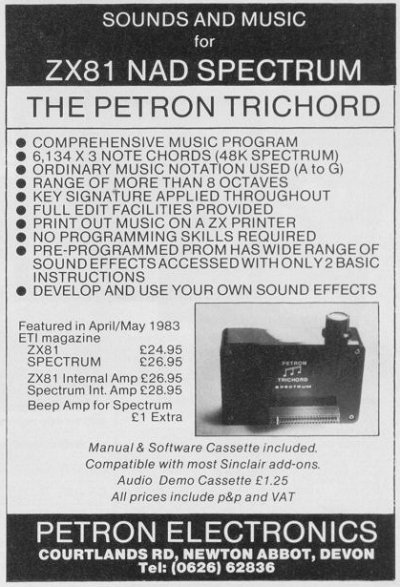
Sound synthesiser box. Pre-set or custom sounds. 6134 chords (48K). Uses AY-3-8910 chip.
Discussion
Nobody has started a thread about this yet.
Remarks
sound generator
Files and rights
No permission is on record either way. Screens and pictures are copied here on a take-down basis: if you hold the rights and want something removed, say so and it goes.
In the magazines 21
ZX Computing #19Jun 1985 · p.49
Newtech (Micro) Developments [redacted] These have a built-in sound generating chip, usually of the AY type and offer three channels of programmable sounds for music or effects. For both the ZX81 and Spectrum, this small but surprisingly loud, all-in-one interface is superb. The difference between the ZX81 and Spectrum unit is ONLY the software, so you can get one for your '81 and if you upgrade to the Spectrum use it with that for the price of the appropriate software. I respect this company as they have always been helpful and seem to supply good backup to their customers who write from all over the world. Peter Moore, the designer, is known to our regular readers for his hardware project articles (last month's was a Beep Booster). Backup provided includes the production of music books containing Trichord arranged coding. The first in this series is "Christmas Carols" and contains 25 carols set out in the trichord code (three columns of note/octave shorthand - C2) and the words. This is on sale from them for £5.95 with 50p p&p for European sales and £1.50 for the rest of the world. (No extra for GB.) Highly Recommended.
ZX Computing #17Feb 1985 · p.115
Ray Elder
MUSIC MICRO PLEASE! An outline of some of the more harmonious programs and devices recently produced. Ray Elder takes up the Baton and conducts the investigation. For the professional/dedicated/expert musician there is the Midi interface and synthesiser system, but for many others, including yours truly, the cost of such equipment is beyond the realms of an overdraft. For us interested but impoverished would be musicians there are a few more affordable, though much less versatile, alternatives. FORTE! An essential first step is to do something about the BEEP, there are several ways around this, you can simply amplify the thing or, if you want to get the most from the computer, then you will need to purchase a unit which incorporates a sound chip. Most of these units use a version of the AY-3-8910/8912 chip and this is a well tested and reliable chip which can produce some impressive sounds. Simple amplification of the BEEP can be achieved in several ways and is the least expensive of the two options. Beep amps either have a built in speaker or send the sound to the TV and some such units are: THE CHEETAH BEEP AMP, this puts the sound through the TV and is in the same size box as their other units, complete with a full through port for other peripherals. Cost £9.95. CURRAH MICRO SPEECH unit. This is primarily a speech unit but it also routes the Spectrum Beep through the TV and is worth considering if you want to investigate the world of speech as well. Cost £29.95. DK'TRONICS BEEP AUDIO AMP. This is a self contained unit in two parts, the amplifier interface and a separate 1" pod mounted loudspeaker. The interface has a full through port and, although lipped, fits both versions of the Spectrum securely. Cost £14.95. THE TRICHORD, a full sound box including AY chip, amp and speaker and software for both ZX81 and Spectrum, available from Newtech Developments Ltd. Cost ranges from £24.95 to £26.95 depending on model and internal amp fitted or not. WILLIAM STUART SYSTEMS sound generator unit, designed to go with their speech recognition and synthesiser units but can be used on its own (if plugged into a stereo system it sounds superb). Software is available separately and is excellent, the ARP program kept me fascinated for hours. FULLER (reinstated by Nordic) have a sound unit and a master unit which includes speech, we have not tried one out yet, but the new look packaging is nice. And finally DK'TRONICS again, identical to their beep amp in size and shape is a full Sound Synthesiser. This is based on the AY chip and is supplied with a demo tape. Cost £29.95. THE DK'TRONICS 3 CHANNEL SOUND UNIT I will give a detailed account of this unit as it is one of the few still left in my possession, most of the others had to be returned after each specific review, and anyway its one of the latest on the market, and most are similar in operation. This is supplied with an eight page booklet which gives setting up details, the volume is adjustable by a small screwdriver through a little hole in the top of the unit, full volume is loud enough for most purposes! Some demo programs are given which explain the basics of programming the beast, these are in BASIC but a machine code programmer can glean enough information to enable him/her to incorporate routines in their programs. Most of the manual is dedicated to operating instructions for the program supplied, these are brief and there are gaps which left me confused - the use of the Envelope generator for instance. The software itself is good and allows you to create tunes in 3 part harmony and is cursor controlled, this means that it can be operated by a joystick. However I found it a little tedious to use and the editing is almost non-existent, an error early on means re-entry of the rest of the line. During playback the three lines of music are shown as a letter/number representing note and octave. Without prior musical knowledge you may find it hard to get anything of worth from it. The sound quality itself is very good, the speaker handles the output with minimal distortion and many a long hour was happily spent with this program. A unit which is nicely made, looks and sounds good and is well worth considering. It also works well with other peripherals, the Technology Research Disk drive unit functioned without problems and it was easy to convert the software supplied to disk. The ZXLprint III Centronics unit also sat at the back quite happily, and of course DK's own units, joystick interface etc. proved compatible. MAKE MUSIC is a program produced by the Buffer micro shop which works in conjunction with any Spectrum sound unit using the AY-3-8912 chip and attempts to emulate a three track recorder, similar to the BBC Music Processor program. It is quite successful although rather awkward to operate, the screen display is not as informative as the BBC, and envelope control is non existent. Good, but not as versatile as it could have been, and as far as I know, the only one of its type for the Spectrum. XOR from a company called Xorsoft and described by reviewer Clive Smith as "one of the better ones" and Music Maker from Malan are two programs which help you compose simple tunes with the inbuilt Beep. Music Maker from Bellflower is an early attempt which didn't quite come up to scratch, editing and printer copies are virtually non-existent and there are irritating pauses when a new line is needed. Sinclair's own offering is Musicmaster. When it came out I said that it probably pushed this aspect of Spectrum computing to the limit and it remains a top program in this field. This has two modes of entry, note names and keyboard simulated, editing is good, replay is fast and a stave printout is provided. AND FINALLY... from a small company (you may like to play "spot the advert" for their products) comes my favourite program so far! MUSIC TYPEWRITER from Romantic Robot, [redacted] is a very professional piece of programming, easy to use, excellent screen presentation, error trapping and helpful prompts. Fast replay, versatile editing, stave and note printouts, transposing to other keys, six octaves, treble and bass clefs, 23-255MM (metronome scale), menu driven and up to 16 pieces of music held in memory at one time. Even without an amp it sounds good. Do you get the impression I'm impressed? A keyboard overlay is provided and versions of the program are available for use with a sound generator chip and even with the Midi interface if you so require. If you are interested in music and own a computer then get it. Cost £9.95. For those of you who enjoy DIY then watch out for our Beep amp hardware project and some musical programs soon to be published in ZX Computing.
ZX Computing #12Apr 1984 · p.97
Colin Christmas
THE PETRON TRICHORD - A SOUND CHOICE? Colin Christmas has a close encounter of the noisy kind with this ZX81/Spectrum unit. Petron Electronics have produced a music and sound peripheral for use with the ZX81 and the Spectrum. The Trichord can be bought with or without a built in amplifier and speaker and plugs straight into the edge connector or port at the rear of the computer. The basic unit will drive most audio amplifiers, but for playing music it's best if linked up with a stereo hi-fi amplifier. A short lead and connector plug are supplied for this purpose and a programming manual and software cassette also come as part of the package. Four programs are provided on the cassette : "S" for the Trichord's own programmed sound effects, "D" and "G" for producing and utilising User Sound Effects and on the other side of the tape, the Music Program, "M". A demonstration cassette with sound effects and music produced by the Trichord is also available. If you use the unit with the ZX81, then a 16K RAM pack is necessary to play the music. In its own, you will only be able to use the pre-programmed sound effects in the Trichord's memory. One initial criticism is that as the RAM pack plugs into another edge connector at the rear of the Trichord, the old nightmare of crashing programs caused by the 'Wobblies' is back with a vengeance. Users who don't spend time, money or ingenuity getting the three units firmly linked up and 'bolted down' will find themselves close to tears on more than one occassion in the early stages of getting to know the Trichord. As only the most enthusiastic and more seriously minded micro-user is likely to be interested in the Trichord, it can mean unnecessary frustration and time wasting. THE LITTLE BLACK BOX The pre-programmed PROM inside the Trichord contains the data for many sound effects. Program "S" enables you to use one POKE instruction and one USR instruction (both clearly laid out in the manual) to select a huge variety of 'blips', 'bongs', 'pings', 'bangs', 'crashes', 'chugs', 'whistles', 'chatters', 'chitters'/hisses', 'hoots', 'explosions' and so on! In fact, the POKE instruction selects the sound to be generated and the USR instruction triggers the sound. The manual gives a general guide to the range and variation possible over the 250 or so numbered sounds. It's both intriguing and entertaining just to sit down with this program and find out for oneself what is already contained in the 'little black box'. Thus far, no programming skills at all are needed - so far, so good. But there's more, a LOT more. The next step may be to add any of the sounds you have now heard to one of your own programs - no problems here either. Load "S" and without altering line 1 of the program, start to type in your program. Two lines (quite familiar by this time) together with the number of the effect you want (see manual) are inserted with fine numbers every time a sound effect is required. Suddenly you enter a new dimension, sound!! The end of a simple game has a comic air of finality when accompanied with a rattle of machine gun fire. All that's needed to get the most out of this program is a little imagination - the time taken to expand programs to the new dimension is welt spent. CLEVER STUFF But even that's hardly getting one's money's worth and of course, the Trichord is designed to go a lot further. Programs "D" and "G" on the software cassette enables the imaginative, creative and simply curious user to devise and then use their own sound effects. "D" is used, with the manual, to explain how the Trichord's sounds are generated. It's fairly technical stuff and surely really intended for more advanced micro-users who are used to converting from binary code to decimal while brushing their teeth in the mornings! However, unless you are one such a person and therefore already know how internal envelope generators work in units like the Trichord, then it is important to work through this section and this program - if only because you need to know how the 14 registers in the PSG affect the production of sounds if you're going to devise your own effects. That surely is one of the reasons for buying the Trichord in the first place. Having produced sounds guaranteed to arouse the curiosity of the most woozy Arcade addict and the occupants of any passing UFOs, you will be ready to decide which of your 'created effects' you want to use and perhaps keep for posterity. Again, it's straightforward enough. The List function is used to display the data for each register. Write it down and when it's time to type in your own program, load "G" from the Software cassette. The computer asks for the necessary data and one by one, for each newly created sound, this data is entered. Follow the manual carefully and it's not too difficult. Finally, of course, the program, with those original and amazing sound effects (yours, naturally) can be saved on tape. MUSIC MICRO PLEASE! The Music Program, "M" really is something else!! With the Spectrum, 16K will give a maximum of 674 chords, while 48K will give 6,134 chords. The 16K ZX81 program gives a maximum of 833 chords and there is space for 833 lines of music. The manual states that the user doesn't have to be able to read music to use the program. This is only true in the strictest, most literal sense. To get the most out of the Trichord Music Program or even get close to getting the most, you need a fair level of music theory and practice behind you. The first question the computer asks after loading is 'SHARPS?' followed by 'FLATS?'. These are necessary to establish which key signature the user wishes to use for a piece of music. As the program progresses it is also necessary to know something about octaves, also about minims, crotchets, quavers, semi-quavers, demi-semi-quavers and hemi-demi-semi-quavers (though not necessarily by these names) because, when copying music into the computer, longer notes have to be converted to the equivalent multiple of the shortest note in order to find out how many computer lines there are in each bar. The speed at which the music is played can be varied from approximately 10 chords per second with no effective maximum chord length. On the Spectrum, music can actually be played manually by setting the speed to 0. Chords of up to three notes can be played and when typing music in, these are entered one note to each of three channels. Each channel has a separate volume control which you set before the music is played - the computer asks for a number between 0 (silence) and 15 (the loudest). Variation in the stress or volume of individual notes can thus be achieved by changing the notes around between the three channels, if each channel is given a different volume. PLAY IT AGAIN, SAM At various places in the program there are functions for editing, playback and for listing of music already entered. The Trichord will play back music from any line you choose and list from any line chosen. As with the sounds programs, provided you follow, check, recheck and familiarise yourself with the manual, it's not too difficult. (Assuming that is, that your knowledge of music is adequate.) Once again, knowledge of the layout of written music is necessary to be able to use the table of notes supplied in the manual not to mention some familiarity with the piano keyboard itself. Anyone who can play the piano but who only has a limited knowledge and experience of computers, will not find this music program easy to use. On the other hand, an experienced computer user with little or no formal knowledge of music will also find the program difficult to use. But, put the two ingredients together, Mr Computer and Mr Music, and the results are very impressive indeed. Go one step further and use professional studio recording equipment and the results, though sounding somewhat 'electronic' are nevertheless remarkable. The music of course can be saved or printed out if linked to a printer or transferred to a music cassette. Overall, it's an impressive piece of equipment and one can envisage its use, for example in schools where children already have access to computers, showing great potential. However, it's a bit beyond more than a few of us who reckon we're 'quite musical' - perhaps for us it's back to the synthesisers...
Sinclair User #24Mar 1984 · p.35
GENERATING THE SOUND OF MUSIC For those with a musical bent who have a Sinclair machine, help is at hand. Not a musical bent straightener but the Trichord from Petron Electronics, a stereo programmable sound generator board, available in two versions, with and without an internal amplifier and speaker, for both the ZX-81 and Spectrum. The Spectrum version can also have a BEEP amplifier built-in. The Trichord has three basic modes of operation. First, using an inbuilt PROM, it can reproduce any of 255 sound effects ranging from one described as a 'low bong' to a steam engine and whistle, plus many indescribable ones. Second, it can be used to play three-part harmony and, finally, the internal registers of the PSG chip can be accessed to produce your own sound effects. Programs on a tape supplied with the unit demonstrate those features. Once the information about a sound has been fed to the PSG it will maintain that sound without continuous computer updating, making it ideal for use in games. All versions of the Trichord are in the same-sized black plastic box which has a ZX-81 connector and through port. On a Spectrum that means only a Sinclair printer could be plugged into the back of it. With prices ranging from £24.95 for the ZX-81 version to £29.95 for the Spectrum version with BEEP amplifier, the Trichord is probably the most versatile sound generator on the market at the price. The manual is available separately at £1.25. Petron Electronics is at [redacted].
Your Spectrum #1Jan 1984 · p.15
SPECTRUM IN HARMONY BEEP, goes Spectrum Basic. By contrast, the Trichord has a full range of sounds, and can play three notes simultaneously. With the Trichord, which was originally presented as a project in the experimenters' magazine Electronics Today International (ETI), there is a piece of software which helps the user who is not a trained musician to operate it. The device with internal amplifier and speaker costs £28.95, while a bigger version, able to amplify the Spectrum BEEP costs an extra £ 1.00. There is the option of one without amplifier or speaker, at £26.95. Details are available from Petron Electronics, [redacted]. Don't just ask for a Trichord, because they need to know which Sinclair computer you have. And there is a demo cassette for an extra £1.25 inclusive.
The Trichord unit - Petron's answer to the BEEP.
News/Note6
- ZX Computing #16Dec 1984 · p.56
- ZX Computing #14Aug 1984 · p.40
- Sinclair User #24Mar 1984 · p.35
- ZX Computing #11Feb 1984 · p.87
- Your Spectrum #1Jan 1984 · p.15
- ZX Computing #9Oct 1983 · p.60
Feature4
- ZX Computing #17Feb 1985 · p.115
- Popular Computing Weekly #2Jan 1985 · p.21
- C&VG (Computer & Video Games) #30Apr 1984 · p.165
- ZX Computing #10Dec 1983 · p.106
Advert3
- Sinclair User #22Jan 1984 · p.108
- Your Spectrum #1Jan 1984 · p.79
- Sinclair Programs #14Dec 1983 · p.32
Letters1
- ZX Computing #20Aug 1985 · p.9
Review1
- Sinclair Projects #9Apr 1984 · p.6
Classified1
- ZX Computing #9Oct 1983 · p.153
Reviews from people here
Sign in to write about this, or make an account. It takes a minute and lets you correct the catalogue too.
Everything ZXDB can hold about this is here.
Sign in to correct or add to this.
Hold the rights to this and want it taken down?