
Prism VTX5000 Modem
Hardware: Network
O.E. Ltd · 1983 · Pound sterling 74.95 · Pound sterling 29.95 budget
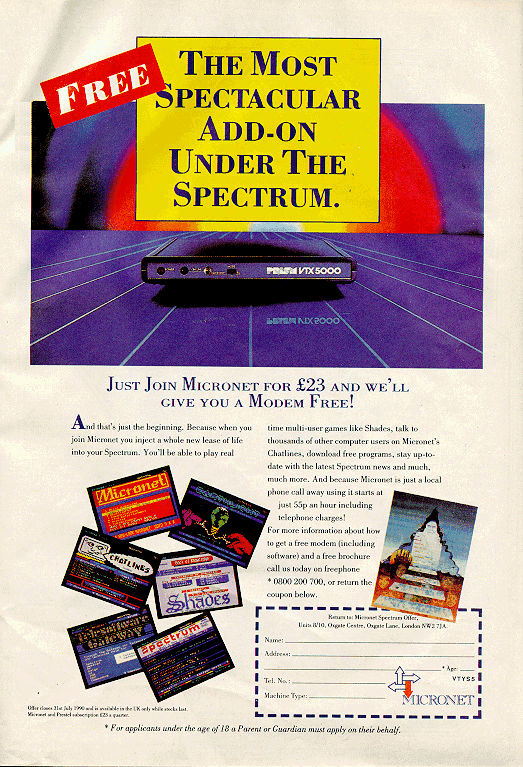
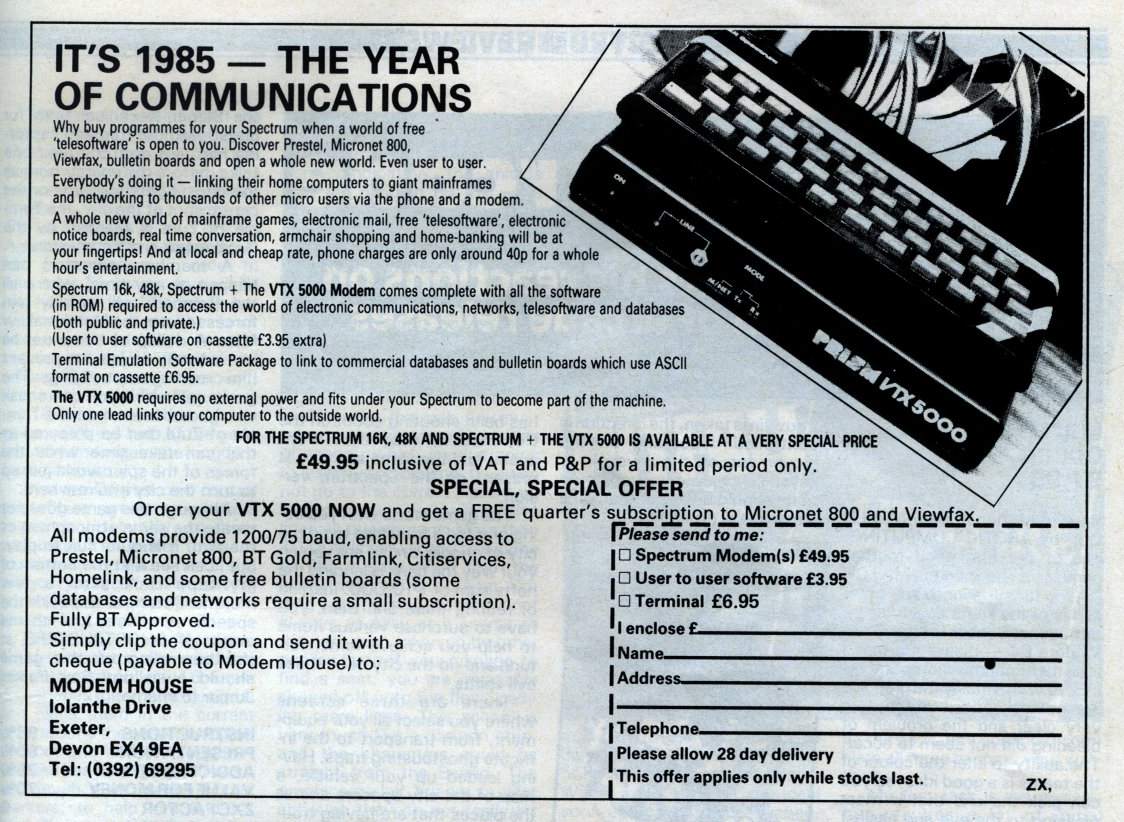
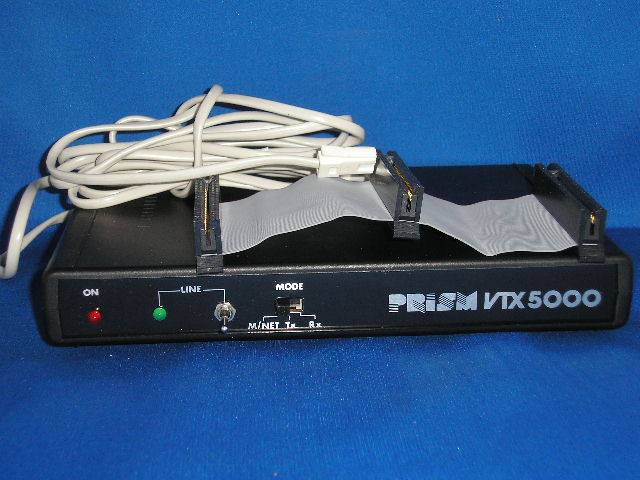
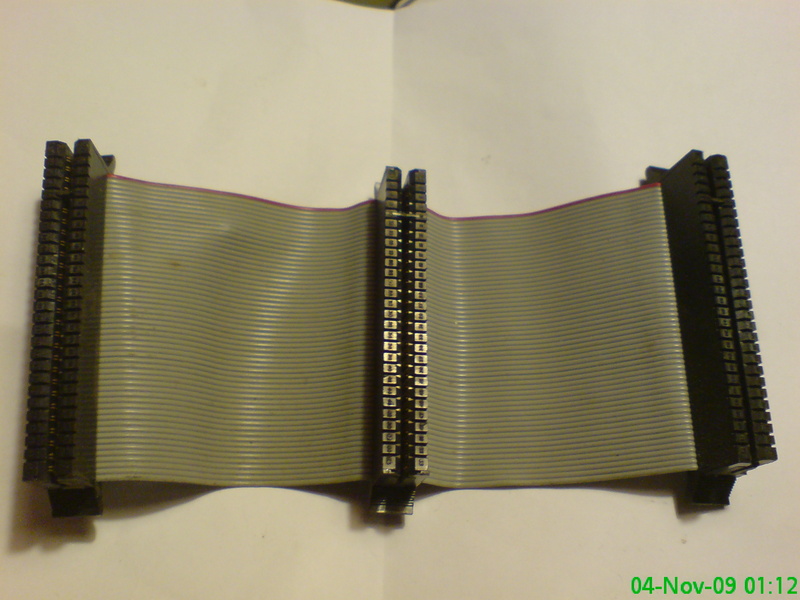
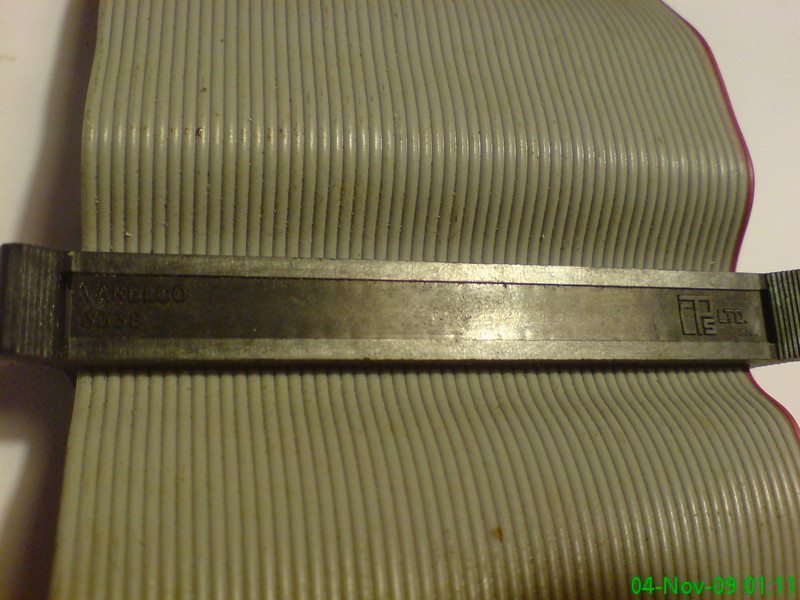
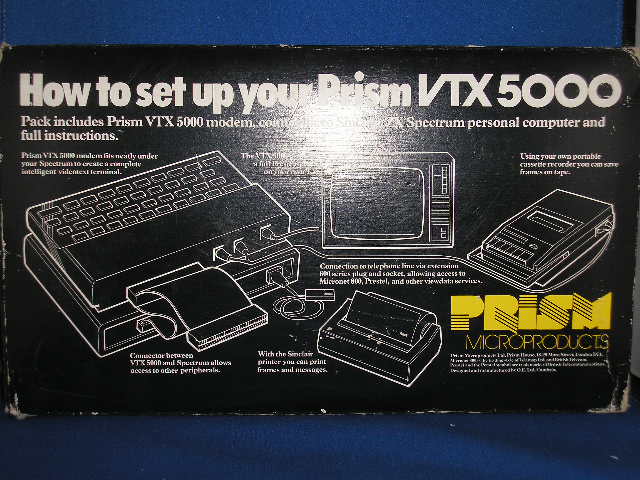
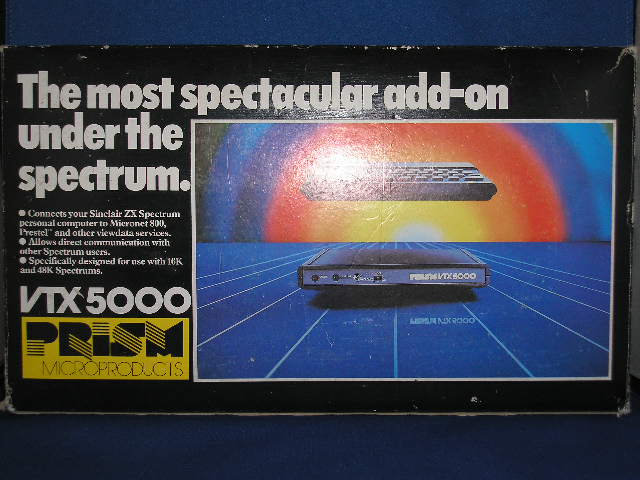
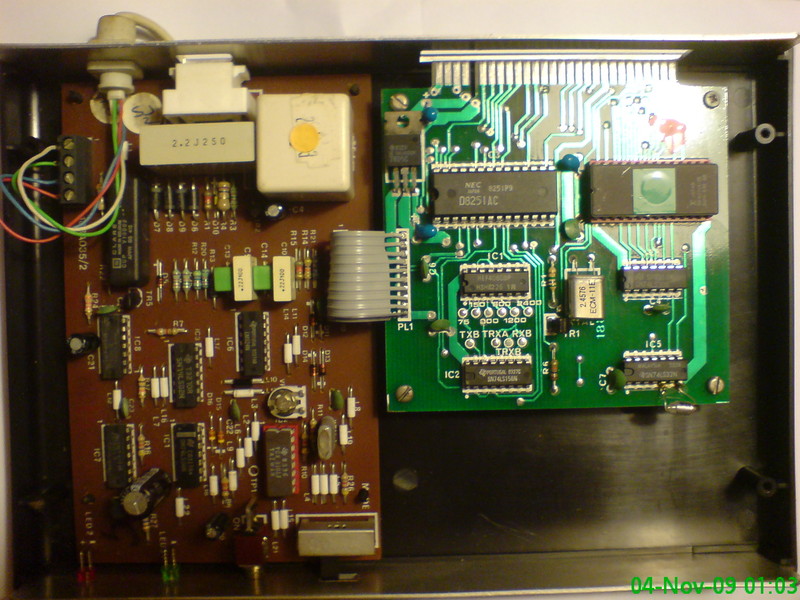
1200/75 baud modem with viewdata terminal software on ROM. This modem was initially for use with Micronet 800 (a section of Prestel), but due to other software, was able to access other non-viewdata (scrolling) systems. Also able to do 1200/1200 half duplex.
Discussion
Nobody has started a thread about this yet.
Remarks
Came with the {VTX 5000 User To User Communications Software|O.E. Ltd|0011152} tape.
Documents
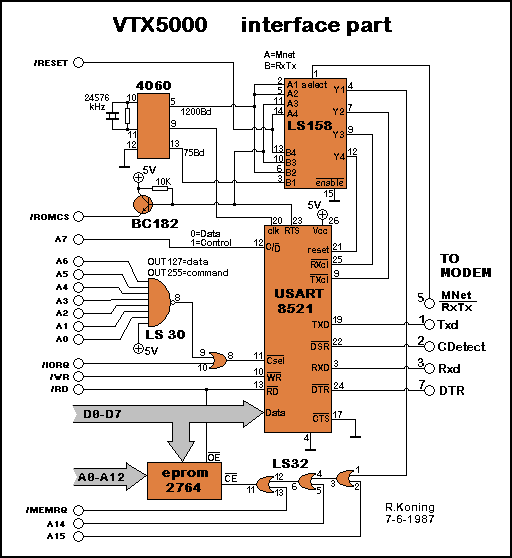
- PrismVTX5000Modem_Schematics-Interface.bmpHardware technical documentation 280 KB
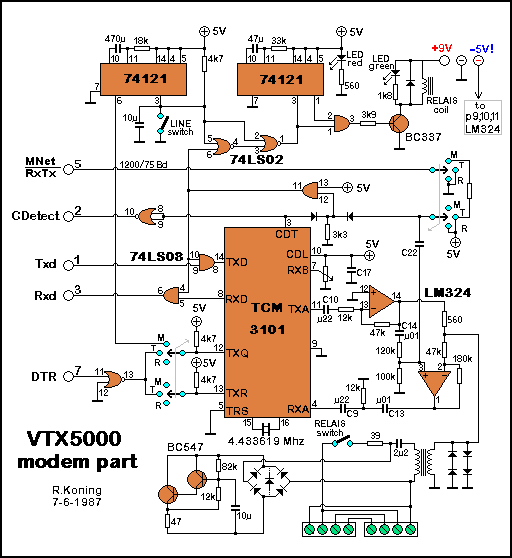
- PrismVTX5000Modem_Schematics-Modem.bmpHardware technical documentation 280 KB
- PrismVTX5000Modem.zipScanned instructions 14,660 KB
Files and rights
No permission is on record either way. Screens and pictures are copied here on a take-down basis: if you hold the rights and want something removed, say so and it goes.
Scores
In the magazines
- Your Computer #81986 · Overall2/5
In the magazines 76
Your Sinclair #79Jul 1992 · p.42
Jon Pillar
WIRED YS presents a handy-dandy guide to having fun with your peripherals. And who better to lead us down the hardware path than JON PILLAR? Quite a lot of people to be honest, but they were all at lunch. There's more to life than playing Speccy games. Using Speccy hardware is also to be recommended. Over the years a huge number of little black boxes have appeared for plugging into the back of everyone's favourite, um, little black box. Sadly, a lot of these have now gone forever. The Specdrum, the Slomo, the Music Machine... where are they now? Actually, they're still around, you just have to look rather hard for 'em. For those of you who can't be bothered looking rather hard, there are still plenty of goodies to be collected. VTX5000 MODEM BG Services/£15 The wonderful world of communications, eh? How else could you swell BT's bloated coffers by chatting about the weather with Ned Gimp from Hawaii? The VTX5000 links you up, via an ordinary household phone socket, to bulletin boards and network services across the country. (Or, indeed, the globe.) The actual VTX itself is a pretty ancient machine - if modems were tins of wallpaper paste, the VTX would be a very old tin of wallpaper paste. It's a 1200/75 device, receiving data at 1200 baud, and transmitting it at 75 baud. What's a baud? I'm glad you asked me that question. It's the unit of time taken to move one bit of data through a phone line. I think. 75 baud is the slowest rate possible, which goes to show just how old the VTX is. Thankfully, due to the widespread use of the modem, plenty of PD terminal emulators and other bits of driver software have sprung up - some of them extremely sophisticated, which makes life that ever so vital bit easier. In fact, the only problem I had with BG's modem package was that it assumes a certain amount of techy knowledge on the user's part. As the nearest I've previously been to a modem is Putney, it was a bit of a struggle to get things started. Logging onto the various boards themselves is fairly painless, although if you live outside the London/Reading area you'd better be prepared for some stonking phone bills. Once you've connected to a service, you can while away the hours swapping gossip, downloading software and promising your mum that you really will be in bed by 3am. Alternatively, if you can coax a pal into buying another VTX, you can use BG's User to User program, which allows you to chatter away electronically between yourselves to your heart's content. Overall, a fun bit of kit, though half the fun is figuring out which boards you can connect to! IT'S ALL GOING HORRIBLY WRONG DEPARTMENT Speccies are like mushrooms. If you keep them warm and nurtured, they flourish. But if you trample them into the ground or allow your dog to eat them while walking in the woods, they tend to fall over. Furthermore, I wouldn't recommend that you put them in a pan and cook them with a nice free-range egg in an attempt to make a mushroom omelette, because it won't work. Um, actually, Speccies aren't like mushrooms at all. Forget I said that bit. Anyway. The point I'm failing quite spectacularly to make is that Speccies are temperamental beasties. Inevitably, they'll break down. And while the most sensible course of action is to take your ill machine along to an authorised repair centre, you can fix some things in the comfort of your own home. But be sure to have a responsible adult on hand. They will then say, "I told you that you should have gone to an authorised repair centre," in a patronising tone of voice when you bodge the job and wreck your Spec. If you feel up to the task though, quite a few companies offer Speccy spares - everything from new ROM chips to new +3 disk drives. WAVE are particularly well-endowed with small bits of Speccies. Their catalogue has just about everything you need to build your own machine! Buy the spares direct, put them aside for that fateful day, and it'll be cheaper to repair your Speccy yourself. Or else get your local soldering iron whizz to do it for you. Just don't say we didn't warn you if things go even more horribly wrong. Well, that's it. Hopefully this little trip through hardware land has been useful and informative. If not, why should I care? I'm off to digitise the climax of The Terminator and save it out to disk as an animated sequence. Just don't tell anyone, or they'll all be at it…
Handel, our lovely model, hails from Grimsby. His hobbies includes eating crisps. He's demonstrating the +2 ROM. (Clap clap clap).
Here's some hardware. Basically.
Um, that's a phone. The interesting bit is behind it. Just over there. That's the VTX5000 modem. It's rather fine. Thank you.
Without this little black box, YS would never reach the shops! Yes, our Multiface helps load the delivery vans. Or something.
Your Computer #8Aug 1986 · p.262/52/5
Overall 2/5
Anthony Thompson 2/5
MODEM ROUTE TO SUCCESS A good modem can cost as much as a computer. Anthony Thompson investigates. Every branch of computing has its own set of jargon. With word-processors you can cut, paste, insert or zap. With joysticks you can have auto-fire, pistol grips and microswitches and with monitors you can have RGBs, dual frequency and monochrome display. In most cases, common sense will give you a rough idea of what the jargon means but there is one area of computing where you might need a little help. Communications is an area filled with seemingly meaningless phrases but one which offers rich rewards to those who dare to enter; to link your computer to the world of unlimited telephone bills, all you need is a modem. The word modem is an abbreviation of modulator-demodulator. It is a device which translates the electronic language of a computer into a series of sound waves and vice versa. Those sounds are then sent down a telephone line to whatever service you choose. All modems require software to work. With some models such as the Miracle Technology 64 multimodem it is built-in, while others like the Datastar Magic modem require a separate package. Software varies in price depending on the machine and the number of features you want. AUTO-DIALLING More expensive systems may incorporate more facilities such as auto-dialling and answering, on-screen clocks and memory buffers to store incoming data. Such features are really worth buying only if you intend to make full use of them. An auto-answer machine, combined with the correct software package, will allow you to create your own bulletin board with whatever services you like, but unless you do not use your telephone a great deal, it is best to have a separate line installed. Modems in the same price range tend to have similar functions. The more expensive models have several additional features but the value is dependent on the purpose for which you intend to use it most. The baud rate, the speed at which the modem sends and receives data, is an important consideration. Some systems send and receive data at 300/300 baud, the equivalent of 30 characters per second, but more recently many viewdata and bulletin board systems have adopted the Prestel standard of 1,200/75. While more and more systems are using that speed, the number still using 300/300 is sufficient to justify buying a modem which can handle both. Faster speeds are available but they cost considerably more and can really be used only with the commercial electronic mail systems; they are geared more towards business than home users. Most modern modems connect directly into the telephone socket. For those whose homes use older-type connections, acoustically-coupled modems which incorporate rubber cups to fit on the handset are available but they are often more difficult to use. Modems capable of faster speeds such as 1,200/1,200 are available but they cost considerably more and can really be used only with commercial electronic mail systems which are geared more towards business rather than home users. The operating speed of a modem is sometimes defined by the V system. That relates to a set of recommendations for data transmission by telephone made by the United Nations technical committee. V21 refers to the 300/300 system while V23 includes 1,200/75. There is also V22, the 1,200/1,200 system, and others which define modems which can auto-dial, auto-answer and so on. Modems are sometimes also defined as being intelligent or Hayes-compatible; the latter refers to an American standard and the AT command set which some software packages use. Using this system, to dial a number from the keyboard, you type ATD followed by the number and return. The AT command attracts the attention of the modem while the D tells the modem to dial. Variations of the command set include help functions and dialling from memory. Most modern modems connect directly into a telephone socket. For those whose homes use older-type connections, acoustically-coupled modems which incorporate rubber cups to fit on the handset are available but they are often more difficult to use. A final point to mention is to ensure that the modem you buy is BABT-approved. If it is, it will display the green approval sticker - it is a criminal offence to use a non-approved modem on the BT network. MIRACLE WS2000 MODEM Price: £130 Baud Rate: A, B, C, D Auto Dial As Standard: No Star Rating: **** MIRACLE WS3000 MODEM Price: £399 Baud Rate: A, B Auto Dial As Standard: Yes Star Rating: **** PRISM VTX5000 MODEM Price: £70 Baud Rate: B Auto Dial As Standard: No Star Rating: ** VOYAGER 7 MODEM Price: £79 Baud Rate: A, B, C, D Auto Dial As Standard: Yes Star Rating: **** CIRKIT Price: £35 Baud Rate: A, B, C, D Auto Dial As Standard: No Star Rating: **** MINI-MAX Price: £66 Baud Rate: A, B, C Auto Dial As Standard: Yes Star Rating: **** MAGIC MODEM Price: £79 Baud Rate: A, B Auto Dial As Standard: Yes Star Rating: *** TANDATA Price: £99 Baud Rate: B, D Auto Dial As Standard: No Star Rating: *** DATACHAT 1223 Price: £89 Baud Rate: B Auto Dial As Standard: No Star Rating: ** INTERMOVER M5021 Price: £98 Baud Rate: A Auto Dial As Standard: No Star Rating: *** 64 MULTIMODEM Price: £99 Baud Rate: A, B, C Auto Dial As Standard: No Star Rating: **** VOYAGER 11 Price: £99 Baud Rate: A, B, C, D Auto Dial As Standard: Yes Star Rating: **** PACE NIGHTINGALE Price: £137 Baud Rate: A, B Auto Dial As Standard: No Star Rating: *** DIGISOLVE CHIPCHAT Price: £150 Baud Rate: A, B, D Auto Dial As Standard: No Star Rating: *** AMSTRAD MODEM Price: £175 Baud Rate: A, B, C, D Auto Dial As Standard: Yes Star Rating: **** TANDATA TM200 Price: £199 Baud Rate: A, B, C, D Auto Dial As Standard: Yes Star Rating: *** DACOM DSL2123AD Price: £255 Baud Rate: A, B, C, D Auto Dial As Standard: Yes Star Rating: **** PACE 2123S Price: £239 Baud Rate: A, B, C Auto Dial As Standard: Yes Star Rating: **** M4000 Price: £282 Baud Rate: A, B, C, D Auto Dial As Standard: Yes Star Rating: *** DACOM 2123GT Price: £395 Baud Rate: A, B, C, D Auto Dial As Standard: Yes Star Rating: ***** PACE 2400S Price: £595 Baud Rate: A, B, C, D, E Auto Dial As Standard: Yes Star Rating: *****
AMSTRAD At around £35, the Cirkit acoUstic is probably the cheapest modem available for the Amstrad CPC range. It operates on 1,200/75 baud, allowing access to Prestel, Micronet, BT Gold and several others. The price includes the interface and companion software. The interface can be used with other modems offering a wider variety of baud rates and it can also be used to interface other RS232 devices. The software provides full Prestel support and is available on either tape or disc. SPECTRUM The Mini-Max modem from KDS Electronics represents superb value. It connects directly to the BT lines and features 300/300 and full duplex 1,200/75 operation. It also has an auto-dial mode and for an additional £15 an add-on board will give you an auto-answer facility as well. The modern will operate with any computer with an RS232 interface. COMMODORE The direct-Connect Compunet modem offers the Commodore 64 user access to Compunet; three months' subscription is included in the price. A baud rate of 1,200/75 means that users could access Prestel if they so desired but Compunet, being a specialist database, can offer much more of interest to the Commodore user than Prestel or any of the other Commercial databases could ever hope to do. No interface is required. BBC The recently BABT-approved Datastar magic modem is good value for the BBC micro, long hailed as the king of the communications computer world. The modem has a six-way rotary switch and LED indicators to show Which mode you are in. The Companion software costs around £20 and is controlled by the function keys; 1200/75- and 300/300 baud rates are available, giving access, to Prestel and many private bulletin boards.
NEW RELEASES The new series four from Pace Micro Technology are intelligent modems offering high-speed operation. There are three models, ranging from the 2123S which operates at V21 and V23 to the 2400S which can operate at V21, V22, V22bis and V23. All the models have a 32-character LCD display which is used to provide useful information during operation. That includes the real and elapsed time and diagnostic messages if a transmission should fail. The modem will also store up to 64 numbers which can then be dialled automatically. Further development of the internal software to include additional features such as error-correction and password security is under way. Modem House has produced a range of multi-standard, multi-computer modems. The Voyager 7 model features built-in auto-dial and answer functions, full CCITT V21 and V23 specification and full function LED display. The basic cost is low, at around £79.95 plus VAT, but the software and interface for, say, an Amstrad CPC6128 raises the price to £159.95. That modem can also be operated anywhere in the world with an optional 11.0V power supply. Full bell tones, essential for communicating with American bulletin boards, are also available but only as an optional extra, because full bell-tone specifications are illegal in the UK, and certain other countries.
SUPPLIERS GUIDE 1. Cirkit Acoustic Modem Cirkit [redacted] 2. Mini Max Modem KDS Electronics [redacted] 3. Micronet VTX 5000 Modem House [redacted] 4. Magic Modem Jansz Computer Communications, [redacted] 5. Tandata TM110 V23 Tandata [redacted] 6. Voyager 7 Modem House [redacted] 7. Datachat 1223 GEC Communications [redacted] 8. Intermover M5023 Modular Technology [redacted] 9. 64 Multi Modem Miracle Technology [redacted] 10. Voyager 11 Modem House [redacted] 11. Pace Nightingale Pace Micro Technology [redacted] 12. Digisolve ChipChat Digisolve [redacted] 13. Miracle Technology WS2000 Miracle Technology [redacted] 14. Amstrad Modem KDS Electronics [redacted] 15. Tandata TM200 Tandata [redacted] 16. Dacom DSL2123AD Da Com Systems [redacted] 17. Pace 2123S Pace Micro Technology [redacted] 18. Modular Technology M4000 Modular Technology [redacted] 19. Dacom 2123GT D Com Systems [redacted] 20. Miracle Technology WS3000 Miracle Technology [redacted] 21. Pace 2400S Pace Micro Technology [redacted]
Your Spectrum #18Sep 1985 · p.20
Stephen Adams
BITS 'N' PIECES My, how it's grown - almost a MegaSpectrum! Which of these useful little add-ons could you do with on your Speccy? To help you choose, Stephen Adams has done his bit and come up with a piecemeal review of them all. #1 A/D AND D/A BOARDS EPROM Services/£23.95-£57.95 (A/D), £26.95-£54.95 (D/A) The A/D board allows you to digitise the voltage input into a number the computer can then understand by changing it from an analogue reading to digital number. The D/A board lets you send out a voltage that's not digital (not just on or off). You can use the D/A board to send voltages to control things like amplifiers or train sets - speeding the trains up or slowing them down. In schools and labs these boards are often used to replace the voltmeter, ammeter and resistance meters - that way they can have an accurate computerised version that's able to take several versions at once. You can even use the boards with a simple Basic program to find out where in the circuit something's happening. #2 SOUND BOARD Various/£15-£55 You'll find sound boards in all sorts of shapes and sizes but they all basically use the same chip, AY8910 (or ATY8912). So, if you want to let rip with a guitar riff on your Speccy, let me explain how they work. They provide three different oscillators (or voices as the cool dudes in the music biz call em) and a noise output that can produce anything from pips to sea sounds. You can program the oscillators to produce any audio tone and mix them all together to form music or background sounds to your games. You can even use a sound board as the basis for a very cheap synthesizer. You can add to the basic set-up so that you've got more notes to play with and the output can repeat any rhythm or note at varying pitches while you tinkle out the rest of the tune. And the big plus if you're into games is that this needn't keep you from the joystick as the chip will carry on producing the last note until you reprogram it. Choose a sound board according to your needs and wallet but one tip is to go for one with a good amplifier included - the output from the chip is much too low to hear at all. #3 SP ROM UPLOADER Cambridge Microcomputers/£29.95 This uploader contains two sockets for 8K or 16K ROMs or EPROMs so that they can be transferred to any place in memory at the push of a button. You can also go straight from power up into a program without recourse to LOAD "". The advantage of EPROMs is that they can contain anything you like, but you must use an EPROM blower. How about using them to change the character set or run an automatic program in conjunction with a timer that turns on the Spectrum or even to run advertisements in shop windows - well, I've done that anyway! #4 INPUT AND OUTPUT PORTS Various/£15-35 These are the arms and legs, eyes and ears of a computer. They allow it to find out just what's going on around it. You can connect up an input port for use as a joystick, a weather station reader, a light pen or even sensors for a burglar alarm - and that's just a few of the uses for this versatile board. The outputs are used to control relays that can operate lifts, dial the telephone or control a robot arm. The limits of the input/output port are your own imagination. #5 PRINTER INTERFACE Various/£30-£50 As add-ons go, this must be the most popular one after the joystick interface. The interface can come with tape software that has to be loaded up before you use the unit, like the one shown, or with a controlling EPROM built in, like the Kempston E interface. Whether you choose a top-notch daisywheel printer or a slightly more down-market dot-matrix, it'll usually come with a Centronics socket for the interface to plug into. Mind you, if you find that the printer you've chosen has a serial interface then you'll have to lay your hands on an RS232 interface. You may find the choice limiting, though. While there are as many Centronics interfaces as there are printers, the number of RS232 interfaces is basically limited to the Interface 1 and ZX LPrint versions. If you want to go in for screen copying, you'll find that it's been brought to a fine art with units like the Kempston E but with serial interfaces screen copies are still a shady area. #6 EPROM BLOWER Cambridge Microcomputers/£29.95 You'll find one of these boards very useful if you want to store any of your programs semi-permanently. It can handle data up to a 16K limit and works by creating ROM chips which replace Basic, so that you can upload a program almost instantly - though you'll need a ROM SP uploader for that. Programs stored like this can't be altered by POKEs or by turning off the power. You'll need four 9 volt batteries to program it but it'll usually run on - 5 volts from the Spectrum. If you want to reprogram it, you'll have to put ultra violet light through the window in the top - that's the only way of wiping the ROM clean. This is certainly a great way of storing your favourite routines but, unfortunately, it just doesn't have the capacity to save most machine code games. #7 RGB MONITOR ADAPTOR Adapt Electronics/£36.95 If you've considered using a colour monitor because it'll give you clear letters and graphics plus sharper, brighter colours, then you're going to need an adaptor. This is because the Spectrum doesn't have a Red/Green/Blue video output that most normal monitors use. The RGB interface by-passes any circuitry inside the monitor, so it can directly control the television tube. That way it eliminates the 'fuzz' and background lines found on most tellies. The new version from Adapt shown here now includes a through bus and should work with all monitors. #8 VTX 5000 Modem House/£49.95 With one of these modems you'll have all the equipment you need to operate a telephone line through your Spectrum - though you'll still have to do the dialling manually! Prestel software is supplied in ROM and if you're quick on the uptake you can get three month's Micronet subscription free. You can also use your modem to swop program data or code with your friends and/or different computers via a Bulletin Board - one of the free message systems dotted around the country. If you're in business, you can also use it to send telexes (through Prestel or Telecom Gold) as well as having an electronic mailbox for letters that take only a few seconds to post. These applications require special software but that can be picked up quite cheaply from Modem House. A word of warning, though - watch your phone bill as using a modem can become habit-forming! #9 MICROSLOT Currah/Dk'tronics/£9.95 This is the cheap way of getting round any device that doesn't have a through connector. It's a small T-shaped block that offers you two edge connectors instead of one. More than one can be used as a mini motherboard allowing you to add extra boards as you need them.
Crash #18Jul 1985 · p.92
MORE MODEM MANIA In the last issue of Tech Niche we promised you a review of Spectrum modems. On the face of it that was a little bold, not only because there are so many modems about but also because the manufacturers of them are either a) mean b) hard to find c) don't want to be found or d) they never really had a modem in the first place. Anyway enough excuses. We did manage to decide on the two most important modems to review in this issue and we'll pass over the other for the meantime. The VTX 5000 and the Protek 1200 modems are both front runners simply because they provide an uncomplicated means of communicating with Prestel or, perhaps more importantly Micronet, at a reasonable cost. These two modems are limited because they do not provide the facilities that would allow you to communicate easily with every sort of on line computer there is - there are modems that do, but generally they cost a lot more and are more complicated to set up. When we reach the stage of examining hobbyist bulletin boards and specialist databases we shall also examine some of the kit that is needed to make those connections. But they will have to wait for a future Niche. To begin to explain why modern compatibility is nearly as big a laugh as computer software compatibility, it is necessary to take a look at the workings of modems. As stated in the last issue Modem is simply a shortened form of MOdulator DEModulator. We all know that computers hump information around internally as representations of one's and zero's. Computers really aren't that smart: to a computer life is very simple, a situation is either black or white, on or off, one or zero. All this means is that if a computer wants to tell somebody that it knows The Answer it can't simply shout out 'forty two', well it can, but only because the computer knows how to turn its version of 'forty two', 101010, into our version of 'forty two' - 42. So if one computer wants to chat to another computer it will do so in a signal representing binary numbers, and all that the modem does is to take the binary message and turn it into a form that can be sent down a standard telephone line. Fed with data in serial rather than parallel form, all a modem does is convert characters into sequences of notes for transmission, and decode incoming signals which have been sent down the telephone line, assemble them into characters and hand them over to its host computer. In the case of the basic Spectrum, which doesn't have a RS232 port fitted as standard, you either need to get hold of a modem which connects directly to the edge connector and sorts out the interfacing problem for itself, or use a suitable RS232 interface for your Spectrum which should allow you to connect it to any modem. The RS232 interface provided on Interface 1 isn't up to the job, although people are rumoured to working on that problem. Once you've got a modem attached to a Spectrum and working, the next problem is to make sure that it is compatible with the modem at the other end of the the line. They must both talk the same language in order to hold a successful conversation. A number of variables are involved, the two most important of which concern the speed with which the signal is sent and the pitch of the notes used. In Europe we have two main standards. CCITT V.21 which is for 300/300 baud communications, and the V.23 for 1200/75. The baud rate is a measure of the speed at which data is transmitted. Typically, 300 baud represents a rate of about 30 characters a second, while 1200 baud is about the fastest speed of transmission achievable on a normal telephone line, and works out at about three lines of text on the Spectrum screen per second. The V.21 standard is used by most hobbyist bulletin boards and on-line services. If you want a modem to talk to these chaps then it must be able to adopt that standard (neither the VTX or the Protek can). The most widely used standard now being used by Spectrum owners, due largely to Micronet, is the 1200/75 baud V.23. This is the standard adopted by Prestel which sends frames at 1200 baud and receives instructions at 75 baud. It was this standard that the VTX and Protek modems were designed to use. Some bulletin boards cater for 1200/75 communications, however, and user-to-user communication is also possible with these modems. If you have a burning desire to go truly international and communicate with systems in the USA or Canada, then you will have to consider yet another range of standards. The American Bell 103 is similar to our V.21 and the Bell 202 is like our Prestel (V.23) standard except that Bell uses different pitches to CCITT systems. Modems are around that can switch between all these different standards - but at a price. We hope to bring you news of one of these, the new Miracle Modems Spectrum version soon. There's no point on lashing out on super whizzo (and expensive) hardware if your main interest is in talking to Prestel and Micronet, however. Apart from the communications software needed to drive the modem itself and sort out such housekeeping problems as word length and parity so that the receiving modem on a system is sent what it expects to receive, a further problem can arise from lack of compatibility with software. Clearly the computer that you want to talk to and your computer both need software to organise a multitude of functions be it simply transmitting chunks of text to another computer or sending a message to a mailbox on a large system. The problem is that each computer has a different view of the outside world. For example, problems may be caused by incompatible character sets. Prestel would never understand what a Spectrum SYMBOL SHIFT keypress was meant to mean, but software converts it to be sent as a star - that's fine because the Prestel machine knows that the star means an instruction is on it's way. Saves a lot of argument and down time with grumpy computers does the software. Remember that no matter how smart a modem is, without the software it's just a pile of chips and capacitors. The software that comes with the VTX and the Protek modems is able to convert the Spectrum's output into a form understood by Prestel, and a few more clever tasks besides. THE PRISM VTX 5000 Supplier: Modem House Price: £49.95 This modem really seems to have become the standard for clever people (a recent survey shows that most clever people own Spectrums Source: SEOS 1985). The principal advantages with the VTX are two fold. Firstly the software is held on ROM (read only memory) which means the machine is raring to go on power up so time is saved especially when, as often happens, your connection with the mainframe is broken and you have to reset the Speccy. The second advantage is that the modem is hard wired, plugging into the phone socket and then the phone plugs into the back of the modem. This greatly reduces the chances of the modem being interfered with by outside noises! The software has most of the functions that you could need including automatic log on and off. Micronet frames can be saved to tape or microdrive and printed out, you are able to download the software or compile messages off line loaded to tape ready to be sent when you are on line. The VTX can be used as a user to user modem to allow you to communicate with other users so long as the same V.23 standard is observed. Other software is available for the machine which allows you contact databases and bulletin boards that use the same speeds but transmit text in an rolling form as opposed to screen by screen. Specnet by Stephen Adams costs £5.95 and a similar package by Stephen Gold can be downloaded from Micronet for a small charge. THE PROTEK 1200 Supplier: Protek and high street shops Price: £39.95 The battery powered Protek machine is £10 cheaper than the VTX, but it presents the disadvantages of having to load the software into your machine before you can go on line. Also, the modem is acoustically coupled, which can give you some very undignified moments as you try to squidge your handset into the two rubber cups. If you have a trimfone or a phone in a style other than the traditional one then forget it, but being battery powered the modem has certain portability advantages (only really advantageous when you get your Spectrum running off batteries too, though!) While the software is as useful as that of the VTX it is not as easy to use since some functions require you to load in the odd chunk. If you want to use the modem user to user you have to agree which one of you is to be the original sender and who is to receive and then load in the appropriate code. With the VTX modem you only have to slide a switch. CONCLUSION In my opinion the extra £10 for the VTX modem is more than justified. It is easier to use and simple to set up, it is moderately idiot proof as well as being neat and tidy when in operation. The only advantage that the Protek may have is that the acoustic coupler could, in theory, be used with any computer that can supply it with RS232 input providing you can write, buy or scrounge the appropriate software to drive it.
Personal Computer News #90Dec 1984 · p.29
PLUG IN PARAPHERNALIA Our eight-page guide to Christmas peripherals. PICK OF THE PRINTERS MONITORS IN FOCUS DISK DRIVES ASSESSED ...AND OTHER ADD-ONS DECIPHERING THE PERIPHERALS PUZZLE Once you've had a computer for a little while,you may be wondering what else you can do with it, aside from playing games and writing the odd program. Buying one of the wealth of peripherals currently on the market can open up a whole new realm of possibilities, by presenting new programming challenges, new types of software,and providing more capabilities for your computer. The problem is, what to buy, for how much,and where from? Probably the most uninteresting peripherals are printers,which are only of real use for word processing, screen dumps,and program listings. These come in many different types, sizes, prices and capabilities,from dot matrix to daisywheel. Of much more interest these days are modems. Unfortunately,they can give you that dreaded disease known as Hackery, which includes symptoms such as high telephone bills, sleepless nights and no interest in anything else. Other add-ons include light pens and touch pads for budding computer artists. These generally come with some software, but make sure when you buy that there are some details on howto program it yourself. The same applies to joysticks and tracker balls. On some machines handling these is easy but on others, such as the Spectrum and Electron, things area little more difficult. There are so many gadgets available that it would be impossible to name them all. Out of these, perhaps the most exciting are second processors, some of which can turn your humble home micro into something approaching the power of a minicomputer. Others are just add-ons to allow a sought after CP/M system. These are much more common, being available for the BBC, Commodore 64, Amstrad CPC464, and Sinclair QL, to name but a few. One point to bear in mind when you buy something extra for your micro is what you are going to do with it when you become fed up with the applications that come with it. If you make sure that there are details on how to access and control it, you will be able to write your own routines to run it, thereby giving it a whole new lease of life. PCN's six page peripherals guide should give you some idea of what is available, how much you should expect to pay, and where you can get them from. PRINTERS Many people think they can live without printers, probably due to their high prices, but eventually you'll probably want one for your microcomputer. There are a number of types around, from the more expensive daisy wheels to the cheaper thermal or ballpoint pen printers. Not to be forgotten, too, are the ubiquitous dot matrix and the ink jet types. The former are generally judged by their Epson compatibility and features. Once the type of printer has been decided upon, there are then a number of additional features to choose from, print buffers, RS232 or Centronics, graphics capabilities, redefinable character sets, and speed being just a few. A printer with all of these the Smith Corona D200 for example - can cost up to £500. Alternatively, a ballpoint pen plotter such as a MCP-40 will cost around £150, but this only takes narrow paper and doesn't give you half the facilities. THERMAL BROTHER EP-22 The EP-22 is quite cheap and will take either thermal paper or a carbon ribbon. It has a keyboard, which makes it a word processor too. PRICE: £169.95 INTERFACES: RS232 REVIEW: Issue 35 FEED MECH: Pinch PRINT MECH: Thermal paper or thermal carbon ribbon PAPER SIZE: A4 width SPEED (APPROX): 16cps POWER SUPPLY: 4 U2 batteries AVAILABILITY: Brother [redacted] BROTHER HR5 The HR5 thermal printer from Brother basically uses the same mechanism as the EP-22 and EP-44. PRICE: £180.55 INTERFACES: RS232 REVIEW: Issue 47 FEED MECH: Pinch PRINT MECH: Thermal paper or carbon ribbon PAPER SIZE: A4 width SPEED (APPROX): 16cps POWER SUPPLY: 4 U2 batteries AVAILABILITY: Jones & Brother [redacted] DOT MATRIX SMITH CORONA D200 If you want a dot matrix that does nearly everything for your needs then the Smith Corona D200, at £483, is a good buy. PRICE: £483 INTERFACES: RS232 and Centronics, both fitted REVIEW: Issue 87 FEED MECH: Pinch and tractor PAPER SIZE: A4 width SPEED: 160cps FEATURES: 2K internal buffer, NLQ AVAILABILITY: Smith Corona dealers WALTERS WM80 If you just want a workhorse with no fancy bits, then choose a bottom-end machine such as this. PRICE: £189.75 INTERFACES: RS232 or Centronics REVIEW: Issue 43 FEED MECH: Pinch and tractor PAPER SIZE: A4 width SPEED: 80cps AVAILABILITY: Walters Microsystems International, [redacted] COLOUR INTEGREX COLORJET The Integrex Colorjet is mainly for BBC and Apple owners. A BBC screen dump program comes with this very versatile printer. PRICE: £632.50 INTERFACES: RS232 and Centronics REVIEW: Issue 51 and 44 FEED MECH: Pinch PAPER SIZE: A4 width SPEED: 37cps AVAILABILITY: Integrex [redacted] COMMODORE MPS 801 There are no frills on this and you will have difficulty attaching it to anything except a Commodore. PRICE: £395.95 INTERFACES: I triple Commodorey REVIEW: Issue 79 FEED MECH: Pinch and tractor PAPER SIZE: A4 width SPEED: 38cps AVAILABILITY: Commodore [redacted] DAISIES JUKI 6100 The Juki 6100 has above average speed at 17cps and is a nice cheap daisy wheel printer although it does have a few rough edges. PRICE: £385.25 INTERFACES: RS232 and Centronics REVIEW: Issue 17 FEED MECH: Pinch WHEEL TYPES: Triumph Adler PAPER SIZE: Up to 13in SPEED: 17cps AVAILABILITY: Most dealers SMITH CORONA L1000 The L1000 from Smith Corona is a good quality printer if a little noisy and slow. £50 extra for a parallel interface. PRICE: £368 INTERFACES: RS232 and Centronics REVIEW: Issue 78 FEED MECH: Pinch and optional tractor feed WHEEL TYPES: Smith Corona PAPER SIZE: Up to 13in SPEED: 12cps AVAILABILITY: Smith Corona dealers MODEMS Modems could well be classed as the up and coming peripheral of 1985. With the rapid growth of bulletin boards and the increase in Prestel-type systems, the number of cheap modems available has doubled since last year. One of the problems that beset their introduction was BABT/BSI approval. The modems had to be sent to the BABT or BSI for testing for compatibility with BT's telephone network. By the middle of 1984, there were so many modems awaiting the green sticker that people started selling them without. Things have settled down a bit now and there are a number of good modems on the market. These can be split up into different types - direct connection, acoustic coupler, single speed, or multi speed. The standard transmission speeds are 300/300 and 120005. The first is generally used for bulletin boards, although both Prestel and Telecom Gold are available on this speed. Whatever modem you buy, make sure you get one that fits your needs as far as baud rates go, otherwise you may feel a bit left out. COMMODORE COMMUNICATIONS Those with a Commodore 64 needn't feel left out. The Commodore Communications modem gives you access to Compunet, of course, and also Prestel. In the near future, Commodore is going to produce some software to allow user to user communication. If you want to use the various bulletin boards, you will have to acquire an RS232 port and a standard 300 modem. PRICE: £99.95 BATA?: Yes BAUD RATES: Full duplex 1200/75 INTERFACE: Commodore cartridge port and direct connection to BT CONTACT: Commodore dealers PRISM VTX 5000 One of the most popular modems for the Spectrum is the Prism VTX 5000. If you only want access to Micronet and Prestel it is ideal, although it can have a few problems with Interface 1. The way around this is to connect the whole system up without the modem and let it warm up (go and make a cup of coffee). Once warm, the VTX5000 can be connected (after powering down again) and it will work. PRICE: £99.95 BATA?: Yes BAUD RATES: Full duplex 1200/75 INTERFACE: Spectrum system bus and direct connection to BT CONTACT: Micronet 800, [redacted] PACE NIGHTINGALE The Pace Nightingale is another multi speed modem with both Bell and CCITT frequencies. It is a hard wire modem ie it connects directly into the telephone socket. Built mainly to be used with the BBC, for which the Commstar ROM is available, the complete package costs about £136. It is also available for any other RS232 compatible communications package. PRICE: £136.85 BATA?: Yes BAUD RATES: Full duplex 300/300 1200/75 INTERFACE: RS423/232 CONTACT: Pace Software [redacted] MINOR MIRACLES WS2000 The Minor Miracle WS2000 is great for bulletin board hackers and Prestel users alike. It lacks auto dial and auto answer facilities, which are a little expensive at £30 each but at least you're given the option. PRICE: £149.44 Auto dial and answer boards extra at £30 each BATA?: Yes BAUD RATES: Full duplex 300, 1200/75, half duplex 600,1200 INTERFACE: RS232 with DTR, RTS, CTS, DCD handshaking EXTRAS: Also has the Bell 103/113, 108, 202 and CCITT, V21, V23 tones standards fitted. CONTACT: Minor Miracles [redacted] SENDATA 700B For the ultimate in portability, it is hard to beat the Sendata 700B acoustic modem, distributed by Tandy. This modem will fit onto any standard telephone via its flexible connector so you can use it in a phone box if you don't mind the pips corrupting your data. PRICE: £235 BATA?: Yes BAUD RATES: Full duplex 300/300 INTERFACE: RS232 to the computer, and acoustic modem to BT CONTACT: Sendata [redacted] MONITORS The major excuse for not buying a monitor is that it's not strictly necessary if you have a TV. The counter arguments are that with a monitor you can see your superb high-resolution graphics with less eyestrain. The clincher is that someone else might want to watch TV. You mostly measure a monitor's quality by its bandwidth. This defines how fast the individual dots are scanned on the screen so obviously the faster it does this, the better the picture will be. 10MHz is at the low end of the range with the better colour monitors having over 20MHz. Another consideration is whether to buy colour or monochrome. The latter comes in various different coloured phosphors, usually green on green. Other options are orange on orange or grey on grey, if you want full colour, you must pay quite a lot more for high quality. If you are not too bothered about that there are a number of converted TV tube monitors available for much less. CHEAP COLOUR At the very cheap end come the JVC and Fidelity converted TV tube-type monitors. The JVCs come in two different versions, medium- and high-resolution. The 1302-2 is the high-resolution version but has a rather dirty white. This is generally caused by the quality of the phosphors used. However, it's not at all bad for £229.95. The lower priced version, the 1302-1, costs less at £149.95 but the bandwidth is not as good. MONITOR: JVC 1302-1/1302-2 PRICE: £253 RESOLUTION: 370 x 470 pixels/580 x 470 CRT SIZE: 14in/14in BANDWIDTH: 6MHz/10MHz CHARACTERS: 80 x 25/80 x 25 CONNECTION: RGB analogue/TTL SYNC: Pos or neg AVAILABILITY: Opus Supplies, [redacted] The Fidelity CM14 resembles the JVCs ie it's a converted TV tube. Its advantage is that it can be interfaced to a number of different machines, and has a built-in speaker and amplifier to allow access to, for instance, the Commodore 64's sound output. Cables for a number of machines are available from Tape Recorder Spares. One drawback to the CM14 is that it gives a better picture with some computers such as the Oric, but a bad one with others, notably the Dragon. MONITOR: Fidelity CM14 PRICE: £228 RESOLUTION: 370 x 470 pixels CRT SIZE: 14in BANDWIDTH: 12MHz CHARACTERS: 80 x 25 CONNECTION: RGB TTL, Audio input (1Kohm imp) SYNC: Pos or neg AVAILABILITY: Micro Peripherals [redacted] BETTER QUALITY Near the top of the range of colour monitors are Kaga, Microvitec, and one from Prism. The latter looks suspiciously like the Fidelity although it is better quality. The Kaga monitors come in a range, at the top of which is the Vision III. This has a black anti-glare tube and good colours. MONITOR: Kaga Vision III PRICE: £370 RESOLUTION: 640 x 440 CRT SIZE: 12in BANDWIDTH: 18MHz CHARACTERS: 80 x 25 CONNECTION: RGB AVAILABILITY: MBS Data Efficiency, [redacted] The Cub is popular and usually found attached to BBCs. The range is wide but the standard version is probably the most common. MONITOR: Microvitec Cub 1431 PRICE: £225 RESOLUTION: 452 x 585 CRT SIZE: 12in BANDWIDTH: 18MHz CHARACTERS: 80 x 25 CONNECTION: RGB TTL AVAILABILITY: Dealers MONOCHROME There are several monochromes around, and again, you pay for quality. A very average green-on-green monitor is Zenith's. This produces a fairly good picture on its 12in tube. It does have a switched option to allow the screen size to be altered between 40 or 80 columns. MONITOR: Zenith 123E PRICE: £90.85 RESOLUTION: 640 x 300 CRT SIZE: 12in BANDWIDTH: 18MHz CHARACTERS: 80 x 25 or 40 x 25 CONNECTION: Composite video AVAILABILITY: Most dealers Since most home micros now have an RF output socket as standard, many people want to use them with TVs. The quality of picture varies but the Sony Trinitron range is generally the best. MONITOR: Sony Trinitron KV1430 PRICE: £249 RESOLUTION: 320 x 250 CRT SIZE: 14in CHARACTERS: 60 x 25 CONNECTION: UHF switchable. AVAILABILITY: Electrical stores STORAGE Most home micros can only store data and programs on cassette, which can be a major hassle. The first big upgrade step that most micro owners take is some kind of fast access, mass storage system. For most machines this means a disk drive although for the Spectrum, Microdrives or Wafa drives are usually cheaper. As well as the disk/wafer drive, most machines need an interface to allow them to control the system. The odd one out is the Commodore 64 which has all the necessary bits and pieces built in. The problem here is that it can only be used with Commodore disk units (a typical Commodore gambit). SPECTRUM The main Spectrum storage system is the Sinclair Microdrive. This needs the Interface 1 to be fitted but once in, up to eight drives can be used, each giving access to 85K or so of storage. Unfortunately, this is not too reliable and is still rather slow, and there's no fancy filing system. The additional commands are those printed on the top row of the keyboard in red, so there are no random access files and no way of telling what type the file is until you try to load it. A better system is the Rotronics Wafa drive. This gives access to more storage space and a few more details about file types and sizes. The wafers, so far, have also been found to be much more reliable than the Sinclair Micro cartridges. SYSTEM: ZX Microdrive expansion pack PRICE: £99.95 COMMENTS: Comes with Interface 1, a single Microdrive, four pieces of software, an introductory cartridge, and a blank. Extra drives at £49.95 each. Interface 1 has a pseudo RS232 and a network port. AVAILABILITY: High street stores SYSTEM: Rotronics Wafa drive PRICE: £129.95 COMMENTS: Includes two drives, a word processor and a blank cartridge. Also includes an RS232 and a Centronics port. AVAILABILITY: High street stores BBC The BBC has one of the better filing systems found on home micros. From Basic you get proper random access files, loading and saving of programs and data with the big bonus that it is fast. The drawbacks are that you must have your Beeb altered and a disk controller fitted, costing around £100. You are also limited to a maximum of 31 files per disk and only four drives.The Acorn system is the most common, so if you don't buy its disk drives (which are not the best) you won't get a format program or a disk manual. Most dealers have sussed this and will sell you some other drives with the format disk included, or just the format disk at a nominal cost. The manual or a facsimile can be obtained in most good computer stores. There are a number of alternative filing systems for the BBC. These include the AMCOM, Watford, plus many others. They are not standard and some AcornSoft programs may not run on them. They do, however, improve on the Acorn DFS by getting around the 31 file limit. Which one you get depends on its price, performance, and what you want to do. Also for the BBC are a number of fast tape systems, including the Ikon Ultradrive and the Phloopy. The Ultradrive is better and costs about a quarter the price of a disk system. SYSTEM: Acorn DFS Upgrade PRICE: £115 Fitted DISK DRIVES: Cumana 100K £171.35, 200K £222 AVAILABILITY: Acorn Dealers SYSTEM: Watford DFS PRICE: In kit form £142.60 for single density, £97.75 for double density COMMENTS: The single density (100K 40 track) is more expensive due to the 8271 disk controller costing £90 AVAILABILITY: Watford Electronics [redacted] SYSTEM: Ikon Ultradrive PRICE: £79.95 COMMENTS: Pack of 6 cassettes £20.13 AVAILABILITY: Ikon Computer Products [redacted] AMSTRAD The Amstrad has a disk system in the offing, from Amstrad itself. This is a Hitachi drive and can be accessed from Basic using the definable I command to give IA, IB to select which drive, ITAPE, IDISC, ICPM, IDIR, IERA, and IUSER. From Basic there are, unfortunately, no random access files. The facilities are minimal with no proper filing. However, it does come with a full CP/M system and DR Logo fitted. The CP/M is the same good old standard that has been around for a number of years, the assembler is for the 8080 but on the whole, it paves the way for the Amstrad to become a full business system. SYSTEM: DDI-1 PRICE: £199.95 COMMENTS: Includes interface CP/M and DR Logo AVAILABILITY: High street stores INPUTS Input devices are things like joysticks, add-on keyboards, touchpads and light pens. Most of these can be simply plugged in and either come with their own software or can be used with existing games. Most computers have a minimum of a keyboard for input but some, most notably the original Spectrum Minus, have a keyboard that is less than suitable for a great deal of typing, as in word processing. Due to this, there has been a ready supply of add-on keyboards offerings from, for instance, Fuller, Cheetah, Transform and lately Sinclair itself, with the launch of the Spectrum Plus. Touchpads also seem to be booming with the release of the Touchmaster system for the Spectrum, Commodore 64, and Dragon. Also in the running is the KoalaPad but this is mainly for the Commodore 64 and the Apple. Also in the range of peripherals to help you with your graphics are light pens. These are usually for the Commodore 64 and imported from the US. A number of add-on Spectrum keyboards are available and most require fitting by the user. All you do is invalidate your guarantee by opening up the Spectrum's case, and pull out the keyboard connectors. These are then replugged into the add-on keyboard with the Spectrum circuit board and the add-on box re-assembled. A simpler way uses a buffer that plugs directly into the back of the Spectrum, so you don't have to invalidate your guarantee. KEYBOARD: Transform PRICE: £69.95 FITTING: Invalidates guarantee AVAILABILITY: Transform [redacted] KEYBOARD: Fuller FDS PRICE: £49.95 FITTING: Invalidates guarantee AVAILABILITY: Fuller [redacted] KEYBOARD: Stonechip PRICE: £59.95 FITTING: Plugs straight in AVAILABILITY: Stonechip Electronics [redacted] The peripheral for games players who want more speed and style is a joystick. The shape, size, and quality vary greatly but a rule of thumb is that quality costs more. Joysticks also fall into two types, is switched and analogue. The former is by far the most common with the usual connection being the standard Atari D plug with nine pins. Commodore, Atari, and Spectrum use this type and it is normally possible to obtain an interface for most other machines. The BBC micro is left out when it comes to joysticks as it uses the analogue type. These tend to be more expensive but more flexible to use. The major thing to watch out for is whether the stick might break just as you escape from the whirling hurling alien that is breathing down your back. One of the best is the Quickshot MkII, which comes with suction cups on the base to stop it slipping at tight moments. It also has its fire button built into the handle - good value for £12.95. Another good 'un is the Kempston Pro which doesn't have the fire button in the handle. It has two in tandem on the base allowing use by fight or left handers. It is also very solid. The BBC requires analogue sticks that plug into the analogue port at the back. The recommended version is marketed by Acorn but it seems to have been designed the wrong way round and is difficult to control. Other versions such as the Shado sticks from Spectrum at £16.95, come with an automatic centering mechanism that improves things no end. Of the light pen systems available, most and by far the best, are for the Commodore 64. The Flexidraw package from Inkwell Systems costs £140 but the accompanying software is flexible with full rubber banding, circles, fills, and a zoom. For the BBC, the best graphics package available is the BitStick. The trouble is that this does require the 6502 second processor and disk drives plus a souped-up joystick. However, for your money you get a system that will allow very high quality graphics to be designed and stored. The cleverest part is where you can zoom into part of a picture and then into a smaller part and so on until you run out of disk space. This means pictures can be designed with much more detail than is possible to see on screen. The major drawbacks are the price (£375 plus £199 for the second processor), and the lack of a suitable printer/plotter to obtain hard copy. The Spectrum is way behind in the graphics stakes with Touchmaster, DK'Tronics, and Stack being the few to produce something. The packages that come with these systems are primitive compared with other machines. The problem appears to be lack of interest from the US. The Touchmaster system costs £149.95 and is available from Touchmaster on [redacted]. The DK'Tronics light pen costs £19.95 and is available from DK'Tronics [redacted].
ZX Computing #15Oct 1984 · p.20
Ray Elder
ON LINE Ray Elder describes his close encounter with British Telecom. This is an account of how I became one of Prestel's customers, and a description of what the computer information service offers from the point of an interested incompetent. I have always been fascinated by the more practical aspects of computing, you only have to remember my previous project on using a Spectrum for word processing to realise that, and the thought of being able to access the information on British Telecom's computer intrigued me. Early in June I contacted Micronet 800, a computer specialist user group who provide an information service on the Prestel Database, and applied for registration with them. Prestel is very similar to Ceefax and Teletext, services offered by the TV companies, in display and basic functions but with two very important differences. The first is that you can communicate with Prestel by sending messages, replies to questions and quizzes and also download information and programs into your computer or to a printer for a permanent copy. The second is that you have to pay for it! however at off peak times, after 6.00pm weekdays or 12.00 Saturday or all day Sunday the use of the computer is free, but you still have to pay the standard phone charges either at local or national rates depending on which computer you contact. In order to use the Prestel computer you must be a member of one of it's user groups, once you become a member then you have access to all the other information in the database except for some pages which another user group has set up and may want to keep private. Having phoned Micronet, (01-278 3143), a few days later a letter and an application form arrived. I dutifully completed said form and returned it to them the same day. I was starting to become quite excited about it. THE EQUIPMENT Before I continue the saga any further it is worth mentioning the various boxes which will allow you to connect your computer to BT's lines. Note that any equipment attached to the phone needs to be approved by BT, so look for their approval sticker before purchasing anything, A specialist system of a keyboard/keypad and a connection device can be acquired, but for one purposes I'll take a brief look at the modems available to link up the Sinclair computers, both Spectrum and ZX81. By the way, the modem is a MOdulator/DEModulator and is the device which connects the computer to the phone lines and by which the signals to and from the computer are matched to the signal that is sent over the phone lines. This use of a universal standard means that you can communicate with someone who is using a completely different micro and not only another Sinclair user. There are two methods of making the connection, probably the cheapest is by an acoustic coupler. This is a rubber device into which you insert the telephone handset and all signals are sent audibly. The computer is then loaded up with accompanying software and the connection is made as normal. The disadvantage with this system is that in a noisy environment extraneous noise may cause the link to fail. An advantage is that if you own a portable computer then information can be sent from a call box anywhere in the world and collected later on your home (or office) based machine. The other method is by using a direct connection via the detachable telephone socket that is fitted to the latest phones installed. If you have the old type of connection then BT will have to change it, this may cost £25.00, but many "special" offers are around and Micronet were (and may still be) providing this free when I joined. MEANWHILE... A week after I posted my application a large envelope bounced off the doormat and was quickly sat on by the cat. After removing the moggie I tore it open (the envelope, not the cat) and found a nicely produced folder of information, a Prestel contributors directory, a welcome letter and an advertising brochure from a well known credit card organisation. The people who provide and maintain the pages are known as Information Providers or IP's - yet another bit of jargon to remember. The letter proclaimed "WELCOME TO MICRONET 800! YOU ARE NOW ONLINE TO ONE OF THE WORLD'S LARGEST DATABASES." Except I wasn't. My phone had one of the older type of connectors and I couldn't link up to the phone lines until a BT chappie changed it. I also had another problem. My phone was situated in the small entrance hall at the front of the house, my computer was set up at the back. There was no room to put the machine with the phone and it wasn't practical to have a 20ft lead running through the centre of the living room, not with a cat that attacks anything, a child who eats anything and other members of the family including myself, who'll trip over anything. So the phone would have to be moved. No great problem as the line arrived at the back of the house anyway, all they'd need to do was drop it down, bring it in the window and add the new connector. The other reason that I wasn't online was that all users have their own customer identity and password to prevent someone else from using the service at your expense, this would be forwarded in a separate envelope later. With all this justified security I was expecting Securicor and full escort to arrive and not just the plain brown envelope that eventually was sat on by the cat. Excitement becoming more intense. THE SPECTRUM BOX The unit which I am using is the Prism VTX5000, this is a direct connection device which fits under the Spectrum and is the same length but slightly deeper so that a bit will either stick out in front or at the back. It is compact and has an ON light, a LINE light connected to a toggle switch and a 3 way slide switch marked M/NET, Tx and Rx on the front. A lead comes from the back of the unit and is plugged into the phone socket, the telephone lead is then plugged into the socket provided at the back of the modem. A connector ribbon is supplied which has three sockets, one for the back of the unit, one to fit the Spectrum's port and one which provides an extension for the printer etc. This lead was rather short and I would have liked it to have been longer to allow for non standard set ups. I do not have a Microdrive as yet, but I can foresee difficulties in using both together, some unsatisfactory lashing together of leads and the devices would have to be undertaken. I have my Spectrum housed in a DK'Tronics keyboard and there was no chance of the modem fitting beneath it! I solved the problem by putting the modem on top of the keyboard and plugging one socket into a Currah micro slot adapter. The unit hangs over the back and I support it with wooden block legs, this is only satisfactory because the whole lot is permanently housed in a cabinet and the back is not seen. The manual is a work of art, only a genius could make something so simple so confusing! Actually each section of the manual is written in a very clear step by step manner, its just that the sections were put together in a confusing way. The main sections dealing with operating the modem are in two chapters, "The main features" and "User instructions in more detail". Being a 'do it by numbers' type idiot, I found myself trying to operate the system from the first section which does not contain an adequate explanation. It would have been better if all the details of "How to log on" for instance, were not split into the two sections. On Wednesday the BT engineer called, I was out, my wife explained what was required, move phone from front to back of house. "Ummm. Very sorry, that's an 'outside' engineers job. Can't do it, I'll talk to the boss" and away he went. The next week two of them turned up and spent a day drinking tea and climbing ladders. Eventually the phone was repositioned, a very neat job, they even fitted two sockets and also managed to sell us a new phone! Cost £18.00 (the reason I'm quoting prices is so the Taxman will make an allowance). Fine - except that the phone now permanently picks up Radio 4 and this does not seem to be appreciated by Prestel. Excitement reached fever pitch. ZX81 BOX I'm afraid that I haven't been able to test out the ZX81 adaptor as either my letter to them has been lost in the post, or the unit has been delayed on its trip to us. I will quote from the information I have. The unit fits between the ZX81 and the RAM pack and other peripherals such as the printer, and it can be used in conjunction with both acoustic and directly connected modems. With both ZX81 and Spectrum units the screen is changed into a 40 character per line format and the double height and graphic modes are also used. The ZX81 loses the colour, flash and more sophisticated screen controls but the Spectrum unit copes admirably. I have been told that the ZX81 screen does not completely fit onto the TV and that a sideways scroll is provided to allow you to read all the text. Considering the problems it sounds like an ingenious device! THE LAST ROUNDUP Finally all was ready, connected and powered up. Here we go! As soon as the Spectrum was switched on the Micronet 800 logo appeared, on pressing a key a menu of seven options was presented, the last being to go to BASIC. I am using the ZX LPrint III Centronics interface to drive a Shinwa printer, this has to be initialised before use so I pressed seven. The machine then reset, ie cleared out all programs and gave the usual Sinclair copywrite notice. I initialised the interface and then stopped. There was no way of getting back to the Modem program bar turning off and on the power to the machine, and this would mean the interface would need to be reinitialised! After many attempts I discovered that by getting into LOAD or SAVE mode from the modem and pressing BREAK, I could initialise the interface and get back to the modem. Fortunately they had allowed for load/save problems and also you may need to get back after downloading software. Right, option 0, enter my identity, phone number given. When carrier tone (a high pitched whistle) is heard switch on modem, replace phone. I did. It worked! After entering my personal password I was greeted by name and allowed free access to the whole lot, and what a lot there is. I haven't counted but there are hundreds, probably thousands of different companies providing information. I was able to demonstrate its use to four people, none of them interested in computers, by finding a subject they were interested in, wines, photography, camping and money. I was able to save screens on tape or printer for a permanent copy, download software, some free - perhaps not professional quality, but what can you expect - and some charged for. I can order goods through this system by quoting my credit card number (now I understand why American Express sent their brochure) or reply to questionaires. I can send and receive messages to other users on the Micronet mailbox, and by joining Directel, another user group, I can use their mailbox facilities. I also found a "personal" section somewhere in the system which was very amusing, a set of messages to and from users almost like an electronic version of CB. It would take months to just look at all the info, held in the system, but I'm convinced there must be something for everybody and personally I find it the most exciting development that I've encountered. A word of warning, it is easy to become so engrossed in the system that you lose track of time, remember that all the time you are on line you are being charged for your call at the appropriate rate! So far I must have spent enough time logged on to keep Buzby in birdseed for a year or two! I adorn this article with some samples of the Prestel IP pages, and if any readers are using Micronet already or link up in the figure, then I can be contacted through Mailbox and my number is 919993265, whether I will be able to manage to find the time to reply to everyone who writes will depend on how many people make contact. As usual I'll do my best.
Your Computer #6Jun 1984 · p.93
Jack Russell
Jack Russell reviews adaptors for the Spectrum, BBC and ZX-81 Micros. This review covers several packages available for the popular BBC Micro and ZX Spectrum computers which allow them to operate as viewdata terminals. This means that services such as Prestel can be accessed without having to buy a special terminal. The VTX 500 ZX Spectrum adaptor consists of a flat black plastic box containing the modem which fits under the computer. There is a ribbon cable and connector which plugs into the back of the Spectrum and further devices such as a printer can be connected on to a spare connector on the ribbon cable. There is a telephone type cable out of the VTX 5000 which will plug into a standard British Telecom wall socket. Your telephone then plugs back into a socket on the back of the adaptor, allowing yon to use the phone normally. The BBC system supplied had a slightly larger box which attached to the computer via a cable into the RS-423 connector. This box could then be placed under the telephone. In addition the BBC adaptor had an EPROM chip which had to be fitted into one of the spare "sideways" ROM sockets in the computer. When the Spectrum is switched on a start up screen appears inviting you to press any key. When this is done the Main Menu is displayed. To get to this stage on the BBC Micro the command. *MIC. needs to be typed. It is from this menu that all the features of the package can be controlled. Items on the menu include: log on, terminal operation, save/view frames, print frames, download and mailbox editor. To use Prestel it is necessary to log on to the system. When the menu option to do this is selected the program prompts for your ID number. This is then sent to Prestel when a connection is established. Upon dialling up the Prestel phone number and flipping the switch on the modem to on-line the screen is cleared and the Prestel sign-on frame appears. All normal Prestel facilities can then be used. Frames can be read just by pressing the number keys and the special keys* and £. To return to the menu the keys Caps Shift and Enter on the Spectrum or Tab on the BBC are used. This allows the use of other functions in the package such as saving frames on tape or disc, printing and so on. Everything appeared to work correctly so next I tried downloading a 'free' telesoftware program. The downloading operation seemed to work well but I was not too impressed with the quality of the 'free' programs on offer. On the Spectrum it is necessary to restart the terminal program after downloading because the support program gets overwritten by the downloaded one. When this restart function is performed the main menu is displayed again and selecting the Terminal option takes you back to Prestel. The final function provided was an editor to prepare mailbox frames while offline. I was not impressed by this part of the package as only one line at a time can be edited and it is not possible to correct errors in earlier lines; the whole message must be retyped from the start. I'm sure that improvements could be made here. However, I think that the Mailbox facility is one of the most exciting things about Prestel. The modem hardware worked well and I had no trouble downloading some software. The Spectrum package in particular was impressive in being able to produce a 40 column full colour Prestel display.
Big K #3Jun 1984 · p.50
Richie Newman
THOSE SHIFTING, WHISPERING WIRES... What is a Modem and how does it differ from a cheeseburger? Is 'Acoustic Coupling' something rude done at high volume? Richie Newman steers us through the Telecommunications jungle... Become a micro trendy! Communicate! It's the latest craze (we're told) and everybody's doing it - so get out there and do it too. What for? You may well ask. With who? Why? And - more to the point - what's in it for me? Or slightly more positive - how? How? OK, you just connect your micro to the phone line by using a modem. Simple. Well, almost simple. The truth is that there are several different types of modem at several different types of price. The price, in fact, can vary from around £50 to well over £200, so it's worth working out first exactly what you aim to do with the modem (within reason) and how much you can afford (or alternatively, who you can touch for the cost). The word 'modem' is an abbreviation of modulator/demodulator. The gadget itself translates the signals coming out of the micro, (which are digital) into analogue signals, which then travel serially down the phone wires and back again. So by using the telephone network, a modem and your micro, you get to communicate with other micro users, as well as vast databases held on mainframe computers. There are two basic types: acoustic and direct-connect. Acoustic modems have tended, to date, to be cheaper than the direct-connect variety. They are shaped into rubber or plastic sockets into which you jam your telephone handset ear and mouth pieces. A word of warning here - if you have a Trimphone, a Mickey Mouse phone, or any other weird telephonic instrument, then your chances of successfully stuffing the handset into an acoustic modem are pretty slight - or more accurately, impossible. So, you have to have a standard British Telecom issue phone, called a series 700, for a kickoff. But other than that, any micro with an RS232 or equivalent serial interface port is on its way. (If your micro doesn't have an interface as standard, fear not, the gap has been spotted and plenty of sterling can be made by manufacturing and selling interfaces for the likes of the Dragon or Spectrum). There is a wide variety of acoustic modems on the market which, despite varying considerably in price, don't necessarily vary equally considerably in quality. Among the more expensive (and some say the best) are the A211 and AJ311 from Anderson Jacobson. The A211, cost £229, has rotating rubber cups(!) which can be moved into different positions to accommodate different shaped handsets (still no Trimphones though), as well as allowing both full-duplex (which means that two-way communication is possible simultaneously) and half-duplex (where you can only communicate in one direction at a time). The AJ311 costs £279 and comes with extra features, including something called 'echo' which tones down unwanted noise on the line. Thereby hangs another tale. One of the major problems for acoustic modems is noise, whether it's on line, or simply in the room you happen to be in (so don't sit in the kitchen with the washing machine on or near anyone who's taken to drilling holes in the plasterwork). Noise, unfortunately, interfaces with the signal transmission, and you can end up with considerable amounts of garbage on your screen. At the lower end, cost wise, of the acoustic market, modems include the Networking interface from Prism Technology Holdings at £60.10 and the build-it-yourself acoustic kit from Maplin Electronics, at £50. Variations in price, however, are not the only difference between modems. No, sir. There is also such a thing as a baud rate - the frequency at which messages are transmitted the higher the frequency, the faster the transmission. There are two most commonly used rates: 1200/75, which means information is sent at 75 baud and received at 1200 baud; and the 300/300 rate (work it out for yourself). The former is the one used by Prestel to communicate with its enormous database, while the latter is most commonly used to communicate from one micro to another, or to the ever-growing number of micro bulletin boards around the country. So, for instance, the Networking Interface, which has a baud rate of 1200/75, is great for getting into Prestel and its attendant services like Micronet 800 or Viewfax 258 - but no use at all if you want access to other micro enthusiasts, via the bulletin boards. Whereas the 300/300 baud kit from Maplin presents you with the problem in reverse. On top of that, once you've built your modem from a kit, you have to trot off and get it approved by British Telecom - because if you don't, chickadeess you're breaking the law. (This is to make sure that the correct signals are sent down the lines, otherwise it could be pretty dangerous). These regulations, baud rates and duplex modes also apply to direct-connect modems. In their case, they are connected directly to the phone wire, usually via a jack socket which BT has to install for you (cost around £25-£28 - they don't take kindly to people hard-wiring their kit into BT lines). Direct connect modems tend to be more expensive than their acoustic counterparts, though the price of everything connected with the micro market is dropping so fast that who knows what will have happened by the time this is published? Direct connectors do, however, have the distinct advantage that they don't suffer from noise interference as they are plugged directly into the lines. Scicon has just zapped into the market with its Buzzbox (they probably took months to come up with that name) which for £69.50, gives you direct connect on 300/300 baud. (You'll have to cough up an extra £9.50 fora mains adapter if you don't just want to run it off the batteries, though.) Prism pops up again in the direct connect market with a range of modems, including the VTX5000, at £99.95 (specifically designed for Spectrum) and the Modem 1000 at £69.95 inc vat (for a number of other micros). The Prism direct connect modems, like the acoustic, operate at 1200/75 for access to Prestel and other private viewdata services. The modems do have a switch which allows you to change from 1200/75 full duplex to 1200/1200 half duplex to communicate direct user to user but, so far, Prism haven't come up with the software to allow you to do this. So now you've got your modem and your software and it's all suitably approved. But in buying it you'll have had to decide what you want to access with it. So it might be best to read this article in reverse, 'cos here's the 'what's in it for me' section. There's Prestel, for one. A vast database that was looking pretty shaky till the micro boom livened things up a bit. As well as its own information - covering most things from airport flight departures and arrival-times to prices on the stock exchange - a number of 'Information Providers' also offer their wares on Prestel. These include Micronet 800 which offers telesoftware (both free and charged) which can be downloaded from the screen into your micro, its own mailbox for exchange of messages (beware, they are censored) and an electronic magazine on the computer industry. For micro users, it's actually a pretty good service, though it will cost you £32 a year to subscribe to Micronet, plus £5 a quarter for Prestel. (Plus the phone bill). There is also Viewfax 258, an open database which offers software, and views and news on the micro scene, and is the home of the infamous MicroGnome who is no respecter of anything. Now for the 300/300 baud lot, which really means bulletin boards. They are all free and provide a forum for messages and notices, often of particular interest to the micro hobbyist covering kits for sale, programming hints, general tips, personal messages and libraries of free software. Bulletin boards are not just limited to the UK. As most of Europe uses the same telephone frequency standards set down by the Consultative Committee for International Telegraph and Telephone (CCITT - but I still had to explain), bulletin boards in Sweden, for instance, are at your disposal. The USA however, is no good. Let me re-phrase that. You can't access US bulletin boards because they use different frequencies. Clear now?
Personal Computer News #40Dec 1983 · p.321
Geof Wheelwight
Ian Scales
John Lettice
PC MICROPEDIA VOL 13 PART 2 PERIPHERALS Your guide to microcomputing add-ons. PERIPHERALS BUYERS GUIDE Once you've bought your micro, you'll soon discover the purchase of that central piece of hardware wasn't even the half of it. You'll start learning about the capabilities of your chosen machine, and as you go you'll find you want to do a number of things that require add-ons. You may want to handle large quantities of data, for example, or you may just want to handle it faster, in which case you'll need a disk drive. And you'll want some hard copy output, so you'll need a printer. Not just any old printer either, because you may want to have a specific kind of printout. You're also likely to be having trouble negotiating the use of the domestic TV - so can you afford a monitor, and if so, how do you choose one? Once you've got it all, your micro may want to phone up its mates and tell them all about it, so what about a modem? What's available for your micro, and how do you choose the best? All this and more will be revealed in our peripherals buyers guide. ADD-ONS ADDED UP Microcomputers are not very useful without other pieces of equipment for them to control or be controlled by. In the world of computers these pieces of equipment are known as peripherals; a clumsy and unfortunate term but one which we're stuck with. Peripherals aren't just things which you add on as a luxury or afterthought as the term may imply. In a technical sense just about everything apart from the processor chip itself is a peripheral - the RAM memory is a peripheral, as is the keyboard, the various interfaces and the video circuitry. These features instruct or are instructed by the logic produced by the processor and the software. This section deals with what we will call add-ons. Add-ons are always peripherals, but they are peripherals of a special kind in that they are designed to be optional extras, hardware enhancements. They are the bits of equipment you are likely to want to buy once you have come to grips with Basic programming and are looking for new and interesting ways to use your machine. Add-ons are products such as printers, cassette tape systems, disk drives, monitors, speech synthesisers, graphic input devices and devices which enable communication over the telephone to another computer or receive information over the airways from a broadcasting database like Oracle or Ceefax. This Micropaedia will look at a range of off-the-shelf peripherals for a variety of machines and give you an idea of the sort of things you can buy, what you can use them to do and what you should look out for when you're deciding which item to purchase. In many cases an add-on will require an interface to enable it to communicate with the host computer. The two most common standard interfaces are the parallel Centronics interface and the serial RS232. Parallel interfaces send information a byte at a time down a ribbon cable (the bits which make bytes travel in rows like a line of cars driving side by side down a multi-lane roadway during rush-hour). The serial interface is rather like a one lane off-ramp going from our imaginary multi-lane road, it straightens our rows of bytes into a single line of bits and sends them off one at a time. The serial interface is a necessary prerequisite to communicating over a telephone line, though it is often used to send information to printers and other peripherals as well. A computer like the BBC Micro is well endowed with a host of interfaces to enable it to talk to disk drives, printers and different sorts of display units. However, in comparison with many of its competitors the BBC is an expensive micro. When you buy a less expensive micro like the ZX Spectrum, for instance, you'll find that it's cheap because most of these I/O (input/output) features have been left out of the design. To compensate, the cheaper machines often have an edge connector. This is really just an extension to the micro's bus (the parallel pathway taken by the data around the circuit board). With the provision of the edge connector, Sinclair Research was able to offer add-ons like the ZX printer, Interface 1 and Interface 2. But the problem with this approach is that the user is limited to add-ons which are specifically designed to be used with a particular computer. You can't (without expensive adaptions) use the ZX Printer with other computers, and you can't use just any old printer with the Spectrum. It wasn't long, therefore, before independent manufacturers were producing what are known as standard interfaces as add-ons for the Spectrum so that users could configure and use a wide range of standard add-ons, especially printers. But even hobbyist computers with interfaces can suffer from compatibility problems. Commodore owners, for instance, will be well aware that the interfaces on their machines are not industry standard ones, and they are therefore limited to buying printers and disk drives from Commodore. So it's not surprising that there are several interface adaption units now on the market that enable the Commodore interfaces to communicate with standard printers. Joysticks are becoming especially popular add-ons for most machines. Many computer manufacturers seem to have been caught napping, under-estimating the interest in action games. Providing the necessaries has often fallen on third-party manufacturers. The Spectrum, especially, has been deluged with various joysticks and interfaces to control them. Again, especially with the Spectrum, the problems concerning standards comes to the fore. Fortunately, Sinclair has now released its Interface 2 for the Spectrum. This unit, which plugs onto the edge connector, allows you to plug in standard joysticks, it also has a games cartridge slot for Sinclair's own range of games. The importance of Interface 2, is it will enforce a standard on software writers. Before Sinclair's release the different controllers available had different ways of controlling the screen action, so a game written with one set of joystick routines wouldn't necessarily run with another. Most of the games produced for machines without joysticks as standard were configured to use a combination of key depressions to control the action on-screen. So some of the joystick controllers on offer get you to configure them so they know which key is supposed to be depressed and send the program the character string it's looking for. On other machines the joystick controller is no problem. On the BBC, Atari, Commodore and so on there are joystick ports as standard. But users are not limited to simply using the joysticks on offer from the manufacturer as there are a bewildering variety of custom sticks available from the third-party people. Some joysticks use potentiometers instead of plain old contacts. This tends to give you a greater degree of precision. Some sticks have been designed to be hand-held, with the stick on top of a pistol grip handle and a trigger as the fire button. Others are table-top types, also with a pistol-grip but with a button on the top for the thumb to fire. Some games controllers aren't joysticks at all. The Apple, for instance, can be fitted with a track-ball device instead of a joystick. Communications is another popular area to expand your machine into. The costs of the devices necessary to hook yourself into the telephone network are coming down in price rapidly as chip manufacturers produce the wherewithal to do it on smaller and smaller slivers of silicon. What you normally need is an RS232 and a modem. The modem can be either directly or acoustically coupled. The attractions of the modern have increased recently with the establishment of Micronet, a specialist information provider on Prestel which gives the latest micro news and provides a large array of free software which can be downloaded by its subscribers. Whatever the sorts of add-ons you wish to acquire, the most important consideration is that of compatibility. As you can see from the run-down above, compatibility (or lack of it) is the thing which probably promotes the most nail-biting among users. This consideration applies most of all to storage. There have been some wonderful and innovative storage devices touted recently. Unfortunately, these are of much less use to the average punter if they are not widely supported by the people who produce the software. In many cases it will be impossible to move your existent games and commercial programs across to your new media as the programs will be protected. With add-ons, get assurances that they are going to do the job for which you require them before money changes hands. -- Interfacing is a crucial question for the micro owner. A cheap micro like the Spectrum is cheap partly because it doesn't have a range of interfaces built in. You can buy interfaces for it, both Centronics and RS232, but if you just have the basic machine the only printer you can connect it to is the ZX Printer, which is cheap, cheerful, and a shade illegible. With a BBC, on the other hand, you get RS232 and Centronics interfaces built in, so you can hook it up to an Epson, say, or the Shinwa CP80 quite easily. The same principle applies to other add-ons, such as joysticks, disk drives and monitors, so if you want to hook your micro up to a lot of things, and you have one of the machines that is short on interfacing, your first step is to get some. -- Printers probably offer the most diverse range of choices to people who want to do a spot of adding on. They can be divided roughly into three broad categories. The most popular type of printer is probably the dot matrix. This uses a column of tiny wires which punch through ribbon creating each character as a matrix of dots. This technology produces the best possible of all printer worlds, with fairly high-quality results when printing text, the possibility (with the right software) of doing graphical output and a reasonable speed and price to cap the package off. Dot matrix printers usually achieve at least 40 cps (characters per second), and more outlay will get one which can do up to 160 or more cps. Most hobbyists would probably find 40 to 80 cps quite adequate. Printers with this sort of speed and reasonable flexibility can now be bought for between £200 and £300. Although dot matrix text is eminently readable, it's not thought to be quite up to the standard of the traditional typewriter-type of output, which of course uses solid moulded characters stamped through a ribbon to create a precise character image. To cater for people who plan to use their printers mostly for turning out letters there is a category of printers called daisywheels. These are basically typewriters designed to be used by computers. Enough print arms to support the alphabet and various special symbols radiate from a central hub. The wheel is rotated back and forth so that the desired character appears under a hammer which then strikes the moulded character through a ribbon and imprints it on the paper. The assembly containing the wheel and hammer is drawn back and forth across the page as the paper is fed through the mechanism. Unlike dot matrix printers, which use a tractor mechanism to feed through continuous paper, the daisywheel is usually set up to accept single sheets. Because it's a very mechanical device it's also slower than a dot matrix when it's priced in a similar bracket. Money will buy you a fast daisy, but it is usually a lot of money. There are now a few daisies under £500, and these tend to plod along at about 12 to 15 cps - usually enough time to walk around the block while a reasonably sized piece of text is being printed out. Considering the noise a lot of them make, this might not be a bad idea. There is a third category of printers which we can call 'alternative technologies'. These are usually either electrostatic or thermal. As a rule, if you get rid of as many precision moving parts as possible you keep the price down. These printers often cost around £100 or less like Sinclair's ZX Printer, an electrostatic printer which selectively burns a special coated paper as it passes through. Tandy has just released the TP 10, a thermal printer, which achieves much the same result by applying heated elements to special paper. These printers usually work on narrow rolls of paper, and are targeted at users who only want to have a hard-copy of listings and dabble with a few graphics. There is no 'best of all worlds' in buying a printer. Without spending a gigantic amount of money you are going to lose out on either print quality, graphics ability or speed - it's very difficult to get all three together. The following examples are typical of what's available on the market. The different capabilities will give you an idea of what you should look for in the printer you require. -- The CP 80 should serve as a similar pointer to the dot matrix market. We think it's a particularly nice little printer and it is competitively priced. The first thing you notice about the CP 80 is that it is light and fairly small. The second thing you notice is that the paper is fed in by the tractors from the rear of the printer rather than dragged out once it's been printed. This seems to work without a hitch, and enables you to start a new lot of continuous paper without wasting a piece by feeding it into the tractor mechanism. This printer has both a tractor and normal typewriter-type rollers, so you can use single sheets of paper as well. There is the normal clutch of buttons and warning lights. The printer is capable of about 80 cps. Another interesting feature is its carbon film ribbon which is slightly more expensive than your normal dot matrix ribbons, but this drawback has been allowed for by the manufacturers. The penny pinchers among us are able to change the ribbon in the cartridge up to 4 times instead of throwing the cartridge away. This ribbon gives very sharp and dense text. The dip switches are inside the machine. Using these and the control codes you are able to do such things as choose between normal, enlarged, condensed, emphasised, double strike, subscript, superscript and underline type-styles. You can switch the character set to italics, and do bit image graphics superscripts, subscripts, alter line spacing in 216ths of an inch, change the form length and the line length and line spacing. -- When the Juki 6100 Daisywheel printer was released in May 1983, it caused as much of a stir in the industry as any printer is likely to cause. Here was a daisywheel with lots of nice features, high-quality print, and all for a price of just £399. Previously you would have been shelling out at least twice as much for a printer of similar quality. The Juki can provide you with a benchmark. You are unlikely to find anything much cheaper with the same features. If you look at more expensive daisies you can work out for yourself whether their features are worth the extra cost to you. The Juki uses standard Triumph Adler daisywheels and IBM ribbons, it's a plodder, not a racer, and churns along at about 17 cps, in doing this, however, it tends to make a high pitched whining noise which is minimised to some extent by lots of insulation on the interior casing - still, you can't have everything. The maximum paper width is 13 inches and this can be fed in sheet form or you can use continuous stationery if you're that way inclined. The pitch (that's the number of characters per inch) can be varied between 10, 12 and 15. You can buy a wide selection of wheels featuring different typefaces and different pitch sizes. The all-important dip switches (there are 10) control the automatic line feed, form length (it can be 11 or 12 inches) and the number of lines per inch (6 or 8). You can specify continuous or cut paper. In addition to the dip switches, of course, there is a big selection of control codes. They enable you, among other things, to backspace by one column, do an upward or downward paper feed and to insert sub or superscripts. You can do bold or shadow printing, set the left and right margins as well as the top and bottom and you can get the printer to print its extra symbols on the daisywheel. -- Storage is a vexing problem for the low-cost micros. By their very precise mechanical nature, magnetic storage devices must be priced at a level which usually puts them completely out of the scale with the micros at the bottom end of the market, it's difficult to justify linking up a full-scale disk system costing several hundred pounds to a £99 Spectrum, for instance. Yet cassette tape storage is so slow and inefficient, that there have been many attempts to find a middle course between the cost of a floppy disk system with all its random access and variable length file-handling capabilities and the out-of-depth domestic cassette tape recorder, which, after all, was designed to play analogue music tapes. Despite the problems, however, prices in the disk drive area are falling, due mostly to increased volume and more streamlined distribution methods. There are, after all, a lot of Dragons and BBCs out in the field and last year's computer buyers are often this year's disk drive purchasers. It is possible to buy single 40 track drives below £200 now, but the chances are that this particular technology is not going to get much cheaper in the near future. Disk drive buyers must pay careful attention to the details concerning compatibility with existing disk operating systems and disk interfaces. The point is that a disk drive is only really useful if it gives you access to a wealth of off-the-shelf disk-based software. Always seek assurance that the program you want to run will be formatted for the drives you are buying. And don't be too certain that you can save your existing tape-based games and programs to the disk. Many of these are protected by the program to make them unlistable so they can't be copied. What makes the floppy disk drives so expensive is the precision components necessary to rotate the disk at the correct speed and align it in the spindle at the correct angle. Then there is a stepper motor which must position the read/write head at exactly the right position over the disk as it spins. -- When it comes to alternatives, the most successful so far must be Sinclair's Microdrives. The Microdrives can be used by the Spectrum with the addition of the Sinclair Interface 1. Instead of a disk, the drives house an endless tape cartridge, so there's no stepper motor and no finicky alignment problems. The tape is wound right through in about 10 seconds and because it's wound off the middle of its spindle and simultaneously wound back on the outside it's ready to go through again immediately. Because of the speed of the data transfer (about 16 Kilobits per second) it can do a good job of simulating genuine random access. ie you can specify a file and the system will go through the tape reading all the information and keeping the relevant sectors in its memory. Unlike a cassette tape system it has an operating system which allows it to maintain variable length files. If you save a file and then save another one or two after it, you have no way of increasing the length of the first or second file without saving a new version on another tape. As with a disk, the Microdrive splits its media up into segments of 255 bytes and then splits up the file and writes them to as many of these segments as the length of the file requires. Then if you load the file and perhaps add more information to it, the operating system will simply save it to its former segments and any other free segments it can find on the tape. After you've been using the tape for some time loading, changing, resaving and deleting files, all the sectors of all the files will be scattered right over the length of the tape. It's to be hoped that the Microdrive will be the forerunner to other such devices for other computers. At the moment it is only being sold by Sinclair on a strict rotation basis to mail-order purchasers of the Spectrum, but it shouldn't be long before it's readily available to one and all. Once this happens it's almost inevitable that enterprising concerns will engineer interfaces so that other machines can also take advantage of its cheap price. -- The Hobbit was released earlier this year as a halfway house between disk and cassette for BBC users. It gains access to the BBC micro through the user port and uses Philips digital microcassettes to store data. Its operating system is housed on a ROM which goes into one of the free 'sideways' ROM sockets in the BBC. Once installed, the operation of the drive is completely under software control. Data is loaded at about 750 bytes per second - much faster than a domestic tape recorder, it has a full set of file handling commands and operates in much the same way as a very slow disk drive. -- Choosing a modem at the right price is becoming an easier proposition these days as the prices of the components which go into the things plummets for the manufacturers who put them together. Modem stands for MODulator/DEModulator, and its task is to act as the go-between for the digital computer and the analogue telephone system. A modem takes the digital pulses that race around a computer and converts them into modulated tones that can be sent down a telephone line. The digital pulses first have to be straightened out by an RS232 interface into a serial form (one bit at a time). If your computer has an RS232 interface it is a fairly straightforward task to put a communications system together. Most standard modems will plug straight in. If you haven't got any interfaces on your machine then the procedure is a little more problematic. The Spectrum, for instance, now offers two fairly reliable routes to the wonderful world of telephone communication. The addition of Sinclair's Interface 1 (when it becomes generally available) will enable you to directly connect the necessaries as Interface 1 has its own RS232 interface. Alternatively, Spectrum users can opt for the new VTX 5000 from Prism, which has built-in RS232 and software and plugs directly into the Spectrum's edge connector. For other machines there is rather more diversity. There are dozens of standard modems on the market to choose from. Modems sort themselves out into two broad categories. These are acoustically coupled modems and hardwired or directly coupled modems. As the name suggests the hardwired modem is plugged directly into the telephone network via a standard Telecom wall socket. The acoustically coupled modem attaches itself to the telephone's handset where a speaker in the coupler opposes the handset's mouthpiece and a microphone opposes the earpiece. The acoustic coupler has the advantage of being more portable than the hardwired modem and, up until recently, seemed to be slightly more popular because the prices of the directly-wired variety were higher. This was presumably because of the stiff regulations placed in the way of directly connected modems. (Telephone companies are always wary of allowing items running off the mains to be attached to their expensive networks. Think of the damage a short-circuit could do by sending 240 volts into the telephone system). Acoustic couplers can also suffer from background noise corrupting the data. Direct modems are often capable of dialing their own numbers and automatically receiving a call and accepting data. Terms you will encounter when buying a modem are likely to include half and full duplex. Full duplex describes modems which are capable of simultaneously sending and receiving data. Why, you may ask, should a modem want to do this, it acts as a check on the integrity of the data being received at the other end. The full duplex computer receiving the data is immediately sending it back again to check its validity. The sending and receiving is done at different frequencies so that the data doesn't get tangled up. Half duplex mode only sends data one way at a time. Because it is only using a single area on the bandwidth it is less likely to be the victim of interference. Most modems are now capable of both half and full duplex. Baud rate is another bit of obscure jargon guaranteed to confuse and frustrate the budding communicator; Baud is a measure, of the number of modulations per second (the modulations represent the binary code). It's important to know what the baud rates of your likely digital correspondents will be before you purchase your modem, as you can't always select a full range of transmission or receive speeds, especially with the cheaper products. Micronet for instance, a micro enthusiast's database on Prestel,operates at 1200 baud receive and 75 send (from the user's point of view). -- Prism Microproducts is at the forefront of the new generation of (mostly) hardwired modems. PCN recently reviewed its latest release, the VTX 5000, an all-in-one communications package for the edge connector of the Spectrum to enable it to hook up to Micronet. (Issue 30.) Prism's general purpose hardwired modem costs £89.95, and we'll look at this to give you an idea of some of the features you should expect to get for the price, now that Prism has set a new standard in value for money. Although it's been targeted at Prestel and Micronet, this is no ordinary Prestel modem, it does have the requisite 1200 receive/75 transmit baud rates for the service, but it also offers 1200 baud in half duplex, opening up the possibilities of micro-to-micro communication over the telephone system. We tested this one on a BBC using the standard Micronet terminal software and it performed faultlessly. Don't pay more than £89.95. -- Joysticks are a subject close to the hearts of many micro enthusiasts. It was (probably still is) widely predicted that action games would be a flash in the RAM phenomenon like the hoola hoop - a quick craze that will die out once users realise the joys of programming. Indeed this seems to have been the thinking behind the Sinclair computers. Both the ZX81 and Spectrum were released without any type of joystick facility. The idea was that the users would learn how to do Basic programming, and their widespread success seemed to bear this idea out. But it's probably true to say that the Spectrum and ZX81 sold despite their being stickless - because they were affordable while their games-playing competitors were out of reach. It wasn't long, in the Spectrum's case, before manufacturers produced joystick controllers. Sinclair Research didn't take too long to cotton on as well, and released the Interface 2 about three months ago - it's reported to be selling well. Most other micros have joystick facilities as standard. Those that don't, like the Spectrum, have at least one independent supplier of controllers. But the good news with joysticks is that once the controller has been sorted out, compatibility isn't too much of a problem. Add-on joysticks for the portless computers seem to have settled on the 9-way D-Plug joystick socket arrangement. Computers like the BBC and Dragon have their own separate plugs and sockets, but the computer manufacturers, for once, seem to have left the field open to the third-party manufacturers. At best they only make a token effort in providing their own joysticks which, if available, are usually fairly cheap and nasty. Sinclair hasn't even attempted to provide joysticks, just the controller with a D-socket so you can choose your own. It's pretty easy to tell a good, rugged, well constructed joystick from a flimsy, liable-to-fall-to-pieces one. Ruggedisation (as the computer industry likes to call anything that prevent kit from disintegrating at the slightest excuse ) is of prime importance when you're picking a joystick, especially if you're the excitable type and actually think you are repelling invaders. Here are three joysticks which illustrate three basic approaches to the problems of controlling screen objects in a precise manner. All three are very solidly constructed and should stand a lot of abuse. -- The Flight Link Joystick takes yet another approach with its potentiometer joystick. Instead of a mechanical assembly closing one or two of four contacts to return the appropriate character strings to the processor, the Flight Link has two potentiometers on a universal joint mechanism which sit at right angles to each other. The potentiometers fix the desired direction of movement by plotting an x/y co-ordinate according to the rotation of the potentiometers. To you or me, this means that there is no spring loading. Instead, the stick moves freely on its axis and stays where you leave it. The stick itself is very small and you are required to be dainty rather than brutish to make the best use of the system. Thumb and forefinger rather than clenched fist is the way to handle this one. You can keep it on the table or hold it in your hand, and it's ruggedly constructed so you can probably drop it a few times as well. Available from Flite Link Control [redacted]. -- Kempston's Competition Pro is a good, solid family saloon type of joystick. Nothing flash or innovative here, just attention to detail and precise control. The stick's 'throw' (the distance you have to move it to get things moving on screen ) is very short, and this means that its base is capable of supporting the assembly without you having to tie up your remaining hand to prevent it toppling over as you dash to the other side of the screen to zap an alien. This also makes it extremely responsive. Kempston claims the shaft is nylon covered steel, which sounds impressive. There's also a comfortable knob on top so you don't develop a permanent extension to your life line - often an unfortunate side-effect after extended playing with some of its angular competitors. The firing buttons are 'hair trigger' and the merest hint of push will set off whatever is supposed to be set off. The Kempston features a standard D-plug. Available from Kempston [redacted]. -- The Spectravision Quickshot changes the joystick recipe with a helicopter-style grip and a choice of fire buttons. Many people prefer this sort of grip to the more conventional Kempston type because it's easier to keep the whole assembly in the one position when you are playing. Damage is done on screen by either the thumb or one of the fingers of your free hand. The Quickshot also proudly features what is described as a contour groove to give your free hand better purchase around the auxiliary fire button on the base. If all this doesn't keep the thing steady, you can resort to using the suction caps on the four corners. Accuracy, again, is very good and the triggers are very responsive. Again the standard plug to suit Atari, Commodore, NEC and Spectrum (Interface 2). Available from most Atari and Commodore dealers. -- Speech synthesisers are just starting to graduate from being experimental whizz-bang gadgets, with which you can amaze and delight your friends, to everyday features. Not run-of-the-mill you understand, but at least useful aids in their own right - especially to enhance the realism of games, both the action and adventure types. They also appear regularly in educational-type products such as spelling aids. Up until recently it was left up to the users to program speech into their own programming creations, usually the user (listener) is given a couple of levels of entry into the system. At a basic level there is generally a set of tailor-made words in ROM which the user can just POKE into a program. These may include the letters of the alphabet and the numbers and perhaps a few Basic keywords. Some synthesisers feature a second level. Here you can actually phonetically concoct your own words by typing allaphones. Allaphones are alphabetical symbols which stand for the 64 (yes only 64) distinct sounds we make when we talk. By combining allaphones with suitable pauses you can laboriously put your own words together. It gets better with practice and not surprisingly, even if you don't learn anything about computers doing it you do gain an understanding of speech. The slightest millisecond pause makes all the difference between a word making sense or sounding foreign. -- The Namel Supertalker is a good all-rounder. It can make use of phonemes, another form of coding the human voice's composite sounds, and it also has its own built in 550-word vocabulary. It's also very versatile because, unlike many of the other products, it works through an RS232 interface and so can work with any micro which possesses RS232 output. The Supertalker has its own processor and RAM, so you can download a custom vocabulary and call up the words you want when you want them. Its sound comes from a built-in speaker driven by a small amplifier. Not the cheapest but certainly one of the best. -- The BBC Microcomputer, with all its extra nooks and crannies, can play host to a couple of ROM chips supplied by Acorn; which impersonate veteran newscaster Kenneth Kendall. No untidy black boxes for Acorn, Kenneth is tucked right out of sight and his voice comes through the BBC's built-in speaker. You can access 165 words provided in the PHROM (Phrase Read Only Memory). To make up your own words you have access to what Acorn calls compound words, made up by combining two or more words from the 165 word vocabulary. Silent periods can also be generated. You can write in assembly language straight to the processor, though this is a very tedious process and can use up a disproportionate amount of the already limited user RAM on the BBC, so most users will probably stick to the words provided. The sound is recognisably Kenneth Kendall, though he does sound a little muffled. -- For the micro that has everything, you could do worse than buy it its own little robot. The Zeaker Turtle measures just 5in by 5in by 2in, and not only can it move around, it also has an artistic bent - in fact drawing on the floor is its forte. The Zeaker can work with the BBC, Spectrum or ZX81; the latter through special adaptions for the edge connector. You control it through a high-level language called Snail Logo. This gives you commands like Forward, Left, Right, Pen up, Pen down and soon on, and all this can be looped and repeated. It's very simple, but it is fun to use and the beauty of it is that it provides the budding programmer with very positive and immediate feedback. You are actually getting something concrete happening through you own programming efforts. The Zeaker can also turn out reasonable graphics - nothing like a plotter of course, but with care the results can be quite pleasing. Contact Colne Robotics [redacted]. -- The Beebplotter is not what it sounds - it is for the BBC, but it's not a plotter - it can more accurately be described as a tracer. It plots graphics onto the screen. It can work as a light pen, translating your free-hand sketches to the computer's memory. But it beats the light pen because it's also capable of tracing outline. If your drawing's like mine you'd rather lift someone else's artistic efforts in any case. It's ideal for copying maps or diagrams. Beebplotter can be used in any of the BBC's graphics modes and it plugs into the analogue port. It supports a number of commands to do things like fill enclosed spaces with a specified colour. The results can be dumped to a Seikosha or Epson printer and your efforts can obviously be saved to disk or tape. Contact Watford Electronics [redacted]. -- What about a system that accepts voice commands for the Apple II? VIM (Voice Input Module) represents a major advance in packaging what was previously mainframe experimental technique on a tiny card at a relatively tiny price (£899 inc VAT). The card disappears into the Apple and the only obvious bit of hardware is a microphone. You load up the requisite software and are ready to input. This is really a very sophisticated device as it scans the sound waves we offer it as input at several frequencies and samples them at specific points in time. You have to build up your own vocabulary of course, so that the thing knows what you're talking about. You type in a word and the system asks you to make the audio equivalent several times. Then it can get a good idea of how you are likely to say it. -- Micropaedia Editor: Geof Wheelwright Contributors: Ian Scales, John Lettice Design: Nigel Wingrove NEXT WEEK To finish off our series of buyer's guides we will be looking at a range of 'popular software' - otherwise known as games. Just in time for the Christmas rush, you can choose your stocking fillers from our selection of games for the Spectrum, Dragon, BBC, Oric, ZX81, Vic-20 and Atari.
Chatterbox starts from a slightly different premise from most units, in that it can be used for a number of machines with slight modification.
Mannesman Tally printers tend to be more upmarket, but the company does also sell the MT80, which is aimed more at the Epson end of the market.
Seikosha is best know in the hobbyist market for its low-cost printers. Print quality isn't as easy on the eye as more expensive models, but they're still excellent value.
The Currah Microspeech sells for £30, and while it's a reasonable little speech synthesiser in a crowded market, the really interesting things about it is that Currah is trying to get software manufacturers to incorporate its facilities into their games.
The Juki 6100 was something of an advance for daisywheel printers when it came out in the early Summer. At around £450 it brings the cost of letter quality daisywheel printers within striking distance of dot matrix. It's fairly good for the price, and importantly for daisywheel printers, is relatively quiet. Overall it's a highly creditable debut in the printer market for Juki.
The Prism VTX5000 modem for the Spectrum (top) is designed to hook the Spectrum up to Micronet 800. It's important because it's a cheap, hardwired modem that gives a mass market machine easy - and comprehenslble - access to the outside world in the form of Micronet and Prestel. Modems in general tend to be less accessible than this, but the idea is really that you can get your micro to talk to other micros over the phone.
Today when you say printer, you're very likely to be saying Epson. The Epson matrix printers are reliable workhorses in many an office and home.
Sinclair User #20Nov 1983 · p.56
Stephen Adams
ADAPTOR OPENS UP THE MICRONET WORLD Spectrum users can now take advantage of a growing database. Stephen Adams reports on the hardware which makes it possible. The Prism VTX 5000 modem has been designed to give Spectrum users access to the Micronet 800 closed-user database on Prestel. It consists of a flat, black box slightly bigger than the Spectrum on which the Spectrum rests, connected to the modem via a three-plug ribbon cable. The cable connects the Spectrum and modem and provides an expansion connector for other peripherals like the printer. If you are using Interface 1, connect it to the interface connector. On the front of the modem are two switches and two LEDs. The red LED is the power-on light and the green LED indicates to the user that the modem is connected via the line switch to the telephone line. The second switch allows you to select the mode to be used - Micronet terminal, half-duplex transmitting terminal with echo, or receiving terminal. The Micronet terminal works at 1,200 baud receive and 75 baud transmit to Prestel. The other terminals work at 1,200 baud both ways. The connection to the telephone line is via a new-style jack plug and socket fitted by British Telecom. At present the cost of fitting it is being included in the price of the adaptor. The telephone is fitted with a plug on the end which plugs into the back of the modem or the wall socket. The modem is approved by British Telecom but has no auto-dial facility, so the telephone must be used to dial the Prestel computer before the modem is switched-in. As long as the LINE switch is in the correct position it will not effect the use of the telephone and the unit can be left connected all the time. The unit has two printed circuit boards, one to interface to the microcomputer and one containing the modem and isolation circuitry. The modem is a Texas one-chip modem type TCX3101 controlled by a 4.4MHz PAL colour frequency crystal. It has amplifiers between it and the line and provides various handshaking signals to the communications interface chip via a 10-wire interface cable. The board also contains an isolation transformer and a reed relay to hold a telephone call when the handset is replaced on the telephone. The Spectrum interface board contains an 8251 communications chip, 8K EPROM, baud rate oscillator and various decoding chips which allow it to switch-out the 16K Sinclair Basic ROM and replace it with its own. Various speeds are available, the RS232-type interface being marked from 75 to 2,400 baud, but the board is connected to work only at 1,200 or 75 baud. The chip is operated by a 0 on bit 7 of an I/O address but checks the lower five hits to see if a Sinclair device is requested. That may affect some other devices like joysticks, which also use that method of addressing. On powering-up the modem and Spectrum - the modem is powered from the Spectrum via a voltage regulator by turning it on at the mains plug - the modem switches in the 8K EPROM and loads a Basic and machine code program from the ROM into RAM. It also loads a new Prestel graphics set above RAM TOP. A warning is printed in the front of the manual about not powering-up by plugging-in the power socket to the back of the Spectrum when using Interface 1 - the Microdrive interface. Do not ignore it as some damage may occur if you do. The Basic program then RUNs and presents the user with the Micronet 800 logo, which also gives the software version number and date. Pressing a key will then get you on to the main menu, one of five used to control the system. That gives seven functions and is returned to for SAVEing and LOADing software from Prestel, saving, printing or viewing frames - each page is called a frame - entering other menus or entering or leaving Prestel. Option one lets you log-on to Prestel after inserting your identity number and password into the computer. That may be done before or after obtaining Prestel. The number is issued by Prestel via Micronet and is the one by which you are charged, so do not let anyone else have the number or they could incur large bills which you would have to pay. To contact Prestel dial the number for the local Prestel computer - it will always be a local number to save cost to the user - and wait for the computer to answer with a high-pitched tone. Then throw the line switch on the modem and replace the handset on the telephone; that prevents noise from the telephone corrupting the data. The control of the telephone line is then with the Spectrum. You are then ready to use Micronet 800, from whose page you start, or other open Prestel facilities. Micronet and other closed databases are restricted to members who pay a subscription to join. In the case of Micronet it is £52 per year. Micronet 800 provides facilities for exchanging messages with other users, including the Information Providers; ordering goods; downloading free programs; or buying programs which are downloaded to you over the telephone. There are also various news and information pages on BBC and Spectrum machines. The present database of free programs seems to be made up of programs seen in Sinclair User and the amount of programs for sale is limited. There are two 16K programs and about 10 48K programs and none of the famous names is among them either. None of the major software houses for Spectrum software seem to want to use Prestel to sell their programs but that may change as more users log-on from Spectrums. The Prestel page is 40 columns by 24 lines and so the character set has been altered to give the smaller characters required, as well as re-defining the graphics characters. Various features also allow you to specify colours and use FLASH or REVEAL functions. The page number is always printed at the top with the price of the page and what kind of page it is - in this case Micronet 800. At the bottom of the page is anything you type-in at the keyboard. Only numbers, the two SHIFT keys, and ENTER are recognised. To get out of any frame press CAPS SHIFT and ENTER, which will return you to the main menu, from which you can get back to Basic by pressing 7. Any of the frames can be copied to the Sinclair printer, stored in RAM or on tape. The screens are stored as a single DIMensioned variable B$(600) and are SAVEd and LOADed as DATA. The terminal software uses normal 32-character Spectrum screens for the menus. The frames for programs have the first two pages as an introduction and from page number c onwards they consist of the data stored in CET format at about 850 bytes per frame. Micronet always starts loading from page c until the last page unless it is told by the user from the downloading menu. When LOGging OFF Prestel, a response page is printed if there are any messages in the mailbox for you. You then have a choice of reading them, erasing them or storing them on tape like any other page. Using Prestel can become very boring, as the only facilities you have are the numbers 0-9, the SYMBOL SHIFT key - used as * - and the ENTER key - used as #. To work your way through to a particular page you can either go direct to the page, if you know it, by * Page number #, or by using one key to select from a menu the next descending menu, until you reach the page you want. All the time you are doing that you will be charged for the price of a local telephone call. If you intend to use Prestel a good deal it is worth storing some of the index pages on tape via the Save Frame facility, as they can allow you to pick up the correct page immediately. As the control program is written in Basic it would not be too difficult to alter it to do a search of Prestel for the information you want, or to call a certain page automatically. That would certainly speed the access to the information and save money on telephone bills. That kind of program would have to be SAVEd on tape, as the original program would be installed on switch-on. You do not have to be connected to Prestel to view pages stored on tape and the terminal software allows you to leave Prestel and do something on the computer and then return to it where you left off. That will happen also when you download software as it over-writes the Basic program. To return to Prestel you type RAND USER and then a number, which depends on whether you own a 16K or 48K Spectrum. The only way to leave Prestel is to LOG OFF on the main menu or by changing the LINE switch. For this a computer can be connected between 8am and 6pm from Monday to Friday and between 8am and 1pm on Saturday. An additional fivepence a minute will be added to the normal local telephone charge. More details can be found on page 123 on Prestel or by telephoning Freephone 2043. The instructions with the package are simple and easy to understand, with plenty of pages reproduced by a Sinclair printer. The only facility not mentioned is the two terminal facilities, TX and RX. TX allows you to send data and programs at 1,200 baud to another user using a 1,200 baud modem. Any data sent is also echoed to the Spectrum for printing on the screen, which is a useful way of checking it is working. You can transmit only in this mode and cannot see anything sent to you. The RX mode is the same as the TX mode, except that any characters typed in are not echoed, but are lost. So to talk to another user you must move the switch constantly from TX to RX and back again. There is a software switch for it but at the moment there is no software to run it. Micronet 800 and the Prism VTX 5000 modem allow you access to the database, at a price. The cost of the modem is £74.95 plus £13.15 per quar ter plus VAT. For that you get access to Prestel and Micronet 800; a free jack socket is fitted within 72 hours by British Telecom where your telephone was sited. Also the telephone has a new cord to allow it to plug into the socket. Those charges are made quarterly, so it would be better to keep a note of how much time you spend and when, as you go along, so you do not receive a massive bill. The usefulness of having all this information on tap 24 hours a day, seven days a week, will depend on how much it costs to get it and what is available. On Micronet the information side is just getting started for the Spectrum and the cost is high. Prestel has more information in it, as it has been operating longer, and information on airlines, railways, pubs, clubs, theatres in any area of the country could be very useful if you want to make a reservation. The more people who use the system, of course, the better the system becomes and possibly the cheaper it becomes. The VTX modem provides the key to the door and I had no problems using it which were attributable to the modem. It is for users of the system to explore this new world like an adventure game, publishing the interesting pieces - and the annoying ones - for everyone else to see. Using the mailbox facility, messages could arrive by Micronet and not by post in the near future, taking seconds instead of days. It could also solve the commuting problem by you doing your work from home via a Prestel terminal. Micronet 800 is at [redacted].
'Instructions with the packages are simple and easy to understand.'
Personal Computer News #30Oct 1983 · p.30
John Lettice
ITEM: Prism VTX5000 MACHINE: Spectrum 16/48K MANUFACTURER: Prism PRICE: £99.95 inc VAT, p&p CONTACT: Micronet 800, [redacted] THE PRISM DIARIES The Prism VTX5000 promises the Spectrum all the fun of the phone. John Lettice gets its number. Spectrum owners can now access SMicronet, with the aid of the Prism VTX5000 modem. The Prism is a neat black box which fits tidily under the Spectrum and - with the aid of your customer identity number and password - opens up micro news, downloadable programs and Prestel to you. The unit itself is the same size as the Spectrum, and is simply designed, with a mode switch an on-line switch and a power light on the front. The back of the unit houses an edge connector which links to the Spectrum edge connector, and other peripherals can be connected via an extension in the ribbon cable. The manual makes reference, to Interface 1, and the Prism's construction is such that it should be possible to use the two together, but we were unable to test for compatibility. We did test a total of three Prisms - but that's another story - and there was no wobble problem with any of them. Indeed, one of them clung onto the Spectrum with leech-like determination. The combination can only be good news for Prism, Micronet and the Spectrum; Micronet increases its potential market massively by adding the fast-growing numbers of Spectrum users to its base, while the Spectrum gets new opportunities to display its potential. If all this pans out right, the advantages for Prism are fairly clear. SETTING IT UP Getting the Prism and Spectrum up and running is easy. You use the ribbon cable supplied to connect the two together, set the mode switch to M/NET, connect the Prism to the telephone socket (if you don't have one of these beasts, phone British Telecom and go back to go), then power up and follow the instructions on the screen. This is the gist of the instructions in the manual that comes with the Prism, and you can see that they're not exactly idiot-proof. First, there is no proper diagram to show you how to set the system up. There's only one way you can set up the ribbon connector's extension edge connector back of the box shows, apparently, the connector's extension edge-connector wedged firmly into the Spectrum's edge connector. It doesn't fit, clearly, but this drawing could well cause much scratching of heads among new Spectrum owners. There is also the question of the little silver switch labelled 'On-Line". This is initially referred to in the manual only in the sense of 'switch on the adaptor'. Later on there are further instructions which partially explain, and partially contradict, the earlier instructions. For example, should you replace your receiver five or 20 seconds after going on-line? And why are the instructions in two sections at either end of the manual? The number of people who'll read on as far as the second lot before trying to log-on are as the grains of sand on the floor of the Ritz ... These may seem carping criticisms, and with many other micros they would be largely irrelevant, but the Spectrum is being bought by a lot of people who're new to the game, and who would appreciate clear, easy to follow instructions. IN USE That said, a little thought before your first effort should see you alright, and once you've actually made the connection, the incredible Micronet maze adventure begins. You wend your way through with a combination of number (for menu options or specific pages) and # and *. The Enter key produces #, while * is achieved by the Symbol Shift. We Spectrum owners are being standardised... It's relatively easy to find your way around Micronet and Prestel once you've worked out the basic directory and menu pages, but it's a lot more fun to meander around them - you never know what you might find in the course of a good browse. If you want to know more about where to find specific topics, PCN issue 8, page 23 gives a brief directory to the 20,000 pages of Micronet. Once you've read that lot you can always try Prestel. Prestel gives you access to a whole range of general and specialist interest news and information. You can get the day's headline news, home and international, you can delve deeper into stories, and you can also tap specialist information sources on, for example, commodities and financial topics. You can also get tourist information, check hotel prices home and abroad... essentially, if you're not a high powered executive it's a very cheap way of pretending, until the phone bill comes in. SOFTWARE If the charm of stuffing your head full of the sort of information you'd never expected you needed in the first place fades, there's still the free downloadable software to try. Sparing no expense, your PCN reviewer sampled a number of the games available. To put it bluntly, the free games are fairly rudimentary. The standards are there, including Pacman, invaders and the like, but they have a great deal more in common with magazine listings than with commercial games. There is the argument that these are still early days in the Spectrum's relationship with Micronet, and that the range of free software available will increase as the number of users increases, but it seems that there hasn't been a great deal of movement, either in terms of quality or games available, over the months Micronet has been available for, say, the BBC micro. Of course, you can't expect too much for free, but the Spectrum/Prism team-up has meant that the investment necessary to join Micronet is far lower than it was, and a consequence of this might be that people will be joining in the expectation that it's a bottomless supply of free software. At the moment it certainly isn't and there's no guarantee it will become so. However, Micronet can be viewed as a supply of cheap software, which is a different matter altogether. So far the supply of commercial software available is limited. People who've owned Spectrums for getting on for a year now will get a sense of deja vu when they see Mastermind again - a neat little presentation, but not something that's going to get you killed in the stampede to download. Micronet splits its commercial downloadable software into eight categories, only a few of which are currently downloadable. There were at the time of review only two 16K games for the Spectrum, and although there were rather more of the 48K variety, the range didn't quite fall into the cornucopia category. The menu alleges that there is educational software now available, but I failed to gain access to any of it. Conversely, at the time of review business software was listed as unavailable, but I did manage to get through to a subsidiary menu which led to - nothing, as yet. This space to let, I assume. As for the 'general' software, we had perhaps best draw a veil over the somewhat specialist nature of at least one of the two on offer. That said, Spectrum Micronetters should not despair. If you take a look at the software that is now available for the BBC micro, you'll see there's much more of interest, and as the Spectrum is at least the equal of the BBC as regards the amount of software available, things should change very fast. As for price, it's difficult to tell what things are likely to cost when there's such a small range available, but the software does promise to be fairly good value. Downloading the software is again menu-driven, and fairly straightforward. I did have a few problems getting some games loaded - particularly Midway, which appropriately enough seemed to get stuck somewhere in between - but this is probably attributable to the telephone system being not all it could be, rather than to any fault of Prism or Micronet. One point worth bearing in mind is that you are automatically taken off-line when you download software. You have to log-on again, so trying various dodges to get yourself back on the Micronet merry-go-round is a particularly pointless exercise. I initially thought that you were always, taken offline, whether or not you had successfully downloaded, but this seemed to vary. On one occasion, after an unsuccessful try, I was left online and menu-less, and although I'd seen money clocking up while downloading was being attempted, I lost track of the bill while getting out and going back to go. I foresee a certain paranoia among Micronetting tightwads. VERDICT Considering the difficulties you would have had getting your Sinclair hooked up to the phone lines, never mind linking into Micronet, just a year or so ago, the VTX5000 comes into the dream come true category. It plugs directly into the phone lines, so there's no problem with extraneous noise - which you'd tend to encounter with an acoustic modem - and there's no fiddling around trying to match your handset with the modem. The Prism also has all the software ready-installed, so just powering up takes you into the main menu; in this sense it's very user friendly, and is easy to handle once you've got the hang of the system's basic working methods. A more detailed manual would have made it even more accessible, but even the shortcomings here are relatively easy to surmount. So if you want to get into Micronet and Prestel, the Prism offers a cheap, neatly-styled and efficient way of doing it. But more important than that is the fact that communications technology seems to be following micros as regards price. We've now got to the stage where both micros and the ability to communicate with the world outside can be afforded by a wide range of people. It's now only a matter of time before a wide range of databases can and will be accessed by home users, and the Prism is an indication that the time involved could be very short indeed. If Prism does the same for other micros, the acoustic modem would certainly seem to be on the way out, and as far as the Spectrum is concerned the VTX5000 represents a giant step. It isn't simply a tool for letting the machine be used with Micronet - it's a route out into the big wide world, and it will at least start the Spectrum off in the direction that micros will be taking through the home information revolution.
The Prism modem fits neatly underneath the Spectrum, making few demands on desk-space or your sense of style.
Personal Computer News #32Oct 1983 · p.41
Ian Scales
TELESOFT OPTIONS Catch your breath while Ian Scales analyses the state of the art of data transfer on micros. The past few months have witnessed the triumphant arrival of a variety of separate communications devices for low-cost microcomputers. Now seems to be a good time to take an overview of what's actually going on and which, if any, technology is worthy of your considerable investment. Among those devices to consider are the recently released BBC telesoftware service and Acorn's teletext adaptor for the BBC micro. At the moment the term 'communications' covers three broad concepts. First there is simple computer-to-computer communication, sometimes called networking. The notable recent release in this field is the Interface 1 for the Sinclair Spectrum. The Interface 1 also features a standard RS232 serial interface, which brings us to the next level of communication, the use of the telephone system. Once you have a serial interface (one that sends the data out one bit at a time) it's a short step to configure a modem to convert these digital signals into analogue pulses and send them down the telephone system to another modem which converts them back to computer-speak again. This technology is the basis of Micronet. Britain's public access database and information service. The arrival of Micronet has spurred activity in the modem market. It is now possible to buy a complete RS232 and directly connected modem for the Spectrum for £100 (PCN Peripherals issue 30). Here enters the first complication. Spectrum owners now have two routes. You can buy the Interface 1 and configure your own modem or you can get the all-in-one package from Prism. Prism also sells an RS232-driven, directly coupled modem for £90, so if your computer has an RS232 interface and you have some communications software you're in business. The advantage of the telephone-based approach includes having a virtually unlimited amount of information theoretically accessible. Using a modem on the telephone system allows you to interact with the computer dispensing the information on the other end of the line. In other words you have access to as much information as the computer can hold and you can tell it what to send you. The same cannot be said for the third way of sending electronic information. This involves broadcasting days over the air. This is the way Ceefax and Oracle work. Until recently the hardware needed to access these systems was a special teletext adaptor which you hooked up to your TV set. In this guise the systems were essentially non-enthusiast consumer or business items of only passing interest to the micro hobbyist. But the BBC and Acorn (PCN Monitor, issues 29 and 30) have teamed up to enhance the BBC Computer Literacy Project by introducing a telesoftware service on Ceefax. With the purchase of Acorn's long-awaited teletext adaptor for the BBC Micro the user has free access to any software beamed over the airwaves by the BBC and access to all the Ceefax information - the usual news, weather, travel services and so on. The Teletext adaptor, when it eventually arrives in volume, will cost £225 (inc VAT). The essential difference is that this system is non-interactive. The computer that dishes the stuff out is receiving no indications from your computer as to what you want. Because it's possible to safely send data on a spare TV channel much faster than over a telephone line, there is a way of coping with this non-interactive problem. You send the entire database over the airwaves in a sort of loop. After about 30 seconds the whole lot has been broadcast and you're back at the beginning again. The computer simply selects the data required by the user as it comes flooding into the system, and displays it on the screen. Obviously there is a limit to the amount of data that can be sent out without long waiting periods at the keyboard. Under the Ceefax system you have the ability to chain the pages together. The system saves a consecutive series of pages so you can read them at your leisure. This facility is also vital for downloading medium to long programs. At the moment BBC owners are faced with two competing technologies and it probably won't be long before other micro owners are being lured in similar directions. The BBC owner can select Ceefax, where there is a much more limited quantity of information - though, the BBC claims, there will' be a concerted effort on quality. The Ceefax route also has the advantage of being a free service, though the initial outlay of £225 for the adaptor is pretty steep. On the other hand there is the modem investment to take advantage of the telephone-based information services and databases. Here you get a lower entry cost, but ongoing charges for the service.
Personal Computer News #10May 1983 · p.38
Ralph Bancroft
PRODUCT: Prism directly coupled modem PRICE: £89.95 INTERFACE: RS232 CONTACT: Micronet (if a Micronet user), [redacted], or Prism Microproducts, [redacted] PRESTEL BYPASSED Ralph Bancroft feels the pulse of a hard-wired modem which permits micro-to-micro communication. Twelve months ago the cheapest way to hook your micro up to the telephone was to buy an acoustic modem costing £300. Then there came Micronet - as part of its package it offered an acoustic modem at a discounted price of £57, which included software so that micro users could talk to Prestel. Unfortunately, acoustic modems have their faults. Having the right-sized telephone handset helps (there are five different kinds), but even then you can never be too sure that you will get a perfect acoustic seal. Background noise can make funny characters appear on the screen, and worse still, data can become corrupted - making your downloaded software unusable. But from June these problems could become a thing of the past. Prism Microproducts, one of the joint partners in Micronet, is launching a hard-wired modem for £89.95, which includes the cost of the terminal software. Instead of using an acoustic coupler, which acts like a reverse telephone handset with a speaker opposing the microphone in the handset and a mike opposing the speaker, at hard-wired modem sends pulses directly down the telephone line. PCN was provided with a prototype version to Pro-Test. We think it will open a new era in personal computing. Prism's is no ordinary Prestel modem. In addition to the usual 1200 receive/75 transmit baud rates it also has settings for 1200 baud rates in a half duplex mode. This opens up the realms of micro-to-micro communication over the telephone network, bypassing Prestel. My only complaint with this option is that since it is half-duplex you will have to switch repeatedly between transmit and receive modes in order to have a conversation with another micro. In its Prestel mode the modem could not be faulted. Using the standard Micronet terminal software on a BBC micro all you have to do is follow the on-screen instructions, leaving out the one that tells you to put the receiver into acoustic coupler. The difference compared to using the acoustic coupler was startling. No longer did background noise in the office turn the characters on screen into a load of gibberish. Trial runs of downloading software were all successful. The first of these chip modem's will go to Micronet users, but when volume supplies become available (most probably in September) they will be available from retail outlets such as W H Smiths. TWO VERSIONS Two versions will be on offer. One will be a simple plastic box. The other will be tailor-made to sit under the telephone. The reason for this second option is to do with the way the device connects up. Connection with the micro will be by way of an RS232 port. Connection with the telephone network will be via a new-style telephone connector (a small rectangular plug compared to the old style round and chunky one). The telephone itself plugs into the back of the modem, again by way of a new-style connector. The disadvantage of this arrangement is that if you don't have a new-style telephone connection in your house (and very few do) you will have to get one installed. How much Buzby will charge for this service remains to be seen. But the impression I get is that British Telecom is keen to see all telephones connected this way. Perhaps it would be worth suggesting that you are doing them a great favour by having a modem installed! The advantages of wiring up this way are, first, you will have full use of the telephone when the modem is not in use. Secondly, especially with the box under the phone version, it leaves everything tidy. Prism is expecting a heavy demand for the product. The company says it is trying to buy up the entire UK supply of Texas instruments' 'modem on a chip'. The company has reason to be optimistic, as the product is competitively priced. But purists may have grounds for suggesting it could have more features. Having used a Torch as a Prestel terminal. I for one appreciate the convenience of having a built-in auto dialler and programmable customer ID. Prism says that these features could have been included, but only at the expense of another £20 on the purchase price and a delay in bringing the modem on the market. Another facility that would be attractive is 300 baud full duplex mode, as is used not only by some commercial databases but also by the handful of micro bulletin boards around the country.
Offer18
- Your Sinclair #79Jul 1992 · p.43
- Your Sinclair #55Jul 1990 · p.69
- Your Sinclair #37Jan 1989 · p.66
- ZX Computing #26Jun 1986 · p.65
- ZX Computing #24Apr 1986 · p.72
- Sinclair User #43Oct 1985 · p.16
- Sinclair User #42Sep 1985 · p.61
- Sinclair User #41Aug 1985 · p.12
- ZX Computing #20Aug 1985 · p.39
- Sinclair User #40Jul 1985 · p.92
- Sinclair User #39Jun 1985 · p.117
- ZX Computing #19Jun 1985 · p.31
- Your Spectrum #15Jun 1985 · p.47
- Your Spectrum #14May 1985 · p.32
- Sinclair User #38May 1985 · p.116
- Sinclair User #37Apr 1985 · p.143
- Sinclair User #36Mar 1985 · p.125
- Sinclair User #32Nov 1984 · p.71
Advert14
- Your Sinclair #4Apr 1986 · p.23
- Sinclair User1986 · p.86
- Sinclair User #45Dec 1985 · p.99
- Sinclair User #44Nov 1985 · p.60
- Computer Gamer #4Jul 1985 · p.35
- Home Computing Weekly #111May 1985 · p.32
- Your Computer #5May 1985 · p.32
- Home Computing Weekly #109Apr 1985 · p.18
- Popular Computing Weekly #14Apr 1985 · p.39
- Personal Computer News #79Sep 1984 · p.25
- Personal Computer Games #2Dec 1983 · p.44
- Popular Computing Weekly #41Oct 1983 · p.30
- Personal Computer News #27Sep 1983 · p.44
- Personal Computer News #26Sep 1983 · p.46
Multipage ad9
- Sinclair Programs #25Nov 1984 · p.21
- Sinclair Programs #24Oct 1984 · p.43
- Sinclair Programs #23Sep 1984 · p.19
- Sinclair Projects #11Aug 1984 · p.15
- Sinclair Programs #22Aug 1984 · p.55
- Sinclair Programs #21Jul 1984 · p.43
- ZX Computing #13Jun 1984 · p.19
- Sinclair Programs #20Jun 1984 · p.43
- Sinclair Projects #10Jun 1984 · p.15
Two-page ad7
- Personal Computer News #57Apr 1984 · p.46
- Personal Computer News #56Apr 1984 · p.60
- Popular Computing Weekly #15Apr 1984 · p.40
- Sinclair User #20Nov 1983 · p.152
- Sinclair Programs #13Nov 1983 · p.56
- Sinclair User #18Sep 1983 · p.100
- Sinclair Programs #11Sep 1983 · p.44
News/Note5
- Your Computer #7Jul 1987 · p.16
- Your Computer #5May 1986 · p.23
- Sinclair Projects #10Jun 1984 · p.7
- ZX Computing #9Oct 1983 · p.60
- Home Computing Weekly #21Jul 1983 · p.8
Letters3
- New Computer Express #148Sep 1991 · p.37
- New Computer Express #146Aug 1991 · p.33
- Personal Computer News #87Nov 1984 · p.9
Feature3
- Your Computer #5May 1986 · p.58
- Personal Computing Today #6Jan 1985 · p.76
- Computer Answers #15Apr 1984 · p.144
Full-page ad2
- Personal Computer News #62May 1984 · p.36
- Personal Computer News #30Oct 1983 · p.22
CompoResult1
- Your Computer #2Feb 1985 · p.53
CompoEntry1
- Your Computer #12Dec 1984 · p.77
Related
- Elsewhere
- WorldOfSpectrum
- Same entry at
- Spectrum ComputingZXInfo
Reviews from people here
Sign in to write about this, or make an account. It takes a minute and lets you correct the catalogue too.
Everything ZXDB can hold about this is here.
Sign in to correct or add to this.
Hold the rights to this and want it taken down?