
RD Digital Tracer
Hardware: Graphics
RD Laboratories · 1983 · Pound sterling 59.50
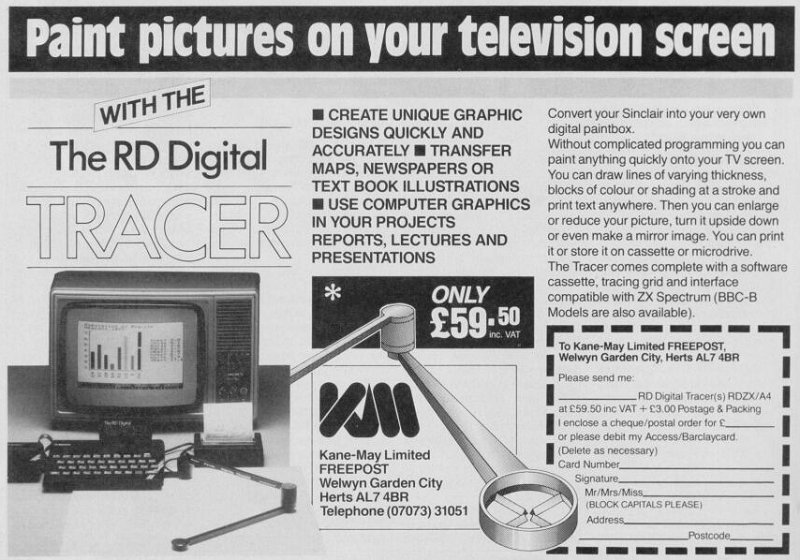
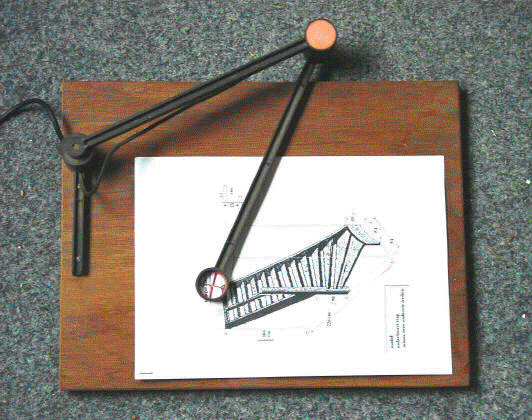
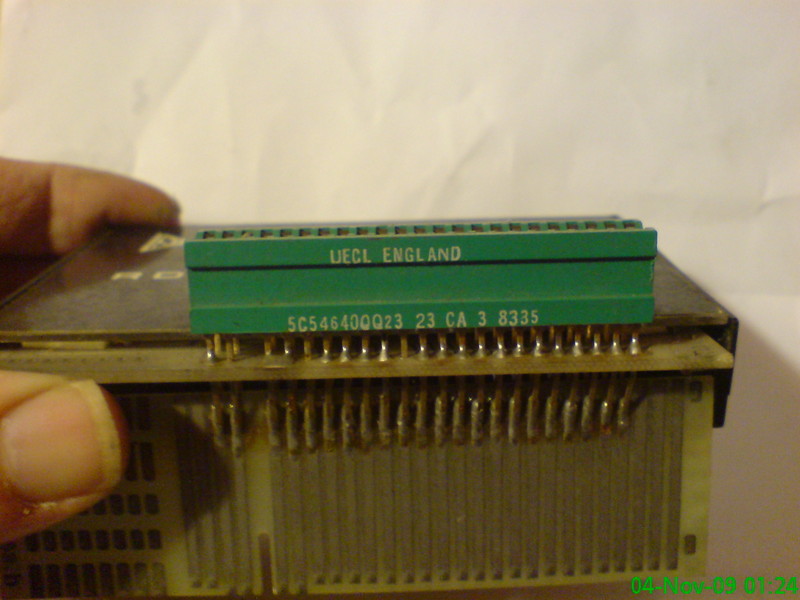
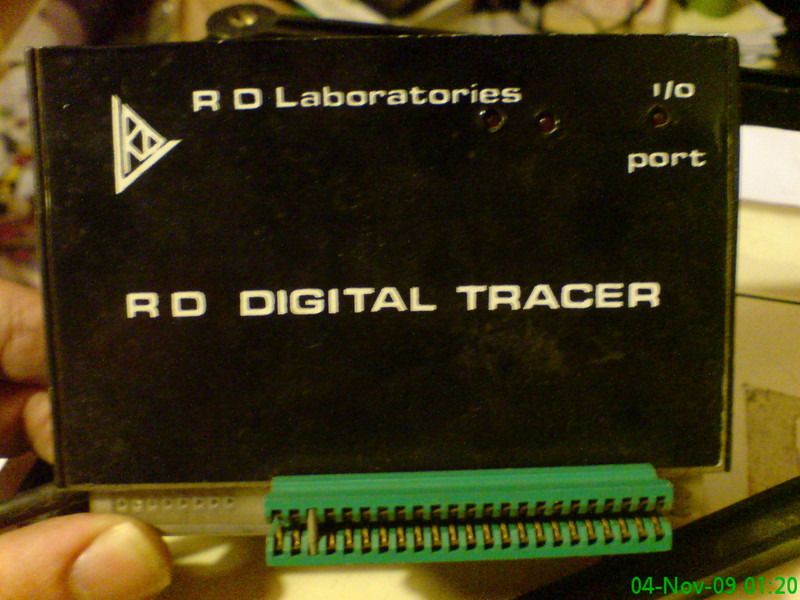
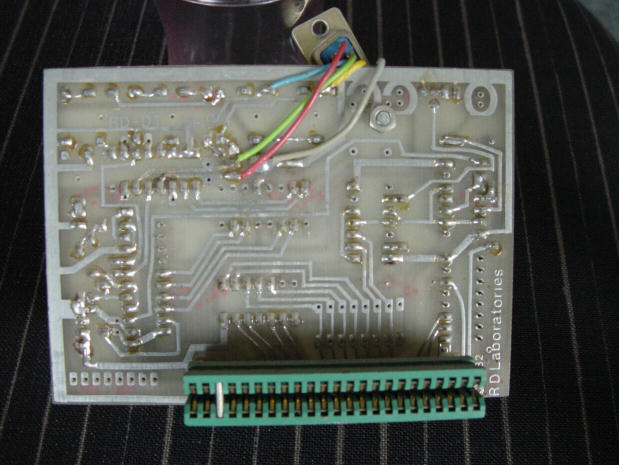
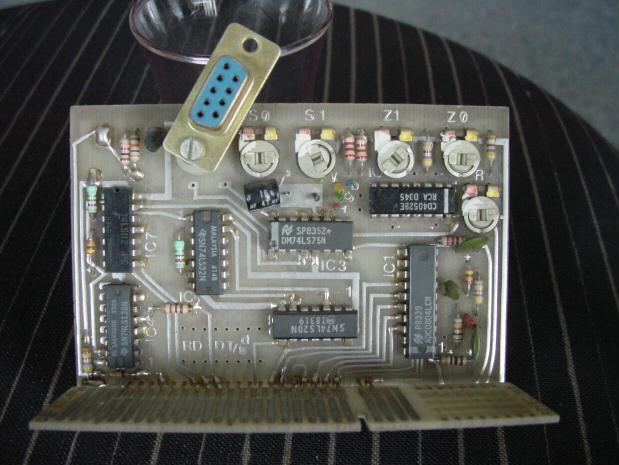
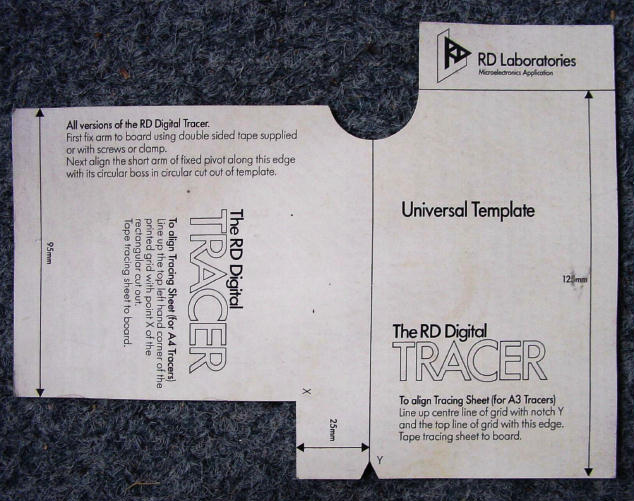
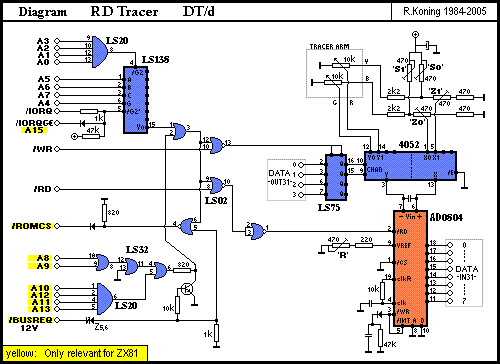
Tracer arm allows you to trace images direct to screen. "Convert your Spectrum into your very own digital paintbox. Without complicated programming you can paint anything quickly onto your TV screen. You can draw lines of varying thickness, blocks of colour or shading at a stroke and print text anywhere. Then you can enlarge or reduce your picture, turn it upside down or even make a mirror image."
Discussion
Nobody has started a thread about this yet.
Remarks
Came with a tape {RD Digital Tracer|RD Laboratories|0017475}.
Documents
- RDDigitalTracer_Manual.pdfScanned instructions 2,917 KB
Files and rights
No permission is on record either way. Screens and pictures are copied here on a take-down basis: if you hold the rights and want something removed, say so and it goes.
In the magazines 52
ZX Computing #22Dec 1985 · p.41
Colin Christmas
GRAPHICS '85 A comprehensive review of the state of the art by Colin Christmas. As we see this old year out and welcome the new one in, it's a better time than most to stand back and take stock. Looking back (and leaving the prophecies and predictions to others) it must surely be agreed that for Spectrum users with an eye on Graphics it has been a most exciting year. I can't speak for other departments but for me, it has been Christmas every issue. In this issue I want to do something special take a look at the goodies that have come our way. Our way? Who are We? We are the Graphics Grabbers, Artwork Addicts, Design Doodlers. For us the screen is a window on a world of colour, images, line, shape, pattern, design, texture, light and shade. And like a window it opens out into an exciting new visual world. For business, for profit, for learning for discovering or for pleasure. From the weekend dabbler or doodler to the serious professional, from the games enthusiast to the educational user, from beginner to experienced programmer and right across the age range, you will find Spectrum owners who are hooked on graphics. It's fairly formidable task - covering the range of Graphics Hardware and Software now available to Spectrum owners but let's get started. LIGHTPENS I've had most success to date, with the package from Dk'tronics. The pen itself is rather like a biro or felt tip pen. It is attached by a wire to a control interface which of course comes with the package. The interface is plugged into the back of the Spectrum. A program on cassette is included. The glass screen of your monitor is the working area and drawing surface, so some consideration has to be given as to whether this is the way you want to work. Then there are practical aspects such as the distance of your screen from your keyboard, and the fact that you have to work on a perpendicular 'face'. The height of the screen is therefore important if you do not want to suffer from muscle fatigue in your drawing arm. Lightpens give you a physical contact and interaction with your drawing surface if that is important. Calibrating the pen each time may prove a chore, but after that it's plainsailing - within the limitations of the power of the program. Again it's a good way of getting started or the very basics of graphics, of getting into the picture as it were. Sensibly introduced in the classroom it could be useful aid and introduction for children in an educational context. It is limited though in its potential for advanced or complex screen designs. Graphics Tablets give you similar physical point of con tact with your drawing-surface. This time it is horizontal and again a 'pen' is used. There's a review of the Saga Graphics Pad in this issue. So when you are ready look it up. They certainly take you further than the lightpen. But then you pay a lot more for the facilities they offer. Now for something almost completely different, the Sinclair LOGO pack. Another excellent starter, but as I have hinted, quite different. This pack has very obvious educational applications and for very young children. The founding father of the LOGO language intended it as a language for children which would develop logical thinking, introduce young minds to computer programming and have very definite terms of reference for the teaching and development of mathematical concepts. Drawing is achieved by moving a small graphics 'turtle' - a triangle - around the screen. This is done by sending through the computer commands known as Primitive Procedures (mostly single words and abbreviations of those words). Your sense of direction needs to be accurate and formulated mathematically. Once you have established procedures for drawing, say, a square, this group of procedures can be assigned a single word or name which LOGO will then understand as a command to repeat the whole set of procedures. The emphasis or bias is fundamentally mathematical, arithmetical or geometric. You do not just learn to draw a square, you also learn what makes a square what it is and from there the difference bet ween a square and a rectangle or a parallelogram. It is a language itself, apart from BASIC. Hence learning to use it is learning to program a computer in another language. The graphic aspect being displayed on the screen is part of the incentive and motivation for progressing with the new language. Two fairly weighty and comprehensive books or manuals are part of the pack. The first book deals exclusively with Turtle Graphics and is an absorbing and refreshingly different kind of programming experience. The second book acts as a reference manual for Sinclair LOGO, The growth, use and development of LOGO by Spectrum owners, especially in schools will, I think, be affected by the cost factor. When DREAM SOFTWARE released Computer Aided Designer, my own children had not had their Spectrum for long. They, like me were exploring the full graphics potential of the machine when C.A.D. turned up and kept us enthralled for days. Now, still an old favourite, I would recommend it as another in the 'Starter' category. With very obvious educational values and as a springboard for more ambitious projects later in Design. The manual is simple and very straightforward - alphabetically leading you through the twenty seven commands available in the program. Some forty custom shaped graphics, UDGs can be designed. By giving precise measurements most geometric shapes can be drawn, filled and so on. It remains impressive after all this time, and the potential for drawing in 3D is considerable. Similarly, another old favourite, VU-3D from PSION. This has the added and appeal of enabling the viewer to move around the object in 3D. Graphics and Design, pure and simple. High resolution colour and an incredible understanding of perspectives are real bonuses with this program. Future designers in the Aircraft or for that matter almost any other industry, may have started young with something like C.A.D. or VU-3D. I doubt if they would have been able to afford the RD Digital Tracer, from RD Laboratories. This is closer to an instrument than anything else I've come across in graphics and design hardware and software for the Spectrum. It comes in two versions, the Standard and the Professional. Both are fairly highly technical and sophisticated tools. The Tracer consists of a short fixed arm and pivot from which extends a drawing arm hinged at the centre with another floating pivot which moves across your drawing surface area. The arm is connected to the computer by a length of cable via an interface plugged into the rear port of the Spectrum. A cardboard template and transparent grid overlay are included for calibration purposes, the tracer is a precision instrument. The software cassette contains five programs. The usual options are offered in the first, plotting single points, construction of basic geometric figures, filling, hatching, change of ink, border, paper colour, adding text, UDGs and so on. The display image can be moved up, down, and from side to side, scaled up and down, and reversed. Multiple screen images including images at different scales and at different positions can be achieved. By adding other BASIC routines and software, the Tracer's capabilities can be extended into the field of statistical analysis. This immediately puts the Tracer into a specialist Graphics and Display category. Although the Tracer can be used with the ZX81 and 16K Spectrum, its full potential can only really be developed on the 48K and then only by competent programmers. It's a versatile instrument for the specialist. It's the season of Good will and all that, so why not give a last mention for all whose speciality is Games Designing. It's been around for a while, but standing the test of time in lots of ways. I'm referring of course to the High level User Friendly Realtime Games Designer from Melbourne House. Or as it is more commonly known, HURG. Still a powerful program and a very good manual. How did they do it in those all time greats like Pacman, Donkey Kong and Space invaders? H.U.R.G. will tell you how. It's a pretty good list of graphics goodies and that other seasonal expression comes to mind. 'There's something here for everyone.' You have no excuse for not knowing how and from whom in Spectrum Graphics, just how to enjoy the graphics power behind those buttons.
ZX Computing #14Aug 1984 · p.25
Colin Christmas
DESIGNS FOR LIVING Computer Aided Design - CAD - has come to the Spectrum. Colin Christmas reveals all... It's not an original prediction but I did reach it all on my own. It's simply this, that in the next few years there will be a rapidly increasing availability of Utilities and 'functional' hardware for home micro users like myself, and of Programs and Add-ons which can be used for educational purposes, for business, marketing, advertising and so on. Software and hardware which will soon put the small computer like the Spectrum alongside the text book and the audio visual aid on desks at home, in schools, colleges and the office of the small businessman. I did say it wasn't original and I know I'm not alone in reaching these conclusions. Other natives in the world of the home computer are becoming restless too. Playing games whether simulation, adventure or arcade poses the same problem as does taking sugar as part of our daily diet. We know we use too much. With that knowledge it's not difficult to cut down or to give it up altogether; "There's more to food and drink than the sugar, lad..." and there's more to a Spectrum or a ZX81 than games. Does anyone ask a Brain Surgeon to take out tonsils for the rest of his life? Does anyone spend hundreds of pounds on a camera to take holiday snaps? Surely the answer is, "Not if they've got any sense." What makes sense in this case of the Spectrum and computers like it is that we make the most of its' potential in the most 'user-friendly' ways. Two important areas being opened-up to home computer users now are to do with graphics and design, both vital to modern technology and industry. So much so that many Education authorities are now reorganising the traditional and separate basis of subjects like woodwork, technical drawing, art and craft. The new subject area is being called Craft, Design and Technology. It's an exciting development in educational terms. Teachers of this subject and amateurs like you and t know have access to materials once only available to those who could work with a main-frame Computer. If you're interested in graphics or design then I can recommend graphics pad, light pens and various 'draw' utilities to open up a new horizon for say the Spectrum. In particular, l can recommend the RD DIGITAL TRACER, from the range of equipment produced by RD Laboratories Ltd. This is one of many units enabling users to transfer information or images from paper to the TV screen. The least that can be said about such instruments and utilities is that they reveal and demonstrate the potential and capabilities of home computer colour graphics. There are two versions of the Digital Tracer. The Standard, (£55.50) and the Professional, (£75.50) the main difference as far as I can tell, is that while the Professional Tracer can be calibrated to work from an A3 size grid, the standard tracer can only cope with A4. A software cassette is supplied which contains 5 programs. The main program, with general purpose trace and draw features, plus 4 others, in BASIC and machine Code loaded automatically to the top of RAM. Programs 1 to 4 are suitable for both 16K and 48K machines and are recorded twice, once on each side of the tape. The 5th program is a composite on side one. You would get the same result by MERGING 2, 3, and 4 with the main program. This will only load on the 48K Spectrum. On side two, the 5th program is compiled from Programs 1, 2 and 3, and will load on the 16K. The Tracer can even be used with the ZX81 in a memory mapped code. The ZX81 programs appear as 2 printed listings in the instruction manual which comes with the kit. They will run on the 16 K ZX81 using POKE and PEEK to access the Tracer rather than IN and OUT. The first listing offers elementary drawing and printing facilities. The second provides recordings of coordinates for use in analytical programs. The Tracer itself consists of a short fixed arm and pivot from which extends the drawing arm which is hinged at the centre with a floating pivot joint. This gives a maximum working length of 250cm and an angular range of 0 to 110 Degrees. 0.9 metres of cable connects the arm to the machine via an interface with a 23 way edge connector which plugs easily into the rear port of the Spectrum. A cardboard template is supplied for positioning the tracing sheet correctly in relation to the arm. The arm has to be calibrated with the grid. After that you're away on your own. The manual is fairly clear and helpful, which is just as well because in order to get beyond the initial thrill of transferring outlines from paper to grid, you're going to need the manual for every next step. Border, Ink and Paper colours are easily changed. There's a choice of thick or thin lines too. Single points can be plotted and various common shapes - circles, straight lines, rectangles, semi-circles, right angles and so on, can all be simply and rapidly constructed by having to only define two points with the tracing heads. This is achieved by having access to a number of automatic routines. Complete outlines can be "painted in" or filled with any ink colour. There are two "hatching" effects at your fingertips at the same time. Text, graphics and UDG characters can be added to the screen display as normal, iNVERSE or FLASHing. Screens can then be saved on tape or copied on a printer. Previously drawn displays can also be loaded. And thus endeth only the main program. It's possible then to go on to achieve up and down movement of the display image, movement from side to side, images scaled up or scaled down, reversed left to right turned upside down or any chosen combination of these. As one might expect, the higher the magnification scale used, so resolution and accuracy suffer. Similarly scale reduction of the screen image will produce very fine and accurate detail. As if all this was not enough, it's possible to produce multiple screen images at different scalings and positions. Finally it is possible to create unique graphics characters which can also then be saved. The manual boasts that the unit can be used without any programming knowledge. This is true. However, more competent programmers are going to be able to go a lot further. The Tracer's capabilities can be extended by adding BASIC software, additional routines and so on. This way it is possible for graphical information to be used for statistical analysis by using the computer to process coordinates of images which have been transferred from originals. The only criticism of the manual concerns the kit for the Professional model of the Digital Tracer. The additional instructions necessary for the calibration of the tracer arm for the Professional should be incorporated properly in the manual itself and not merely included as a photocopied insert. The action of the Tracer Arm takes some getting used to as does the fact that rapid flowing movements, when achieved, do not transfer easily to the screen. All movements in fact have to be steady and deliberate. On top of this, it does seem at first to be expensive. With no pun intended, I think that the question of cost needs to be put into perspective and once in use in classrooms, laboratories and office, the Tracer will be the subject of speedy re-evaluation. One of the areas where it most certainly should have a use is in the introduction to, and then later, experimentation with the techniques of Computer Aided Design. Anyone involved professionally with Electronics, aircraft or vehicle design will have been familiar with this system for many years. But they used big computers to do it, and the whole approach was the province of the experts. This need no longer be true. And if the RD Digital Tracer seems altogether too daunting and the cost frightens you off, then I can recommend Computer Aided Designer for the 48K Spectrum from Dream Software, as one of several programs now available which will enable you to begin exploring the graphics potential of your machine, seriously and at a price you can afford. Designed to be user friendly for the beginner, compared to the Digital Tracer, (which would of course be rather unfair). Dream's package (Manual and cassette) can best be described as User Best - Friendly... It's a delight to use. Explanations and descriptions are kept short so that you can move quickly through the manual and familiarise yourself with the program. The program makes available 27 Commands and the manual takes you through them alphabetically, (thoughtful that!). The only way to do any kind of justice to this utility is to whizz through a few of them quickly. There are 5 options for designing custom shaped graphics - User Defined Blocks or Sprites. 40 can be constructed, each UDB being 24 by 24 pixels. Circles, parallelograms, rectangles, squares, triangles, can all be drawn to chosen sizes within the given Grid. 3D cubes and cuboids can be drawn automatically (calibrated in units of 16 pixels). Any shapes can be filled with colour. Paper and Ink colour can be changed at any time. The cursor square can be moved all over the grid using the cursor keys and should you find yourself in a corner, then the cursor square can be instantly centred. Straight lines can be drawn in 16 directions, 26 'User Points' can be assigned anywhere on the screen using letters A-Z and then you can trail lines through all or via selected numbers of them. Lines can be multiplied and joined to a point. Similarly 26 shapes, each containing up to 64 commands can be defined anywhere on the screen. And so on and so on... I have to confess to being grabbed by this utility. User friendly indeed. It takes only a short while to learn the 27 commands, and before you know it almost, you are engrossed in the experience as you enter the hitherto remote world of Computer Aided Design. All screens, sprites and designs can of course be dumped to tape We discovered that screens can also be loaded without first having to load C.A.D. by keying LOAD "" CODE 16384,6912. The potential for designing own title screens using C.A.D. is tremendous. Already much of this is kids stuff. And that's the point. It's getting difficult to keep up with them. Most start with Graph paper, designing screens, devising their own UDG's. Many have already discovered the disadvantages of trying to work on a 10 by 10 grid and companies like Computer Agencies Limited are now producing PIXEL PADS. These are large sheets of paper which contain several graphic aids, the largest part being a gridded screen representation, beneath which are several UDG squares. These squares are an 8 by 8 matrix and also, down the left hand side, the sheets have additional programming information necessary to get started, plus the facility to work in binary in order to enter the graphics as DATA statements. Not so very long ago, paper pen and ink took over from styluses and papyrus. I don't suppose anyone at the time considered it a dramatic development. It happened because the means was there. Later printing took over from the quill and the scroll. Felt tip pens joined crayons and coloured pencils. Each successive generation assimilates the facilities enjoyed by the previous generation with startling ease. It won't be long before using the techniques of Graphics and Design will occupy more of our time at home, in school and college when we sit down with our computers.
Crash #6Jul 1984 · p.102
Franco Frey
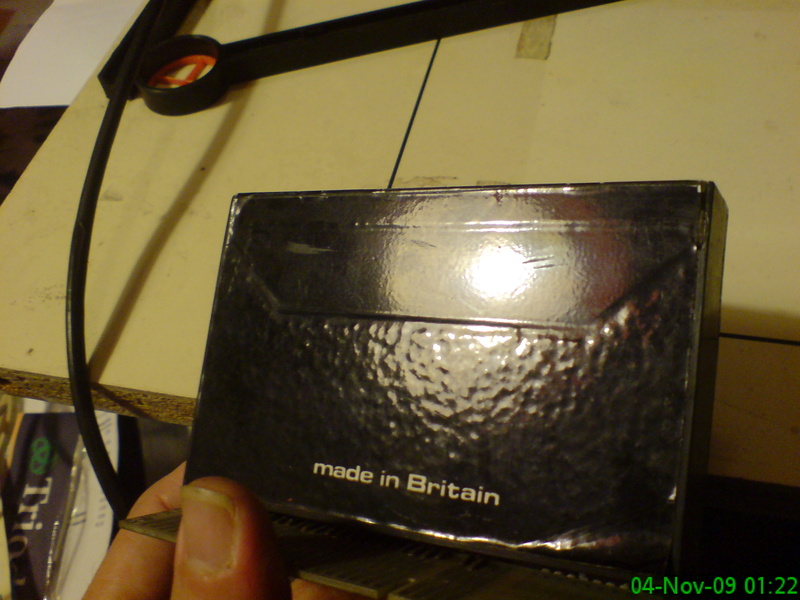
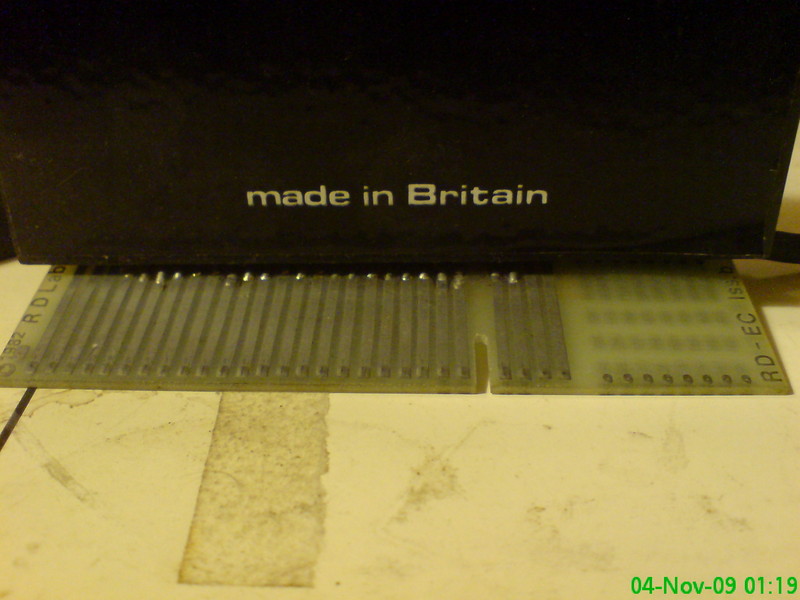
MAKING AN IMPRESSION Faced with the problem of copying an existing drawing, pattern or map on to the Spectrum TV screen, there would be little hope of a fast and simple job. Drawing grids, listing coordinates, rescaling and inputting either via suitable software or via light pen could simply take hours. Unless of course an RD DIGITAL TRACER were at hand. CONSTRUCTION The tracer consists of a double jointed arm with a hair cross sight at its end. The knee joints contain potentiometers which detect in combination with the supplied software the exact location of the hair cross in reference to the tracers base. The tracer interface unit does not inspire confidence, in fact the enclosure is constructed out of a standard cassette box and certainly doesn't reflect the high cost of the unit. Nevertheless the tracer performed immaculately throughout the test and proved reliable. INSTLLATION The tracer can reach a maximum tracing area of 300 x 300mm using automatic scaling, but the nominal area is 256 x 176mm for normal draw mode. The base is fitted in position with a damp or with the double-sided adhesive strip supplied. A template is provided for positioning the tracing sheet grid in the correct location. The interface of the tracer is plugged into the back of the Spectrum (with the power supply disconnected!) or into the extension port of the printer edge connection. The software cassette DT2 is loaded and the system is ready. SOFTWARE The cassette contains five programs: DRAW: All general purpose draw features including outline paint and copy. SCALE: The drawing is transferred to screen scaled up or down, reversed left to right and upside down and repositioned. RETRACE: Stores a string of drawing commands and coordinates for later retracing. In practical terms this means that it stores an outline drawing which can be recalled repetitively. GRAPHICS: Sets up an array of user defined graphics COMP: Comp 48 includes all four above progams. Comp 16 includes DRAW, SCALE and RETRACE. RETRACE, SCALE and GRAPHICS must be run from within DRAW and must therefore be merged with DRAW. The DRAW program prompts entry of background and paper colour and a flashing cross wire cursor displays the current position of the trace head. If the trace head is moved out of the tracing area, a warning BEEP will sound. A large or small or invisible cursor may be selected. Border, paper and ink colour changes, screen clearing, display of colour character grid, line erasing within character square, etc, facilitate the production of the drawing. Drawing can be accomplished either in normal mode by holding down key W (pen down) or in continuous mode (toggle key C). Pressing key E will create thick lines, while key Q plots single points. Special drawing functions are provided including straight line, quarter, half and full circle, rectangle and right angles. All these facilities permit rapid production of complex outline drawings. For area filling four different functions are available: key g: paints solids key F hatches (alternate horizontal lines) key D hatches (every third line) (Sym) M: Toggles shading limits (shading to edge) Text may be printed using key P for normal, key M for inverse and key V for flash after positioning the cursor at the desired print position. The screen display may be copied on the printer or saved on cassette at any time and recalled at a later date from within the DRAW programme for further modification. SCALE When operating the tracer with DRAW the drawing on the tracing sheet is transferred with a fixed nominal scale of 1mm to 1 pxel. With the program SCALE the display image may be moved up and down, left and right, scaled up and down, reversed left to right and turned upside down or any combination of these. Automatic scaling can be achieved by: Figure entry mode: by inputting the coordinates of the desired rectangle on the screen. Upon completion the cursor will move only within the confines of this rectangle when moving the tracing arm across the entire nominal tracing area. Drawn entry mode: The four coordinates are input automatically by the screen cursor. By indicating the lower left and upper right position with the screen cursor, the required area rectangle will be displayed temporarily or permanently. Single point entry: inputing a scale factor and positioning the trace head at a reference point on the drawing to be traced. The x and y coordinates may be read and input. RETRACE The program RETRACE stores consecutive points from the tracer, the x and y coordinates and the key pressed being stored in a string array. The program allows to trace many outlines, stores at different points in the array and to recall any one in particular commencing the retrace at the appropriate sample number. Up to 5,000 samples may be stored on a 48K Spectrum or 500 With a 16K memory. GRAPHICS DRAW enables text to be printed normal inverse and flashing including standard graphic symbols or UDGs. With GRAPHICS a new character set may be generated and saved to tape for later use. The current character set is displayed. Entering the letter to be changed the 8 x 8 dot matrix is displayed and the character may be redesigned with the use of keys 1 and 0. If an error is made while generating a line of the character it is possible to return to the beginning of that line. The programs SCALE, RETRACE and GRAPHICS must be merged with DRAW to operate. However the composite program may be loaded, which contains all the above mentioned facilities. The programmer may use individual routines from the utility program and merge them with his own. Furthermore he may add additional subroutines to be called by non-assigned keys and customise the program to suit his requirements. All this can be done in Basic and should not prove too difficult. A complete listing is provided for this purpose. CONCLUSION The RD DIGITAL TRACER runs rings round the usual drawing utilities with and without light pens. The tracing arm is definitely more easy and accurate to use than a light pen. However its application lies not in sketching and freehand drawing, but is limited to the copying or tracing of existing drawings. The extra features of SCALE, RETRACE and GRAPHICS increases the efficiency of the system and makes it the most versatile tracing utensil on the market. The only drawback is the price of £55.50 which makes it a rather expensive Spectrum add-on, and limits its application to the serious or well off Spectrum owner.
Personal Computer News #24Aug 1983 · p.41
Trevor Jones
PRODUCT: RD Digital Tracer HOST COMPUTER: 48K Spectrum PRICE: £55 incl. VAT CONTACT: RD Laboratories, [redacted]. SCREEN TRACER The RD Digital tracer opens doors to graphics tracing with Spectrum. Trevor Jones reports. Until the technology of the man-machine-interface catches up with what is depicted in science fiction, we will be limited to the more usual input devices for communicating with computers. When executing tasks that are not numeric or textual the limitations of the standard keyboard soon become apparent. The problem worsens when you try to enter freehand sketches or graphics into the micro. Most people make life a little easier by using some form of joystick or graphics tablet. An inexpensive alternative method is to use a digitiser to measure the position of a tracing head and turn this information into a discreet digital value which can be manipulated by the micro. The RD digital tracer is such a device. It can be used for graphics creation, or Computer Aided Design if you prefer. The RD digitiser consists of a base and two pivoted arms which move the two potentiometers that are used to sense the position of the tracing head. The potentiometers are connected to the electronic interface which is housed in an empty cassette case covered in black plastic tape. The unit plugs into the back of the Spectrum and is input/output mapped, therefore data acquisition is fast. There are four other programs provided which can be merged with the main draw routine. Scale is the first of these. This program allows you to translate your shape left, right, up or down. The shape can also be scaled up or down as well as perform multi-combinational operations, such as move left, increase size and invert. The retrace routine allows you to trace an outline, save it and alter it later. The x,y coordinates can also be used by the user in his programs. These coordinates are a representation of the pattern traced out on the screen. User defined graphics may be created, used and displayed simultaneously as other traced shapes on the screen, although the graphics facility would be used before tracing. FEATURES The background and foreground colour can be changed to any one of seven colours. Circles, semicircles, rectangles, straight lines, right angles and single points can be plotted easily by using the various control codes. Outlines of intricate shapes, such as maps, can be drawn and shaded in with two different types of patterns; you can also colour in the shapes that you have drawn. Text can be incorporated onto the graphics display in one of three modes:- normal, inverse, or flashing. PRESENTATION The tracer arrives in a container that bears more than passing resemblance to a shoe box. It was certainly robust enough to protect the unit, even if it was a little bland in colour. The user manual is a 24 page affair which details how to connect up the system, and the various facilities offered. The manual did not pose any great difficulty in terms of understanding how to use the system. An installation template and a tracing sheet was also provided. GETTING STARTED The digitiser is easy to use: all that has to be done is to push the 22 way adaptor onto the back of the Spectrum expansion port. Connections for the rest of the system are just as easy. Once the television and the cassette recorder are plugged in and you have loaded the control program, you can start to explore the potential of the digitiser. IN USE It's almost child's play to draw circles and rectangles using this system. All you have to do is specify the position of the start coordinate and the end coordinate, then your required shape will be drawn for you by pressing the appropriate control keys. To paint or shade in the areas drawn is just as easy, and the background colour can he changed without halting the program and reloading it. The documentation stated that this digital tracer was suitable for computer aided design. However, I was not too impressed at the quality of some of the lines. Some trial and error was called for while trying to determine the right speed at which to move the tracer's head to prevent wobbly lines. In the scale mode you soon realise that you don't get something for nothing. When you magnify an object you tend to lose out on the object's definition, conversely if the screen's display is reduced to a suitable level you can draw intricate details with reasonable accuracy. One point that I felt was missing is the ability to use a pencil or similar device in conjunction with the tracing head. This would have made such things as copying maps that much easier. Creating unique graphics certainly proved useful as I was able to create my own circuit symbols and use them in the main draw program. It was not possible to merge all the programs to be used at once on a 16K Spectrum, but on a 48K machine this posed no problem as there was ample RAM for user application or further subroutines that would enhance the supplied software. When trying to merge the programs they did not always merge at the first or even the second attempt. VERDICT This digitiser offers an inexpensive method of creating graphics directly on the screen. Overall the system provides a very comprehensive set of functions which proved easy to use. It also operated satisfactorily apart from the slight problem while trying to merge certain programs. Apart from this the hardware and software features of the system along with ease of use makes it a worthwhile investment.
ZX Computing #6Apr 1983 · p.31
ADDING ON YOUR SPECTRUM Our review team take a brief look at some of the hardware add-ons fir the ZX Spectrum. Now that the ZX Spectrum has well and truly established itself on the micro market, it is amply supported by a wealth of hardware add-ons. Most of these peripheral devices have been manufactured by the people who supported the ZX81, but just as the Spectrum has attracted new users with its prowess, so too has it attracted a new following from the add-on manufacturers. In this brief guide, we have not tried to cover all the devices currently available on the market but rather give you a flavour of the technology you can add on to your Spectrum. As joysticks are an obvious favourite, these have been covered in some detail whereas RAM packs are fairly standard and so have only been briefly touched on. Also included in this section area number of quite specialised add-ons like sound units and a digital tracer. If you own a Spectrum, you will no doubt have begun to realise the potential you hold in your hands. Over the next few pages you will hopefully see further applications for you and your computer to explore. DIGITAL TRACER - RD LABORATORIES The device from RD Laboratories must be singled out as special if only for its cheap price - this sort of technology has normally only been available for up-market computers. The Digital Tracer comes complete with an instruction booklet, a tracing sheet and a template which is used for alignment. The cassette supplied with the package includes four programs which can be used individually or MERGEd and used together. Using the programs you can plot individual points, draw lines, alter the background and foreground colours, shading areas enclosed by the tracer, printing and editing of text on screen. Thus, you could, using the Digital Tracer, transfer a picture or diagram to the screen, further develop it using the editing facilities, and then SAVE the screen to tape. In practice, however, the digital tracer is a little tricky to use. As you draw using the tracer, a crosshair target comes up on the screen, and by skillful manipulation, very accurate drawing can be accomplished. However, when you start trying to fill in areas of the screen, or adding fine detail to your drawing, it does get a bit awkward. Since the software is written in BASIC, rather than machine code, it would seem fair to lay the blame for any of the tracer's shortcomings at the software's door. Other programs on the cassette include a co-ordinates program which can be used to move an origin and x and y coordinates around the screen. Another program allows you to draw at a fast speed with the tracer, with the computer plotting the points at a slower rate. And the last program is used to define user characters, but is not intended for use with the tracer. All in all, a useful device which faithfully reproduces the drawing action on screen. The Digital Tracer is available at £49.95. For more details on this product contact RD Laboratories, [redacted].
The Digital Tracer from RD Laboratories.
Your Computer #1Jan 1983 · p.46
Simon Beesley
GRAPHICS TABLETS How often have you wanted to input a picture or a design straight into your home computer? Simon Beesley evaluates two products for the BBC and Sinclair machines which claim to allow you to do just that. The RD Digital Tracer enables pictures to be drawn or copied to the Spectrum's screen. It consists of a mechanical arm which is hinged at the base and the middle and can be mounted on a drawing board. At each joint of the arm there is an angular transducer. Signals sent by the transducers are digitised by an interface board, plugged into the rear of the Spectrum. The board has a connection to take a ZX Printer or Microdrive. The kit also includes a software cassette, an instruction booklet, a tracing sheet and a template for aligning the tracer with the tracing sheet. DRAWING PROGRAM Once you have loaded a drawing program you can transfer a picture to the screen by moving the head of the tracing arm. Probably the most important question to answer is how easy is it to transfer an outline to the screen accurately. The tracer picks up movements within an area 30cm, by 20cm. Since the Spectrum's resolution is 255 pixels by 175 this gives just over a millimetre per pixel. The arm certainly responds to movements this small, but achieving an exact screen copy depends more on how much fine control the arm's action allows. As with a joystick, the problem is to strike a balance between too much give and too much resistance: few people can manage to control a joystick steadily if it moves too freely, and, on the other hand, too stiff an action is equally likely to result in jerkiness. The RD Tracer scores quite highly in this department. Although the action is fairly free you can steady its movement by putting pressure on a pencil inserted in the tracing head. Four programs are included on the software cassette, which can be used alone or merged together. The main drawing program provides a number of plotting options and also allows you to use Spectrum Basic's plotting functions. Single-letter entries allow you to plot individual points or draw a continuous line, change the background or foreground colour, delete lines and print text. Among the other options is a facility for filling in or shading the area enclosing the tracer. The position of the tracer on the screen can be indicated by a small or large crosswire. You can draw a circle using the Spectrum's Circle command and define the centre and radius through the tracer position. The Spectrum's facility for saving the screen to tape is also available. THE PLOTTING MODES These and other plotting modes enable you to copy a picture to the screen as closely as the Spectrum's resolution and colour range permits. But putting a detailed colour picture on the screen could be a lengthy process. The programs are written in Basic and some of the routines are rather slow. For example, keyboard entries are not detected instantly and filling an enclosed area can make demands on your patience. Bursts of rapid sketching are too much for the tracer to copy faithfully. This is a software, not a hardware, problem. To be fair, the routines RD Laboratories supplies are adequate but machine-code versions would make the tracer much more effective. The software cassette also contains a program which prints the x and y co-ordinates of the tracer at the top of the screen as it moves and allows the origin and scale of the plotting co-ordinates to be changed. The third program provides a blind-drawing facility; points can be inputted at greater speed than normal and are then drawn at a slower speed. Lastly, there is a program to design characters which does not make use of the tracer and which is given free to the buyer. While the tracer has an obvious use in schools and could perhaps even find a place in an office, RD Laboratories say that they have taken at least 50 percent of their orders from home users. At a price of £49.95, inclusive of VAT and postage, this is the first such device to be produced which is suitable for low-cost micros. It will also work with the ZX-81 and two short programs are included for this purpose but the ZX-81's limited screen resolution gives it only a limited application. SOFTWARE SUPPORT RD Laboratories intends to support the tracer with more general-purpose and specialised software packages. Details from [redacted]. CONCLUSIONS Both devices allow a picture to copied to the screen accurately, if rather slowly. The Spectrum Tracer's price and light-weight construction make it suitable for the hobbyist and for use in schools. Software for the Tracer is adequate but could be greatly improved upon. The BBC Graphics Tablet has a more solid design which affords a greater degree of fine control. With appropriate software it could find a wider application, outside the confines of the home and classroom. The program supplied with the BBC Tablet is barely satisfactory and scarcely justifies its relatively high cost.
Advert25
- Your Spectrum #11Feb 1985 · p.26
- Your Spectrum #10Dec 1984 · p.40
- Sinclair User #33Dec 1984 · p.10
- ZX Computing #16Dec 1984 · p.144
- Sinclair Programs #26Dec 1984 · p.48
- Your Spectrum #9Nov 1984 · p.56
- Sinclair User #32Nov 1984 · p.142
- Your Computer #4Apr 1984 · p.148
- Your Computer #4Apr 1984 · p.212
- Your Computer #11Nov 1983 · p.192
- Your Computer #10Oct 1983 · p.152
- Your Computer #9Sep 1983 · p.178
- Your Computer #8Aug 1983 · p.118
- Sinclair User #16Jul 1983 · p.74
- Your Computer #6Jun 1983 · p.160
- Personal Computer News #15Jun 1983 · p.68
- Your Computer #5May 1983 · p.207
- Your Computer #4Apr 1983 · p.150
- Sinclair User #11Feb 1983 · p.41
- Your Computer #2Feb 1983 · p.94
- Your Computer #1Jan 1983 · p.95
- Your Computer #12Dec 1982 · p.76
- Your Computer #11Nov 1982 · p.58
- Popular Computing Weekly #27Oct 1982 · p.28
- Your Computer #10Oct 1982 · p.126
News/Note12
- ZX Computing #18Apr 1985 · p.50
- Sinclair User #35Feb 1985 · p.47
- Your Computer #5May 1984 · p.44
- Personal Computer News #23Aug 1983 · p.3
- Computing TodayJun 1983 · p.7
- Home Computing Weekly #15Jun 1983 · p.11
- Sinclair User #15Jun 1983 · p.14
- Your Computer #4Apr 1983 · p.33
- Sinclair Projects #3Apr 1983 · p.15
- Sinclair User #12Mar 1983 · p.25
- Sinclair Projects #1Dec 1982 · p.8
- Your Computer #11Nov 1982 · p.16
Full-page ad5
- Your Computer #3Mar 1984 · p.98
- Your Computer #2Feb 1984 · p.46
- Home Computing Weekly #50Feb 1984 · p.35
- Your Computer #1Jan 1984 · p.224
- Your Computer #12Dec 1983 · p.262
Feature4
- ZX Computing #22Dec 1985 · p.40
- ZX Computing #16Dec 1984 · p.83
- ZX Computing #14Aug 1984 · p.25
- ZX Computing #6Apr 1983 · p.31
Related
- Elsewhere
- WorldOfSpectrum
- Same entry at
- Spectrum ComputingZXInfo
Reviews from people here
Sign in to write about this, or make an account. It takes a minute and lets you correct the catalogue too.
Everything ZXDB can hold about this is here.
Sign in to correct or add to this.
Hold the rights to this and want it taken down?