
Saga 2001 Keyboard
Hardware: Keyboard
Saga Systems Ltd · 1987 · Pound sterling 119.95
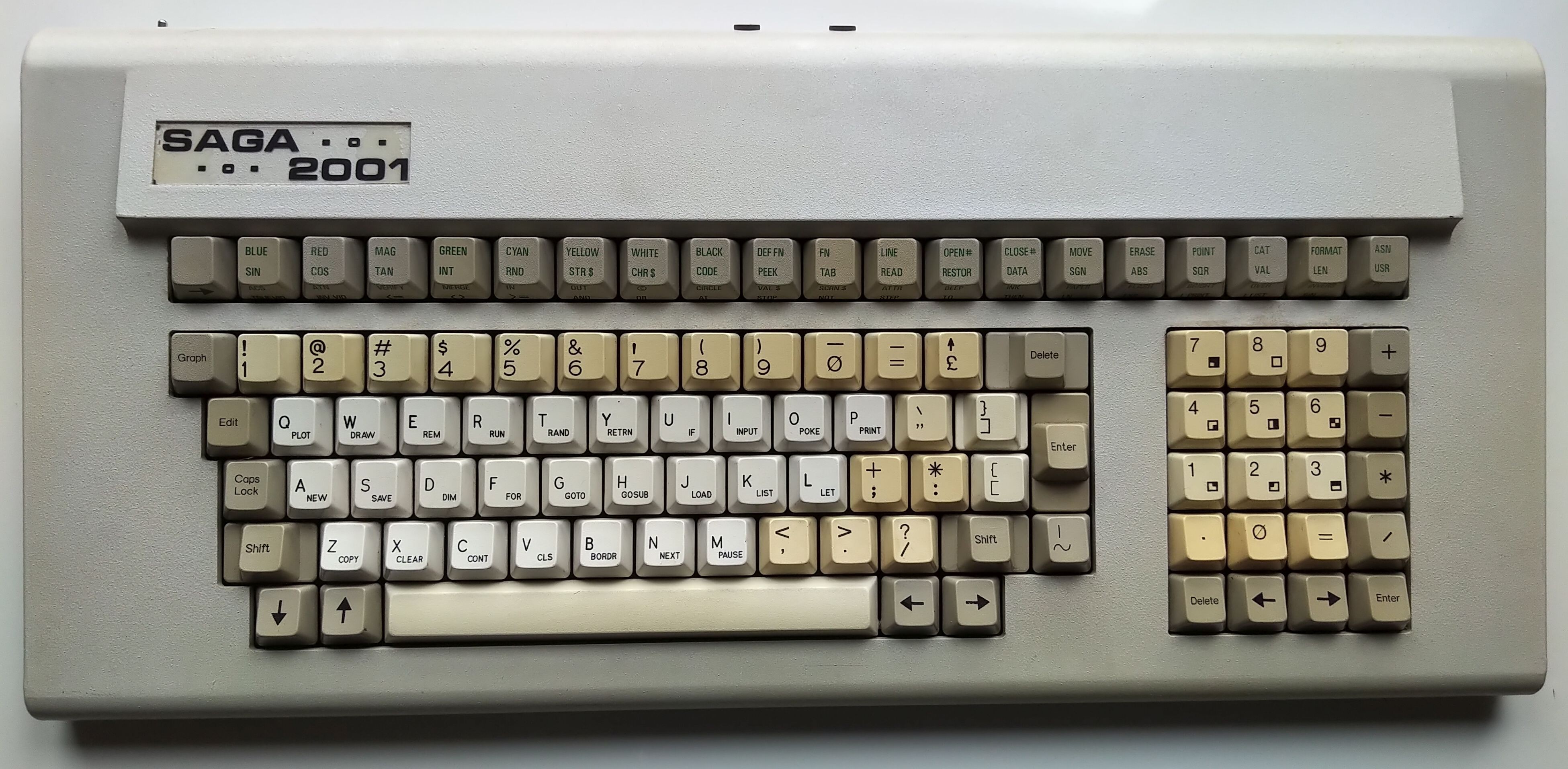
Infra red keyboard. No wires. 101 full travel keys.
Discussion
Nobody has started a thread about this yet.
Remarks
referred to as Commander keyboards in Albatross adverts
Files and rights
No permission is on record either way. Screens and pictures are copied here on a take-down basis: if you hold the rights and want something removed, say so and it goes.
In the magazines 87
C&VG (Computer & Video Games) #59Sep 1986 · p.88
Robert Schifreen
EXTRA BITS By Robert Schifreen Hi there! Extra Bits is back with a round up of all that's new in the world of hardware and peripherals for your micro. If there's any type of add-on that you'd like reviewed here then drop me a line care of the magazine. Also, if you've spent your hard-earned cash on a product that you now think was a waste of money, use this page to tell the manufacturer just why you don't think much of what they're producing! FREE WP FOR SPECTRUM Saga's range of keyboards for the Spectrum has recently increased. The latest is the model 2001 which uses infra-red light beams to link it to the computer, instead of a wire. Just like the remote control on a TV. So, for £119, you can use your Spectrum without having to sit down at the table. If your neighbour has a 2001 keyboard as well, you could always try pointing your keyboard through his window and taking control of his computer! Oh yes, and Saga are giving away a copy of The Last Word word processing program with the keyboard, which normally retails for around £15. Saga are on [redacted].
Sinclair User #53Aug 1986 · p.86
John Lambert
YOU'LL BELIEVE A KEYBOARD CAN FLY Ever since the launch of the Spectrum, people have complained about its keyboard. Not surprisingly the add-on keyboard market boomed to such an extent that even Sinclair joined in and brought out the Spectrum Plus, simply a rubber-key Spectrum in a 'better' box. Now Saga, that doyen of keyboard manufacturers, has released its latest - and possibly its greatest - keyboard. The Saga 2001 keyboard can only be described as completely over the top. Forty seven centimeters long, 99 printed keys and if that isn't enough, it connects to the Spectrum via an infra-red link. You can type away at the keyboard and have the TV so far away that you can't even read it. Saga has attempted to produce, and arguably succeeded, the ultimate word processing keyboard. And to press home the point it even supplies a copy of it's word-pro package The Last Word with it. Even without the infra-red gimmick, the 2001 is a good keyboard for typing. The main block of 49 keys is laid out with all the punctuation keys on the right - like a typewriter - with a separate numeric pad to the right of this and a row of 20 function keys along the top. The confusion starts, though, when you try to program using it. The 2001 hasn't got a Symbol Shift key, let alone an E mode key. Although many of the Symbol Shifted keys are available as single keys, many more, and nearly all the E Mode keys, are put on to twenty function keys at the top. To get it all on, each function key has four functions, reached by a combination of just pressing the key, using Caps Shift, or pressing the left-most function key first and then the key. None of the key sequences required appear to match the original Sinclair keyboard. Do you remember how long it took you to remember where all the functions were when you first got your Spectrum? It's like learning them all over again. This lack of an E Mode key also creates difficulties with some programs. In Tasword II for example, where you use E Mode to reach the alternate functions, without such a key you have to trick the keyboard into thinking you've pressed it by using one of the E Mode punctuation keys first. These keys also have to be pressed twice - once to get the character, and once more to get out of E Mode. Load up a game and you have another problem. The keyboard works by registering a key press and translating it into the necessary sequence of key presses to simulate it. For example press Function Key 20 and you get the keyword Usr. This one press has to be translated into the sequence: hold Symbol Shift, press Caps Shift, release both, press L. When the infra-red receiver is plugged in, the Spectrum's keyboard is automatically disabled so you can't even use that as a back-up. This receiver, a largish white and grey box, sits comfortably on top of the Spectrum. On the first production run of 2001s it connects to the Spectrum via a cable and box which goes into the edge connector. This fouls the power socket and so will be replaced on subsequent models. On the model I received this box was dead-ended, that is, there was no through connector for other add-ons. This may change on the later models, if not you will need a two-way adapter if you want to plug in a printer interface. Most mass storage devices, though, such as Interface One or the Technology Research Beta disc interface, have through connectors so they can be fitted without additions. Both, incidentally, work happily with the 2001. The keyboard itself and infra-red link is battery powered, using a rechargeable battery. For recharging a lead is supplied which connects to the receiver, the power coming from the Spectrum. A version of the 2001 for the 128K Spectrum is also planned. So what's it like to use? Very good, once you've got used to it. The keys are a little heavy compared to other Spectrum add-on keyboards, but very positive and the best I've used to date. For word processing the layout is as close to a normal typewriter as you'll find and, after all, 99 per cent of the time you use the letter/punctuation keys rather than the function keys. For programming and arcade games - adventure games are largely text entry - the keyboard does leave a little to be desired, largely because of the E Mode problem. The keyboard is definitely aimed at the dedicated, serious user who is just as likely to own a program such as Beta Basic, which allows keywords to be typed out in full. All you have to do now is scrape together the £119.95 to pay for it. The one thing it isn't is cheap. Saga Systems, [redacted].
Additional keys Graphics, Edit, Caps Lock, Shift, Delete plus four shifted cursor keys Punctuation keys = £ " ] ; : [ , . / " Shifted punctuation keys - / } + * { < > ? |
ZX Computing #28Aug 1986 · p.22
2001 - KEYBOARD OF THE FUTURE? Saga Systems £119.95 Saga are currently putting the finishing touches to the latest in their range of add-on keyboards for the Spectrum - the infrared controlled 2001. What's an infrared controlled keyboard? Well, for a start, it's one that doesn't require you to take your beloved Speccy apart and install it inside the body of the new keyboard. Work is still being done on the infrared link, but the prototype that we've been playing with gives a good idea of how the finished version should work, and it's impressive because of more than just the hi-tech infrared business. The 2001 keyboard is a complete unit in itself and requires no fiddling with screwdrivers to connect it to your Spectrum as it connects via an interface that plugs into the Spectrum's peripheral port like any other type of interface. The interface goes into the Spectrum and the keyboard is linked to the interface by infrared (just like some TV remote control units). What this means is that not only are you spared the bother of taking your Spectrum apart (which is a business that always worries me, not being very technically minded) and also voiding your guarantee, but you can also dispense with that miserable tangle of wires that clutters up your desk and makes life so awkward for Spectrum owners whenever they want to connect the machine to anything. You just set up your Spectrum as you would normally, and then, with the 2001 interface in place, you just shove it - wires, power supply, and all - onto a shelf somewhere and then settle down to work with your nice, tidy 2001 keyboard. Then, when you actually start to use the keyboard, you'll start to realise that there's more to the 2001 than just a load of infrared rays. Saga haven't just produced a unit with better quality keys and a few extra keys for numbers and punctuation, which is what most add-on units amount to. With the 2001 they've virtually redesigned the entire keyboard layout and entry system. The single letter and keyword entry system remains the same, but Saga have more or less done away with extended mode, and altered the fiddly symbol shift/shift plus extended mode system. SHIFTING KEYS Along the top of the keyboard (the rear row) is a row of keys for all the extended mode functions: if you want to enter commands like CODE, PEEK, TAB and so on, all you have to do is press the appropriate key - there's no need to press symbol shift/caps shift or anything else. These new keys also carry the various VIDEO and symbol shift functions, but because you only have to use the symbol shift key (sensibly positioned away on the left of this row) to get at these the whole business is much easier than on the Spectrum's normal keyboard (especially with the VIDEO functions which allow you to manipulate the attributes of what you're putting on screen - I've always found using these a horrendous business on the Spectrum, but the 2001 makes it simple). Furthermore, the way these functions are grouped together on the individual keys has been rearranged: normally the key for 'I' would carry that letter, the keyboard INPUT, symbol shifted AT, extended mode CODE and extended mode plus symbol shift would give you IN (and that's an indication of how awkward the Spectrum's entry system really is!). But on the 2001 the 'I' key offers just INPUT and the letter 'I' as usual, and all the other functions normally associated with that key are arranged on other keys on the back row of the unit. Because of the extent to which all the keys have been rearranged it took me quite a while to get used to the new layout, and I made lots of mistakes when my hand automatically went to press a key that was no longer there or did something totally different to its usual function, but the new arrangement is a definite improvement. Saga have even improved the layout over their own earlier keyboards: most punctuation symbols have their own keys and at last they've put the Delete and Edit keys in sensible positions. The 'calculator cluster", the group of keys on the right hand side of the board which deal with numbers and maths functions, has been enlarged over Saga's previous efforts: the block graphics characters are labelled on the number keys, all the obvious maths keys are there (/*-+) and separate Delete and Enter keys have been included. Mind you I would have liked the 2001 to have separate Stop and Break keys, and for one of the punctuation keys to be a little further from the Enter key, as I often found myself typing sets of quotation marks when I was trying to hit the Enter button instead. The keys themselves are noticeably smaller and closer together than on other Saga boards and I found that I often over stretched my fingers when trying to hit keys, but this is really just a matter of time and becoming familiar with the board. OVERALL Because you don't have to fit the Spectrum's circuit board inside it the 2001 is very slim and quite flat and looks like a 'real' computer terminal board, especially with that extra row of keys along the back. All in all, the 2001 is an impressive piece of hardware but though the £119.95 price tag isn't unreasonable considering what's gone into it, that is still a lot of money to pay for an add-on to a computer that probably only cost £140 itself. And, with Amstrad apparently ready to launch a 128 Spectrum with a 'proper' keyboard and built-in tape recorder for just £140, existing 48K owners could upgrade to a whole new machine for just another £20. If you're looking for an add-on keyboard then you couldn't do much better than this (though Saga's Elite 3 is still a strong competitor), but the 2001, for all its admitted excellent features, might very well have priced itself into a very small market.
Your Sinclair #7Jul 1986 · p.81
Max Phillips
SAGA 2001 A KEYBOARD ODDITY Max Phillips tries a new keyboard out. It worked better than he thought. It thrust him backwards to the year 1968. A year when you didn't eve have to sit near your Spectrum to it... FAX BOX Package: 2001 Keyboard with The Last Word Supplier: Saga Systems Price: £119.95 Reviewer: Max Phillips I'm writing this review on a Spectrum. Big deal, huh? Well, my Speccy is six feet away and facing backwards. If the truth be known. I'm lying back between my big Kef speakers, with my feet up, my hair down, Procul Harum on loud and the lights on low. I'd be wearing shades but it gets difficult to see the screen... It's done with a Saga 2001 'wireless' infra-red keyboard, the neatest and most laid-back way to feel at one with your magic machine. Yeah I'm six feet away and I'm typing faster and more accurately than I've ever done on a Spectrum. The 2001 is a positive monolith with 101 keys divided into a proper QWERTY section, 20 Basic function keys and a separate numeric pad with calculator keys. There's also a big box hanging off the back of the Speccy to tune-in to the late night finger broadcasts - that's why you have to turn your machine round! The ether-level connection is great; easily the most reliable and position tolerant infra-red system I've ever used. When the battery gets flat the 2001 starts doing its own typing - no problem, just hook up the cable and recharge the thing while you work. And, boy, can you move with this keyboard. The key action and layout are nigh-on perfect - having a proper typewriter bit means you can really hammer those characters in. So fast. In fact, that the clear ol' Spectrum can have trouble keeping up! Fortunately, lots of recent programs have keyboard buffering and will never miss a stroke - anyone feel like coding one up for Basic? The only big hitch is the fiendish way the shift keys are done. What's great about it is there's no double-shift system at all - you just hit the relevant keyword on the function keys (with Shift and/or a special arrow key) to get extended or symbol-shifted characters. The 2001 sorts out the relevant Speccy shifts and sends them all in one go - you never even see the E mode cursor anymore. Fast as this is, you're going to slow down when you try working out which keys you press to control any reasonably complicated program. What was Symbol-Shift S for SAVE might now be anything from DEF FN to TRUE VIDEO. Brain ache! And you're going to find games a bit weird as well - not only are you missing the normal shift keys, but the 200, unlike every other Spectrum keyboard, doesn't register several keypresses at once. Neither does it help when you discover that with the 2001 attached, the Speccy keyboard is as dead as a weekend in Tamworth. Wave goodbye to the made-up key codes like Symbol-Shift and Space while you're at it - you just can't do them on the Saga. So the 2001 is the ultimate in hip ways to use your machine and a real delight if you're using your Spectrum for word processing, databases. programming or playing vast adventures. But it's a pain that there's no normal CAPS SHIFT and SYMBOL-SHIFT to improve compatibility and it's not much cop for games. Plus it proves that useful bit of old wisdom; the best things in life may well be free but the good ones are flippin' expensive. So it goes. S'pose I'd better get up, slot another record in and turn the microdrive over.
HAVE TO GET THE LAST WORD IN... Saga has also taken on Myrmidon Software's wordprocessor, The Last Word or TLW to its friends. It's available separately or comes with the 2001 and Elite keyboards. There's definitely a run on Speccy wordpros at the moment; and TLW is well up with the competition.
Advert26
- Your Sinclair #14Feb 1987 · p.101
- Your Sinclair #13Jan 1987 · p.94
- Your Sinclair #12Dec 1986 · p.113
- Your Sinclair #11Nov 1986 · p.103
- Your Sinclair #10Oct 1986 · p.103
- Your Sinclair #9Sep 1986 · p.89
- Popular Computing Weekly #36Sep 1986 · p.56
- Your Sinclair #8Aug 1986 · p.22
- Popular Computing Weekly #34Aug 1986 · p.10
- Popular Computing Weekly #35Aug 1986 · p.14
- ZX Computing #28Aug 1986 · p.41
- Your Sinclair #7Jul 1986 · p.22
- Popular Computing Weekly #27Jul 1986 · p.10
- Popular Computing Weekly #30Jul 1986 · p.13
- ZX Computing #27Jul 1986 · p.99
- Crash #30Jul 1986 · p.44
- Popular Computing Weekly #25Jun 1986 · p.6
- Popular Computing Weekly #23Jun 1986 · p.33
- Popular Computing Weekly #24Jun 1986 · p.11
- Popular Computing Weekly #26Jun 1986 · p.10
- Crash #29Jun 1986 · p.78
- Crash #28May 1986 · p.105
- Popular Computing Weekly #21May 1986 · p.2
- Your Sinclair #5May 1986 · p.22
- ZX Computing #24Apr 1986 · p.37
Full-page ad26
- Sinclair User #56Nov 1986 · p.72
- Sinclair User #55Oct 1986 · p.94
- Sinclair User #54Sep 1986 · p.62
- ZX Computing #29Sep 1986 · p.91
- Sinclair User #53Aug 1986 · p.83
- Sinclair User #52Jul 1986 · p.99
- ZX Computing #26Jun 1986 · p.99
- Sinclair User #51Jun 1986 · p.78
- Your Sinclair #6Jun 1986 · p.75
- ZX Computing #25May 1986 · p.17
- Sinclair User #50May 1986 · p.75
- Your Sinclair #4Apr 1986 · p.16
- Sinclair User #49Apr 1986 · p.94
- Your Sinclair #3Mar 1986 · p.95
- Sinclair User #48Mar 1986 · p.91
- Your Sinclair #2Feb 1986 · p.95
- Sinclair User #47Feb 1986 · p.78
- Your Sinclair #1Jan 1986 · p.121
- Sinclair User #46Jan 1986 · p.44
- Sinclair User1986 · p.131
- Sinclair User #45Dec 1985 · p.57
- Your Spectrum #21Dec 1985 · p.81
- Sinclair User #44Nov 1985 · p.42
- Your Spectrum #20Nov 1985 · p.73
- Sinclair User #43Oct 1985 · p.49
Classified14
- Your Sinclair #38Feb 1989 · p.100
- Your Sinclair #37Jan 1989 · p.137
- Your Sinclair #35Nov 1988 · p.118
- Your Sinclair #34Oct 1988 · p.120
- Sinclair User #78Sep 1988 · p.94
- Your Sinclair #33Sep 1988 · p.110
- Sinclair User #77Aug 1988 · p.94
- Your Sinclair #32Aug 1988 · p.87
- Sinclair User #76Jul 1988 · p.102
- Your Sinclair #31Jul 1988 · p.103
- Sinclair User #75Jun 1988 · p.112
- Your Sinclair #30Jun 1988 · p.102
- Sinclair User #74May 1988 · p.95
- Sinclair User #73Apr 1988 · p.111
News/Note10
- Your Computer #9Sep 1986 · p.16
- C&VG (Computer & Video Games) #59Sep 1986 · p.88
- Sinclair User #53Aug 1986 · p.86
- Your Sinclair #5May 1986 · p.13
- Your Sinclair #4Apr 1986 · p.11
- Popular Computing Weekly #8Feb 1986 · p.5
- Your Computer #1Jan 1986 · p.29
- ZX Computing #22Dec 1985 · p.11
- Sinclair User #43Oct 1985 · p.45
- C&VG (Computer & Video Games) #34Aug 1984 · p.130
Feature2
- ZX Computing #27Jul 1986 · p.30
- Your Sinclair #7Jul 1986 · p.81
CompoEntry2
- Crash #23Dec 1985 · p.152
- Your Spectrum #19Oct 1985 · p.21
Offer1
- Sinclair User #53Aug 1986 · p.37
Review1
- Popular Computing Weekly #30Jul 1986 · p.13
CompoResult1
- Your Sinclair #2Feb 1986 · p.4
Reviews from people here
Sign in to write about this, or make an account. It takes a minute and lets you correct the catalogue too.
Everything ZXDB can hold about this is here.
Sign in to correct or add to this.
Hold the rights to this and want it taken down?