
Triton Quick Disc
Hardware: Disk
Radofin Electronics · 1985 · Pound sterling 119.00
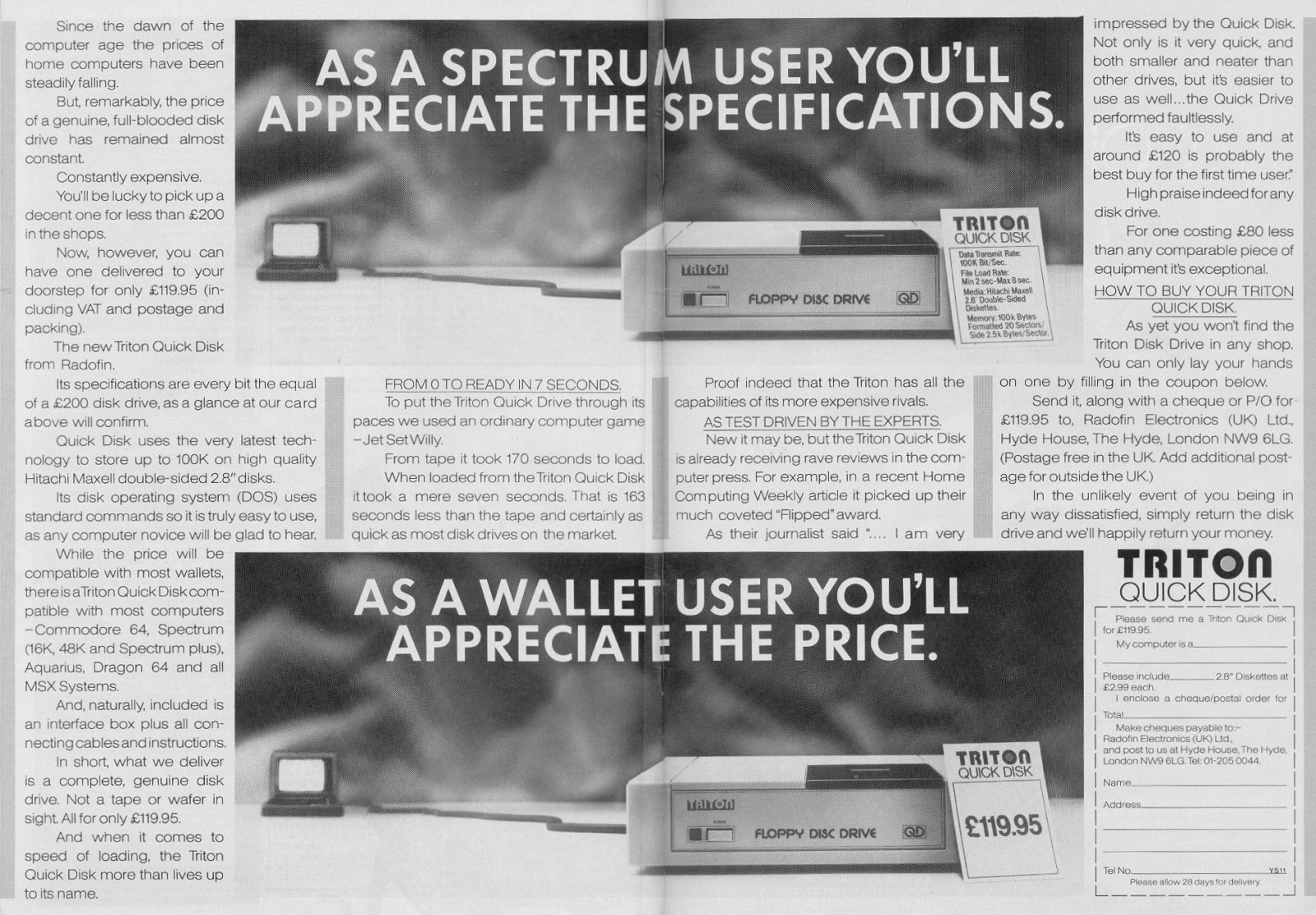
2.8" disk drive. Stores 100K per disk. Trasfer rate of 101 kbits per sec.
Discussion
Nobody has started a thread about this yet.
Remarks
2.8" disk drive
Files and rights
No permission is on record either way. Screens and pictures are copied here on a take-down basis: if you hold the rights and want something removed, say so and it goes.
In the magazines 15
Crash #21Oct 1985 · p.104
Franco Frey
THE EXPRESS GANG If you don't enjoy your tea while waiting for your program to load from the audio cassette recorder, or you're just generally of a nervous disposition, you will have considered acquiring an improved storage medium for the Spectrum. Most people reckon that they can transfer their games collection on this new acquisition and will be able to call off any desired game at the bat of an eyelid! Whoops, not quite so... Most storage devices require some sort of operating system, which enables the user to access the various functions. With the Spectrum this usually means that the operating system provides an extension of the BASIC instructions, without interfering with the normal cassette commands. These functions can thus be called up within BASIC and executed either directly from the keyboard or from within the BASIC programme. The commands are usually reminiscent of the BASIC Microdrive commands, but do vary quite a bit from disc system to disc system. The only other alternative access to the drive functions is via machine code, but unless the manufacturers provide the necessary information regarding the entry points to the various machine code routines, this approach may be impossible or of little interest to the average user. It may be noted that until recently none of the drives had a hardware triggered interrupt facility, which would allow the games program execution to be interrupted and the complete contents of the Spectrum memory to be dumped, a perfect way of copying cassette games onto disc/cartridge. The Microdrive in combination with the excellent Mirage interface manages to do this and the latest addition is the improved version of Technology Research's Beta Disk interface with TR-DOS V4. For the other interfaces, if the user knows what he is doing, there is the possibility of breaking into the program and manipulating it onto disc in various sections, but only if the operating system memory requirement does not interfere with the program execution area. The drives vary considerably in the memory requirements and some drives make it their business not to use a single byte of the standard 48K available to the Spectrum, an obvious advantage. In this issue of CRASH Franco Frey begins a survey of the Spectrum fast storage market which will include such mundane things as the Sinclair Microdrive right up to systems which make the Spectrum appear to be an add-on. Not all these storage devices belong to the desirable group of floppy disc drives. We review Microdrive/Interface 1 lookalikes such as the Wafadrive with its stringy floppy cartridges; the latest entry, the Triton, with its peculiar spiral track motion disc system and the horde of standard Shugart compatible floppy disc drives such as the Beta Disc, Kempston, Timex, and Opus. Many of these products include added benefits such as serial and parallel interfacing and some even provide joystick interfaces. The units will be individually reviewed and scrutinised right down to the last bolt or screw. We shall be specifically looking at the cost and performance of the individual storage media, the mechanical and electronic performance of the devices and, most important of all, how the operating systems involved interface with the good old Spectrum. So here comes the crazy Express gang.... TRITON QD HARDWARE: Large cream coloured disk drive unit with integrated power supply and mains lead connected via permanent lead to black coloured interface box which connects to the Spectrum system edge connection. Interface provides an expansion port for printer or other add-on. A slide switch is provided for drive selection. Interface 1 may not be connected to the system, as it uses same ROM configuration. SYSTEM DESCRIPTION: Although the TRITON QUICKDISK uses hardjacketed floppy disk media, it falls under the category of the stringy floppy systems, as the access is not random but sequential. Unlike the standard disk drives, where individual tracks may be accessed by positioning the read/write head with a stepper motor, the TRITON QD combines the floppy disk rotation with a continuous linear tracking of the head and thus creates a single spiral track along the disk similar to a record groove. The spiral is completed within eight seconds whereupon the linear motion disengages and returns to the start position. This means that consecutive access time is restricted to eight seconds. In general this works out faster than the Microdrive and similar to the Wafadrive. Formatting requires only one go and this means an extremely fast formatting time. The interface caters only for one drive and should a second drive be required, a second interface will have to be installed. OPERATING SYSTEM: Extended Basic residing in shadow ROM. SYSTEM COMMANDS: FORMAT <drive number> formats and initialises a diskette. CAT * <drive number> examines and displays file contents on screen: Bytes free, Filename, Type (Basic-b, Data-d, Machine code-m), Size (bytes) and Execution address. SAVE * <drive number>; b; "filename" stores BASIC program to diskette on selected drive number. SAVE * <drive number>; d; "filename"; <variable name> stores a data file to a diskette on selected disk drive. SAVE * <drive number>; m; "filename"; <starting address;, <ending addresss> stores a machine code program to a diskette on selected disk drive. LOAD * <drive number>; "filename" loads a file from diskette in selected disk drive. ERASE * <drive number>; "filename" deletes a program from diskette in selected disk drive. COPY * <drive number> TO drive number>; "filename" copies a file from one drive to the other. COPY # formats a diskette on drive 2 and block transfers files from drive 1 to drive 2. Neither copy command can be used in BASIC program mode. ERROR REPORTS: 13 error messages EXTRA FACILITIES: Second drive requires extra interface. MANUAL: Preliminary manual sufficient, contains most necessary information. APPLICATION PROGRAMS: None, but listing of utility included for transferring unprotected programs from tape to disk. CRITICISM: Slow access due to loop time. Fairly expensive for stringy floppy type drive without serial or parallel ports. COMMENTS: Longer life media compared to cartridge tapes. MEDIA: 2.8 inch hard jacketed floppy disk with write protect tab. Price £2.99 TECHNICAL SPECIFICATION: Number of drives per system: 2 Storage capacity (formatted): 100Kbytes (2 sides) Number of sectors: 20 per side Sector size: 2.5Kbytes Data transmission rate: 101.6 Kbits per sec Recording density: 4410 BPI TIMING: Formatting: 8 sec Cataloguing: 2.5 - 8 sec Loading a screen: 2.5 - 8 sec PRICE: £119 MICRODRIVE AND INTERFACE 1 HARDWARE: ZX Interface 1 stacks under the Spectrum and uses the Spectrum system edge connection. It includes a 9-pin D serial port connector and the LAN input and output sockets and provides also an extension port for further add-ens. The MICRODRIVE connects via a pluggable flat cable to the INTERFACE 1. Further MICRODRIVES can be stacked side by side. SYSTEM DESCRIPTION: The Interface 1 incorporates the Microdrive controller, a local area network (LAN) and a serial RS232 interface. Up to eight Microdrives may be accessed, with each having a formatted capacity of more than 85K. The system commands are incorporated as a BASIC extension in a shadow ROM. Two new concepts have had to be established, the CHANNELS and STREAMS. The various functional parts of the computer system are defined as channels to which data can be sent. There are seven types of channels, the keyboard (k), the screen (s), the ZX printer (p), the text RS232 interface (t), the binary RS232 interface (b), the network (n) and the Microdrive (m)). A network channel requires a station number "n"; x where x is in the range of to 0-64. A Microdrive channel requires a Microdrive number and a file name "m"; y; "name" where y is the Microdrive number (1-8) and the name is a string between 1 and 10 characters long. The routes along which data flows to and from the channels are known as STREAMS. There is a maximum of 16 streams #0 - #15. Apart from the four streams #0 to #3 the streams may be between any input and output channels. Streams #0 and #1 output data to the lower part of the television screen and input from the keyboard. Stream #2 outputs to the upper part of the screen but cannot input. Stream #3 outputs via the ZX printer, but cannot input. Stream channels have to be opened and closed for use. OPERATING SYSTEM: Extended Basic residing in 8K shadow ROM. SYSTEM COMMANDS: RUN automatically loads and runs after a NEW or after switching on any program stored under the name "RUN" in Microdrive 1. CAT [#x] displays an alphabetically ordered list of all files in the cartridge of Microdrive n. With the optional stream statement the catalog can be sent to the specified stream. LOAD * "m"; n; "filename" loads a program from Microdrive n with the name "filename" SAVE * "m"; n; "filename" [LINE x] saves a program to the Microdrive n under the filename. If the line statement is included, the program will automatically run starting from line x. VERIFY * "m"; n; "filename" verifies, ie compares the data of the just saved file on Microdrive n with the file still residing in RAM. MERGE * "m"; n; "filename" merges the program from Microdrive n with the existing BASIC program in RAM. ERASE * "m"; n; "filename" erases the program from the Microdrive cartridge in the specified Microdrive. FORMAT "m"; n; "name" formats the Microdrive cartridge on Microdrive n and gives it the specified cartridge name. OPEN #x; "m"; n; "filename" sets up a new channel "m"; n; "filename" and attaches it to stream #x. If a filename is not to appear on the catalogue, it can be protected by giving it a name beginning with the character whose code is 0. The file will not appear on the catalogue. PRINT #x, data outputs the print sequence data to the specified stream. The print statement can use three forms of separators: semicolon prints nothing; comma takes the cursor to the next half line and apostrophe gives a new line. CLOSE #x unlinks any channel from the specified stream after emptying the respective buffer. INPUT #x, data inputs the variable from the specified stream. INKEY #x returns a single character as a string from the stream if a character is available, and returns a null string if not. MOVE #x TO #y moves data from the source (x) to the destination channel or stream (y). This allows you, amongst other things, to make backup copies of data to another Microdrive and can also send complete files to the printer. ERROR REPORTS: Extensive with over 21 error reports. EXTRA FACILITIES: Local area network connects up to 64 Spectrum workstations. Serial RS232 interface with software selectable. Baud Rates from 50 to 19200 text and binary files. MANUAL: Comprehensive APPLICATION PROGRAMS: Demo program including printer server and network game. CRITICISM: Slow access time due to long search periods. Short cartridge life, occasional tape jamming by pinch roller. Non-standard RS232 connector (9-pin D) COMMENTS: Still the cheapest fast storage system. MEDIA: Microdrive cartridge using continuous loop tape (5m x 1.5mm) with write protect tab. Price £1.95. TECHNICAL SPECIFICATIONS: Number of drives per system: 8 Storage capacity (formatted) bigger than 85K Sector size: 512 bytes Recording density: approximately 500 bytes per inch TIMING: Formatting: approx 34 sec Cataloguing: approx 10 sec Loading a screen: approx 7.5 sec PRICE: Interface 1: £49.95 Microdrive: £49.95 (But look for special deals!)
Sinclair User #42Sep 1985 · p.40
QUICK DISC MAKES A CHANGE Considering the price of disc drives, the new Triton Quick Disc from Radofin - anyone remember the Aquarius? - Electronics Ltd looks like a good deal. For only £119.95 you get a disc drive and an interface for the Spectrum. First impressions can be deceptive but, and it is a big but, it does offer disc drive speed at a very reasonable price. As with other fast storage devices in its price range, the microdrive and wafer drive, it is dedicated to the Spectrum. Therefore, if you decide to change computer you will have to throw it away. The Spectrum interface is hard wired to the drive using just over 1/2 metre of cable. That is 5cm too short if you want to put the drive on the left of the Spectrum. On the side of the interface is a two position switch to denote first and second drive - the interface for the second drive plugs into the back of the first. The instructions say that only the second drive or a ZX Printer should be plugged into the interface, which is a problem if you want to add a printer or joystick interface. Unlike all other disc drives the 2.8in does not use concentric tracks but a spiral, as on a record. Despite that it is still quick, although not as fast as a normal drive, with most timings taking just a few seconds. Formatting takes eight seconds, CAT three seconds, saving roughly 10 to 15 seconds and loading well under 10 seconds. The instructions, which admittedly are provisional, say "...after 3 accessments (?), a few seconds rest is recommended.". Presumably they refer to the drive, not the user, but the instructions suggest that the drive is not up to heavy use. Each disc can hold 100K, 50K on one side, arranged in 2.5K sectors. The drive is single sided so the discs must be taken out and turned over to reach the other side. The commands used to access the disc are a re-hash of the microdrive commands. You can SAVE and LOAD Basic, code and data, FORMAT the disc, obtain a CAT, ERASE files or COPY them from one drive to another. They also contain some interesting anomalies. The command to save is SAVE *d;t; "filename" where'd' is the drive and Y is the type of file - Basic, code, data. To load any file you use LOAD *d; "filename." Despite scouring the manual - and not exactly being a stranger to disc drives - I could not find a way to save a Basic program so that it auto ran. The one good feature of the drive is that it only uses the printer buffer. That means you can clear down to as low as 24000 and still use the drive. Transferring your programs to disc is, therefore, made easier. For the price, and the ease of use, it is well worth considering but the commands are basic and not well thought out. Radofin Electronics (UK) Ltd, [redacted].
Your Spectrum #16Jul 1985 · p.24
Iolo Davidson
DISKO TECH Get the low-down on hi-tech. YS disk jockey, Iolo Davidson takes two new disk drives out for a spin. Prepare for a close encounter of the 3" kind! Mention disk drives and most people's minds immediately turn to thoughts of speed, but that's only one of the advantages. In fact, some disk drives won't even give you much in the way of speed. Some would say the major advantage of disk over tape, and especially over stringy-floppy tape cartridges (and they're pretty fast anyway), is the greater reliability and security of data storage. This is at least as important as fast access if you're using the disk for business - a loading error could mean financial disaster. The third advantage of disks is the filing system used by disk operating systems. It's true that stringy tapes, like the Microdrive, have a similar kind of thing, so this isn't exclusively an advantage of disk, but you certainly don't get it on cassette! The disk operating system, or DOS (you realise, of course, that some software houses, like Digital Research and Microsoft, are also DOS houses!), keeps a DIRectory or CATalogue of the programs or data files on each disk. You can use the DIR or CAT (Speccy uses CAT), command to see what's on a disk, and the other DOS commands allow you to SAVE, LOAD or ERASE files, without having to manually operate rewind, play and record controls. It's this that makes the real difference - it's quick and easy for your programs to use the disk to store and retrieve data - and not just the sheer speed of disk loading. The Spectrum disk drives we're looking at here share all the above advantages, though to varying degrees. The only real drawback is the price. It's not too much to pay for what you get, but it's still a lot of cash to splash out on what's supposed to be a peripheral. You probably ought to think twice about stumping up the readies if you're really only interested in nothing more than world record non-stop JSW marathons. YOU SPIN ME ROUND... Both these drives use the new smaller size disks, rather than the industry standard 5.25" workhorse. But it's not so long ago that the standard size was eight inches, and 5.25s were reckoned to be toys, so pay no attention to any dinosaur who pooh-poohs diddy disks. The new sizes, in the region of three inches, are every bit as good as 'real' disks, except for the amount of storage available per disk. Problem is, these three inchers cost at least twice as much as Microdrive cartridges or 5.25 inch disks, and sometimes a fair bit more. Perfection is unobtainable anywhere in the known universe (When did you last visit Castle Rathbone? Ed.), but I've seen nearer misses than these two. Certainly, both drives are more reliable than the Microdrive, but neither DOS offers much improvement on the arduous Microdrive syntax. If you already have one of Sinclair's little brown stringy spoolers (and assuming that it works for you), then suffer on - there's no point forking out again for something slightly better. Also, you can't connect disks and Microdrives at the same time, because the shadow ROMs clash. But, and it's a big but, if you're still using cassette and need more speed, or if your Microdrives treat you like they treat me, then either of these machines will give you fast storage and more reliability than Microdrives at only double the price. Transferring your own programs to disk is a doddle, but the commercial software that's designed to be copied to Microdrive or Wafadrive, is still going to give problems. Now, there are plusses and minuses on both drives. Of the two, I'd put my money on the Opus as it has more storage on line at one time and the extra interfaces. The Triton would fit different keyboards more easily, it didn't hum or overheat, and it was faster, despite a rather dodgy DOS. But, despite all my griping, these are both good products, not just the toy for the boy whose Dad has everything! OPUS DISCOVERY 1 If you're thinking seriously about a disk drive, it's quite likely that you'll already have invested in a proper keyboard - and no, I don't mean a Plus. Well, that's where you're going to hit the first snag with the Opus Discovery - it's constructed in such a way that the use of these add-on keyboards is extremely tricky. The computer sits half on a shelf, and you're supplied with a pair of stick-on feet to support the rest of the machine. Without the feet, you're magically transported back to the ZX81 days of Rampack wobble and white-out. There's a single fixing screw sited to suit both the Spectrum Plus and the original Speccy, but most add-on keyboards won't have a convenient hole in the right place. Some keyboard upgrades mount the computers circuit board too high from the keyboard's base, so that there's not enough room between the connector and the shelf on the Opus to fit the computer. The practical solution to the problem is to buy an extension ribbon cable to connect the two units - but that costs money, (unless you pinch the one from your VTX 5000 modem!). Some kind of flexible connection should've been a part of the original design, as it is for the Triton QD. This would've also made it much easier to get at the tape and TV sockets, which are otherwise jammed tight against the Discovery's case under the shelf. While I'm whining, suppose I'd better mention the Opus's power supply. The one on our review machine sure makes a bit of a hum. The drive itself is quieter than the Triton's, but the transformer providing the power is on all the time. Overheating's also a slight problem. It doesn't get dangerously hot, but with the case removed, I still found the transformer too hot to touch. I have a hunch that it was chosen for its ability to fit in the box rather than its output current rating. It's a very tight fit, jammed as it is between the bottom of the case and the actual drive. The problem is that fitting a more capable unit would've probably meant going over to a circular design. It's possible to fit a second drive into the Discovery 1 (or rather, have Opus fit it) whereupon it becomes a Discovery 2.1 do hope that they uprate the transformer at the same time. The Discovery uses the Sony-designed 3.5" disks - just feed them into the slot as if you were posting a letter. To get them out again, you press the eject button. This is a slick system and great improvement on large disk drives that require the manual opening and shutting of a 'door'. To use both sides of this kind of disk, the drive must have two heads, as you can't flip the disk over to get to the other side. The Discovery has only the one head, so the capacity of each disk is about 178K - half of what it could have been if both sides were used - but that's still more per disk than the Triton. You also get a good selection of expansion options with the Discovery. There's a joystick port, parallel printer output, composite video socket and a through connection for hooking your other peripherals to the Speccy edge connector. Unfortunately, the video output is in black and white only, and the printer port has an edge connector instead of a proper Centronics socket. The printer connection works in input as well as output, so you can use it to hook two Spectrums together - provided they both have Discovery 1 attached, of course. The DOS commands are mostly identical to those of the Microdrive. The bad news is that the Microdrive has a tortuous command syntax. But the good news is that this awkward syntax means Microdrive software works on the disks without alteration, provided it uses Basic for saving and loading. Machine code tricks using hook codes won't work, as the Discovery shadow ROM is different from the Microdrive's. Programs that have the facility to transfer to Microdrive 'should transfer to disk in exactly the same way' (it says here). The only program I own with that facility is Superchess 3.5 and it doesn't transfer, probably because it tries to do it in machine code. HiSoft's Devpac can save assembly language programs created with Devpac to Microdrive, and this also didn't work. The CAT command gives you a Microdrive-like catalogue, with just the names and amount of storage left on the disk. Not a patch on the Triton's comprehensive directory. The command syntax differs from Microdrive in one rather neat way, as it defaults to the "m" channel. This means that you can save four keyboards by omitting the "m"; (including the quotes and the semi-colon) in the LOAD *"m"; 1;"name" command. This is also the case with SAVE *, ERASE and so on. The Opus manual's a neat little production and shows that the Discovery hasn't been rushed into the market. Trouble is it just doesn't contain all the info required. It's good on the command structure you'll need to use the machine from Basic (in fact, better than the Microdrive manual at explaining some things), but it doesn't tell you about the amount and location of RAM used for disk and other channels and streams. This seems to be similar to the Microdrive system, with the DOS in shadow ROM and chunks of memory being inserted between the systems variables and the Basic program for print channels and so on. It seems though, that merely loading a file doesn't move the start of Basic like it does with Microdrives, but you're not told. You're also given all sorts of info and sample listings for using the joystick in your own programs. But the one item of info that you're actually going to need is that you should select the Kempston option from a game's joystick menu. Again, they haven't divulged this. Finally, one last added attraction. The Discovery can set aside the top half of the Spectrum memory as a RAM disk. This allows disk commands to be used on DATA files at memory access speeds without waiting for disk reads, once the files have been downloaded to the RAM disk. This is a pretty powerful technique when used on big 'PC' type micros with huge memories and although the Spectrum doesn't have a lot of room for the program when you have the RAM disk active, it's still good to have. TRITON QD QD stands for quick disk, a name given to the top-loading 3" version of the minidisk drive. This isn't the same as the Hitachi designed 3" disk used on the Amstrad, which is front loading and has a protective shutter. The top-loader is less widely used than the Sony or Hitachi type, so you may have trouble tracking down the disk - a point to bear in mind. There's nothing intrinsically wrong with the smaller disk, but there are differences. One is that the drive has a flip-up door that you slide the disk into and then shut, just like on a standard cassette tape machine. You turn the disk over to see the other side, again like a cassette. There's no sliding shutter to protect the magnetic surface. More importantly, the 3" quick disk is generally capable of less storage than the 3.5" though this does depend partly on the drive mechanisms. The Triton's 50K per side for 100K per disk is typical, and compares with Opus's 178K per disk. This limits the amount of storage that you can have active at any one time to, say, one large arcade game. The Triton file directory is more informative than that of the Opus, with info on file type (Basic, Code or Data), start address and size. Pretty essential stuff, this. After that advance on the Discovery, the QD starts slipping back. There are no interfaces for printers or joysticks, only a through connection for the Spectrum edge connection, which you're told to use only for the ZX Printer or another Triton QD. Mind you, I did manage to connect a Kempston interface - it doesn't fit properly physically, but it's all right electrically. The command syntax is neither usefully identical to the Microdrive syntax, nor a simplification. It's different enough to be incompatible with programs using Microdrive commands, but just as much of a chore to type. Some disk commands cannot be used within a program, and other must have a line to themselves. There's a default to the disk (there are no Microdrive type channels anyway) which disposes of the "m", but you must add a type specifier for Basic, Code and Data when saving. Plus, there's lots of opportunities for operator error built-in. You must not power-up the Spectrum before the disk drive, you must nor touch the (hair-trigger) eject button during a disk access, you must not access the disk continuously more than three times without a few seconds rest. In an ideal world, these mistakes would be made impossible by the hardware or operating system - not left as pitfalls for the user to avoid. If you've got the gelt, you can buy another QD and chain the edge connectors to run two disks at once. This'll probably be more expensive than adding a second disk to the Discovery, and it'll certainly take up a lot more disk space, as you can't stack a top-loading unit. The QD has its DOS in ROM and uses the printer buffer as workspace when loading and saving, so very little memory is used by the disk system. Most software shouldn't have any trouble with space, unless it has some of its own code in the printer buffer, like some tape copiers do.
DISKOGRAPHY Drive: Opus Discovery 1 Storage Per Side: 178K Storage Per Side: 178K Auto-Verify On Save: No No. File Per Side: No limit Simplest Case Syntax: LOAD *1; "name" Price: £199.95 Disk Type: 3.5" Sony Through Connector: Yes Other Interfaces: Printer and joystick Drive: Triton QD Storage Per Side: 100K Storage Per Side: 50K Auto-Verify On Save: Yes No. File Per Side: 20 Simplest Case Syntax: LOAD *1; "name" Price: £119.95 Disk Type: 3" Top-loading Through Connector: Yes Other Interfaces: None
Drive: Opus Discovery 1 Format Time: 20 sec CAT Time: 2 sec SAVE 35K Time: 20 sec LOAD 35K Time: 20 sec Erase 35K Time: 3 sec Drive: Triton QD Format Time: 9 sec CAT Time: 3 sec SAVE 35K Time: 15 sec LOAD 35K Time: 7 sec Erase 35K Time: 10 sec
Your Computer #5May 1985 · p.35
Various Disc Drive Triton £129 The Quick Disk is designed as a cheap alternative to floppy disc drives, with only a slight reduction in performance. There are three versions, Spectrum, Commodore 64 and MSX available, each priced at £129 with 100K 3in discs available at £1.99. The hardware consists of the disc drive and an interface box which plugs into the rear expansion socket of the computer. The performance of the drives is only marginally slower than normal disc drives. A file takes a minimum of one sector and there are 20 by 2558 byte sectors per side, providing a maximum of 20 files/programs per side. Data files may be transferred between the three types of computers using the discs. The drive repositions itself at its start position after every operation; this adds a further three to four seconds before the next disc access can be made, but does leave the head out of harms way and the data safe. The quick disks overall are slightly quicker than the Spectrum Microdrives and appear to be reliable. Command format is simpler than Microdrive, but only just. As the quick disk built in software does not take up any additional space in memory, most software can be converted to run on the quick disk very easily using the conversion program provided in the manual. There are a few problems with the Spectrum version - the only printer that can plug in directly is the obsolete ZX Printer, the Alphacom 32 does not work from the rear of interface. Interface 1 cannot be connected which loses the RS-232 port and modem facilities although a standard Centronics adaptor does work. The MSX and Commodore versions do not have to sell against competitively priced products and appear to be good value for money, the Spectrum version needs tidying up to produce a viable alternative to Microdrives and stringy floppies.
Two-page ad5
- Sinclair User #45Dec 1985 · p.54
- Sinclair User #44Nov 1985 · p.50
- Your Spectrum #20Nov 1985 · p.14
- Sinclair User #41Aug 1985 · p.58
- Home Computing Weekly #119Jul 1985 · p.24
News/Note3
- Sinclair User #42Sep 1985 · p.40
- Home Computing Weekly #106Apr 1985 · p.1
- Your Spectrum #7Sep 1984 · p.6
Letters1
- Your Computer #6Jun 1987 · p.13
Feature1
- Your Spectrum #16Jul 1985 · p.24
Review1
- Home Computing Weekly #112May 1985 · p.22
Related
- Elsewhere
- WorldOfSpectrum
- Same entry at
- Spectrum ComputingZXInfo
Reviews from people here
Sign in to write about this, or make an account. It takes a minute and lets you correct the catalogue too.
Everything ZXDB can hold about this is here.
Sign in to correct or add to this.
Hold the rights to this and want it taken down?