
CAD-Master Light Pen
Hardware: Graphics
Trojan Products · 1984 · Pound sterling 17.25 · Pound sterling 14.95 budget
Also known as Trojan Light Pen (English)
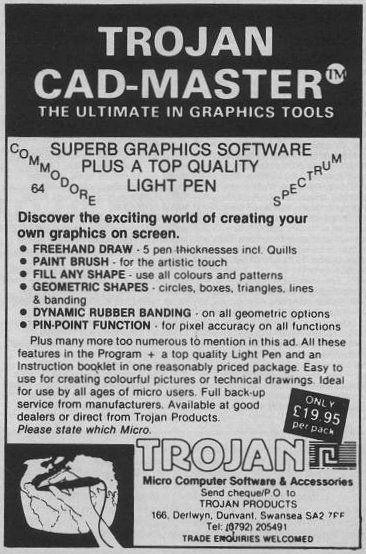
Create exciting graphics on screen.
Discussion
Nobody has started a thread about this yet.
Remarks
Came with the {CAD-Master - Light Pen & Graphics Software|Trojan Products|0007999} tape.
Files and rights
No permission is on record either way. Screens and pictures are copied here on a take-down basis: if you hold the rights and want something removed, say so and it goes.
In the magazines 66
Your Sinclair #27Mar 1988 · p.62
Phil South
RAGE HARD! You wanna know what's hardest in hardware? Once again YS whips out the magic screwdriver in our first hardware round up of '88. It's been ages since we did a really ripping hardware spread, so we thought it was about time. After a bit of barking at Phil Snout to get his screwdriver out and look at these beasts, we've pulled together a positive cornucopia of hoopy hardware and super software, to turn even the most soft-boiled trainspotter into a hard-boiled egghead. The star of our show is Miles Gordon Technology's Plus D disk interface, the only real alternative for tape users to upgrade to a +3, from the designers of the Disciple. Check out the review further on. Other contenders for the hardware crown are the Multiface family from Romantic Robot, the plastic pal who's fun to be with; a couple of wacky Multiplugs for those of you who work all your household appliances from one socket; an aerial switch so you can plug all your computers, game consoles and videos into your telly at the same time; and Computer Cupboard's nifty little Trojan Light Pen for you to scribble on your screen. Worra lorra lorra stuff. As well as all this hardware, we've got a brain-boggling selection of the most fascinating hardware-based software. So, let's cut the babbling and launch into the reviews. MGT PLUS D FAX BOX Product: Plus D disk interface Price: (Plus D only) £49.95, (with drive) £129.95 Supplier: Miles Gordon Technology, [redacted] A year ago Rockfort Products was marketing a sort of Interface 1 shaped disk interface called the Disciple. It was a very fancy bit of kit, as it goes, with a couple of joystick plugholes, a snapshot button for saving off screens or games, and a parallel printer port. This wangy little peripheral was actually the brainchild of Cambridge based Miles Gordon Technology. So when MGT decided to upgrade the Disciple and market it themselves, they looked very carefully at the mail they got about the Disciple and what people said about it. The result of their research is the new slimline, MGT Plus D. The joystick ports are gone, and the device no longer looks like an Interface 1. Actually it now looks uncannily like one of those flat joystick interfaces, with a button and power light on the top, and two flat IEEE type ports on the back for the disk and printer plugs. If you buy the unit as a package deal you also get a three and a quarter inch disk drive which is very slick and efficient. The Plus D is, to adopt the most massive critical cliche, a joy to use. It's fast, efficient and wholly reliable, and although it's rumoured that there are certain games it won't 'backup', so far we haven't found one. (Incidentally, info about what the machine can't do will no doubt be featured in the independant Disciple User Group Magazine, FORMAT, in the coming months.) The Plus D handles microdrive syntax (even the hook codes), so it can be used with a program which reads and writes to microdrives, without having to rewrite it. Using the button on the top you can print out a screen to your printer, save it to tape, or save the whole program in 48K or 128K modes. Some of the nicer features of the gadget are the ability to rename files, and boot a file in one of three ways; the usual microdrive way with all those asterisks and semicolons; using a LOAD D1 'FILENAME' format, the D1 bit meaning Drive 1; or by typing LOAD Pn, where n is a number. This is a special function of the Plus D, where each file has a number on the directory, and LOAD P1 loads the file numbered 1, LOAD P2 the one numbered 2. As well as this the computer can suss whether the file is a SCREEN$ or CODE or a Basic program from the entry in the directory. Neat, eh? Another item which should have been a feature of microdrive syntax in the first place (ahem!) is the wildcard. Basically, the Plus D can be as easy or as complicated as you want, and should fit into anybody's current setup, making it faster, more powerful and most importantly, a lot more fun. This really is, price-wise and facility-wise, one of the best alternatives to a +3 system yet devised. In summing up, it's nice to see so many good British products in this hardware lineup. There's not many computers you could say that of, and fewer that could match the quality and design of the peripherals represented here. HARD NEWS It's funny, but there's two distinct categories of equipment that we get sent for review. There are the things we review which stay around for a long time after because we like to use them in real life. And then there's the other stuff which we like a lot when it first comes in, but when all's said and done has no real application apart from novelty value. First category things are used until they disintegrate, but second category things tend to just sit around collecting thick layers of dust. And why are we telling you all this? Because all the things on these pages are first category things, items of equipment that are so useful we have to buy new ones when they break down. 1. Multiface +3 Romantic Robot £39.95 Probably top of this list of things YS couldn't do without is the Multiface family of gadgets from Romantic Robot. The most recent of these of course is the Multiface +3. Without this box there would be no screenshots in YS, or if there were, they would be fuzzy photos rather than the technically perfect inkjet dumps we use today. How is this done? Well, having fastened a Multiface to your computer you simply blip the red button on the top of the machine, and follow the menus to save the screen, which is then done automatically. There's a toolkit feature built into the unit, not unlike the previous Multifaces for 48 and 128K, which enables you to POKE numbers into addresses in hex or ASCII formats. The unit can also send shaded print dumps out through the printer port on the back of the +3. So if you've got a printer connected, the picture on screen comes out on the page. If you haven't, the bits just spill out over your desk (that's a joke, by the way!). 2. Multiprint Romantic Robot £34.95 This printing out of screens on proper printers is a trick favoured by the Multiprint interface, a dedicated printer box for all Spectrums to Epson compatible printers. As well as supporting all the usual Speccy syntax of LPRINT, LLIST, COPY etc, it also does a nifty line in various sized dumps, straight to printer. But more importantly, it is the only interface that allows you to reconfigure it while the computer is still running. That's to say you can print out a listing at one measure which turns out to be too wide, press the red button, change the width, line feeds, margins etc and return to print it out properly without having to reset the computer. 3. Smoothflow Multiplug Cambrian Distributors £23.99 Speaking of resetting the computer, has a spike in your mains supply ever found you just topping the highest known score on Outrun and looking like you're going to finish, when suddenly...PHUT! The lights in your room flicker for a moment and your Speccy resets? Could you do without this? Of course you could, which is why you need a snappy new Smoothflow Multiplug. This gizmo, made in the UK by Conblock, screws to your skirting board and accepts four wacky little micro-sized versions of the conventional 3 pin plug. So four into one will go! Now, not only will you be safe from surges and spikes (fnar fnar), but you can also plug your TV, tape machine, Speccy and modem, or indeed any four machines, into just one socket! Incidentally, if spikes don't really bother you, you can just take advantage of the mini plugs by getting a regular Multiplug. 4. Multiplug (Cambrian Distributors) £10.99 Yes, for just over a tenner you can get a four-way Multiplug like this one, which, like it's big brother, uses those dinky little plugs, but also is manufactured to British Standard 5733, so it won't go phut in your face. The same spec as the Smoothflow, but with no buffering for spike protection, so don't blame us if your computer crashes when the mad scientist next door plugs in his generator. 5. 3-2-1 Aerial Plug (Cambrian Distributors) £4.99 Doesn't it give you a pain in the neck switching around the aerial plug on the back of your telly with the RF lead on your Speccy. It does? And what about when you plug in your Nintendo to play Super Mario Bros? Well, it really started getting to us, so we got ourselves a 3-2-1 Aerial Switch to solve the problem. This little box is a three-into-one coaxial switch, which means it can either drive three switchable receivers from one aerial plug (a coaxial plug!) or can send three switchable RF signals to one telly. This means that using this box you can not only have your Speccy, game console and video going into the same telly and push the switch for which one you want, but also (if you had enough aerial cable) have a telly in three rooms and switch the aerial signal to each one depending on where you are! Not a bad little gadget, really, with low interchannel interference. 6. Trojan Light Pen Computer Cupboard £19.95 And finally, if you want to do professional Computer Aided Design on your Speccy, why not buy a Trojan Light Pen? When you buy the Cadmaster graphics system, you get this pen shaped device, which allows you to draw straight onto the screen. This can be very handy if you are quite good at drawing with a pen, but not so hot with a mouse or joystick. With this package you can do freehand drawing, boxes, circles, lines, triangles and rays. You can choose line thicknesses, quills, brushes and text styles, copy, paste, fill with patterns, wash, colour and dump to printers to your heart's content. The program is now compatible with all flavours of Spectrum, from Issue One wubber keyboards, to the new +3 (for £23.95), and is also compatible with microdrives and other media that use that format. It's remarkably accurate, and doesn't suffer from the wristache and slap/rattle sound effects you usually get from using Spectrum mice. The biggest recommendation of the product is that it's British and so all technical backup is available from a telephone number printed on the pen itself. In summing up, it's nice to see so many good British products in this hardware lineup. There's not many computers you could say that of, and fewer that could match the quality and design of the peripherals represented here. SOFT OPTIONS Music Machine Sound Sample Editor Quasar Software £9.99 cassette Although this isn't a legitimate Ram Electronics product, it does work marvellously well with the samples from this excellent sound sampling sequencer. Using key letters (the same as the Music Machine's little menus) to activate various buttons on the screen, you can change the pitch of a sample, alter the volume and actually edit individual points in the waveform. You can also equalise the sound, shifting certain harmonics to make the sound easier on the ear. Brill for the closet Jean-Michel Jarre. The Last Word Computer Cupboard £14.95 cassette Word processing isn't an application you immediately think of in connection with Spectrum computers. But with the advent of The Last Word, all that changed. A sophisticated full featured word processor which, due to the +2 and +3's new keyboard, makes any kind of writing a piece of cake. There's an 80 column screen, up to 148 characters line length, mail merge for those important mailshots. a calculator for you to do Apple Macintosh impressions on, and over 60 commands for you to input and edit the text to your taste. The code for loading and saving is even user alterable allowing you to customise it to your own system. Also available on +3 disk (£19.95). Tasword Plus Three Tasman Software £19.95 disk There can't be a Spectrum user who hasn't heard of Tasword. It has been the standard text editor on the Speccy for more years than this magazine can recall. And now, keeping up with the times as ever, Tasman has produced an extended +3 disk version of the popular word engine. The thing which makes Tasword such a belt to use it it's little on-line help pages, which means you can call them up while editing a document, just by pressing a couple of keys. Like The Last Word it's user alterable to your taste, and like it says in the blurb "now you can write a manual without having to read one." Who wrote that? Qualitas Plus Seven Stars £10.95 The worst thing about writing on a Speccy has always been the quality of print you get from a normal Epson type printer. Either you use the quick draft mode (Ooooo) or you have to settle for one typestyle in the NLQ mode. But now all that has changed. You can beef up your printer's output with Qualitas. Originally planned as an NLQ printout program for Tasword files, Qualitas has now had a Plus added, not to mention compatibility with Tasword Two, Three, The Writer and The Last Word. Now you can print out in the five fonts supplied with the basic Qualitas Plus pack, or you can lay out another £5.95 with the add-on Display Pack and have another 10 decorative fonts to play with. Y'see? Quality doesn't have to be expensive.
ZX Computing #27Jul 1986 · p.25
Carol Brooksbank
THE TROJAN PEN Carol Brooksbank puts pen to screen with the Trojan Light Pen. Trojan Products £14.95 If you always thought of a light pen as being attached to its own interface which plugs into the peripheral port, this one will be a surprise. The twin wires from the pen separate at the end. One has a miniature jack plug attached, and the other a connector plug for a PP3 battery. You load the software supplied, remove the 'ear' plug from the Spectrum and plug the pen in there. The battery simply hangs around on the end of the wire as you work. To be honest, it looks a bit Heath Robinson, and I have to put a question mark over the arrangement's reliability. The model we had to test started working intermittently after a couple of hours, but you could get it going again by pressing the connector to the battery or jiggling the wire. Perhaps it was just a poor connection on this particular instrument and not a symptom of an arrangement which puts too much strain on a not very strong connector. I hope so, because in other respects this is a very good light pen. THE SOFTWARE When the software loads, the menu appears and a light touch of the pen on the box alongside an option selects the one you want. There are three thicknesses of normal pen and two of italic, plus a dotted line and an airbrush. You select the ink colour direct from the main menu, but to select paper colour, you touch the pen alongside the colour, and then select the 'New' option which gives a choice of clearing the screen or returning. Either option takes you back to the main menu to choose the ink colour, but the second preserves your current artwork. You then select the drawing mode; freehand, circle, box, line, triangle, or ray, and you will go straight to the drawing screen. Freehand drawing is where a light pen scores over most software graphics packages, because you have control over the speed. With the Trojan you place the pen over the spot where you want to start and press '1' or 'space'. The key must be held down while you draw so your computer must be quite close to the screen. I found that you need to work fairly slowly or you run ahead of the cursor and it is almost impossible to return the pen to the exact spot to continue a line once you have broken it. The geometric options, box, triangle etc. are easier to position exactly. You place the pen where you want the start of a line, the first corner of a shape or the centre of a circle to be, press the key, and a one pixel cursor appears. Its position is given at the bottom of the screen in x,y co-ordinates and line and column numbers, and you can use the arrow keys to move it. This can be repeated with the circle circumference or the other corners of a shape so you can position it exactly. OPTIONS The Fill option is efficient, but very slow, almost like a BASIC fill. You have seven textures and solid colour to choose from and the current ink colour is used. If you choose a texture, it is filled first in solid colour and there is then a pause long enough to make you think you chose the wrong option before the texture appears. There is a Copy option, which offers a choice of small (which turns out to be the same size as the original), large, 2x height and 2x width. You place a box round the area to be copied, select the size and mark the bottom left hand corner of the new position. Again, the position is shown and the arrow keys can be used to adjust. This option is especially useful for varying the appearance of text, because the text option only offers the standard Spectrum typeface. If you need to erase, the E key will remove the last line or shape drawn. The erase option will take out everything drawn during the last option chosen, and the window option allows you to clear a selected portion of the screen, or you can clear the whole screen. Your artwork can be saved and loaded on tape or Microdrive, and the pen software can also be transferred to Microdrive. I suspect that the BASIC can be altered to use the pen with Wafadrive, and the handbook also gives a sample program to allow you to incorporate the pen operation into your own programs. You would not expect a light pen to be as sophisticated as the software graphics packages available, but although its options are limited, it is more accurate than I expected it to be. The ability to position lines and shapes with pixel precision is certainly useful. If you want to be the Rembrandt of the small screen you would probably use it to add the freehand drawing and stick to a graphics program for textures, colours and detailed work. But if you want basic drawing and colour facilities then this could be for you, and, above all, it is fun to use.
Sinclair User #49Apr 1986 · p.96
John Lambert
SHEDDING LIGHT Spectrum light pens have never really caught on. Until now most of the offerings have been wildly inaccurate or have flickered badly in use. The new Cadmaster from Trojan goes a long way toward resolving these problems. The main thing is that it works well. The drawing program, which is supplied with it, doesn't feature the whizz-bang, pull-down menus of the new Art Studio type of program, but it is more than good enough to produce some very acceptable results. The other advantage over Art Studio and a mouse is the price - £19.95. At less than a third of the price of the Art Studio package more people will be able to afford it. Using the pen is very simple, just point and shoot. On loading a menu screen is displayed, from this you can select with the pen the type of line you want to draw - thin, medium, thick, dotted, spray can or two types of quill. Various options are then available to draw freehand, lines, boxes, circles etc with the added advantage that the position can be fine-tuned using the cursor keys. Areas can be filled, albeit painfully slowly, in one of eight patterns, and there is a useful copy facility which allows you to to select part of the screen and to redraw it on one of four sizes. The finished masterpiece can be saved to tape or microdrive. The Cadmaster has a few disadvantages. Most operations require you to point and then press a key, which may be an awkward manoeuvre for some people. The pen also needs a PP3 battery to power it and though it will last over a year it is one more thing to remember. Overall, a commendable effort and one which should make Cadmaster the top Spectrum light pen. Trojan Products, [redacted].
Sinclair User1985 · p.27
HARDWARE WORLD With ever-increasing amounts of peripherals available for Sinclair computers, users are finding it more and more difficult to know what to buy. We present a buyer's guide to joysticks, keyboard and printers and review the best of the rest from the 1984 add-on market. The last year has brought about a vast change in the sort of add-ons available for the Sinclair machines. Many are technically brilliant while some would have made Heath Robinson blush. There are few add-ons still being produced for the ZX81, with even fewer new ones, but there has been an avalanche of Spectrum designs, and the start of what promises to be an interesting range for the QL. The most popular areas of interest - printers, joysticks and keyboards - are dealt with in separate sections but there have been some very innovative designs produced in other areas. TROJAN LIGHT PEN If you prefer a more immediate means of putting graphics on the screen then the light pen from Trojan Products may be the answer. The pen is supplied with driving software on tape which allows you to draw pictures or to choose from a menu. Once the software has loaded the pen simply plugs into the EAR socket of the Spectrum, it takes its power from a PP3 battery that is also supplied. On screen you are given the option of drawing or instructions. The instructions show how to use the pen and also how to modify it to use in your own programs as a menu chooser. All that needs is about 20 lines of Basic and 200 bytes of machine code, both of which are given. When using it in that way the code gives a number that corresponds to the line number to which the pen is pointing. In that way it is easy to pick from a list of options. The drawing program has two movable points and by using these you can draw lines, circles and boxes, fill areas with colour or even draw freehand. Other options allow you to load and save pictures, change colours, insert characters or copy the screen to a Sinclair printer. The pen works well and is easy to use, overall a well thought out product. Light Pen, £17.25 inc. VAT and p&p, from Trojan Products, [redacted].
Crash #3Apr 1984 · p.92
Franco Frey
THE TROJAN (WORK) HORSE Having reviewed a software oriented drawing program in the last issue of the magazine (PAINTBOX from Print 'n' Plotter), it seemed irresistible to take a closer look at one of those trendy light pens which supposedly turn your TV screen into a versatile drawing board. The Trojan light pen comes neatly packaged in an ex-VHS plastic cassette box containing the magic wand, which could easily be mistaken for one of those promotional biros (it even includes address and telephone number) if it weren't for the protruding cable terminating into a battery clip connector and plug, a 9V PP3 battery, the utility program cassette and the instruction leaflet. The program is loaded in the usual way and prompts you after auto-running. The cassette recorder plug (EAR) is removed from the Spectrum and swapped with the light pen plug. The battery connector is clipped onto the PP3 battery. The fun may begin. The light pen provides two independent functions. Its first use is as a fast menu pointer, enabling the computer operator to make a selection of available options just by pointing the pen at the specified line position on the TV screen. The program explains in detail how to incorporate this facility into your own programs. Required is a 200 byte long machine code routine which has to be copied and saved. This routine is accessed by two basic programs: One required for the calibration of the light pen to the individual TV set and the menu selection program, which returns the line number in form of a variable PL. The selection works every time and is reliable and fast. Only criticism is the fact that the machine code routine seems to be not relocatable and must therefore be saved in memory location 59400: SAVE "mc" CODE 59400,200 Its second use is as a high resolution drawing pen. After selecting HIRES DRAW you are confronted with a simple pen alignment routine which gives way to a menu line display. To select a function you just align up the pen with the letter or the blank space on the right hand side and press key 1. A white cursor will travel to the point selected and the option is selected. The menu line incorporates the following functions: M - Move the main cursor. Once selected the program prompts you to position the pen in the desired position and to press 1. S - Secondary cursor for line, box and circle routines. B - Box with M and S as opposing corners. CO - Copy screen to printer. C - Circle with centre point M and radius ABS (M-S). D - Draw. After selection position pen at desired starting point and press 1. A flashing cursor controls your writing speed: Do not move pen outside flashing cursor area or the line draw facility will not be able to follow the pen movement. CR - Print characters with M as starting point. E - Erase last action. F - Fill area designated by M. Upon selection a colour menu will appear on the screen. I - ink colour selection. L - Draws line from M to S. N - New clears the screen to the current paper colour. P - Paper colour selection. T - Saving or loading screen content. The light pen performed satisfactorily with all functions, but it was found to be very sensitive to the light conditions: The TV brightness had to be adjusted for optimum results and the TV set not exposed to any glaring sunlight. The draw facility suffers from its usual setback with light pens of not being able to locate the writing position accurately enough for high resolution drawings and the drawing of straight lines in this mode requires a lot of practice and skill. Paper colour selection allows for instant colour switching, but also creates the usual confounding problem caused by the character mapped attribute resolution. Ink and paper colour will clash if not worked out within the confines of the attribute boundaries. The colour fill facility displayed the usual speed, but appeared never to crash even if the area to be filled wasn't 'airtight': the routine would escape from the leak and fill the entire surrounding area and give a triumphant bleep of approval upon completion much to the dismay of the screen designer. Using erase however clears up this mess and gives you a second chance. Obviously the light pen has its limitations for freehand drawing due to the inaccuracy of positioning the pen on a pixel level, but then no one should expect to be able to draw to such a high resolution on the curved TV screen at an uncomfortable angle and with possible alignment errors. It is left to the individual to accept this limitation or to forfeit the freehand drawing for a cursor controlled drawing routine. Certainly the menu selection facility is very elegant and can obviously be incorporated into one's own programs. For the ultimate professional screen creations it is still necessary to revert to the primitive paper grid pad design where the original artwork has to be simplified and coaxed into the confines of the pixel and attributes grid of the Spectrum and input via binary or decimal code direct into the screen memory area. The light pen certainly is a lot more fun to handle and should at least convert your TV screen into an amusing and versatile sketch pad.
Advert48
- Your Sinclair #36Dec 1988 · p.25
- Your Sinclair #27Mar 1988 · p.64
- Sinclair User1986 · p.75
- Computer Gamer #7Oct 1985 · p.56
- Computer Gamer #5Aug 1985 · p.55
- ZX Computing #20Aug 1985 · p.39
- Electronics & Computing MonthlyAug 1985 · p.43
- Computer Gamer #4Jul 1985 · p.49
- Your Spectrum #16Jul 1985 · p.35
- Sinclair User #39Jun 1985 · p.116
- Home Computing Weekly #112May 1985 · p.15
- Home Computing Weekly #114May 1985 · p.33
- Personal Computer News #106Apr 1985 · p.45
- Home Computing Weekly #108Apr 1985 · p.20
- Home Computing Weekly #110Apr 1985 · p.26
- Popular Computing Weekly #9Feb 1985 · p.32
- Personal Computer News #95Jan 1985 · p.35
- Popular Computing Weekly #3Jan 1985 · p.14
- Games ComputingDec 1984 · p.54
- ZX Computing #16Dec 1984 · p.149
- Popular Computing Weekly #51Dec 1984 · p.52
- Popular Computing Weekly #49Dec 1984 · p.21
- Personal Computer News #92Dec 1984 · p.28
- Popular Computing Weekly #45Nov 1984 · p.37
- Popular Computing Weekly #47Nov 1984 · p.58
News/Note4
- Sinclair User #61Apr 1987 · p.20
- Sinclair User #49Apr 1986 · p.96
- Your Spectrum #5Jul 1984 · p.5
- Sinclair User #27Jun 1984 · p.31
Feature4
- ZX Computing #35Mar 1987 · p.26
- Sinclair User1985 · p.26
- ZX Computing #16Dec 1984 · p.84
- Computer ChoiceMar 1984 · p.68
Letters2
- Sinclair Programs #29Mar 1985 · p.7
- Your Spectrum #9Nov 1984 · p.14
CompoResult1
- Home Computing Weekly #114May 1985 · p.5
CompoEntry1
- Home Computing Weekly #109Apr 1985 · p.7
Review1
- Popular Computing Weekly #33Aug 1984 · p.15
Reviews from people here
Sign in to write about this, or make an account. It takes a minute and lets you correct the catalogue too.
Everything ZXDB can hold about this is here.
Sign in to correct or add to this.
Hold the rights to this and want it taken down?