
Competition Pro 5000 Joystick
Hardware: JoyCommon
Kempston Micro Electronics Ltd · 1983 · Pound sterling 25.00
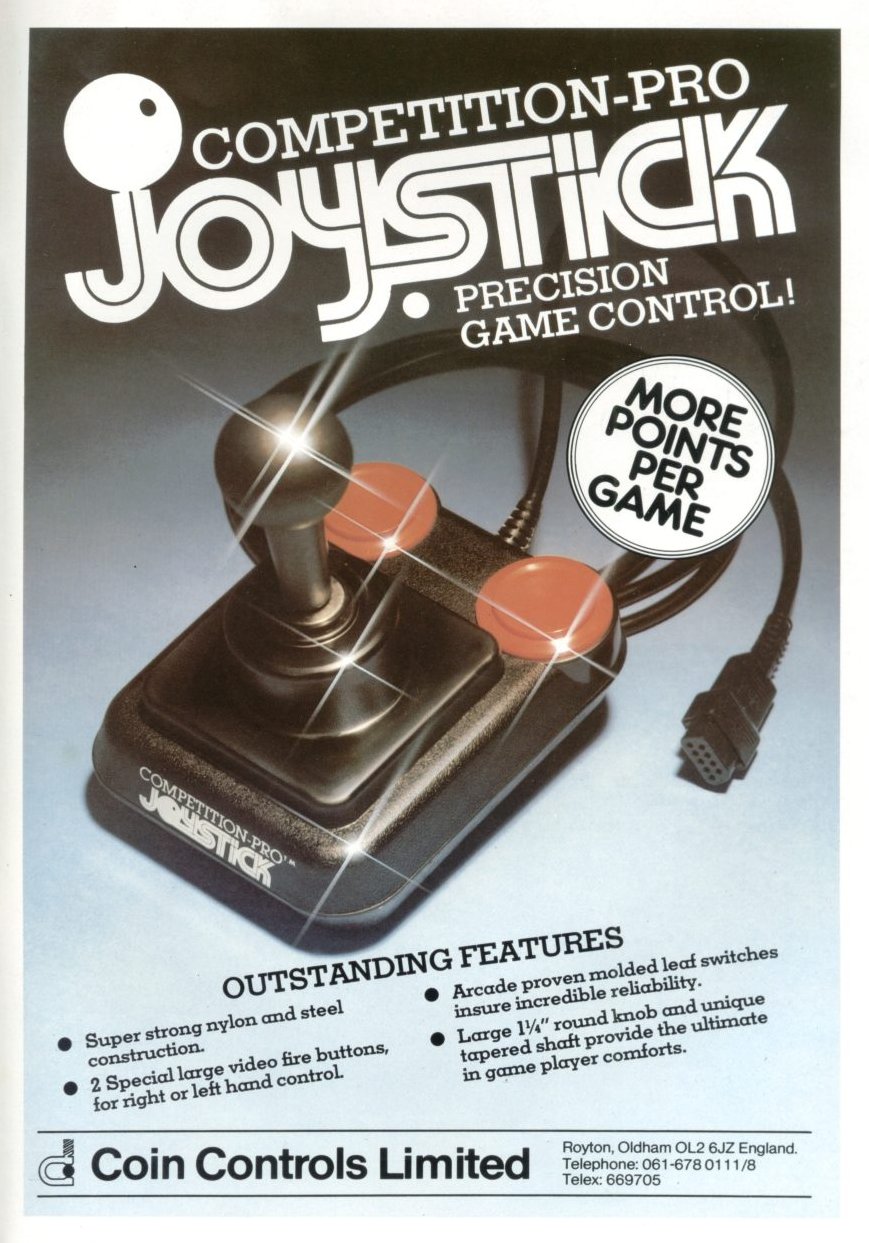
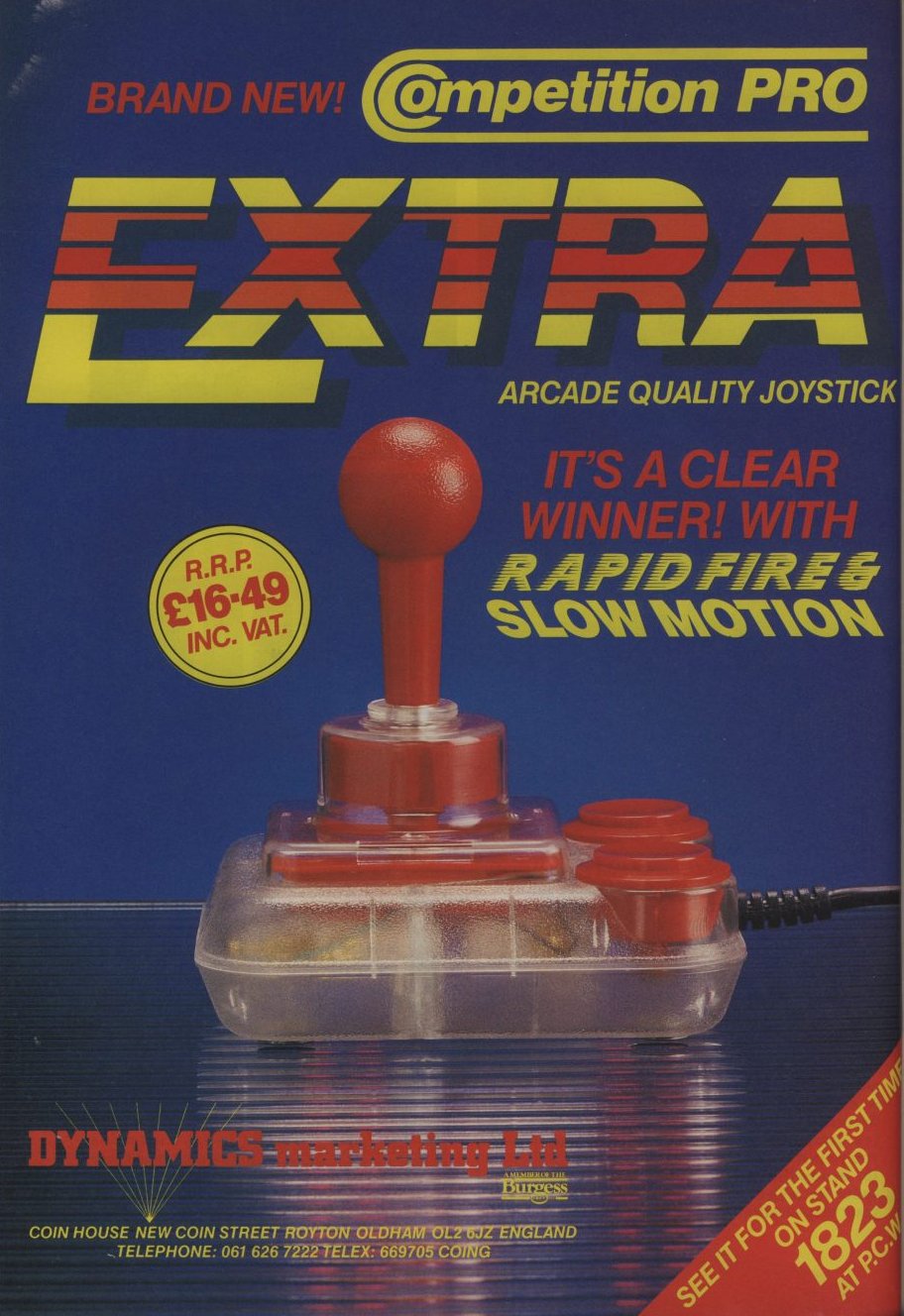
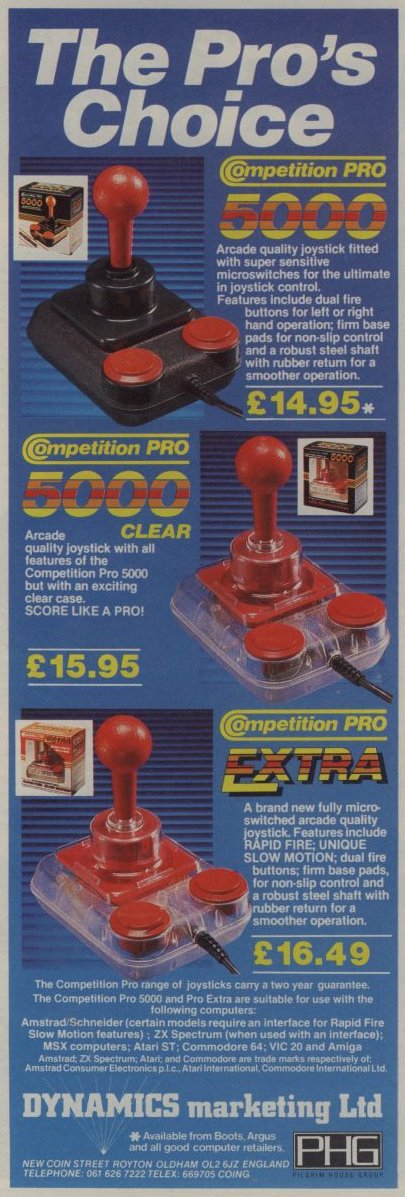
Discussion
Nobody has started a thread about this yet.
Files and rights
No permission is on record either way. Screens and pictures are copied here on a take-down basis: if you hold the rights and want something removed, say so and it goes.
Scores
In the magazines
- The Games Machine #261990 · Overall7/10
- Crash #821990 · Overall4/5
In the magazines 98
Crash #82Nov 1990 · p.113/53/54/54/54/5
Response 3/5
Feel 3/5
Look 4/5
Overall 4/5
Mark Caswell 4/5
IT'S A STICK-UP Whatever happened to the days of all joysticks being a small base with a stick in the middle and a fire button that never worked? Today they look more like something from the control panel of an F-16 and get bigger and sillier all the while. Nick Roberts and Mark Caswell delve into the CRASH joystick bin to discover whether the joystick really is a gamesplayer's best friend... QUICKJOY III Spectravideo £10.95 MARK: I'm not fond of Quickshot joysticks. I owned a Quickshot II many moons ago and that busted within a couple of months. This looks a first glance just like it, but its trendy red body sets it out from the crowd. Again two buttons are present and each gives a solid click with each depression, though one problem is the uncomfortable hand grip. With a fairly long shaft the Quickjoy III works best on a table top, but with my shovel-sized hands I found holding the stick quite easy. A relatively cheap stick that should be given serious consideration. Pro 9000 Euromax £14.95 NICK: This joystick has a classic design that has been copied so many times. The rectangular based with its two fire buttons on the end is comfortable to use both on a table and in the hand. The handle is quite short and has a ball at the top. The two fire buttons are not too good though as they're not microswitched and this lets the stick down. Not bad. QUICKJOY JET FIGHTER Spectravideo £14.95 MARK: Sadly the Jet Fighter costs too much for what it delivers. At first glance the stick is so impressive with its moulded shaft and very solid looking base. But the major problem here is the length of the travel: you have to move the stick so far to get a response that quick movements are near impossible! Diagonals are as elusive, though the fire buttons again answer with a responsive click when pressed. Steer well clear of this one: to quote The Hitchiker's Guide To The Galaxy - it looks like a fish, it moves like a fish, but steers like a cow! QUICKJOY V - SUPERBOARD Spectravideo £19.95 MARK: It looks like this stick contains everything but the kitchen sink!! With six fire buttons (four on the base, two on the shaft), top or base fire button selector and a digital timer (what for, I've no idea) it's a big mutha! On the table is the only practical way to use the Superboard. Travel is fairly short and thus responsive. A tough stick that should up to punishment pretty well, but twenty quid is serious dosh. WICO COMMAND CONTROL Suncom £24.99 NICK: The Command Control has a classic joystick design - a sturdy base with a long stick coming from the centre and fire buttons on both the base and the top of the stick. Unfortunately the size and shape of the base make it very uncomfortable to hold in your hand. A good feature is the inclusion of three interchangeable grips that slide onto the stick to suit all gamesplayers. There are some bad faults though. The grips do not come far enough down the stick, thus leaving a gap at the bottom. This can easily pinch a chunk our of your hand while you're playing, making the baddy who's torturing you on screen seem more realistic! The top fire button is also annoying as it needs a hard push to make it work. SURESHOT COMMAND MODULE Sonmax £17.95 MARK: If you want to know what big means, you should see the Command Module! With two large microswitched buttons you don't need to move your hand far to fire that laser, though I'm not overly fond of the gaudy sticker on the base. Stick travel is short making the Command Module very responsive, and so are the microswitched fire buttons. I'd advise you to wear sunglasses when using this joystick (due to the sticker) but it's a good all rounder. TURBO PEDAL Euromax £24.95 NICK: You've got to be joking! This is so rubbish I couldn't stand using it for more than one game! You put your foot down on the pedal and all you hear is a bang - the sound of the plastic pedal against the plastic base. Eventually you do get some response from it (after a few more bangs). I found that my feet and legs began to ache soon after starting to use the Turbo Pedal, making playing a long racing game an agonising experience. A few suckers on the base wouldn't have gone amiss as the thing keeps sliding away from your foot! ZIPSTICK SUPER PRO Sonmax £13.95 Standard Autofire £14.95 MARK: I'm afraid I'm a bit biased towards this stick, I've owned one of these for four years or so and it's still going strong! The sleek black shape and trendy yellow fire buttons and collar look good, and the stick itself feels 'worn in' even when first used. Button pushes and stick movement are rewarded by solid clicks, and both pixel perfect and wild waggling movements are easily achieved. Check the Super Pro out for yourself, I reckon this and the Cruiser are the two best sticks around. THE ARCADE Euromax £17.95 Standard Turbo £19.95 NICK: With a triangular base, a fire button on the end and a short handle this joystick is very comfortable to use. Euromax claim it's been the best selling joystick for nine years. The turbo version of the stick comes with an autofire and a Pro 9000 type handle to support a fire button. The fire buttons are not too hot though. Using a single leaf switch they need a bit of prodding to get then to work. ULTIMATE RAPID FIRE Euromax £22.95 NICK: This is one BIG joystick! The Ultimate Rapid Fire is probably the closes you're going to get to an arcade stick with its large base and two fire buttons either side the short ball handle. A dial-a-speed rapid fire button sits on the top of the base and can be turned to vary the speed of fire or to turn it off. With this stick being the size it is you can easily rest it on your lap to pay a game but there are also suction cups on the base to secure it to a table top. This is definitely the best of the big sticks and a personal favourite. COMPETITION PRO Dynamics £14.95 MARK: The Competition Pro is another distinctive stick with its red shaft and fire button. The ball shaped handle is comfortable to hold, though table top use is hampered by the lack of suckered feet. The medium travel of the stick makes it responsive, but I find the use of leaf-switches in the fire buttons very silly. Overall a rugged, comfortable stick that should be considered. CRUISER Powerplay £12.99 MARK: Now here's my idea of a perfect stick: the comfortable rounded handle along with the sensibly placed microswitched fire button make this a definite winner. It comes in several colours: blue, black, clear and an eye warping multi-coloured best. All have the innovative "pull and twist" collar ring that adjusts the stick tension. Like the Super Pro the Cruiser's ruggedness is legendary - we CRASH louts have been abusing Cruiser sticks for years without complaint. Unreservedly recommended. QUICKJOY JUNIOR Spectravideo £5.95 MARK: This is a cheap stick, and unfortunately it shows. The fire buttons are placed sensibly enough on the base and under the index finger, but sadly a lot of bashing is needed to gain response. The stick is small so young hands will find it easy to hold, and table top players are well catered for with four strong suckers. With such a short 'stick', response is fairly good, I found diagonals easy to obtain and the Junior is almost silent when the stick is moved (no metal grinding on metal sounds here, matey!) At six quid the Quickjoy Junior is okay as a first buy, but I'd personally save my pennies. SINCLAIR STICK Amstrad Free With Speccy NICK: This is one of the easiest joysticks to break! I've lost count of how many I've destroyed over the years! It responds quite well, although you feel as if you're hitting against plastic all the time instead of a nice micro switch. The main problem is the shape of the base. The rectangular box design has rounded-off corners but can still be very painful if you lean on them. Supplied with all +2, +2A and +3 computers there can't be many people haven't seen one of these sticks. Not the best in the galaxy, but how can you complain when it's free? CHALLENGER REMOTE CONTROL Euromax £29.95 MARK: Let's face it, remote control sticks are a very expensive gimmicks that serve little purpose. Although this one works pretty well there seems to be a slight delay between you pressing the button and on-screen response. The stick is a rather natty grey colour with two fire buttons both on the shaft, though the handle isn't moulded and I found that prolonged use cramped my hand. There are plenty of cheaper 'normal' sticks on the market, and in my opinion the Challenger will only be bought by people interested in gimmicks. SPEEDKING Konix £9.99 Standard £10.99 Autofire NICK: The Speedking is one of the better joysticks when it come to the left/right waggle. You can get very high speeds on sports games using it. The only problem is that it creates a giant strain on the hands and arms. You can't use it vigorously for long, you have to take a break. For normal use the hand moulded stick sits comfortably in your left palm and the position of the fire button on the right is perfect. To my knowledge the Speedking is only available n a version for right handed players, cutting out a large segment of the joystick market. Overall a good stick but playing Daley's Olympic Challenge can be hell! WICO ERGOSTICK Suncom £18.99 NICK: This is a real winner with me. It's similar in size, shape and design to the Konix Speedking but has one important difference: instead of being made from hard plastic, the Ergostick has a rubber covering which makes it much easier on your hands. The rubber also stops the stick slipping and sliding about. The only problem is a knobbly bit on the end, it really begins to hurt after a long playing session! An excellent joystick I would recommend to all byte bandits out there! NAVIGATOR Konix £14.99 MARK: Beam me up Scotty! The Navigator is somewhat akin to a Star Trek phaser. Due to the handle, table top use is impossible (or at least improbable), and prolonged use can lead to hand cramping. The stick is physically very short (no more than an inch or so high) so people with big hands will find holding the handle very difficult. Response is fairly good due to the short travel, but I must say this is none of my least favourite sticks. Right, there you have it: the professionals' view of the joystick world. Choose your stick carefully - it can make or break your Speccy gaming fun!
Comfortable to hold, but without suckers the Competition Pro is not suited to the table top.
The Games Machine #26Jan 1990 · p.427/10
Overall 7/10
CENTRE BYTES THE PUNISHERS Back when Spectrums were first released, joystick owners were a breed apart. That elite group of computer owners who took their gaming seriously. Nowadays, though, with all new games machines having built-in joystick ports, there's no excuse not to have one But there's such a wide range that it's difficult to choose. Fear not, as the Centre Bytes teams look at all the popular joysticks around, plus some newer and more innovative ones ways to hand out the punishment. COMPETITION PRO EXTRA/PRO PC Dynamics Marketing £14.99 This stick is ugly! It's not so much the shape (it's shaped exactly like the old Kempston joysticks) but the colour. Do you really want an acid green joystick? There's also a Day-glo pink version, should you have absolutely no colour taste. Colour aside, though, it's excellent. It can be held in the hand comfortably, responds well and, more importantly, it's strong. However, there's one problem: the fire buttons. They work well, but the microswitches aren't as durable as the movement ones. Subsequently, if anything does go wrong it's the fire buttons packing up. This happened to us a few times. Although, a good autofire is provided to preserve the buttons. The PC version is moulded in grey and cream, presumably because PC owners want to match all their peripherals to the colour scheme of their computers. However, to get the stick working with your PC you'll need an interface. Dynamics recommend their own Compro A/D games card. (They would.)
C&VG (Computer & Video Games) #76Feb 1988 · p.629/108/1010/10
Durability 9/10
Design 8/10
Value For Money 10/10
Ian Machin
Tony Takoushi
ANOTHER ONE TO CHECK OUT, BRAINS! Joysticks, as everybody knows, are seriously crucial to playing computer games. C+VG's Ian "Brains" Machin and Tony Takoushi look at new joysticks for the Sega and Nintendo Means machines. This is it! Another arm-aching, palm-sweating, finger-cracking, wrist-wrecking, cramp-creating, muscle-mangling, joint-jumping joystick round up. And in general we've got a great crop of Value for Money joysticks out at the moment. Right, first joysticks up for the heavy-handed C+VG zip and zap test are from Dynamics. COMPETITION PRO EXTRA The Comp Pro extra has been designed around the same specifications as the original Comp Pro 5000 joystick, except that it's translucent and incorporates an auto-fire and slow motion option. There are also a pair of micro switch fire buttons which give a greatly increased position. Handling the joystick is easy and simple. It fits neatly between both hands, but may take some time until you become accustomed, and eventually comfortable with it. To toggle between auto-fire, normal and slow motion, there is a small switch, which is located at the rear of the joystick base it can be operated quickly and easily during gameplay. The Competition Pro Standard is still the best, and now that it includes both auto-fire and slow motion, it's a sure winner! Price: £16.95 Ian Says: Excellent COMPETITION PRO 5000 This was the joystick that started it all. Yep, that's right! The Pro 5000 has been the forefather of what all joysticks should be, sturdy, well-built, fully microswitched, highly responsive and extremely reliable. The 5000 was the prototype for the Pro Extra and as its counterpart, is of the same design, but is red and black in colour. It is fully microswitched apart from the fire buttons, and has the same performance qualities and characteristics as the Pro Extra and there is also a clear version too. Another joystick which has just come to my attention, which looks identical to the Pro 5000, is actually a Taiwanese import and is constructed in such a way it can only be described as cheap! It can easily be recognised by looking at the of the joystick, there you will seen the words Micro Pro. As well as this, when moving the stick, it gives a stiff and rugged feel. This joystick should be avoided at all costs! Price: £14.95 (Standard model)/£15.95 (Clear model). Ian Says: Excellent EUROMAX MICO HANDLER The Micro Handler is, I can only describe as, as an all purpose joystick, due to the fact, that it consists of a variety of joystick gadgets which include two paddles, an autofire switch, a couple of buttons and of course the joystick handle itself. All of these are contained within a sturdy rectangular metal box, with four suction cups at it's base. It is easily positioned neatly and comfortably upon the lap, or can be placed on a table top and held steady, via the suction cups. The joystick handle is a real beaut, with only one finger, it is possible to sway ail eight directions. To go with the auto-fire switch, is an auto-fire speed controller. which can speed up or slow down the pulse rate of the auto-fire mechanism. The fire buttons are just that little bit dodgy. When using them in a rapid motion, they often become stuck, if pressed at an angle. The only way round this is, of course, to press them carefully. Overall, the Micro Handler is a must for all dedicated gamesters and is worthy of adding to your joystick collection. Price: £24.95 Ian Says: Excellent EUROMAX PROFESSIONAL The Euromax Pro is probably the nearest thing, when it comes to quality and design, to the Competition Pro 5000. Design of the joystick is identical, apart from a few embossed decorative and structured extras. The fire buttons are square, instead of round and is yellow and black in colour. Joystick manoeuvrability is just great! Smooth, quick and incredibly simple. The fire buttons give superb response and all microswitches give a loud noticeable click, which I feel is very important, as it gives a much better reaction from your ear to your finger. There are two versions the same joystick, one of these has an auto-fire option and the other one, you've guessed it, doesn't. The Professional has definitely got to be one of the best joysticks on the market, let's hope it stays that way! Price: £15.95/£18.95 (Auto-fire) Ian Says: Excellent EUROMAX ELITE The Elite is quite a neat little joystick, and is one of the joysticks in Euromax's cheaper range and is worth every penny. It uses long lasting microswitches and sits quite well between both hands. The Elite would suit people with small hands and at £11.95 should be within the financial reach of the average game player. It is red and black in colour and the fire button is positioned to the front of the joystick. The response quality from the Elite is not really up to the Professional's standard, but it's acceptable. As you may already know, C+VG has its own joystick with our neat little logo embossed on it. Well, our joystick is really the Elite, cleverly in disguise! It's yellow and blue in colour. There is also an auto-fire and non-auto-fire versions of the Elite, but the C+VG joystick is a non auto-fire only. Price: £11.95/£15.95 (Auto-fire) Ian Says: Average EUROMAX PRO ACE MICRO ACE Both the Pro Ace and Micro Ace look exactly the same. The only difference is that the Pro is leaf switch operated and the Micro Ace uses microswitches. Both look like mini pyramids and have a wide fire button at the front. The Micro Ace gives a relatively good feel and is quite accurate. The Pro Ace, because it uses leaf switches, requires excessive movements to create any response at all. The price for the Pro Ace seems fair, although having to pay £12.95 for the Micro Ace, I'd rather save a quid and buy the Elite instead! Price: £8.95 (Pro-Ace)/£12.95 (Micro-Ace) Ian Says: Average MASTERTRONIC MAGNUM The Magnum is the ideal joystick for younger gamesters and can easily be held steady by small hands. It looks rather like a gun, except that there is no barrel. The trigger is on a slant and the stick is placed on top just beyond the trigger. It is fully microswitched and responds well to sudden movements. The fire button is nice and large. The Magnum is ideal for a whole host of games, ranging from arcade adventures to super fast shoot 'em ups. Mastertronic have now reduced the price of their magnum to compete against the Speed Kings price cuts. Price: £12.50 Ian Says: Good KONIX SPEEDKING The Speedking comes in three versions for computers and games consoles. The Speedking is probably the only joystick which has been designed, solely to fit perfectly into the hand, that is, into a big hand. It's design and size suggests that it can be held in the palm of a large hand. Therefore it is ideal for an adult, and may be found awkward for a child. The stick is easily manoeuvrable, responds well and can handle a considerable amount of frequent pounding. It uses microswitches as does the fire button, which is situated to the right hand side of the grip. There are also two other versions of the Speedking for the Sega and Nintendo, each has all the features of the original Speedking, but include the necessary connections and triggers to make them compatible. At £11.99. plus the game Thing Bounces Back, the Speedking is even more value for money! Price: £11.99/£12.99 (Auto-fire) Ian Says: Good SEGA AND NINTENDO If you are the proud owner of either a Nintendo or a Sega console you will probably have felt quite a bit of frustration on using the controller pads that come with the units, writes Tony Takoushi. This isn't to say they are no good, on some games they are ideal but GENERALLY they leave a lot to be desired. I went hunting around to see if there are any alternative joysticks that are compatible with the consoles. I found that Sega have released a new joystick (to be reviewed when I am sent one!) as well as a special trackball controller, I have yet to hear of Nintendo doing the same. Other companies have seen the gap and have stepped in. Wico is well known for its arcade and home computer joysticks and now it has produced the Command Control for the Nintendo. A UK company, Konix has also released a contender in the Nintendo and Sega stakes with its specially fitted Speed King Joysticks. The standard Sega and Nintendo Joysticks are very similar in design and function. They both have A + B buttons and the joystick section is simply a press down pad that is thumb size. The Sega has a screw-in knob which gives the press down pad that is about a better feel but still remains fiddly and unbalanced in the hand. Problems tend to occur on games where you need a fine control of diagonal position. For a game which require straight up/down/left/right the controller is OK. As I said above the Nintendo has two alternatives, Wico or Konix. The Wico weighs in at a hefty 16 pounds (sterling!) and is not cheap. But you do get what you pay for. It is very rugged and is clearly built to last. As you can see from the picture the SELECT and START buttons are on top of the base unit with the fire button on the joystick handle, the B button is on either side of the base of the stick (good news for the left or right handers among you). It has a four foot cord and the unit slips easily into your hand. The response is fast and smooth, and clearly Wico has employed the same design and quality thinking in this stick as in its other arcade and computer joysticks. The Konix Speed King has been around for home computers and the console version retails for £12.99 - which is quite a bit less than the Wico. It has a four foot cord, is designed to fit in the palm of your hand and boasts a shorter faster throw (stick movement), the fire button is well placed by your index finger. Indeed, the joystick is well designed for your hand and has a fast feedback. The START and SELECT buttons are placed on top of the base unit and there is an auto-fire option on the rear end of the unit. I quite enjoyed playing with the Speed King BUT real problems occurred when I had to use the B button in a game. This was because it was placed and it was very distracting trying to alternate between buttons. I also found the stability of the stick to be uneven and it tended to rock back and forth when I was in tight corners.
Personal Computer News #90Dec 1984 · p.29
PLUG IN PARAPHERNALIA Our eight-page guide to Christmas peripherals. PICK OF THE PRINTERS MONITORS IN FOCUS DISK DRIVES ASSESSED ...AND OTHER ADD-ONS DECIPHERING THE PERIPHERALS PUZZLE Once you've had a computer for a little while,you may be wondering what else you can do with it, aside from playing games and writing the odd program. Buying one of the wealth of peripherals currently on the market can open up a whole new realm of possibilities, by presenting new programming challenges, new types of software,and providing more capabilities for your computer. The problem is, what to buy, for how much,and where from? Probably the most uninteresting peripherals are printers,which are only of real use for word processing, screen dumps,and program listings. These come in many different types, sizes, prices and capabilities,from dot matrix to daisywheel. Of much more interest these days are modems. Unfortunately,they can give you that dreaded disease known as Hackery, which includes symptoms such as high telephone bills, sleepless nights and no interest in anything else. Other add-ons include light pens and touch pads for budding computer artists. These generally come with some software, but make sure when you buy that there are some details on howto program it yourself. The same applies to joysticks and tracker balls. On some machines handling these is easy but on others, such as the Spectrum and Electron, things area little more difficult. There are so many gadgets available that it would be impossible to name them all. Out of these, perhaps the most exciting are second processors, some of which can turn your humble home micro into something approaching the power of a minicomputer. Others are just add-ons to allow a sought after CP/M system. These are much more common, being available for the BBC, Commodore 64, Amstrad CPC464, and Sinclair QL, to name but a few. One point to bear in mind when you buy something extra for your micro is what you are going to do with it when you become fed up with the applications that come with it. If you make sure that there are details on how to access and control it, you will be able to write your own routines to run it, thereby giving it a whole new lease of life. PCN's six page peripherals guide should give you some idea of what is available, how much you should expect to pay, and where you can get them from. PRINTERS Many people think they can live without printers, probably due to their high prices, but eventually you'll probably want one for your microcomputer. There are a number of types around, from the more expensive daisy wheels to the cheaper thermal or ballpoint pen printers. Not to be forgotten, too, are the ubiquitous dot matrix and the ink jet types. The former are generally judged by their Epson compatibility and features. Once the type of printer has been decided upon, there are then a number of additional features to choose from, print buffers, RS232 or Centronics, graphics capabilities, redefinable character sets, and speed being just a few. A printer with all of these the Smith Corona D200 for example - can cost up to £500. Alternatively, a ballpoint pen plotter such as a MCP-40 will cost around £150, but this only takes narrow paper and doesn't give you half the facilities. THERMAL BROTHER EP-22 The EP-22 is quite cheap and will take either thermal paper or a carbon ribbon. It has a keyboard, which makes it a word processor too. PRICE: £169.95 INTERFACES: RS232 REVIEW: Issue 35 FEED MECH: Pinch PRINT MECH: Thermal paper or thermal carbon ribbon PAPER SIZE: A4 width SPEED (APPROX): 16cps POWER SUPPLY: 4 U2 batteries AVAILABILITY: Brother [redacted] BROTHER HR5 The HR5 thermal printer from Brother basically uses the same mechanism as the EP-22 and EP-44. PRICE: £180.55 INTERFACES: RS232 REVIEW: Issue 47 FEED MECH: Pinch PRINT MECH: Thermal paper or carbon ribbon PAPER SIZE: A4 width SPEED (APPROX): 16cps POWER SUPPLY: 4 U2 batteries AVAILABILITY: Jones & Brother [redacted] DOT MATRIX SMITH CORONA D200 If you want a dot matrix that does nearly everything for your needs then the Smith Corona D200, at £483, is a good buy. PRICE: £483 INTERFACES: RS232 and Centronics, both fitted REVIEW: Issue 87 FEED MECH: Pinch and tractor PAPER SIZE: A4 width SPEED: 160cps FEATURES: 2K internal buffer, NLQ AVAILABILITY: Smith Corona dealers WALTERS WM80 If you just want a workhorse with no fancy bits, then choose a bottom-end machine such as this. PRICE: £189.75 INTERFACES: RS232 or Centronics REVIEW: Issue 43 FEED MECH: Pinch and tractor PAPER SIZE: A4 width SPEED: 80cps AVAILABILITY: Walters Microsystems International, [redacted] COLOUR INTEGREX COLORJET The Integrex Colorjet is mainly for BBC and Apple owners. A BBC screen dump program comes with this very versatile printer. PRICE: £632.50 INTERFACES: RS232 and Centronics REVIEW: Issue 51 and 44 FEED MECH: Pinch PAPER SIZE: A4 width SPEED: 37cps AVAILABILITY: Integrex [redacted] COMMODORE MPS 801 There are no frills on this and you will have difficulty attaching it to anything except a Commodore. PRICE: £395.95 INTERFACES: I triple Commodorey REVIEW: Issue 79 FEED MECH: Pinch and tractor PAPER SIZE: A4 width SPEED: 38cps AVAILABILITY: Commodore [redacted] DAISIES JUKI 6100 The Juki 6100 has above average speed at 17cps and is a nice cheap daisy wheel printer although it does have a few rough edges. PRICE: £385.25 INTERFACES: RS232 and Centronics REVIEW: Issue 17 FEED MECH: Pinch WHEEL TYPES: Triumph Adler PAPER SIZE: Up to 13in SPEED: 17cps AVAILABILITY: Most dealers SMITH CORONA L1000 The L1000 from Smith Corona is a good quality printer if a little noisy and slow. £50 extra for a parallel interface. PRICE: £368 INTERFACES: RS232 and Centronics REVIEW: Issue 78 FEED MECH: Pinch and optional tractor feed WHEEL TYPES: Smith Corona PAPER SIZE: Up to 13in SPEED: 12cps AVAILABILITY: Smith Corona dealers MODEMS Modems could well be classed as the up and coming peripheral of 1985. With the rapid growth of bulletin boards and the increase in Prestel-type systems, the number of cheap modems available has doubled since last year. One of the problems that beset their introduction was BABT/BSI approval. The modems had to be sent to the BABT or BSI for testing for compatibility with BT's telephone network. By the middle of 1984, there were so many modems awaiting the green sticker that people started selling them without. Things have settled down a bit now and there are a number of good modems on the market. These can be split up into different types - direct connection, acoustic coupler, single speed, or multi speed. The standard transmission speeds are 300/300 and 120005. The first is generally used for bulletin boards, although both Prestel and Telecom Gold are available on this speed. Whatever modem you buy, make sure you get one that fits your needs as far as baud rates go, otherwise you may feel a bit left out. COMMODORE COMMUNICATIONS Those with a Commodore 64 needn't feel left out. The Commodore Communications modem gives you access to Compunet, of course, and also Prestel. In the near future, Commodore is going to produce some software to allow user to user communication. If you want to use the various bulletin boards, you will have to acquire an RS232 port and a standard 300 modem. PRICE: £99.95 BATA?: Yes BAUD RATES: Full duplex 1200/75 INTERFACE: Commodore cartridge port and direct connection to BT CONTACT: Commodore dealers PRISM VTX 5000 One of the most popular modems for the Spectrum is the Prism VTX 5000. If you only want access to Micronet and Prestel it is ideal, although it can have a few problems with Interface 1. The way around this is to connect the whole system up without the modem and let it warm up (go and make a cup of coffee). Once warm, the VTX5000 can be connected (after powering down again) and it will work. PRICE: £99.95 BATA?: Yes BAUD RATES: Full duplex 1200/75 INTERFACE: Spectrum system bus and direct connection to BT CONTACT: Micronet 800, [redacted] PACE NIGHTINGALE The Pace Nightingale is another multi speed modem with both Bell and CCITT frequencies. It is a hard wire modem ie it connects directly into the telephone socket. Built mainly to be used with the BBC, for which the Commstar ROM is available, the complete package costs about £136. It is also available for any other RS232 compatible communications package. PRICE: £136.85 BATA?: Yes BAUD RATES: Full duplex 300/300 1200/75 INTERFACE: RS423/232 CONTACT: Pace Software [redacted] MINOR MIRACLES WS2000 The Minor Miracle WS2000 is great for bulletin board hackers and Prestel users alike. It lacks auto dial and auto answer facilities, which are a little expensive at £30 each but at least you're given the option. PRICE: £149.44 Auto dial and answer boards extra at £30 each BATA?: Yes BAUD RATES: Full duplex 300, 1200/75, half duplex 600,1200 INTERFACE: RS232 with DTR, RTS, CTS, DCD handshaking EXTRAS: Also has the Bell 103/113, 108, 202 and CCITT, V21, V23 tones standards fitted. CONTACT: Minor Miracles [redacted] SENDATA 700B For the ultimate in portability, it is hard to beat the Sendata 700B acoustic modem, distributed by Tandy. This modem will fit onto any standard telephone via its flexible connector so you can use it in a phone box if you don't mind the pips corrupting your data. PRICE: £235 BATA?: Yes BAUD RATES: Full duplex 300/300 INTERFACE: RS232 to the computer, and acoustic modem to BT CONTACT: Sendata [redacted] MONITORS The major excuse for not buying a monitor is that it's not strictly necessary if you have a TV. The counter arguments are that with a monitor you can see your superb high-resolution graphics with less eyestrain. The clincher is that someone else might want to watch TV. You mostly measure a monitor's quality by its bandwidth. This defines how fast the individual dots are scanned on the screen so obviously the faster it does this, the better the picture will be. 10MHz is at the low end of the range with the better colour monitors having over 20MHz. Another consideration is whether to buy colour or monochrome. The latter comes in various different coloured phosphors, usually green on green. Other options are orange on orange or grey on grey, if you want full colour, you must pay quite a lot more for high quality. If you are not too bothered about that there are a number of converted TV tube monitors available for much less. CHEAP COLOUR At the very cheap end come the JVC and Fidelity converted TV tube-type monitors. The JVCs come in two different versions, medium- and high-resolution. The 1302-2 is the high-resolution version but has a rather dirty white. This is generally caused by the quality of the phosphors used. However, it's not at all bad for £229.95. The lower priced version, the 1302-1, costs less at £149.95 but the bandwidth is not as good. MONITOR: JVC 1302-1/1302-2 PRICE: £253 RESOLUTION: 370 x 470 pixels/580 x 470 CRT SIZE: 14in/14in BANDWIDTH: 6MHz/10MHz CHARACTERS: 80 x 25/80 x 25 CONNECTION: RGB analogue/TTL SYNC: Pos or neg AVAILABILITY: Opus Supplies, [redacted] The Fidelity CM14 resembles the JVCs ie it's a converted TV tube. Its advantage is that it can be interfaced to a number of different machines, and has a built-in speaker and amplifier to allow access to, for instance, the Commodore 64's sound output. Cables for a number of machines are available from Tape Recorder Spares. One drawback to the CM14 is that it gives a better picture with some computers such as the Oric, but a bad one with others, notably the Dragon. MONITOR: Fidelity CM14 PRICE: £228 RESOLUTION: 370 x 470 pixels CRT SIZE: 14in BANDWIDTH: 12MHz CHARACTERS: 80 x 25 CONNECTION: RGB TTL, Audio input (1Kohm imp) SYNC: Pos or neg AVAILABILITY: Micro Peripherals [redacted] BETTER QUALITY Near the top of the range of colour monitors are Kaga, Microvitec, and one from Prism. The latter looks suspiciously like the Fidelity although it is better quality. The Kaga monitors come in a range, at the top of which is the Vision III. This has a black anti-glare tube and good colours. MONITOR: Kaga Vision III PRICE: £370 RESOLUTION: 640 x 440 CRT SIZE: 12in BANDWIDTH: 18MHz CHARACTERS: 80 x 25 CONNECTION: RGB AVAILABILITY: MBS Data Efficiency, [redacted] The Cub is popular and usually found attached to BBCs. The range is wide but the standard version is probably the most common. MONITOR: Microvitec Cub 1431 PRICE: £225 RESOLUTION: 452 x 585 CRT SIZE: 12in BANDWIDTH: 18MHz CHARACTERS: 80 x 25 CONNECTION: RGB TTL AVAILABILITY: Dealers MONOCHROME There are several monochromes around, and again, you pay for quality. A very average green-on-green monitor is Zenith's. This produces a fairly good picture on its 12in tube. It does have a switched option to allow the screen size to be altered between 40 or 80 columns. MONITOR: Zenith 123E PRICE: £90.85 RESOLUTION: 640 x 300 CRT SIZE: 12in BANDWIDTH: 18MHz CHARACTERS: 80 x 25 or 40 x 25 CONNECTION: Composite video AVAILABILITY: Most dealers Since most home micros now have an RF output socket as standard, many people want to use them with TVs. The quality of picture varies but the Sony Trinitron range is generally the best. MONITOR: Sony Trinitron KV1430 PRICE: £249 RESOLUTION: 320 x 250 CRT SIZE: 14in CHARACTERS: 60 x 25 CONNECTION: UHF switchable. AVAILABILITY: Electrical stores STORAGE Most home micros can only store data and programs on cassette, which can be a major hassle. The first big upgrade step that most micro owners take is some kind of fast access, mass storage system. For most machines this means a disk drive although for the Spectrum, Microdrives or Wafa drives are usually cheaper. As well as the disk/wafer drive, most machines need an interface to allow them to control the system. The odd one out is the Commodore 64 which has all the necessary bits and pieces built in. The problem here is that it can only be used with Commodore disk units (a typical Commodore gambit). SPECTRUM The main Spectrum storage system is the Sinclair Microdrive. This needs the Interface 1 to be fitted but once in, up to eight drives can be used, each giving access to 85K or so of storage. Unfortunately, this is not too reliable and is still rather slow, and there's no fancy filing system. The additional commands are those printed on the top row of the keyboard in red, so there are no random access files and no way of telling what type the file is until you try to load it. A better system is the Rotronics Wafa drive. This gives access to more storage space and a few more details about file types and sizes. The wafers, so far, have also been found to be much more reliable than the Sinclair Micro cartridges. SYSTEM: ZX Microdrive expansion pack PRICE: £99.95 COMMENTS: Comes with Interface 1, a single Microdrive, four pieces of software, an introductory cartridge, and a blank. Extra drives at £49.95 each. Interface 1 has a pseudo RS232 and a network port. AVAILABILITY: High street stores SYSTEM: Rotronics Wafa drive PRICE: £129.95 COMMENTS: Includes two drives, a word processor and a blank cartridge. Also includes an RS232 and a Centronics port. AVAILABILITY: High street stores BBC The BBC has one of the better filing systems found on home micros. From Basic you get proper random access files, loading and saving of programs and data with the big bonus that it is fast. The drawbacks are that you must have your Beeb altered and a disk controller fitted, costing around £100. You are also limited to a maximum of 31 files per disk and only four drives.The Acorn system is the most common, so if you don't buy its disk drives (which are not the best) you won't get a format program or a disk manual. Most dealers have sussed this and will sell you some other drives with the format disk included, or just the format disk at a nominal cost. The manual or a facsimile can be obtained in most good computer stores. There are a number of alternative filing systems for the BBC. These include the AMCOM, Watford, plus many others. They are not standard and some AcornSoft programs may not run on them. They do, however, improve on the Acorn DFS by getting around the 31 file limit. Which one you get depends on its price, performance, and what you want to do. Also for the BBC are a number of fast tape systems, including the Ikon Ultradrive and the Phloopy. The Ultradrive is better and costs about a quarter the price of a disk system. SYSTEM: Acorn DFS Upgrade PRICE: £115 Fitted DISK DRIVES: Cumana 100K £171.35, 200K £222 AVAILABILITY: Acorn Dealers SYSTEM: Watford DFS PRICE: In kit form £142.60 for single density, £97.75 for double density COMMENTS: The single density (100K 40 track) is more expensive due to the 8271 disk controller costing £90 AVAILABILITY: Watford Electronics [redacted] SYSTEM: Ikon Ultradrive PRICE: £79.95 COMMENTS: Pack of 6 cassettes £20.13 AVAILABILITY: Ikon Computer Products [redacted] AMSTRAD The Amstrad has a disk system in the offing, from Amstrad itself. This is a Hitachi drive and can be accessed from Basic using the definable I command to give IA, IB to select which drive, ITAPE, IDISC, ICPM, IDIR, IERA, and IUSER. From Basic there are, unfortunately, no random access files. The facilities are minimal with no proper filing. However, it does come with a full CP/M system and DR Logo fitted. The CP/M is the same good old standard that has been around for a number of years, the assembler is for the 8080 but on the whole, it paves the way for the Amstrad to become a full business system. SYSTEM: DDI-1 PRICE: £199.95 COMMENTS: Includes interface CP/M and DR Logo AVAILABILITY: High street stores INPUTS Input devices are things like joysticks, add-on keyboards, touchpads and light pens. Most of these can be simply plugged in and either come with their own software or can be used with existing games. Most computers have a minimum of a keyboard for input but some, most notably the original Spectrum Minus, have a keyboard that is less than suitable for a great deal of typing, as in word processing. Due to this, there has been a ready supply of add-on keyboards offerings from, for instance, Fuller, Cheetah, Transform and lately Sinclair itself, with the launch of the Spectrum Plus. Touchpads also seem to be booming with the release of the Touchmaster system for the Spectrum, Commodore 64, and Dragon. Also in the running is the KoalaPad but this is mainly for the Commodore 64 and the Apple. Also in the range of peripherals to help you with your graphics are light pens. These are usually for the Commodore 64 and imported from the US. A number of add-on Spectrum keyboards are available and most require fitting by the user. All you do is invalidate your guarantee by opening up the Spectrum's case, and pull out the keyboard connectors. These are then replugged into the add-on keyboard with the Spectrum circuit board and the add-on box re-assembled. A simpler way uses a buffer that plugs directly into the back of the Spectrum, so you don't have to invalidate your guarantee. KEYBOARD: Transform PRICE: £69.95 FITTING: Invalidates guarantee AVAILABILITY: Transform [redacted] KEYBOARD: Fuller FDS PRICE: £49.95 FITTING: Invalidates guarantee AVAILABILITY: Fuller [redacted] KEYBOARD: Stonechip PRICE: £59.95 FITTING: Plugs straight in AVAILABILITY: Stonechip Electronics [redacted] The peripheral for games players who want more speed and style is a joystick. The shape, size, and quality vary greatly but a rule of thumb is that quality costs more. Joysticks also fall into two types, is switched and analogue. The former is by far the most common with the usual connection being the standard Atari D plug with nine pins. Commodore, Atari, and Spectrum use this type and it is normally possible to obtain an interface for most other machines. The BBC micro is left out when it comes to joysticks as it uses the analogue type. These tend to be more expensive but more flexible to use. The major thing to watch out for is whether the stick might break just as you escape from the whirling hurling alien that is breathing down your back. One of the best is the Quickshot MkII, which comes with suction cups on the base to stop it slipping at tight moments. It also has its fire button built into the handle - good value for £12.95. Another good 'un is the Kempston Pro which doesn't have the fire button in the handle. It has two in tandem on the base allowing use by fight or left handers. It is also very solid. The BBC requires analogue sticks that plug into the analogue port at the back. The recommended version is marketed by Acorn but it seems to have been designed the wrong way round and is difficult to control. Other versions such as the Shado sticks from Spectrum at £16.95, come with an automatic centering mechanism that improves things no end. Of the light pen systems available, most and by far the best, are for the Commodore 64. The Flexidraw package from Inkwell Systems costs £140 but the accompanying software is flexible with full rubber banding, circles, fills, and a zoom. For the BBC, the best graphics package available is the BitStick. The trouble is that this does require the 6502 second processor and disk drives plus a souped-up joystick. However, for your money you get a system that will allow very high quality graphics to be designed and stored. The cleverest part is where you can zoom into part of a picture and then into a smaller part and so on until you run out of disk space. This means pictures can be designed with much more detail than is possible to see on screen. The major drawbacks are the price (£375 plus £199 for the second processor), and the lack of a suitable printer/plotter to obtain hard copy. The Spectrum is way behind in the graphics stakes with Touchmaster, DK'Tronics, and Stack being the few to produce something. The packages that come with these systems are primitive compared with other machines. The problem appears to be lack of interest from the US. The Touchmaster system costs £149.95 and is available from Touchmaster on [redacted]. The DK'Tronics light pen costs £19.95 and is available from DK'Tronics [redacted].
Crash #10Nov 1984 · p.24
BATTLEFIELD JOYSTICK Joysticks are your most immediate connection with any game you play - the man-machine interface. The melting joystick makes a nice image for an advertiser who's suggesting that his games can beat anything, but do joysticks in real life really stand up to the beating they receive, are they tough enough for the job, do they move well, are the handles right, will the buttons fire? The CRASH reviewing team settled down for a weekend of joystick bashing on several types and makes, and here we look at the results... There are now many makes of joystick available, and almost as many types as there are makes. Each boasts design innovations so that it is better than all the others - and they come in a range of prices too. We all know that joysticks on arcade machines take a battering, so too do those at home. Do they stand up? We tested 19 joysticks from well known manufacturers to see how they all compared. A joystick must be able to withstand games that require fast and repeated movement, so what better than Ocean's Daley Thompson's Decathlon? We used the Commodore version of the game because it is more violent than the Spectrum! But it isn't only toughness; joysticks must also be capable of fine and positive movement, comfortable to use with sensible fire buttons. Several arcade skill games were used to test four major points for both the stick action and the fire button action. TRAVEL means the maximum movement between opposite poles (e.g. up/down) on the stick, and how far the fire button had to be depressed. On stick action over 1.5 inches was considered to be very long. Oddly, some of the short sticks had longer to travel than the taller sticks. ACTION FORCE means the amount of hand or finger pressure required to keep the stick pressed over or the fire button down. REACTION SPEED indicates how fast contact is made, how quickly the action affects the game, and how well rapid movements can be made (especially rapid fire buttons). RESPONSE/FEEDBACK indicates how positive the stick or fire action feels and whether there is any physical or audible feedback to tell the player that contact has been made. ERGONOMICS how useful is the stick for hand held playing, and how well does it operate on a table top. Is the stick well designed for comfort, ease of fire action and general stability. After preliminary testing, the joysticks all went through ten minutes of the Decathlon to see how long they were likely to stand up to use. During this test, some joysticks broke. Finally, all the sticks have 9 pin D connectors and are Atari compatible on the pin outs. They all need an interface of one sort or another to work with the Spectrum (except the clip-ons). Some offer 2 independent fire actions, but these only work with either a Cambridge interface or the programmable Comcon from Frei Ltd., which was the interface used for this test. Each joystick review is split into two halves; firstly a brief technical breakdown; secondly the review team's report. PRO ACE Supplier: Sumklock Microware, [redacted] Price: £12.95 Lever Action: Strong plastic handle suspended between two plastic bushes. Central copper star acting as self-centering spring and contacting 4 copper rivets Fire Action: Oblong fire button at 12 o'clock operating copper contact switch. Trigger button at tip of stick activates copper plate contact. Ergonomics: Average size easy grip enclosure for handheld operation. Rubber feet for table operation. Left and righthanders welcome. Lead: Plastic moulded D connector and retaining grommet. Weak point: Copper contact star can weaken and deform. Soft copper contact surface creates dust and can oxidise if not used over long period. STICK ACTION Travel: long Action force: very hard Reaction speed: slow Response/feedback: very poor and irregular - up/down was not too bad but left/right was terrible, and a lot of slack FIRE ACTION Travel: long on stick button, very long on base button. Action force: medium. Reaction speed: poor Response/feedback: poor, no indication or 'feel'; rather rubbery. Ergonomics: the shaped base fits the hand well with a well positioned left or right hand base fire button, but very unstable on a table top, especially with the sticky travel. The long thin stick is quite comfortable to hold. Life expectancy: top fire button pulls out too easily, the copper contacts bend out of shape easily with use, causing erratic response. The general stick response and travel means that the handle will take a beating on hard, fast games. SPECTRUM MECHANICAL Supplier: EEC Ltd., [redacted] Price: £9.95 Lever Action: Plastic shaft strengthened by long selftapping screw suspended in rubber mount activates via cam plate four flexible key actuating fingers. Fire Action: None Fixing: integrally moulded clip grips. Main body flexes under use. STICK ACTION Travel: long Action force: heavy. Reaction speed: poor Response/feedback: no feedback and generally poor response as casing flexes greatly during play. Ergonomics: This unit clips over the edges of the computer and is made from one piece. This means that together with the stiff stick movement the unit flexes heavily during use, especially with more violent games, and this sometimes renders the key pressed inoperable. The tendency to move away from position during play can also disenable any 8 directional movement. Life expectancy: not very high on fast games, and indeed there may be the slight chance of damaging the computer in a game like the Decathlon. FLIGHTLINK Supplier: Flightlink Control Ltd., [redacted] Price: £10.50 Lever Action: Short Steel short suspended in brass bell bush and compression spring for self-centering action. Plastic bush activates subminiature microswitches. Fire Action: 2 miniature square fire buttons at 6 o'clock. Two independent fire actions in combination with appropriate interface. Ergonomics: No rubber feet. Lever shaped body for handheld operation. Left and right-handers welcome. Lead: D type connector with plastic cover. No grommet Weak point: Lead entry point unprotected. STICK ACTION Travel: long. Action force: very light Reaction speed: fast. Response/feedback: good, positive lock at end of travel for secondary compass points, but tends to slide on primary compass points (left/right/up/down). FIRE ACTION Travel: medium long. Action force: light. Reaction speed: fast - good for rapid fire. Response/feedback: some slack but reasonably firm and positive. Ergonomics: handheld is very good because of small size and light weight but overall a bit pathetic on the table top. The 2 independent fire buttons are in a straight line, which make them a bit awkward for table use, as supporting hand is in the way. Life expectancy: because of fight action and metal construction, stands up to a hard game very well. Life should be quite good. SLIK STIK Supplier: Consumer Electronics Ltd., [redacted] Price: £9.95 Lever Action: Short rubber mounted steel shaft contacting 4 rigid contact plates in end position. Tough short throw movement. Fire Action: 1 left-hand round fire button at left 10/11 o'clock position in enclosure. No trigger button. Ergonomics: No rubber feet or suction cups. Small well rounded body for handheld operation. Left-handers only Lead: Plastic moulded D type connector and sleeved retaining grommet Weak point: Moulded plastic support wall for contact plates can crack and break off. STICK ACTION Travel: very short Action force: medium Reaction speed: good. Response/feedback: quite positive feel and solid end stop with solid clunk. FIRE ACTION Travel: short Action force: medium to hard. Reaction speed: good. Response/feedback: sort of sticky feel, but solid end stop with loud clunk. Ergonomics: lightweight construction and small size make it good for handheld use and reasonably stable on a table top, the corner position of the fire button is good for right handers, but poor for left handers. Life expectancy: Pretty good because of the short stick, short travel and steel shaft. It feels quite safe even on a hard game. KEMPSTON PRO 5000 Supplier: Kempston Micro Electronics Ltd., [redacted] Price: £13.50 Lever Action: Strong steel shall suspended in rubber bush. Leaf contact switches actuated by nylon bush. Fire Action: 2 large arcade style round fire buttons actuating leaf contact switches Ergonomics: Average size well rounded enclosure for handheld operation. Rubber feet for table top operation. Lead: Plastic moulded D type connector and moulded sleeved grommet. Week point: Body flexes under use. STICK ACTION Travel: short Action force: medium Reaction speed: instant Response/feedback: no audible feedback but fairly good response overall. FIRE ACTION Travel: very short. Action force: very light - good rapid fire. Reaction speed: fast. Response/feedback: good with hard, positive feel Ergonomics: not very good for handheld use with the large base but reasonably steady on a table top. The two large arcade style fire buttons on the base are well placed for left or right-hand use, and the round knob shaped stick is comfortable to hold. The slightly stiffer action of the stick on this version of the 5000 make it slightly more tiring to use on the Decathlon. Life expectancy: Good KEMPSTON PRO 3000 Supplier: Kempston Micro Electronics Ltd., [redacted] Price: £12.75 Lever Action: Hollow plastic shaft supported in rubber washer actuating 4 leaf contact switches. Fire Action: 2 trigger buttons (trigger finger and thumb) and one banana shaped fire button at 12'o clock. All fire buttons operate one leaf contact switch. Ergonomics: Small rubber feet. Handheld or table top operated. Lead: Moulded D type connector and moulded sleeved grommet Weak point: very weak hollow plastic shaft STICK ACTION Travel: medium long Action force: medium to hard. Reaction speed: quite fast Response/feedback: slow, very soggy feel and imprecise. FIRE ACTION Travel: base button medium - top and trigger buttons long. Action force: medium Reaction speed: poor Response/feedback: not very positive, soggy feel and no feedback. Ergonomics: similar to PRO 1000 - top fire button badly placed for handheld use. On a table the base button is in the way of second hand holding base fire button which occupies most of the front of the base. Trigger fire is quite well placed. Life expectancy: the hard game proved too much for this joystick, which broke, the stick snapping off at the base, before its ten minutes were up. The somewhat thin hollow plastic stick obviously lowers life expectancy rather drastically if hard games are going to be played with it. KEMPSTON PRO 1000 Supplier: Kempston Micro Electronics Ltd., [redacted] Price: £10.99 Lever Action: Hollow plastic shaft supported in rubber washer actuating 4 leaf contact switches. Fire Action: Banana shaped red fire button operates leaf contact switch. Ergonomics: Handheld or table top operated (rubber feet). Lead: Moulded D type connector and moulded sleeved grommet Weak point: Very weak hollow plastic shaft STICK ACTION Travel: short. Action force: hard. Reaction speed: medium. Response/feedback: no feedback, rubbery feel to the stick and even on a slow game it felt as though the handle might break at any second FIRE ACTION Travel: medium long Action force: medium hard and tiring for rapid fire. Reaction speed: slow. Response/feedback: no feedback, again - very rubbery. Ergonomics: seems fine for handheld use at first, but not well designed as centre of gravity is all wrong to be able to operate stick and fire at the same time. Not too bad on a table top, quite stable with supporting hand holding it tightly, but too much resistance for single handed stick operation. Again, the long, curving base fire button gets in the way of the supporting hand. Life expectancy: Joystick was rendered useless after two minutes of Decathlon, because the stick snapped off at the base. Same thin, hollow Construction as the Pro 3000. COMPETITION PRO Supplier: Euromax Electonice Ltd., [redacted] Price: £16.95 Lever Action: Strong steel shaft suspended in rubber bush. 4 industry standard V3 microswitches actuated by plastic bush. Fire Action: 2 large arcade style round fire buttons actuating leaf contact switches. Ergonomics: Average size well rounded enclosure for handheld operation. Rubber feet for table top operation. Plastic moulded 0 type connector and moulded sleeved grommet. Weak point: Body flexes under action STICK ACTION Travel: short, in fact just about right. Action force: light. Reaction speed: instant. Response/feedback: although in most respects identical to the Pro 5000 this stick has audible clicks - generally very good. FIRE ACTION Travel: very short. Action force: very light - good rapid fire Reaction speed: Fast. Response speed: good, with hard positive feel. Ergonomics: base too large for handheld use, stable on table top with well placed left hand fire buttons on base. Comfortable knob shaped slick. Life expectancy: Good. ATARI Supplier: Atari International, [redacted]. Price: £7.50 Lever Action: Nylon shaft supported between pivot point and upper shoulder support. Nylon actuator ring activates 4 dome switches on pcb. Plastic gaiter and deformation of ring creates self-centering force. Fire Action: One round fire button at 10/1 1 o'clock activates dome switch. Ergonomics: Average size square body for hand-held operation Rubber feet for table top operation. Lead: Moulded D typo connector and moulded sleeved grommet. Weak Point: Actuator ring will wear and snap. STICK ACTION Travel: short Action Force: light to medium. Reaction: good Response/feedback: no feedback, soggy feel which gets soggier with use and hardens up with disuse. FIRE ACTION Travel: medium. Action Force: light. Reaction Speed: good - very good rapid fire Response/Feedback: very firm feel but no feedback. Ergonomics: the hand-sized square base and light construction are ideal for hand-held use, although the corner placed fire button can be awkward, and isn't very good for left-handers. Life Expectancy: not too long, but reasonable considering price. SUPER JOY Supplier: Spectravideo Ltd., [redacted] Price: £9.95 Lever Action: Plastic shaft with actuator ring activating 4 dome switches on pcb. Deformation of ring creates self centering action. Shaft Supported between lower pivot point and upper shoulder bearing. Fire Action: 3 firing buttons, on lever thumb switch, two on side of enclosure (10 and 2 o'clock). All three activate dome switches. Ergonomics: Slim body suitable for handheld operation. 4 suction cups for table operation. Lead: Moulded D type connector and moulded sleeved grommet. Weak point: Actuator ring will wear and snap. STICK ACTION Travel: short. Action force: very light. Reaction speed: medium fast. Response/feedback: not very good - a lot of play in the stick and then over travel. FIRE ACTION Travel: short. Action force: light Reaction speed: medium to slow. Response/feedback: no good for rapid fire with top stick button and oddly placed twin fires on either side of the base. Quite a positive click. Ergonomics: quite good for handheld use with slim sides to the base - we found the side buttons hard to use. On the table the narrow base with large suction cups make single handed stick operation hopeless, and the cups tend to give it a soggy feel overall. The long stick travel was found to be too much for the Decathlon and the thin base, even with supporting hand, makes wobble too much in a fast game. Life expectancy: if the unit had actually had good suction cups, it wood have smashed to bits within minutes on the Decathlon - as it was the units base only lasted the ten minutes before coming apart at the base seam with the side buttons sliding inside. It was repairable. FAMOUS REDBALL Supplier: CGL, [redacted] Price: £23 Lever Action: Long and hefty steel shaft supported in elastomeric bearing. Plastic ball sleeve activates 4 leaf contact switches Fire Action: Thumb activated lever switch activates leaf contact via central tappet and dome head. Round fire button at 10/11 o'clock activates further leaf contact. Ergonomics: Large body with 4 rubber feet designed for table top operation Lead: Moulded D type connector and integrally moulded sleeved retaining grommet. Special feature: Button selector switch for lever or enclosure fire button control. Weak point: Lever suspension allows slight axial movement which can activate fire leaf contact by mistake. STICK ACTION Travel: medium long. Action force: medium Reaction speed: good. Response/feedback: no audible feedback, response quite springy. FIRE ACTION Travel: short to contact with over travel. Action force: light Reaction speed: last - good rapid fire from base not bad from stick top Response/feedback: positive response, feels solid on base, less so on stick button. Ergonomics: solid and heavy base make it very stable, but hard to hand hold. The round knob shaped stick is comfortable and very good for single handed use as the top fire button can be disenabled for hand over the top action. The disenabling switch is at the rear of the base. Flexing of the centre steel shaft however, can cause unwanted firing action during direction movement, and is particularly pronounced during fast games. Life expectancy: very good due to solid construction. THREE WAY DELUXE Supplier: CGL, [redacted] Price: £25 Lever Action: Long tough steel shaft suspended in elastomeric bearing support. Plastic ball sleeve activates 4 leaf contact switches Fire Action: Thumb lever switch activates leaf contact via tappet and dome head. Extra fire button at 10/11 o'clock activates further leaf contact switch. Ergonomics: Moulded D type connector end moulded sleeved retaining grommet. Special feature: Fire function selector disables body mounted fire button. Three different grips provided, which can be pushed onto steel shaft. Grips have 360 degree rotation. Weak point: Shaft suspension allows slight axial movement which can trigger off fire button inadvertently. STICK ACTION Travel: very long Action force: medium. Reaction speed: good. Response/feedback: some over travel, otherwise a positive end stop, no audible clicks. FIRE ACTION Travel: medium on stick top and long on base button. Action force: light Reaction speed: fast, good rapid fire from either button. Response/feedback: light clicks, rather soft in feel. Ergonomics: base identical to Famous Red Ball, so not good for handheld use but steady on table top. A base mounted slide switch allows either both or only one fire button to operate. The steel centre shaft has pull off handle which may be replaced with one of two others, so there is a moulded grip handle. This allows a wide range of individual grips and is an unusual feature. Again, like the Famous Red Ball, the flexing centre shaft can cause unwanted fire action during directional movement. On a fast game, the tendency of the handles to twist around the shaft can be disorienting. Life expectancy: stood up very well, and because of solid construction, should have a long life. THE BOSS Supplier: CGL, [redacted] Price: £13 Lever Action: Steel shaft supported in elastomeric bearing. Plastic ball sleeve activates 4 leaf contact switches. Fire Action: Thumb activated lever switch activates leaf contact via tappet and dome head. Ergonomics: Average size body for handheld operation. 4 rubber feet for table top operation. Lever grip can be rotated. Lead: Moulded D type connector and integrally moulded sleeved retaining grommet. Weak point: Lever suspension allows slight movement which can activate fire leaf contact by mistake. STICK ACTION Travel: long on over travel Action force: medium. Reaction speed: medium. Response/feedback: no feedback, response a little soft but reasonable. FIRE ACTION Travel: short to contact with over travel. Action force: very light. Reaction speed: fast - good rapid fire. Response/feedback: good positive response, no feedback. Ergonomics: rather heavy, solid construction and large base makes it awkward to hand hold, although a rebated underlie at the front and back do help. Moulded handle grip and top stick fire are reasonable for either hand use or table top, where the weight makes it reasonably stable. The handle twists on the base, which is uncomfortable and disorienting. Life expectancy: quite good as the whole is very solid but the long over travel on the tall stick may put it at risk on regular hard games. VOLTMACE DELTA 3S Supplier: Voltmace Ltd, [redacted] Price: £10.00 Lever Action: Short steel shaft, gimble mechanism operating two small rotary switches, two small tension springs for self-centering action. Fire Action: 3 small fire buttons operating rubber membrane switches. Two independent fire actions in conjunction with appropriate interface. Central green fire button F1, two red buttons for F2. Ergonomics: Calculator style flat enclosure for hand-held operation. No rubber feel for table top operation. Lead: Moulded D type connector, no grommet. Weak Point: Life of Rotary switch contacts may be limited, lead entry point. STICK ACTION Travel: long over-travel but short dead travel. Action Force: exceptionally light. Reaction Speed: instant. Response/Feedback: very good response, not much feedback. FIRE ACTION Travel: very short - more over travel. Action Force: very light. Reaction Speed: very good. Response/Feedback: nice firm end to travel, not much feedback. Ergonomics: above average for hand-held use with light stick travel and fire buttons within easy reach of thumb, ibis features 2 independent fire actions, with fire one using one button, and fire 2 using two for left or right-handed players. Very well laid out and light. It's long base makes it reasonable on the table although it moves in frenzied games. Life Expectancy: quite good because of the steel shaft. It 'feels' safe. SPECTRUM STICK Supplier: Grant Design Ltd., [redacted] Price: £9.95 Lever Action: Plastic handle suspended by lower pivot point and two upper slide plates with integrally moulded leaf spring for sell-centering. Slide plate cams activate key plungers. Fire Action: None Fixing: Left and right grip arms with stud and wing nuts. Weak point: Plastic arm will wear and snap. STICK ACTION Travel: very long. Action force: very light. Reaction speed: good. Response/feedback: no audible feedback, but feels positive. Ergonomics: this is a cursor key clip on joystick unit which mechanically depresses the cursor keys. It operates well in 8 directions and is quickly attached to the keyboard, leaving the zero key free for fire action. The short slick moves freely and feels good. Obviously it cannot be handheld and when attached to the computer is very stable! Life expectancy; surprisingly good, considering its light construction but not designed to withstand the onslaught of too many Decathlons. ARCADE PROFESSIONAL Supplier: Euromax Electronics Ltd., [redacted] Price: £28.95 Lever Action: Short and strong steel shaft rotating in ball point bush compressed spring and nylon washer for self-centering action. 4 industry standard V3 lever operated microswitches actuated by nylon bush. Extra plastic end stop bush for 8 or 4 way action. Fire Action: 2 large body-mounted arcade style round fire buttons. Ergonomics: Large arcade style console for two hand operation. Heavy metal base with foam pad for stable table top use. Console top out of GRP with silver flake black high-gloss paint. Lead: Plastic moulded D type connector. Non retaining round grommet. Weak point: None STICK ACTION Travel: medium to long Action force: light. Reaction speed: instant. Response/feedback: good to excellent, very positive. FIRE ACTION Travel: medium to long. Action force: light. Reaction speed: very fast - excellent for rapid fire. Response/feedback: good, solid feel and clunky feedback. Ergonomics: handheld - you've got to be joking! It's huge! the large sized arcade style box makes it excellently stable and it has a low centre of gravity, hardly moves at all. Nice big arcade style fire buttons make life easy. Life expectancy: very good, it feels solid. Everyone felt this was just about the best on a hard game. QUICKSHOT 1 Supplier: Spectravideo Ltd, [redacted] Price: £9.95 Lever Action: Plastic shaft supported between pivot point and upper shoulder support. Plastic actuator ring actuates 4 dome switches on pcb. Deformation of ring creates sell-centering effect. Fire Action: One round fire button at 10/11 o'clock activates dome switch. Lever thumb switch activates dome switch. Ergonomics: Average size well rounded body for hand-held operation. 4 suction pads for table top operation. Lead: Moulded D type connector and moulded sleeved retaining grommet. Weak Point: Very weak actuator ring will wear and snap. STICK ACTION Travel: very long. Action Force: light to medium. Reaction Speed: good. Response/Feedback: audible click, but it didn't feel very responsive. FIRE ACTION Travel: short Action Force: medium. Reaction Speed: slow. Response/Feedback: audible click with positive feel, but resistance makes for poor rapid fire speeds Ergonomics: the long stick and large base with big suckers makes it poor for hand-held use, but reasonably stable on a table with the suction cups, although they give it a soggy feel. Life expectancy: not very long, showed signs of splitting along base seam, and the base area of the stick was starting to wear where it enters the base. QUICKSHOT 2 Supplier: Spectravideo Ltd., [redacted] Price: £11.95 Lever Action: Plastic shaft supported between pivot point and upper shoulder support. Plastic actuator ring activates 4 dome switches on pcb. Defamation of ring creates self centering force. Fire Action: Large trigger fire button and lever thumb switch both activating dome switches. Ergonomics: Average size moulded body for handheld operation. 4 suction feet for table top operation. Lead: Moulded D type connector and integrally moulded sleeved retaining grommet. Special feature: Rapid fire action increases firing power on single shot games. Provided constant stream of firing signals. Will not work with all interfaces, as it requires non standard 5V supply on the D connector. Weak point: Plastic actuator ring will wear and snap. STICK ACTION Travel: medium long Action force: medium Reaction speed: good Response/feedback: no feedback, overall rather soggy feel to it. FIRE ACTION Travel: very short. Action force: light. Reaction speed: good - reasonable rapid fire. Response/feedback: good, positive feel and audible click. Ergonomics: no good for hand held use with large base and suction cups in the way, although this makes it good on a table. This joystick has a Rapid Fire slide switch, which is badly placed so that the supporting hand tends to knock it on, and it doesn't always work with the Spectrum, causing all sorts of disasters! Top stick and trigger fire buttons are usefully placed. Life expectancy: better than Quickshot 1, medium expectancy - the long stick and travel means it gets rather a battering in fast games, especially with the full hand grip required. TRIGA COMMAND Supplier: Datel Electronics, [redacted] Price: £19.99 (excl. P & P) Lever Action: Nylon shaft supported between pivot point and upper ball support. Nylon actuator ring activates 4 dome switches on pcb. Deformation of ring creates self-centering action. Fire Action: Trigger button forces large copper contact to solid contact post. Ergonomics: Average size square body for handheld operation or with 3 separate suction cups for table operation. Large handgrip with trigger button. Lead: Moulded U type connector and moulded sleeved grommet. Weak point: Actuator ring and handgrip rotation stoppers will snap. STICK ACTION Travel: very long, although travel to response is short with long over travel. Action force: very light Reaction: very fast. Response/feedback: good response, long travel after contact makes life easy, no audible feedback. FIRE ACTION Travel: short to response, long over travel. Action force: very light. Reaction speed: medium - trigger action tires finger rapidly on fast firing games. Response/feedback: audible click - long travel after contact makes for a tiring fire action. Ergonomics: too large a base for comfortable handheld use, but light action and solid base make it very steady on a table. The large girth stick is comfortable to hold but the trigger fire is awkwardly pieced so that the finger tends to squeeze oh it, and its edges are quite sharp. This stick only has a trigger fire. Life expectancy: The large handle lends to twist too much and this combined with the long over travel makes it feel unsafe on a hard game, as though the stick would break off it survived the ten minutes however. THE ARCADE Supplier: Euromax Electronics Ltd., [redacted] Price: £15.95 Lever Action: Steel shaft supported in tough rubber washer. Plastic dome on shaft activates 4 subminiature lever microswitches. Self-centering with rubber washer and plastic nose for endstop. Fire Action: Single large red fire button activates subminiature microswitch. Light action. Ergonomics: Hand or table operation with 4 rubber feet. Solid feel and operation. Lead: Moulded D type connector and moulded sleeved grommet. Weak point: None. STICK ACTION Travel: very short Action force: hard. Reaction speed: slow and not very delicate. Response/feedback: not very good because of overall stiffness. FIRE ACTION Travel: long Action force: medium Reaction speed: slow - not good for rapid fire. Response/feedback: audible click, but soggy in feel. Ergonomics: quite good to hold, although the smallish, tapered base cause the hand to slip forwards in use. On the table, very stable with quiet games, although moves a bit on the faster ones because of hard action force required. Life expectancy: quite good, seems robust enough. This review does not cover the entire spectrum of joysticks on the market. Below you will find a further list of joysticks which may be reviewed in a later issue - God and the manufacturers of joystick willing. Please ask the suppliers listed in this review where to get hold of their products - not all operate a mail order service. COOKBRIDGE SURESHOT Supplier: Coookbridge Computer Supplies, [redacted]. Price: £15.95 CRACKSHOT Supplier: Jiles Electronics, [redacted]. Price: £7.50 SUPERCHAMP Supplier: Dean Electronics Ltd., [redacted]. Price: £12.95 QUICKSHOT 2+2 (modified Quickshot 2 with 2 independent fire actions and no rapid fire action) Supplier: Frel Ltd., [redacted]. Price: £13.95 LS JOYSTICK Supplier: Solidisk Technology Ltd., [redacted]. Price: £9.95 STARFIGHTER Supplier: Consumer Electronics Ltd., [redacted]. Price: £13.95 TAC 2 Supplier: Consumer Electronics Ltd., [redacted]. Price: £18.95 JOY SENSOR Supplier: Consumer Electronics Ltd., [redacted]. Price: £29.95
Personal Computer Games #5Apr 1984 · p.349/107/107/107/10
Strength 9/10
Responsiveness 7/10
Ease Of Use 7/10
Value For Money 7/10
Peter Connor
THE JOYSTICK OPTION Peter Connor takes today's joysticks through their paces. It's when you've just been playing a version of Defender and you have to ask your mum to come and untie the knots in your scrambled fingers that you finally realize it might be a good idea to get yourself a joystick. But which one? How can you choose from the thousands of ads in the computer magazines, each claiming that their particular peripheral is the best? Money, of course, will be an important factor, especially when you notice that the more luxurious models can cost two or three times as much as something more modest. But after you've smashed the piggy-bank and decided what you can afford there are still some tricky decisions to be made. You will have to consider the kind of games you like to play and also the kind of games-player you are. Are you on of those hunched desperadoes who grips his stick with both hands and wildly wrenches it all over the place? Or are you the more refined type, calmly zooming out of trouble with the gentlest of pressure on the controls? Depending on which of these two descriptions fits you best you will want something either big and strong or smaller and more sensitive. It might even be necessary for you to consider such factors as the behavior of pets and parents. There isn't much point buying a joystick with a spongy grip if Fido likes nothing better than chewing on something rubbery and bone-like in his playful moments. And what's the use of a small sensitive stick if your ham-fisted Dad is in the habit of having a good mega-zap when you're tucked up in bed? Before you buy you must do some serious thinking about your family and yourself, and then most important of all read the PCG guide on how to get real joy from your stick. Suncom's Joy Sensor is one of the more unusual sticks around. In fact, it isn't a stick at all, it consists of a circular, flat plastic pad on which the player presses to produce movement on the screen. Above the circular pad is a smaller, rectangular one which is the firing pad. This has rapid or single fire options. The Joy Sensor's controls are very sensitive and the rapid-firing option is welcome, but somehow it just doesn't seem right. Pressing hard or quickly on the direction pad is likely to give you nasty friction burns on your thumb. And the shape of the contraption - like a pocket calculator - makes it rather uncomfortable to hold. The manufacturers make a selling point of the fact that there is 'no stick to move, no resistance to movement', but don't games-players want at least something to grasp and at least some resistance? Suncom's other products Starfighter, Slik Stik and Tac-2 - are more traditional, all being versions of the stick-in-base formula. The Slik Stik's thin steel handle is set in a light but sturdy plastic base. The handle is topped by a bright orange knob to stop your hand slipping. The stick is quite stiff in the base but is still very responsive. It does, though, seem a little small for an adult's hand and is probably better suited to the younger player. The Starfighter has a similar base but the handle is smoother, thicker and minus the knob: it is also quite short. Control is of similar quality to the Slik Stik but the handle can get a bit slippery and the whole thing seems less robust; you might be afraid of breaking it if you get too excited. Tac-2 is Suncom's luxury joystick. It's bigger and much more robust than either of the two already discussed. It has a long thin stick with a black knob set in a solid plastic base. Suncom claim it can withstand two million depressions, and I wouldn't like to argue with that figure. Despite its strength it has a good feel and is very responsive. There's also a choice of two fire-buttons. Wico also produce a range of four sticks, one of which is a curiosity. This is Le Stick, a joystick without a base works by means of mercury switches in the grip. Movement is produced by tilting it at least 20 degrees in the desired direction. Le Stick is made of springy black rubber and has the fire button on top, it's very comfortable and a lot less tiring than the normal type of stick. It does, though, feel very strange at first and takes some getting used to. The lack of a base and the lack of resistance could mean that some will never come to terms with it. It's quite easy to confuse directions on games such as Defender and seems more suited to lateral movement games such as Galaxians. Wico's range of more conventional sticks starts with The Boss. The comable black handle has moulded finger-grips and is set in a solid base providing good resistance. The Boss gives good control but the fire-button, at the top of the handle, is a little slack and has a slow response time. A step up from this is the Command Control 'built on a solid steel shaft mounted in Wico's ultra smooth arcade diaphragm module.' You get a red grip and a snazzy red and black base. Firing is interchangeable between base and grip. This is a very solid stick with a nice feel and good response. Top of the Wico range is the 3 Way Command Control. This is essentially the same thing as the ordinary Command Control but has three different grips 'ergonomically designed to fit your hand and mind.' Not bad, eh? The choice is between a grip with finger mouldings, a narrow smooth one and a thin smooth one. You should be able to accommodate just about everybody with this range. As well as this choice of grips the 3 Way also has the edge over the ordinary Command Control in responsiveness and robustness. Emax Computing's Arcade Professional comes with a truly awesome warning: 'This panel,' you are told, 'is a professional module. It is not a toy.' Well, if it isn't a toy it isn't going to sell very well, because the number of people I know who make a living playing arcade games is pretty small. The Arcade Professional is an enormous module, as befits its price. The base measures about a foot across, dwarfing the stick itself. The 'non-slip foam base' doesn't prevent the module from roaming around the table when you get excited. Control is very disappointing; the steel stick is too loose in the base and, consequently, response time is slow. What is worse is that the stick is in the ideal position for left-handers. I have nothing against these people, but I do believe that the right-handed are in the majority, even among the arcade professionals. The Spectravideo Quickshot is, I think, a toy; but it's still a good joystick. It has a large grip with finger-mouldings set firmly in a sturdy base. There is a choice of fire-buttons on grip and base and there are also suction pads to stick it down to the table. It's very comfortable and gives good response. If you like a really big handle, then Triga Command 2 could suit you. The grip is curved away from the player and has tough plastic on the sides with the fire-button at the top front. The stick is fixed quite loosely in the base and does not feel very strong, but it is responsive. Lighter and smaller, but just as sensitive, is the Pro-Ace. The shaft here is small and smooth and set firmly in the base; only the slightest pressure is required to get movement on the screen. Unfortunately, the fire-button at the top of the stick seems a little loose and makes a clanking noise every time you shoot. Another one for those who like something firm and sensitive is the Competition-Pro. This has a very stout base in which two fire-buttons are set - there's no button on the stick itself. The large knob and short stick mean that this is one to hold in the palm and direct with short, sharp movements. There's not a great choice of joystick for Dragon owners. Dragon Data themselves produce one, but it is far from satisfactory. It's designed to be held in one hand while the stick is manipulated with the other. Unfortunately the stick is very small and very weak; over-enthusiastic use can lead to an early retirement. But the worst thing about this stick is that it isn't self-centring. As a result you go all over the place and movement takes a long time. A much better version of the same thing is the Computer Joystick which is self-centring and is therefore much more responsive. It's also rather more robust. Useful gadgets for the Spectrum are clip-on mechancial sticks for games using cursor-key control. EEC's stick is sturdy and has a nice large handle. This is quite stiff in the base and would suit players who appreciate some resistance. Grant Design's stick is smaller and has a looser feel; less pressure is required to produce movement. That old favourite, the Atari joystick, shouldn't be forgotten. Most games-players must by now be familiar with this sturdy peripheral. Its simple design has withstood many a mega-zap from the roughest of players. It has a straight stick with the fire-button on the base. There is quite a lot of resistance and control is good. Despite the flashly new styles around the Atari is still a contender. The Trickstick is a remarkable new idea which you will either love or hate. It is quite different from any other joystick I've encountered. The stick is basically a slim cylinder with six buttons: two on the top face, two on the upper part and two on the lower part. You hold it in two hands and are supposed to press lightly on the buttons. These you have already adjusted by turning the sensitivity knob; different people it seems require different degrees of resistance. The Trickstick is much more comfortable than the normal kind of joystick, but really does take some mental adjustment from the player. You have to restrain yourself from wrenching the thing all over the place as with the usual thing. Once you get the hang of it, it becomes exceptionally responsive and saves a lot of wear and tear on the thumbs. Of course, old-fashioned megazappers might never adjust. But the Trickstick is the shape of things to come. LINKING UP YOUR SPECTRUM OR ORIC One of the problems that games players suffer with machines such as the Spectrum and Oric is that no provision is made for a joystick, the only remedy to this is to buy an interface costing anything from £10 upwards. There are two main types of interface: dedicated and programmable. The dedicated type usually plugs into the edge connector of your micro. It suffers from the fact that only software written specifically for it can be used with it. However, the most popular interface of the dedicated type, the Kempston joystick interface for the Spectrum, can be used with a large number of games. Sinclair have recently launched their own joystick/cartridge interface, the Interface 2 and this will probably become the favourite with both software houses and users. But as yet not a great number of games are compatible. The latest addition to the joystick interface market are the programmable type. These allow you to make each position of the joystick equivalent to any key you choose. This means that the joystick can be used with any game. The AGF interface is one example.
Personal Computer News #40Dec 1983 · p.321
Geof Wheelwight
Ian Scales
John Lettice
PC MICROPEDIA VOL 13 PART 2 PERIPHERALS Your guide to microcomputing add-ons. PERIPHERALS BUYERS GUIDE Once you've bought your micro, you'll soon discover the purchase of that central piece of hardware wasn't even the half of it. You'll start learning about the capabilities of your chosen machine, and as you go you'll find you want to do a number of things that require add-ons. You may want to handle large quantities of data, for example, or you may just want to handle it faster, in which case you'll need a disk drive. And you'll want some hard copy output, so you'll need a printer. Not just any old printer either, because you may want to have a specific kind of printout. You're also likely to be having trouble negotiating the use of the domestic TV - so can you afford a monitor, and if so, how do you choose one? Once you've got it all, your micro may want to phone up its mates and tell them all about it, so what about a modem? What's available for your micro, and how do you choose the best? All this and more will be revealed in our peripherals buyers guide. ADD-ONS ADDED UP Microcomputers are not very useful without other pieces of equipment for them to control or be controlled by. In the world of computers these pieces of equipment are known as peripherals; a clumsy and unfortunate term but one which we're stuck with. Peripherals aren't just things which you add on as a luxury or afterthought as the term may imply. In a technical sense just about everything apart from the processor chip itself is a peripheral - the RAM memory is a peripheral, as is the keyboard, the various interfaces and the video circuitry. These features instruct or are instructed by the logic produced by the processor and the software. This section deals with what we will call add-ons. Add-ons are always peripherals, but they are peripherals of a special kind in that they are designed to be optional extras, hardware enhancements. They are the bits of equipment you are likely to want to buy once you have come to grips with Basic programming and are looking for new and interesting ways to use your machine. Add-ons are products such as printers, cassette tape systems, disk drives, monitors, speech synthesisers, graphic input devices and devices which enable communication over the telephone to another computer or receive information over the airways from a broadcasting database like Oracle or Ceefax. This Micropaedia will look at a range of off-the-shelf peripherals for a variety of machines and give you an idea of the sort of things you can buy, what you can use them to do and what you should look out for when you're deciding which item to purchase. In many cases an add-on will require an interface to enable it to communicate with the host computer. The two most common standard interfaces are the parallel Centronics interface and the serial RS232. Parallel interfaces send information a byte at a time down a ribbon cable (the bits which make bytes travel in rows like a line of cars driving side by side down a multi-lane roadway during rush-hour). The serial interface is rather like a one lane off-ramp going from our imaginary multi-lane road, it straightens our rows of bytes into a single line of bits and sends them off one at a time. The serial interface is a necessary prerequisite to communicating over a telephone line, though it is often used to send information to printers and other peripherals as well. A computer like the BBC Micro is well endowed with a host of interfaces to enable it to talk to disk drives, printers and different sorts of display units. However, in comparison with many of its competitors the BBC is an expensive micro. When you buy a less expensive micro like the ZX Spectrum, for instance, you'll find that it's cheap because most of these I/O (input/output) features have been left out of the design. To compensate, the cheaper machines often have an edge connector. This is really just an extension to the micro's bus (the parallel pathway taken by the data around the circuit board). With the provision of the edge connector, Sinclair Research was able to offer add-ons like the ZX printer, Interface 1 and Interface 2. But the problem with this approach is that the user is limited to add-ons which are specifically designed to be used with a particular computer. You can't (without expensive adaptions) use the ZX Printer with other computers, and you can't use just any old printer with the Spectrum. It wasn't long, therefore, before independent manufacturers were producing what are known as standard interfaces as add-ons for the Spectrum so that users could configure and use a wide range of standard add-ons, especially printers. But even hobbyist computers with interfaces can suffer from compatibility problems. Commodore owners, for instance, will be well aware that the interfaces on their machines are not industry standard ones, and they are therefore limited to buying printers and disk drives from Commodore. So it's not surprising that there are several interface adaption units now on the market that enable the Commodore interfaces to communicate with standard printers. Joysticks are becoming especially popular add-ons for most machines. Many computer manufacturers seem to have been caught napping, under-estimating the interest in action games. Providing the necessaries has often fallen on third-party manufacturers. The Spectrum, especially, has been deluged with various joysticks and interfaces to control them. Again, especially with the Spectrum, the problems concerning standards comes to the fore. Fortunately, Sinclair has now released its Interface 2 for the Spectrum. This unit, which plugs onto the edge connector, allows you to plug in standard joysticks, it also has a games cartridge slot for Sinclair's own range of games. The importance of Interface 2, is it will enforce a standard on software writers. Before Sinclair's release the different controllers available had different ways of controlling the screen action, so a game written with one set of joystick routines wouldn't necessarily run with another. Most of the games produced for machines without joysticks as standard were configured to use a combination of key depressions to control the action on-screen. So some of the joystick controllers on offer get you to configure them so they know which key is supposed to be depressed and send the program the character string it's looking for. On other machines the joystick controller is no problem. On the BBC, Atari, Commodore and so on there are joystick ports as standard. But users are not limited to simply using the joysticks on offer from the manufacturer as there are a bewildering variety of custom sticks available from the third-party people. Some joysticks use potentiometers instead of plain old contacts. This tends to give you a greater degree of precision. Some sticks have been designed to be hand-held, with the stick on top of a pistol grip handle and a trigger as the fire button. Others are table-top types, also with a pistol-grip but with a button on the top for the thumb to fire. Some games controllers aren't joysticks at all. The Apple, for instance, can be fitted with a track-ball device instead of a joystick. Communications is another popular area to expand your machine into. The costs of the devices necessary to hook yourself into the telephone network are coming down in price rapidly as chip manufacturers produce the wherewithal to do it on smaller and smaller slivers of silicon. What you normally need is an RS232 and a modem. The modem can be either directly or acoustically coupled. The attractions of the modern have increased recently with the establishment of Micronet, a specialist information provider on Prestel which gives the latest micro news and provides a large array of free software which can be downloaded by its subscribers. Whatever the sorts of add-ons you wish to acquire, the most important consideration is that of compatibility. As you can see from the run-down above, compatibility (or lack of it) is the thing which probably promotes the most nail-biting among users. This consideration applies most of all to storage. There have been some wonderful and innovative storage devices touted recently. Unfortunately, these are of much less use to the average punter if they are not widely supported by the people who produce the software. In many cases it will be impossible to move your existent games and commercial programs across to your new media as the programs will be protected. With add-ons, get assurances that they are going to do the job for which you require them before money changes hands. -- Interfacing is a crucial question for the micro owner. A cheap micro like the Spectrum is cheap partly because it doesn't have a range of interfaces built in. You can buy interfaces for it, both Centronics and RS232, but if you just have the basic machine the only printer you can connect it to is the ZX Printer, which is cheap, cheerful, and a shade illegible. With a BBC, on the other hand, you get RS232 and Centronics interfaces built in, so you can hook it up to an Epson, say, or the Shinwa CP80 quite easily. The same principle applies to other add-ons, such as joysticks, disk drives and monitors, so if you want to hook your micro up to a lot of things, and you have one of the machines that is short on interfacing, your first step is to get some. -- Printers probably offer the most diverse range of choices to people who want to do a spot of adding on. They can be divided roughly into three broad categories. The most popular type of printer is probably the dot matrix. This uses a column of tiny wires which punch through ribbon creating each character as a matrix of dots. This technology produces the best possible of all printer worlds, with fairly high-quality results when printing text, the possibility (with the right software) of doing graphical output and a reasonable speed and price to cap the package off. Dot matrix printers usually achieve at least 40 cps (characters per second), and more outlay will get one which can do up to 160 or more cps. Most hobbyists would probably find 40 to 80 cps quite adequate. Printers with this sort of speed and reasonable flexibility can now be bought for between £200 and £300. Although dot matrix text is eminently readable, it's not thought to be quite up to the standard of the traditional typewriter-type of output, which of course uses solid moulded characters stamped through a ribbon to create a precise character image. To cater for people who plan to use their printers mostly for turning out letters there is a category of printers called daisywheels. These are basically typewriters designed to be used by computers. Enough print arms to support the alphabet and various special symbols radiate from a central hub. The wheel is rotated back and forth so that the desired character appears under a hammer which then strikes the moulded character through a ribbon and imprints it on the paper. The assembly containing the wheel and hammer is drawn back and forth across the page as the paper is fed through the mechanism. Unlike dot matrix printers, which use a tractor mechanism to feed through continuous paper, the daisywheel is usually set up to accept single sheets. Because it's a very mechanical device it's also slower than a dot matrix when it's priced in a similar bracket. Money will buy you a fast daisy, but it is usually a lot of money. There are now a few daisies under £500, and these tend to plod along at about 12 to 15 cps - usually enough time to walk around the block while a reasonably sized piece of text is being printed out. Considering the noise a lot of them make, this might not be a bad idea. There is a third category of printers which we can call 'alternative technologies'. These are usually either electrostatic or thermal. As a rule, if you get rid of as many precision moving parts as possible you keep the price down. These printers often cost around £100 or less like Sinclair's ZX Printer, an electrostatic printer which selectively burns a special coated paper as it passes through. Tandy has just released the TP 10, a thermal printer, which achieves much the same result by applying heated elements to special paper. These printers usually work on narrow rolls of paper, and are targeted at users who only want to have a hard-copy of listings and dabble with a few graphics. There is no 'best of all worlds' in buying a printer. Without spending a gigantic amount of money you are going to lose out on either print quality, graphics ability or speed - it's very difficult to get all three together. The following examples are typical of what's available on the market. The different capabilities will give you an idea of what you should look for in the printer you require. -- The CP 80 should serve as a similar pointer to the dot matrix market. We think it's a particularly nice little printer and it is competitively priced. The first thing you notice about the CP 80 is that it is light and fairly small. The second thing you notice is that the paper is fed in by the tractors from the rear of the printer rather than dragged out once it's been printed. This seems to work without a hitch, and enables you to start a new lot of continuous paper without wasting a piece by feeding it into the tractor mechanism. This printer has both a tractor and normal typewriter-type rollers, so you can use single sheets of paper as well. There is the normal clutch of buttons and warning lights. The printer is capable of about 80 cps. Another interesting feature is its carbon film ribbon which is slightly more expensive than your normal dot matrix ribbons, but this drawback has been allowed for by the manufacturers. The penny pinchers among us are able to change the ribbon in the cartridge up to 4 times instead of throwing the cartridge away. This ribbon gives very sharp and dense text. The dip switches are inside the machine. Using these and the control codes you are able to do such things as choose between normal, enlarged, condensed, emphasised, double strike, subscript, superscript and underline type-styles. You can switch the character set to italics, and do bit image graphics superscripts, subscripts, alter line spacing in 216ths of an inch, change the form length and the line length and line spacing. -- When the Juki 6100 Daisywheel printer was released in May 1983, it caused as much of a stir in the industry as any printer is likely to cause. Here was a daisywheel with lots of nice features, high-quality print, and all for a price of just £399. Previously you would have been shelling out at least twice as much for a printer of similar quality. The Juki can provide you with a benchmark. You are unlikely to find anything much cheaper with the same features. If you look at more expensive daisies you can work out for yourself whether their features are worth the extra cost to you. The Juki uses standard Triumph Adler daisywheels and IBM ribbons, it's a plodder, not a racer, and churns along at about 17 cps, in doing this, however, it tends to make a high pitched whining noise which is minimised to some extent by lots of insulation on the interior casing - still, you can't have everything. The maximum paper width is 13 inches and this can be fed in sheet form or you can use continuous stationery if you're that way inclined. The pitch (that's the number of characters per inch) can be varied between 10, 12 and 15. You can buy a wide selection of wheels featuring different typefaces and different pitch sizes. The all-important dip switches (there are 10) control the automatic line feed, form length (it can be 11 or 12 inches) and the number of lines per inch (6 or 8). You can specify continuous or cut paper. In addition to the dip switches, of course, there is a big selection of control codes. They enable you, among other things, to backspace by one column, do an upward or downward paper feed and to insert sub or superscripts. You can do bold or shadow printing, set the left and right margins as well as the top and bottom and you can get the printer to print its extra symbols on the daisywheel. -- Storage is a vexing problem for the low-cost micros. By their very precise mechanical nature, magnetic storage devices must be priced at a level which usually puts them completely out of the scale with the micros at the bottom end of the market, it's difficult to justify linking up a full-scale disk system costing several hundred pounds to a £99 Spectrum, for instance. Yet cassette tape storage is so slow and inefficient, that there have been many attempts to find a middle course between the cost of a floppy disk system with all its random access and variable length file-handling capabilities and the out-of-depth domestic cassette tape recorder, which, after all, was designed to play analogue music tapes. Despite the problems, however, prices in the disk drive area are falling, due mostly to increased volume and more streamlined distribution methods. There are, after all, a lot of Dragons and BBCs out in the field and last year's computer buyers are often this year's disk drive purchasers. It is possible to buy single 40 track drives below £200 now, but the chances are that this particular technology is not going to get much cheaper in the near future. Disk drive buyers must pay careful attention to the details concerning compatibility with existing disk operating systems and disk interfaces. The point is that a disk drive is only really useful if it gives you access to a wealth of off-the-shelf disk-based software. Always seek assurance that the program you want to run will be formatted for the drives you are buying. And don't be too certain that you can save your existing tape-based games and programs to the disk. Many of these are protected by the program to make them unlistable so they can't be copied. What makes the floppy disk drives so expensive is the precision components necessary to rotate the disk at the correct speed and align it in the spindle at the correct angle. Then there is a stepper motor which must position the read/write head at exactly the right position over the disk as it spins. -- When it comes to alternatives, the most successful so far must be Sinclair's Microdrives. The Microdrives can be used by the Spectrum with the addition of the Sinclair Interface 1. Instead of a disk, the drives house an endless tape cartridge, so there's no stepper motor and no finicky alignment problems. The tape is wound right through in about 10 seconds and because it's wound off the middle of its spindle and simultaneously wound back on the outside it's ready to go through again immediately. Because of the speed of the data transfer (about 16 Kilobits per second) it can do a good job of simulating genuine random access. ie you can specify a file and the system will go through the tape reading all the information and keeping the relevant sectors in its memory. Unlike a cassette tape system it has an operating system which allows it to maintain variable length files. If you save a file and then save another one or two after it, you have no way of increasing the length of the first or second file without saving a new version on another tape. As with a disk, the Microdrive splits its media up into segments of 255 bytes and then splits up the file and writes them to as many of these segments as the length of the file requires. Then if you load the file and perhaps add more information to it, the operating system will simply save it to its former segments and any other free segments it can find on the tape. After you've been using the tape for some time loading, changing, resaving and deleting files, all the sectors of all the files will be scattered right over the length of the tape. It's to be hoped that the Microdrive will be the forerunner to other such devices for other computers. At the moment it is only being sold by Sinclair on a strict rotation basis to mail-order purchasers of the Spectrum, but it shouldn't be long before it's readily available to one and all. Once this happens it's almost inevitable that enterprising concerns will engineer interfaces so that other machines can also take advantage of its cheap price. -- The Hobbit was released earlier this year as a halfway house between disk and cassette for BBC users. It gains access to the BBC micro through the user port and uses Philips digital microcassettes to store data. Its operating system is housed on a ROM which goes into one of the free 'sideways' ROM sockets in the BBC. Once installed, the operation of the drive is completely under software control. Data is loaded at about 750 bytes per second - much faster than a domestic tape recorder, it has a full set of file handling commands and operates in much the same way as a very slow disk drive. -- Choosing a modem at the right price is becoming an easier proposition these days as the prices of the components which go into the things plummets for the manufacturers who put them together. Modem stands for MODulator/DEModulator, and its task is to act as the go-between for the digital computer and the analogue telephone system. A modem takes the digital pulses that race around a computer and converts them into modulated tones that can be sent down a telephone line. The digital pulses first have to be straightened out by an RS232 interface into a serial form (one bit at a time). If your computer has an RS232 interface it is a fairly straightforward task to put a communications system together. Most standard modems will plug straight in. If you haven't got any interfaces on your machine then the procedure is a little more problematic. The Spectrum, for instance, now offers two fairly reliable routes to the wonderful world of telephone communication. The addition of Sinclair's Interface 1 (when it becomes generally available) will enable you to directly connect the necessaries as Interface 1 has its own RS232 interface. Alternatively, Spectrum users can opt for the new VTX 5000 from Prism, which has built-in RS232 and software and plugs directly into the Spectrum's edge connector. For other machines there is rather more diversity. There are dozens of standard modems on the market to choose from. Modems sort themselves out into two broad categories. These are acoustically coupled modems and hardwired or directly coupled modems. As the name suggests the hardwired modem is plugged directly into the telephone network via a standard Telecom wall socket. The acoustically coupled modem attaches itself to the telephone's handset where a speaker in the coupler opposes the handset's mouthpiece and a microphone opposes the earpiece. The acoustic coupler has the advantage of being more portable than the hardwired modem and, up until recently, seemed to be slightly more popular because the prices of the directly-wired variety were higher. This was presumably because of the stiff regulations placed in the way of directly connected modems. (Telephone companies are always wary of allowing items running off the mains to be attached to their expensive networks. Think of the damage a short-circuit could do by sending 240 volts into the telephone system). Acoustic couplers can also suffer from background noise corrupting the data. Direct modems are often capable of dialing their own numbers and automatically receiving a call and accepting data. Terms you will encounter when buying a modem are likely to include half and full duplex. Full duplex describes modems which are capable of simultaneously sending and receiving data. Why, you may ask, should a modem want to do this, it acts as a check on the integrity of the data being received at the other end. The full duplex computer receiving the data is immediately sending it back again to check its validity. The sending and receiving is done at different frequencies so that the data doesn't get tangled up. Half duplex mode only sends data one way at a time. Because it is only using a single area on the bandwidth it is less likely to be the victim of interference. Most modems are now capable of both half and full duplex. Baud rate is another bit of obscure jargon guaranteed to confuse and frustrate the budding communicator; Baud is a measure, of the number of modulations per second (the modulations represent the binary code). It's important to know what the baud rates of your likely digital correspondents will be before you purchase your modem, as you can't always select a full range of transmission or receive speeds, especially with the cheaper products. Micronet for instance, a micro enthusiast's database on Prestel,operates at 1200 baud receive and 75 send (from the user's point of view). -- Prism Microproducts is at the forefront of the new generation of (mostly) hardwired modems. PCN recently reviewed its latest release, the VTX 5000, an all-in-one communications package for the edge connector of the Spectrum to enable it to hook up to Micronet. (Issue 30.) Prism's general purpose hardwired modem costs £89.95, and we'll look at this to give you an idea of some of the features you should expect to get for the price, now that Prism has set a new standard in value for money. Although it's been targeted at Prestel and Micronet, this is no ordinary Prestel modem, it does have the requisite 1200 receive/75 transmit baud rates for the service, but it also offers 1200 baud in half duplex, opening up the possibilities of micro-to-micro communication over the telephone system. We tested this one on a BBC using the standard Micronet terminal software and it performed faultlessly. Don't pay more than £89.95. -- Joysticks are a subject close to the hearts of many micro enthusiasts. It was (probably still is) widely predicted that action games would be a flash in the RAM phenomenon like the hoola hoop - a quick craze that will die out once users realise the joys of programming. Indeed this seems to have been the thinking behind the Sinclair computers. Both the ZX81 and Spectrum were released without any type of joystick facility. The idea was that the users would learn how to do Basic programming, and their widespread success seemed to bear this idea out. But it's probably true to say that the Spectrum and ZX81 sold despite their being stickless - because they were affordable while their games-playing competitors were out of reach. It wasn't long, in the Spectrum's case, before manufacturers produced joystick controllers. Sinclair Research didn't take too long to cotton on as well, and released the Interface 2 about three months ago - it's reported to be selling well. Most other micros have joystick facilities as standard. Those that don't, like the Spectrum, have at least one independent supplier of controllers. But the good news with joysticks is that once the controller has been sorted out, compatibility isn't too much of a problem. Add-on joysticks for the portless computers seem to have settled on the 9-way D-Plug joystick socket arrangement. Computers like the BBC and Dragon have their own separate plugs and sockets, but the computer manufacturers, for once, seem to have left the field open to the third-party manufacturers. At best they only make a token effort in providing their own joysticks which, if available, are usually fairly cheap and nasty. Sinclair hasn't even attempted to provide joysticks, just the controller with a D-socket so you can choose your own. It's pretty easy to tell a good, rugged, well constructed joystick from a flimsy, liable-to-fall-to-pieces one. Ruggedisation (as the computer industry likes to call anything that prevent kit from disintegrating at the slightest excuse ) is of prime importance when you're picking a joystick, especially if you're the excitable type and actually think you are repelling invaders. Here are three joysticks which illustrate three basic approaches to the problems of controlling screen objects in a precise manner. All three are very solidly constructed and should stand a lot of abuse. -- The Flight Link Joystick takes yet another approach with its potentiometer joystick. Instead of a mechanical assembly closing one or two of four contacts to return the appropriate character strings to the processor, the Flight Link has two potentiometers on a universal joint mechanism which sit at right angles to each other. The potentiometers fix the desired direction of movement by plotting an x/y co-ordinate according to the rotation of the potentiometers. To you or me, this means that there is no spring loading. Instead, the stick moves freely on its axis and stays where you leave it. The stick itself is very small and you are required to be dainty rather than brutish to make the best use of the system. Thumb and forefinger rather than clenched fist is the way to handle this one. You can keep it on the table or hold it in your hand, and it's ruggedly constructed so you can probably drop it a few times as well. Available from Flite Link Control [redacted]. -- Kempston's Competition Pro is a good, solid family saloon type of joystick. Nothing flash or innovative here, just attention to detail and precise control. The stick's 'throw' (the distance you have to move it to get things moving on screen ) is very short, and this means that its base is capable of supporting the assembly without you having to tie up your remaining hand to prevent it toppling over as you dash to the other side of the screen to zap an alien. This also makes it extremely responsive. Kempston claims the shaft is nylon covered steel, which sounds impressive. There's also a comfortable knob on top so you don't develop a permanent extension to your life line - often an unfortunate side-effect after extended playing with some of its angular competitors. The firing buttons are 'hair trigger' and the merest hint of push will set off whatever is supposed to be set off. The Kempston features a standard D-plug. Available from Kempston [redacted]. -- The Spectravision Quickshot changes the joystick recipe with a helicopter-style grip and a choice of fire buttons. Many people prefer this sort of grip to the more conventional Kempston type because it's easier to keep the whole assembly in the one position when you are playing. Damage is done on screen by either the thumb or one of the fingers of your free hand. The Quickshot also proudly features what is described as a contour groove to give your free hand better purchase around the auxiliary fire button on the base. If all this doesn't keep the thing steady, you can resort to using the suction caps on the four corners. Accuracy, again, is very good and the triggers are very responsive. Again the standard plug to suit Atari, Commodore, NEC and Spectrum (Interface 2). Available from most Atari and Commodore dealers. -- Speech synthesisers are just starting to graduate from being experimental whizz-bang gadgets, with which you can amaze and delight your friends, to everyday features. Not run-of-the-mill you understand, but at least useful aids in their own right - especially to enhance the realism of games, both the action and adventure types. They also appear regularly in educational-type products such as spelling aids. Up until recently it was left up to the users to program speech into their own programming creations, usually the user (listener) is given a couple of levels of entry into the system. At a basic level there is generally a set of tailor-made words in ROM which the user can just POKE into a program. These may include the letters of the alphabet and the numbers and perhaps a few Basic keywords. Some synthesisers feature a second level. Here you can actually phonetically concoct your own words by typing allaphones. Allaphones are alphabetical symbols which stand for the 64 (yes only 64) distinct sounds we make when we talk. By combining allaphones with suitable pauses you can laboriously put your own words together. It gets better with practice and not surprisingly, even if you don't learn anything about computers doing it you do gain an understanding of speech. The slightest millisecond pause makes all the difference between a word making sense or sounding foreign. -- The Namel Supertalker is a good all-rounder. It can make use of phonemes, another form of coding the human voice's composite sounds, and it also has its own built in 550-word vocabulary. It's also very versatile because, unlike many of the other products, it works through an RS232 interface and so can work with any micro which possesses RS232 output. The Supertalker has its own processor and RAM, so you can download a custom vocabulary and call up the words you want when you want them. Its sound comes from a built-in speaker driven by a small amplifier. Not the cheapest but certainly one of the best. -- The BBC Microcomputer, with all its extra nooks and crannies, can play host to a couple of ROM chips supplied by Acorn; which impersonate veteran newscaster Kenneth Kendall. No untidy black boxes for Acorn, Kenneth is tucked right out of sight and his voice comes through the BBC's built-in speaker. You can access 165 words provided in the PHROM (Phrase Read Only Memory). To make up your own words you have access to what Acorn calls compound words, made up by combining two or more words from the 165 word vocabulary. Silent periods can also be generated. You can write in assembly language straight to the processor, though this is a very tedious process and can use up a disproportionate amount of the already limited user RAM on the BBC, so most users will probably stick to the words provided. The sound is recognisably Kenneth Kendall, though he does sound a little muffled. -- For the micro that has everything, you could do worse than buy it its own little robot. The Zeaker Turtle measures just 5in by 5in by 2in, and not only can it move around, it also has an artistic bent - in fact drawing on the floor is its forte. The Zeaker can work with the BBC, Spectrum or ZX81; the latter through special adaptions for the edge connector. You control it through a high-level language called Snail Logo. This gives you commands like Forward, Left, Right, Pen up, Pen down and soon on, and all this can be looped and repeated. It's very simple, but it is fun to use and the beauty of it is that it provides the budding programmer with very positive and immediate feedback. You are actually getting something concrete happening through you own programming efforts. The Zeaker can also turn out reasonable graphics - nothing like a plotter of course, but with care the results can be quite pleasing. Contact Colne Robotics [redacted]. -- The Beebplotter is not what it sounds - it is for the BBC, but it's not a plotter - it can more accurately be described as a tracer. It plots graphics onto the screen. It can work as a light pen, translating your free-hand sketches to the computer's memory. But it beats the light pen because it's also capable of tracing outline. If your drawing's like mine you'd rather lift someone else's artistic efforts in any case. It's ideal for copying maps or diagrams. Beebplotter can be used in any of the BBC's graphics modes and it plugs into the analogue port. It supports a number of commands to do things like fill enclosed spaces with a specified colour. The results can be dumped to a Seikosha or Epson printer and your efforts can obviously be saved to disk or tape. Contact Watford Electronics [redacted]. -- What about a system that accepts voice commands for the Apple II? VIM (Voice Input Module) represents a major advance in packaging what was previously mainframe experimental technique on a tiny card at a relatively tiny price (£899 inc VAT). The card disappears into the Apple and the only obvious bit of hardware is a microphone. You load up the requisite software and are ready to input. This is really a very sophisticated device as it scans the sound waves we offer it as input at several frequencies and samples them at specific points in time. You have to build up your own vocabulary of course, so that the thing knows what you're talking about. You type in a word and the system asks you to make the audio equivalent several times. Then it can get a good idea of how you are likely to say it. -- Micropaedia Editor: Geof Wheelwright Contributors: Ian Scales, John Lettice Design: Nigel Wingrove NEXT WEEK To finish off our series of buyer's guides we will be looking at a range of 'popular software' - otherwise known as games. Just in time for the Christmas rush, you can choose your stocking fillers from our selection of games for the Spectrum, Dragon, BBC, Oric, ZX81, Vic-20 and Atari.
Chatterbox starts from a slightly different premise from most units, in that it can be used for a number of machines with slight modification.
Mannesman Tally printers tend to be more upmarket, but the company does also sell the MT80, which is aimed more at the Epson end of the market.
Seikosha is best know in the hobbyist market for its low-cost printers. Print quality isn't as easy on the eye as more expensive models, but they're still excellent value.
The Currah Microspeech sells for £30, and while it's a reasonable little speech synthesiser in a crowded market, the really interesting things about it is that Currah is trying to get software manufacturers to incorporate its facilities into their games.
The Juki 6100 was something of an advance for daisywheel printers when it came out in the early Summer. At around £450 it brings the cost of letter quality daisywheel printers within striking distance of dot matrix. It's fairly good for the price, and importantly for daisywheel printers, is relatively quiet. Overall it's a highly creditable debut in the printer market for Juki.
The Prism VTX5000 modem for the Spectrum (top) is designed to hook the Spectrum up to Micronet 800. It's important because it's a cheap, hardwired modem that gives a mass market machine easy - and comprehenslble - access to the outside world in the form of Micronet and Prestel. Modems in general tend to be less accessible than this, but the idea is really that you can get your micro to talk to other micros over the phone.
Today when you say printer, you're very likely to be saying Epson. The Epson matrix printers are reliable workhorses in many an office and home.
Sinclair User #21Dec 1983 · p.67
Stephen Adams
AIMING TO SPEED THE RESPONSE Stephen Adams looks at the wide range of joysticks that are now the market. Joysticks are a favourite weapon against space invaders, pirates and in other fighting games. They are also very useful for flight simulation, maze games like Mazog for the ZX-81 or Escape for the Spectrum. That is because they speed the response to the games by up to 300 percent and if the games have been written to obey joysticks, the response to the keyboard has probably made the game run more slowly. Most work on one of two principles, the commonest being the switched type like the Atari joystick. The other is the proportional joystick, which instead of just indicating the direction of the joystick also sends back a report on its exact position. It does so by giving an X/Y value for the position of the stick in the vertical and horizontal directions. You can write software for those joysticks but no commercial software uses them. The Atari joystick set a standard by being the first to be used on a video game and since then the style has changed but the connections to the game have not. The Atari joystick has a 9-pin "D" type socket on the end of it which has five pins at the top and four pins at the bottom. They are numbered from one to nine, starting at the top right-hand side - looking at the plug - and only pins 1-4, 6 and 8 are connected. Those pins are connected to five switches in the joystick, one side of the switch being connected to a numbered socket, and the other being connected to a common point, which is connected to pin on the socket. Operating the joystick in any of the four directions makes that switch operate, connecting the common pin to the socket pin of that switch. The fifth switch is the fire button. Thus only one switch can be operated at a time, plus the fire button. That kind of switch cannot be used directly in place of the keyboard switches, as all the switches are connected together. Therefore an interface has to be used to connect the joystick to the Spectrum without damaging it. The interfaces are of various kinds but a standard seems to have been set by Kempston, which contacted software companies before it launched its joystick to pursuade them that there should be a standard way of using a joystick on a Spectrum. That standard way of working has now been written into some of the software by mos of the big companies as an alternative to using the Sinclair keyboard. The software is easier to write if you have only one address to look at or to control. It is also not difficult in machine code to take one byte from an address and check that a switch has operated. It is much easier than scanning the entire keyboard for several different keys. The address the Kempstori uses is very simple; it requires only bit A6 to be low using anIN instruction to operate the chip. Address 31 is used to read the value of the joystick. The joystick switches each operate one bit of the binary data returned from the port and as the Kempston Competition Pro joystick allows you to operate two switches directly instead of one - allowing you to go in diagonal directions as well - it is very useful. Only five of the bits are thus used and all the rest are set to 0. If one of the joystick switches is operated, that bit changes to a binary 1 and the number returned will be greater than zero. The AGF Interface II allows you to simulate a set of keys on the keyboard but they are fixed to the cursor keys and use 0 for the fire button. It also allows you to use other devices on the back of the joystick and is available in ZX-81 and Spectrum versions. Unlike the Kempston joystick, which works on both the ZX-81 and Spectrum with the appropriate software, keyboard interfaces for the Spectrum cannot be transferred to the ZX-81 as not only is the edge connector too big - 28 ways instead of the 23 of the ZX-81 - but the expansion port has different connections. The Protek is also a cursor-type interface but like most of the interfaces reviewed has no PCB edge to which to connect anything else like a sound board. The Jiles Electronics interface is a three-way, bare-board device which can he made to look like that from Kempston, a cursor-controlled joystick, or to work Psion programs. The selection is via two little pegs and is probably the cheapest solution to fitting joysticks, at £13.95. The Sinclair joystick port in Interface Two operates either the first five or the last five of the number keys. The only software which works with the system is that from Sinclair or Psion. Soundboards like the Fuller Box and the ZXM from Timedata also have joystick interfaces but use different addresses for them. Programmable joystick interfaces have also begun to appear for the Spectrum which allow you to program the positions of the joystick to operate different keys on the keyboard. That allows you to operate it with any software, whether it be designed for the joystick or not. The simplest to understand is the Pickard controller, a plastic box on which there are 40 sockets, one for each key on the keyboard. Five jack plugs, the same type as the cassette leads, are used to program the five positions of the joystick by plugging them into the appropriate sockets for the game. At no time is the keyboard disabled. The connection to the joystick is via an Atari socket on the side and the connection to the computer is made by plugging-in plugs to the keyboard sockets inside the case. The power is obtained by plugging the power supply into the unit and then a flying lead is plugged into the computer power socket. It is a very simple and inexpensive way of doing the job and will work for the ZX81 or Spectrum. The AGF version also programs it manually by using a set of crocodile clips, one for each data line and one for each address line. It now seems a complicated way of doing things, as it is not as easy to understand as the Pickard, but it does not involve entering the computer. A set of cards is provided to mark the positions of the clips for each game, which seems to prove the point. The unit also tends to be unstable and programming it during a game can crash the system. Cambridge Computing and Stone- chip have employed a different method to program the joystick. They have used 1K of RAM to store the positions of the keys where the joystick should operate. In the Stonechip design you can even have the diagonals operating different keys, giving nine positions. The Stonechip is also the easiest to operate and has the advantage over the Cambridge in that it will also operate the Microdrive interface, Interface One. To use it all you have to do is push a three-position switch to PROGRAM on the front of the unit and, while holding down the key for that position, operate the joystick. A quick flick is all that is required for each position of the joystick. Then move the switch to NORMAL and LOAD the game. To use the joystick just switch it to PLAY and the game will respond to the joystick. The review model also disabled the keyboard when in use but the company says a small modification will be done to all the current units to prevent that and will be informing all customers so far as to when to return units for free modification. The Cambridge unit requires you to LOAD a tape first, which takes you through a menu to program the joystick. If you touch the joystick while LOADing the program, it crashes. It also appears to crash after programming the joystick completely as it NEWs itself to be ready for the next program and that is not mentioned in the instructions - but the joystick still works. The joystick settings can also be viewed and recorded on tape. The menu program still has to be LOADed first. It has also a rear edge connector so that other things can be plugged-in. The interface is intended to work with the joystick which accompanies it but can still be purchased separately if you want to use an Atari joystick. The advantage of using your own is that you not only have an eight-position joystick but two independent fire buttons for games at a cheaper price than Atari. Cambridge says it will change software when it can obtain a Microdrive on which to test it. Electrotech also uses the same system to program its joystick but its interface board is uncased and will work only with its joystick console. The console contains a four-position joystick and three large 1in. fire buttons and looks as if it should belong in an arcade game. It is very robust but costs at least half as much again as the other two. Joysticks tend to be personal things, so I asked a few friends at a computer club and my children for their options on the range available. The result is clearly for the Kraft joystick, with Cambridge Computing second with its two fire buttons. The Kempston Competition Pro joystick is a good all-rounder with its eight positions. The others go to show that an increase in price does not always provide easier control. The Jiles Electronic joystick is probably the least helpful, as its stick becomes more like a flexible toy in use. The Atari shows how much joysticks have developed, as it now seems very stiff and unresponsive compared to the newer types.
'It is much easier than scanning the entire keyboard for difficult keys.'
1. Micropower (Analog) 2. Atari 3. Starfighter 4. Kraft 5. Quickshot 6. Slik Stik 7. Cambridge Computing 8. Stonechip interface 9. AGF interface 10. Protek interface 11. Joysensor 12. Jiles III interface 13. Jile II interface 14. AGF Programmable interface 15. Midwich Analog interface and joystick 16. Tac 2 17. Jiles joystick 18. Kempston joystick and interface 19. AGF programmable interface 20. Stonechip interface 21. Quickshot 22. Midwich interface
Atari joystick Fire W N E S 6 1 3 8 2 4 9-way socket Byte returned from Kempston Joystick 0 0 0 Fire S N E W
Joystick Interfaces Interface: Cambridge Programmable?: Y Cursor: Psion: Kempston: Price: £29.50 inc.joystick, £24 on its own. Interface: Stonechip Programmable?: Y Cursor: Psion: Kempston: Price: £24.95 Interface: AGF Programmable?: Y Cursor: Psion: Kempston: Price: £33.95 Interface: AGF II Programmable?: Cursor: Y Psion: Kempston: Price: £16.95 Interface: Kempston Programmable?: Cursor: Psion: Kempston: Y Price: £15 without joystick, £24.50 with joystick Interface: Protek Programmable?: Cursor: Y Psion: Kempston: Price: £14.95 Interface: Jiles III Programmable?: Cursor: Y Psion: Y Kempston: Y Price: £13.95 Interface: Pickard - from Success Services Programmable?: Y Cursor: Psion: Kempston: Price: £21.45
Number: 1 Joystick: Kraft switch hitter Positions: 8 Fire Buttons: 2 Cost: £18.95 Comment: Light, fingertip control. Number: 2 Joystick: Cambridge Computing Positions: 8 Fire Buttons: 2 indep. Cost: £7 Comment: Fire buttons may hurt after a time. Number: 3 Joystick: Kempston Positions: 8 Fire Buttons: 2 Cost: £14.50 Comment: Solid and reliable Number: 4 Joystick: Starfighter Positions: 8 Fire Buttons: 1 Cost: £13.95 Comment: Short but easy to use Number: 5 Joystick: Quickshot Positions: 4 Fire Buttons: 2 Cost: £12.95 Comment: Suckers can fix it to a table but a little loose in action Number: 6 Joystick: Joysensor Positions: 4 or 8 Fire Buttons: 2 Cost: £29.95 Comment: Touch-sensitive pads, it takes time to get used to. Number: 7 Joystick: Slik Stick Positions: 8 Fire Buttons: 2 Cost: £9.95 Comment: Noisy in use. Number: 8 Joystick: Tac-2 Positions: 8 Fire Buttons: 2 Cost: £18.95 Comment: Accurate but may also be stiff. Number: 9 Joystick: Atari - from AGF Positions: 4 Fire Buttons: 1 Cost: £7.54 Comment: Stiff but inexpensive. Number: 10 Joystick: Jiles Positions: 4 Fire Buttons: 2 Cost: £6.50 Comment: Bends in use.
Personal Computer Games #1Sep 1983 · p.18
Tony Harrington
BOOSTERS Peripheral can boost your micro's powers and your fun. Tony Harrington has scoured the shops for you. There seems to be a new microcomputer on the market every week. But that is as nothing compared to the rich growth now taking place of computer peripherals of all kinds. You may want the freedom of a joystick for reflex-type games. Or you may want additional memory or processing power. In every case, there is bound to be at least half a dozen suppliers eager to offer their wares. The ideal way of doing a peripherals round-up is to group what is available for each brand of home computer. But many suppliers offer add-ons for more than one kind of micro, so the list becomes repetitive. In the first of our series of peripherals, therefore, we have listed the suppliers. The names of the micros are highlighted when the peripheral concerned is specific to a particular machine. First in our list is Flight Link, which is based in Alton. It makes three ranges of joystick, suitable for a wide range of micros. The first model in the range is the J1. This has dual axis carbon track controls and comes with or without cases, switches and cables. The second, JS2, has high-quality, all-metal dual controls. At the top end of the range, which will be outside the pocket of most micro-enthusiasts, is the JS4. It has inductively coupled contact less joysticks. This firm takes the business of making joysticks very seriously. It pays a lot of attention to unique demands, such as the control of puppets or the movement of vessels under water. Its products range in price from £3 to a staggering £1,000. Akhter Instruments, based in Harlow, also has a range of peripherals. In particular, there are three types of green monitors: the Hitachi MM1216 at £102.35; the SM12H 18MHZ monitor at the same price, and the cheaper,if less powerful SM12N 15MHZ at £79.35. All prices include VAT. The company also offers 14-inch colour monitors whose prices range from £239 plus VAT for the normal resolution of 400 dots up to £499 plus VAT for the high-resolution 800 dots screen. SIR Computers, from Cardiff, supplies a Z80 disk pack for the BBC Micro at £895. That sounds steep, but the system aims to be a sophisticated development of the machine's potential. It connects to the BBC micro in the same way as a normal disk drive. It then opens up the whole range of CP/M software for business and dataprocessing as well as games. This is because the firmware supplied with the machine allows you to switch between Basic and CPN, an operating system developed from CP/M 2.2. The disk pack also, of course, provides a dual 2 x 400K disk drive for use with the standard BBC Basic. The machine is able to run CP/M because it includes a Z80A processing card with its own 64K RAM card, which communicates with the 6502A in the BBC computer. The supplier claims that, in most cases, the speed of execution of programs is improved by up to 50% compared to conventional single processor computers. Computer Concepts has had considerable coverage for its Wordwise ROM-based word processor for the BBC micro. The price is £39 plus £1.50 for postage and packing; VAT is on top of that. The 'chip' plugs into one of the empty sockets inside the machine. It is supplied with a spiral-bound manual and a cassette which contains an example document and a free Typing Tutor program. Basingstoke supplier Fox Electronics offers the Vixen RAM cartridge for the Vic 20. This cartridge is switchable between 16K or 8K and 3K. It plugs into the rear expansion port and should be fully compatible with all motherboards and modules. No readdressing of existing Basic programs is needed. The price is £39.95. The same supplier also offers a 42-key travel keyboard for the Spectrum. You are supposed to be able to remove the ZX printed circuit board from your Spectrum and simply screw it down into the keyboard case. The supplier promises that no soldering is required. This costs £39.95, including postage and packing. There is also a ZX-Panda 16K RAM pack for the ZX81. This is expandable to 32K with a plug-in module from the same supplier. It includes a LED power indicator and is designed to connect without risk of the wobble that plagued the early Sinclair RAM packs. Prices range from £19.95 to £46.00 including postage and packing. For users who don't like the standard ZX81 keyboard there is a replacement keyboard with a calculator-type design. This is a stick-on replacement and is priced at £9.95 from Filesixty. Those of you who are being slowly blinded by the glare from your TV set being used as a monitor might like to try out the effects of antiglare screens. Merseyside firm Datatel Business Products offers a range of antiglare screens which give a sharper, clearer image and cut down eyestrain. The price is £19.95 plus £1.80 for postage and packing. Datatel Business Products also makes a multi-purpose computer stand which has an all-steel construction. This comes as a self-assembly kit and there are two sizes: two foot and two-and-a-half feet in height. KK Electronics, of London, has a range of colour monitors compatible with the BBC, Lynx, Oric, Acorn and all other computers with RGB. The monitors have a 16-colour display plus a brightness control. There is also a quality sound amplifier with loudspeaker control. Prices start at £239.95, plus VAT. A speaker which plugs into the microphone socket of the Spectrum and boosts the sound output is sold by Alan White, of Poole. The speaker comes complete with volume control and needs no soldering. It costs £5.50 inclusive of postage and packing. If you are worried about thieves making off with your home computer, you can at least ensure that they have to go to the trouble of taking the table with them, thanks to a little device from Ofco Ltd. Called Securit, the locking device fixes to the desk top without the need for any holes being drilled. It costs £29.95 plus VAT. More and more games designers are adding complex sound routines to their offerings. But for those Dragon owners who reckon that the sound of their machines still lacks a little, JCB Microsystems offers the Sound Extension Model for the Dragon 32. The price is £34.95 including VAT. The sound extension model looks much like an ordinary games cartridge and plugs into the Dragon's expansion port. Based on the AY-3-8910 sound chip, the module adds an extra command called music to Basic. The range of possible sounds is specified as numbers and characters. A sound synthesiser as used by professional musicians this is not. For the price, you wouldn't expect it to be. But it will produce a creditable set of tunes and a variety of games noises from wailing sirens to bomb blasts. The novice computer user will probably not have his (or her) machine long - and will run only a few programs - before the need for more memory becomes apparent. The BBC Model B, for example, has excellent ROM facilities, but has used up quite a bit of its RAM space accordingly. BBC Micro users after more storage will find the quaintly named Hobbit tape system worth a look. Made by Ikon Computer Products, the device operates as a sort of half-way house between cassette and disk-drive storage media. It comes in two parts: a cassette unit and an integrated circuit which contains the tape operating system to drive the Hobbit. This last comes as a ROM card which has to be inserted in one of the three sockets in the BBC before the cassette unit can be used. It represents a faster, more efficient and effective way of storing data and programs than conventional cassette recorders. And it has a number of commands which deal with the saving and loading of data. The Hobbit cassette unit is about three and a half inches wide, roughly the same in height, and four inches deep. It weighs two pounds. Four large rubber pads on the base ensure that the equipment stays on the table instead of skittering off onto the floor. The device has a data transfer speed of 750 bytes of data a second, five times faster than ordinary cassettes. The price is £135 plus VAT. Kempston Micro Electronics has a joystick named the Competition-Pro for the ZX Spectrum. It is a nylon and steel construction, with a self-centering stick and two fire buttons. It plugs into the Spectrum expansion port. You can buy it at WH Smith branches for £25 including VAT. The same supplier has joysticks for the VIC 20 and the Atari 400 and 800. They come at the somewhat cheaper price of £16.50 including VAT. Microcell Computer Systems, based in Leeds, advertises the Sinclair ZX 16K RAM pack at £28.50. The company also has a range of monitors including the BMC BM12E green monitor and the Sanyo SCM12H green monitor, both for £100. Cheetah Marketing, London, has an even cheaper ZX81 compatible RAM pack at £19.75 and the 64K RAM pack at £44.75. Both prices include VAT and postage and packing. Warrington firm Micro Aids has bought up a way of allowing keen Spectrum users to take their machines with them wherever they go. The Spectrum/ZX81 microcase is designed to hold the computer, power supply, printer and rampack, with space left over for a cassette recorder or the fabled Sinclair micro drives. The supplier advises that the shallow tray which contains the case can be used as an attractive desktop console. And the detachable top of the case could be used as a TV stand. The price starts at £29.95, including VAT. The Harrow-based firm, Home Entertainment Centre, has a number of add-ons for the Atari 400 and 800. In addition to joysticks at £14.95, there is a keyboard at £79.95, a 48K expansion at £99.95 and a disk drive at £289.99. If you have wanted to make your micro talk back, the Namal Supertalker is a useful extra. It comes from Namal Associates in Cambridge. Priced at £89.95, it has an extensive built-in ROM/RAM dictionary and a standard RS232 interface. It will run on a number of different micros. And as it is a phoneme synthesiser, it is not limited to particular words. It has been designed around the Votrax SC-01A phoneme speech synthesiser chip. You create words by using a sequence of codes to build words out of component sounds. Up to 200 to 250 new words can be dumped into the device's RAM to add to the 550 high-usage words already stored in ROM. Special versions are available for the ZX81 and the Spectrum. These versions are memory mapped. In compensation. the price for these two models is £49.95, including VAT.
Key. 1: ZX81 keyboard. 2: Atari disk drive. 3: Flight Link joystick 4: Sinclair 16K RAM pack. 5: Dragon 32 sound module. 6: BBC Hobbit storage unit. 7: BBC disk pack. 8: Kempston joystick. 9: Spectrum microcase. 10: Securit anti-theft device.
The Cheetah RAM pack.
The Flight Link joystick.
The Hobbit is a memory storage device for the BBC.
The Kempston joystick.
The Micro Aid case.
The Securit anti-theft device.
Personal Computer News #13Jun 1983 · p.393/55/54/55/5
Control Accuracy 3/5
Button Response 5/5
Grip 4/5
Construction 5/5
Ian Scales
JOYSTICK SHOOT-OUT These days games players are becoming choosier about their joysticks, so devices for manipulating screen-objects are appearing in great variety. All of them claim to provide the ultimate 'user interface', giving more accurate control and delivering better scores. Over the coming months PCN will run several joystick roundups, and we'll look at selected joysticks as and when they appear. Which joystick should you buy for your micro? Ian Scales gets to grips with the problem. INTERFACING WITH THE SPECTRUM ITEM: Kempston Competition-Pro Joystick and Spectrum interface MACHINE: Sinclair Spectrum PRICE: Spectrum Joystick and interface £25, Vic20/Atari joystick£ 16, Spectrum joystick interface £15. OUTLETS: Kempston [redacted] Kempton's Competition-Pro joystick for the Spectrum represents one way around the perennial problem of getting a joystick to manipulate a game designed for a keyboard. The Pickard joystick controller (PCN May 20-26) is an ingenious, if primitive solution to the problem of the portless Spectrum. The Kempston joystick approaches the problem on two flanks. First, the company has managed to get several software companies to include joystick routines in their commercial games. These are compatible withKempston's joystick interface. The interface plugs onto the edge connector on the Spectrum, and the joystick is configured through a standard joystick port. This means it is possible to configure other joysticks to the interface. This is no mean feat, and indicates a certain amount of clout and respect for Kempston among the micro-software industry. There are currently 14 action games with Kempston joystick compatibility, including products from Artic, Silversoft and Quicksilva. The other method of configuration is a little more complex. It is possible to dig into Basic programs and modify them to accept the joystick commands, which are mapped to address 31 in the Spectrum. Kempston claims the joysticks are selling like hot cakes. Joysticks tend to be packaged rather like something you'd expect to find in Woolworth's. Kempston's joystick is no exception. The packaging is slick, but the documentation tends to let it down, it never ceases to amaze me how much effort many companies put into a product, only to shove a scrappy bit of paper in as a last thought. I suspect that the instructions may also be a little obscure for many people. The joystick itself is another matter - it looks as though it has been ripped out of an Italian sports car. The good thing about it is its low profile and short throw (motoring correspondent jargon for how far the stick moves at its handle). With longer sticks there is a tendency for the long travel to topple the thing when you're after a particularly devious alien on the other side of the screen. The only solution here is to keep a firm grip of the thing with the other hand. With the Kempston joystick, I found that as long as I kept enough weight bearing down on the stick, I could keep my other hand completely free for the firing button. The joystick is extremely accurate, and is very responsive to small movements. Construction is also very rugged. Kempston boasts of the nylon-covered steel shaft on the stick, and the unit has a very droppable feel about it. The firing buttons, by the way, could be described as 'hair trigger'. It takes only the slightest depression to zap. The joystick is connected to a special interface, which is plugged into the Spectrum edge connector. The only grumble I can find about the hardware is that the lead dangles down across the Spectrum keyboard, making it difficult to enter the loading commands. CHOPPER-STYLE FIRE CONTROL ITEM: Spectravision Quickshot MACHINE: Atari 400/800, Commodore 64, Vic, NEC C-6001 PRICE: £11.95 DISTRIBUTOR: Vulcan Electronics OUTLETS: Most Commodore and Atari dealers The Spectravision Quickshot features more of a helicopter-style grip. This is to be encouraged, as extended playing with a stick tends to wear holes in the palm of your hand. The Quickshot has a full pistol-grip, with its trigger button on the top of the handle. There is another button on the base, so you can adapt it to your own playing style. The base also features a "contour groove' for better grip, although the advantages of this are hard to gauge. The Quickshot uses a standard joystick plug compatible with Atari, Commodore Vic 20 and the NEC 6001. It also features suction cups on the corners of the base. These aren't really the ultimate answer to the stability problem, but they can be a help as long as your playing style isn't too aggressive. Accuracy and feel are very good - there is none of that 'loose tooth' feel in the playing action. The Quickshot is heavily constructed, and this is a very important factor in choosing a joystick. Its cord is a comfortable four feet. Distributor Vulcan Electronics is promising to release an interface for the Spectrum soon and this will apparently cost around £10. THE ATARI PLAYS ITS BEST SHOT ITEM: Atari Joystick controllers MACHINE: Atari 400 and 800 PRICE: £13.99 OUTLETS: Most Atari dealers Atari's own joystick for the Atari 400 and 800 is worth using as a yardstick for the others. It's probably fair to say that some other computer manufacturers have never really had their hearts in producing fiddly little peripheral items like joysticks. Atari's joystick controllers consist of what looks like a scale model of Nelson's column without Nelson. This doesn't really endear it to the palm of your hand - the thing can get rather uncomfortable during an intensely 'gripping' phase of play. The casing isn't as flimsy as some, and it looks as though it could take a reasonable pounding without problems. The lead is a short three feet. The accuracy is good, although the mechanism seems over-sprung, needing a good deal of effort to move it. The single firing button is not as responsive as it could be, needing a good strong push to get it firing. ACORN'S PORTABLE PISTOL-GRIP ITEM: BBC Joystick Controller MACHINE: BBC model A or B PRICE: £13 per pair including VAT OUTLETS: Mail order from Acorn or through BBC micro dealers Acorn has approached joysticks from yet another angle. The BBC joystick controllers we tested came as pairs, sharing the joystick plug at the back of the BBC micro - both cables go into the same plug, instead of the controllers resting on a table, they are the pistol-grip type, with the fire button occupying the trigger position. You aren't tied to a flat surface while playing - instead the controller is held and fired with one hand and the joystick is manipulated with the other. This gives you more flexibility in your playing position. Two people playing an action game can easily adjust positions to take turns in front of the screen, and it also makes it much easier to play in front of the domestic telly, which usually doesn't rest on a table. But this hand-held design has disadvantages too. It is often difficult to maintain your bearings when you are controlling a screen object over two dimensions. It pays to try and keep the trigger pointed at the screen, so you can keep your stick movements oriented to what you expect to happen in the game. Because these joysticks are hand-held, they use a different method to send information to the computer. Instead of the normal spring-loaded stick, which centres itself in a vertical position when left to its own devices, the BBC controller uses a pair of potentiometers to send information to the computer. The computer interprets the signals from the potentiometers as directions for movement across an X-Y axis. To the user all this means is that the joystick moves evenly through about 90 degrees in two dimensions - there is no spring loading and this is eminently suitable for a hand-held controller, it also gives the user more accurate control over the screen object. So much for the theory. In practice, we found that the joystick was fairly accurate, but comfort was another matter. The pistol-grip area is a rectangular plastic moulding with little compromise for the shape of the hand. It is uncomfortable to use for any length of time, and the trigger mechanism is difficult to get to, unless you have the finger-reach of a concert pianist. The unit's construction can only be described as flimsy. Although the BBC joystick is reasonably priced at £13, we would recommend 'hanging fire'. PCN will bring you other joysticks for the BBC5 as they come to hand. RATINGS This panel rates what we consider the most important joystick capabilities of the joysticks featured in this round-up. The products actually varied quite markedly. Some, as can be seen, were good in on area and bad in another. 5: Excellent 4: V. Good 3: Good 2: Fair 1: Poor Quickshot Control Accuracy: 3/5 Button Response: 3/5 Grip: 5/5 Construction: 4/5 Price: £11.95 Atari Control Accuracy: 3/5 Button Response: 2/5 Grip: 1/5 Construction: 2/5 Price: £13.99 per pair Pro+ Interface Control Accuracy: 3/5 Button Response: 5/5 Grip: 4/5 Construction: 5/5 Price: £25.00 BBC Control Accuracy: 4/5 Button Response: 1/5 Grip: 1/5 Construction: 2/5 Price: £13.00 per pair
Kempston's Competition Pro is a solidly constructed unit and comes with an interface for the ZX Spectrum.
The Spectravision Quickshot features a helicopter-style grip. It works with the Atari and the Vic 20.
The standard Atari joysticks may not be particularly high in quality, but they are a good buy.
ZX Computing #6Apr 1983 · p.28
ADDING ON YOUR SPECTRUM Our review team take a brief look at some of the hardware add-ons fir the ZX Spectrum. Now that the ZX Spectrum has well and truly established itself on the micro market, it is amply supported by a wealth of hardware add-ons. Most of these peripheral devices have been manufactured by the people who supported the ZX81, but just as the Spectrum has attracted new users with its prowess, so too has it attracted a new following from the add-on manufacturers. In this brief guide, we have not tried to cover all the devices currently available on the market but rather give you a flavour of the technology you can add on to your Spectrum. As joysticks are an obvious favourite, these have been covered in some detail whereas RAM packs are fairly standard and so have only been briefly touched on. Also included in this section area number of quite specialised add-ons like sound units and a digital tracer. If you own a Spectrum, you will no doubt have begun to realise the potential you hold in your hands. Over the next few pages you will hopefully see further applications for you and your computer to explore. ADDING ON YOUR SPECTRUM Our review team take a brief look at some of the hardware add-ons fir the ZX Spectrum. Now that the ZX Spectrum has well and truly established itself on the micro market, it is amply supported by a wealth of hardware add-ons. Most of these peripheral devices have been manufactured by the people who supported the ZX81, but just as the Spectrum has attracted new users with its prowess, so too has it attracted a new following from the add-on manufacturers. In this brief guide, we have not tried to cover all the devices currently available on the market but rather give you a flavour of the technology you can add on to your Spectrum. As joysticks are an obvious favourite, these have been covered in some detail whereas RAM packs are fairly standard and so have only been briefly touched on. Also included in this section area number of quite specialised add-ons like sound units and a digital tracer. If you own a Spectrum, you will no doubt have begun to realise the potential you hold in your hands. Over the next few pages you will hopefully see further applications for you and your computer to explore. The Kempston joystick is a very solid looking device. Housed in black plastic, the joystick has a thick stick with a bulbous handle which makes it very easy to grip. There are two firing buttons, each brightly coloured red, supposedly for left or right handed players (Heaven forbid that software games become so complex that you have to choose between the type of laser you blast the aliens with!). The joystick comes complete with a boxed interface which easily plugs in and out of the rear edge connector of the Spectrum. It does not, however, have any facility for any other add-on to be fitted once the joystick is in position. The joystick operation is easily programmed for in BASIC or machine code, and full instructions plus a number of demonstration programs are provided for you to get the hang of it. At the time of writing, the Kempston joystick was compatible with at least five games on the market, including those from Quicksilva, Softek, Abbex and New Generation. Operation of the joystick was a bit stiff at first, but once you get used to it, skillful manipulation was possible. The cost of the Kempston joystick is £25. Further details on this device are available from Kempston Micro Electronics, [redacted].
The solid looking Competition pro joystick from Kempston Micro Electronics.
Sinclair User #12Mar 1983 · p.27
Kempston Micro Electronics £[PRICE] JOYSTICK FROM KEMPSTON Kempston (Micro) Electronics has a joystick of the switch type for the ZX-81 or Spectrum. It is a Competition-Pro joystick and is input/output-mapped by A6 being low. The joystick has a solid metal shaft and is spring-loaded with a black balled top. The two red fire buttons are about one inch in diameter and both produce the same result. The joystick can be in eight positions as the leaf springs used will both operate if moved in a diagonal direction. The joystick gives 8 for down, 4 for up, 1 for left and 2 for right. So up/right will give 6 and the joystick fire buttons both give 16. The interface is "dead-ended", so it must go on after any other equipment, but it is attached to the joystick by 5ft. of cable, so that should not be a problem. Software is always important to an item like this and Kempston already has four programs which can use the joystick, from Abbex, Quicksilva and Softek. Gulpman has also been converted for use with the joystick. When you buy the joystick you also get the listings of three programs provided free - one Space Invaders, a hi-res drawing program and a program to mix with the Bat and Ball game provided on the Horizon tape. The joystick costs £25 inc. VAT from Kempston Electronics, [redacted].
Advert40
- C&VG (Computer & Video Games) #97Dec 1989 · p.131
- The Games Machine #23Oct 1989 · p.43
- C&VG (Computer & Video Games) #95Oct 1989 · p.99
- Your Sinclair #46Oct 1989 · p.53
- Crash #69Oct 1989 · p.9
- Sinclair User #83Feb 1989 · p.49
- C&VG (Computer & Video Games) #88Feb 1989 · p.42
- Crash #60Jan 1989 · p.18
- The Games Machine #14Jan 1989 · p.124
- C&VG (Computer & Video Games) #87Jan 1989 · p.106
- Crash #59Dec 1988 · p.197
- The Games Machine #13Dec 1988 · p.116
- C&VG (Computer & Video Games) #86Dec 1988 · p.121
- Sinclair User #80Nov 1988 · p.97
- ACE (Advanced Computer Entertainment) #14Nov 1988 · p.79
- Your Sinclair #35Nov 1988 · p.40
- ACE (Advanced Computer Entertainment) #10Jul 1988 · p.15
- Your Sinclair #30Jun 1988 · p.83
- Crash #49Feb 1988 · p.102
- Your Sinclair #25Jan 1988 · p.89
- Your Sinclair #25Jan 1988 · p.93
- C&VG (Computer & Video Games) #74Dec 1987 · p.185
- C&VG (Computer & Video Games) #64Feb 1987 · p.64
- Crash #37Feb 1987 · p.80
- C&VG (Computer & Video Games) #63Jan 1987 · p.72
Full-page ad27
- C&VG (Computer & Video Games) #72Oct 1987 · p.142
- Sinclair User #24Mar 1984 · p.2
- Sinclair User #23Feb 1984 · p.2
- Your Computer #2Feb 1984 · p.153
- Computer ChoiceFeb 1984 · p.33
- Sinclair User #22Jan 1984 · p.2
- Your Computer #1Jan 1984 · p.132
- Computer ChoiceDec 1983 · p.22
- Your Computer #12Dec 1983 · p.257
- Sinclair User #21Dec 1983 · p.2
- Your Computer #10Oct 1983 · p.248
- Sinclair User #19Oct 1983 · p.2
- Sinclair User #18Sep 1983 · p.2
- Sinclair User #17Aug 1983 · p.2
- Sinclair User #16Jul 1983 · p.2
- Your Computer #7Jul 1983 · p.19
- Sinclair User #15Jun 1983 · p.2
- Sinclair User #14May 1983 · p.2
- Your Computer #5May 1983 · p.150
- Sinclair User #13Apr 1983 · p.2
- Sinclair Projects #3Apr 1983 · p.52
- Personal Computing Today #8Mar 1983 · p.2
- C&VG (Computer & Video Games) #17Mar 1983 · p.99
- Sinclair User #12Mar 1983 · p.2
- Sinclair User #11Feb 1983 · p.38
Feature8
- Your Sinclair #61Jan 1991 · p.62
- ACE (Advanced Computer Entertainment) #2Nov 1987 · p.25
- Personal Computer Games #5Apr 1984 · p.34
- Crash #1Feb 1984 · p.21
- Computer ChoiceFeb 1984 · p.62
- ZX Computing #10Dec 1983 · p.107
- Personal Computer Games #1Sep 1983 · p.19
- ZX Computing #6Apr 1983 · p.27
News/Note8
- C&VG (Computer & Video Games) #104Jul 1990 · p.10
- Your Sinclair #54Jun 1990 · p.8
- Your Spectrum #6Aug 1984 · p.5
- Your Computer #7Jul 1984 · p.35
- Computing TodayMay 1983 · p.7
- Sinclair Projects #3Apr 1983 · p.14
- Sinclair User #12Mar 1983 · p.27
- Popular Computing Weekly #4Jan 1983 · p.5
Review1
- Crash #82Nov 1990 · p.12
CompoEntry1
- Sinclair User #94Jan 1990 · p.89
Offer1
- Sinclair User #80Nov 1988 · p.31
Related
- Same entry at
- Spectrum ComputingZXInfo
Reviews from people here
Sign in to write about this, or make an account. It takes a minute and lets you correct the catalogue too.
No description recorded.
Sign in to correct or add to this.
Hold the rights to this and want it taken down?