
Sinclair QL
Hardware: Computer · Sinclair QL
Sinclair Research Ltd · 1984 · Pound sterling 399.00
Discussion
Nobody has started a thread about this yet.
Remarks
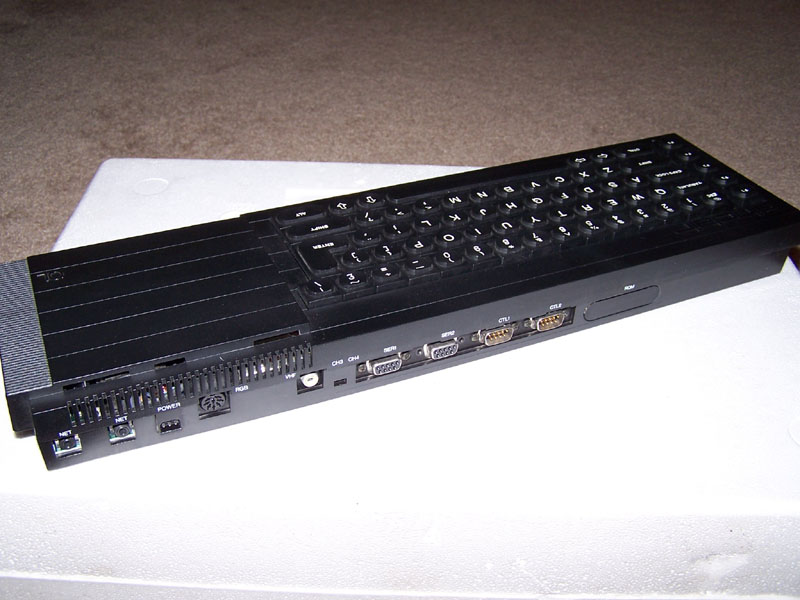
A business-oriented personal computer with Motorola 68008 processor (7.5 MHz), ROM cartridge socket, 2 built-in Microdrive cartridge drives, 2 RS-232 ports, 2 joystick ports, proprietary QLAN ports, 32Kb of ROM and 128Kb of RAM (expansible to 896Kb)
Documents
- QL_ServiceManual.pdfHardware technical documentation 15,282 KB
- QL_EpromManagerII_UserManual.pdfInstructions 673 KB
- QL_CentronicsPrinterInterface_UserManual.pdfInstructions 78 KB
- QL_ICE_UsersManual.pdfInstructions 10,398 KB
- QL_ToolkitIII_UserManual.pdfInstructions 1,078 KB
- QL_DiskDriveManual.pdfInstructions 3,484 KB
- QL_UsersGuide.pdfInstructions 2,908 KB
- QL_SpeedScreen_UserManual.pdfInstructions 698 KB
- QL_Eye-Q_UserManual.pdfInstructions 1,318 KB
Files and rights
Distribution permission is on record, granted to another archive rather than to this one. Screens and pictures are copied here; everything else links to the archive that holds it.
- AllowedSinclair Research Ltd → WorldOfSpectrum
Awards and competitions
Big K - Readers Poll 1984
- 1Good Idea But... (of the Year)
- 2Crash of the Year
In the magazines 7
Big K #9Dec 1984 · p.84
Bill Bennett
HARDWARE THE COMPLETE BUYERS GUIDE A comprehensive Christmas guide to the boxes bidding for your bucks. By Bill Bennett. SINCLAIR SPECTRUM Sinclair's Spectrum is the Model T Ford of home computers. (It comes in any colour so long as it's black.) Now facing its third Christmas, the old Spectrum magic is beginning to wear a bit thin. However, at £129 for a 48k machine, you could do a lot worse. For: basically a million-plus owners can't be wrong. This huge user base means that software sellers and hardware hawkers can't afford to ignore the Spectrum. Software hackers have exploited the hardware to the limit; recently the pace of software development may have slowed a little but the Spectrum has the widest software range of all the home computers. There is something for everybody, and some of the software is simply brilliant. Against: For all it s good points, the Spectrum is a bit naff around the edges. I found that a Spectrum tends to break down after a lot of use. Sometimes the machines just die, but a lot of people find that the "dead flesh" rubber keyboard tends to wear out. Microdrives might be technically clever, but they are no substitute for a real disc drive. I'm not impressed by the need to pay extra money for a joystick and cartridge port, and again there isn't much decent software available on cartridge. No sane person would use the Spectrum for any serious purpose such as word-processing or running a business. To build a Spectrum up to specification approaching that of, say, an Atari 600XL can set you back around £400. Pose Value: One of the Boys. SINCLAIR QL Sometimes I think Clive Sine.lair and Malcolm Maclaren are the same person. Both have ginger hair, both have the art of hype down to an artform and they share a motto: "Cash from Chaos". All the same, the generous 128k RAM and meaty Motorola 68008 processor make most punters' eyes water. For: SuperBasic is everything you want from a version of the world's most popular programming language, though it may not be fully debugged yet. The QL has what passes for a real keyboard, even if it doesn't feel as good as those on more expensive machines. The local area network will appeal to sociable computer users. Unlike previous Sinclair micros, the QL has been treated to a liberal dose of user ports. The QL comes together with four software packages, which are not wonderful, but are enough to get you started. Some of the QL's features are imperfect implementations of very advanced facilities, for example "windows" and "multi-tasking". Against: The QL is slow, even though it uses the 68008 chip running at a zippy 7.5MHz. The 68008 is a junior member of the ultra-wonderful 68000 chip family, and is a powerful processor capable of addressing vast quantities of RAM. However, although it may be a 32-bit processor internally, externally it uses an 8-bit bus. This is a bit like reducing a motorway to a single lane of traffic, and makes the QL a sheep in wolf's clothing. Any new machine suffers from lack of software, but the QL has been around for some months now and there is still hardly any software, and (to my knowledge) no games. This is because the QL uses microdrives and doesn't have a cassette port. The microdrives can't hold much data either and spare cartridges are not easy to get hold of. Pose Value: Sloane Rangers and Hooray Henries. COMMODORE 64 Love it or loathe it, you can't ignore the Commodore 64. There are certainly a lot of 'em out there in Userland. At about £190 a time, the 64 is good value, and can grow into a useful system with discs, printers and modems all available as add-ons. Commodore claim that it is equally useful in the home and in the office, though I find it too slow for any serious computing. The keyboard isn't really up to the kind of bashing that most working micros have to take, and the 40 column screen rules out decent word-processing. It uses the 6510, a special version of the vintage 6502 eight-bit processor and boasts 64k of memory. For: In my book the 64 passes the most important test of all; there are lots of other users about. This means book, magazine and software publishers will continue to support owners for a while yet. With a 64 you aren't likely to be left high and dry. Sprites and the Sid chip sound synthesiser give the 64 some powerful hardware features. Peripheral addicts can choose from a wide range of add-on printers, a disc drive, and a modem f or Commodore. Independently produced add-ons include MIDI interfaces that can connect the 64 to music equipment, speech synthesisers, light rifles and loads of other goodies. Against: although the 64 has some tasty features like sprites, hi-res graphics and a beefy sound synthesiser, the BASIC is incapable of supporting them, and there isn't much of the 64k memory left once you use graphics. This means that to get a 64 to do anything interesting you have to learn machine-code, or pay out for a BASIC extension. That might be painful, but reading the manual makes a visit to the dentist seem like fun. Believe me, if you can get information out of the supplied manual, you should apply for a job with MI5. Loading games from cassette is very slow. Newer games use special fast ("turbo") loaders to get around this. The disc unit isn't that rapid either. I find that the 64's TV output tends to give a poor picture, and curing this with a colour monitor can set you back £200. Pose Value: Hacker. MSX MSX seems to be the flavour of the month, but not everyone agrees. Britain's micro-computing big-wigs think that they can ignore it and it will go away. For: MSX is a good idea, allowing users to build "mix and match" systems, similar to component hi-fi rigs using parts from different manufacturing ranges. All MSX machines use the same BASIC, which is one of the better versions of the language, and there is already an impressive software range for the machines. The computers are all nicely designed, and come with proper keyboards and stylish cases that look terrific on coffee tables. MSX-DOS is very similar to MS- DOS, the system used by the IBM-PC, so will give MSX users access to a larger software base. Against: In many ways MSX is not all that it's cracked up to be. For a start, the different versions of BASIC are NOT identical. Software houses cannot guarantee that MSX software will run on every machine. MSX computers are overpriced. These machines are no better technically than computers costing £100 less. What annoys me is that MSX machines are all based on old technology. Which means an MSX computer is severely limited from day one. Pose Value: Habitat Customers. AMSTRAD WHEN I heard that Amstrad was going to launch a computer I wasn't surprised. After all, Sony and JVC make hi-fi and computers, Amstrad makes cheapo hifi so why not make cheapo micros? The best thing about the Amstrad micro is that a single purchase buys a complete system. For the price of two weeks in Torrermolinos you can pose in the comfort of your home with a computer, built-in cassette unit and a colour monitor. Amstrad could have picked a snappier name than "CPC-464" for the machine. I suppose it means something to someone. Like most other fashionable computers the Amstrad uses the Z80, which is to micros what Linndrums are to hit records. For: as eight-bit computers go, the Amstrad is quick. In most respects it is as quick as the BBC model B; it beats heavyweight so-called 16-bit micros like the Sinclair QL and IBM-PC, and is about four times as rapid as the Sinclair Spectrum. On its own these statistics don't mean much, but it all adds up to a well designed ROM. Against: it's a shame you can't buy the monitors separately. An even bigger shame is that you can't upgrade from a monochrome monitor to a colour version. Instead you must pay for an adaptor allowing the monochrome version to use a colour television. If you already have a tape-recorder you have to pay for bits you don't need. At the moment there isn't a great deal of brilliant software but some is on the way. Pose Value: Move over, Paul Weller. ATARI 600XL and 800XL Atari Micros have been consistently underrated by the UK press and public alike. This is probably due to the curious pricing policy of the machines in the past. But now they are as cheap as any and the Atari 600XL is brilliant value at around £89. Much of what applies to the 600XL applies to the 800XL. It uses the same 6502 processor, has the same graphics and runs the same software. But it has a full 64k memory whereas the 600XL has a measly 16K. For: Unlike almost every other range of computer, any Atari computer can run on any Atari computer software. Atari did this ages before anyone heard of MSX. This means that the amazing games available on cartridge for the Atari 400 and 800 will run on the 600XL and 800XL. Graphics and sound have been standard on Atari computers for years now, and Atari was the first manufacturer to use sprites. It's not so much a question of the Atari being a little out of date, more that the competition has taken a long time to catch up. I really like the Atari peripherals which include a graphics tablet and a track-ball. Against: the cartridge software is very good but the cassette software can be both expensive and boring. Not only that but I found that the cassette loading can be unreliable. This doesn't matter in the USA where everyone is so rich they can afford floppy disc drives. Over here in the UK all peripherals seem expensive, especially compared with the cost of the actual main computer unit. So far the Atari has not achieved the kind of sales to create a lot of excitement in the UK, though the new low prices could change that. Pose value: Space Cadet. ACORN BBC MODEL B As advertised on the television, night after night. Hardly an episode of Tomorrow's World goes past without a free plug. The Beeb has a large following in the UK, but is unheard of in the rest of the world. Its success is due to two factors: the good name of the British Broadcasting Corporation, and a government that handed them out willy-nilly to schools. If it was simply called the Acorn Proton, it would have been forgotten ages ago. A 6502 and 32K of ROM isn't world-shattering, but Acorn have made a creditable attempt at pushing the hardware to the limits. For: everybody knows that the Beeb is a powerful computer. A decent keyboard with function keys, sensible ports - and, maybe the best version of BASIC in the civilised world combine to make it a serious proposition for businessmen and home users alike. Recently I have seen some excellent games software for the Beeb, and there is also a great deal of educational, engineering and scientific software for the machine. There are also two very good word-processors. A lot of tasty add-ons are available for the Beeb, including MIDI interfaces, modems, extra ROMs and a teletext adaptor. It is even possible to add second processors (Z80 and 6502). The Beeb is also one of the very fastest machines around. Against: the Beeb is expensive for what it is; so are the Acorn add-ons. Adding a disc can be very expensive - you need a chip which costs nearly £100, making the effective price of the full spec Beeb... £500 Pose Value: Guardian Reader. ACORN ELECTRON Concerned parents everywhere love the Electron. It has worthiness written all over it. Being an Acorn, the Electron isn't cheap, in fact you have to be holding a fair bit of folding to find £200 for a micro with just 32K of RAM. For: programming the Electron is similar to programming the BBC. Certain software written for the Beeb can transfer to the Electron. Against: expensive with a small memory. I would expect to see a printer port and a pair of joystick ports included in the basic machine. To add these on seems to cost an arm and a leg. This seems to be part of Acorn's policy of simply not making any concessions to the customers. On the whole Electron software is dreary. At times the Electron appears to be no more than a sawn-off Beeb. It isn't quite BBC-like enough. If Acorn had given it a better spec, then the Electron would have hit sales of the flagship model B. Pose Value: Teacher's Pet. ORIC ATMOS Heavy Metal fans will love the Atmos because it is LOUD. Not only is this beasty big on the decibel front, but it has built-in sound commands like SHOOT, ZAP, PING and EXPLODE. The demonic black and red colour scheme of the case will liven up any headbanger's dungeon. Destined to become one of life's also-rans - the Atmos actually isn't a bad little machine. For: The Atmos does have a lot of memory spare for a 48K machine. The keyboard is fairly good and capable of taking a thrashing from decibel-crazed users. Also the Atmos has a built-in parallel printer port so it can be used with an Epson printer or the Oric four-colour plotter. Against: Oric had a second chance with the Atmos. But amazingly, the tape operating system was actually made less reliable in the new machine. Software houses haven't exactly fallen over board to produce software for the Oric machines and a lot of what does exist is boring. Pose Value: Headbanger.
Personal Computer News #75Aug 1984 · p.24
David Janda
Kenn Garroch
Stuart N Cooke
THE DEFINITIVE QL PRO-TEST Dongle-free QLs are poised to arrive on the streets: the hardware, the software and the SuperBasic got a long cool look from PCN. QL - THE HARD FACTS By Stuart Cooke At long last the Sinclair QL computer is becoming available. Everyone who ordered the computer just after the launch should have received it. According to Sinclair things are going so well that you should be able to buy the QL in high street shops from next month. Since the QL first made an appearance there have been a few changes in both the software and the hardware. How good is this so-called finished version of Sir Clive's brainchild? Due to a problem of fitting the ROMS inside the QL computer, early versions of the machine were sent out with some of the operating software in a 'dongle' which was fitted into the cartridge slot on the rear of the machine. Probably the first thing you'll notice about the new machine, once you get it out of its polystyrene box, is the total lack of any form of dongle. Yes, the ROM is now inside the machine. IN USE With the external power supply plugged in and the micro connected to your TV or monitor, you can start to use the QL. Before you can do any work you are asked if you are using a TV or monitor. If you have a monitor the QL switches into 80 column mode, if you have a TV it uses 40. It is possible to have 80 columns on a TV, but you lose characters off the edges of the screen and they are difficult to read. The display is not the best by any means but it is adequate. With a TV the colours tend to be a little wavy. Even with a monitor that gives sharp pictures when used with other machines the picture may not be great. Once you start to use the computer you find what is probably the most disappointing feature of the QL: the keyboard. Most computers today have a stepped keyboard and real keys. The keys on the QL are totally flat, rather like a calculator keyboard. When given to a touch typist to try out the reaction was definitely not favourable. Because the keyboard is flat, Sinclair has included three feet that push into holes at the rear of the machine. This does tilt the keyboard towards you but doesn't step it. STORAGE Everyone interested in computers probably knows that Sinclair has provided two Microdrives rather than disk drives with the QL. Unfortunately these drives, and the small tape cartridges associated with them, are nowhere near 100 per cent reliable. If you have a Spectrum with an Interface 1 and Microdrives you can save your programs onto cassette for security. Unfortunately, the QL has no cassette interface and so you have to put all your faith in the Microdrives. The main problem with the drives appears after the, machine has been switched on for a while. The power socket is just behind the two drives and the QL gets very warm, especially towards the rear of drive two. When the QL failed to back up the software supplied with the machine, a spokesman for Psion said that this could be caused by the drives getting too hot. Turning the machine off and trying again later was his suggestion. If you had a long program in memory it seems rather silly to have to turn the machine off and let it cool down before you can save it. Fortunately, it appears that drive 1 can normally be trusted as it doesn't get as warm as number 2 - always verify any programs though as you can't be too careful. INTERFACES The rear of the machine supports a vast array of sockets. These are the cartridge/ ROM port, two joystick ports, two serial ports, TV, monitor, power and network connectors. The most important thing to notice about these sockets is that they are nothing like those found on other machines. If you happen to have a fairly new telephone examine the socket it plugs into. This could be the same type used on the QL for the joystick and serial ports. If you want to make your own leads for the machine you're going to have problems. An hour spent going around the local hardware shops led me to believe that you simply can't buy them. The first company to produce an add-on that converts the serial sockets to standard 25-way D-type sockets and the joystick ports to 9-way could well be set to make a fortune. VERDICT It's a real pity that the QL doesn't live up to what was expected of it. There are too many points which show a lack of thought - for example the type of socket on the rear, in another six months, when there are lots of add-ons and the bugs in the machine are fixed, the QL will probably be a good buy. At the moment I think my money will go elsewhere. SOFT SPOT FOR THE QL By David Janda Four application packages are supplied with the Sinclair QL computer. Psion, who until now has produced software mainly for the Spectrum and ZX81, has produced the packages, called Quill, Archive, Abacus and Easel. The packages offer word processing, database, spreadsheet and charting facilities. According to Psion, each of these packages should be able to produce data which can be moved from one package to the other, creating a full business system. There are a couple of points relating to the packages that I would like to dismiss. First, it was previously thought that the packages would be able to run in multitasking mode; this is not so. Second, the QL has a fair amount of RAM, but don't expect to use a lot of data - this is because the packages are very large. COMMON FEATURES The screen layout of each package is divided into three main areas. The top section is for the control area; the centre being used to display commands. Common prompts are shown at either side. This area is updated as different commands are used. The main work area is used as the main display, and it may be split into more sections depending on what package is being used. The lower part of the display is used for the display area. Its purpose is to show information relating to options chosen, program status, user input etc. Each package uses the function keys on the QL. F1 calls up the help file, which is organised in levels, and you return to the main display by pressing Return or the Escape key. F2 switches off the control area, thus giving more room for the work area, and F3 will toggle in the control area commands. Finally, pressing Escape will return you to the last command. The user can select a 40, 64 or 80 screen width to suit the TV or monitor being used. Also printer configuration programs will allow fancy features such as underlining to be used. QUILL - WORD PROCESSOR The Quill's control area displays information on cursor movements as well as deletions and paragraphing. Information on what file is in use, page number, word count and others is shown in the display area. Cursor, movement is by letter, word or paragraph. Deleting text is achieved by letter, word or line. Both tabs and margins can be set as desired and will remain in effect until reset. Different visible typefaces can be incorporated within the text, and provided the printer driver is used, these effects should appear on the final copy. Typefaces include superscript, subscript, bold, underline and 'paint'. Paint simply allows existing text to be changed to a particular typeface. Headers and footers can be incorporated as well as paging. Options allow line spacing to be changed as well as details relating to the format of the document. The screen I/O on the QL is atrociously slow, and this is evident when using different features of the package. Things grind to a halt when the package is accessing the Microdrives, and Quill uses them a lot. The latest copy of the Quill which I used had some oddities. It didn't allow more than one paragraph to be copied if there were spaces between them. Also, running out of memory sometimes resulted in the machine hanging up, or in some cases giving weird line numbers with minus values. As far as features are concerned, the Quill offers a lot. However, it lacks in some respects, flexibility being one. The fact that existing Quill files cannot be merged is just one example. ARCHIVE - DATABASE Archive's real power lies in the fact that it can be used as a simple index system, or as a complex data management system. This is because it offers two modes of operation. It can be used in command mode, where the user enters commands that are directly executed on a data file. Using the Archive program editor, it's also possible to define whole procedure orientated programs that can do tasks from creating a new database to maintaining an old one. There is no fixed limit on the number or fields there are in a record or the length of each field. Records can therefore be of varying length and can be added or deleted at will. Two types of data are permitted: numeric and alphanumeric. Records can be sorted in ascending or descending order and multiple key fields are allowed. No immediate commands are provided to change the type or number of fields in a record, but under program control this operation would be very easy. Data within a file can be interrogated in a number of ways. Jumps through a file can be made to the first or last record, or forwards and backwards by one record. FIND will perform a global search through all records and fields while SEARCH will do just that, but by using expressions such as IF NAME$= "David"... Sub-files can be created by using the SELECT command which will 'group' together records that match a specified criterion... With a package as flexible as Archive's, its many other capabilities can only be matched by the imagination of those who use it. I found that the only item to hold up the operation of the package was the Microdrives. ABACUS - SPREADSHEET Abacus incorporates all the normal features that you would expect from a spreadsheet. The difference between it and others is that it has very flexible text and labelling features as well as an excellent user-interface. Up to 64 columns by 256 rows can be used to make up the spreadsheet. Moving about within it is achieved using the cursor keys, and the row/column position is always indicated. Larger movements use the GOTO command followed by the cell reference. All calculations are performed to 16 digits, and as most don't require that many digits to be displayed, a host of formatting options are available. These will allow text and numbers to be displayed left, centre or right justified. One of the main features of Abacus is that rows and columns of cells can be referenced by sensible names. That is, any text in a cell can be used as a label and can be used in calculations. The label can mean a reference to a whole column or row, and this method of identifying whole sections of the sheet is very easy to use. As I have mentioned, the user interface is very good. Entering figures on a spreadsheet is not the most exciting thing to do, and any aid in error-free entry is welcome. Abacus provides the user with many (sensible) defaults, and on occasions I was surprised at how little I had to bash out commands or ranges. EASEL - BUSINESS GRAPHICS This is by far the easiest package to use. Sinclair claims that it is possible to produce a graph after seconds of using the package - and it is right. This package will usually be used with imported data from Archive or Abacus, but it can also be used quite quickly manually. When the program is run, a bar graph is selected as default with months displayed along one axis. The graph will be re-scaled depending on what values are entered, and if the entries go off the edge of the graph, it will be re-drawn on a smaller scale. Different bar designs can be selected using different colours and thicknesses, and scales can be reset. Line graphs and pie charts are available as alternatives, and as with the bar charts there are plenty of ways in which they can be presented. For the final copy a photo of the screen can be taken, or the high-resolution screen dump to an Epson FX-80 can be used. Using the package was great fun if nothing else. It was so simple to display bar graphs that I completely overlooked the more advanced editing features of the package. These allow you to create a new set of figures (and a new chart) from previous data. IMPORT/EXPORT Each of the packages has its methods of saving and loading data. But this data can only be read by the package that it was saved with. Data can, however, be moved between packages, and this is referred to as importing and exporting. This is possible between Abacus, Archive and Easel, but not Quill which can only import data. The compatibility between the different packages is achieved because the format of the data produced by the three is exactly the same. The only 'problem' in exporting data between the packages is that a few rules have to be followed. This does not restrict the user because the necessary information is well presented. I had no trouble at all. Quill data cannot be exported because it is formatted text. Importing to the Quill is, achieved by exporting data to a Microdrive ASCII file which is formatted, and thus can be handled by the Quill. VERDICT For 'free' software, the QL packages are good. However, the 'you can't complain for the price' attitude doesn't apply. Many are going to buy the QL purely because four pieces of software are thrown in, and many are no doubt intending to use these packages in their businesses. I would strongly suggest to anyone who intends to use the packages for 'serious' , work to think again. There is nothing more precious than your data, so the software that you use and the system that you use it on has to be of very high quality. In the packages I received, bugs (or oddities if you wish) need to be sorted out. Also note that the packages are quite large, and in the case of using the Quill, don't expect to write a chapter or two and hope to have memory spare - there won't be. But by far the biggest setback are the Microdrives. As a form of mass storage they are a joke. Not so funny when data files can't be read back into one of the application packages, though. To summarise their performance - they are slow and unreliable. HOW SUPER IS THE BASIC By Kenn Garroch The QL's SuperBasic lives up to its name in some ways, but in others it certainly does not. First of all the pros. SuperBasic supports a wide range of useful commands that should make programming quite easy and efficient. It has a number of control structures which, though they are not really the standard implementations, do show willingness on Sinclair's part to upgrade Basic to a higher level than is normal. CONTROL The control structures are unusual in that they use the command EXIT to get out of them, so instead of LET T=0 REPEAT LET T=T+1 UNTIL T=10 you need to use: LET T=0 REPEAT loop LET T=T+1 IF T=10 THEN EXIT loop END REPeat The FOR...NEXT is also rather unusual as it is possible to say, for instance: FOR T=0 TO 10, 7 TO 4 STEP-1, 1 TO 4 PRINT T; NEXT T and have the routine step T through all the appropriate values and print: 01234567891076541234 Note the QL does not insert leading or trailing spaces as do most other Basics. Other unusual commands are such things as BAUD, for setting the baud rate of the serial port, full turtle graphics, PAN to scroll the screen horizontally, and SCROLL to do it vertically. It is possible to POKE bytes (8 bits), words (16 bits) and long words (32 bits), renumber a program with RENUM, and do automatic line numbering with AUTO. A SELECT structure is provided which is similar to ON GOTO and SCALE can be used to set the size of a drawing produced by a graphics procedure. Multiple line procedures, and multiple line functions, with full parameter passing are available and easy to use. One nice thing about the procedures is that they can be defined somewhere at the top of the, program and then used as direct commands, so instead of having to type DIR MDV1__ for a directory of drive one, the following procedure can be defined and a directory obtained by typing DIR 1 DEF PROCedure DIR (d$) DIR "MDV"+d$+"__' END DEFine STRINGS All the above commands should make SuperBasic something special, but unfortunately there are a few drawbacks. FILL$("aaaaaa", 32767) has a bug in it and is capable of producing very long strings and filling them with rubbish. Trying: a$=FILL$("aaaaaa", 32767) PRINT LEN(a$) causes the machine to print garbage. When the QL is printing a long string, it is not possible to stop the beast with the usual CTRL SPACE. This applies to any of the commands, such as plotting long lines, and so on. By far the best way of hanging the QL up is to press the Control ALT and 7 all at once. No matter what the machine is doing, this will cause it to stop. Of course it is a little difficult to press all these keys at once, but the fact remains that it causes the machine to fall over backwards and go to sleep. When using FOR...NEXT loops, including anything on the same line as the start of the loop, for example FOR T=0 To 10: PRINT "here" PRINT T*T NEXT t causes 'here' to be printed 11 times and the rest of the loop only once. This applies to placing anything after the colon, even REM. FUNCTIONS Using a recursive function to evaluate factorials such as DEF FUNCtion FACT (X) IF X<I THEN RETurn 1 RETurn x*FACT(X-1) END DEFine and then trying PRINT FACT (1000) will obviously cause an out of memory error, but takes a long time to do it. When it does run out of memory, all the variables are set to zero, making program debugging very difficult, since it is not possible to find out how far the function got before crunching out. The manual states that RENUM cannot renumber RESTORE. This has now been fixed, as have all the other obvious bugs. There are still problems with tokenising the Basic commands and if spaces are not put into the correct positions, eg GOTO10, the command will not work but GOTO 10 will. The date functions are very good and cannot be fooled by trying to feed in bogus dates such as the 32nd of Feb, etc. The problem is that DATES cannot be sliced, eg PRINT DATE$ (1 TO 4) gives an error. To slice it, it is necessary to LET A$=DATE$: PRINT A$ (1 To 4) The beep command is very difficult to use and in fact the manual says that the best way to find out how it works is to experiment. This is not as easy as it sounds since the documentation is not specific enough as to what the parameters do. A problem with the Microdrives from Basic is that if the drive is full and a program is saved, the system puts the file name into the directory. Deleting another file to make room and doing a directory makes it appear as if the program has been saved. In practice this file is empty and when loaded back in, the current program is NEwed, possibly causing a total loss. The SELECT control structure does not work with strings, which is surprising since string equality produces the same result as a numeric equality, ie true is 1 and false is 0 (this is not very standard). If this had worked, it would have made, SELECT equivalent to CASE, and since REPEAT and a proper FOR and IF structure are included, it seems a shame not to have done things properly. USABILITY Other problems with the Basic are generally caused by its inconsistency and possibly make it a little confusing to the beginner. In some cases, spaces are needed between commands and their arguments, but not in others; similarly, procedures are defined with the arguments in parentheses and then used without them. All this adds up to a fairly confusing system, even for the non-beginner. It would also have been nice to have had a decent full screen editor, since EDIT line number allows access to only 160 (320 in mode 4) characters of the line at any one time. This may not seem too bad, except that it is possible to have program lines of almost any length. VERDICT All these problems make the QL's SuperBasic difficult to use at times. A little more error trapping, especially on the string handling, would have been welcome. If Sinclair can fix all the bugs and make the system a little more usable and improve the keyboard and correct the documentation and... and... Well, it could be such a good machine with a very good Basic.
Sinclair User #28Jul 1984 · p.110
John Gilbert
THE QL: SEPARATING FACT FROM FICTION John Gilbert draws on his extensive hands-on experience to answer the basic questions surrounding the new Sinclair machine. The Sinclair QL has finally landed in the Sinclair User offices so that we can offer one of the first reviews on the machine. Despite the external EPROM containing part of the operating system which hung out of the back and bounced round when the keyboard was used, and the almost non-existent manual, the machine was up to the standard which is going to customers. It arrives in a box three times the size of the Spectrum which contains the manual, external EPROM and free RS- 232 lead. Although the machine is not particularly attractive, the keyboard works better than it looks, even if the keys, especially the space bar, had an irritating clacking sound when pressed. When first powered-up the computer will ask the user to press either function key one - F1 - if using a monitor, or F2 for an ordinary UHF television set. There are five function keys which can be utilised in either SuperBasic or machine code for complex tasks performed by the user. For instance, it is possible to call several procedures into operation, such as clearing all areas of the screen at once, by pressing one of the function keys. Unfortunately new computer users may have some difficulty getting to grips with entering programs because the television screen display is different and less easily understandable than that of a monitor. On the monitor the QL initially splits the screen into two windows, or pages, one white and one red. The white is used for program listing and the red for the results of a program, such as graphics or input. The monitor display separates those windows but the television super-imposes one on top of the other, the white listing window being the primary one. As the windows act as two separate screens, you need two separate instructions to CLS them. The CLS 2 clears the listing screen and CLS clears the program results window. Every time the QL finishes a program you will have to perform a CLS 2 to put the listing on to the screen. It would have been better for the QL to switch back automatically to the listing window when a program has finished and list the SuperBasic code. The size of the characters displayed on a screen differs on the television display and the monitor display. The resolution of the monitor is set at 80 characters per line but is coarser on the television setting. It is, however, possible to get 80 columns on the television set using the MODE command which will define the resolution in which the screen is displayed. Sinclair seems to have overcome its difficulties with colour displays on television sets and 80 columns is just about readable. The program editor will alter and add to your lines of SuperBasic program in much the same way as the Spectrum, with one important difference. If you type in a line which has an error the computer will tell you about the error and promptly forget the line. You will have to re-type the line with corrections. If you want to edit a line which you have already entered on the listing screen you must type EDIT, followed by the line number. The only reason you might want to do that is if you want to alter a line which contains an error other than syntax. Error-checking, using the program editor, may be almost non-existent, but Sinclair seems to have learned by its mistakes with the Spectrum so far as error-checking and correcting while a program is running is concerned. Apart from the SuperBasic commands which trap errors, the machine will also allow you to use any variable, numeric or character, without first defining it. If you ask for the contents of an undefined variable, the QL will put an asterisk into it. Error-trapping is essential on a machine like the QL and Sinclair seems at least to have that correct. The way in which SuperBasic and QDOS are implemented with the 16-bit M68008 is an incredible bodge which makes the machine less expensive to manufacture than if it had the full power of the 68000. The chip has an internal structure of 32 bits but the slow speed at which the QL runs shows that something drastic has been done to the microprocessor. When you look at the specifications everything seems rosy until you learn that the machine supports only an 8-bit databus. As a result of the chip mutation, and after running several benchtests on the BBC Micro, Commodore 64 and Spectrum, it was found that the QL was slower than all those machines, including the Spectrum, if you type in a benchtest of only a few lines. If, however, you type in a long program you will find that the computer does not react any more slowly but that its competitors, such as the BBC, do. It runs at about the same speed while interpreting long and short listings. Multi-tasking, especially when used in connection with SuperBasic, is a misapplied term. What can you do in SuperBasic is to run a program while at the same time accessing a peripheral such as a Microdrive to load or save data. It is not possible to run two or more SuperBasic programs at the same time on the QL and so you cannot have Basic multi-tasking. It is, however, possible to run several machine code routines concurrently. Despite disappointments with multitasking, the graphics created using SuperBasic can be spectacular and are as fast, if not faster, than those of the BBC micro. There are two circle commands on the machine, one called ELLIPSE and the other CIRCLE. The latter seems to have been left in by mistake, as it is part of the pre-production operating system and does the same thing as ELLIPSE. The ELLIPSE command is similar to that of the Spectrum CIRCLE. It allows the user to produce arcs, circles and even lines. There is also 3 LINE command which uses absolute co-ordinates on the screen, unlike the Spectrum, which uses relative plotting. QL graphics are easier to use than those of the Spectrum, because each pixel can be referred to absolutely. You do not have to re-set the plot position every time you start a new line as you do with the Spectrum. Turtle graphics seem to have been an afterthought on the part of Sinclair. Unfortunately, they seem to have been hastily implemented and, on our machine, we were not always sure that they would work in the way we intended. The QL starts on the wrong foot by having the turtle pen up, in the non-draw mode, when initialised. To draw a line you have to type PENDOWN and even then the QL will show no sign that the turtle is in operation. Unfortunately, the Microdrives are not up to their best with MERGE. The only Microdrive instruction which provokes anything like the response rate promised by Sinclair is the DIRectory, formerly the CATalogue, command where the names of the files on the 100K Microdrive cartridges are displayed. The Microdrive takes approximately three seconds to display the contents of a cartridge. The access time for Microdrives on the QL is disastrous for the businessman. Quill, for instance, takes two minutes to load. They are, therefore, only slightly faster than a cassette recorder using the baud rate of a Spectrum to load a 48K program. The response rate of Microdrives under the QL QDOS operating system may be slow but it becomes even slower when you enter the operating systems of one of the Psion software packages. Files can take so long to load into the programs that you might wonder whether the machine has crashed in desperation. Microdrives are hopelessly inadequate for the business community and, because of the temperamental nature of operation, could pose a serious risk to data stored on cartridge. It is all very well for Sinclair to suggest that you make back-up copies of all your files, as irretrievable errors can be made during the back-up procedure with your only copy of data in the drive. The serial interfaces on the QL are also hopeless for the intended Sinclair business market. Apart from the RS232 being slow, the business community does not regard it as standard, favouring Centronics instead, and so for business users the choice is, at the moment, whether to buy a QL in the hope of getting a Centronics interface or not to buy a QL at all. Despite the inadequate or non-existent nature of the QL peripherals, the main PCB of the machine is attractive and well put together. The hardware designers should be complimented on the compromises they have taken to make the machine operational. When the external EPROM is taken on board and it becomes possible to use 16K ROMs in the ROM socket, the finished machine will be a serious contender against the PCs and Apricots at the upper end of the market. It is inadvisable for every businessman to order one but Sinclair should aim the machine at the serious home user and Student. For the business user the machine seems inadequate and slow by most 16-bit computer standards. It costs, however, only £399 and represents a considerable achievement for Sinclair Research. The company may have exaggerated the brilliance of the machine and mismanaged the marketing yet again, but it nevertheless has a winner on its hands. It has also broken through to the serious, upper end of the market. So long as it receives the software support the new Sinclair baby should make almost as big an impression as the Spectrum.
Expansion port (0.5 Mb RAM) ROM slot Joystick ports RS-232C ports TV port Monitor port Power Networks Reset Microdrives Microdrive extension
Your Spectrum #4Jun 1984 · p.39
Quentin Lowe
STEERING TO SUCCESS: THE QL ROADTEST The sordid practice of pre-announcement has again gripped our hearts, and Sinclair are once more laughing all the way to Fort Knox. But to keep the interest ticking over during The Big Wait our ever-smiling micro Guru stuffed a company Mercedes full of eager journalists and whisked them over the Cambridge for a day's play with a QL. Quentin Lowe tells the tale. If nothing else, the Cambridge soiree succeeded in wiping a few cynical smiles off a few disbelieving faces. Yes, there are mistakes and disappointments; yes, there are delays and problems that a two-year old could have predicted; but it's one hell of a machine all the same and Sinclair Research knows that, in the end ,it will delight everyone who's had the good grace to put their money up front. Before charging into the review, I must first make all the usual disclaimers. The report is based on a one-day play on an early machine. Details may be different when the machines finally appear (in fact the QL has already changed a bit since the last time I saw one) and nothing that you read can be taken down and used as evidence... Surprisingly, the man from Sinclair said how disgusted they all were that anyone could have written and be selling a book about the QL. But books about mythical computers are only about a fiver, whereas this particular mythical computer is going to cost some four-hundred pounds. Still, Sinclair Research did at least prove that the QL was slightly more than mythical; here's what it's like to ride a Unicorn... THE BODYWORK The machine is delightful to behold and use. Its small size makes it a comfortable desktop companion and the only possible moan is that the three plastic feet (which tip the machine to a suitable typing angle) have a habit of falling off. Early QLs will have an additional 16K of EPROM hanging out the back - an unforeseen extra that's affectionately been nicknamed the 'Kludge'. The Kludge is really a 32K EPROM or ROM cartridge and its current nasty looks should have changed somewhat by the time it reaches the customers. It contains the bits of Basic and QDOS that either weren't ready in time or couldn't be made to fit in the original 32K ROM space. Being an indispensible cartridge, it must have a postponing effect on the QL cartridge software market. In a way, Sinclair's approach is commendable; with the Kludge, you do get a working QL as opposed to yet another apologetic letter. The final QL ROMs will probably be around some four months after Sinclair has frozen the code in them - and the company also has to figure a way of getting 48K of ROM inside the machine in a relatively short space of time. Strange then that it seems to be moving so slowly to finish the code in the ROMs. You also hear rumours of this or that keyword being added/deleted/changed and, despite missed delivery dates, Sinclair Research reckons its got the time for its programmers to do some new and fun things with the extra space available. Oh well, so you get turtle graphics commands too. The keyboard is a bit strange at first. There's a copious layout (rumoured to be close to a DEC-like standard - if that were at all important) and every key you could possibly want is provided, including obscure characters such as {,}, [,], | and that come in useful in languages such as C. What's more, the keys feel good and with a bit of practice you can type reasonably quickly. Best of all, the QL never drops a keypress. It's got a proper type head system like the BBC micro, especially useful when you're waiting for the Microdrives. However, you will notice that there is no delete or backspace key, a curious omission considering its importance. Sinclair has a complete editing key suite between the arrow, Control and Alt keys which will be available in most applications. This includes Control/Left-arrow for backspace. I hate to say it but after five hours, I was quite happy with it. Any Shifted Zs you see in this story are purely coincidental! DRIVEABILITY As soon as you've switched on (and are still cursing the lack of an on/off switch) the QL asks if you're using a TV or Monitor. Pressing F1 or F2 sets the appropriate display mode and the QL then tries to boot the Microdrive cartridge in drive 1 (or as we QLers call in MDV1). The QL searches MDV1 for a Basic program called BOOT and then runs it. This can then load whatever other programs you like, allowing you to create turnkey systems or have the QL boot up just how you like it. If it can't find boot, the system drops neatly into Basic. The choice of TV or monitor is only for aesthetics. Some TVs won't be able to handle the QL's 80 column mode and will have to be operated in 40 columns. Sinclair, a company which has no televisions in its office, assures us that the television display is as good as you'll get. Certainly on a monitor it's bright, sharp and rock-steady - even if one of the QLs we've seen lost the left-hand 50 pixels of the display off the edge of the screen. Amid the growing pile of QL blurb, you tend to lose sight of the display's performance. It's a pure bit-mapped display with its own 32K of memory, operating in four colours at 512x200 or eight colours (which, with a bit of software hocus-pocus, provide 256 stipples) in 256x200 mode. Sinclair has built some pretty clever screen handling software into QDOS and no doubt there'll be lots more to come. Needless to say, the QL's windowing facility is a joke. The windows are not proper windows in the Apple, Digital Research or Microsoft sense, but more a clever screen handling gimmick. A window is effectively a set of four margins, a top left, PAPER and iNK colour, cursor position and so on. It's associated with a particular I/O stream so that screen handling commands can be directed specifically to it. So although it may look like it's a window, it has no contents as such - it can't be opened and closed with stuff inside. There are no window priorities - print to a window behind another one and the new text shows through, destroying whatever was in that place on the top window. Clear a window on top of another one and you destroy its contents and so on. There are PAN and SCROLL commands but these just smooth scroll the area inside the window in any of four directions, losing any data that's scrolled out of bounds. So, with a great deal of care and attention, it is possible to produce some stunning effects. But the windows are just a trick piece of screen handling software. Similar things could easily be achieved on any other microcomputer, including the Spectrum. You may have guessed by now that QL screen handling is very software based. Character generation certainly is, and the eight different sizes available with CSIZE are just the same character definitions trotted out on to the screen in different ways. Following the shock of the impressive display, the next surprise is the two Microdrives. Despite the now wearisome round of moans about Microdrives, the two souped up versions in the QL are a major asset. Having any kind of viable mass storage device in a home computer transforms the system. No-one is going to suggest that Microdrives are fast but they are not as slow as people might think. The QL uses a slave processor to control the drives (it even verifies tape-writes in the background while you get on with something else) and a proper RAM-based directory - unlike with the Spectrum Microdrives. Occasionally you find yourself in exactly the right place and the drives load ten lines of Basic before you've looked up at the screen. Occasionally, they get fussy and you sit there for hours and hours. The media itself is nothing short of fun. The little cartridges can be carried round in pockets, put in Jiffy bags and so on. Despite stern warnings, you can do nasty things like pulling them out while running without wrecking them. This unfortunately became a necessity on a number of occasions while using the Psion packages, but that's a software problem that should be curable. QDOS, incidentally, is very good for friends who swap cartridges around ad-hoc. When you format a tape, it gets named plus it gets a random number written to it. Even if you switch one cartridge for an identically named one, QDOS can detect it and object, thus protecting you from the consequences of the RAM-based directory getting out of sync with the actual tape in use. This process, while quite neat, does unfortunately slow down access. All in all, it's hard to knock anything that's such good value for money. The drive system is probably the QL's best feature - it could be a Z80 with 32K and the drives would put it above its rivals. The only real way to complain about the Microdrives is the sobering thought that when you can finally buy the QLs in Smiths, there'll probably be twin 5.25" inch floppy machines for around the same price. The more disappointing aspects of QL hardware are to be found lurking round the back. The omission of a Centronics port ranks in order of stupidity only second to the lack of a delete key. Instead we face a strange obsession with poorly implemented serial ports. First point - daft sockets. The QL uses telephone jacks which, although very trendy, aesthetic and (let's face it) secure, aren't easy to come by and are more than difficult to wire up yourself. Sinclair's wonderful free-gift for its 'sponsors' who've already ordered is, of course, one of these rare RS232 leads, valued at £14.95. If you're going to use such daft connections, the leads ought to come in the box, value £0! But worse, the two serial ports have to be set at the same baud rate and that rate applies to both transmitted and received data. Think nothing of it until you try to access Micronet (1200 receive with 75 transmit) or drive both a Modem and a Printer. Who knows, maybe some flash device driver can squeeze other rates out of the system. The network is quite openly not much more sophisticated than the ZX Interface 1 network. Sinclair admits to, as yet, having problems with Spectrums on a net to QLs (who wouldn't?) but is able to demonstrate two QLs talking to each other. For the most part, it's still a question of two people stopping what they are doing and negotiating every step of the data transfer (using the NET command and the NETI (net input) and NETO (net output) drivers in QDOS). For the inexperienced, this can take more time than passing a Microdrive cartridge across by hand. However. with QDOS and the 68008, a sensible network should be possible. It remains to be seen whether the built-in system is up to it. STEERING IT On to the software and, like all things Sinclair, SuperBasic plods along as if all it had to do in life was waste away a warm summer evening by the river. It's a glamour Basic that does have some really juicy features, but what people ought to realise is that it's speed that counts. Basics are habitually used for stuff like games and it's their ability to crunch code quickly that makes them good, rather than oversized ranges for floating point variables and so on. SuperBasic also has a lot of the Cambridge academic in it. Long, cumbersome commands and short, terse error messages. The latter seems to come from using a predefined set of rather vague messages provided by QDOS. Quite why this is going on seems too odd to be worth investigating. SuperBasic has all the makings of a grown-up language. Multi-line functions, procedures with local variables, long variable names and formatted listings with words like REM expanded to REMark for you. SuperBasic does away with the humble NEXT command - instead you can use END FOR. Using NEXT allows you to jump out of FOR... NEXT loops whenever you feel that Sinclair's claim of Superbasic making GOTO and GOSUB redundant is a little crass. To be fair, however, if you use FOR followed by a series of statements on a single line, you don't need the NEXT (or END FOR) at the end. Most elegant. The other major nicety is that procedures can be executed outside of programs simply by typing their names. Given that these procedures can have parameters, you can easily add your own commands to SuperBasic to make program development that much more simple. For the most part SuperBasic appears to be a very sensible implementation,although missing some of the essentials - a line number trace being one of the more sore points. It's a mature language, but one which appears to assume a certain familiarity and skill with Basic. Normally that's not the objective at all. To my mind it's for beginners and should therefore provide a fast and friendly environment that makes it easy to learn and use. BACKSEAT DRIVING The four bundled applications were looking a bit sorry for themselves on the day, probably because Sinclair Research gave the impression that there were more releases and versions of the packages than working QLs - and because they are still some way from being presentable. However, running versions 0.99C, did give a fair impression as to what they are about. The packages are real business programs and have no rival on any other similarly-priced machine. But they are not as slick as they first sound. The overall feeling was one of slowness, particularly with the word processor, QL Quill, which relies heavily on using MDV2 as a scratchpad. QL Abacus, the spreadsheet, also seemed more lethargic than you'd expect. The packages now run under QDOS and are loaded from Basic BOOT programs. One thing that's been going on is that they've been steadily adapted to use more and more of the ever-growing QDOS. In places this may speed the system up (for example, fast area fills in graphics) or it may improve performance (QDOS supports 256 stipples based on the eight available colours). Hopefully, having to go through QDOS will not have a slowing effect. There's no facility for linking the packages directly but they can exchange data in a predefined import/export format. Going from the database to the wordprocessor produced a document with the database information plonked inside in an ordinary looking 'comma and quote' format. So it should be possible to access and create import/export files from Basic. However, the time taken to export a file, load another application and import the file is a considerable deterrent. What's more worrying is the user image of the programs. They look quite fabulous and exciting in the screen shots and over someone else's shoulder. But try sitting down and doing a job and you find a shockingly large amount of typing needs to be done and there are some fairly curious and fiddly key sequences. You can get used to curious user interfaces, but you can't cope with insecurity. Almost any filing operation causes the QL to hang, the ESCape key being ignored. If something is wrong with the cartridges in use the system hangs indefinitely, all the while re-trying the same operation.There are also a number of dangerous operations which should be checked before any move is made. Tell Archive to Quit and it resets the machine, wiping your current data, programs and screen formats, all without asking any questions. No doubt much of this could (and probably will) be sorted out before machines start being shipped in any quantity. But the overall suspicion is that the packages perhaps try to do more than is necessary and may be too have suffered in the rush. It's hard to believe they put a strain on the machine but it is easy to wonder whether someone has been a bit over-ambitious. Many people have ordered QLs solely for the four packages and it's certainly not unreasonable because you get the Perfect suite. However, it's nowhere near as good as gritting your teeth and buying one of those ageing Osborne things on the grounds that you get SuperCalc and WordStar. TRANSMISSION QDOS, the QL's ROM-based operating system, does exist and by all accounts is an impressive piece of work. It wasn't really possible to tell how good it is because you can't use it directly and there's as yet no access to some of its more powerful features - a touch of the 'honest the really powerful features are there; you just can't use them' department! Neither is there any documentation; so much of QDOS remains a mystery and these details are perforce more sketchy than they should be. QDOS is a proper operating system, despite being stuck in ROM rather than loaded from Microdrive on power up. Elsewhere the practice of putting serious operating systems in ROM has almost died out, since it makes it quite hard to cure bugs and update users with new versions. That forgiven, Sinclair appears to have produced a very mature system. QDOS has been likened to Unix simply because it's 68000-based and uses lots of Unix style syntax. In reality it's nearer to something like MS DOS 2 with the promised bonus of multi-tasking. QDOS provides total hardware support (graphics, Microdrives, network and so on), multiple Input/Output streams with installable device drivers, multiple programs in memory with pipes and simple multi-tasking - although these latter features can't be demonstrated. At first glance, everything is beautifully implemented. All I/O devices have names (see table) and you OPEN and CLOSE streams to them, PRINT and INPUT to and from them. Some support other appropriate commands such as CLS and iNK or LOAD and SAVE. When you open a channel, you can pass an arbitrary string of characters excluding commas, to the particular device driver software. This can be used as parameters for the driver so, for example, you specify a filename when you use MDV1 or MDV2. A command to OPEN a CONsole in a screen window includes a rather ungainly spec for where the window goes and so on. Sinclair has already let the syntax for such parameter lists get out of control and inconsistent. The beauty of the system is that any new device can become part of the machine at will. A Centronics interface add-on will probably become a CEN device. To print to it, you would OPEN CEN with a parameter list that perhaps tells it what sort of printer it's using and whether a screen dump is required or not. There's room for 16K of code for each device, allowing for some pretty sophisticated additions to the system. Obviously, it makes it easy to bring in floppy and hard disk add-ons. QDOS recognises that devices are either character based (such as printers, keyboards, networks and so on) or directory based (such as Microdrives and hard disks). Once the calls to QDOS are available, there's plenty of room for improving the system; a RAM-disk driver, perhaps, for half-megabyte QLs? Or a fancy font generator for the screen. With all this so nice, it's surprising that the company has made some really bad decisions with the rest of the operating system. Files are kept absolutely simple - all are effectively just collections of ASCII bytes and QDOS will happily dump any file on the screen or down the network using the Basic COPY command. This is not such a bad idea - as a consequence, you can do little things like create programs for the Archive database with a Basic program or import from the spreadsheet into Basic and so on. SuperBasic programs are saved as straight ASCII so a straight file editor (not Quill) would provide a global editing facility. QDOS is fine on the standard 128K twin Microdrive home computer, but the moment anyone puts a hard disk on the system, Sinclair Research will feel really stupid about the way it's done the DOS. There are almost no file types, no partitioning system and so on. This is fine if you have two drives with about ten files on each, but it makes a hard disk system unmanageable. None of QDOS's great facilities - such as pipes and multi-tasking - are available from the keyboard through Basic. It's nothing short of lunacy to have the gear all nicely debugged and sitting there in the ROM, but to allow no access to it short of coding up your own machine code once the documentation is available. It's a serious operating system, so why does it have to hide behind Basic? In reality it needs a command line system like CP/M or MS DOS before it can be used properly. And for that matter, a cartridge of utilities - a text editor, for instance - would be very helpful. There's a chance that all this may happen, but not for some considerable time. Even so, despite one or two harsh words, it's hard to deny that using the QL has made me want to own one. The machine, when it happens, is likely to have the same sort of impact and long-lasting appeal as the Apple II, IBM PC and Sinclair Spectrum. The system feels grownup and organised and the hardware feels professional enough for serious work both in development and actual gainful employment. For hackers, it's a dream come true - a serious computer that's got great graphics (don't mention the sound), a meaty Basic, fast loading and saving and a trendy processor. The bog-standard new user who bought it just as a desktop tool will, for the money, see it in the same light. Shame that - as dreams go, this one is such a long time coming about.
"Despite one or two harsh words, it's hard to deny that using the QL has made me want to own one."
"SuperBasic plods along as if all it had to do in life was waste away a warm summer evening by the river."
A Psion loading screen... get used to it, you're going to see a lot of it!
A careful sequence of window commands moves around SuperBasic's default arrangement.
On power-up or reset, the QL needs to be told whether it's using a monitor or TV.
QL Abacus in action, even if it does run slightly slower than you'd expect.
QL Quill is dramatic to watch but frequently very slow in operation.
The SuperBasic listing builds in Window #2 as you enter it. The CSZIE command produces two character heights and four character widths in software. Output from the SuperBasic program appears in Window #1. Window #0 is for commands and error messages.
QDOS DEVICES MDV1, MDV2: The Microdrives CON: A window opened as a console (that's both input and output from the window) SCR: A window opened as a screen (for output only) NET: The Network port SER1, SER2: The two serial ports
SUPERBASICALLY... SuperBasic boots with three windows open - the black one is for SuperBasic commands and error messages, the white one is for SuperBasic LISTings and the red area is for 'input to' and 'output from' the running SuperBasic program. This is automatically set up by two console channels (#0 and #1 - the red and black windows) and one screen channel (#2). The three window system is designed to provide an easy environment for developing programs. However, the novelty quickly wears off as you discover some rather awkward problems. If you LIST a program twice, it appears in the white window with no line space between the two copies of the program. More importantly, there is no command to change the defaults for these windows. To make the QL look like a normal Basic computer, you have to turn off Windows # 1 and #2 and use explicit commands such as LIST#0 and PRINT#0. The problem of the default channels also manifests itself in other areas. All error messages generated by QDOS (and hence SuperBasic) are sent to channel #0. Close it (as the Psion packages do while loading) and you can't get any error messages! To conclude - although SuperBasic may have some immediate visual appeal it is obvious that further research is required before it will be comfortable to use.
THE KLUDGE Early QLs will have a 16K EPROM kludge containing the remainder of QDOS and SuperBasic that didn't fit in the original 32K ROM space. Unfortunately this rather monopolises the cartridge port. On the bright side, however, the extra space did give Sinclair Research room to add some turtle graphics commands. Rumours that the kludge is merely aesthetic and designed to make the QL look and feel like a true Sinclair Research device are, of course, nonsense!
Big K #2May 1984 · p.21
Andy Green
Tony Tyler
THE CLASS OF 84 Summer is a-comin' in, the Special Relationship is down the Tube as usual and around the land the atmosphere resounds with the hoarse shrieks of rival hardware salesmen promoting their wares. It seems as if Brits and Americans have different ideas about the reuirements of computer games. Big K takes a look at the line-up. Reports: Tony Tyler, Andy Green BEWARE OF THE BLACK REVOLUTIONARY It's a fairly safe bet that once all the shouting has died away, the savants will remain of the opinion that the Sinclair QL is an exciting and revolutionary machine. Consider the statistics: 128K RAM. The 68008 32-bit (nearly) processor. Sleek black looks. Microdrives as standard. And the price - which, at £399, is obviously pitched against the Acorn BBC machine. (This, despite its excellence and apparently unlimited expandability, is going to have to work a whole lot harder from now on.) The QL is still - at time of writing so new that it's not easy to predict exactly who will do what with it. 128K seems to argue a facility for giant adventure games and with adventures now coming into their own as they are, so much would seem to be an ace bet. Its graphics abilities would also seem on paper to be superb, though again we have to say we haven't seen them. In this connection, at least one major British software company we know has sent all its employed programmers on a 68000 Assembler course. This processor certainly seems to be the state of the art, and the chip to get involved with over the next two years (goodbye Z80? Arrivederci 6502?). Yet Uncle Clive has hedged some of his bets. The looks of the QL appear to indicate a long pent-up lust on Clive's part to get in amongst all that small-business-user money. Whereas the extraordinary price makes the machine within the reach - just - of games players. It's probably safe to say that Sinclair have thrown a unique machine at the market and are waiting to see which way it will land. Against it: slowish microdrive technology, the sluggardly Sinclair mail-order system and the fact that Motorola are currently rejecting 98% of all 68008 chips coming off-a-da assembly lines, making the second-mentioned even more of a problem. For it: outstanding value; unlimited possibilities in practically every sphere. [ZXSR: The following are reviews of other computers in The Class of 84 article] ALL-SINGING, ALL-DANCING The Coleco Adam is the all-singing, all-dancing, all-in-one machine that came this Spring from the US company that brought you the world's most advanced videogame system. How good is it? Actually, it seems as if it's technically very good indeed, as well as being excellent value for money (though on this, more below). 80K RAM is nothing to sniff at; you also get a daisywheel printer, built-in word processing, and of course instant access (provided you're willing to pay) to the outstanding library of ColecoVision ROM game cartridges. It looks pretty flash, too, with the detachable, sculptured keyboard, and the multi-K stringy-floppy data storage. All for around £600-£700. Seems to good to be true. Then again, the actual price has crept up somewhat from last summer, when Coleco announced the Adam system. Secondly, it's not at all sure that their suss of the Brit Market will correspond with the admittedly potent US sale (the Adam is currently the best-selling mid-price system in the USA). Consider: in America the Adam is being sold as a 'family system' - the acceptable image being that of Mom, Paw, Gramps, Sis and Junior all huddled round the smooth-looking system, screaming with glee as each pixel flickers. Is that going to happen here? After all, the basic Coleco system is heavily games-based - and arcade games at that. Yet at the same time the Adam offers an efficient but patronising (and 40-col) word processor. What single person do you know who will want both the flashest/shallowest arcade games and a word processor? Come to think of it, what family (British) do you know who are still such novices to the market that they will opt simultaneously for what this country sees as two widely separate ends of the market at once? Yes, it's an efficient system. But at £700-odd quid? For that you can get a QL plus a hi-res monitor; or an Elan plus a disc drive plus a hi-res monitor; or any other combination of the above. Yet it comes with all that CBS clout, undoubtedly will function without hangups, can be bought off the shelf (no mail-order queuing), and is an all-in-one package that you may well be able to persuade les Parents to stump up at least part of the cost for. Assuming you want a printer, it seems like a good buy. Certainly CBS hope you will think so. SCROLL ON, IT'S A NEW ROM! The new 48K Oric Atmos lives in a stylishly modern black and red plastic case of the same dimension as the original Oric-1. In fact the two micros are almost exactly the same, bar a better keyboard and a new BASIC ROM on the Atmos. Most software that runs on the Oric-1 will run on the Atmos, although changes in way the Atmos reads tapes means that BASIC programs sometimes won't autorun upon loading - bad news for programs that use Auto running as copy protection... Apart from the full travel QWERTY keyboard and the new colours the Atoms appears identical to the Oric-1 from the outside. The same interfaces come out the back: TV socket, RGB monitor, cassette port, printer port, expansion port and power socket, and there is still the famous built-in loudspeaker, albeit a little quieter than the explosive Oric-1 sound system. This also cures an important 'bug' on the early Oric-1... when the speaker tried to draw too much current on loud noises the screen 'shuddered' badly, rendering it unreadable. The new BASIC ROM that Oric have developed - V1.1 instead of the V1.0 used in the Oric-1 - succeeds in squashing many bugs and has several new commands, including a VERIFY extension to the CLOAD command which checks that what you've just saved matches what's currently in memory: STORE and RECALL which let you save and read variables and strings to tape: and the Boolean algebra commands AND OR and NOT. SPEED-UP The new cassette handling routine now prints up the filename currently loading together with the letter B or C (for Basic or machine Code). This together with the ability to save individual variables to tape is a vast improvement. The best thing about the new Basic is the sped-up scrolling. On the Oric-1, scrolling was tortuously slow, giving the whole computer a very unprofessional appearance. The new scrolling routine is very slick. The original Oric-1 manual has been variously described by Oric personnel as 'A joke', (Groaning sound) and 'Yes. I'm sorry about that'. I am pleased to report that the new Atmos manual has improved dramatically - in facto, it's one of the best I've seen for a long time. Things missing that could/should have been included are a built-in assembler a la BBC, a joystick port and a 'reset' switch accessible without turning the machine over! The Oric-1 graphics were slagged off when it first came out... and, sad to say, the Atmos is little better. Although as the Atmos Demo Tape shows, two-colour graphics are easy to implement and give a resolution of 240 by 200, eight colour displays are a real hassle and in some cases nigh on impossible to implement. That said, clever programming can still give some very good graphics. Add-ons to be expected shortly include an Atmos disc drive (which we've seen, and it is very, very nice) using 3 inch microdiscs, and the long awaited Modem - although don't expect that too soon. DETACHABLE THIS, INFRA-RED THAT The IBM PC Junior - unofficially known hitherto as the Peanut - represents Big Blue's much-heralded shot at the ""lower"" (i.e. games freaks') end of the market. IBM, since their entry into the PC market with the now-definitive (and pricey) PC (senior), have come to dominate the £2,000-plus end of the market; you can scarcely get a personal computer off the ground in the USA these days without advertising it as 'IBM-compatible'. What does this mean for the PC Junior? Again, like the Coleco Adam, here we have a shot at the punter who is thought to have more than £500 to spend - and is willing to spend it. This seems to be a phenomenon of the US market - the idea that the Com 64/Atari price bracket is now such small beer that the next generation of customers will willingly splash out another monkey or two on a machine that really adds nothing to what you can already buy except an infra-red keyboard and of course the deservedly fabled IBM after-sales service. Infra-red? This means you can sit twenty feet away from your TV and still tap away. But at the twenty feet can you see your TV screen? Much sarcasm has already been expended on this apparent blunder. Another hangup is the unlabelled keyboard (the idea being that you buy overlays with various bits of software). Will us perennially broke Brits be prepared to lash out £300 over the odds for the luxury of a useless feature (the detachable keyboard) plus the IBM name? Your guess is as good as ours. As for games. Imagic (the US ROM specialists) have signed a mega-deal to produce stuff for the Junior, with the first carts being premiered at the recent Las Vegas CES show. Admittedly they're good carts - but is this what we really need at this stage of the game? FIRST IN- LAST OUT? They've been written off more time than Freddie Laker, but can still weigh in with a sharp product at an affordable price. Besides, Atari's a name of magic. What's new from the people who brought you the world's first (and still best-selling — just) videogame system? Why the XL range, of course; successors to the 400/800 range. All the way from the bottom-end, 16K (but expandable to 64) 600XL, through the 800XL (64K built-in), to the top-end 1450 XLD, with two built-in disc drives Currently on sale: the Atari 800XL. Essentially, it's an 800 souped-up with a new, streamlined casing and considerably more ROM. And what's wrong with that? Especially when you consider that (unlike the ill-fated and never launched 1200), this means that the world's most extensive and flash shoot 'em up library is yours for the asking (and, let it be said, that's worth paying-out). The 800XL's virtues are the virtues of its predecessor: a 6502 processor, ANTIC and GTIA chips giving you unparalleled graphics abilities and up to 256 - count 'em - colours. Its failings are the failings of its software (to date): i.e., shallow plot fines, too much bang-bang. And if Atari were keeping up their old-style Americanism, that might be enough to make you come over alltionalist. But they aren't. They've recently cleaned up their act to a great extent, and have launched AtariSoft to cater for the wealth of software writing-talent presently to be found in the ol' UK. Good for them - alone among the US giants. And if the guts of the new machine are very similar to the guts of the old 800... what's wrong with that? That computer was way ahead of its time when launched, and is still second to none in its price bracket. Our feeling is that, despite the apparent attractions of the Adam, and the Big Namesville of the IBM PC Junior, it'll still be the Atari 800XL which will keep the Stars and Stripes flying in most British homes when all the shouting is over and all the salesmen have been fired. They were the first in - they may just be the last out. CAN YOU HEAR ME? Without a doubt the most excitingly styled machine to come on the market to date is the all-British Elan. Style, you say, is OK - what else can it do? How about 64K standard memory (actually 52K usable RAM - beat that, Commodore). How about stereo sound? (Beat that everybody). Sound being perhaps the most neglected of all computer facilities to date, it's safe to say that by providing stereo, Elan have taken the games possibilities up more than a notch. Another factor: the built-in joystick (a facility shared by Spectravideo), which does away with Peripheralitis in no uncertain terms. At £200-odd it's also priced well within the reach of the Recreational Computerist. Half the price of a QL (OK, half the memory, too, but like all the new breed the Elan is expandable). At all events it cuts the Commodore and the Electron to pieces on paper. We should point out that at time of writing we haven't laid claw on a single Elan key, so there remains room for modification of this and all other views expressed above. But the looks of the thing are enough to make anyone drool - certainly it makes the QL look like a briefcase. And the stereo sound facility - perhaps this long-neglected dimension of games writing (not to mention other applications, such as music-scoring) will now come into its own. One to watch. And listen to.
The Adam Complete (not including monitor). Yes, but can it make popcorn? And if not, why not?
PRICES: MORE THAN £500 Coleco Adam (USA) IBM PC Junior (USA) £300-500 Sinclair QL (GBR) UNDER £300 Atari 800XL (USA) Elan (GBR) Atmos (GBR)
C&VG (Computer & Video Games) #31May 1984 · p.156
EXTRA BITS Two things which make a micro are hardware and software. Software is the part you can't see - the program, recorded on tape or disk. Hardware is that part that you can see - the computer itself, disk drives, the cassette recorder, a printer. Anything which you plug into your micro to add certain facilities or functions is called a peripheral. In February's C&VG we decided that it was about time we looked at some of the hardware which might interest the games-playing micro-owner. Since then, a lot more add-ons have been released, so we've decided to make Extra Bits a regular feature. You'll find all the latest hardware releases in these pages every three months. Just to prove that we know there's more to the hobby than software. So if there's anything that you think deserves a mention and perhaps a review on these pages, then drop me a line with some details. If you're already in with the communications revolution then you may be a member of Micronet. If so, write to me via Mailbox. My account number is 012 786 556. NOT THE ZX83 A lot has happened for the games player since February. One of the most interesting and closely-watched launches was Sinclair's new micro - the QL. The initials stand for Quantum Leap which sounds like it should mean enormous but, in fact, means quite the reverse. A quantum leap is the smallest possible. Maybe Clive doesn't mean it's a giant leap forward at all. Perhaps he thinks it's only a small step down from, say, an IBM PC which costs many times more. Indeed the free software which comes on microdrive cartridge with the QL will soon be made available to IBM owners, at a cost of around £800. Although Nigel Searle, Sinclair's Managing Director, said at the QL's launch that the machine was aimed at small businesses and not at the games market, many software houses are realising how good a machine the QL will be for writing games on. Its very fast. It has 128K of RAM; enough to store a very large arcade game, and for adventure freaks, the 800k of space available on microdrives could bring some of the traditional adventures out from the massive mainframe computers and onto a home micro for the first time. SPECTRUM INTO QL WILL GO Software house Joe the Lion is currently working on a Spectrum emulator for the QL. This, we're promised, will allow you to load and run Spectrum games on your new QL. The adaptor to handle the cassette input (the QL works only on microdrives) plus the software will cost around £25. MONITOR YOUR SPECTRUM Spectrum owners unhappy with the quality of the display which the machine produces on a normal television can now use a professional monitor, but luxury comes at a price. There are two ways of linking a Spectrum to a monitor. Microvitec, well known maker of display monitors and given much publicity on the BBC's Computer Programme, now has a monitor especially for the Spectrum. And if you think you may ever outgrow your trusty little micro with rubber keyboard, then it'll also fit a QL. It's a standard monitor in a black case to match Sinclair's fairly uninteresting colour scheme. As well as having standard connections for a BBC and QL (which has normal RGB output to drive standard monitors), it is also the first to have the added circuitry inside to accept a connection straight from the Spectrum's edge connector. Although a video signal is available from this connector, it is not in the correct form to be used by a monitor and until now no-one has converted it. The Microvitec product in question is the 1431 and it costs £286, which is around £35 on top of the basic Beeb-only model. This covers the extra chips and things to handle the Spectrum. IT'S A MIRACLE If £35 for a few chips sounds a little expensive to you, then you obviously haven't heard of the Miracle Systems MI3 interface. Its a fairly large black box which you plug into the back of the Spectrum. It then has a socket on the outside to allow a normal RGB monitor to connect to the machine in the same way as the BBC. In effect, this machine has the same circuit as the special Microvitec monitor but fits on the Spectrum directly instead. As an added extra, it also contains a sound amplifier. A volume knob on top is provided to keep the neighbours happy and the box takes all its Power and signals from the edge connector. And so it should - at a cost of just over £70. It's better value to buy the Microvitec monitor and put your ear closer to the machine. Unless of course you already have a monitor. And talking of TVs, the new Sinclair flat screen TV is now available, but still only through mail order. It costs £79 and is a true pocket television. You can run it from a mains adaptor or a special battery. There's no connection for linking it to a computer, although such a facility would be impractical anyway and rather difficult to read. RISING THERMALS Until recently the only printer which would connect straight to a ZX81 or Spectrum without extra hardware was the official Sinclair electrostatic printer. Currently priced at £39, it's still pretty good as value goes. Problem is that it doesn't go very far where print quality is concerned. The paper's also quite expensive and is difficult to write on. Without opting for the expense of a professional dot matrix or daisywheel printer, there is still a happy medium to be found (Russell Grant take note) in thermal printers. These use special paper, but it's treated in a different way. It's a lot thinner, and you can write on it too. Rolls of this thermal paper cost around £l each and, because it's thinner, you get a lot more on a roll. There are two thermal models, distributed by Dean Electronics. Called the Alphacom 42 and 32. they cost £99.95 and £59.95 respectively. The 32 will plug straight into a Spectrum or ZX81 and print the full graphics of the machine. As well as being easier to read than the output from Sinclair's device, it also prints faster. The model 42 comes complete with an interface to link the printer to an Atari, Vic, 64, Dragon or BBC and prints all the graphics. Further interfaces can be plugged in and they cost £25 each. So if you've got a Beeb and a Dragon, you can link them both to the printer for a total of under £125. The Commodore version works with both the Vic and the 64, and even prints cursor control characters properly. A couple more Commodore add-ons have arrived recently. Protek has brought out an interface which will allow you to use any tape recorder with your Vic or 64 - you won't have to fork out for the overpriced Commodore version. This box of tricks cost £9.95, and Protek is based in Edinburgh. TRUE MAGIC Facing imminent launch from Commodore itself is Magic Voice, a speech synthesiser for the 64. It comes as a cartridge but has the expansion slot duplicated on the back, in true Sinclair style, so that you can also plug games in. Some speech systems work on allophone systems. This splits the words up into syllables so that you can produce any word. The Commodore unit only stores whole words, and can hold 235 of them. You can change this list of words if you can digitise your own voice. Commodore will be launching such a system in the summer, called Voicelab, which will let you do just this. No price has been announced for this, but Magic Voice itself costs £49.95. No doubt other software companies will produce games with built -in speech, but Commodore has started the ball rolling with 'Wizard of Wor'. MICRONET HITS 64 Also due out soon for the 64 is a Micronet modem to allow you to link up to the Micronet service. Launch date for the system is mid May, and until then they'll all be hard at work preparing the Commodore 64 database of news, reviews and software. DISK OR MICRODRIVE? Since the launch of the Byte Drive 500 from ITL, you can now buy a true 5.25in floppy disk drive from your local Spectrum dealer. Based around a Shugart drive, the package includes all the necessary interfaces to link to your Spectrum and costs £245. The interface alone, which allows you to use the drive of your choice, costs around £90. However there are a couple of problems with the device. A couple of people have told me that it's rather difficult to use and that the commands are rather complicated - especially in machine code. Slightly more serious is the almost total lack of software released on disk for the Spectrum. This makes the system an ideal buy for a programmer, but not such a bargain for the games player - unless software companies will provide ways of backing up cassette games to disk which is very unlikely in view of recent events. DRIVE WITH CLIVE If exercise is the name of the game, then these two new Spectrum add-ons will interest you. A driving module is now available for the Spectrum, similar in function to the add-on for the ColecoVision. It's a steering wheel contraption which plugs into the Spectrum to add reality to those road race games. The device is produced by Spirit Software which is based in London. I can't tell you anymore about the company as they don't have a phone number at the moment. But if we hear any more news about this product, then you'll be the first to know. Also recently announced is an exercise bike complete with computer interface. The idea seems to be that you use it like a joystick. In your attempts to out-run a Pac-Man, the faster you pedal, the faster you move on screen. Sounds quite clever, really, but rather tiring. After 20 screens of action, your legs'll probably feel a little worse for wear. If you'd like to try your own hand (leg?), then details are from Micro Scope in Maidenhead. HEARING VOICES AGAIN Latest in the line of speech synthesisers to land on my desk is an offering from Cheetah, which comes as a little black box (don't they all) and sits on the user port at the back of a Spectrum. Unlike the Commodore Magic Voice cartridge, this one uses a system of allophones. This means that instead of storing whole words, it stores syllables which you can link together to produce absolutely any word in any language. Although this is harder to program, it is far more versatile and well worth the extra effort. You won't need any software to run the package - it's all on a ROM, so there're no tapes to load. It does come with a cassette demo, though, complete with sample speech in foreign languages, including German and French. And the Scottish one's pretty funny too. Sweet Talker, from Cheetah, costs £29.75. MORE MODEMS Latest news on the modem front is that Minor Miracles has brought out its world standard modem. Although still awaiting approval from British Telecom, the company told me this afternoon that, if the customer wants one, they'll be more than happy to supply it. And at a starting price of around £118, I'm not surprised. But rest assured that the product is well worth the money. It's beautifully made in real plastic, and features all the different baud rate settings. As well as allowing you to link up to Micronet, you can also dial up the various 300 baud bulletin board services which are run in this country. And, if your 'phone bill can stand the pace you can try some of the foreign ones too, The modem will handle all the different rates, leaving you to worry how you're ever going to pay for all those international calls.
C&VG (Computer & Video Games) #29Mar 1984 · p.35
SINCLAIR'S QUANTUM LEAP! The new computer from Sinclair, the QL, was launched in the middle of January. It's totally unlike anything currently available, and is supposedly aimed at the small-business user. However, it has all the potential of becoming a classic games machine. QL stands tor Quantum Leap - which it certainly represents. The machine is not based around cassette storage but on the new microdrive. It has two of these built in and you can add up to six more if you wish. The machine has a 16-bit chip at its heart, which means that it is totally incompatible with the Spectrum. It will not run Spectrum software, and microdrive cartridges can only be read by the one machine. There is no cassette interface at all, so all software will be on microdrive or ROM cartridge. The machine has 128K of RAM and is capable of running a 90K Basic programme in hi-res graphics. The computer is very last, and runs a new version of Basic written by Sinclair and called SuperBasic. It comes with four application programs on Microdrive including a very power word processor RS232 interface and joystick ports are built in. Despite what Sir Clive said at the launch, expect a large amount of games to appear shortly after the machine becomes available in quantity. And the price for this massive memory, built-in-microdrives, 16-bit machine? The same as a BBC model B at £399. It's available only through mail order at the moment. Phone Sinclair on [redacted] for more details.
Reviews from people here
Sign in to write about this, or make an account. It takes a minute and lets you correct the catalogue too.
Everything ZXDB can hold about this is here.
Sign in to correct or add to this.
Hold the rights to this and want it taken down?