
ZX99 Tape Control
Hardware: undetermined · 1 players
Discussion
Nobody has started a thread about this yet.
Files and rights
No permission is on record either way. Screens and pictures are copied here on a take-down basis: if you hold the rights and want something removed, say so and it goes.
In the magazines 4
Sinclair User #9Dec 1982 · p.30
Ap Pandaal
GETTING THE BETTER OF THE ZX PRINTER Ap Pandaal sorts his way through the serials and the parallels to get copies. When the Sinclair printer was introduced, it was regarded as a real breakthrough both in design and price. Since then, the price has been increased from £49.95 to £59.95 - perhaps to offset the price reduction of the 16K RAM pack and because the special metallised paper has proved to be expensive to use. Since the printer draws its power from the ZX-81 power supply, that has caused problems due to the heavier current consumption, even though a bigger transformer capable of providing 1-2 amps is provided free by Sinclair with every printer sold; sometimes, a helping hand has to be given to pull through the paper while it is printing. Those shortcomings prompted several independent companies to find other ways of providing hard copy. Before examining them it is worthwhile looking at the problems involved in transferring information or data from the ZX-81 to a printer. The keywords LPRINT, LLIST and COPY are subroutines contained in the ROM, so entering one of those keywords from the keyboard is a jump to the relevant section in the ROM. The LLIST command looks at the section of memory where your Basic program is stored and transfers the contents for forwarding to the printer. That process is very complex, since the program is not stored as simple characters but in a much shorter form using tokens to represent the keywords. Those tokens have to be 'blown up' by the ROM to form a keyword before they can be sent to the printer. Sinclair uses a nonstandard way of representing characters which would not be recognised by a printer other than its own. The industry standard, ASCII, ensures that the alphabet, numbers and other characters are each represented by a fixed number, for instance A to Z have the numbers 65 to 90. There are also standards for connections to printers, two of the popular ones being Centronics parallel and RSZSZC serial. In simple terms, a parallel data transfer means that the eight data bits which comprise a character are transferred all at once, while in serial transfer the bits are sent one after another. Parallel transfer therefore is much faster but fewer wires are required for hooking-up a printer with a serial transfer method. Not surprisingly, Sinclair has its own standard which is largely the result of economies in design. At present there are four companies which have designed interfaces for linking the ZX-81 to a printer: Company: Cobra Interface: RS232C Handshake: Yes Price: £29.95 Company: Data-Assette Interface: RS232 Handshake: No Price: £49.95 Company: Memotech Interface: Centronics Handshake: Yes Price: £39.90 Company: Capital Computers Interface: RS232C/Centronics Handshake: Yes Price: £39.95 The significance of the handshake column is that the speed of data transfer is restricted - up to 300 baud - if handshake is not provided. The Cobra interface is contained in a neat black box which plugs into the back of the ZX-81. There are two jack sockets on the side of the interface, the bigger one being the serial output while the smaller one is for handshaking. The interface contains a 2716 EPROM, located between 2000 hex and 2FFF hex. In the EPROM are the routines which provide program and data listings. A four-page instruction manual is provided by Cobra which describes how to connect it to a printer. The interface does not use the Sinclair keywords LLIST and LPRINT but uses a USR call to its own EPROM. Before a program can be listed, the format of the output has to be set by using a table or the manual. It is possible to list a program, list a string of data and also to type in lower-case by using the inverse characters. Unfortunately, there is no way of obtaining a screen copy. The ZX-99 made by Data-Assette works in a similar way but is not a true RSZBZC, as it is not capable of monitoring the status of the printer, since it has no handshake facilities and can therefore operate only at up to 300 baud on most printers. Although more expensive than the Cobra, it provides extra facilities for tape handling. Capital Computers also markets a combined RS232C and Centronics interface for use with its motherboard system. It has not been possible to test the interface for this survey but it operates on the Sinclair keywords LLIST, LPRINT and COPY. The interface is said to be bi-directional, thus allowing full communication between other intelligent devices. The Memotech interface is neatly-packaged in a black aluminium case which is similar to RAM modules. The version supplied was designed to be used exclusively with a Seikosha GP100A 80-column printer but the later versions have a small hardware modification to allow them to work any Centronics-type printer. As well as providing listings in upper- and lower-case, using inverse characters, the interface also allows double-width printing, which is achieved by sending control characters to the printer. It is also possible to print up to 80 characters on a line by sending-out the relevant control character. A flat 34-way ribbon cable connects the interface to the printer, the two ends plugging-in. It is not possible to print the Sinclair graphics since they are not standard ASCII but the high-resolution module can be used with the interface to print graphs plotted in high resolution. The unit is easy to use, since the standard keywords are used to list, print and copy and that is a great advantage over some of the other interfaces which have to make use of variables for their operation. Other than the Sinclair printer, there are only three known printers which have been designed for use on the ZX-81. Dean Electronics markets the model 81 thermal printer which costs £110.97 including the purpose-built interface, a roll of paper, postage and VAT. The printer uses 4.2in. wide thermal sensitive paper and is capable of printing up to 40 columns. The only controls on the printer are power and paper advance. The interface is contained in a rather over-sized black case. That seems strange, since the interface printed circuit board is populated largely with empty IC sockets, perhaps to allow future use with other computers. Another annoying feature is that the cable from the interface to the printer is so short that it is difficult to plug or unplug the power, cassette and TV leads to the ZX-81, since the computer has to be to the right of the printer, which gets in the way of the leads. That apart, the instructions provided with the printer are clear and easy to follow. It is possible to list, print a string of characters and perform a screen copy, both in normal mode and enhanced mode which means that the characters are printed at twice their height. The printer prints faithfully all the Sinclair character set, including inverse and graphics. That is achieved by using variables in conjunction with USR calls. It is not possible to copy the screen directly from the keyboard, since the display file is cleared. The only way to deal with that problem is to put the USR call in the program in such a position that the screen is filled first. The Amber 2400 is a plain-paper dot matrix printer costing £105.24 including interface cable, paper, postage and VAT. The paper rolls are 2%in. wide, which allows up to 24 characters to be printed in normal mode. The printer can be used in serial or parallel mode with a variety of computers but, sadly, it is extremely difficult to use with a ZX-81. Amber is the first to concede that the interface provided is not the complete package you need for use on ZX-81. The main reason is that the driving software is not provided in an EPROM as it is on the other interfaces mentioned, but has to be loaded separately from a cassette. That software has the task of converting the non-standard internal character codes into ASCII and also checking the status of the printer. It is not possible to obtain listings or a screen copy. There are, however, routines to allow the printer to be used with a Spectrum, which is much easier to interface, since it uses ASCII codes. Amber Controls Ltd, [redacted]. Capital Computers Ltd, [redacted]. Cobra Technology Ltd, [redacted]. Data-Assette, [redacted]. Dean Electronics Ltd, [redacted]. Memotech Ltd, [redacted].
'As the printer draws its power from the ZX-81 power supply that has caused problems due to the heavier consumption.'
Dean Electronics thermal printer.
Memopak interface with Seikosha GP-100A printer
ZX Computing #4Dec 1982 · p.121
Tim Langdell
GETTING INTO PRINT PROPERLY Tim Langdell looks at Capital Computer's print interface which allows you to add 'proper' printers to the ZX81, Data-assettes tape control system ZX99, and the Z-XTRA by Cirrus which provides a 16K RAM extension, and a series of extra facilities in an EPROM. Whilst the Sinclair printer is clearly excellent value for money, the quality of its print could hardly be described as high quality. So if you are interested in producing listings that are clear to read or in doing some kind of word-processing with your ZX81 then a more standard type of printer would be useful to you. Up until recently, though, it was not possible to add such a printer onto a ZX81. The printer interface from Capital offers this facility for attaching either a serial (RS232) printer or a parallel (Centronics type) one. The interface comes as two printed circuit boards. One is a mini-motherboard with two slots for hardware add-ons. The printer interface card itself fits into one of these slots and the other is free for another add-on of your choice. The motherboard also duplicates the connector at the rear of a ZX81 and so you can still attach to 16K RAM pack quite easily. The edge connectors on the boards were of reasonable quality and gave a snug fit. However, I would not advise moving the ZX81 around much on a table top when the interface is attach ed. The interface allows a Centronics or RS232 type printer to be attached because it has an EPROM on board (a 2K 2716 one by Mostek) which contains the necessary software to decode the output from the ZX81 into the signals which these two types of printer need to receive. Thus this software in EPROM handles the transmission of the characters to be printed by dealing with the busy signals, strobes, and setting the necessary Baud rate (speed at which the characters in the form of data bytes are sent to the printer). This EPROM sits in memory above the ZX81'S ROM at around 9K (from 2000 to 2800 HEX). Therefore this device is unlikely to conflict with any other add-ons and does not interfere with memory extensions up to 48K. SETTING UP THE INTERFACE This was reasonably easy, although the instructions which came with the boards could have been more explicit. For a serial printer you would need a 14 pin DIL plug and a 2 5 D-connector joined by ribbon cable of at least 6 way. On the board are two DIL sockets, one 1 4-way and the other 16-way. The 14-way is used for a serial printer and the connections area as follows: 8 N/C 9 N/C 10 N/C 11 N/C 12 I/P TTL 13 O/P TTL 14 GND 7 GND 6 N/C 5 N/C 4 N/C 3 I/P RS232 (BUSY) 2 O/P RS232 1 GND As you can see outputs for TTL devices are also catered for. Capital claim this to be a full specification RS232, which will therefore amply meet most people's needs to add printers or modems. The baud rate for the RS232 is set by a DIL switch on the PCB. Switches 5 to 7 can be set either on or off to achieve baud rates from 50 to 9600. The booklet with the interface makes it clear how to do this. THE PRINTER The parallel printer is as easy to attach and requires a 16 pin DIL header, a standard Centronics plug and 16-way ribbon cable. The connections to the 16 pin DIL socket on the board are: 9 D7 8 GND 10 D6 7 FAULT 11 D5 6 N/C 12 D4 5 UNIT SELECT 13 D3 4 PAPER BUSY 14 D2 3 BUSY 15 D1 2 ACKNOWLEDGE 16 DO 1 DATA-STROBE Selecting the number of characters per line on the print out is done by POKEing location 16507 with the required number. If you don't tell the interface otherwise it POKEs this location with 64. You'll note in your ZX81 handbook (p. 179) that this location is free in the systems area of RAM. Calling the main printing routine is easily done by having a programme line or direct command as PRINT USR 9407. An asterisk appears prompting you to type in either 'S' to select the RS232 output, 'P' for the parallel printer, 'K' to print directly from the keyboard (note this isn't possible with Sinclair's printer), or STOP to return to the BASIC programme again and halt printing. You can also get a hexadecimal memory dump by pressing 'M' in response to the asterisk prompt. But first you must set up which area of RAM/ROM you want to print to the printer by POKEing the following locations: START OF DUMP- POKE 16434, low byte POKE 16435, high byte ENDDUMP- POKE 16438, low byte POKE 16439, high byte Another look at the systems area on pages 177 to 179 of your manual will reveal that these locations are usually used by the ZX81 as the SEED for RND and as the coordinates for the last PLOTed point respectively. Clearly these aren't used during a print out for these purposes. Variables can be printing during a BASIC program by using a few lines like: 10 CLEAR 20 LET A$ = "STRING" 30 LET A = USR 9533 LLIST will list a BASIC program beginning at the line where the cursor is, much as with the Sinclair printer. LPRINT works as usual too and sends the first string in the variable area. SHIFTED 9 allows (to get inverse 'G' cursor) lower case letters graphics or control commands. For instance, SHIFTED A gives the Centronics command DC2, SHIFTED S gives the 'SO' command and so forth. If you do not have a larger type printer then these commands will not mean much to you. If you have a printer though, I suggest that you consult its manual for a full explanation of the control commands. INTERFACES Capital claim that the interface has been updated since our sample of it, and now the EPROM offers more potential. Details are not available at present, but we understand the price is about the same at £39.95 + VAT. The mini motherboard costs £14.50 + VAT. If you require a Centronics or RS232 type interface, then this one from Capital certainly does the job. At a total of about £45 it is not cheap, but nonetheless offers good value for money. Capital seem committed to keeping their customers informed of improvements, and mention such tempting items as a battery back-up memory module and an EPROM programmer to be on the way. Out of interest, the mini motherboard also has a reset button on it which can be very useful if your programme crashes. Using a reset button is much kinder to the machine than switching off and on again. ZX99 FROM DATA-ASSETTE The ZX99 is a tape control system allowing you to handle up to four cassette recorders with your ZX81. It also has a simple version of an RS232 interface to allow a full size printer to be attached. The ZX99 comes in a black casing which is well made and well designed to match the ZX81 's styling. It connects to the ZX81 with an edge connector of good make, and the '81's rear connector is duplicated at the rear of the ZX99. The sockets on the sides of the ZX99 allow the four cassette recorder to be attached and the RS232 as well. There are four LEDs on the front panel which indicate which of the cassettes is in operation. The unit comes with one of the most complete and lengthy manuals I have seen with any ZX81 add-on. It has some 48 typed pages of information. The four cassettes which can be attached are intended to be two for input and two for output. That is, two are intended to be used as additional data storage and two to write programs or data on. The ZX99 contains a 2K EPROM which does all the work. Like Capital's interface this device also sits in memory at the 2K above the Sinclair 8K ROM. The unit is not a simple data storage device, but has many functions which are called with USR commands. There are four major types of command available: selection of a tape drive, reading, writing or skipping blocks of data; copying tapes; and printing data or listings via the RS232 interface. It is possible to select two outputs at once and hence make two copies onto two different cassettes of the same data or program. The use of storing data on tape means that by saving it in blocks you can load data block by block until the data you require is in memory. Thus, whereas a 16K memory extension would probably only allow you to handle a list of about 150 names and addresses, use of the ZX99 would let you store and handle many times this number. The ZX99 doesn't use the ZX81's LOAD to get blocks of data into RAM as this would destroy the program in the memory as loading took place. The ZX99 uses a buffer by requiring you to send data to it in the form of strings. The string can have any label in the ZX81's repertoire, but it is signposted by the contents of Z$. So if you choose to call your buffer A$ and have it 200 bytes long then a program would include these lines: 10 DIM A$ (200) 1000 LET Z$ = "A" 1010 LET STATUS= USR 8210 (reads data to tape from A$) Data-assette recommend the use of the form 'LET STATUS = USR...' rather than 'RAND USR...' because the value returned to the variable 'STATUS' has been designed to give feedback as to the types of errors that might have happened. Reading into the string A$ (or whatever) is just as easy using USR 8213. Many examples and suggestions about handling data are given in the ZX99's manual. The unit also has a block skip instruction which allows you to get the ZX99 to skip past each program to check what you have on any particular tape, and to get accurately to a space on tape for the next program to be saved to. The ZX99 can also be used to copy tapes either making one new copy or two depending on which USR command is chosen. The manual's section on using the RS232 interface is extensive and shows clearly how baud rates from 110 to 9600 can be selected. The interface also allows choice of so called 'stop bits' and parity checks. Inverse video produces lower case letters on the printer, but the ZX99 gives you the option of reversing this so that the lower case letters are normally produced and the graphics mode of the '81 is then used to get capitals. This would be very useful when doing word-processing with an expanded ZX81. Error report codes are listed at the back of the manual (the ZX99 produces some extra codes like the ZX81's own ones which have such meanings as insufficient memory space, or BREAK pressed while ZX99 in progress). There is also a full listing of the completion codes which are returned when a USR function is called with 'LET STATUS = ...'. These codes allow a very detailed analysis of why a recording may have failed anything from detecting poor electrical contacts to failing to select the correct channel. All in all, it is a very impressive device for those who feel that they would like to have some of the data storage and handling facilities usually associated with a disc drive, but cannot afford such a system, (very few exist for the ZX81 anyway). The problem is, how many people require this type of storage? Now that 48K and 56K RAM packs are available one would imagine these would handle most requirements of ZX81 users. The tape system is very slow on the ZX81, as those of you fortunate enough to compare it with the faster Spectrum system will now be painfully aware. Thus, while it would allow you to handle very large address lists and so on, it would be rather frustratingly slow. Indeed it is hard to imagine such purposes being seriously achieved by a ZX81 rather than a faster machine such as an Atom, Apple, BBC, or even the Spectrum. To be fair to Data-assette though, when they launched this device the ZX81 was the only cheap micro available. Z-XTRA BY CIRRUS This device is a late entry to the scene of ZX81 add-ons. It is both a 16K RAM extension and a series of extra facilities resident on an EPROM. The unit is a large black metal box about twice the size of theZX81 itself. Connection is made to the ZX81 with a standard edge connector although this is probably the best quality one I've seen on any ZX81 add-on. The Z-XTRA plugs into the mams and provides power for itself and the ZX81. Therefore the ZX81's own power supply is not needed. On one side of the Z-XTRA is a 2.5mm socket to take a plug from your cassette recorder's 'remote' socket. This allows the Z-XTRA to turn the cassette's motor on and off when necessary. There is also a reset button, which allows you to start the ZX81 again after a program crash without resorting to the extreme of switching the power supply off and on. On switching on you will have 16K of RAM and to access the Z-XTRA's facilities you will need to type RAN USR 9834. (the EPROM resides once more at the 2K above the 8K ROM). A menu may then appear on the screen. I say may because at the time of writing CIRRUS had not yet fully decided which options would be available with the basic machine. However, with all options chosen a display like this will be obtained: 1. LOAD 2. SAVE 3. HEX DISPLAY & MODIFY 4. INVADERS 5. FREE MEMORY 6. DISABLE KEYBOARD BEEP 7. ENABLE KEYBOARD BEEP 8. SWITCH TAPE ON 9. SWITCH TAPE OFF CIRRUS were at pains to express that this is not the choice available on the basic unit, but rather a 'taster' of what will be available to purchasers of the unit in the form of custom EPROMs fitted in the Z-XTRA's case. As it is when you buy it it will probably only have the so called 'Z XPRES' tape SAVEing and LOADing system in it (no.s 1 and 2 above), so I'll mention this first. SAVEing AND LOADing Z-XPRES is a very fast program/data loading and saving system which allows you to save or load the entire 16K or RAM in less than a minute (typically 30 seconds). This gives it a baud rate of several thousand and makes it even faster than the Spectrum. However, you have to save the entire 16K even if there's only a 1 or 2 thousand byte program in it. This is not a problem though as the saving and loading is extremely fast. There is also a 'checksum' on the operations meaning that loading and saving errors are detected and poor copies are very unlikely. If a LOAD is terminated by O/O then the loading went well, but if it returns X/O then there was an error in the loading. Note that unlike the ZX81 or Spectrum's normal loading systems this system will load a poor program and allow you to list it and make corrections. In general the facilities available with my review sample were impressive. It was possible to obtain a HEX display of memory contents by simply entering '3' when the menu was displayed. SLOW mode must be chosen, and an address prompt appears. The address in HEX where you wish to start is entered and when SPACE is pressed the memory contents are displayed filling the screen. A cursor indicates which byte is presently being looked at by the unit, and this cursor can be moved through memory very quickly, (pressing the SPACE moves it right, N moves it left). The screen automatically scrolls up or down depending on where the cursor is. To copy the screen to a ZX printer you simply press 'Z' and to exit the facility you press 'Q' (for 'quit'). To modify any byte in RAM (not ROM of course) you simply align the cursor with the byte in question and enter the new value. Pressing the SPACE again moves the cursor on and leaves the new byte in RAM displayed on the screen. This facility has obvious uses to the machine code programmer, but is perhaps of rather less use to the rest of us. MEMORY Free memory could be determined by selecting '5', and this displayed the free memory up to 9999 bytes. Above this value the most significant byte was displayed in HEX and the least significant in decimal a rather puzzling method. Thus having 15240 bytes left produced F240. To get a fully decimal version you could enter PRINT USR 8465. When the unit was switched on pressing any key produced a beep. To turn off the beep '6' could be selected when in the menu mode, and '7' would switch back on again. The beep sound could be switched on at any time by RAND USR 9716, and off again with RAND USR 9735. The beep sound could also be sounded for a set period using RAND USR 9779. The period of the beep is set by entering RAND x beforehand, where x has a value between 0 and 255. This beep period uses just the low byte of the RAND seed and so a maximum beep of 25.5 seconds is available. It was possible to turn the tape recorder on and off by selecting either 8 or 9 in the menu. A memory test was also possible by entering PRINT USR 9023, PEEK(16417). This tests every bit pattern for every location and takes about 1 min 40 sees. I'm not sure whether many ZX81 users would find this very useful. A more useful facility was the RENUMBER routine called with RAND USR 8192. The version in EPROM was only a prototype renumbering but leaving GOTOs and GOSUBs unchanged. A full version will apparently become available. TO SUM UP The Z-XTRA consisting of Z-XPAND (a 16K RAM extension), Z-XTEND (an EPROM) incorporating Z-XPRES (only) a high speed cassette I/O port, costs £59.95 in kit form, and £79.95 fully built. Postage and packing is an extra £2.95. At this price I have my doubts about how many ZX81 owners will buy this unit. You may already have a 16K RAM pack in which case you might be more interested in the EPROM facilities only. Cirrus do not plan to offer this though, which is a pity. Perhaps they will change their minds. If the 16K RAM is not needed then all you are left with tor about £80 is a reset button, a fast cassette SAVE and LOAD and a I/O port. Although Cirrus neglect to mention it in their literature, there is a connector at the rear of the unit taking the output of a Z80 PIO chip to enable an EPROM programmer to be added. At £80 this does not seem good value. Their choice of only selling the Z-XPRES with the unit seems a pity, why not a few extra useful routines such as a RENUMBER or the BEEP facility too? They had a Space Invaders game on the EPROM for demonstration purposes, and so clearly intend to market such software on ROM too. Perhaps a game on the EPROM as it comes might be worthwhile. The total package with all of the options reviewed above is estimated by CIRRUS to sell for £70 in kit form and £93 ready built. This is a great deal of money to spend on a £50 machine! In conclusion this is a nice piece of equipment which is well made, but is likely to be outside the price range and needs of the average ZX81 owner. ADDRESSES: Capital Computers Ltd., [redacted] Data-assette, [redacted] Cirrus Electronics, [redacted]
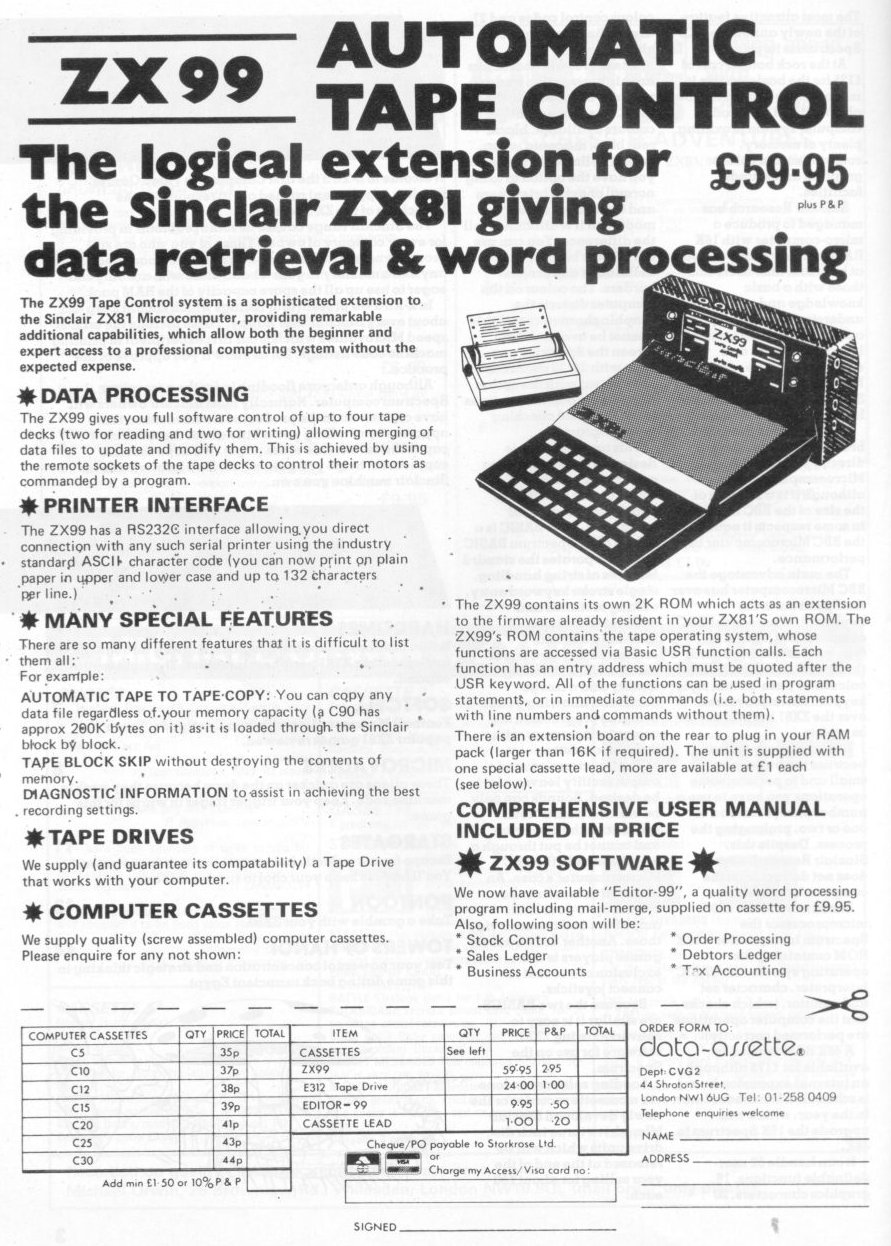
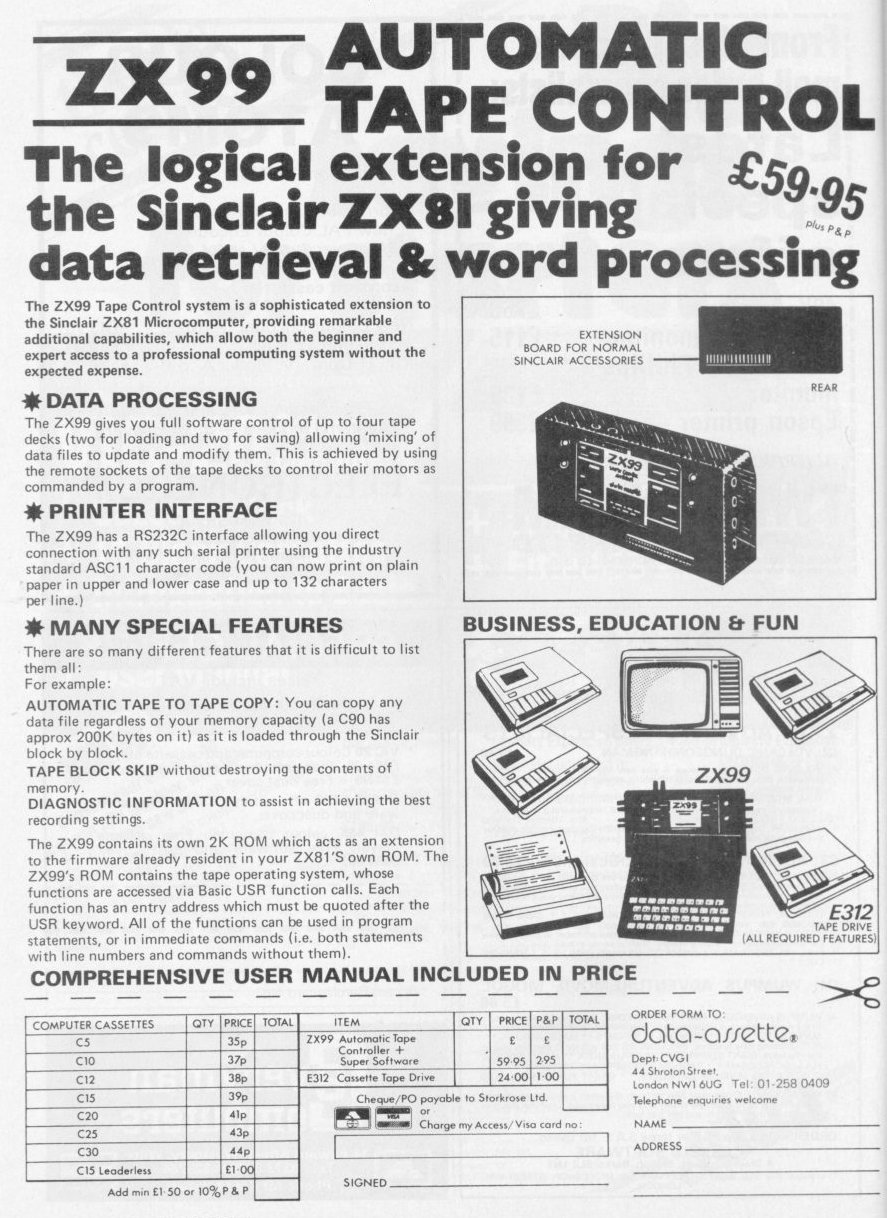
Inside the ZX99
The ZX99
The ZX99 in use, controlling four cassette machines
Sinclair User #5Aug 1982 · p.39
Stephen Adams
CONTROL SYSTEM BOOSTS POWER Stephen Adams looks at the Data-Assette ZX-99 and finds it good but that it could involve a lot of expense. The ZX-99 is a control system for up to four different tape recorders which also has an RS232 tape interface for running a printer. The tape commands are all stored in a 2K ROM between 8K and 10K but the total area used is the whole of the 8K section between 8K and 16K. That is because of the way the ZX-99 divides the tape recorders - there must be at least two to make a sensible system - into INPUT and OUTPUT tape recorders. The two input sockets are selected individually and one lead is provided with the ZX-99 to connect the EAR and REMOTE sockets on the tape recorder. The normal cassette leads are plugged from the ZX-81 into the ZX-99 at the tap and all of the SAVEing and LOADing is done through the ZX-99. There is a 50-page manual with the ZX-99 and it is well worth reading before starting. It is well-written and contains not only a chapter on all of the commands but example programs, problems which may occur and any peculiarities of the system. The commands are in the form of USR calls to various parts of the 2K ROM which can either be used direct from the keyboard or within a program. It is very easy to use in Basic but it requires the use of several variables to be set up for use by the ZX-99 before the USR commands are used. These are a single-dimensioned string (DIMX$(300)), Z$, Z and Y. The dimensioned string can be any single letter and is used to store the data to be sent or received from the tape. Z$ is used to tell the ZX-99 which string is used for the buffer - i.e., Z$ = "X" - and variable Z the length of that buffer string to be sent. The Y variable is used to control the printing operations of the RS232 interface. The variables can be put to other uses in the program but must be filled with the correct data for the ZX-99 before doing a USR command, or an error code will stop the program. There is also a "completion code" in the form of an error report when LET L = USR 1234 is used. Variable L can be checked if there has been a fault, as the report will be 0 if all is well. One of the useful extras provided by the code is a check of the quality of a program which has been read back from the tape by the ZX-99. It consists of checking for three common errors - too high a level, too low a level, and varying tape speed giving longer pulses than are to be expected. A number which gives the sum of the three errors is returned in the completion code if they are found. The USR commands provide the following functions: - Turn on the tape drive of any one input or turn on either or both of the tape drive outputs. - Read or write a data buffer of length Z into or out of the tape recorder. On output, two copies can be made if required, one from each output. - Skip the next block of data or program on tape. - LOAD a program into the ZX-81 memory from an input tape drive and then SAVE it again on to one or more output tape recorders. - Print-out a data buffer to an RS232 printer. Y defines speed, number of stop bits, parity and a choice of upper- or lower-case printing of the Sinclair character set. All codes sent to the printer are in ASCII and the user can define any ASCII character. - Print a full list of a Basic program to the RS232 printer. No controls are provided - only the data and the common. Graphic characters are printed as ASCII codes. The RS232 can be used only with a printer, as only an output on 3.5mm jack is provided. All the ASCII control and other codes, including upper- and lower-case, can be generated from the keyboard or from within a program. When using a data buffer to print-out a string of characters, carriage return and line feed are separate but <> will produce both for a new line. The length of the printed list is limited only by the maximum length the printer can print, so long lines will look completely different on the printer. The speed at which the printer can work can be between 110 and 9,600 baud but the RS232 port expects to print at full speed, so the printing speed must be adjusted to that with which the printer can cope. The graphics characters in a ZX-81 program are all converted into ASCII characters and are printed as such. That means that as some of the graphics correspond to control characters it could cause some weird effects on the printer, such as double-sided characters and graphics dots. The only way to avoid that is to convert all the graphics into CHR$(x) but that wastes memory. On the latest models, when LISTing the program, the graphics characters have been converted to spaces, enabling the user to fill-in the gaps with the appropriate graphic when the printing had been completed. The original ZX-998 did not do that, causing problems in the LISTing. Data-Assette has offered a new ROM to people who bought the original model. That does not apply when printing a data buffer, of course, as CR/LF can be done at any time along the entire length of the printer. One useful thing in the LIST routine is that it generates a blank line after single GOTOs, GOSUBs or RETURNS, showing the end of a routine. The tape LOADing and SAVEing are done at the same speed and in the same way, using Sinclair ROM routines, so there is no increase in speed. The fact that five seconds of blank tape is recorded between each piece of data also means that is better only to SAVE to tape large amounts of data, otherwise the data records take so long to load. CLS is also recommended to be used during data recording, otherwise that causes noise in the silent part of the tape. A data limit of 40 bytes is also imposed on the user as the minimum the system will put on to tape. Block skip will check and report tape errors but will not verify the data against the program in memory. COPYing a program overwrites all the system variables, so a re-start is made after one program has been copied, thus NEWing any program in memory. BREAK is recognised throughout all the routines and will revert to a Basic listing as normal, except on COPY. The ZX-99 has some very good features to build into programs where data needs to be written to and read from a cassette tape. Unfortunately that does not improve the speed of transfer, as the same tape system is used. The minimum requirement is two tape recorders at once, which may prove a strain on some budgets, as well as the cost of the ZX-99, which is £62.90 including VAT and postage. The printer routines included are very useful for doing reports and graphics on a real paper printer, as the printer is under complete user control. The differences in appearance, such as the representation of lower-case by inverse letters on the screen and the limit of 32 characters per line on the ZX-81, would have to be solved by the program. The non-restoration of slow mode on return to Basic is also annoying, as the ZX-99 works only in fast mode. for obvious timing reasons. In all, a very good tape control and printer system. The ZX-99 can be bought by contacting DataAssette at [redacted].
'Non-restoration of slow mode on return to Basic is annoying.'
'One of the useful extras provided by the code is a check of the quality of a program which has been read back from the tape.'
Sinclair User #1Apr 1982 · p.11
ADD-ONS TO MAKE YOUR COMPUTING MORE FUN As more and more people buy ZX-81s, more and more companies are bringing out add-on products. Each month we will look briefly at what has arrived recently on the market. AIMING FOR REAL POWER Data-assette has launched the first of its hardware add-ons for the ZX-81. Called the ZX-99, the device slots into the expansion board and according to the company gives the ZX-81 real computing power. Four tape recorders can be handled at one time and business applications are now within reach. The ZX-99 also provides an R8232C serial output interface which allows a wide range of printers to be driven. The ZX-99 is available from Data-assette, [redacted].
Reviews from people here
Sign in to write about this, or make an account. It takes a minute and lets you correct the catalogue too.
No year, publisher, description recorded.
Sign in to correct or add to this.
Hold the rights to this and want it taken down?