
The Spreadsheet
Utility: Spreadsheet · ZX-Spectrum 48K · 1 players · English
MiCROL · 1982 · Pound sterling 9.95
Discussion
Nobody has started a thread about this yet.
Play
- SpreadsheetThe.tzx.zipTape image English12 KB
- SpreadsheetThe.tap.zipTape image English7 KB
- SpreadsheetThe.tzx.zipTape image English4 KB
Documents
- SpreadsheetThe.pdfInstructions English189 KB
Files and rights
No permission is on record either way. Screens and pictures are copied here on a take-down basis: if you hold the rights and want something removed, say so and it goes.
Credits
- Graham Ashercredited
Sign in to credit somebody, or say what these people did.
Scores
In the magazines
- Sinclair User #111983 · Gilbert Factor7/10
- Personal Computer News #21983 · Overall Value3/5
In the magazines 20
Personal Computer News #2Mar 1983 · p.353/53/52/53/52/53/53/5
Features 3/5
Documentation 3/5
Performance 2/5
Usability 3/5
Reliability 2/5
Overall Value 3/5
Pete Galliard 3/5
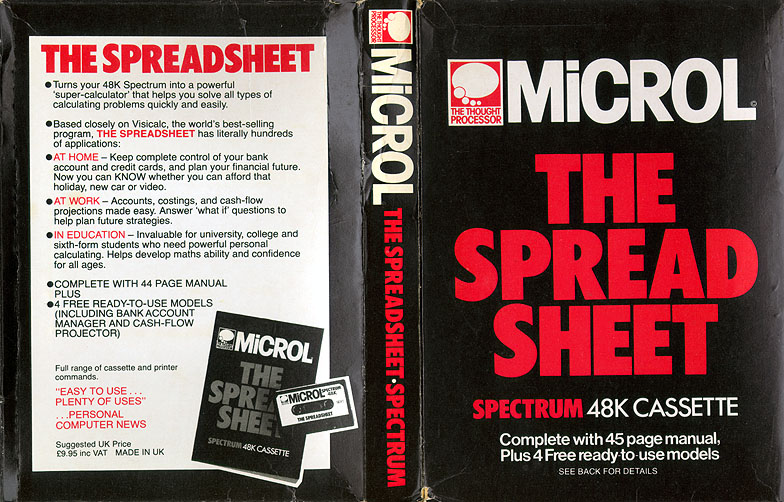
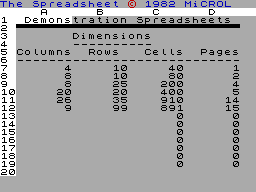
NAME: The Spreadsheet APPLICATION: Spreadsheet SYSTEM: ZX Spectrum, 48K PRICE: £9.95 PUBLISHER: Microl, [redacted] FORMAT: Cassette LANGUAGE: Basic OUTLETS: Mail order, Boots, major department stores CRASH COURSE IN SPREADSHEETS Pete Galliard tallies the Spectrum-based Spreadsheet package against VisiCalc and Supercalc. Microl's spreadsheet package for the Sinclair Spectrum is cheap, especially compared to VisiCalc and Supercalc - its big brothers on the bigger micros. And since the Spectrum is so portable, it's practical to carry it around in your briefcase to the office, home or a hotel, and just plug into a TV set. FEATURES The Microl Spreadsheet lets you SAVE models you have created along with the program itself. There is a CALCULATE command, which allows recalculation of the whole model. The REPLICATE command allows calculation rules to be reproduced over different parts of the spreadsheet. There's also the option to modify those calculation rules, if you need to do so. You can make changes to format, such as the number of decimal places, and it is possible to alter the widths of columns. Although you can display only four columns at one time, there is a jump facility to let you move the window to any part of the spreadsheet you wish. You can enter text and numbers into the cells, and all the standard arithmetic rules can be used. There are also quite a few features not there. You cannot:- - split the screen to give two independent windows on the spreadsheet; - overlay data from one spreadsheet to another; move. Insert or delete specific columns or rows; - search for a particular number; - protect particular cells from accidental changes or sabotage. PRESENTATION The package comes on cassette, along with a simple 15-page manual. Microl says the manual is being updated to include extra information on how to design effective models. GETTING STARTED It takes about three minutes to LOAD the package from cassette. SAVEing and reLOADing each model takes about the same time. If you're new to spreadsheets, expect to spend an hour or two learning how to use them. The knack is fairly easy to pick up, especially if you are used to playing with numbers. The layout itself is identical to that used in larger spreadsheets. The commands are easy to use - they are simple, reasonably memorable, and consist of single-letter or single key commands. Most are the initial letter of the action you wish to perform, and all are set out in a single long list in the manual. One of the most annoying problems with this package is the extremely slow response when moving beyond the limit of the window. Program crashes are also frequent and easy to cause. There are no DELETE, INSERT and MOVE commands, and this reduces the package's scope. Aligning numbers with decimal positions is also a problem. I used the package to build a budget model for testing, and I found that when I entered a whole number of pounds, with zero pence, the layout ended up looking confusing. The program right-justified it so that the pounds ended up in the pence column. You would have to define a different local format to cope with those cells affected. If you want good-looking reports on your screen, you will need to spend a good deal of time formatting it. But if you can tolerate truncated titles and headings, and just focus on the numbers, the model can be built up quickly. When the window passes beyond the near by range of five columns or 20 rows, there is a delay of about ten seconds. I carried out a benchmark test by building a model of 26 columns and 31 rows and filling the whole matrix to capacity with numbers seven digits long. When the matrix was recalculated I found it took six minutes to complete. I tried recalculations with decimal numbers and text information, and got similar results. The size of the model you can create is limited. The package comes set up with a default model size of 26 columns and 31 rows. The maximum number of columns remains 26, but you can extend the number of rows to 99, if memory space allows. This package's reaction to virtually every misdemeanour is to crash. It crashes if you use invalid expressions or command keys, long calculation rules, and if you reach the limit of memory size. Recovery is pretty straightforward and the data is not lost as all that happens is it dives into Spectrum Basic. But program crashes resulting from typing errors are irritating. VERDICT Overall, I found this product fair value for money. I had to fault it on reliability, and the performance really was too slow on larger models and when the window was moved, not surprisingly since the package is written in Basic. If you have a Spectrum and are prepared to live with those weaknesses, you will probably find plenty of uses for Spreadsheet.
Sinclair User #11Feb 1983 · p.297/10
Gilbert Factor 7/10
MICROL PACKAGES ARE WELL WORTH THE WAIT Customers finally have started to receive their Spectrum software packages from MiCROL and the general impression of the Use and Learn and Spreadsheet cassettes is very good. Use and Learn consists of a software cassette and well-presented booklet containing explanation and listings of the programs on the cassette. The first program is an excellent music composer which draws manuscript lines and notes played on the screen as a tune is composed. When the tune has been completed the composer can listen to the music. The cassette also contains a variety of novel and interesting games, including one in which you have to make a parachutist jump from an aircraft on to a target. Also included in Use and Learn is a series of useful routines such as Ramtest to check for faults in memory; Tapefile, which lists your collection of tapes; and Memory Map Monitor, which tells you how much memory for programs and variables you have remaining. The Spreadsheet, for the 48K Spectrum, provides the user with a table, or matrix, which can contain numbers or formulae for solving numeric problems. It can be used in business and the home and closely resembles VisiCalc for the Apple but is less than one-tenth of the price. Compared to the Vu-Calc spreadsheet produced for the Spectrum by Sinclair it is much clearer and slightly easier to understand. Its one failing compared to the Sinclair version is that it is slower. The decision when choosing to buy either must be a trade-off between facilities and speed. Both MiCROL software packages are excellent value for money. Both packages cost £9.95 and can be obtained from MICROL (U.K. Mail Order), [redacted].
Advert17
- Sinclair User #20Nov 1983 · p.97
- Sinclair User #18Sep 1983 · p.89
- Sinclair User #17Aug 1983 · p.83
- Sinclair Programs #10Aug 1983 · p.57
- Your Computer #7Jul 1983 · p.33
- Sinclair Programs #9Jul 1983 · p.45
- Sinclair Programs #8Jun 1983 · p.17
- Sinclair Projects #4Jun 1983 · p.5
- Sinclair User #14May 1983 · p.97
- Sinclair Programs #7May 1983 · p.17
- Personal Computer News #10May 1983 · p.68
- Personal Computer News #8May 1983 · p.61
- Popular Computing Weekly #16Apr 1983 · p.9
- Popular Computing Weekly #15Apr 1983 · p.9
- Personal Computer News #6Apr 1983 · p.60
- Sinclair User #13Apr 1983 · p.57
- Sinclair User #11Feb 1983 · p.56
Feature1
- Sinclair User1984 · p.22
Related
- Tags
- MiCROL Office
- Same entry at
- Spectrum ComputingZXInfo
Reviews from people here
Sign in to write about this, or make an account. It takes a minute and lets you correct the catalogue too.
No description recorded.
Sign in to correct or add to this.
Hold the rights to this and want it taken down?