
Wild Words
General: Education · ZX-Spectrum 16K · 1 players · English
Longman Software · 1983 · Pound sterling 7.95
Discussion
Nobody has started a thread about this yet.
Play
- WildWords.tzx.zipTape image English9 KB
- WildWords.tap.zipTape image English10 KB
Documents
- WildWords(EN).pdfInstructions English135 KB
Files and rights
No permission is on record either way. Screens and pictures are copied here on a take-down basis: if you hold the rights and want something removed, say so and it goes.
Credits
- Micromegacredited
Sign in to credit somebody, or say what these people did.
Scores
Elsewhere on the web
- WorldOfSpectrum 3 votes6.67
In the magazines 11
Crash #22Nov 1985 · p.85
Rosetta McLeod
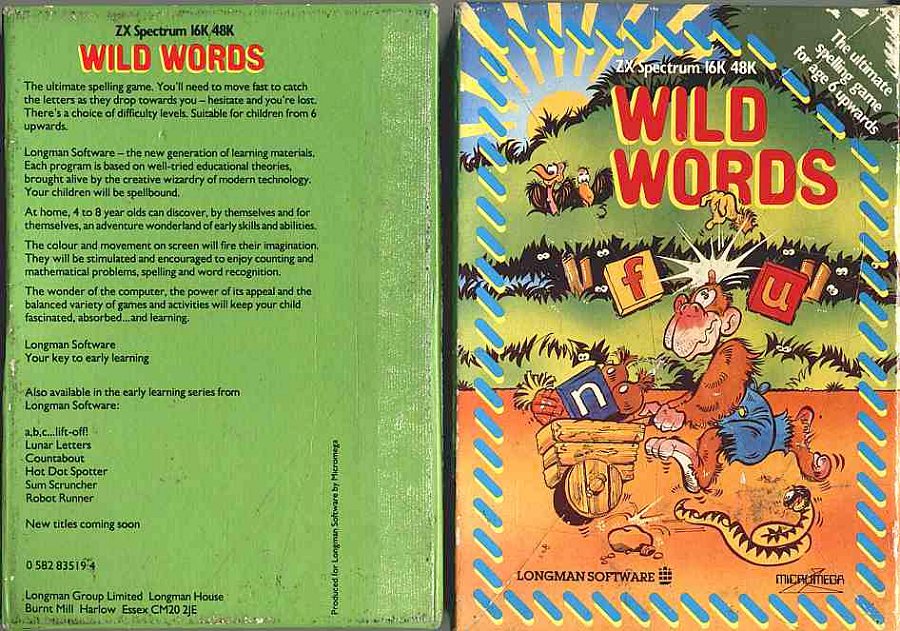
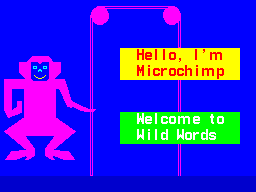
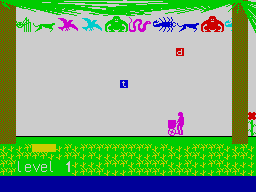
A SOFTWARE SEXTET FROM LONGMAN A slightly different format this month, as I look at six programs from Longman Software in their Early Learning series. Longman have built up a solid reputation as respected publishers of educational book materials, and they are now attempting to extend their success into the field of computer software, aimed particularly at the home market. The blurb on the attractive packaging tells us that 'each program is based on well-tried educational theories, brought alive by the creative wizardry of modern technology. Your children will be spellbound... The wonder of the computer, the power of its appeal and the balanced variety of games and activities will keep your child fascinated, absorbed... and learning.' Well, this certainly sounds good, but do the programs live up to these claims? The six programs fall into two distinct categories: a,b,c,... Lift Off! and Wild Words aim to encourage word recognition and spelling while Countabout, Hot Dot Spotter, Sum Scruncher and Robot Runner try to develop counting and number skills. Each package contains a sheet of notes for parents giving easily followed instructions on loading the program and playing the game, as well as a very useful section, Other Things To Do, which suggests some additional (non computer) ways to encourage the specific learning activity. The acquisition of literacy and numeracy skills is, of course, extremely important, and many parents, wishing to do their best for their children, purchase software which claim to stimulate children towards acquiring these skills. A word of caution for parents, however: you child's school is likely to have a carefully constructed syllabus for teaching letter and number work. If you are in any doubt about how to use a computer program to supplement this work. It might be a good idea to contact your child's teacher for a chat. a,b,c... LIFT-OFF! This letter and word-recognition program is in two parts. The alphabetic order game displays at the start a picture of an apple, the word 'apple' and the letter A. The player is then asked to press the next letter, and is rewarded with the picture of a bus, the word and the initial letter. Pressing ENTER changes the game to A. B, C Lift-Off' The screen shows a conveyor belt for loading crates onto a rocket The child has to match the object which appears on the conveyor belt with the correct word displayed at the top of the screen. If the word and object match, the S key (for Snap) is pressed, and when the rocket is fully loaded with its six objects, it takes off. This is a simple but useful program which young children will enjoy, though the speed of the Snap game is too fast for the lower age range. COUNTABOUT Another number game, Count About attempts to give practice in addition and subtraction in the number range 1 to 9. A number of objects appear on the screen (birds, clocks, crocodiles etc) together with a simple sum. For example, if two objects are displayed on screen, the player might he instructed to 'Make 6: 2 plus ? equals 6'. If the correct number key is pressed, the equivalent number of objects appears on the screen together with the completed sum. Visually this game is much more appealing than Hot Dot Spotter, and the sort of structured reinforcement approach it involves is quite useful in achieving its limited objectives. WILD WORDS Wild Words is a spelling game covering over 200 words which range from 3 to 14 letters in length. The menu offers 5 levels of difficulty - level 1 includes simple words like 'bur', while more complex spellings such as 'people ' appear at level 5. When the choice of level has been made, the target word appears for a short time at the bottom of the screen. During the game, the player can see the word again by pressing H. The game element involves the child having to use the horizontal cursor keys (or 5 and 8 on the Spectrum Plus) to move Microchimp and his wheelbarrow across the screen to catch the correct letters falling from the top. The letters must be caught in the right order to spell the target word. After each word is correctly spelled, the child is rewarded with a tune, and the flower on the right of the screen grows one step further. The children who tried this game for me didn't think much of it and rapidly lost interest. The game was not strong enough to retain their attention, and they soon gave up, claiming it was 'boring'. From an educational viewpoint, the program seemed to me to be extremely limited and totally lacking in flexibility. Spelling is taught most successfully when the words have some sort of context for the child it would have been much better if the parent had been given the option of entering his or her choice of words for the child to spell, taken perhaps from a favourite hook, or if the package had included some reading material which used the target words in context. SUM SCRUNCHER Obviously, educational software aimed at the 6 plus age group has to provide a fair amount of entertainment, but this game fails to provide much entertainment or education. This time, the arcade routine features a serpent-patrolled maze in which Microbug is trapped. There are thirty five gates with numbers on them, and the idea is that when the problem at the bottom of the screen is solved, the player moves Microbug, using the four cursor keys. to a position directly below the gate displaying the correct answer There are six levels of difficulty to choose from, ranging from easy addition and subtraction (though this 'easy' option includes sums like 59 plus 4 and 47 plus 7) to difficult division as in 56 divided by 7. A major flaw in the game is that the numbers displayed on the gates are all two digits so 5 is represented as 05 and Microbug has to be positioned extremely carefully, directly below and between the two digits, before the number is accepted. This game provides nothing more than mechanical, repetitive exercises and children are unlikely to want to play it again and again. ROBOT RUNNER Do you remember chanting out your tables at school? I certainly do land I'm not that old!), though there was little emphasis on whether pupils actually understood what the recitations meant. Robot Runner gives children practice in the 2 to 9 multiplication tables. The player has to answer the sum correctly in order to move Robot Runner across the screen to retrieve the stolen treasure of Endor. There are, however, all sorts of obstacles to be avoided on the way. At the beginning, the menu allows you to choose which of the nine tables to practise alternatively you can opt for a mixture. Instead of having to press the number keys for the correct answer, the player uses the two vertical cursors to increase or decrease the runner's speed to the number wanted. Certainly, the game element in this program is much more interesting than in Sum Scruncher, and the game is quite a useful way of reinforcing the tables. HOT DOT SPOTTER Hot Dot Spotter is a very simple number game. The player has to count the number of dots on a dropping ball and press the corresponding number key. The game starts fairly slowly, using low numbers, and as the players' skill improves the game becomes faster and more difficult. The scoring system is dependent on how quickly the correct key is pressed, and the notes tell us that 'seeing your score mount closer and closer to the High Score as you successfully catch each ball is a great thrill'. Unfortunately, my team of testers didn't seem to think so! I'm afraid I found this game to be educationally sterile. There was little motivation for the player, and the number skills involved could have been practised to greater effect with dice and bits of cardboard. GENERAL RATING All of the programs are well error-trapped but, with the exception of a,b,c... Lift Off!, they have little of real merit to commend them. This isn't to say that they are bad programs, but simply that they are no better or worse than other educational software which relies mainly on an arcade format to sweeten the drill/practice pill. They all run well, however, and are easy enough to use, but are lacking in flexibility and, generally speaking, belong more to the education system of the past than to the computer age. The programs all cost £7.95 and will run on the 16 or 48K Spectrum. * Next month, I'll be looking at an outstandingly good series of early learning programs from Five Ways, entitled The Learning Box.
Title: A, B, C, Lift Off! Educational Aim: letter/word recognition Age Range: 4 - 8 Control Keys: all letter keys used; S to snap Use of Colour: bright & attractive Graphics: in the letter recognition section, the pictures are rather small and a large part of the screen is unused Title: Wild Words Educational Aim: spelling Age Range: 6 and over Control Keys: H to see the word again, then cursor keys Use of Colour: good Graphics: uninspiring Title: Hot Dot Spotter Educational Aim: number skills Age Range: 4 - 8 Control Keys: number keys only Use of Colour: limited Graphics: very dull Title: Count About Educational Aim: addition and subtraction Age Range: 4 - 8 Control Keys: number keys only Use of Colour: good Graphics: good Title: Sum Scruncher Educational Aim: number skills Age Range: 6 and over Control Keys: cursor keys only Use of Colour: bright and clear Graphics: reasonably good Title: Robot Runner Educational Aim: multiplication Age Range: 6 and over Control Keys: cursor keys only Use of Colour: attractive Graphics: fairly good
Advert7
- Sinclair User #22Jan 1984 · p.113
- Your Computer #1Jan 1984 · p.210
- Sinclair User #21Dec 1983 · p.4
- Your Computer #12Dec 1983 · p.7
- ZX Computing #10Dec 1983 · p.111
- C&VG (Computer & Video Games) #26Dec 1983 · p.92
- Personal Computer News #30Oct 1983 · p.66
News/Note2
- ZX Computing #11Feb 1984 · p.86
- Home Computing Weekly #35Nov 1983 · p.3
Review1
- Home Computing Weekly #44Jan 1984 · p.37
Related
- Same entry at
- Spectrum ComputingZXInfo
Reviews from people here
Sign in to write about this, or make an account. It takes a minute and lets you correct the catalogue too.
No description recorded.
Sign in to correct or add to this.
Hold the rights to this and want it taken down?