
HiSoft Ultrakit
Programming: BASIC · ZX-Spectrum 48K · 1 players · English
HiSoft · 1984 · Pound sterling 9.45
Discussion
Nobody has started a thread about this yet.
Play
- HiSoftUltrakitV1.1.tzx.zipTape image English7 KB
Documents
- HiSoftUltrakit.txtInstructions English51 KB
Files and rights
No permission is on record either way. Screens and pictures are copied here on a take-down basis: if you hold the rights and want something removed, say so and it goes.
Credits
- Richard Tellercredited
Sign in to credit somebody, or say what these people did.
Scores
In the magazines
- Personal Computer News #821984 · Overall Value4/5
In the magazines 58
Crash #11Dec 1984 · p.91
Franco Frey
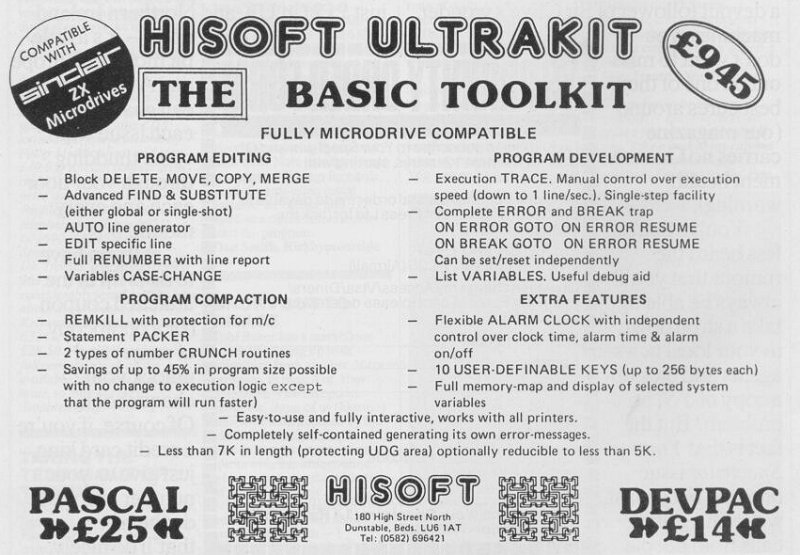
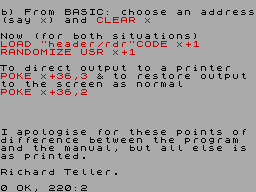
Program: ULTRAKIT Producer: Hisoft, [redacted] Memory required:48K Price: £9.45 ULTRAKIT is not the name of a new pop group, but a new utility for the Spectrum. Coming from the very much famed company HISOFT (producers of DEVPAC and PASCAL), ULTRAKIT is a boost for the Sinclair Basic and provides the user with a more sophisticated, and comprehensive Basic. It provides User Defined Keys, error trapping, an alarm clock, program trace and many other extra features. ULTRAKIT is less than 7K and sits just under the User Defined Graphics area. It can be loaded at any time before or after program development as a machine code block (a Basic loader program is provided if required) and can initially be activated with a Randomise User command. ULTRAKIT uses two types of command. One type is the Pre Defined Command (PDC). These commands are obtained by holding ENTER and pressing one of the digit keys, releasing ENTER (the message will appear) and only then releasing the digit key. This may sound difficult, but it soon becomes second nature. The other type is termed a Kit command. These are accessed using REM in immediate mode. This produces the HISOFT copyright message and the command can be typed in letter by letter. The command may be abbreviated to one letter - U for Update etc. The execution follows after pressing ENTER. There are 11 Pre Defined commands and 23 Kit commands. THE CLOCK The clock is interrupt driven and will therefore work whenever the interrupt is not disabled (Microdrive, cassette handling and Lprint disable interrupts and therefore stop the clock operation momentarily). The clock time display can be turned on and off by ENTER8 and can be updated or set by use of the Kit command UPDATE. The alarm time can also be turned on and off by ENTER9 and can be set by the Kit command WARNTIME. The alarm will run for one minute and the alarm can be switched off by ENTER0. AL in the display indicates that the alarm is set. Obviously the clock will run even if the display is switched off. USER DEFINED KEYS The ten digit keys may be defined by the user to produce any string required (up to a maximum of 256 characters per key) when accessed. A vertical line at the end of the string is an implied ENTER command and will lead to the immediate execution of the string on call up of that digit number (SPACEdigit). Strings without implied ENTER will appear in the edit line on call up and can thus be used for calling up often used Kit commands with SPACEdigit. Pressing ENTER will execute these. This means that multi-statement commands may be immediately executed via the User Defined Keys. Kit commands can only be called up on the edit line, but cannot be executed directly (ENTER required). Setting up and editing the User Defined Keys is accomplished with a Kit command KEY followed by the string. The multi-statement strings allow the user to save with ULTRAKIT information either as DATA statements or as user defined functions and quickly retrieve and use after ULTRAKIT is activated again. User Defined Graphics may be saved this way and can be redefined with the press of a (user defined) key. PROGRAM TRACING Trace is activated by the Kit command TRACE and requires 3 parameters, the trace-on line, the trace-off line and the initial speed of tracing (0 to 6 and >127 for single stepping). This enables only certain program sections of interest to run under trace. On a GOTO or RUN in the edit line followed by ENTER the program will be executed one statement at a time at a reduced speed and the current line and statement will be printed inverse in the top right screen. The execution speed may be changed by pressing one of the digit keys 1 to 6 and 0 (1 full speed, 0 1.5 second delay) or by pressing Symbol Shift to enter the single step mode. In single step mode the current variables may be monitored (V), the current line (L) or next line (N) may be listed, or the screen cleared (C). Pressing SYMBOL SHIFT executes the next statement, pressing one of the digit keys returns to normal trace. Trace mode inactivates the toolkit and on completion toolkit has to be reactivated with SYMBOL SHIFT and SPACE. Microdrive commands inactivate TRACE. FIND AND SUBSTITUTE These two Kit commands can be used to search for and replace occurences of strings. The FIND string and the SUBSTITUTE string can be put into the respective buffers by the use of the PUT Kit command. The search can be started at a specified line number N. It will displace the line in which it occurs and pinpoint with a flashing cursor the exact position of the string. A minus sign in front of the start search line number will cause a search through the whole program starting with the start line and will list all occurences in the form line:statement. SUBSTITUTE operates in a similar fashion, but will either substitute and display the line in which it occurs or with a minus sign replace all occurences automatically. SUBSTITUTE may be used to substitute a variable for an explicit number which appears frequentl in the program. With inclusion of a statement Let val=n at the beginning of a program. PROGRAM COMPACTION ROUTINES Among the Pre Defined commands there are 4 program compaction routines, which will reduce the amount of programming space required at the cost of making the program totally unintelligible. CRUNCH1 will convert all numbers to a dummy 0 (ASCII representation of the number set to 0). The real value is unrecoverable. CRUNCH2 converts 0 to PI, 1 to SGN PI, 3 to INT PI, and all other numbers to their VAL equivalent. The program will however run slower. REMKILL deletes all REM statements, control codes and unnecessary spaces. Machine code routines within REM statements may be protected by placing an asterisk as the first REM character. PACKER will compress the program into as few statements as possible (127 statements per line as a maximum), avoiding however taging lines onto a preceding line including REM, STOP, IF, GOTO, RUN or RETURN. To compress your program into a minimum possible space, REMKILL followed by a ReNUMBER, then PACKER and finally one of the CRUNCHes will do the trick. This should only be done after the program has been fully debugged and saved in its normal expansive form. INTERESTING FEATURES Other interesting Pre Defined commands are MAP which displays a memory map of the Spectrum and L-CASE and U-CASE which convert all variables to lower or upper case. The following Kit commands are also available: BREAK can be set to break program execution and resume at a given line number. COPY copies a block of lines indicated by start and end of block line number to a destination line number. These lines will be renumbered in 1's starting from destination1. Only the line numbers will be renumbered and not GOTO's etc. These must be changed by hand. DELETE deletes a block of lines. EDIT will bring down a specific line for editing. GRAB deletes part of the toolkit to gain programming space. There are three levels. HIDE inactivates temporarily the toolkit and increases the execution speed. INFORM displays the current default values for the command parameters. JOIN joins two program lines if the number of statements does not exceed 127. LOSE-KIT inactivates the toolkit permanently. MOVE copies similar to COPY but then deletes the original block. NUMBER renumbers the program from a start line to the end with a chosen start line and increment. All GOTO, GOSUB, LIST, LLIST, RESTORE, RUN and LINE statements are adjusted accordingly and a report is given on all lines containing these expressions. ON-ERROR equivalent to BREAK, except that all errors are trapped with the exception of 0:OK, 9:STOP STATEMENT, 14:BREAK CONT repeats, and 21:BREAK INTO PROGRAM. QSEPARATOR specifies the character used to separate the two parameter strings. RAMREL will change RAMTOP without CLEARing variables. The parameter is a relative move from existing RAMTOP. CONCLUSION HISOFT are providing with ULTRAKIT a professional tool without any unnecessary frills. The most powerful facilities are the TRACE, ONERROR, MAP, USER DEFINED KEYS, FIND/SUBSTITUTE and the compaction routines. All the other Basic extensions such as ReNUMBER, JOIN, MOVE, COPY and DELETE complement this package. The two command modes Kit and Pre Defined are easy to get used to and provide a very fast and efficient way of accessing all the available facilities. Some trouble was experienced with the single step TRACE mode, as it appeared to skip several statements at a time when SYMBOL SHIFT was pressed. The manual provided with the cassette explains in detail the use of the keyboard, the accessing of the Kit and Pre Defined commands, the alarm clock, find and substitute, program tracing and the user defined keys. There is a complete index of the Kit and of the Pre Defined commands. A chapter is dedicated to the customising of the toolkit. Microdrive owners may save the ULTRAKIT on microdrive with the instructions supplied. Several poke addresses are provided to facilitate customisation of the various displays and printouts. ULTRAKIT is a must for any serious Basic programmer, as it improves and compliments the Sinclair Basic in the editing and debugging area, which makes life a lot easier when creating extensive Basic programs.
Personal Computer News #82Oct 1984 · p.545/54/55/54/54/5
Features 5/5
Documentation 4/5
Performance 5/5
Overall Value 4/5
David Janda 4/5
IT'S ULTRAKIT David Janda pitches in with his sampling of a basic programmer's toolkit for Spectrum users from Hisoft. If micro manufacturers ever wondered what they could do to make their latest toy more attractive to hackers, they couldn't do worse than include a suite of programming tools. The importance of programming aids is enormous. Give a craftsman a good set of tools and he'll be able to do a good job. Give him only a few tools and he'll do the job a lot slower and not as well. Hisoft, who produce the well known Pascal (issue 4) has come up with a Basic toolkit that is one hell of a piece of software. Interrupt driven, this software provides the programmer with 35 commands, ten function keys, Microdrive compatibility and toolkit customisation. FEATURES The 7K Ultrakit can be loaded before or after program development and gives the programmer two types of command. First there are 23 kit-commands which require parameters such as numbers or strings, and there are 12 pre-defined commands which execute immediately and require no parameters. Ten function keys can be set up with a string of 255 characters each. The string can include Ultrakit commands as well as normal Basic keywords. AUTO, NUMBER, COPY and MOVE are used to generate line numbers, renumber and manipulate parts of the program being worked on. A flexible FIND and SUBSTITUTE will work in single-shot or globally, and in both cases line numbers are reported. A very powerful command is TRACE which can be used to display program line and statement numbers as the program is running. Parts of the program can be selected, and a single step option is allowed. If single stepping, you have the further options to list variables, list current line, list next line, clear screen and restart trace at one of ten speeds. The pre-defined commands include four types of program compactor, clock and alarm, as well as a command to display the Spectrum's memory map to screen or printer (Figure 1). Many of the commands can be dumped to the printer, and in all there is a lot (Table 1). IN USE The first thing I did was to transfer Ultrakit to Microdrive after stripping off the Basic loader. This enables the kit to be loaded when a program is already in memory and it's worth the effort. Of all the commands available, TRACE is the one I used the most. The SYMBOL SHIFT key is used to single step and this is a wise choice because it's ignored by INKEY$. The only disappointment with TRACE is that it's not possible to make a dump of the line numbers to the printer. Hisoft assures me this will be included in a later version. VERDICT This is by far the best Basic toolkit I have used on the Spectrum. Easy to use (which is important in program development), it enables the Basic programmer to get on with the job. INTERRUPTS AND CUSTOMISING Ultrakit uses interrupts to scan the Spectrum keyboard 50 times a second, thus slowing Basic by about 5 per cent. The reason for scanning is the necessity to intercept and interpret keystrokes that would normally do something else. The effect of this scanning is to slightly change the characteristics of some keys. First, pressing REM in direct mode will display on the edit line the Hisoft copyright and wait for the user to input one of the 23 kit commands. The SPACE and ENTER keys act as extra shift keys when Ultrakit is active. The effect of this is that auto-repeat on them is disabled and they respond AFTER they have been released. An example of this is when accessing one of the pre-defined commands. The required action is to press the ENTER key, then the key corresponding to the command, release ENTER followed by the letter key. Accessing the function keys is done in a similar fashion with the SPACE key being pressed followed by one of the digit keys. Ultrakit can be customised in several ways. This is achieved by poking toolkit variables with parameters and then saving an image of the toolkit to tape or Microdrive. The clock, alarm and trace displays can be directed to any part of the screen, and in the case of the trace this facility will allow the output to be directed to the report lines, thus avoiding any clashes with the main program. The toolkit can be customised so that the clock and trace are displayed in normal video. The copy routine to the printer can be redirected thus allowing for many types of printer interface to be used. Finally, saving the Ultrakit to tape or Microdrive will also save any function key definitions.
FIGURE 1: Screen dump of MAP command Description: CHANNEL INFO Bytes: 23792 Name: CHANS Description: PROGRAM START Bytes: 23813 Name: PROG Description: PROGRAM END Bytes: 24090 Name: VARS Description: VARIABLES END Bytes: 24104 Name: E_LINE Description: 1 FREE BYTE Bytes: 24106 Name: STKEND Description: TOP OF BASIC Bytes: 58137 Name: SP Description: RAMTOP Bytes: 58176 Name: RAMTOP Description: KIT STARTS Bytes: 58178 Name: KITRAM + 1 Description: USER GRAPHICS Bytes: 65368 Name: UDG Description: TOP OF MEMORY Bytes: 65535 Name: P-RAMT Description: PROGRAM SIZE Bytes: 277 Name: VARS-PROG Description: PROGRAM + VARS Bytes: 291 Name: E_LINE_PROG Description: SPACE (BASIC) Bytes: 34031 Name: SP-STKEND Description: SPACE (CODE) Bytes: 1 Name: KTRAM-RAMPTOP
TABLE 1: Ultrakit Commands (abbreviated) AUTO - Line generator. BREAK - Error detection. COPY - Duplicate program lines. DELETE - Program lines. EDIT - Program line. FIND - String. GRAB - Disables parts of toolkit for use by Basic. HIDE - Temporarily disables Ultrakit, iNFORM Display default parameters. JOIN - Program lines. KEY - Function key. LOSE KIT - Deactivate Ultrakit MOVE - Program lines. NUMBER - Renumber. ON ERROR - Error detection. PUT - String buffer. QSEPERATOR - Define separator. RAMREL - Move RAMTOP. SUBSTITUTE - String. TRACE - Program execution. UPDATE - Clock. VARIABLES - Display. WARNTIIAE Clock. Pre-defined commands: K-MODE, PRINTERS, CRUNCH1, CRUNCH2, REMKILL, PACKER, MAP, LOWER CASE, UPPER CASE, CLOCK TIME, ALARM TIME, ALARM SWITCH.
Advert54
- Your Sinclair #3Mar 1986 · p.25
- Your Sinclair #2Feb 1986 · p.87
- Your Sinclair #1Jan 1986 · p.111
- Your Computer #12Dec 1985 · p.114
- Sinclair User #44Nov 1985 · p.114
- Your Computer #11Nov 1985 · p.101
- Your Spectrum #20Nov 1985 · p.22
- Sinclair User #43Oct 1985 · p.105
- Your Spectrum #19Oct 1985 · p.39
- Your Computer #10Oct 1985 · p.78
- Sinclair User #42Sep 1985 · p.74
- Your Spectrum #18Sep 1985 · p.52
- Your Computer #9Sep 1985 · p.38
- Your Spectrum #17Aug 1985 · p.18
- Your Computer #8Aug 1985 · p.86
- Popular Computing Weekly #30Jul 1985 · p.15
- Your Computer #7Jul 1985 · p.38
- Your Spectrum #16Jul 1985 · p.51
- Popular Computing Weekly #23Jun 1985 · p.23
- Popular Computing Weekly #25Jun 1985 · p.28
- Sinclair User #39Jun 1985 · p.99
- Your Spectrum #15Jun 1985 · p.44
- Personal Computer News #109May 1985 · p.32
- Sinclair User #38May 1985 · p.73
- Your Spectrum #14May 1985 · p.53
News/Note2
- ZX Computing #18Apr 1985 · p.21
- ZX Computing #17Feb 1985 · p.83
Related
- Same entry at
- Spectrum ComputingZXInfo
Reviews from people here
Sign in to write about this, or make an account. It takes a minute and lets you correct the catalogue too.
No description recorded.
Sign in to correct or add to this.
Hold the rights to this and want it taken down?