
Disc Manager
Utility: Media Admin · ZX-Spectrum 48K · 1 players · English
Bradway Software · 1987 · Pound sterling 10.50 · Pound sterling 10.50 disk
Discussion
Nobody has started a thread about this yet.
Play
- DiscManager.opd.zipDisk image English56 KB
Files and rights
No permission is on record either way. Screens and pictures are copied here on a take-down basis: if you hold the rights and want something removed, say so and it goes.
Credits
- Robert Chafercredited
Sign in to credit somebody, or say what these people did.
In the magazines 31
ZX Computing #38Jun 1987 · p.56
John Wase
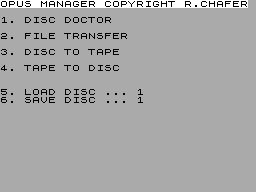
Bradway Software £10.50 Disc Manager from Bradway Software is a comprehensive file and disc maintenance utility, including a file copier, a disc doctor, and comprehensive 9-page manual. The loader program provides you with four options: Disc doctor, File transfer, Select load disc, Select save disc. Disc doctors provides facilities for examining the free space left on the disc, printing a full catalogue, or getting even more information about a file. It allows you to select files for erasing, rename a file or read a block from the disc into the Spectrum memory; the contents can then be examined, edited and finally written back to a disc. The arrangement of the files on a disc, along with the location of the empty sectors is provided by the "list block" facilities which will also list to the printer. "Modify block" allows you to alter the contents of a block and the "write block" facility permits saving the contents of an edited block back on the disc after suitable checks. The file copier allows you to select and copy a file or groups of files from one disc to another. The program checks to make sure that the save or load disc is in the appropriate drive. It copied a disc from my 178K 3.5" drive to my 720K 5.25" drive without difficulty. However, it does this by loading files into the computer memory (29K is available) and awaiting a keypress before saving: patience is necessary, or a large brick on the keyboard! The copy program is optimised to use the minimum disc space and files are copied in the order selected. This allows you to keep precious groups of files together, and also to assign a precedence to files which have to be saved on a fairly full disc. Finally, the instruction manual contains some invaluable information on how to recover damaged or erased files (the erase, of course, merely deletes the catalogue title). It tells you how to search the disc, check the blocks, re-insert a name into the directory, and recover the file that went missing. Great stuff! Most of my gripes concern two-disc systems or large capacity discs. For those with a single disc system, I would recommend this program; go ahead and buy it. It is still helpful to users of twin discs of similar sizes, and indeed, useful, though not perfect, for those who have discs of two different sizes. My principal irritations were with the clumsy transfer system; with a two disc system, the transfer, once initiated, should be automatic to the end. Similarly, you have to go right back to the start every time you wish to change source or destination drive, and then reload the transfer program; not a good idea. There is no single-key "compact" option, no "rename disc" option, and no single-key "format" option: this is useful if you wish to extend the catalogue file, particularly necessary with large capacity discs, but again this facility also is lacking.
Figure 1. File copier menu.
Classified18
- Your Sinclair #31Jul 1988 · p.103
- Your Sinclair #29May 1988 · p.110
- Your Sinclair #28Apr 1988 · p.102
- Your Sinclair #27Mar 1988 · p.94
- Your Sinclair #26Feb 1988 · p.95
- Your Sinclair #25Jan 1988 · p.119
- Your Sinclair #24Dec 1987 · p.119
- Your Sinclair #23Nov 1987 · p.104
- Your Sinclair #22Oct 1987 · p.104
- Your Sinclair #20Aug 1987 · p.94
- Your Sinclair #19Jul 1987 · p.93
- Your Sinclair #18Jun 1987 · p.97
- ZX Computing #38Jun 1987 · p.81
- Your Sinclair #17May 1987 · p.91
- ZX Computing #37May 1987 · p.88
- Your Sinclair #16Apr 1987 · p.106
- ZX Computing #36Apr 1987 · p.88
- Your Sinclair #15Mar 1987 · p.90
Advert12
- Your Computer #4Apr 1988 · p.74
- Popular Computing Weekly #6Feb 1988 · p.37
- Your Computer #2Feb 1988 · p.72
- Your Computer #1Jan 1988 · p.88
- Popular Computing Weekly #49Dec 1987 · p.52
- Your Computer #12Dec 1987 · p.96
- Your Computer #11Nov 1987 · p.81
- Your Computer #10Oct 1987 · p.75
- Popular Computing Weekly #32Aug 1987 · p.34
- Popular Computing Weekly #27Jul 1987 · p.33
- Your Computer #6Jun 1987 · p.74
- Popular Computing Weekly #18May 1987 · p.43
Reviews from people here
Sign in to write about this, or make an account. It takes a minute and lets you correct the catalogue too.
No description, tag recorded.
Sign in to correct or add to this.
Hold the rights to this and want it taken down?