
Letta-Head
Utility: Graphics · ZX-Spectrum 48K · 1 players · English
Bradway Software · 1985 · Pound sterling 9.00 · Pound sterling 9.50 microdrive
Discussion
Nobody has started a thread about this yet.
Remarks
The B-Side contains a version for use with the Wafadrive.
SPOT: stationery design; aka. Letter-Head; cf. Letta-Head Plus (enhanced version)
Play
- Letta-Head.tzx.zipTape image English28 KB
Files and rights
No permission is on record either way. Screens and pictures are copied here on a take-down basis: if you hold the rights and want something removed, say so and it goes.
Scores
In the magazines
- Sinclair User #431985 · Overall3/5
In the magazines 8
ZX Computing #36Apr 1987 · p.75
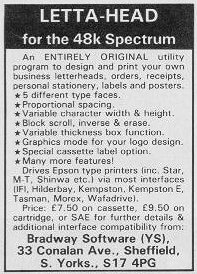
Bradway Software £9.00 Recently, Carol Brooksbank gave some beautiful examples of screen dumps, posters and tickets, with hints on how to produce them (ZX, Feb 87). One of the difficulties of this sort of thing is that you need a good collection of dump routines to fit your printer/interface combination. As there are lots of interfaces and printers, you can be left with quite a problem to get your masterpiece printed, sometimes soluble, it's true, but only if you are prepared to spend a lot of time. Bradway Software have been producing programs that are, literally, just the ticket. Two programs, in particular, sort out virtually all these sorts of problems, enabling you to product a variety of machine code dumps in an enormous range of printer/interface combinations. Letta-head plus is designed primarily to allow you to print letterheads, labels or small tickets. A special feature lets you produce labels, three in a row if necessary, and a variant of this gives you ready-outlined cassette labels. Cassette, microdrive or Opus disc versions of the programs are available for an additional £1.50. Typical of the care taken to cover all combinations is the inclusion of a Wafadrive version on side B of the cassette; this is because the Wafadrive uses much more of the Spectrum RAM for its system variables, buffers and directories than a microdrive, and it was therefore impossible to include the Wafadrive printer interface version within the main program. The program itself comes with a choice of five assorted print styles already available, and a further twenty replacements which can be selected from a menu and loaded: or you can load in your own favourite fonts or use a font-editing/designing program (also supplied) to create your own designs. The program enables you to print to any part of the screen in one of these fonts, put a box round if, invert an area, scroll any part of the screen in any direction (grand if you want to centre things), invert or erase an area and put in a grid to help planning. The art subroutines are pretty rudimentary (plot, draw, arc, circle and rapid fill); this is not a substitute for a graphics program, nor was it intended to be so. Any SCREEN$ from such a program can, however, be loaded, edited and used as part of the display: a scratchpad/memory is provided to help you with this and allow you to merge one SCREENS with another. A strength and a weakness of the program is that a large amount is in BASIC which means that it is very user friendly (although system errors have not been trapped), readily adapted, and, most important of all, can be restarted on crashing without losing the picture. It also means that cursor movement, erasing and printing to the screen are all fairly slow, and one would not want to use this program for printing out many pages of fancy text. The best feature is the way the program will deal with a huge range of printer/interface combinations. In addition there are hints and tips for dealing with "not quite Epson-standard" printers including the Brother and Centronics GLP, and even the "not nearly Epson-standard" Smith Corona Fastext 80, for which a special machine code patch is included. All in all, I found this to be a utility program which has had a great deal of thought put into it, is very well documented and, within its limitations, does what it was intended to do with a minimum of user-hassle, and I would recommend it. Unlike Lettahead, Dumpy does not have built-in type fonts and design capabilities. What it does is to assemble from its comprehensive library of short routines a range of stand-alone, relocatable machine-code screen-dump programs which will suit your printer/interface combination. Dumpy allows you to choose between normal or sideways dumps, plain or shaded dumps, and there is a whole range of widths, heights and printer densities to choose from. In addition, one can specify an area of screen and use an auto-start to skip over blank lines at the start or finish of the picture. If you have done something silly like trying to locate the machine code in the middle of the BASIC program area, a large black warning appears on screen, but you are still allowed to proceed: in other words it is designed both for the nincompoop and those who blind us with science. Finally, you get the option of saving the code and/or testing it, for which a coloured screen is loaded. Again, this program has been carefully put together with a comprehensive 12-page handbook neatly printed in stiff card covers and including a helpline for those in need. Both programs are available from Bradway Software on cassette at £8.50 for Dumpy 3 and £9.00 for Lettahead+, microdrive cartridges or Opus discs £1.50 extra, including post and packing.
Sinclair User #43Oct 1985 · p.773/53/5
Overall 3/5
Mike Wright 3/5
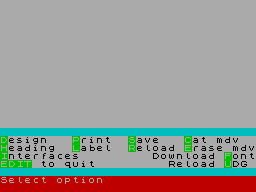
Publisher: Bradway Software, [redacted] Price: £7.50 Memory: 48K Bradway Software, a small, new, software house, has released Letta-Head for the Spectrum and Epson-compatible dot matrix printer. It is designed to personalise your own stationery, but has a variety of uses, including labels, posters, order forms and invoices. A special option allows cassette labels to be designed without printing over the hole in the middle. It is run from a series of menus and prompts in the bottom eight lines of the screen. Options are selected by single key entry. The only exceptions are the escape option which is CAPS SHIFT and 1, and where numbers greater than 9 can be entered. The top 16 lines are used for designing the two options of heading and label. The design features allow text to be added in any one of six fonts, including user-defined graphics. You can vary the height and width of the characters independently, from one to nine character squares. Graphics can be added through the Art option which plots points, draws straight lines, arcs and circles. It also features a fill routine. Another option allows you to draw boxes with the border varying from one to nine pixels in thickness. The text graphics and boxes are all defined by moving a flashing cursor and using ENTER to mark the corners. Unfortunately, the cursor does not move particularly quickly and it would be nice to see it increase speed when the keys are held down. If you decide that part of your design is in the wrong place, it can be independently scrolled using the cursor keys, by marking a box around it, to another part. Plotting graphics is a long and tedious job. Not only must each pixel be plotted individually but CAPS SHIFT is still needed to use the cursor keys. To save time, designs - saved as a SCREEN$ - from graphics packages or other sources can be loaded and altered. All or any part of the design can be erased, and again that is done using the cursor to mark a box round the offending area. Two useful features are the ability to overlay a chequered grid, to aid design, and the reservation of an area of memory which will hold the design. A design held thus can be loaded back replacing the one on screen or merged with it. You can also exchange the two designs. Before you design a label, you must select its size. Four choices, three fixed and one user-definable, are offered for both the width and height of the label. In practice, despite a maximum set size of 5in x 1 15/16in, I found that the printing never exceeded 4.25in x 1.5in. The printing options vary considerably. For labels the only variables are the number to be printed, the number across the paper and the horizontal and vertical separation. For headings the print height and width, the left hand margin and the sheet length can be set. Each sheet can include its own numbering system, starting from any given alphanumeric. My initial reaction was that Letta-Head would make a useful program for the home but that it might be limited for office use. By the time I had explored it, however, I was prepared to look more favourably upon it. Nevertheless the quality of the printed large-size characters is not sufficient to make the correct impression in business. Using logos created on a graphics package could produce acceptable results.
Classified5
- Your Computer #8Aug 1985 · p.105
- Your Spectrum #16Jul 1985 · p.63
- Your Computer #6Jun 1985 · p.134
- Your Spectrum #15Jun 1985 · p.68
- Your Computer #5May 1985 · p.140
Feature1
- MicroHobby #66Feb 1986 · p.27
Related
- Tags
- g093
- Same entry at
- Spectrum ComputingZXInfo
Reviews from people here
Sign in to write about this, or make an account. It takes a minute and lets you correct the catalogue too.
No credit recorded.
Sign in to correct or add to this.
Hold the rights to this and want it taken down?