
Lin-O-Type
Utility: Visual/Screen · ZX-Spectrum 48K · 1 players · English
Bradway Software · 1987 · Pound sterling 8.50 · Pound sterling 10.00 microdrive
Also known as Line-O-Type (English)
Discussion
Nobody has started a thread about this yet.
Play
- Lin-O-Type.tzx.zipTape image English26 KB
Files and rights
No permission is on record either way. Screens and pictures are copied here on a take-down basis: if you hold the rights and want something removed, say so and it goes.
In the magazines 50
ZX Computing #37May 1987 · p.44
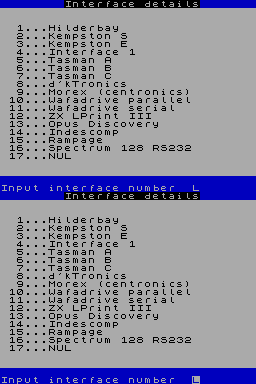
Bradway Software £8.50 Linotype is a rather complicated fun program to allow you to use your printer like an electric typewriter to produce small pamphlets, publicity sheets and the like in a variety of typestyles. It is one of the programs of the "Dumpy" family, and, as such, caters for a very wide range of printers and interfaces; moreover, since it contains a hefty chunk of BASIC in the Tasword 2 tradition, it can be readily adapted to fit any storage medium: tape, microdrive and discs of various sorts are all catered for. What you get for your money is a master program and a 12 page manual, nicely produced in clear type, photoreduced on a good quality photocopier and neatly bound in stiff card covers. So away you g. The first step is to use the master program to set up your own customised version. This is necessary because the installation part of the program is subsequently erased to provide more space for use by the Lin-O-Type program proper. The master program goes through a series of questions about your printer and your interface, asking about line feeds and all sorts of other things. I merely selected the Opus Discovery Interface, and then just typed in the defaults; this worked a treat on my Epson FX 80. The master program finally ends by saving your customised program on your disc. After that, you're away. You can use the program in two modes. The first mode is almost that of an electric typewriter in which the text which you type in is printed out line at a time. So I had a go at this (figure 1). Great fun, too. Printed out all sorts of things - even Greek and Russian fonts. Easy! The key to this is the way in which things are changed - press extended mode and immediately a prompt comes up on the input line - "FN?". A glance at the manual and you enter the necessary letter, A to E for the fonts in memory, F to load some more (though you can't load in the middle of a line) and so on. The type style selected actually comes up on screen to help you, so you really see what is happening before the printer gets hold of it. Emboldened by this success, I read a Tasword file in and watched it being printed out in a variety of styles. Although this is a rather nice little program, I managed to find a couple of small bugs in it, principally concerning Tasword 3 files, looked in the manual and found that this sort of situation was covered by a user support number which I used several times one evening: the bugs will be removed in your copies. Nice to know user support is so good. Ail in all, I liked it. The cost of Lin-O-Type on cassette is £8.50, (£1.50 extra for disc which is not bad), from Bradway Software of [redacted].
Figure 1. Sample fonts.
Classified26
- Your Sinclair #31Jul 1988 · p.103
- Your Sinclair #29May 1988 · p.110
- Your Sinclair #28Apr 1988 · p.102
- Your Sinclair #27Mar 1988 · p.94
- Your Sinclair #26Feb 1988 · p.95
- Your Sinclair #25Jan 1988 · p.119
- Your Sinclair #24Dec 1987 · p.119
- Your Sinclair #23Nov 1987 · p.104
- Your Sinclair #22Oct 1987 · p.104
- Your Sinclair #20Aug 1987 · p.94
- Your Sinclair #19Jul 1987 · p.93
- ZX Computing #38Jun 1987 · p.81
- Your Sinclair #18Jun 1987 · p.97
- Your Sinclair #17May 1987 · p.91
- ZX Computing #37May 1987 · p.88
- ZX Computing #36Apr 1987 · p.88
- Your Sinclair #16Apr 1987 · p.106
- Your Sinclair #15Mar 1987 · p.90
- ZX Computing #35Mar 1987 · p.89
- Your Sinclair #14Feb 1987 · p.99
- Your Sinclair #13Jan 1987 · p.122
- ZX Computing #33Jan 1987 · p.85
- Your Sinclair #12Dec 1986 · p.107
- ZX Computing #32Dec 1986 · p.87
- ZX Computing #31Nov 1986 · p.89
Advert23
- Your Computer #4Apr 1988 · p.74
- Popular Computing Weekly #6Feb 1988 · p.37
- Your Computer #2Feb 1988 · p.72
- Your Computer #1Jan 1988 · p.88
- Your Computer #12Dec 1987 · p.96
- Popular Computing Weekly #49Dec 1987 · p.52
- Your Computer #11Nov 1987 · p.81
- Your Computer #10Oct 1987 · p.75
- Popular Computing Weekly #32Aug 1987 · p.34
- Popular Computing Weekly #27Jul 1987 · p.33
- Your Computer #6Jun 1987 · p.74
- Popular Computing Weekly #18May 1987 · p.43
- Your Computer #4Apr 1987 · p.79
- Your Computer #2Feb 1987 · p.80
- Your Computer #1Jan 1987 · p.86
- Your Computer #12Dec 1986 · p.96
- Your Computer #11Nov 1986 · p.96
- Your Computer #10Oct 1986 · p.94
- Your Computer #9Sep 1986 · p.95
- Your Computer #8Aug 1986 · p.87
- Your Computer #7Jul 1986 · p.79
- Your Computer #6Jun 1986 · p.87
- Your Computer #5May 1986 · p.83
Related
- Tags
- g093
- Same entry at
- Spectrum ComputingZXInfo
Reviews from people here
Sign in to write about this, or make an account. It takes a minute and lets you correct the catalogue too.
No credit, description recorded.
Sign in to correct or add to this.
Hold the rights to this and want it taken down?