
Protitler
Utility: Visual/Screen · ZX-Spectrum 48K · 1 players · English
Hall Video Products · 1991 · Pound sterling 35.00
Protitler, 1 of 4
Discussion
Nobody has started a thread about this yet.
Remarks
video editing & effects
Play
- Protitler.z80.zipSnapshot image English16 KB
- Protitler(SideA).tzx.zipTape image English20 KB
- Protitler(SideB).tzx.zipTape image English3 KB
Files and rights
No permission is on record either way. Screens and pictures are copied here on a take-down basis: if you hold the rights and want something removed, say so and it goes.
Credits
- Bill Hallcredited
Sign in to credit somebody, or say what these people did.
In the magazines 1
Sinclair User #116Oct 1991 · p.21
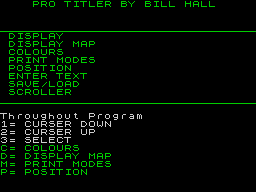
TECHNICAL Now that video-making using camcorders is becoming a popular and more affordable hobby, lots of videomakers are realising that a home computer can help by producing captions, special effects and edits to give their finished videos that professional look. Though you could spend hundreds of pounds on video-editing and special effects gear, even the Spectrum has lots of uses; we looked at three software packages specifically designed for creating Spectrum captions and video effects. Protitler from Hall Video Services costs 35 including p&p. It's extremely simple to use, being controlled almost entirely by three keys (cursor up, down, select). There are two main routines; Display, which shows pages of text one by one, and Scroller, which turns your text into rolling captions. You can select one or the other from the main menu, where you'll also find options for tape/microdrive/disk save and load, and the text entry routine. Up to 160 lines can be entered, divided into 60 pages. Each page can have its own type size, font (from a choice of four plus italics and bold), scroll type, background and type of removal (fade, cut, wipe or scroll); there are automatic text centering and scroll speed routines, and optional effects such as freezes, speedups, enlarged header lines, three-directional splits and so on. Effects are added using the Effect Edit menus, where eight lines of text are shown in a small window, and for each page you can choose nice-looking effects like dissolves, simple patterns like stars and bomb-bursts, colour changes, background effects and flashing characters. Protitler comes complete with a simple drawing program for creating background pictures which can be displayed behind your titles. It's very easy to use, but there's an even simpler alternative in the cheaper Superintro II; this has been around for four years - in fact it was one of the first home computer video titling packages on the market. It still stands up very well, having been regularly updated, and at 20 is very good value for money. The operating system is very similar to Protitler's, but most of the functions are carried out from a single menu page with inset windows. The number of lines per page is limited to eight, number of pages to 20, font sizes to three, and so on; but as a consolation there's more "error trapping" to prevent you from creating pages full of garbage, so Superintro is ideal for the beginner. Hall Video also supply parts and instructions for a Spectrum composite video output conversion; cost is 4 or 5 depending on model, and the company is also working on a Spectrum genlock which will allow you to superimpose captions over a video image. The main rival to Protitler, Chris Brown's Videomaster, costs 25 on tape or Plus D disk (if you have a Spectrum Plus 3, you can buy the tape and transfer the program to a 3 inch disk). The program comes with a neat 30-page manual (word-processed and laid-out using a Spectrum, incidentally). Videomaster is written in Basic rather than machine-code, so it's not particularly fast; but it has a huge range of facilities allowing you to create captions, borders, backgrounds and special effects. The main menus includes options to change the storage system (tape/disk), enter a filename to load or save, and create text, page layouts, colours and effects. The text entry display has forty lines, shown as two twenty-line pages. You can enter any valid text, plus a series of graphic characters, all of which appear on the display so you can alter any mistakes. The Page Breaks function allows you to create separate sections of text, and the most complicated part of the program, Layout, is stretched over three displays. The Layout functions let you stretch and squash text to any required size, position it anywhere on the screen, choose from one of the ten standard and 32 patterned fonts, compare pages with one superimposed over the other, and define start points for effects such as scrolls and screen "curtains". The Effects page shows you each text page in turn, and allows you to define for each page effects from a huge list which includes scrolls, moire pattern backgrounds. sliding pictures, fades, pauses, coloured wipes, box wipes, flashing characters and so on. Two extra programs. Pattern Maker and Borders and Backgrounds, let you draw simple decorative patterns which can be combined with high-resolution pictures drawn using Spectrum art software, and used in your Videomaster displays; another program, Disc Display, is a "slideshow" utility which displays in turn a sequence of hi-res pictures from a disc, and can also add fade and slide effects. Videomaster is a little slow and relies very heavily on individual keypresses rather than the more user-friendly cursor system used by Protitler and Superintro; but, if you have the patience to work with it, it's much more powerful than either of these two. A demo tape is available for 5, refundable against your order. Hall Video Products, [redacted] Chris Brown, [redacted].
Related
- Tags
- g135
- Same entry at
- Spectrum ComputingZXInfo
Reviews from people here
Sign in to write about this, or make an account. It takes a minute and lets you correct the catalogue too.
Everything ZXDB can hold about this is here.
Sign in to correct or add to this.
Hold the rights to this and want it taken down?