
Stock Control
General: Business · ZX-Spectrum 48K · 1 players · English
Kemp Ltd · 1983 · Pound sterling 14.95
Discussion
Nobody has started a thread about this yet.
Remarks
an unlimited entry version of Stock Ledger
Play
- StockControl_3.tzx.zipTape image English7 KB
Files and rights
No permission is on record either way. Screens and pictures are copied here on a take-down basis: if you hold the rights and want something removed, say so and it goes.
Scores
In the magazines
- Personal Computer News #351983 · Overall Value2/5
In the magazines 28
Sinclair User #34Jan 1985 · p.151
Mike Wright
SOMETHING OLD, SOMETHING NEW A survey of extras Unlike games software which, in general, achieves volume sales rapidly before virtually disappearing, applications software tends to sell steadily and have a much longer life. Many applications programs are developed and improved during their life. With the Sinclair Business User section just over a year old it is a good time to look at the updates to some of the programs we have reviewed. The very first review in December 1983 was of the OCP Finance Manager for the 48K Spectrum. That has been upgraded to include microdrive compatibility, allowing both the program and data to be saved separately to face. That set up routine is only used when loading from the original tape. Saving the program - to tape or microdrive - also saves the printer interface codes to give a personalised the program the option of cataloguing a cartridge is not included. The +80 version of the program, for use with full-sized printers, has had a further refinement added. Previously the program could only be used if you had the Kempston Centronics interface, now it has been programmed to offer a choice of 15 different interfaces - ten Centronics and five RS232 - or to set up the codes for any other printer inter-any microdrive attached. The program is supplied on casette and still includes a facility for saving to tape. Although the program can now be run from microdrive and data files loaded within version for subsequent use. The print-out for the +80 version shows the date of transaction, the account, the details, separate columns for debit and credit and the balance. That compares with the date, account, amount and balance on the ordinary version. OCP has upgraded its other programs in the same way. According to Francis Ainley the good news for QL owners is that he is working on an enhanced program allowing a class heading, in addition to the account and description, to be used with the transaction. The program is likely to feature some sort of windowing. Upgrading to microdrive compatibility was not possible with the Transform Sales/Purchase Ledger/Invoicing package as it was designed to run using twin microdrives anyway. Instead, improvements have been made to the Accounting program. Previously it was only possible to produce an overall total figure for all, or some, of the accounts by loading each account separately, noting totals and adding them up. Now a series of extra menus allows the list of accounts to be displayed and any combination of those to be selected and totalled. Accounts can be erased from a cartridge as another option. The package was reviewed in the November issue. The Kemp Stock Control program was reviewed in the August issue and version 3.0 has been released recently. Like any other programs which have been improved Stock Control is now microdrive compatible but the improvements do not end there. It now has the option of selecting a full-sized printer and a 64-column printout. If a full-sized printer is to be used and your printer interface needs software to drive the printer then that must be loaded each time before the program. The option of a full-sized printer must also be made every time. Although the resulting printouts are more widely spaced they are no more informative than those on the ZX printer. Other improvements include making the length of the stock numbers and descriptions user definable. The stock number can be up to ten characters long while the stock description, previously 20 characters, can now be set at any length between 4 and 30 characters. Of course, the more characters used for those fields the less room there will be for the records. Another improvement now allows up to two decimal places to be used for stock quantities. With those improvements this is now the most flexible stock control program available on the Spectrum. It is difficult to imagine many improvements which could be made to Tasword II, the word processing program from Tasman Software. Instead, Tasman has released its equivalent of Wordstar's Mailmerge program called Tasmerge. The program is designed to operate with Tasword II and the Campbell Systems Masterfile and allows you to insert names and addresses from a Masterfile database into a standard document produced using Tasword II. Now that it has a mailmerge facility Tasword II is once again streets ahead of its nearest rival, although the Softek word processor for the Wafadrive will be a strong contender if rumours of a database and a mailmerge facility are true. With Tasword II and Masterfile included as part of the microdrive/interface 1 Expansion Pack Tasmerge has a whole new market. Speaking of Masterfile, that has been improved since it was reviewed last February. The latest version - version nine - comes in a smart plastic case and now includes MF Print which allows Masterfile to print to full-sized printers. That is done by allowing the user to set up and save the outline report exactly as it is to be printed. The blank report must then be loaded before printing out the selected records. Unlike the ordinary report formats for the ZX printer only one report can be held in memory at one time. Others must be loaded when needed. In addition numeric data can be printed in a variety of formats including integer, two decimal places, with commas showing thousands and prefixing any character such as a currency sign. With those improvements the best database for the Spectrum is now even better. Campbell Systems, [redacted]. Kemp Ltd, [redacted]. OCP Ltd, [redacted]. Tasman Software, [redacted]. Transform Ltd [redacted].
ZX Computing #16Dec 1984 · p.124
Clive Smith
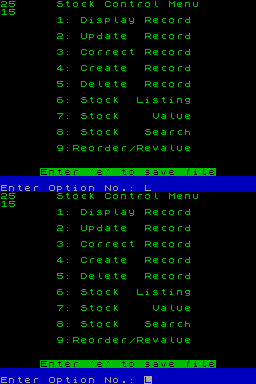
You may or may not have noticed that the Kemp Stock Control program has been about for some time. Well, Kemp have improved their existing program and now have one compatible with ZX microdrive and an improved screen layout. The main features of this program are unlimited entries, audit trail, item/supplier search and it is menu driven with 9 menu options. These include display, update, correct, stock list, total stock value, delete, search and recorder/devalue. The program has a capacity of 600 records per file and between 350 and 450 records per file, which means one microdrive cartridge can hold 700 to 1000 records. Each microdrive will save both program and data and with a full file takes about 30 seconds to load. Verification is automatic when loading or saving, to ensure security. The program and data can still be transfered onto cassette but it takes about three-and-a-half minutes to load. Verification is optional. I liked the improved screen display which is well laid out, and has a green screen effect. On entering date you first enter the stock number, up to 10 characters. Next is the supplier name which has only four characters but allowing 30 for description of goods. Next, your re-order level, seven figure max, and finally unit cost. There is also a ref number which has only four figures. I wish they gave more to hold long invoice numbers. The search facility is fast, about two seconds, an will search either by supplier or stock number. With a printer permanently attached it will keep a full audit trail. The beauty of this program is that is will operate on the ZX printer and all Spectrum Centronics and RS232 printer interfaces to provide output on a 80 column printer. You can also select 32 or 64 characters per line. With ease, you can print out any stock record, keep a daily file of all updates, corrections, creations etc. A stock list of all records with their balances plus anything found in the search, and when your rep rings for an order, will give an instant list of all stock that needs re-ordering. The only fault I found was you have to enter the date every time you update a record. As you have to enter the date at the start, it would have been better to have the option of pressing one key to repeat the date when updating records of the option of changing it if needed. The program also has an access-code to deter tampering, but this cannot be relied to strongly upon. The cassette comes with a booklet to assist you but the program can be followed on the screen with ease. Recommended retail price is £19.95 including VAT which is a fraction of the price you would have to pay for a similar program used on a business computer. All cassettes are also guaranteed for one year and Kemp will answer any queries you have.
Sinclair User #29Aug 1984 · p.118
Mike Wright
SPECTRUM IN THE STORE Mike Wright takes stock of three programs for small business Stock Control for small businessmen, such as shop-keepers, is often a matter of looking at the shelves while working, noticing where stock is low and reordering. In such circumstances is there any point in having and using a stock control program? in attempting to answer that question we look at three stock control programs from Hilderbay, Transform and Kemp. All the programs are driven from a master menu followed by a combination of prompts and secondary menus. They all feature the basic requirements of information on line, supplier, unit cost, stock level and re-order level and offer the ability to add and deduct stock. Any changes in unit costs affecting the total value are, however, dealt with differently. The main differences are in the way the output is presented and each has features which make it attractive to possible users. The Transform program holds up to 900 lines. On loading, the program prompts for a file name for the data before displaying the main menu. That offers eight options, including update stock, list stock, deduct stock and print all details. The four remaining options are used for saving and loading the stock list and/or the program. The options are all selected by a single keystroke. Option one is used for entering the stock details in the beginning and then updating the details at a later stage. When selected, a secondary menu is offered. That is headed Search facility and offers six options - 1, to enter new stock item; 2, to search for a supplier; 3, to search for details of stock; 4, to search for stock number; 0, to scan pages; ENTER to return to main menu. Selecting option one displays the bare details of the line. Those are stock number, line, supplier, unit price, stock level, re-order level and value of stock. The stock number is assigned by the program and the other details are prompted for one by one. When the details have been completed another menu is displayed in the lower half of the screen. That on-screen menu allows changes to be made to any of the details, searching on a stock number and scanning backwards and forwards. To continue entering new stock lines is simply a matter of pressing ENTER. The other options can then be used to search for the supplier, the line and the stock number or to scan through the lines. Adding or deducting stock can be done using any of the search options on the Search facility menu to display the details of the line and then selecting option two to deduct stock or option seven to add stock. The program prompts for the amount of stock assuming the current unit price. If the unit price is changed the total value of the stock is calculated at the new rate. Option two allows listings of the lines of stock to be made by all-lines, supplier, low stock levels, or supplier and low stock. Every time an option is chosen a printout or screen display can be selected. The all-lines option also allows the user to choose the first stock number from which the listing will start and gives the last used stock number. Stock can be deducted also using option three on the main menu which asks for the stock number and when the details are displayed the amount of stock is entered. The cassette insert states that with that option the program can be used easily beside a cash register. It is possible that having the cashier remember the stock number for each line would create more difficulties than it solves. Certainly it is easier to use the search facility to deduct stock. Although the only manual is the cassette inlay, which contains the barest information on running the program, it is remarkably easy to follow and use. Nearly all options are selected by a single keystroke. The exceptions are for printing and deleting a line. The method of displaying the details on a line is one of the most compact and yet clear and informative to be found. In contrast, the Kemp program is fussier in its approach but incorporates more safeguards against accidental errors. The user is asked first if the loaded program is to be verified, then for a two-letter security code - which is set up on the first run - and then the date. After that a nine-option menu is presented. Creating a new line is done from option four. The details are stock number, description, supplier, unit cost, re-order level, present stock level and stock value. Unlike the Transform program the stock number is alphanumeric - numbers and letters - and is user-definable up to four characters. As each value is entered it is displayed. Having realised that each item is being prompted for in turn, it is a shock to find the program asking for the date again - a reference which does no appear to be used elsewhere - and then the type of transaction, for instance goods in or out, when all you might expect to enter is the present stock level. After the transaction type, the amount of stock is prompted. That is followed by a prompt asking for the value of the stock. Entering u calculates the value of the stock at the unit cost and adds or subtracts that from the total value - initially zero. Alternatively, a separate total value can be entered. The same procedure is used for updating the details - option two - as well. There is, unfortunately, no way of skipping from one line to another when updating and once the details have been entered a return must be made to the main menu before updating another line. Corrections can be made to line details or the line deleted using options three and four respectively. Before those can be used the access code must be entered again. A display of the details on a single line can be obtained from option one; a listing of the amount and value of all lines is given using option six, while option seven displays the total value of all stock. Option eight allows the lines to be searched and itemised by either description or supplier. Despite a maximum of 20 characters per description, the search is done on the first four letters only. A list of lines with low stock levels is given by option nine which allows also all stock to be revalued at unit cost, again after the access code is given. Saving and loading is easy. To save a file press e and ENTER on the main menu. The saved version is then used to load both program and data next time. In running the program a printer needs to be attached permanently, as a printout is made automatically at nearly every stage, creating a paper chase for the auditors. The need to enter every option seems tedious after using single keystrokes to select options, as is the need to enter the date at every transaction. The Kemp program is probably the most sophisticated of the three and that is indicated by the packaging and the level of error-trapping. Perhaps, however, you would rather forego some of the sophistication for a slightly more usable program. The Hilderbay program differs from the others in that you are allowed to specify the number of characters used for the details of the lines. The program also allows for an additional amount of text to be specified for each line. The length of the text is also prompted for when setting up the program. The maximum number of possible lines is calculated from the total number of characters in the lines and text. That is displayed while the user is asked for the number of lines to be used. Once that and a file name have been specified the five-option main menu is displayed. Option one allows a line to be found, added or deleted. On selecting the option the line description is asked for and, if found, the details are displayed. If the line is not found, either a new line can be entered or return to the main menu. If a new line it set up the user is prompted for the unit price, a supplier code - between 0 and 235, a type code - 0 to 255, stock level and reorder level. Once the details have been entered they are displayed on-screen with a further menu which allows stock changes, alterations to re-order level and unit value to be made. Available also is the ability to add to the text, delete a line and move backwards and forwards in the list. As the lines are entered they are sorted automatically into alphanumeric order. On opting to make a change to stock the user is prompted for the change in stock - a minus sign is used to show a deduction - and additions are made at the current unit value. If additions are to be made at a different unit value then the Alter unit value option should be used. That prompts for the new value and asks for the number of items at the new value - attempting to enter a negative value causes the program to crash. If 0 is entered the unit cost is changed to the new value and a new total value calculated. If any other number is entered an average unit value for the stock is calculated. A useful feature is the line of text which can be used for suppliers' addresses, contacts or other information. Selecting the second option gives a subsidiary menu offering print options. That allows lines to be listed by supplier and type, re-order levels, text or by 'everything'. Because of the amount of information to be printed the 'everything' option can be selected only when using an 80-column printer. Unfortunately the program is poorly protected from accidental errors in data entry. Considering the high standard of the other Hilderbay programs you might be disappointed with this one. Overall, if you are looking for a stock control program it would seem to be a choice between the Transform or Kemp programs, unless you specifically require the text or averaging unit value features of the Hilderbay program. Transform, [redacted] Hiderbay, [redacted] Kemp, [redacted]
Hilderbay
Kemp
Transform
Transform No. of lines: 900 No. of characters per line: 15 No. of characters per supplier: 5 Low stock indicator: Yes Space for comments: no Cost: £10.75 Hilderbay No. of lines: Variable No. of characters per line: User-definable No. of characters per supplier: 1 Low stock indicator: Yes Space for comments: Yes Cost: £25 Kemp No. of lines: 518 No. of characters per line: 20 No. of characters per supplier: 4 Low stock indicator: Yes Space for comments: No Cost: £14.95
Personal Computer News #35Nov 1983 · p.372/52/53/52/54/52/52/5
Features 2/5
Documentation 2/5
Performance 3/5
Usability 2/5
Reliability 4/5
Overall Value 2/5
Bill Quentin 2/5
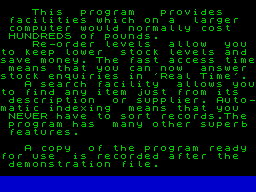
NAME: Stock Control APPLICATION: Accounting SYSTEM: Spectrum 48K PRICE: £14.95 PUBLISHER: Kemp Ltd, [redacted] FORMAT: Cassette OTHER VERSIONS: None OUTLETS: Mail order (soon to be distributed nationally) THE STOCK ANSWER ON SPECTRUM? Does Stock Control really tally with running a small business? Bill Quentin loads it up. The program provides a basic stock control system for the small business. It is a stand-alone system and cannot be linked to other Kemp products, such as the Sales Ledger. This means that all the records must be entered on a daily or weekly basis, increasing yet again the book-keeping requirements of the business. FEATURES Stock Control is like a card index file in that every stock item has a page in the program. These pages can be created, deleted, corrected or displayed according to the wishes of the operator. Here are the print-outs that are available: STOCK LISTING: Stock number, Stock description, Stock level, Reorder flag, Stock value (for all individual stock items). STOCK VALUE: Total stock value (for the whole stock). REORDER LIST: All items to be reordered, Stock numbers, Stock description, Cost (for the whole stock) The reorder list can only be reproduced on the printer. Records of stock changes, deletions etc can also be printed. Stock Control's search facilities are primitive, allowing a match of only the first four letters of either the stock description or supplier's name. In most cases it's considerably easier to perform,a full stock listing and grab the information as it scrolls up the screen. The program provides the following information on each stock item: Stock number: 4 characters Stock description: 20 characters Supplier description: 4 characters Unit cost: 000 000.00 Reorder level: 7 figures Present stock: calculated by program Value: calculated by program. PRESENTATION Stock Control, like the other programs from the Kemp stable, comes in a very attractive box with a beautifully printed leaflet. Kemp should put far more material into its manuals, as 8 pages of A6 is scarcely enough space to describe the operation of the program, never mind detailed information about operating a stock control system. It is important that programs designed to introduce the user to business systems, such as stock control, should not assume prior knowledge of operating such a system. The manual is an adequate reference for general operation for the program, although there is neither an index nor a list of contents. The text is succinct and when read in conjunction with the on-screen comments allows the user to get the program flying without undue fuss, it is a pity that more use wasn't made of the Spectrum's considerable graphics capabilities. GETTING STARTED The program takes about ten minutes to load-verify and save-verify, which are the minimum operations required for any transaction. This limits its use to end of the week summaries rather than a real-time system to be used in a store-room. On entry into the program you are asked for the date, then confronted with the main menu. This is a list of all the various functions which can be performed by Stock Control. Option number 6 gives a complete listing of the stock, number 4 allows you to create a new record, and so on. It would be helpful if the selected option was described on the resulting display screen by more than its function number. Several screens are identical and it is easy to enter the wrong mode by mistake. Only a cursory knowledge of the Spectrum is required to operate the program. The main area likely to cause problems is the saving, loading and verification of the program and data on cassette. A mistake by the operator, or a tape loading error, will require a BREAK and GOTO instruction. EASE OF OPERATION Stock Control can be learnt in under an hour, but it might take weeks to fully understand the stock-control techniques necessary to integrate this package into a practical business. The cassette contains a demonstration program followed by a working copy. The demonstration copy has a set of figures already installed and is therefore a useful training aid. The manual tells you to verify the program after loading it from cassette. RELIABILITY A sample stock of 30 items was entered into the program for testing purposes. All the functions of the program were checked without encountering a software error. The data was saved-verified and then load-verified a total of 20 times without dropping any data. The program uses the standard Spectrum routines for checking and verifying, data being dumped to and from memory, and therefore has some protection against data corruption. Kemp supports all its software during normal office hours which makes for rapid problem solving should any untoward occurrences happen during program installation or operation. VERDICT The program is easy to use and will find a ready market with small businesses needing more information about their stock. Stock Control will not, however, reduce the amount of book-keeping required to operate effective stock control. It is unfortunate that the search facilities are so limited as surely the main advantage of a computer is to reduce the time taken to find stock records. Equally, I was disappointed to find that this program couldn't be linked with other Kemp programs so as to allow a sales ledger entry to automatically alter the stock levels. The program is most definitely not designed to be operated in real-time, it would be most difficult to keep an up-to-date stock record by using this program to record each 'nut and bolt' being removed from the stock room. The problem with attempting this sort of application is the length of time necessary to load and save from a cassette. Kemp is presently developing a Microdrive version of Stock Control which may go some way towards alleviating this problem.
Advert20
- Sinclair User #26May 1984 · p.134
- ZX Computing #12Apr 1984 · p.52
- Sinclair User #24Mar 1984 · p.130
- Sinclair User #23Feb 1984 · p.2
- Sinclair User #22Jan 1984 · p.58
- Your Spectrum #1Jan 1984 · p.52
- Sinclair User1984 · p.120
- Sinclair User #21Dec 1983 · p.39
- ZX Computing #10Dec 1983 · p.116
- Sinclair User #20Nov 1983 · p.36
- Sinclair User #19Oct 1983 · p.136
- Personal Computer News #27Sep 1983 · p.83
- Personal Computer News #26Sep 1983 · p.34
- Personal Computer News #25Aug 1983 · p.84
- Popular Computing Weekly #24Jun 1983 · p.6
- Popular Computing Weekly #25Jun 1983 · p.45
- Personal Computer News #15Jun 1983 · p.86
- Sinclair User #15Jun 1983 · p.108
- Your Computer #5May 1983 · p.206
- Sinclair User #14May 1983 · p.112
News/Note2
- ZX Computing #16Dec 1984 · p.60
- ZX Computing #9Oct 1983 · p.58
Feature1
- Sinclair User #34Jan 1985 · p.151
Full-page ad1
- Your Spectrum #2Mar 1984 · p.77
Related
- Same entry at
- Spectrum ComputingZXInfo
Reviews from people here
Sign in to write about this, or make an account. It takes a minute and lets you correct the catalogue too.
No credit recorded.
Sign in to correct or add to this.
Hold the rights to this and want it taken down?