
Trace
Programming: BASIC · ZX-Spectrum 16K/48K · 1 players · English
Texgate Computers Ltd · 1983 · Pound sterling 6.95
Discussion
Nobody has started a thread about this yet.
Play
- Trace.tzx.zipTape image English1 KB
Documents
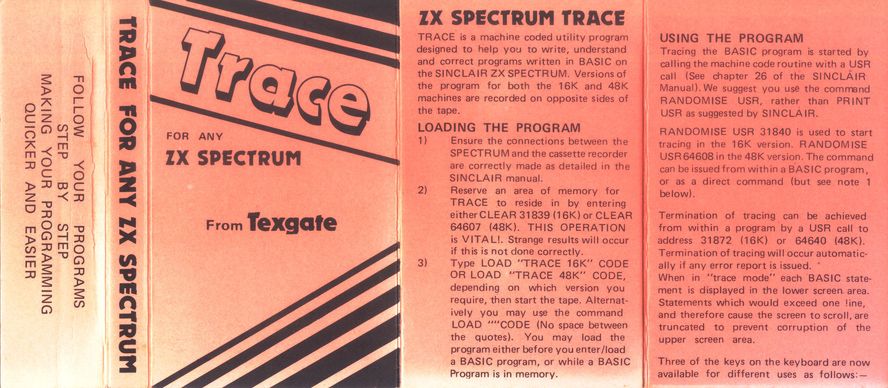
- Trace.pdfInstructions English104 KB
Files and rights
No permission is on record either way. Screens and pictures are copied here on a take-down basis: if you hold the rights and want something removed, say so and it goes.
Scores
In the magazines
- Sinclair User #181983 · Gilbert Factor8/10
- Personal Computer News #171983 · Overall Value3/5
In the magazines 21
Sinclair User #18Sep 1983 · p.348/10
Gilbert Factor 8/10
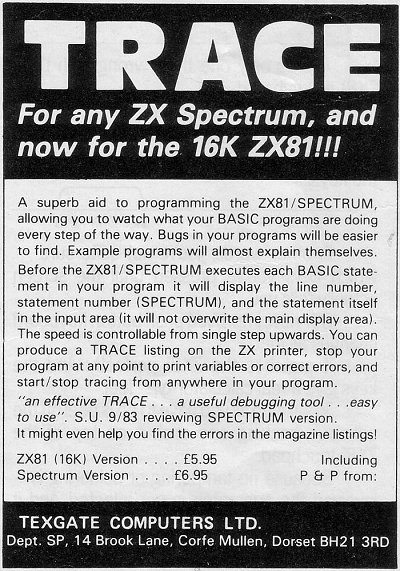
PROGRAM TRACING Some microcomputers, including the Dragon and the BBC microcomputer, have a command call Trace which will run through a program displaying it line by line to show the flow of that program. The Spectrum has no such command in its Basic language but the omission has been remedied by the release of a machine code routine, also called Trace, for both versions of the computer. The routine lists a user program line by line; when it reaches a GOTO or GOSUB it will jump to the line specified by that instruction. If Trace finds an error in a program it will inform the user and if an endless loop has been set up in a user program it will be easier to detect. Unlike the Trace command on some computers, the routine will allow the program to run while it is executing the Trace. The run is performed in the main part of the screen area and it is useful to compare that output to the program line which is creating it at the bottom of the screen. The routine provides an effective Trace command and is a useful debugging tool. It is easy to use and can be operated with no knowledge of machine code. Trace can be obtained from Texgate Computers Ltd, [redacted]. The package costs £6.95.
Personal Computer News #17Jul 1983 · p.333/54/53/54/54/53/53/5
Features 3/5
Documentation 4/5
Performance 3/5
Usability 4/5
Reliability 4/5
Overall Value 3/5
Ted Ball 3/5
NAME: Trace APPLICATION: Programming aid SYSTEM: ZX Spectrum, 16K or 48K PRICE: £6.95 PUBLISHER: Texgate Computers, [redacted] FORMAT: Cassette LANGUAGE: Machine code OUTLETS: Mail Order. SPECTRUM TRACER... A stethoscope on your programs, and a teletext display facility. Ted Ball Peers at two packages. When you are debugging a Basic program it can be difficult to find out what the program is actually doing instead of what you meant it to do. Trace for the ZX Spectrum helps your debugging by displaying each statement in the program as it is executed, allowing you to follow the progress of the program step by step. FEATURES To start Trace you have to give the instruction RANDOMISE USR 31840 on a 16K Spectrum, or RANDOMISE USR 64608 on a 48K Spectrum. This can be in immediate mode or in the program, and you can use a similar USR call within your program to turn off the trace, so you can trace the whole program or just part of it. IN USE When a program is being traced each statement is displayed in the lower part of the screen, together with the line number and the statement number within the line, before it is executed. When you press the Caps shift key the statement is executed and the next statement displayed. You can use the Symbol shift instead of Caps shift to get the statement listed on the printer as well as on the screen. The top 22 lines of the screen are left for use by the Basic program, so the screen display works in the normal way while a program is being traced. Trace allows almost all Basic commands to work as usual, including INPUT, INKEY$ and USR, although there are some points noted in the instructions about the use of INKEYS and USR in a program that is to be traced. The Basic commands that do not work in the usual way are GOTO, GOSUB and NEXT. As described in the instructions, Trace will stop with an error report if it comes across a GOTO or GOSUB that points to itself, for example 10 GOTO 10 or 20 GOSUB 20. However, this type of GOTO is often used in the form: 10 IF INKEY$ = "" THEN GOTO 10 where the program is waiting until a key is pressed. The problem with NEXT is not mentioned in the instructions, but is probably related to the restriction on GOTO and GOSUB. If you have a line of the form: 100 FOR a = 1 TO 10:IF x > y THEN NEXT a with FOR and NEXT on the same line and IF... THEN in front of NEXT, Trace will stop with an error report instead of executing the NEXT. Curiously, Trace will quite happily execute the NEXT if it is not preceded by IF... THEN. VERDICT Apart from the problems with GOTO, GOSUB and NEXT, Trace works very well, and I couldn't find anything else that would crash it, or make it miss a program error. There are a number of toolkit programs available that include a trace as well as other programming aids, although usually the trace in a toolkit will display only the line number. You should consider whether getting the Basic statements displayed by Trace is a sufficient extra feature to justify your buying this program.
Advert18
- Sinclair User #27Jun 1984 · p.64
- Sinclair User #24Mar 1984 · p.20
- Sinclair User #23Feb 1984 · p.62
- Sinclair User #22Jan 1984 · p.117
- Sinclair Programs #15Jan 1984 · p.32
- Sinclair User #21Dec 1983 · p.176
- Sinclair Programs #14Dec 1983 · p.30
- Sinclair User #20Nov 1983 · p.151
- Sinclair Programs #13Nov 1983 · p.32
- Sinclair User #19Oct 1983 · p.97
- Sinclair User #18Sep 1983 · p.32
- Sinclair User #17Aug 1983 · p.91
- Popular Computing Weekly #22Jun 1983 · p.42
- Popular Computing Weekly #23Jun 1983 · p.40
- Popular Computing Weekly #24Jun 1983 · p.36
- Popular Computing Weekly #25Jun 1983 · p.38
- Popular Computing Weekly #20May 1983 · p.42
- Popular Computing Weekly #21May 1983 · p.46
Review1
- Popular Computing Weekly #24Jun 1983 · p.45
Reviews from people here
Sign in to write about this, or make an account. It takes a minute and lets you correct the catalogue too.
No credit, description, tag recorded.
Sign in to correct or add to this.
Hold the rights to this and want it taken down?