
Sample Editor
Utility: Music · ZX-Spectrum 48K · 1 players · English
Quasar Software · 1987 · Pound sterling 9.99
Discussion
Nobody has started a thread about this yet.
Remarks
for use with RAM Music Machine
Play
- SampleEditor.tzx.zipTape image English9 KB
Files and rights
No permission is on record either way. Screens and pictures are copied here on a take-down basis: if you hold the rights and want something removed, say so and it goes.
Scores
In the magazines
- Sinclair User #701988 · Overall8/10
In the magazines 3
Your Sinclair #27Mar 1988 · p.62
Phil South
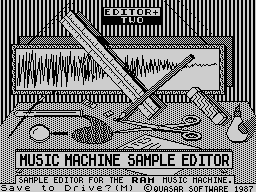
RAGE HARD! You wanna know what's hardest in hardware? Once again YS whips out the magic screwdriver in our first hardware round up of '88. It's been ages since we did a really ripping hardware spread, so we thought it was about time. After a bit of barking at Phil Snout to get his screwdriver out and look at these beasts, we've pulled together a positive cornucopia of hoopy hardware and super software, to turn even the most soft-boiled trainspotter into a hard-boiled egghead. The star of our show is Miles Gordon Technology's Plus D disk interface, the only real alternative for tape users to upgrade to a +3, from the designers of the Disciple. Check out the review further on. Other contenders for the hardware crown are the Multiface family from Romantic Robot, the plastic pal who's fun to be with; a couple of wacky Multiplugs for those of you who work all your household appliances from one socket; an aerial switch so you can plug all your computers, game consoles and videos into your telly at the same time; and Computer Cupboard's nifty little Trojan Light Pen for you to scribble on your screen. Worra lorra lorra stuff. As well as all this hardware, we've got a brain-boggling selection of the most fascinating hardware-based software. So, let's cut the babbling and launch into the reviews. MGT PLUS D FAX BOX Product: Plus D disk interface Price: (Plus D only) £49.95, (with drive) £129.95 Supplier: Miles Gordon Technology, [redacted] A year ago Rockfort Products was marketing a sort of Interface 1 shaped disk interface called the Disciple. It was a very fancy bit of kit, as it goes, with a couple of joystick plugholes, a snapshot button for saving off screens or games, and a parallel printer port. This wangy little peripheral was actually the brainchild of Cambridge based Miles Gordon Technology. So when MGT decided to upgrade the Disciple and market it themselves, they looked very carefully at the mail they got about the Disciple and what people said about it. The result of their research is the new slimline, MGT Plus D. The joystick ports are gone, and the device no longer looks like an Interface 1. Actually it now looks uncannily like one of those flat joystick interfaces, with a button and power light on the top, and two flat IEEE type ports on the back for the disk and printer plugs. If you buy the unit as a package deal you also get a three and a quarter inch disk drive which is very slick and efficient. The Plus D is, to adopt the most massive critical cliche, a joy to use. It's fast, efficient and wholly reliable, and although it's rumoured that there are certain games it won't 'backup', so far we haven't found one. (Incidentally, info about what the machine can't do will no doubt be featured in the independant Disciple User Group Magazine, FORMAT, in the coming months.) The Plus D handles microdrive syntax (even the hook codes), so it can be used with a program which reads and writes to microdrives, without having to rewrite it. Using the button on the top you can print out a screen to your printer, save it to tape, or save the whole program in 48K or 128K modes. Some of the nicer features of the gadget are the ability to rename files, and boot a file in one of three ways; the usual microdrive way with all those asterisks and semicolons; using a LOAD D1 'FILENAME' format, the D1 bit meaning Drive 1; or by typing LOAD Pn, where n is a number. This is a special function of the Plus D, where each file has a number on the directory, and LOAD P1 loads the file numbered 1, LOAD P2 the one numbered 2. As well as this the computer can suss whether the file is a SCREEN$ or CODE or a Basic program from the entry in the directory. Neat, eh? Another item which should have been a feature of microdrive syntax in the first place (ahem!) is the wildcard. Basically, the Plus D can be as easy or as complicated as you want, and should fit into anybody's current setup, making it faster, more powerful and most importantly, a lot more fun. This really is, price-wise and facility-wise, one of the best alternatives to a +3 system yet devised. In summing up, it's nice to see so many good British products in this hardware lineup. There's not many computers you could say that of, and fewer that could match the quality and design of the peripherals represented here. HARD NEWS It's funny, but there's two distinct categories of equipment that we get sent for review. There are the things we review which stay around for a long time after because we like to use them in real life. And then there's the other stuff which we like a lot when it first comes in, but when all's said and done has no real application apart from novelty value. First category things are used until they disintegrate, but second category things tend to just sit around collecting thick layers of dust. And why are we telling you all this? Because all the things on these pages are first category things, items of equipment that are so useful we have to buy new ones when they break down. 1. Multiface +3 Romantic Robot £39.95 Probably top of this list of things YS couldn't do without is the Multiface family of gadgets from Romantic Robot. The most recent of these of course is the Multiface +3. Without this box there would be no screenshots in YS, or if there were, they would be fuzzy photos rather than the technically perfect inkjet dumps we use today. How is this done? Well, having fastened a Multiface to your computer you simply blip the red button on the top of the machine, and follow the menus to save the screen, which is then done automatically. There's a toolkit feature built into the unit, not unlike the previous Multifaces for 48 and 128K, which enables you to POKE numbers into addresses in hex or ASCII formats. The unit can also send shaded print dumps out through the printer port on the back of the +3. So if you've got a printer connected, the picture on screen comes out on the page. If you haven't, the bits just spill out over your desk (that's a joke, by the way!). 2. Multiprint Romantic Robot £34.95 This printing out of screens on proper printers is a trick favoured by the Multiprint interface, a dedicated printer box for all Spectrums to Epson compatible printers. As well as supporting all the usual Speccy syntax of LPRINT, LLIST, COPY etc, it also does a nifty line in various sized dumps, straight to printer. But more importantly, it is the only interface that allows you to reconfigure it while the computer is still running. That's to say you can print out a listing at one measure which turns out to be too wide, press the red button, change the width, line feeds, margins etc and return to print it out properly without having to reset the computer. 3. Smoothflow Multiplug Cambrian Distributors £23.99 Speaking of resetting the computer, has a spike in your mains supply ever found you just topping the highest known score on Outrun and looking like you're going to finish, when suddenly...PHUT! The lights in your room flicker for a moment and your Speccy resets? Could you do without this? Of course you could, which is why you need a snappy new Smoothflow Multiplug. This gizmo, made in the UK by Conblock, screws to your skirting board and accepts four wacky little micro-sized versions of the conventional 3 pin plug. So four into one will go! Now, not only will you be safe from surges and spikes (fnar fnar), but you can also plug your TV, tape machine, Speccy and modem, or indeed any four machines, into just one socket! Incidentally, if spikes don't really bother you, you can just take advantage of the mini plugs by getting a regular Multiplug. 4. Multiplug (Cambrian Distributors) £10.99 Yes, for just over a tenner you can get a four-way Multiplug like this one, which, like it's big brother, uses those dinky little plugs, but also is manufactured to British Standard 5733, so it won't go phut in your face. The same spec as the Smoothflow, but with no buffering for spike protection, so don't blame us if your computer crashes when the mad scientist next door plugs in his generator. 5. 3-2-1 Aerial Plug (Cambrian Distributors) £4.99 Doesn't it give you a pain in the neck switching around the aerial plug on the back of your telly with the RF lead on your Speccy. It does? And what about when you plug in your Nintendo to play Super Mario Bros? Well, it really started getting to us, so we got ourselves a 3-2-1 Aerial Switch to solve the problem. This little box is a three-into-one coaxial switch, which means it can either drive three switchable receivers from one aerial plug (a coaxial plug!) or can send three switchable RF signals to one telly. This means that using this box you can not only have your Speccy, game console and video going into the same telly and push the switch for which one you want, but also (if you had enough aerial cable) have a telly in three rooms and switch the aerial signal to each one depending on where you are! Not a bad little gadget, really, with low interchannel interference. 6. Trojan Light Pen Computer Cupboard £19.95 And finally, if you want to do professional Computer Aided Design on your Speccy, why not buy a Trojan Light Pen? When you buy the Cadmaster graphics system, you get this pen shaped device, which allows you to draw straight onto the screen. This can be very handy if you are quite good at drawing with a pen, but not so hot with a mouse or joystick. With this package you can do freehand drawing, boxes, circles, lines, triangles and rays. You can choose line thicknesses, quills, brushes and text styles, copy, paste, fill with patterns, wash, colour and dump to printers to your heart's content. The program is now compatible with all flavours of Spectrum, from Issue One wubber keyboards, to the new +3 (for £23.95), and is also compatible with microdrives and other media that use that format. It's remarkably accurate, and doesn't suffer from the wristache and slap/rattle sound effects you usually get from using Spectrum mice. The biggest recommendation of the product is that it's British and so all technical backup is available from a telephone number printed on the pen itself. In summing up, it's nice to see so many good British products in this hardware lineup. There's not many computers you could say that of, and fewer that could match the quality and design of the peripherals represented here. SOFT OPTIONS Music Machine Sound Sample Editor Quasar Software £9.99 cassette Although this isn't a legitimate Ram Electronics product, it does work marvellously well with the samples from this excellent sound sampling sequencer. Using key letters (the same as the Music Machine's little menus) to activate various buttons on the screen, you can change the pitch of a sample, alter the volume and actually edit individual points in the waveform. You can also equalise the sound, shifting certain harmonics to make the sound easier on the ear. Brill for the closet Jean-Michel Jarre. The Last Word Computer Cupboard £14.95 cassette Word processing isn't an application you immediately think of in connection with Spectrum computers. But with the advent of The Last Word, all that changed. A sophisticated full featured word processor which, due to the +2 and +3's new keyboard, makes any kind of writing a piece of cake. There's an 80 column screen, up to 148 characters line length, mail merge for those important mailshots. a calculator for you to do Apple Macintosh impressions on, and over 60 commands for you to input and edit the text to your taste. The code for loading and saving is even user alterable allowing you to customise it to your own system. Also available on +3 disk (£19.95). Tasword Plus Three Tasman Software £19.95 disk There can't be a Spectrum user who hasn't heard of Tasword. It has been the standard text editor on the Speccy for more years than this magazine can recall. And now, keeping up with the times as ever, Tasman has produced an extended +3 disk version of the popular word engine. The thing which makes Tasword such a belt to use it it's little on-line help pages, which means you can call them up while editing a document, just by pressing a couple of keys. Like The Last Word it's user alterable to your taste, and like it says in the blurb "now you can write a manual without having to read one." Who wrote that? Qualitas Plus Seven Stars £10.95 The worst thing about writing on a Speccy has always been the quality of print you get from a normal Epson type printer. Either you use the quick draft mode (Ooooo) or you have to settle for one typestyle in the NLQ mode. But now all that has changed. You can beef up your printer's output with Qualitas. Originally planned as an NLQ printout program for Tasword files, Qualitas has now had a Plus added, not to mention compatibility with Tasword Two, Three, The Writer and The Last Word. Now you can print out in the five fonts supplied with the basic Qualitas Plus pack, or you can lay out another £5.95 with the add-on Display Pack and have another 10 decorative fonts to play with. Y'see? Quality doesn't have to be expensive.
Sinclair User #70Jan 1988 · p.678/108/10
Overall 8/10
Chris Jenkins 8/10
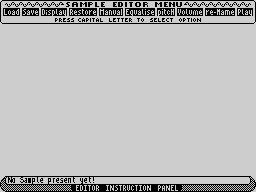
Label: Quasar, [redacted] Author: Keith Turner Price: £9.99 (mail-order only) Memory: 48K/128K Joystick: None Reviewer: Chris Jenkins Quasar's sample editor expands the capabilities of the Ram Music Machine. The Ram unit itself - a combined sampler/MIDI interface/sequencer - is perhaps the best bargain for musicians in terms of functions per pound, and the Quasar editor program is a neat extension. The Sample Editor display shows a two-dimensional plot of the sample you have made using the Music Machine's own software. This can then be trimmed, renamed, changed in pitch and volume, or manually re-drawn, and re-saved to tape. Useful in itself, but Quasar also promises further programs - a real-time/step/time MIDI sequencer, with clock sync and parameter passing, dedicated drum machine sequencing and score display/print. Also lined up is a sample synthesis program, which will be the first time this sophisticated technique has been possible on computer as inexpensive as the Spectrum. Music Machine owners - check out Quasar on 01-9873908.
Crash #46Nov 1987 · p.97
Jon Bates
Welcome to the zoo. Things have been fairly hectic here at the Bates Motel and what with letters to answer and programs to review, I've really been pushed to find time to stab people in showers and push cars into swamps and as to buying all those old ladies clothes... there simply aren't enough jumble sales to go round. But seriously... As promised last month, here are two overviews of programs designed to run on the Ram/Flare Music Machine and brought to my attention by RAMM!, the users' club. Both concentrate on developing utilities that form part of the original package and they're both really useful additions to the original. First on the stocks is the Sample Editor from Quasar Software. It comes in two configurations on the same tape, for the 48 and the + Spectrums, and the basic idea is that it can look at samples you've made using the Music Machine in greater detail and do a lot more to them than the Ram product alone can. When you've put samples through the treatment they can be reloaded back into your sample files for instant use - well, nearly. The honest introduction to the manual does tell you the shortcomings of sampling on the Spectrum and acknowledges that by necessity any sampling on it is a sort of compromise. On loading up there are no voices present, so this means digging out your sampler files. It would have been nicer and more immediate for the first-time user to have some samples to play with, but never mind. Once a sample is loaded, several options give you access to peripherals of the sample. Any alterations at any stage can either be displayed as a waveform or played from a screen keyboard display. 'Equalize' has a representation of a graphic equalizer and you can emphasise or de-emphasise particular harmonics over a very wide selection of 28 narrow harmonic bands, thus pruning odd harmonies and inharmonic frequencies. Overall volume and pitch can be altered; changing the latter is important if you've sampled at a weird pitch which renders that sample useless to anyone but a dab hand at transposing. But the real smartie part is the wavefom display and 'manual alteration which spreads the sample waveform over several pages. Microscopic sections of the sample can be chopped out, inserted, and the join made smooth by carefully checking the values at the new splice. At each juncture the part or whole of the sample can be played so that you can aurally check your handiwork. And at any stage in any of Sample Editor's functions you can restore the original sample if you go wrong; whatever you do, you have a backup. Sample Editor is well worth the £9.99 that will bring it to you from: Quasar Software, [redacted]. They threaten us with more goodies in the near future. (By the way, Quasar lads, my name is NOT Tony.)
Reviews from people here
Sign in to write about this, or make an account. It takes a minute and lets you correct the catalogue too.
No credit, tag recorded.
Sign in to correct or add to this.
Hold the rights to this and want it taken down?