
Cheetah MIDI Interface
Utility: Music · ZX-Spectrum 48K · 1 players · English
CheetahSoft Ltd · 1987
Discussion
Nobody has started a thread about this yet.
Play
- CheetahMIDIInterface.tzx.zipTape image English12 KB
- CheetahMIDIInterface_2.tzx.zipTape image English14 KB
Documents
- CheetahMIDIInterface(EN).txtInstructions English23 KB
Files and rights
No permission is on record either way. Screens and pictures are copied here on a take-down basis: if you hold the rights and want something removed, say so and it goes.
Credits
- Robert Powellcredited
Sign in to credit somebody, or say what these people did.
In the magazines 5
Crash #47Dec 1987 · p.114
Ben Stone
Dominic Handy
CHRISTMAS LISTE Ben and Dom, Crash, [redacted]. What's small and black and bursts the seams of a stocking? A Spectrum add-on, of course - there are hundreds of little black boxes for music, printing, screen art and program transfer. Dominic Handy suggests some utilities and hardware for the Christmas list, and Ben Stone brings joysticks to the world - but don't fight over them, or they'll all be broken by little black Boxing Day. JOYSTICKES TERMINATOR Supersoft £19.9 Like most pointless street cred - take Raybans, expensive earplugs on a Radio Shack personal stereo and the Beastie Boys - the Terminator does serve a purpose, but only just. And its wacky design takes a lot of getting used to. Being so tiny the Danish stick has a lot of travel, so it's quite unresponsive. And the fire pin is difficult to use: you have to hold the grenade and fire with the same hand, but you can get it to work fairly quickly it you're prepared to go through hand-ache agony. The Terminator is all but indestructible, made of very thick plastic and durable electrical parts, but for nearly 20 quid I'd expect something a little more efficient than this. OMPETITION PRO 5000 Dynamics £14.95 (£15.95 with transparent case, Competition Pro Extra £16.49 with autofire and go-slow mode) This is THE joystick. The fire action is brilliant and the stick performs like a dream. It looks much the same as the Euromax Professional, but for just a pound more you can get it with high-tech clear casing (as in the picture). It's durable, because the shaft is made of steel and the microswitched mechanism inside is remarkably simple (and pretty much user-serviceable). The fire buttons work with reed switches, sometimes considered unreliable, but I've never had any trouble. Sadly, there's no autofire on either model, though there's a souped-up version on the market (the Competition Pro Extra) with autofire option and a go-slow mode never before seen on any joystick. SPEEDKING Konix £11.99 (£12.99 with autofire) The Speedking was a novelty when it appeared - the first truly hand-held joystick that worked well. It's easy to use, though it has the problem of the Euromax Professional in reverse: the diagonals are a pig to find and use quickly, which makes playing games like fighting sims very difficult. The position of the fire button really makes your hand ache if you're pressing it a lot - shoot-'em-ups turn into a nightmare when you're doing well! - though it would be difficult to have it anywhere else on the compact little body of the Speedking. There is a Speedking with autofire available. Earlier this year Konix claimed one Speedking lasted for 17,604,000 waggles (that's 27 days of nonstop waggling, folks!), but the story is not now believed, Our Waggling Editor writes. PROFESSIONAL Euromax £15.95 (£18.95 with autofire) The Euromax Professional has most of the features now becoming standard in the joystick world: posey design and microswitches, and an autofire option if you want to pay a bit extra. (It's the autofire version in the picture.) At first it's a little difficult to get to grips with, literally, because it's biased slightly to the diagonals. Theoretically this means the joystick's eight directions are equally easy to use, but in practice the stick often slips out of the vertical/horizontal into a diagonal. But the Euromax Professional has a brilliant fire action. And it's a great stick for games where deft, precise movements aren't needed; it feels rather flimsy, but the couple that were in the office had fairly long lives considering the hammering a CRASH joystick gets! 125 SPECIAL Cheetah £12.99 This new joystick, introduced in last issue's PCW Show report, has the usual eight directional controls as well as two independent fire buttons - and a special rotate function which allows the player to twist the joystick for extra-realistic movement. Of course a joystick of such complexity needs more than the usual five pin in/outputs; you'll have to have an extra joystick port, or use both ports on the +2 and +3/. There is an autofire function. IN THE BLEAK MIDWINTER MIDI INTERFACE Cheetah Marketing £49.95 With this interface box and accompanying software you can control any MIDI instrument via the Spectrum. It's superb for people who can write music but can't play - just enter the notes and the computer plays the instrument. Or do it the other way round: you play the music and the computer puts it into musical notation. Including a MIDI lead for connecting the interface to your instrument, the MIDI interface was reviewed in issue 40. MK5II KEYBOARD Cheetah Marketing £199.95 This 61-key fully polyphonic board with foot switch and MIDI output ports comes packed in a rugged steel case. It's an ideal accessory to Cheetah's MIDI interface. MUSIC MACHINE Ram Electronics £49.95 'One of the best all round music add-ons for the Spectrum' - Jon Bates, Issue 34. A sound sampler, sequencer, editor, drum machine and composer all in one little black interface, the popular Music Machine is supported by a wide range of software. Recent additions include Quasar Software's Sample Editor (reviewed last issue) and Tectrics's chord construction kit Compuchord (Issue 45). SPECDRUM Cheetah Marketing £29.95 Now the standard drum add-on for the Spectrum, the SpecDrum comes complete with eight samples of real drum sounds. Extra drum sounds can be loaded in from tape: the Electro Kit and Afro Kit both retail at £4.99 and the older Latin Kit at £3.99, and all come complete with their own editors. The SpecDrum plugs into most hi-fis via a connecting phone lead. Jon Bates enthused over it in Issue 27. MUSIC TYPEWRITER Romantic Robot £7.95 Coming complete with keyboard overlays (48/+), this clever piece of software is a sophisticated tool for music on the Spectrum. Music written on Music Typewriter is displayed onscreen using realistic graphics which can be dumped to most dot-matrix printers, so you can print your own music. And your compositions aren't limited to Music Typewriter - all your tunes can be converted to machine code for use in your own programs. Jon Bates went sharpening and flattening on Music Typewriter in Issue 16. PRINTING MULTIPRINT Romantic Robot £39.95 A printer interface with all the options, the Multiprint can dump any Spectrum screen to an Epson-compatible printer in three different densities - it's handy for listings, too. There's more info in Issue 43. RAM PRINT Ram Electronics £34.95 Not only does this little black box drive your printer using a very easy menu-driven system (all stored on a ROM chip), it's also useful for those apres-Christmas 'thank you' letters because it comes with a built-in word processor, accessible from BASIC at any time and also on ROM. And if you ever get bored of all those line feeds and ESCape codes you can always plug your joystick in the built-in Kempston port and bash away at a game. See the details in issue 35. FOR THE ARTIST THE OCP ART STUDIO THE ADVANCED OCP ART STUDIO Rainbird £14.95, £24.95 'Probably the best art utility on the Spectrum' - Mike Dunn (On The Screen Editor). Need we say more? Several versions of the mouse- and joystick- compatible Art Studio utility are available for different Spectrum setups; The Advanced OCP Art Studio, which really needs an Interface One and microdrive to use its full potential, is much more powerful than the original. It has a Scrapbook library facility so you can combine and paste together pictures. Issues 24 and 40 have reviews of The OCP Art Studio and The Advanced OCP Art Studio respectively. VIDEO DIGITISER Sunset £128.00 Ever wanted to change Prince Charles's ears, or rub out out that blot on Gorbachov's forehead? You can do this and more, provided you've a video recorder, with the Sunset Video Digitiser. This little black box has all the connections for grabbing TV pictures from the video and then using them anywhere you want - even in games. Sadly, there's no printer ribbon that will put them onto T-shirts. Franco Frey got frame-grabbing in issue 31. VIDEOFACE DIGITISER Romantic Robot £69.00 plus £1.00 postage and packing The Videoface Digitiser is amazingly cheap and fast - it's all here. You can grab and scan three pictures a second, and then produce a very realistic animation sequence using up to six screens. At about hall the price of the Sunset Video Digitiser, this represents unbelievable value for money. NOT A CREATURE IS STIRRING, EXCEPT FOR A MOUSE KEMPSTON MOUSE Kempston Data £49.95 There's no WIMPing out with Kempston's version of the yuppie controller, with button eyes and connecting tail. Don't forget to lock up your cheeseboard and keep the cats indoors. Kempston is still bundling Rainbird's OCP Art Studio with this rodent at £69.95. Or those with a Spectrum +3 you can get Kempston's new Desktop utility package for +3 DOS and the mouse for exactly the same price. COMCON Frei £17.95 (single port), £19.95 (twin port) This is guaranteed to work with any product that uses the Spectrum keyboard. By connecting the six plugs to the miniature keyboard add-on you can have eight directions and TWO independent fire buttons (provided you have the correct joystick - also available from Frei). A twin-port version is also available for complex games. Lloyd reviewed the single-port version way back in Issue Eight. AND... MULTIFACE ONE, MULTIFACE 128, MULTIFACE 3 Romantic Robot £39.95, £44.95, £44.95 'One of the most versatile and user-friendly units on the market' - CRASH Issue 29 - Romantic Robot's Multifaces are ideal for the serious gameplayer or utility user with a fast storage device: they can put cassette games on Beta, Opus and Kempston disks. The Multiface 3 (pictured) can transfer cassette programs for the Spectrum and 128 to the - +3's Amstrad disks. It was welcomed in Issue 45 as a good reason to buy the +3, though Sixword's Swift Disc and Rockfort Product's Disciple are also worthwhile disk systems. The Multifaces have other uses: most POKEs can be entered using the ROM-based toolkit. And printer-owners are also catered tor with a COPY command, ideal for dumping your greatest high scores! All these options are available at any time at the press of a little red button. CRASH first saw the Multiface One in Issue 26. PLUS D Miles Gordon Technology £49.95 (£129.95 with 3.5-inch 780K-capacity disk drive) The Plus D is a new disk and printer interface from the designers of Rockfort Product's Disciple. Its Snapshot button will save all 48K and 128K cassette programs to disk, it's claimed, and the interface can make single and double-size screen dumps to a printer. The Plus D is also available in a package with a disk drive. GAMMA-STRIKE Gamesware £24.95 Gamesware's Gamma-Strike target-shooting system is a novel combination of hardware and software - you plug a target into the Spectrum, shoot at it with a model gun and watch the computer monitor your score! It's all done with the latest signal-detection techniques, and Gamesware promises more 'plug-in games' including darts and snooker soon... look out for the CRASH review. Thank you Santa, lots of luv Ben and Dom xxxxx
Crash #40May 1987 · p.109
Jon Bates
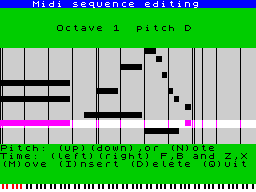
Once again CHEETAH have made devastating inroads into the hi-tech end of the music business with their latest product, the Midi interface. Jon Bates gives it a definite thumbs-up and reckons that you will too. Selling at well under half the price of its nearest rival, it offers eight-track real and step-time recording, merging, looping, overdubbing, patch memory, velocity, pitch and modulation memory, aftertouch, data dump, and transposing facilities. And if that isn't enough it can also act as a real-time midi echo unit. The story goes back nearly twelve months to when it was first rumoured that CHEETAH were in the process of developing a midi interface. As it was, other projects like the MK5 keyboard got in the path of its refinement and over Christmas they assured me that it was really going to happen soon. Well I am prepared to stick my neck out and say the wait has been worth it. It offers an awful lot for £49.95 and rivals bespoke sequencers selling for over four times the price. Okay, enough drooling - down to the program itself. You get the usual CHEETAH type interface box, equipped with midi 'in', 'out',and 'through' plus a midi lead to get you started. The software transfers to microdrive, and on loading you get the extensive main menu. I'll try to do each department justice and talk you through it. Real time recording is first, in sections that you predetermine from 1 to 64 bars in length - known as 'Verses.' I found this name a bit odd at first, but I quickly got used to it. The real time option is called 'Record a Verse': highlight that part of the menu and away you go, the pop-up menu appears and the border changes to magenta. You will hear a metronome beat either from the bleeper or the television set. Each first beat of the bar is emphasised and you get a two bar count-in. The beat before you need to start the border turns yellow and on the first beat of the bar to be recorded it turns red. There is a constant representation of beats executed by a quaint arrangement of flashing squares. The time defaults to 4/4 at 118 beats per minute and for a length of four bars only. At this point it should be mentioned that it has a good set of quantisation (timing correction) options from none at all to half notes (minims), taking all the triplet notes into account as well - most important if you are playing with what drum machines call 'swing' (sort of like Status Quo 'dum da dum dadum'). Having played your four bars you have several options. 'Restart' which lets you hear what you have done and add more over the topo f it - if you are really confident don't stop and the whole thing will repeat anyway complete with the two bar count-in. A point to remember is that the recording process can only be halted at the end of the defined number of bars. So if you have set up 64 bars you've a longish wait. I found that you can overcome this by cranking the tempo up to full whack, tempo and quantisation being alterable in mid-flight as you go along. 'Merge' puts the recorded section into the permanent memory. 'Append' adds the recording to the current verse already set in the memory. You can also transpose up or down a semitone as you append so that the new section is in a different key. If you've fouled up the whole issue, aim for 'Quit' and start all over again. Okay, you've started your mini-ditty. Now what? Well you will find that your first efforts have actually been entered by default into Track One, verse A. The CHEETAH package allows eight tracks, assignable to any midi channel. Each track can have up to 16 verses labelled A to P. A verse can be up to 64 bars long. That's a lot of notes. There is no need to panic about running order at this stage because at the moment all you are doing is committing sections to a track. These can be re-ordered at a later stage to complete the whole magnum opus. Duff or unwanted verses can be deleted to make more room. You can even reverse a verse play it backwards, the notes will sound forwards (unlike reverse tape) but just played in reverse order. A verse can be shifted up or down by up to 12 semitones that's one octave. The only thing that you can't do is endlessly improvise a solo as you are restricted to a maximum of 64 bars - depending on whether you are playing real fast and using lots of memory-extravagant things like velocity and pitch bend. These can be filtered out as you will see. Mind you, 64 bars can be quite a long time and you can chop the best bits from your sweatings over the keys and boil them down to sense the following morning as it were. 'Define Sequence Tracks' allows you to define the tracks and verses you wish to hear whilst recording new verses. Just to keep things in order you can opt to switch off a track which would be counterproductive at any point to the whole proceedings. It has occurred to CHEETAH that we can't play as well as we think or would like, so there is a step-time write/edit option - this has to be one of the easiest note editors I have used. Notes are represented by oblongs of proportional length and the music scrolls left to right, bars and beats indicated by vertical lines. By cunning use of movable horizontal and vertical axis, notes can be deleted, added, altered or moved anywhere over a range of 11 octaves, the particular octave you are in is displayed on a mini keyboard with the name of the note displayed centre screen. It is very accurate and simple to use. In fact I guess you could step-write the exacting bits first, play them back and liven them up with a few alfresco notes here and there. The 'Playback' mode lets you here the bits you have done so far from the beginning, but you can stop and restart at any point. When the business of committing notes to memory has finished you return to edit mode and select 'song page.' Once again utilising a very simple display, the track assembly is really easy to use. Simply move the cursor wound the screen and line it up with the position you want in the track, enter the letter name of the verse (section) that should go there and that's it. I've discovered a few hints and tips over a very long weekend with this interface. Try to map out your piece beforehand as it may save you frustration later. Keep a note of the particular sections and their track number and verse letter if you think of it rather like an eight track recorder you will then keep the individual instruments fairly separate. Perhaps I should mention that when I ran this test I was being super extravagant and ligged a load of tone modules and synths plus a YAMAHA CX5 music computer so I really gave it a hard time. I also found it a good idea to record the note first, correct any blunders, drop them into the memory and then use the 'merge' option to add any program changes, pitch bend, or modulation that I might want on that track. The metronome can be altered to most time signatures: although it would have no effect on the actual notes recorded, it may help you get them in time and with the right feel. In the interests of effective use of memory the program has filtering options for the incoming and outgoing data stream. You can add more and more of the data datastream to the memory record pitch wheel, record modulation wheel, record any another sound controller, record all of the midi mode - systems exclusive and also key pressure. The latter two are very greedy on memory, and CHEETAH have a less greedy option for key velocity/pressure (I assume that here they mean aftertouch) which is called 'channel pressure.' This is useful in mono mode and saves a bit of space. The output datastream can be similarly filtered with the addition of a status filter, instead of continually pumping out data telling the synth what mode it is receiving in, it will only send this when a change of patch or systems exclusive is imminent. One really useful device is the realtime midi echo. What it does is to delay the note and then throw it back to the synth just after you have played it, variable in 10ths of a second up to five seconds. As it stands it only does one repeat but I would love to see this as a separate software package which could give you multiple midi echo perhaps fading away - by juggling with note lengths in the data stream it should be possible to give a reverb effect. This would be a real first, saving tons of money on other effect units if you use midi-equipped gear. I particularly liked the synchronisation page that allowed a selection of trigger pulses per second, namely 24, 48 or 96, as well as external control of either the midi-clock or stop and start controls. The instruction manual tells you what pins on 'Midi Through' will pick up these pulses which means that you can synchronise the whole shooting match to pre-midi sequencers, drum machines and so on. What's the betting that there will be a way to hook it up to the Specdrum in the near future? All in all it is a very we thought out package, that has been economical where necessary but not to the detriment of the facilities available. The simplicity of operation makes it fun to use, it has features that rival most of the mid-price sequencers available in any music shop and what's more it's British. Say no more - get one now. CHEETAH are moving up the jungle to: [redacted], but can still be raised on [redacted].
Your Computer #6Jun 1986 · p.41
ANOTHER CHEETAH ADD-ON FOR MIDI Cheetah are well known for their range of Spectrum add-ons. One of these, the Specdrum, has proved a success and has shown that the company have a commitment to the design and marketing of low-cost music peripherals. The company, have recently launched another music addon in the shape of a £49.95 Midi interface. Regular readers of Your Computer will know that Midi - Musical Instrument Digital Interface - is a standard system of communication protocols that allows a computer to control musical instruments fitted with a suitable Midi socket. The Cheetah interface provides a full complement of Midi facilities including a Midi in/out and through, a real or step time from the instrument or the computer, full Midi compatible assignments. The user can store thousands of notes and initiate a forward or reverse sequence play-back. A Midi delay facility is also provided. The unit plugs into the Spectrum's expansion port and is comnpatible with both 48K and 128K Spectrums although the 128K version of the computer has an in-built Midi port. Of more interest to 128K will be that Cheetah can supply a Midi lead for £9.95. An Amstrad version of the Midi interface should be available by the early summer.
Review2
- Sinclair User #63Jun 1987 · p.61
- ZX Computing #38Jun 1987 · p.28
Related
- Versions
- Cheetah MIDI Interface (Requires)
- Tags
- Cheetah
- Same entry at
- Spectrum ComputingZXInfo
Reviews from people here
Sign in to write about this, or make an account. It takes a minute and lets you correct the catalogue too.
No description recorded.
Sign in to correct or add to this.
Hold the rights to this and want it taken down?