
Shifty
Utility: Word Processor · ZX-Spectrum 48K · 1 players · English
Work Force · 1983 · Pound sterling 7.50
Discussion
Nobody has started a thread about this yet.
Play
- Shifty.tzx.zipTape image English8 KB
Documents
- Shifty.txtInstructions English17 KB
Files and rights
No permission is on record either way. Screens and pictures are copied here on a take-down basis: if you hold the rights and want something removed, say so and it goes.
Scores
In the magazines
- Personal Computer News #121983 · Overall Value4/5
In the magazines 12
Personal Computer News #12Jun 1983 · p.304/53/54/54/53/54/54/5
Features 4/5
Documentation 3/5
Performance 4/5
Usability 4/5
Reliability 3/5
Overall Value 4/5
Ted Ball 4/5
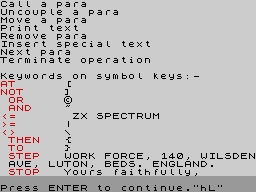
NAME: Shifty APPLICATION: Word processor SYSTEM: 48K ZX Spectrum with ZX Printer PRICE: £7.50 including VAT PUBLISHER: Work Force, [redacted] FORMAT: Cassette LANGUAGE: Basic SHIFTY LOOKS GOOD Two-way stretch to Spectrum word processing. Ted Ball screen tests a pair of packages. Word processing is one the main applications for microcomputers, but the Spectrum and ZX Printer are not suitable for preparing and producing large quantities of printed output. However, Shifty can be useful if you already have a Spectrum and need only small amounts of text printed, and it overcomes one limitation of the ZX Printer by printing sideways on the paper, allowing lines longer than the normal 32 characters. Shifty allows you to type in and edit text, format the text for printing, save the text on tape, and load text from tape. FEATURES Before you can start to enter new text you are asked for the maximum number of paragraphs and the maximum, number of characters you want. When you have given this information you get the prompt 'Press FLASHCUMPRINT key (h = help)'. FLASHCUMPRINT is a mnemonic made up of the initial letters of the commands in the menu. At the beginning the only useful commands are 'H', which displays the full menu, and 'N', for next paragraph, which allows you to start typing in your text. While you are entering text you can also make changes and corrections by moving the cursor around and inserting and deleting text. In the same way as editing a line of Basic. However, Shifty provides a full-screen editor, so you can move the cursor up and down through the lines of text, as well as left and right. When you have finished with a paragraph you press the ENTER key and you get back to the FLASHCUMPRINT prompt. If you want to edit any paragraph, you use 'C' to call up the paragraph, and you can then use the full-screen editor on it in the same way as before. With 'F', for Find, you are asked for a string and Shifty searches the whole text for the string. If it finds it, it displays the section of text and you can then continue looking for more appearances of the string, or return to the menu. Shifty does not allow you to edit immediately it has found a string: you have to return to the menu and then call up the paragraph for editing. The 'A', 'U', 'M' and 'R' commands allow you to manipulate paragraphs. 'A' joins two consecutive paragraphs to make a single paragraph. 'U' splits a paragraph in two, and you move the cursor to the point where you want the paragraph to be split. 'M' moves a paragraph to a different position in the text, and 'R' removes, or deletes, a paragraph. 'I' allows you to insert a special message into the text. The special message has to be put into the program, in data statements, and you can have as many different messages as you want, as the insert command asks you for the line number where the message begins and the number of data items to be used. If you are going to use the same special messages frequently, you can save a copy of the program with the messages in it. 'L' and 'S' are Load and Save. When Shifty saves text, it also saves two other data files and you have to watch the screen, to press a key when Shifty is ready to save the next data file. When the saving is finished, Shifty asks you to rewind the tape and play it, and automatically goes into VERIFY mode. 'P' prints the text. You are asked for the first and last paragraphs to be printed, the line length (which may be anything from 20 to 88 characters), the spacing between lines (one of three values), whether you want the right margin justified and whether you want to view the text on the screen or get it out on the printer. If you select a line length of more than 32 characters, Shifty will automatically print the text sideways. Only a limited amount of formatting is allowed. Apart from the formatting in the Print command, all you can do is include a special character in the text to force the printing to continue on a new line. Anything else you have to do yourself. For example, to centre a heading you have to put the right number of spaces in front of it according to the line width you select for printing. GETTING STARTED The documentation consists of four closely printed sheets of A4 paper, and explains the hardware you need for Shifty and how to use it. Although the documentation includes everything you need. It is not organised very well; the headings are not the same as the commands, so if you want details of a particular command, you have to scan through the instructions until you find what you want. There is a sample text file on the tape, and if you start by reading through the instructions and practising on the sample text, you will soon be able to use Shifty without more than occasional help from the menu or the instructions. IN USE On the whole, Shifty is fairly easy to use, with the same abbreviated menu coming up after each operation has been finished, and with each command giving full prompts for the information required of you. However, It is sometimes tedious to use, with the Print command you have to give all the formatting information every time, even if you just want several identical copies of the same text. You can also spend a lot of time saving and verifying backup copies if you are working on a long file, and since Shifty does not allow file names for saved text, you also have to be careful to keep records of the text you have on tape. Shifty is a little slow in formatting text that is to be printed sideways, but the speed does not really matter unless you are printing large amounts of text. RELIABILTY There are a few minor bugs that drop you into Basic if you give invalid responses to the prompts. For example, if you ask for more than the recommended maximum number of characters when setting up you get an 'Integer out of range' or 'Out of memory' error, according to the size of the number you put in. The tape supplied for review was an advance copy and these bugs may be fixed in the production version. The instructions do tell you how to get back into the program after a crash without losing your text. VERDICT Shifty is certainly good enough for any word processing you will want to do on the Spectrum - in fact it is almost too good for the Sinclair hardware. Printing the text sideways enables you to get the maximum use out of the ZX Printer. The ratings reflect the features of the Shifty program itself and do not take into account the limitations of the Spectrum and ZX Printer. You should remember, however, that the Spectrum keyboard does not allow touch-typing and is difficult to use for typing large amounts of text, and even though Shifty can print up to 88 characters you get only 22 lines to a 'page' when it is printing sideways.
Advert10
- Sinclair User #21Dec 1983 · p.111
- Your Computer #12Dec 1983 · p.150
- Sinclair User #20Nov 1983 · p.51
- Your Computer #11Nov 1983 · p.182
- Sinclair User #19Oct 1983 · p.14
- Your Computer #10Oct 1983 · p.140
- Sinclair User #18Sep 1983 · p.90
- Your Computer #9Sep 1983 · p.6
- Your Computer #8Aug 1983 · p.8
- Sinclair User #15Jun 1983 · p.52
Review1
- Home Computing Weekly #12May 1983 · p.31
Licensed from
- ShiftySoftwareGloster Software
Reviews from people here
Sign in to write about this, or make an account. It takes a minute and lets you correct the catalogue too.
No credit, description, tag recorded.
Sign in to correct or add to this.
Hold the rights to this and want it taken down?